
If you’re looking for a kali linux alternative, the short answer is this: Parrot OS is the best overall pick for most people, BlackArch fits advanced Arch users, BackBox is simpler than Kali, and Ubuntu or Debian often make the most practical remote lab systems. The right choice depends on your workflow, hardware, and whether you’re testing in a VM, on bare metal, or on a VPS. Use these distros only in lawful, authorized environments.
Prerequisites:
- Basic Linux terminal familiarity
- Clear understanding of ethical and legal testing boundaries
- A VM, spare machine, or VPS to experiment on
- Backup or snapshot capability before you start changing tools
If you need background first, see what is Kali Linux and what is a Linux distribution.
What is a Kali Linux alternative and who needs one?
A Kali Linux alternative is any Linux distro or even a clean general-purpose setup that can replace Kali Linux for a specific security workflow. That might mean penetration testing, digital forensics, OSINT, privacy work, network analysis, or a lightweight learning lab.
Kali is still excellent. I’m not anti-Kali at all. But I’ve seen plenty of people install it because it’s famous, then realize they really needed something lighter, more stable, or easier to maintain.
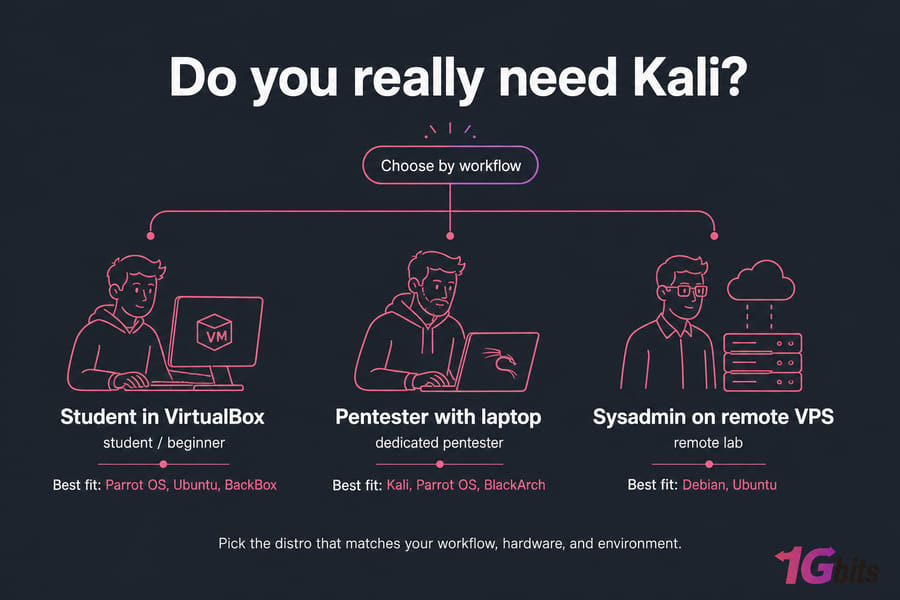
- Dedicated pentester: may want Kali, Parrot, or BlackArch depending on tools and package preference.
- Student or beginner: often does better with Parrot OS, Ubuntu, or BackBox.
- Sysadmin building a remote lab: usually benefits from Debian or Ubuntu on a VPS.
Why users search for a better Kali Linux alternative
Most searches for kali alternatives come from very practical pain points, not distro curiosity.
- Beginner overwhelm: Kali ships with a huge security toolkit. Tools like Nmap, Wireshark, Metasploit Framework, Burp Suite, Aircrack-ng, John the Ripper, Hashcat, SearchSploit, Nikto, and Greenbone are useful but also a lot to absorb at once.
- Rolling release behavior: Kali’s package repositories move quickly. That’s great for fresh tools and CVE research, but it can mean more update friction. If you stay with Kali, at least learn how to update Kali Linux properly.
- Daily-driver limitations: It’s a dedicated security distro, not the best personal workstation for everybody.
- Resource usage: On lower-end hardware or older virtual machine setups, a lighter distro can feel noticeably smoother.
- VPS usability: For remote work over SSH, many users don’t need hundreds of preinstalled packages or GUI-heavy workflows. They need stability and clean package management on a VPS.
And yes, root privileges and security tooling can change how you work. That’s fine in an isolated lab. On your everyday machine? Maybe not ideal.
If you still want native Kali in the cloud, you can install Kali Linux on a virtual server. But many people are better served by a simpler base plus only the tools they actually use. That’s especially true if you’re comparing options for VPS hosting.
Best Kali Linux alternatives compared at a glance
The best kali linux alternative depends more on use case than popularity. Here’s the fast version.
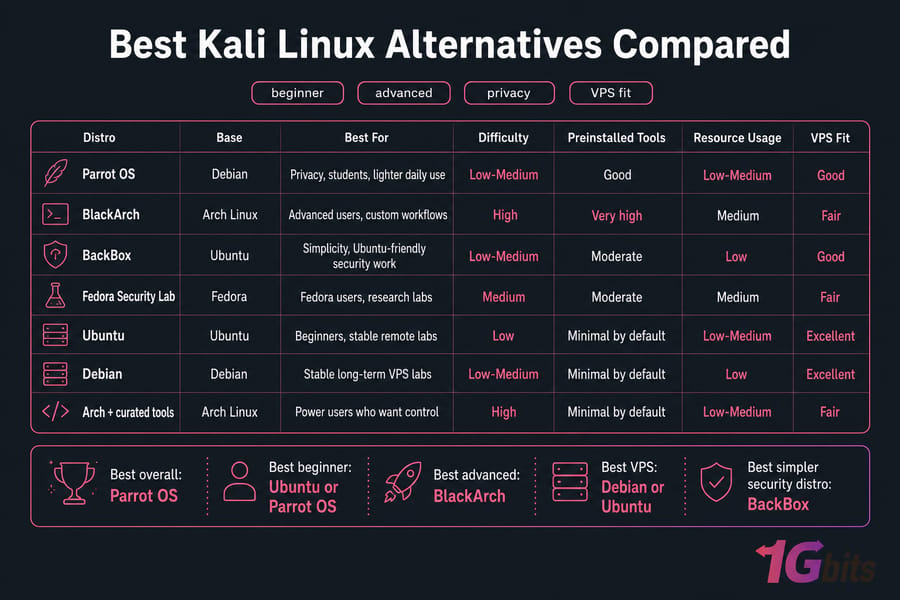
| Distro | Base | Best For | Difficulty | Preinstalled Tools | Resource Usage | VPS Fit |
| Parrot OS | Debian | Privacy, students, lighter daily use | Low-Medium | Good | Low-Medium | Good |
| BlackArch | Arch Linux | Advanced users, custom workflows | High | Very high | Medium | Fair |
| BackBox | Ubuntu | Simplicity, Ubuntu-friendly security work | Low-Medium | Moderate | Low | Good |
| Fedora Security Lab | Fedora | Fedora users, research labs | Medium | Moderate | Medium | Fair |
| Ubuntu | Ubuntu | Beginners, stable remote labs | Low | Minimal by default | Low-Medium | Excellent |
| Debian | Debian | Stable long-term VPS labs | Low-Medium | Minimal by default | Low | Excellent |
| Arch + curated tools | Arch Linux | Power users who want control | High | Minimal by default | Low-Medium | Fair |
Best picks by use case:
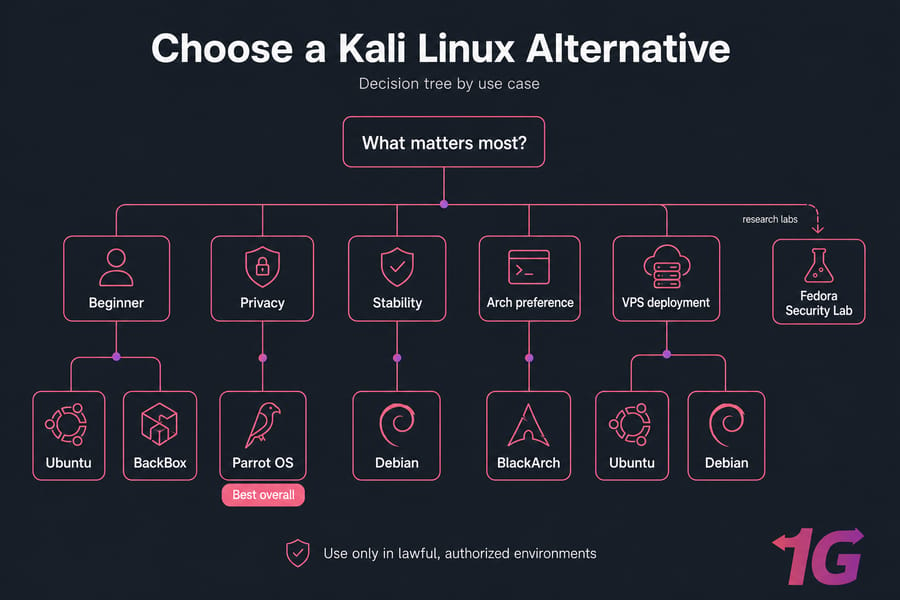
- Best overall: Parrot OS
- Best beginner: Ubuntu or Parrot OS
- Best advanced: BlackArch
- Best VPS: Debian or Ubuntu
- Best simpler security distro: BackBox
For broader context, compare more best Linux distros and review best VPS operating systems.
Parrot OS vs Kali Linux for privacy and lighter pentesting
Parrot OS vs Kali is probably the most useful comparison for normal users. Both are Debian-based distro families, both support a serious security toolkit, and both can handle ethical hacking workflows. The difference is feel.
Parrot Security OS generally feels lighter and more privacy-oriented. That makes it attractive for students, laptop users, and people who want a privacy-focused Kali alternative without quite so much bulk.
- Parrot strengths: lighter footprint, privacy tools, comfortable for mixed daily use plus lab work
- Kali strengths: wider mindshare, more common training material, stronger default recognition in pentesting circles
If you like the Debian ecosystem, it helps to understand Debian and the trade-offs in Debian vs Ubuntu.
My take? If you’re a student running VirtualBox on average hardware, Parrot is often the better first step. If you need exact Kali workflows because your course, team, or documentation assumes Kali, stick with Kali.
BlackArch vs Kali Linux for advanced Arch-based workflows
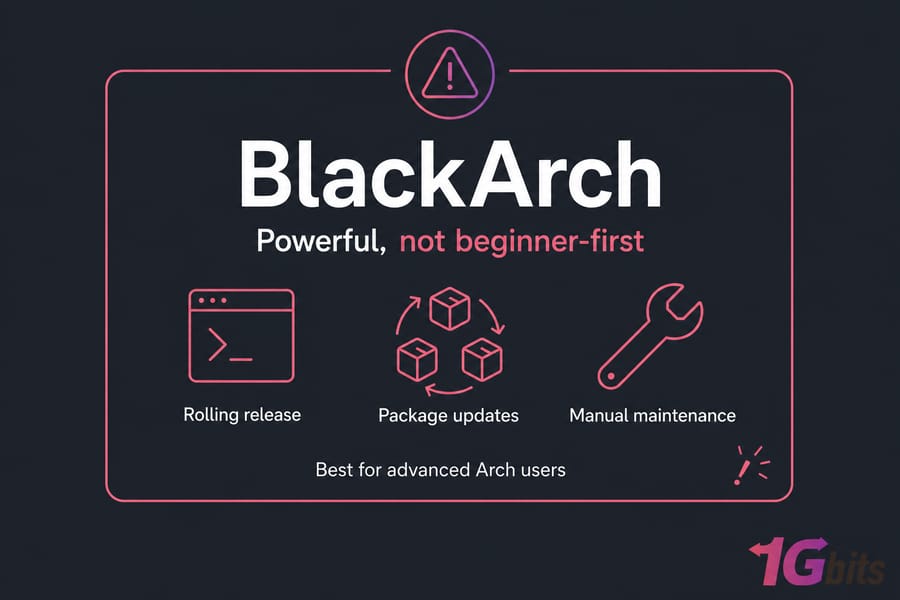
BlackArch vs Kali is not really a beginner debate. BlackArch appeals to people who already like Arch Linux, want huge tool availability, and don’t mind doing more maintenance by hand.
Kali is usually the safer default. BlackArch can be excellent, but it asks more from you — package management confidence, comfort with a fast-moving rolling release distro, and patience when something breaks after updates. I’ve seen experienced admins enjoy that control. I’ve also seen newer users burn a weekend on it.
If you want package-base context, read Debian vs Arch and how to install Arch Linux.
BackBox Linux and Fedora Security Lab as security-focused Linux distros
BackBox Linux is Ubuntu-based, approachable, and cleaner than Kali for users who want a focused security distro without excess weight. It’s a good backbox vs kali linux option when you want familiar Ubuntu behavior and less clutter.
Fedora Security Lab makes more sense if you already prefer Fedora’s ecosystem. It’s useful for users comfortable with Fedora packaging and release style, but it’s not as common in pentesting tutorials as Kali or Parrot.
BackBox is usually easier to maintain for mainstream users. Fedora Security Lab is more natural for people already living in Fedora land. If that’s you, comparing Ubuntu vs Fedora and Debian vs Fedora helps. For more Ubuntu-family options, see best Ubuntu-based distros.
Ubuntu or Debian as a Kali Linux alternative for stable VPS labs
Here’s the thing: a lot of professionals don’t use a full pentesting distro on remote servers at all. They use Ubuntu or Debian, then install only the tools they need with the package manager. For a pentesting distro for VPS use, that’s often the most sensible path.
You get fewer unnecessary packages, easier long-term maintenance, and cleaner reproducibility. Need Nmap, Wireshark CLI tools, OpenVAS components, Burp Suite, or a few forensic packages? Install those. Skip the rest.
| Factor | Ubuntu | Debian | Best Choice For |
| Ease of onboarding | Very easy | Easy | Ubuntu |
| Stability | Strong | Very strong | Debian |
| Package freshness | Generally newer | Generally more conservative | Ubuntu |
| Minimal server setup | Good | Excellent | Debian |
| Long-term lab maintenance | Good | Excellent | Debian |
For minimal, durable server setups, a Debian VPS is often my preference. And if you’re accessing it remotely, learn how to SSH and install and enable SSH on Ubuntu.
How to choose the best Linux distro for ethical hacking
- Beginner: Parrot OS or Ubuntu
- Low-resource system: Parrot OS, BackBox, or minimal Debian
- Privacy-focused: Parrot OS
- Advanced Arch user: BlackArch
- Stable VPS or cloud lab: Debian or Ubuntu
- Prefer preinstalled tools: Kali, Parrot, BlackArch
- Prefer custom stack: Ubuntu, Debian, or Arch
If you’re unsure, start with the environment. A student using VirtualBox usually values convenience. A sysadmin building a blue team or red team lab on a remote server usually values stability. For more ideas, check best Linux VPS hosting and best virtual machine software.
Best Kali Linux alternative for VPS deployment and virtual machines
For remote labs, VPS setups matter because they’re isolated, accessible over SSH, and easy to rebuild. For most labs, start with 1–2 vCPU, 2–4 GB RAM, and SSD or NVMe storage. More RAM helps a lot once you pile on scanners or browser-based tooling.
| Environment | Pros | Cons | Best For | Recommended Distro |
| Local install | Full hardware access | Riskier for daily system | Dedicated lab machine | Parrot, Kali |
| VM | Snapshots, isolation | Limited by host resources | Students, testing | Parrot, Ubuntu, BackBox |
| VPS | Remote access, reproducible | No direct Wi-Fi hardware tasks | CLI labs, server workflows | Debian, Ubuntu, Kali VPS |
If you still want native Kali, use a Kali Linux VPS. If you want cleaner long-term maintenance, Ubuntu or Debian are usually better. Advanced users who want full control may prefer an unmanaged VPS. Fast storage helps too, so NVMe VPS plans are worth a look, especially for larger toolsets or multiple lab snapshots. And if you want hosted virtualization options, see virtual machine hosting.
Common mistakes when picking a penetration testing Linux distro
- Choosing by hype alone. Famous doesn’t mean right for your workflow.
- Installing a bloated stack you won’t use. Sometimes a minimal Ubuntu or Debian build is enough.
- Ignoring package updates and maintenance. Rolling distros demand more attention.
- Picking BlackArch without Arch experience. That usually ends badly.
- Testing on your daily driver. Use an isolated lab and keep VM snapshots.
- Skipping ethics and authorization. The distro is legal; unauthorized activity isn’t.
Before you expose anything to the internet, review Linux server security, secure your VPS, and how to secure servers.
Final verdict: which Kali Linux alternative should you choose?
- Best overall: Parrot OS
- Best for beginners: Ubuntu or Parrot OS
- Best for advanced users: BlackArch
- Best for stable VPS labs: Debian or Ubuntu
- Best simpler security distro: BackBox
Choose by workflow, not brand recognition. If you’re building a long-term remote lab, I’d usually steer you toward Linux VPS, Kali Linux VPS, or Ubuntu VPS options depending on how much preinstalled tooling you actually want. If you need help, 1Gbits also has support and a quick overview of why choose 1Gbits.
Launch your preferred Kali Linux alternative on 1Gbits. Pick a clean remote lab with root access, flexible distro deployment, and fast SSD/NVMe-backed performance. Start with Get Linux VPS, check View Kali Linux VPS, or See Ubuntu VPS.

Leave A Comment