

![How to Set Up a Valheim Dedicated Server [2026 Guide] 🎮](https://1gbits.com/cdn-cgi/image/width=1200,quality=80,format=auto/https://s3.1gbits.com/blog/2026/08/how-to-set-up-valheim-dedicated-server-main.webp "How to Set Up a Valheim Dedicated Server [2026 Guide] 🎮")
Short version, because I know you want to be raiding a Troll cave in twenty minutes, not reading a novel: to set up a Valheim dedicated server, install the Valheim Dedicated Server app through Steam Tools (Windows) or SteamCMD (Linux), edit the start script with your world name, server name and password, open UDP ports 2456–2458 on the firewall and router, launch it, then join by IP. Windows is easier for a first-timer. Linux wins on uptime and automation.
Valheim Dedicated Server Setup in Plain English
That's the whole thing in one paragraph. Everything below is the detail that stops your friends from staring at an empty server browser at 9pm on a Friday.
I've built these on home desktops, on €5 VPS boxes, and on proper dedicated hardware for a 14-person modded community. The install is the easy part. Networking is where 90% of people get stuck — so we'll spend real time there.
What Is a Valheim Dedicated Server and How Does It Work?
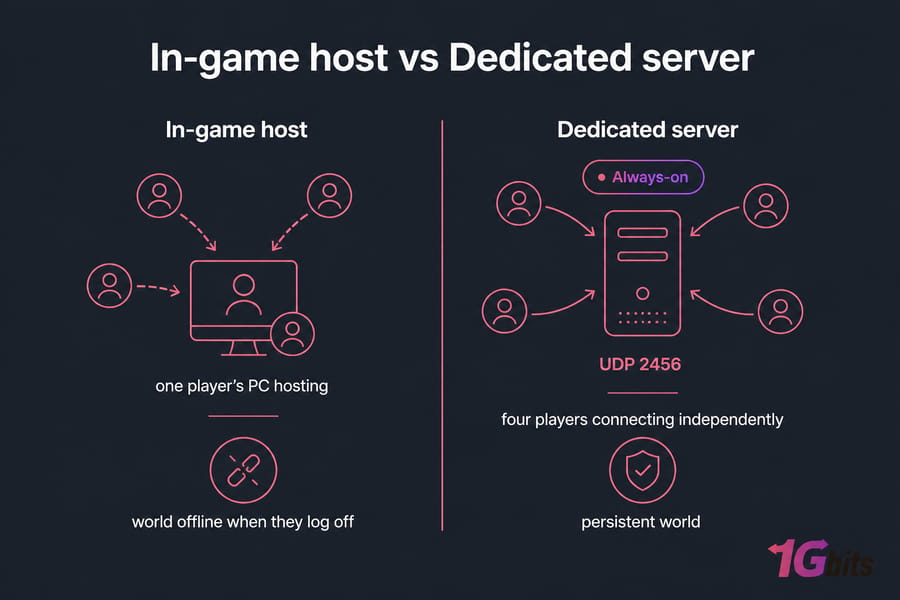
When you host from inside the game, your character's session is the server. You quit, everyone gets dropped. A Valheim dedicated server is a separate headless process — no graphics, no player attached — that keeps the world simulating and reachable whether or not you're logged in.
Dedicated server vs local co-op host
- In-game host: zero setup, but the world only exists while that person plays. Their upload speed becomes everyone's ping ceiling.
- Dedicated server: a persistent world with its own save files, its own password, and its own IP. Anyone can log in at 3am and keep building.
Why Valheim players use dedicated servers
Three reasons, mostly. Schedules don't line up across time zones. Someone wants to farm iron while the others sleep. And modded setups (BepInEx, Valheim Plus and friends) behave far more predictably when the world lives in one fixed place instead of migrating between people's PCs.
Home hosting vs rented hosting
A spare PC in the closet works fine for four friends. It stops working the moment your ISP hands you a CGNAT address, or your electricity bill and router NAT rules start fighting you. If you want the background on the hardware side, this explainer on what a dedicated server is covers the fundamentals. We'll get to the home-vs-rented decision properly near the end.
Valheim Dedicated Server Requirements: CPU, RAM, Storage, Bandwidth
Valheim's server is single-thread hungry. It doesn't care how many cores you throw at it — it cares how fast one of them is. That surprises people who bought a 16-core box expecting magic.
| Players | CPU | RAM | Storage | Upload | Best host type |
| 2–5 | 2 cores, 3.0 GHz+ | 4 GB (6 GB comfortable) | 20 GB SSD | 5 Mbps | Home PC or small VPS |
| 5–10 | 4 cores, 3.5 GHz+ | 8 GB | 40 GB NVMe | 15 Mbps | Game VPS |
| 10+ / modded / multiple worlds | 4–6 fast cores | 16 GB | 80 GB+ NVMe | 25 Mbps+ | Dedicated server |
Why RAM usage creeps up
A fresh world sits around 2 GB. Play for six months, build a sprawling base with hundreds of pieces, drop a few dozen portals, and that number climbs. Long-lived worlds regularly sit at 5–6 GB. If you're unsure how to size this, our guide on how much RAM you need for gaming and hosting is worth a skim.
Storage: speed over size
World files are small — a mature save is maybe 100–300 MB. But Valheim writes autosaves every 20 minutes, and on slow spinning disks that write causes a visible hitch for everyone online. NVMe removes it. If the difference isn't obvious to you, here's the breakdown of NVMe vs SSD.
How many players can it actually handle?
The official cap is 10. Whether 10 people have a good time depends on your CPU clock, your build density, and how many tamed boars are pathfinding in one pen. Honestly? Boar farms have killed more Valheim servers than player counts ever did.
Pro tip: spend your budget on single-core clock speed and NVMe. A 3.8 GHz quad-core beats a 2.2 GHz sixteen-core for Valheim every single time.
Windows vs Linux for Valheim Server Hosting
| Factor | Windows | Linux | Best for |
| Setup difficulty | Point and click via Steam | SteamCMD, a few commands | Windows |
| Resource overhead | 1–2 GB used by the OS | ~300 MB headless | Linux |
| Auto-restart / crash recovery | Task Scheduler, clunky | systemd, one file | Linux |
| Forced reboots | Windows Update, yes | Rare, you choose | Linux |
| Remote management | RDP, bandwidth heavy | SSH, works on 2G | Linux |
| Licensing cost on rented hardware | Adds to monthly bill | Free | Linux |
| Mod tooling familiarity | Most guides assume it | Works, fewer guides | Windows |
My take: start on Windows if you've never touched a terminal and you're hosting on a machine you already own. Move to Linux the day you get tired of a stuck server that nobody's home to restart. For a deeper comparison, read Linux vs Windows dedicated server and our notes on choosing the best OS for dedicated servers.
Valheim Server Ports, Firewall Rules, and Port Forwarding
Read this section twice. This is where it breaks.
Which ports Valheim uses
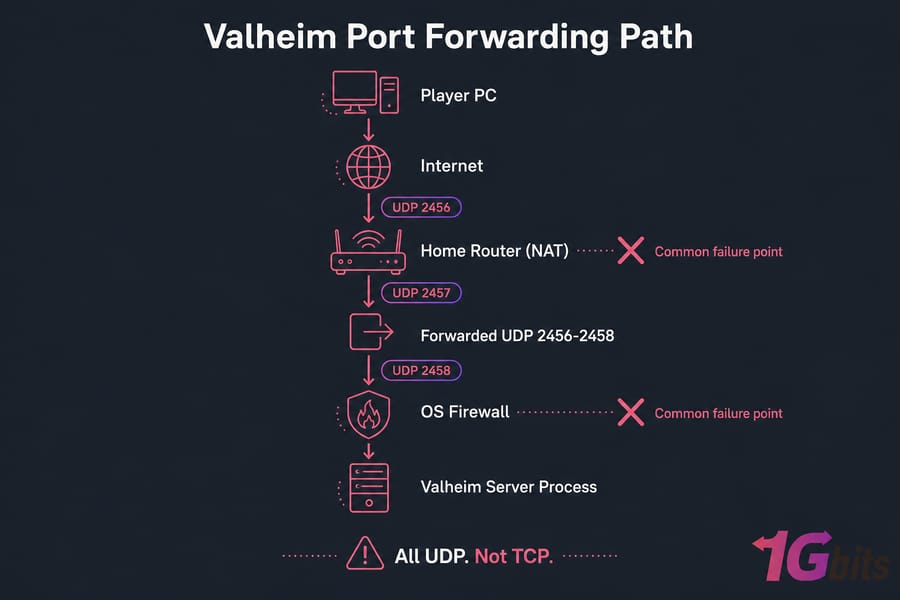
- UDP 2456 — game traffic. Non-negotiable.
- UDP 2457 — Steam query / server listing.
- UDP 2458 — reserved, open it anyway.
All UDP. Not TCP. If you forward TCP 2456 and nothing else, nobody connects — I've watched people burn an hour on exactly that. If you change the port with the -port flag, the range shifts with it: set 2466 and you need 2466–2468.
Windows Defender Firewall
Run PowerShell as Administrator:
New-NetFirewallRule -DisplayName "Valheim Server UDP" -Direction Inbound -Protocol UDP -LocalPort 2456-2458 -Action AllowWindows also throws a firewall prompt the first time the server binary starts. Tick both Private and Public networks. If you clicked "Cancel" out of habit, the rule above fixes it.
Ubuntu / Debian with UFW
sudo ufw allow 2456:2458/udp
sudo ufw allow OpenSSH
sudo ufw enable
sudo ufw status verbose
Allow SSH before enabling UFW on a remote box. Otherwise you lock yourself out and it's a support ticket. More detail lives in our guide on how to configure a firewall on your VPS.
Router port forwarding for home hosting
On a VPS or dedicated server you're done — public IP, no NAT. At home you also need to tell the router where to send that traffic:
- Give the server machine a static LAN IP or a DHCP reservation. If it changes, forwarding silently breaks.
- Log into the router (usually 192.168.0.1 or 192.168.1.1).
- Create a forwarding rule: external UDP 2456–2458 → internal IP, same ports.
- Save and reboot the router if it demands it.
Step-by-step with screenshots for common router brands: how to port forward on your router, plus the general concepts in how to do port forwarding.
Verifying the ports actually work
Testing from inside your own LAN proves nothing — many routers don't support NAT loopback, so the connection fails even when the forward is correct. Test from outside: phone on mobile data, or ask a friend. On the server itself, confirm the process is listening:
sudo ss -ulnp | grep 245Windows equivalent and diagnostics: check open ports in Windows. Linux side: check Linux open ports.
Valheim Dedicated Server Setup on Windows
1. Install the server app
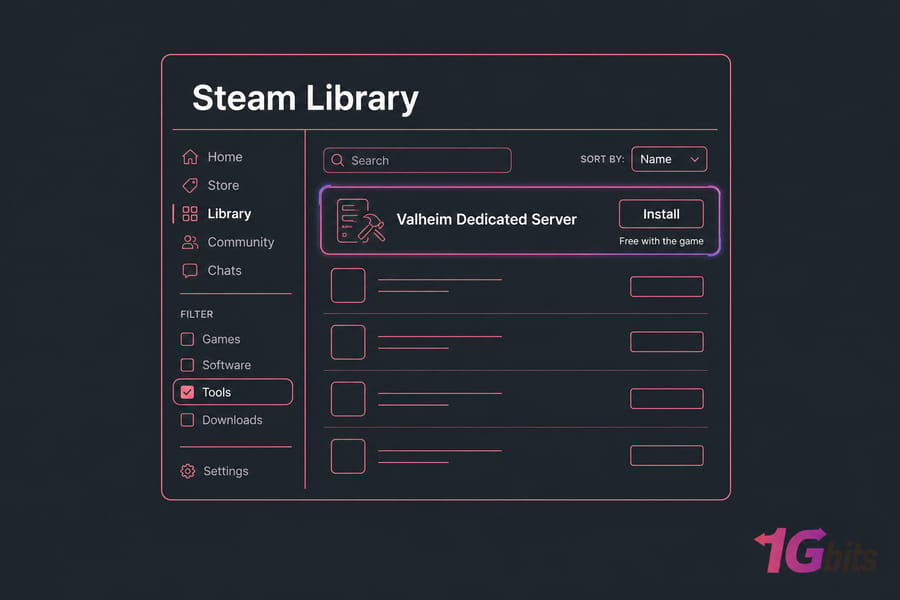
- Open Steam. Go to Library, click the dropdown filter, tick Tools.
- Find Valheim Dedicated Server and install it.
- Default path:
C:\Program Files (x86)\Steam\steamapps\common\Valheim dedicated server
You don't need a second Steam account or a second Valheim licence. The server tool is free with the game.
2. Edit start_headless_server.bat
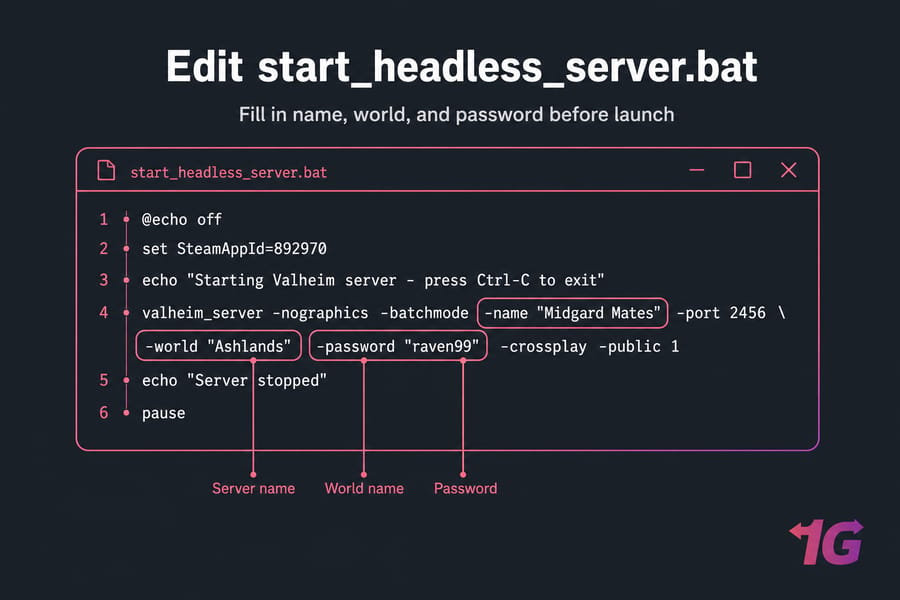
In that folder you'll find start_headless_server.bat. Right-click, Edit (or open it in Notepad). Don't double-click it yet — the defaults are placeholders.
@echo off
set SteamAppId=892970

echo "Starting Valheim server - press Ctrl-C to exit"

valheim_server -nographics -batchmode -name "Midgard Mates" -port 2456 -world "Ashlands" -password "raven99" -crossplay -public 1

echo "Server stopped"
pause
What each part does:
-nographics -batchmode— headless mode, no window rendering. Leave these alone.-name— what shows in the server browser.-port 2456— the base port. 2457 and 2458 are claimed automatically.-world— the world save name. If it doesn't exist, Valheim creates it on first boot.-password— minimum 5 characters, and it cannot contain the server name or world name. The server refuses to start otherwise.-crossplay— enables Xbox/Game Pass players to join via the crossplay backend.-public 1— lists it in the community browser. Use0for join-by-IP only.
3. Run it and watch the console
Double-click the BAT. Accept the firewall prompt. You're looking for these lines in the console:
Game server connected
DungeonDB Start 0
Net scene destroyed
Session "Midgard Mates" registered
First boot takes 1–3 minutes while the world generates. Be patient — people restart it mid-generation and then wonder why the save is corrupt.
4. Connect from the client
Launch Valheim → Start → pick your character → Join Game → Join IP. Enter your.public.ip:2456 and the password. On the same LAN, use the local IP instead.
5. Keep it running after reboot (optional)
Open Task Scheduler, create a task, trigger "At log on", action = your BAT file, and tick "Run whether user is logged on or not". Crude but it works. If you need a refresher on the console side of Windows, see our Windows Command Prompt guide.
Windows in one line: install via Steam Tools → edit the BAT → allow the firewall → launch → join by IP.
Valheim Dedicated Server Setup on Linux with SteamCMD
Ubuntu 22.04 or Debian 12 are the smoothest choices here. You'll need SSH access — if that's new, start with installing and enabling SSH on Ubuntu.
1. Create a dedicated user
sudo adduser --disabled-password --gecos "" valheim
sudo su - valheim
Never run a game server as root. If it ever gets exploited, you've limited the blast radius to one unprivileged account.
2. Install SteamCMD and dependencies
sudo dpkg --add-architecture i386
sudo apt update
sudo apt install -y software-properties-common lib32gcc-s1 steamcmd
Accept the Steam licence prompt when it appears. The i386 architecture line matters — SteamCMD itself is 32-bit even though the Valheim server binary is 64-bit.
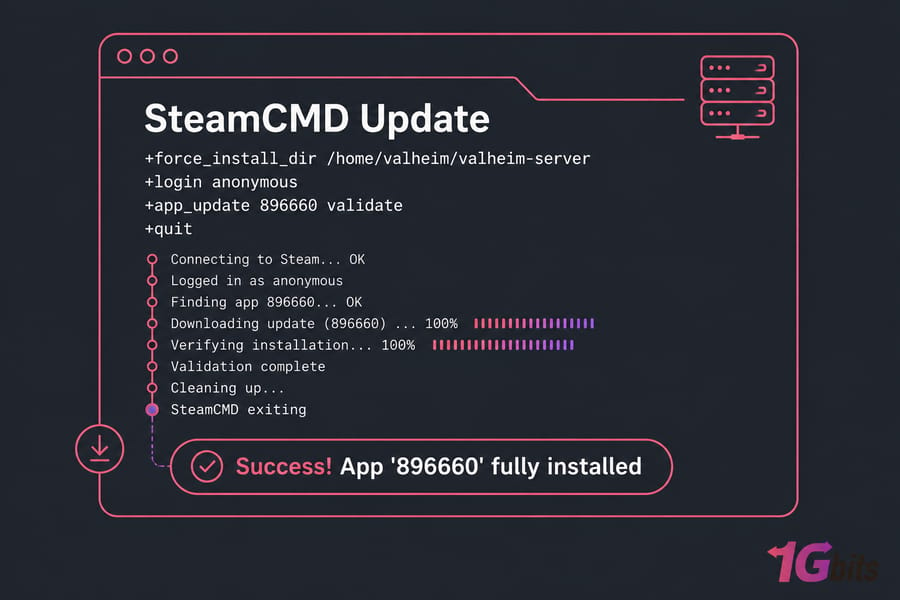
3. Download the server files
steamcmd +force_install_dir /home/valheim/valheim-server \
  +login anonymous \
  +app_update 896660 validate \
  +quit
App ID 896660 is the Valheim Dedicated Server. Anonymous login is fine — no credentials needed. Expect roughly 1 GB of download. The same command is what you'll run later to update, so save it somewhere.
4. Create the startup script
Create /home/valheim/valheim-server/start_valheim.sh:
#!/bin/bash
export templdpath=$LD_LIBRARY_PATH
export LD_LIBRARY_PATH=./linux64:$LD_LIBRARY_PATH
export SteamAppId=892970

./valheim_server.x86_64 \
  -nographics -batchmode \
  -name "Midgard Mates" \
  -port 2456 \
  -world "Ashlands" \
  -password "raven99" \
  -crossplay \
  -public 1 \
  -savedir /home/valheim/valheim-data

export LD_LIBRARY_PATH=$templdpath
The LD_LIBRARY_PATH export points the binary at its bundled Steam libraries. Skip it and you get a cryptic library error. -savedir puts your worlds somewhere predictable instead of a hidden config folder — much easier to back up.
Make it executable and test it:
chmod +x /home/valheim/valheim-server/start_valheim.sh
cd /home/valheim/valheim-server && ./start_valheim.sh
For a quick manual test you can wrap this in a screen session so it survives an SSH disconnect. Long term, use systemd instead. New to the shell? Our basic Linux commands roundup covers the ones you'll actually type.
5. Set up systemd for auto-restart
Create /etc/systemd/system/valheim.service:
[Unit]
Description=Valheim Dedicated Server
After=network-online.target
Wants=network-online.target

[Service]
Type=simple
User=valheim
WorkingDirectory=/home/valheim/valheim-server
ExecStart=/home/valheim/valheim-server/start_valheim.sh
Restart=on-failure
RestartSec=15
KillSignal=SIGINT
TimeoutStopSec=90

[Install]
WantedBy=multi-user.target
Two details people get wrong. KillSignal=SIGINT tells Valheim to save cleanly on shutdown instead of getting hard-killed mid-write. And TimeoutStopSec=90 gives that save enough time on a big world.
sudo systemctl daemon-reload
sudo systemctl enable --now valheim
sudo systemctl status valheim
sudo journalctl -u valheim -f
That last command is your live log. Watch for "Game server connected" and you're done.
Linux in one line: SteamCMD → app 896660 → shell script → UFW rules → systemd → join by IP.
Configure Server Name, World, Password, and Crossplay
| Parameter | What it does | Notes |
-name |
Display name in the browser | Keep it short and searchable |
-world |
Save file name | Created automatically if missing |
-password |
Join password | 5+ chars, must not contain name or world |
-port |
Base UDP port | Uses port and port+1 |
-public |
1 = listed, 0 = hidden | Hidden servers still work by IP |
-crossplay |
Enables PlayFab crossplay backend | Lets Xbox/Game Pass players join |
-savedir |
Custom save location | Highly recommended for backups |
Migrating an existing world
Copy your WorldName.db and WorldName.fwl into the server's worlds folder, then set -world "WorldName". Both files. The .fwl holds the seed and metadata; without it the .db is useless.
Where the save files live
- Windows:
%USERPROFILE%\AppData\LocalLow\IronGate\Valheim\worlds_local - Linux:
~/.config/unity3d/IronGate/Valheim/worlds_local - With -savedir: whatever path you set, under a
worlds_localsubfolder
Admin control happens through adminlist.txt in that same config directory — one SteamID64 per line, then restart. Same pattern for permittedlist.txt and bannedlist.txt. If your group is into the console side of things, our Valheim cheats and commands post covers what admins can actually run in-game.
Backups, Updates, and Performance Tuning
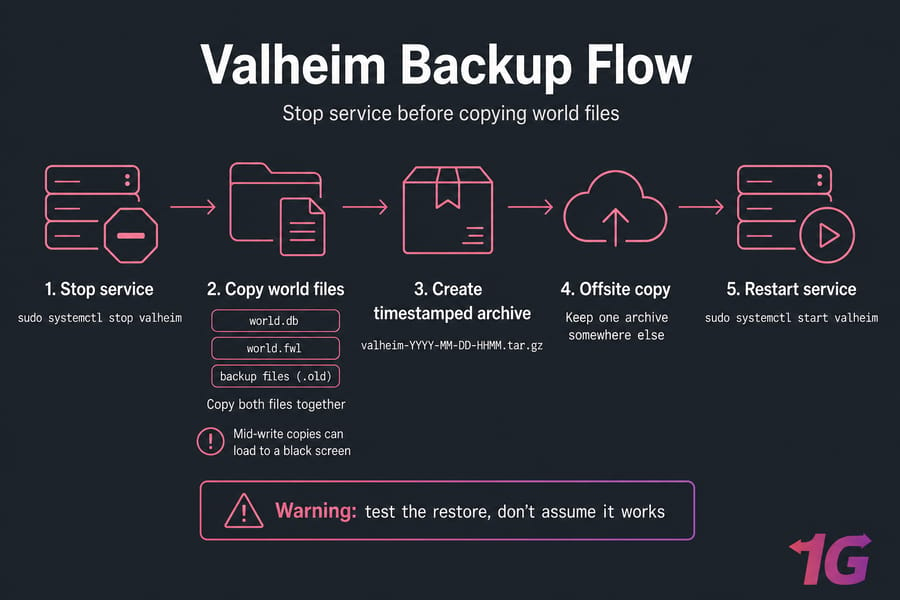
Backing up properly
Stop the server first. Valheim writes both files together, and copying mid-write gives you a save that loads to a black screen.
sudo systemctl stop valheim
tar -czf /home/valheim/backups/valheim-$(date +%F-%H%M).tar.gz \
  /home/valheim/valheim-data/worlds_local
sudo systemctl start valheim
Drop that in a cron job at 5am and you've got daily snapshots. Full walkthrough here: schedule automatic backups for a Linux server.
Warning: Valheim keeps its own .old rollback files, but they're on the same disk. That's not a backup — that's a copy waiting to die with the drive. Keep one archive somewhere else.
Updating without breaking anything
When Iron Gate ships a patch, clients update automatically and the server doesn't. Result: "incompatible version" errors within minutes.
sudo systemctl stop valheim
steamcmd +force_install_dir /home/valheim/valheim-server \
  +login anonymous +app_update 896660 validate +quit
sudo systemctl start valheim
On Windows, just hit Update in the Steam Tools library. Back up first, every time. It takes thirty seconds and saves a very bad evening.
Cutting lag
- Location beats hardware. A modest server 20ms away feels better than a monster 180ms away. Pick a datacentre near your players.
- Restart nightly. Valheim's memory usage drifts upward over days. A 4am restart via cron or Task Scheduler keeps things crisp.
- Watch the build density. Hundreds of connected structures and dozens of tamed animals in one zone hurt more than player count.
- Use NVMe. The autosave stutter disappears.
For measuring rather than guessing, see how to monitor and improve your VPS server speed. And if your server is public, DDoS-protected VPS hosting is worth considering — public listings do attract idiots.
Valheim Server Not Showing Up? Troubleshooting Matrix
| Symptom | Likely cause | Fix |
| Not in community browser | -public 0, or 2457 blocked |
Set public 1, forward the full UDP range, wait 5 minutes |
| "Failed to connect" by IP | Port forward missing or wrong protocol | Forward UDP not TCP; verify from outside the LAN |
| Works for you, not for friends | You're testing over LAN | Test on mobile data; router likely lacks NAT loopback |
| "Incompatible version" | Server behind current patch | Re-run app_update 896660 or Steam update |
| Server won't start at all | Password contains server or world name | Pick an unrelated 5+ char password |
| No public IP reachable | ISP CGNAT | Request a public IP, or host on a VPS |
| Password rejected | Client cached an old one | Remove from favourites, re-add, retype |
| Random disconnects, rubber-banding | Upload saturated or CPU pegged | Check bandwidth and single-core load; consider hosting |
| Crash loop after mod install | Client/server mod version mismatch | Match BepInEx plugin versions on both sides |
| World reverted to older state | Unclean shutdown, .old loaded | Stop with SIGINT, restore your backup |
Logs are your friend. Linux: journalctl -u valheim -n 200. Windows: the console window itself, plus %USERPROFILE%\AppData\LocalLow\IronGate\Valheim. For wider diagnostics, our Linux server troubleshooting guide helps, and if you can't even reach the box, check SSH connection refused fixes.
CGNAT deserves a special mention. If your public IP starts with 100.64–100.127, you're behind carrier-grade NAT and no amount of router configuration will fix it. That's the point where hosted infrastructure with a real public IP stops being optional.
Best Hosting Option: Home PC, VPS, or Dedicated Server?
| Option | Cost | Uptime | Difficulty | Best for |
| Home PC | Electricity only | Depends on your ISP and power | Medium (router work) | 2–4 friends, casual sessions |
| Game VPS | Low monthly | High, public IP included | Low–medium | 4–10 players, always-on worlds |
| Dedicated server | Higher monthly | Highest, full hardware | Medium | Communities, heavy mods, multiple worlds |
Home hosting is genuinely fine for a small group that plays together on weekends. It falls apart with CGNAT, thin upload, and the fact that someone has to be around to reboot the thing.
A game VPS solves the two problems that actually matter: a routable public IP and a machine that doesn't sleep. For most Valheim groups, that's the sweet spot. Ready-configured options live on our Valheim dedicated server hosting page.
Go full dedicated game server hosting when you're running a modded community, multiple worlds, or a Discord that expects 24/7 availability. Dedicated hardware means no noisy neighbours competing for CPU — which, for a single-threaded game like Valheim, is the difference between smooth and stuttery. Browse configurations on our dedicated server plans.
Final Valheim Dedicated Server Setup Checklist
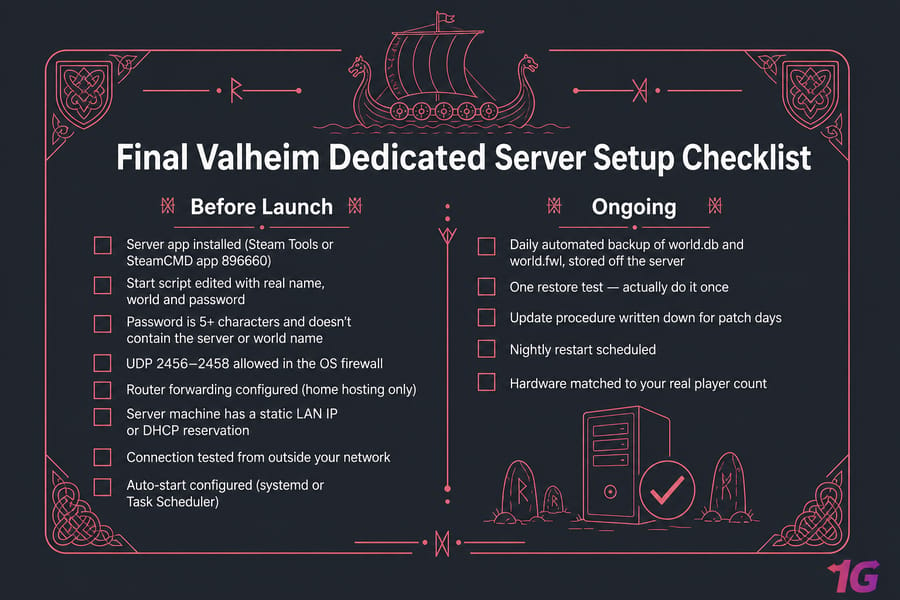
Before you invite anyone:
- Server app installed (Steam Tools or SteamCMD app 896660)
- Start script edited with real name, world and password
- Password is 5+ characters and doesn't contain the server or world name
- UDP 2456–2458 allowed in the OS firewall
- Router forwarding configured (home hosting only)
- Server machine has a static LAN IP or DHCP reservation
- Connection tested from outside your network
- Auto-start configured (systemd or Task Scheduler)
Ongoing:
- Daily automated backup of world.db and world.fwl, stored off the server
- One restore test — actually do it once
- Update procedure written down for patch days
- Nightly restart scheduled
- Hardware matched to your real player count
Tick every box and your Valheim dedicated server will outlive several of your characters. Want more of this? Our gaming server guides cover the same ground for other survival titles.
And if port forwarding, CGNAT, or a PC that reboots at the worst possible moment is standing between you and a working world — get a Valheim dedicated server with NVMe storage, low-latency locations, and a public IP that just works. Skip the network archaeology and go build a longhouse.

Leave A Comment