
A VPS to VDS migration is almost never an in-place conversion. In practice you're moving between two virtual servers — the source VPS stays live while you build, sync, and test the destination VDS, then cut traffic over. If the terminology matters to you, read the VPS vs VDS differences and what a virtual dedicated server is before you buy anything, because "VDS" doesn't mean the same thing at every provider.
VPS to VDS Migration: What "Without Downtime" Actually Means
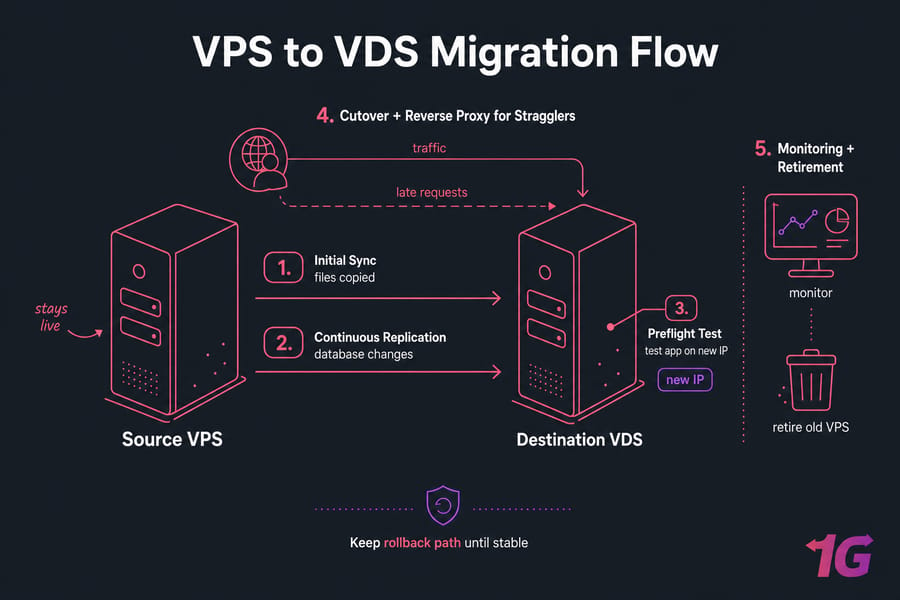
Quick answer: To migrate from a VPS to a VDS without downtime, provision and secure the VDS, lower DNS TTL, run an initial file sync, replicate the database, test the app on the new IP, run a final incremental sync, switch traffic, proxy late requests from the old VPS, monitor, and keep a rollback path.
Here's the honest part. Literal zero downtime needs replication plus a load balancer or proxy in front of both nodes. Everything else is near-zero downtime: a short write freeze, usually 30 seconds to a few minutes. Static sites are trivial. Transactional apps are not. And no, DNS TTL reduction by itself is not a continuity plan — cached resolvers ignore your schedule more often than you'd like.
Choose a Zero Downtime Server Migration Strategy
Pick the architecture before you touch a single command. Your write rate decides this, not your preference.
| Strategy | Interruption | Best for | Rollback ease |
| Database replication + load balancer (HAProxy or NGINX) | None if health checks pass | Ecommerce, SaaS, APIs, membership sites | Moderate — writes exist on both sides |
| Incremental sync + brief write freeze | Seconds to minutes | Blogs, brochure sites, low-write apps | Easy while the freeze holds |
| Maintenance window | Minutes to hours | Legacy stacks that can't replicate | Easiest |
The old VPS can also reverse proxy stragglers after the DNS change. That solves stale caches — it does not reconcile conflicting writes. If moving is only about resources, check whether you can scale a VPS without downtime instead.
Server Migration Checklist Before You Start
Inventory first. Every outage I've cleaned up traced back to something nobody wrote down.
- OS and kernel version, plus an exported package list
- Web server vhosts, runtime versions and extensions
- Databases, users, grants; listening ports (ss -tulpn), firewall rules (ufw or nftables)
- System users/groups and UID/GID, cron jobs and systemd timers
- TLS certificates, mail config and queues, mounts, symlinks, secrets
- All DNS records: A, AAAA, MX, TXT (SPF/DKIM), CNAME, reverse DNS
- Disk and inode usage (df -h, df -i, du -sh)
Take an off-server backup and test the restore. A backup is not a rollback — rollback requires the source to stay usable. Pair this with your server disaster recovery plan. Lower TTL to about 300 seconds 24–48 hours ahead; doing it an hour before changes nothing for already-cached records. Then write down your go/no-go thresholds.
Prepare the Destination VDS
Same OS family, compatible versions. Don't upgrade Ubuntu 22.04 to 24.04 during a migration — that's two risky projects stacked on one night. Size the VDS from peak consumption, not averages, and leave 30% headroom on CPU, RAM, IOPS, and disk.
Then: patch it, create a non-root sudo user, generate an SSH key for source-to-destination transfer, install matching packages, configure the VDS firewall (replication ports restricted to the source IP only, never open globally), and install NGINX or Apache without accepting public production traffic. Disable cron, workers, outbound mail, and webhooks on the destination until cutover. Install monitoring before traffic lands, not after.
If contention on the source is the whole reason you're moving, compare 1Gbits VDS hosting configurations for dedicated allocation, storage performance, bandwidth, and location — then size from your own numbers. Need help scoping it? Talk to migration support before you order.
Use rsync for Live Linux Server Migration
Application directories first. Full root-filesystem replication is an advanced move that can clobber the destination's networking, fstab, bootloader, SSH host keys, and provider agents.
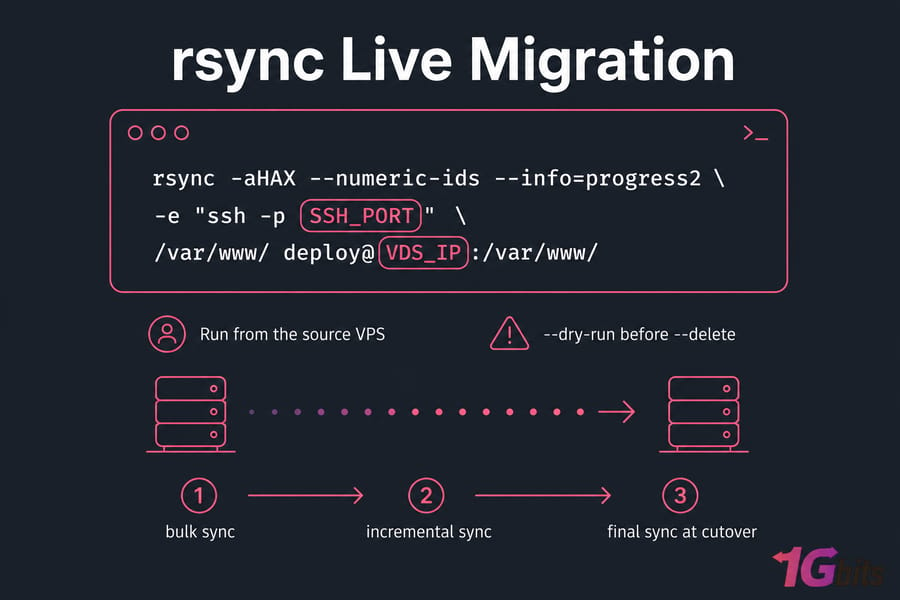
rsync -aHAX --numeric-ids --info=progress2 \
  -e "ssh -p SSH_PORT" \
  /var/www/ deploy@VDS_IP:/var/www/
Run from the source VPS. -a preserves permissions, times, symlinks; -H hard links; -A ACLs; -X extended attributes; --numeric-ids keeps raw UID/GID; --info=progress2 gives a single overall progress line. Replace SSH_PORT and VDS_IP.
Warning: always run --dry-run before adding --delete, and never rsync an active database data directory or /proc, /sys, /dev, /tmp. Exclude caches, logs, and sockets. Plan three passes: bulk sync, incremental sync a few hours later, final sync at cutover. Spot-check with sha256sum on a handful of large files.
Migrate MySQL or PostgreSQL Without Downtime
A dump is stale the second the next order comes in. That's the whole problem.
| Engine | Method | Interruption | Notes |
| MySQL 8 / MariaDB | Consistent dump + binlog replication | Seconds at promotion | Unique server IDs, binary logging on, monitor Seconds_Behind_Source |
| PostgreSQL | pg_basebackup + streaming replication | Seconds at promotion | WAL settings, replication slot, monitor lag |
| PostgreSQL | Logical replication (per table) | Near zero | Handles version differences better |
| Any | mysqldump / pg_dump restore | Minutes to hours | Only with a write freeze |
Follow the official MySQL, MariaDB, and PostgreSQL replication docs for exact syntax — versions differ and I won't pretend otherwise. Don't forget the stateful odds and ends: Redis sessions, job queues, user uploads, and mail queues. Never let both servers accept independent writes unless you've designed conflict resolution. Promote the replica only after the app passes testing.
Test the New VDS Before the DNS Change
Map your domain to the new IP in your workstation's hosts file, or test HTTPS directly:
curl -I --resolve DOMAIN:443:VDS_IP https://DOMAIN/Work through real journeys: homepage, login/logout, checkout or form submit, file upload, a controlled database write, API and webhook responses, redirects, and the full TLS chain. Watch NGINX, application, and database logs while you do it. Grep the codebase and config for hard-coded old IPs. Only proceed when every critical path returns what you expect.
Final Sync and DNS Cutover
Freeze unrelated deployments. Then, in order: stop source workers → enable read-only mode → run the final rsync → confirm replication lag is zero → promote the destination database → start destination workers → update A and AAAA records. Details on the DNS side are in the guide to change DNS settings.
Verify with dig against both authoritative nameservers and a public resolver. Then configure an NGINX reverse proxy on the old VPS pointing at the VDS, preserving the Host header and passing X-Forwarded-For so your logs and rate limits still see real client IPs. That's what catches stubborn cached resolvers.
Validate and Roll Back Safely
Watch 5xx rates, load, IOPS, database connections, replication status, and queue depth with your usual Linux monitoring tools. Roll back if you see sustained 5xx, failed health checks, missing transactions or uploads, broken payment/auth integrations, or resource saturation.
Warning: once the VDS accepts writes, pointing DNS back to a stale source destroys data. Roll traffic back through the proxy, then reconcile writes deliberately. Keep the old VPS running at least 72 hours — 7 to 14 days for revenue-critical systems. Raise TTL only after stability is proven, then wipe and cancel.
Windows, cPanel, Plesk, and DirectAdmin
Different platforms, same principles. On Windows Server, use Robocopy with /MIR and /COPYALL for files, export IIS configuration, and use SQL Server log shipping or Always On for the database — see Windows Server Migration Tools. cPanel's Transfer Tool, Plesk Migrator, and DirectAdmin's Admin Backup/Transfer all move accounts cleanly, but none of them handle DNS strategy, mail queue drainage, testing, or cutover timing for you. For provider-to-provider moves specifically, our general Linux VPS migration guide covers the broader workflow.
Common Mistakes That Cause Downtime
| Mistake | Consequence | Prevention |
| Trusting DNS propagation alone | Users hit the dead old IP for hours | Reverse proxy from the source |
| Copying a running database directory | Corrupt tables | Replication or a dump |
| Cron running on both servers | Duplicate emails, double charges | Disable destination cron until promotion |
| rsync --delete without a dry run | Data wiped on the destination | --dry-run, review, then execute |
| Canceling the VPS immediately | No rollback path | Retain 72 hours minimum |
| Forgetting AAAA, MX, SPF, DKIM, rDNS | Broken IPv6 traffic and email delivery | Full DNS inventory upfront |
🚀 Move Beyond Shared VPS Resources Without Rushing the Cutover
A safe migration starts with a compatible, correctly sized destination. Provision the VDS first, keep the current VPS online through synchronization and testing, and work the validation and rollback checklist before you decommission anything.
Not quite ready to migrate? Keep your current setup running smoothly with VPS hosting plans that scale with your project. Ready for dedicated resources and guaranteed performance? Move to VDS hosting when you need full hardware isolation and predictable CPU power. The right time to switch is when shared resources become the bottleneck — not after they already have.

Leave A Comment