
So you want to know how much RAM for a Minecraft server you actually need before you buy a hosting plan. Short answer: it depends on your peak concurrent players and your workload — not your Discord member count, not advertised slots. Let's get the numbers sorted.
Minecraft Server Requirements at a Glance
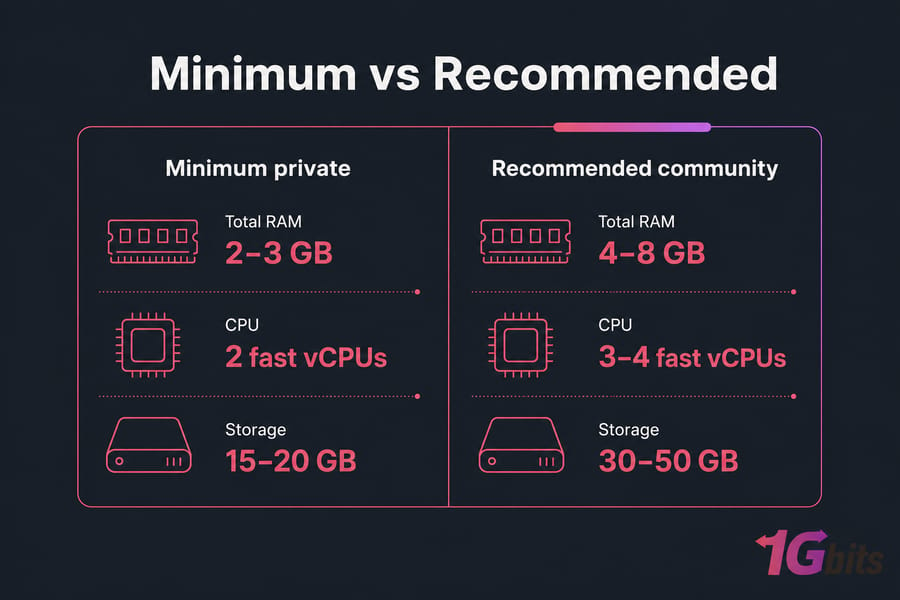
Assuming a Linux-hosted server on NVMe storage, running a current supported Java version with moderate view distance and no runaway plugins, here's a sane baseline. Minimum Minecraft server requirements for a small private world sit around 2–3 GB total RAM, two fast vCPUs, and 15–20 GB of disk. Public servers need more headroom and active monitoring.
| Tier | Total RAM | CPU | Storage |
| Minimum private | 2–3 GB | 2 fast vCPUs | 15–20 GB |
| Recommended community | 4–8 GB | 3–4 fast vCPUs | 30–50 GB |
Don't treat minimum launch specs as production capacity. And no, there's no magic per-player number that guarantees a smooth server. Ready to set up a Minecraft server on a VPS? Use the player-count table below for a more practical starting plan.
Minecraft Server RAM and CPU by Player Count
This is the table you came for. It maps peak concurrent players to total server RAM, a suggested Java -Xmx heap, and a fast-vCPU baseline.
| Peak players | Total RAM | Java -Xmx | Fast vCPU | Best fit |
| 1–5 | 2–3 GB | 1.5–2 GB | 2 | Private vanilla/Paper |
| 6–10 | 3–4 GB | 2–3 GB | 2–3 | Small community |
| 11–20 | 4–6 GB | 3–4.5 GB | 3–4 | Growing plugin server |
| 21–50 | 6–10 GB | 4.5–8 GB | 4–6 | Medium public server |
| 51–100 | 10–16 GB | 8–13 GB | 6–8 | Large optimized server |
| 100+ | 16–32+ GB | Workload-tested | 8+ / multi-server | Network/proxy setup |
A few caveats before you commit. These are starting ranges, not guarantees. For large modpacks, start one or two tiers higher. The vCPU column assumes modern, high-clock cores without severe host contention — a single Minecraft world does not scale linearly across eight cores, so eight cores won't make one world eight times faster.
At 100+ concurrent players you're usually better off splitting load across multiple backend servers behind a proxy like Velocity or BungeeCord. Once you've got a range, compare it against a scalable Minecraft hosting plan rather than picking a package by advertised slots.
Key takeaway: size for peak concurrent players, not registered members or advertised slots.
Player count sets the baseline. Memory allocation and CPU quality decide whether that baseline actually holds up.
How RAM Affects Minecraft Server Performance
RAM holds your loaded chunks, entity state, player data, plugin and mod objects, caches, and the JVM heap. When you run low, garbage collection thrashes and things stutter.
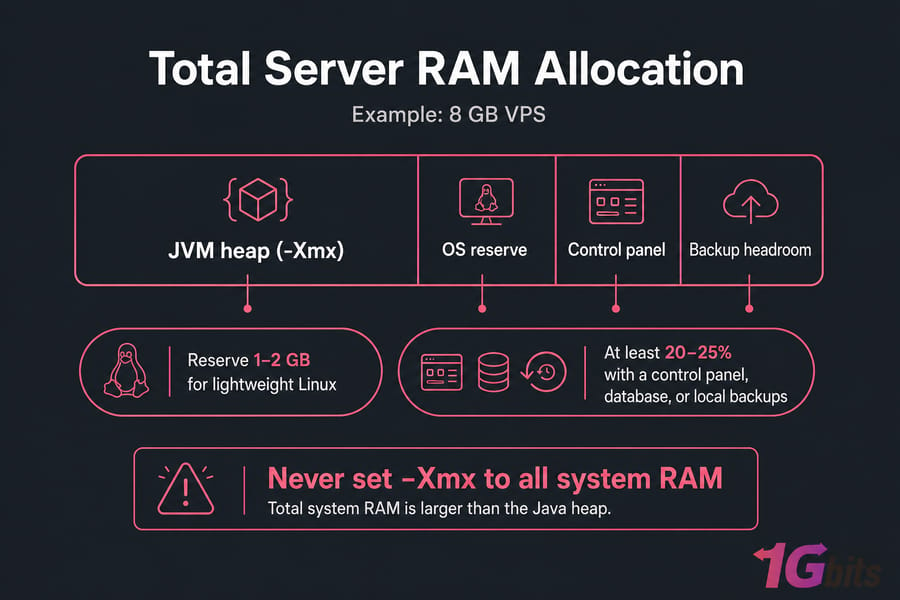
Here's the part most beginners miss: total system RAM is not the same as Java's -Xmx. Your VPS might have 8 GB, but you shouldn't hand all of it to Java. Reserve 1–2 GB for a lightweight Linux system, or at least 20–25% if you're running a control panel, database, or backups locally. If you want a refresher on the basics, here's how RAM works.
-Xms sets the initial heap, -Xmx caps the maximum. More heap can delay garbage collection, but it won't fix lag that's actually CPU-bound. Throwing RAM at every problem is the classic rookie mistake.
Myth: there is no universal 1 GB-per-X-players formula.
Why does a fixed RAM-per-player formula fail? Because players explore different chunks, mods and plugins vary wildly, entity farms differ, and view distance dramatically changes how much world stays loaded. Two servers with the same player count can have very different memory footprints.
Pro tip: never set Java -Xmx equal to all system RAM. Leave room for Linux, JVM non-heap use, backups, and monitoring.
Once memory is sufficient, CPU usually becomes the next hard limit.
Minecraft Server CPU Requirements and Core Count
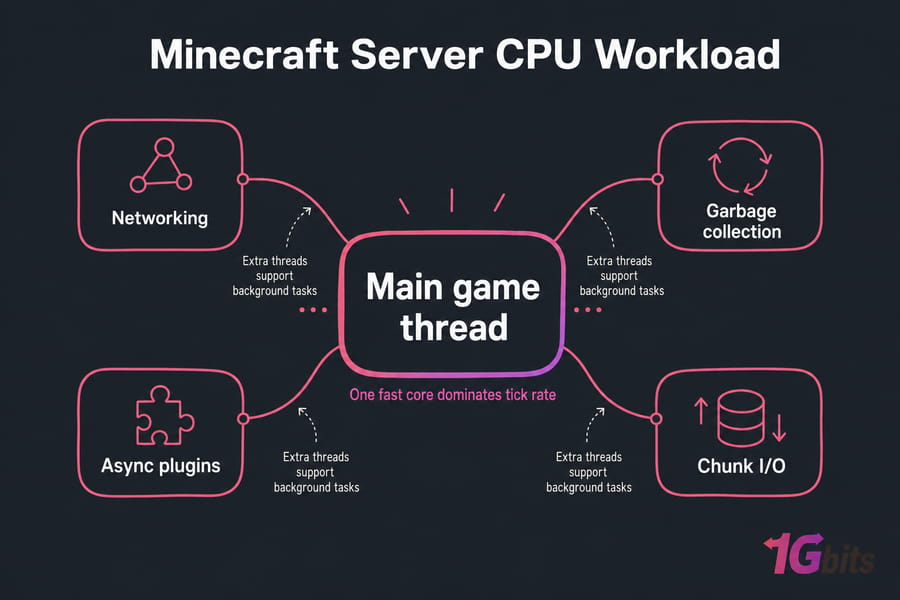
Minecraft's main game loop leans hard on a single primary thread. That's the reality. Extra threads help with networking, garbage collection, plugins, async tasks, and chunk generation — but your tick rate lives or dies on one fast core.
So fast modern cores beat a pile of weak ones. Clock speed matters, but it's not the whole story; architecture and instructions per clock count too. A 3.5 GHz modern core can outrun a 3.5 GHz core from five generations ago.
| Myth | Reality |
| More cores = faster server | One world is bound by main-thread speed |
| Minecraft uses only one core | It uses several, but one dominates |
| GHz alone tells you performance | IPC and architecture matter too |
Practical starting points: 2 fast vCPUs for small private servers, 3–4 for growing communities, 4–8 for larger or plugin-heavy loads. Watch out for CPU steal time on cheap shared plans — that's the host stealing cycles from your VM. A vCPU is not always a guaranteed physical core, so read the fine print. Compare processors properly with CPU benchmark tools.
Pro tip: two fast, lightly contended vCPUs can outperform many slow shared vCPUs for a single Minecraft world.
Vanilla, Plugin and Modded Minecraft Server Requirements
Your server software changes everything. So how much RAM for a modded Minecraft server versus a plain vanilla one? Big difference. Here's the adjustment table.
| Workload | RAM adjustment | CPU impact | Key variable |
| Vanilla | Baseline | Baseline | Exploration/entities |
| Paper/Purpur | Baseline or lower (tuned) | Strong single-thread | Configuration |
| Plugin-light | +0–1 GB | Minor | Plugin quality |
| Plugin-heavy | +1–4 GB | Moderate/high | Database, scheduled tasks |
| Fabric perf pack | Varies | Strong single-thread | Mod compatibility |
| Forge/NeoForge pack | +2–8+ GB | Moderate/high | Mod count, automation |
| Large expert pack | 8–16+ GB total | High | Machines, dimensions, chunk loaders |
Mod count alone tells you almost nothing. Mod behavior is what matters — a modpack with heavy automation, extra dimensions, and chunk loaders can hammer your CPU harder than raw player count ever will. Paper improves efficiency and gives you tuning knobs, but it doesn't guarantee lower RAM in every setup.
Always test the actual modpack's server package and its recommended Java version. And don't assume client modpack RAM equals server RAM — they're different beasts. Trimming demand through Minecraft server.properties settings often beats buying more hardware.
Minecraft Java vs Bedrock Server Requirements
Java Edition carries a bigger plugin and mod ecosystem plus JVM overhead. The Bedrock Dedicated Server is native software and can use fewer resources for a comparable basic workload — though I won't promise a fixed percentage, because that's nonsense.
Running cross-play with Geyser and Floodgate? That adds processing and memory, so size a Java-plus-Bedrock server as Java plus proxy overhead. Player behavior and world activity can still outweigh any edition difference. For the full breakdown, see Minecraft Java vs Bedrock servers.
Minecraft Server Storage, Backup and Memory Headroom
Use NVMe or fast SSD storage. Spinning HDDs on a live world will bottleneck chunk I/O, full stop.
- 20–30 GB for a small new server
- 50–100 GB for active public worlds plus backups
- 100 GB+ for long-running, modded, or multi-world servers
World files grow as players explore, so budget for expansion. Keep several backup generations without stuffing the system disk, and hold at least 15–20% free space. Backup compression temporarily spikes CPU and disk I/O — schedule it off-peak. Here's how to automate Minecraft server backups cleanly.
Warning: swap may prevent a crash, but active JVM swapping causes severe pauses. It is not a RAM upgrade.
How to Calculate Your Minecraft Hosting Requirements
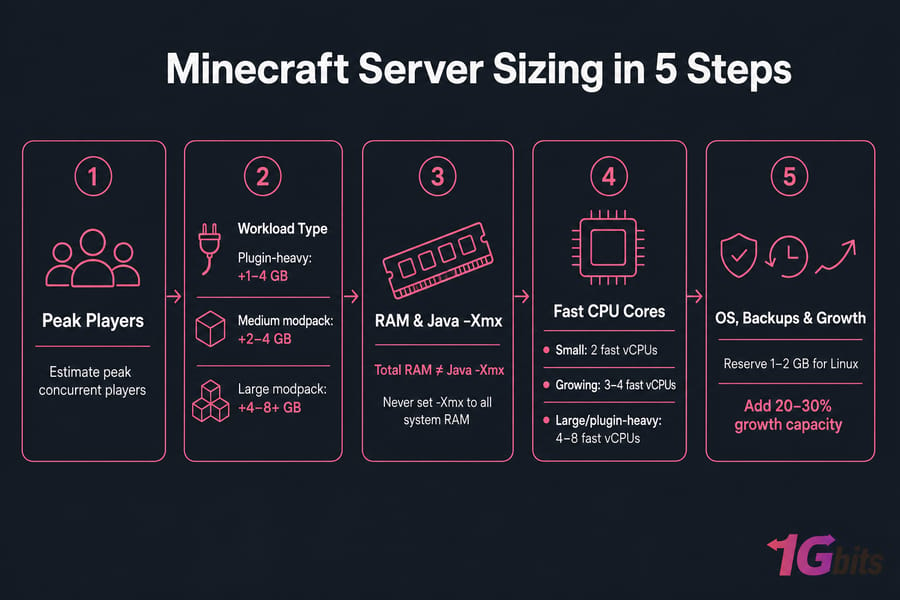
Here's the five-step method I use for a proper Minecraft hosting RAM guide:
- Estimate peak concurrent players.
- Pick a baseline tier from the main table.
- Adjust for workload — plugin-heavy adds 1–4 GB, medium modpack 2–4 GB, large modpack 4–8+ GB.
- Reserve OS and service headroom.
- Add 20–30% growth capacity, then monitor.
Three quick examples (all Linux, no heavy co-hosted database):
- 8-player private Paper: 4 GB total, 2 fast vCPUs,
-Xmx~2.5–3 GB. Light workload, room to breathe. - 25-player plugin community: 8 GB total, 4 fast vCPUs,
-Xmx~6 GB. Databases and scheduled tasks eat CPU. - 15-player large modpack: 10–12 GB total, 4–6 fast vCPUs,
-Xmx~8–10 GB after testing. Machines and chunk loaders drive the cost, not player count.
A KVM-based Minecraft VPS hosting plan with root access lets you control Java versions, server software, launch flags, and backup timing. If you're provisioning from scratch, our Minecraft VPS setup guide walks you through it.
Minecraft VPS Requirements vs Dedicated Hosting
A VPS handles most small-to-medium servers just fine, especially with KVM isolation, NVMe, and easy upgrades. Dedicated hardware earns its keep when things get bigger.
| Criterion | VPS | Dedicated |
| Peak players | Up to ~75–100 | 100+ sustained |
| CPU consistency | Shared/fair-share | Predictable |
| Multiple worlds/instances | Limited | Yes |
| Large modpack load | Can saturate | Handles it |
| Upgrade path | Quick resize | Fixed hardware |
Buying criteria that actually matter: CPU generation transparency, dedicated-vs-shared vCPU policy, NVMe, DDoS protection, root access, and a real upgrade path. Weighing the trade-offs? Read bare metal server vs VPS, and for large deployments consider a game dedicated server with predictable CPU capacity. Planning a move up? Here's how to migrate your Minecraft server.
Know Your Server Size? Choose a Plan You Can Scale
Use your estimated peak players, workload, and Java heap to pick a 1Gbits Minecraft VPS. Prioritize fast CPU, NVMe storage, root access, and enough system memory for the OS and backups — not just the game process. Compare Minecraft VPS Plans at Minecraft VPS hosting.
Minecraft Server Lag: How to Identify an Undersized Plan
Measure before you upgrade. A healthy server targets ~20 TPS with MSPT under 50 during normal play.
A server normally targets 20 TPS; sustained MSPT above 50 means it cannot maintain that rate.
| Symptom | Likely bottleneck | Action |
| Heap near limit / OOM errors | RAM or config | Increase heap, check leaks |
| Sustained high main-thread time | CPU, entities, plugins | Profile with Spark |
| High CPU steal | VPS contention | Move host or plan |
| Active swap | Memory pressure | Add RAM |
| Lag only when exploring | Chunk generation | Pregenerate world |
Use Spark or Paper timings to find the real culprit. Often the fix is configuration, not hardware — lower view distance, cut simulation distance, limit chunk loaders, or replace an expensive plugin. Dig deeper with our guides on common VPS performance bottlenecks.
Launch With Enough Capacity — Without Overpaying
Start with a plan covering your current peak concurrency plus 20–30% headroom. Watch TPS, MSPT, memory pressure, and CPU steal before jumping to the next tier. View Minecraft Hosting Options or learn how to set up the server.

Leave A Comment