
Let's get started with the best Linux distros to watch out for in 2026.
List of content you will read in this article:
• 1. Best Linux Distributions
• 2. Wrapping Up!
You are a power user and fed up with frequent updates, bugs, and other disturbances in Windows? You may also want to switch to an operating system that you can tailor or customize according to your requirements. Then our article about the best Linux distros for programmers is just what you need.
Linux distributions, also known as flavors, originate from various vendors or standards such as Debian, RHEL, Fedora, Arch, and more. In this guide, we'll navigate you through the top Linux distros for programmers, catering to beginners, intermediates, and power users alike. Linux presents an ideal playground for developers, gamers, hackers, security analysts, and privacy enthusiasts due to its versatile nature and diverse offerings.
Quick Answer: Which Linux Distro Is Best for Developers?
Reviewed and updated for 2026.
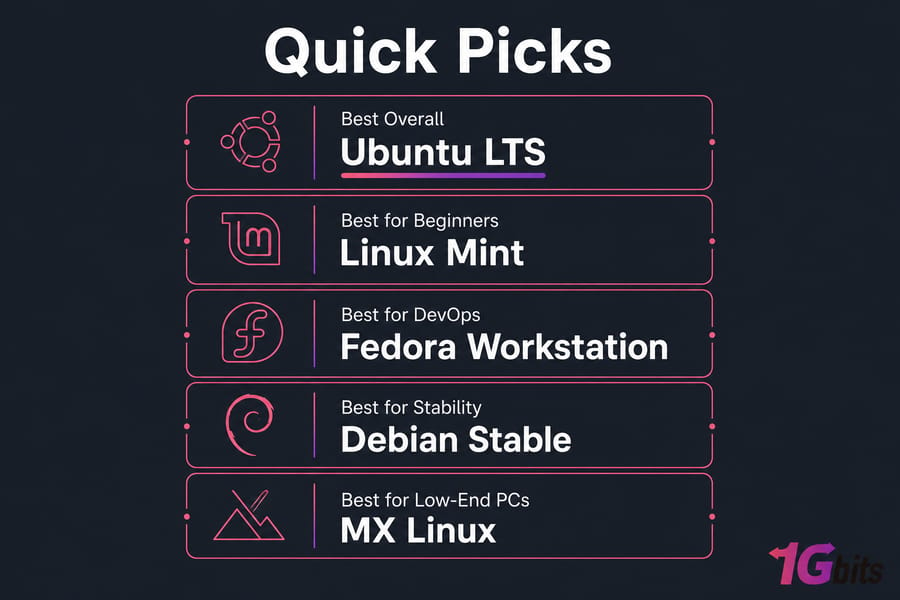
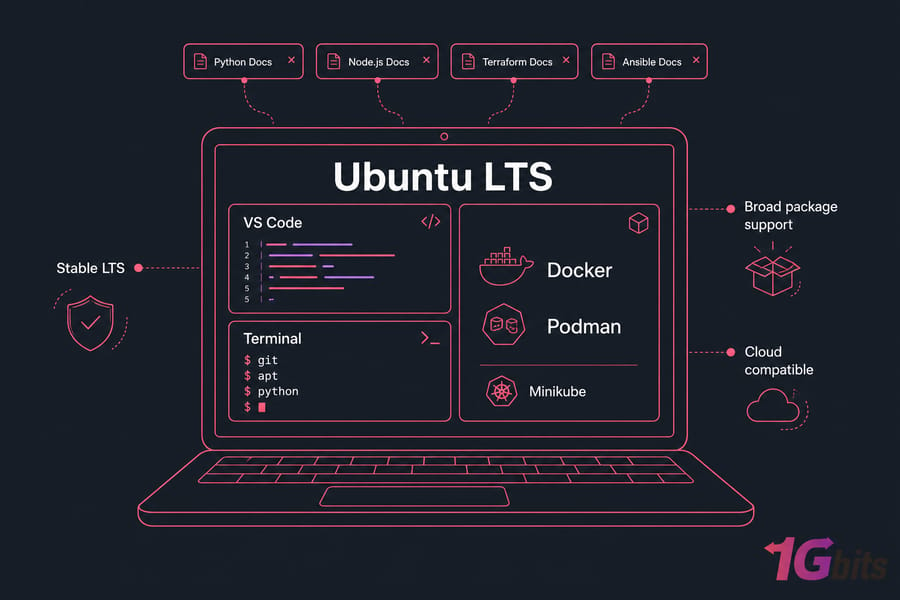
If you want the short answer, Ubuntu LTS is still the best Linux distro for developers overall in 2026. It hits the sweet spot: huge documentation, broad package support, strong cloud compatibility, and very little friction for Python, Node.js, Java, Docker, and day-to-day coding.
For specific use cases, I'd break it down like this: Linux Mint for beginners, Fedora Workstation for modern developer tooling and container-heavy workflows, Debian Stable for rock-solid server-aligned development, and MX Linux for older laptops that still need to get real work done.
If your focus is DevOps, Ubuntu LTS, Fedora, and Debian are the three that matter most. Arch and Manjaro are great for some people — I use Arch in labs now and then — but I wouldn't call them the safest default when you need predictable work machines.
What is a Linux Distribution?
Before introducing the best Linux distros for programmers, let's see what is a Linux distro first. A Linux distribution, commonly known as a distro, refers to an operating system created using the Linux kernel. These distributions encompass user programs, repositories, and libraries, forming distinct versions curated by vendors or communities.
The fundamental distinction of Linux lies in its open-source nature and its release under the GNU General Public License (GPL). This allows anyone the freedom to run, examine, modify, and distribute the source code. Moreover, individuals can even sell their modified versions, setting it apart significantly from proprietary operating systems like Unix, Microsoft Windows, and MacOS, which offer far less flexibility and are not as easily modifiable due to their proprietary nature.
If you're just getting comfortable, it helps to understand what is Linux distribution and what is Linux before you obsess over tiny distro differences.
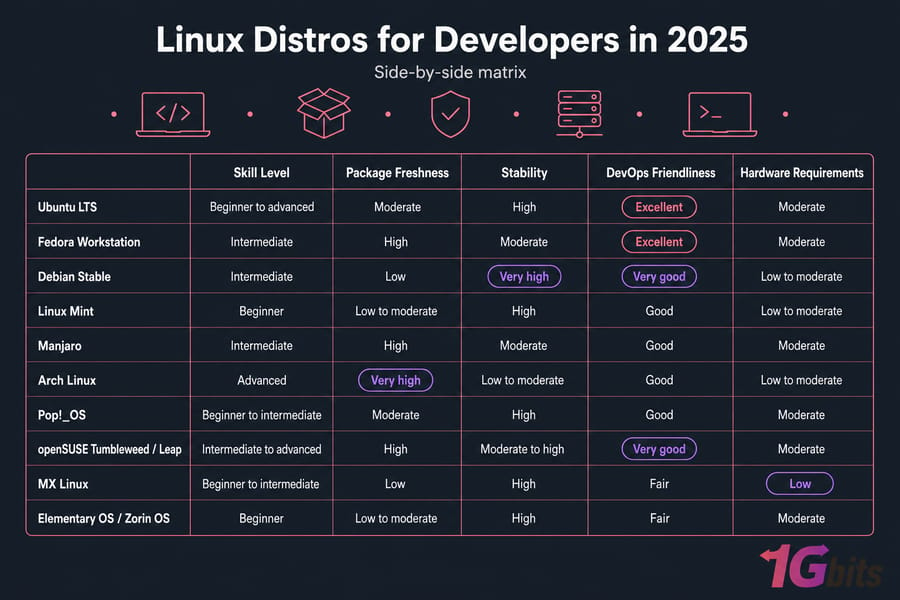
Quick Comparison Table of the Best Linux Distros for Programming and DevOps in 2026
A fast table helps more than ten fluffy paragraphs. So here it is.
| Distro | Best For | Skill Level | Package Manager | Release Model | DevOps Fit | Hardware Needs |
| Ubuntu LTS | Most developers | Beginner to advanced | apt | LTS | Excellent | Moderate |
| Fedora Workstation | Modern tooling | Intermediate | dnf | Regular fast-cycle | Excellent | Moderate |
| Debian Stable | Stable workflows | Intermediate | apt | Stable release | Very good | Low to moderate |
| Linux Mint | Beginners learning programming | Beginner | apt | Ubuntu-based stable | Good | Low to moderate |
| Manjaro | Newer packages with easier setup | Intermediate | pacman | Rolling | Good | Moderate |
| Arch Linux | Full control | Advanced | pacman | Rolling | Good | Low to moderate |
| Pop!_OS | Productivity and NVIDIA laptops | Beginner to intermediate | apt | Ubuntu-based | Good | Moderate |
| openSUSE Tumbleweed / Leap | Power users and sysadmins | Intermediate to advanced | zypper | Rolling / stable | Very good | Moderate |
| MX Linux | Low-end PCs | Beginner to intermediate | apt | Stable | Fair | Low |
| Elementary OS / Zorin OS | macOS or Windows switchers | Beginner | apt | Ubuntu-based stable | Fair | Moderate |
How We Chose the Best Linux Distros for Developers
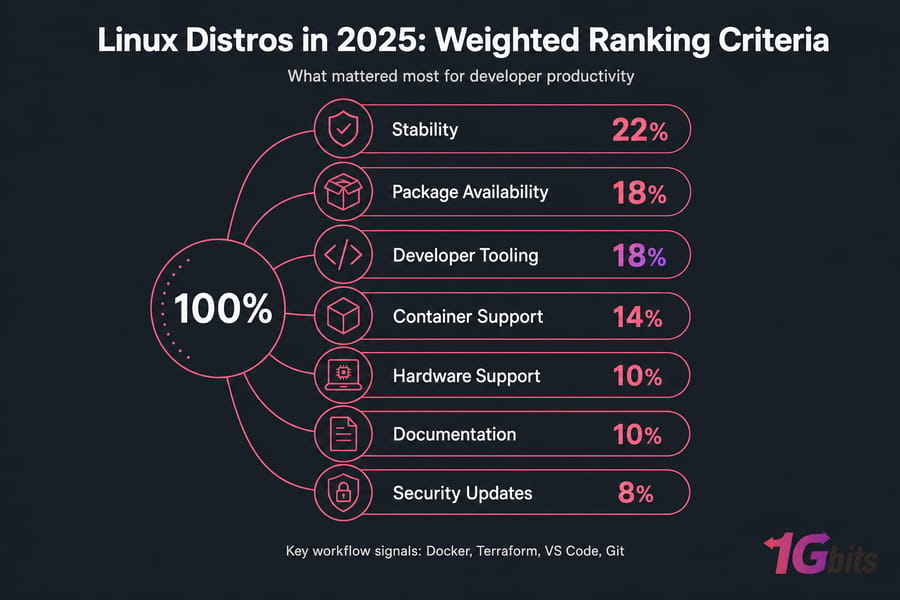
This ranking isn't based on distro fandom. It is based on what actually affects developer productivity: package availability, release cadence, IDE support, container tooling, hardware compatibility, documentation quality, and how annoying the distro gets after week three.
I also looked at official distro ecosystems, community adoption, release documentation, and how well each option fits real developer workflows on desktop and server. That's an important distinction, by the way. A distro can be great for tinkering and still be a bad choice for someone who needs Docker, Terraform, VS Code, Git, and stable updates on Monday morning.
Stability and release model
Release model changes everything. Stable-release distros like Debian Stable and Ubuntu LTS usually give you fewer surprises. Rolling release distros like Arch and Tumbleweed give you newer software faster, but you'll occasionally pay for that freshness with breakage or extra maintenance.
Package managers and software availability
Package ecosystem matters more than branding. apt, dnf, and pacman all work fine, but the surrounding repos, third-party docs, Flatpak support, Snap policies, AppImage compatibility, and vendor instructions can save you hours.
Developer tools and IDE compatibility
A good Linux distro for programming should run VS Code, JetBrains IDEs, Git, terminal emulators, shell scripting tools, language runtimes, and virtualization software without drama.
DevOps and container support
This was a major ranking factor because too many "best distro" lists barely mention DevOps. For 2026, I prioritized Docker and Podman support, Kubernetes tooling like Minikube or kind, Terraform and Ansible compatibility, cloud image availability, and server alignment.
Community support and documentation
When something breaks at 11:40 p.m., you want solutions — not vibes. Ubuntu and Fedora are excellent here. Debian has a huge knowledge base too, though some docs assume a bit more patience. Arch documentation is famously strong, but the distro itself still isn't beginner-friendly just because the wiki is good.
Hardware compatibility and performance
Driver support can make or break your experience. Fedora and Ubuntu handle modern laptops well. Pop!_OS has a particularly good reputation for NVIDIA systems. MX Linux stays on this list because it keeps older machines useful without feeling painfully stripped down.
What Makes a Linux Distribution Ideal for Programming?
We know Linux is best for programming. But what defines the best Linux distros for programmers? Factors such as stability, versatile package management, customization options, robust developer tools, community support, performance efficiency, and a focus on security and privacy all contribute. But how do these factors guide programmers in choosing the perfect Linux distro for their needs? Let's explore the key considerations to help programmers select the most suitable distribution.
Key Considerations for Choosing a Linux Distribution for Programming
Selecting the best Linux distros for programmers involves considering several key factors:
1. Identify Your Priorities: Determine your specific requirements and preferences. Are you seeking stability, customization options, extensive development tools, or a thriving community for support?
2. Consider Stability and Reliability: For consistent coding environments, opt for distributions renowned for stability, such as Debian-based systems like Ubuntu or Linux Mint.
3. Evaluate Package Management: Assess the availability of programming tools, libraries, and package managers. Debian, Fedora, and Arch-based distributions offer diverse repositories for easy software installation.
4. Customization and Flexibility: If customization is crucial, explore distributions like Arch Linux or Solus, which provide high levels of flexibility in setting up your development environment.
5. Developer Tools and Support: Check for pre-installed development tools or distributions with strong support for IDEs, compilers, and version control systems, like Fedora or openSUSE.
6. Community and Documentation: Evaluate the size and activity of the user community, as well as the availability of extensive documentation. Ubuntu and Fedora boast large, supportive communities for developers.
7. Performance and Efficiency: Consider lightweight distributions or desktop environments like MX Linux or Xfce for efficient resource usage without compromising performance.
8. Security and Privacy Focus: Prioritize distributions emphasizing security features and regular updates, such as Fedora or openSUSE, especially when handling sensitive code.
Why Is Choosing a Distro Important?
Selecting the best Linux distros for programmers holds substantial importance, especially for programmers. The choice of distro profoundly impacts the entire development experience. Each distribution comes with its own set of strengths, catering to various preferences and requirements.
The best linux distro for programmers can significantly streamline workflows and enhance productivity. A well-matched distribution not only ensures a stable and reliable coding environment but also provides access to a plethora of programming packages, customization capabilities, and a supportive community. Conversely, an incompatible or ill-suited distro might hinder development, causing inefficiencies, compatibility issues, and frustrations for programmers.
Best Linux Distros for Programmers
1. Ubuntu LTS — Best overall for most developers
Ubuntu LTS is the safest recommendation for most people who want the best Linux distro for developers in 2026.
Why do developers choose it? Simple. Massive community support, broad software availability, stable long-term releases, easy setup for Git, Docker, Python, Node.js, Java, VS Code, and common cloud tooling. It also mirrors a lot of real-world server environments, which matters if you're building locally and deploying to VPS or cloud instances later.
It works well for web development, backend services, Python development, Java development, and general-purpose coding. For DevOps, Ubuntu LTS is especially strong because so many guides, Docker instructions, cloud images, and vendor docs assume Ubuntu first.
Pros:
- Excellent documentation and community support
- Strong
aptecosystem and broad package availability - Great compatibility with Docker, Kubernetes tools, Terraform, and Ansible
- Widely supported by cloud and VPS providers
- Good fit for beginners and professional developers alike
Cons:
- Packages can feel a bit dated compared to Fedora or Arch
- Snap integration annoys some users
- Not the lightest option on older hardware
Best for: most developers, DevOps engineers, students, and teams that want predictable desktops.
Not ideal for: users who want the newest packages all the time or dislike Canonical's ecosystem choices.
If you're comparing the two big Debian-family options, this Debian vs Ubuntu comparison is worth a read. And if you want a test environment before reinstalling your laptop, try an Ubuntu VPS or a general Linux VPS.
2. Fedora Workstation — Best for modern developer tooling
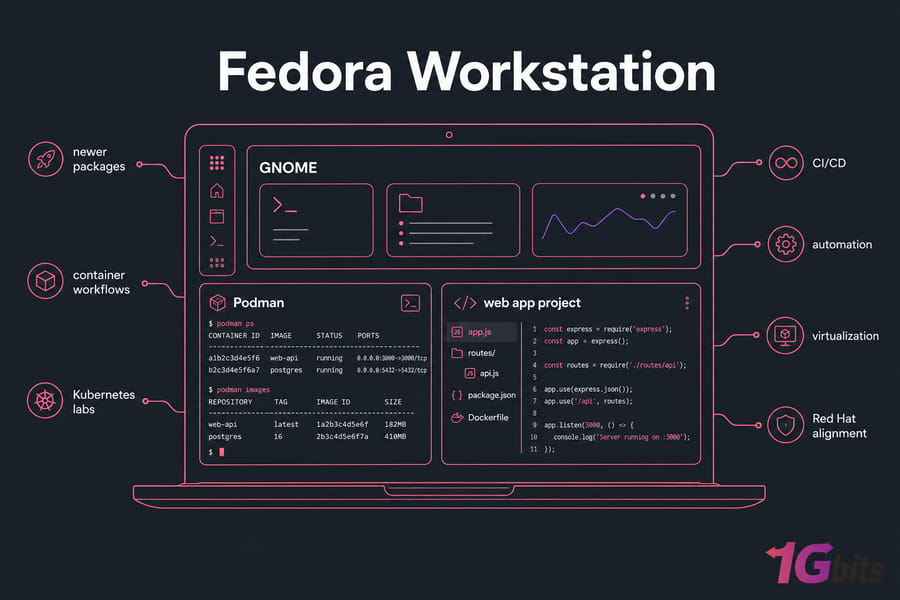
Fedora Workstation is the distro I usually recommend to developers who want newer packages without fully jumping into Arch territory.
Read: What is Linux Fedora?
Fedora has a polished GNOME desktop, fresh kernels, newer compilers, excellent virtualization support, and strong container workflows. Podman support is especially good, and that's one reason Fedora stands out for cloud-native development and DevOps. If your workflow includes containers, systemd tooling, KVM, or Red Hat-style environments, Fedora feels very natural.
Pros:
- Newer packages than Ubuntu LTS or Debian Stable
- Excellent Podman and container ecosystem
- Strong fit for Kubernetes labs, CI/CD, and automation work
- Clean developer experience with GNOME
- Good enterprise alignment through the Red Hat ecosystem
Cons:
- Faster release cadence means more frequent upgrades
- Some proprietary setup steps take extra work
- Can feel less beginner-friendly than Ubuntu or Mint
Best for: modern developer workflows, DevOps engineers, Linux users who want fresh software without going full rolling release.
Not ideal for: people who want maximum long-term stability with minimal changes.
3. Debian — Best for stability and server-aligned workflows
Debian is boring in the best possible way.
Read: What is Linux Debian?
That's not a criticism. For many developers, especially backend and infrastructure folks, boring means stable, predictable, and easy to trust. Debian Stable is one of the best Linux distros for programming when consistency matters more than shiny package versions. It's also a strong match for server-aligned workflows, which makes local-to-server parity easier.
Debian is 100% free and rock-solid, and it's one of the oldest among other Linux distros. As one of the best Linux distros for programmers, it allows you to install both free and paid software and can be used on both physical machines as well as on cloud servers. It forms the basis of some of the most popular Linux distributions such as Kali, Ubuntu, Mint, etc.
Pros:
- Very stable release model
- Excellent base for server-style development
- Huge package repositories with more than 59k+ packages
- Low overhead and efficient resource usage
- Great for long-term projects and conservative environments
Cons:
- Older package versions than Fedora, Arch, or Manjaro
- Desktop polish is fine, not exciting
- Beginners may need a bit more manual setup
Best for: backend developers, sysadmins, DevOps engineers, and anyone who values stable release cycles.
Not ideal for: users who need the newest desktop stack or bleeding-edge toolchains.
If you're evaluating it for server work, compare it with Debian vs CentOS and consider testing a Debian VPS.
4. Linux Mint — Best for beginners learning programming
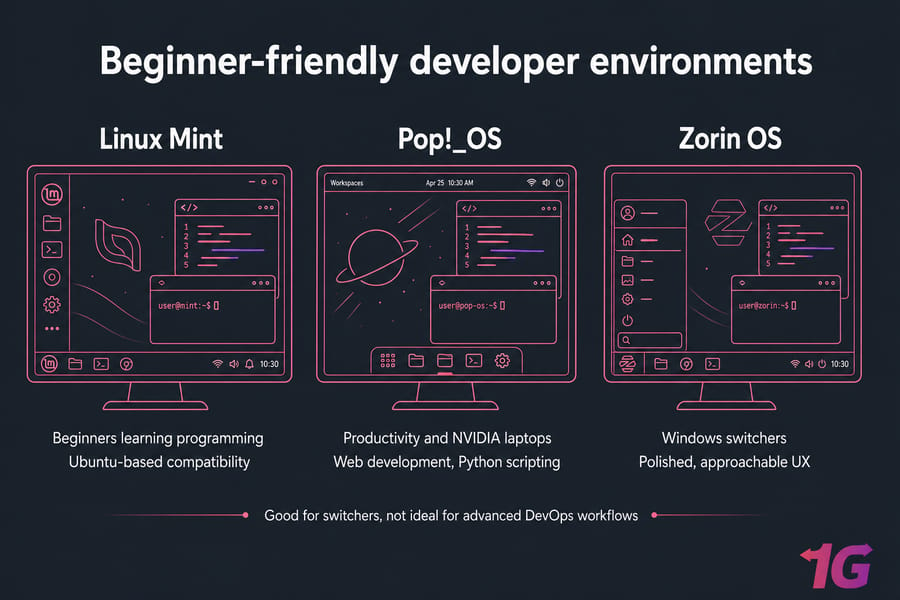
Linux Mint is the easiest recommendation for beginners who want to learn programming without fighting the OS.
Linux Mint is an Ubuntu-based elegant Operating System that is relatively stable, power-packed, and easy to install. It is used by many programmers and sys admins all across the globe. At the time of installation, it allows you to choose between the environments and customize your installation with which packages you want to install and which not.
Because it's Ubuntu-based, you get access to the same broad software ecosystem and lots of the same tutorials. But the desktop feels more familiar to Windows users, and the whole experience is calmer. That's underrated. New developers already have enough cognitive load.
Pros:
- Very beginner-friendly
- Comfortable desktop experience
- Ubuntu-based package compatibility
- Good performance on modest hardware
- Solid choice for students and first-time Linux users
Cons:
- Not as enterprise-aligned as Ubuntu, Fedora, or Debian
- Less interesting for power users who want newer core packages
- DevOps tooling support is fine, not standout
Best for: beginners, students, and Windows switchers who want a friendly Linux distro for coding.
Not ideal for: advanced users chasing the freshest packages or enterprise-like workflows.
5. Manjaro — Best for users who want newer packages without full Arch setup
Manjaro tries to give you the perks of Arch Linux with less manual setup. Sometimes it succeeds beautifully.
It is powerful, looks elegant, has cool themes, and will give you a pleasant installation experience, irrespective of whether you are a power user or a beginner. You get access to newer software, the pacman package manager, and a fairly approachable installation flow. For developers who want newer compilers, kernels, desktops, or language runtimes, that's appealing.
Pros:
- Fresh packages
- Easier onboarding than Arch Linux
- Strong customization options
- Good for experienced desktop developers
Cons:
- Less predictable than conservative distros
- Rolling release requires more attention
- Not my first pick for mission-critical workstations
Best for: intermediate users who want newer packages without building everything from scratch.
Not ideal for: absolute beginners or anyone who wants a zero-drama LTS machine.
6. Arch Linux — Best for advanced users who want full control
Arch Linux is for people who want to build their environment almost from the ground up — and actually enjoy that process.
For advanced users, Arch can be a fantastic Linux distro for development. It gives you very current packages, deep customization, a lean base install, and one of the best knowledge bases in Linux via the Arch Wiki. But the learning curve is real. So is the maintenance overhead.
Pros:
- Maximum control over the system
- Very current packages
- Excellent documentation
- Ideal for experienced tinkerers and minimalist setups
Cons:
- Steep learning curve
- Rolling release can break things
- Takes longer to set up well
Best for: advanced developers, Linux enthusiasts, and users who want full control over every layer.
Not ideal for: beginners, students under deadline pressure, or teams standardizing desktops.
If you want to experiment with it, don't start on your only work machine. Use a VM first, or follow a proper Arch install guide.
7. Pop!_OS — Best for productivity and hardware support
Pop!_OS is one of those distros that feels thoughtfully designed for real desktop work.
It's Ubuntu-based, so package support is strong, but it adds a productivity-focused desktop and good hardware handling. It has been especially popular with developers using laptops, high-DPI screens, and NVIDIA GPUs. If you're doing AI development or GPU-assisted work on a workstation, that matters more than distro purists like to admit.
Pros:
- Good hardware support, especially for NVIDIA systems
- Productivity-friendly desktop layout
- Ubuntu-based software ecosystem
- Easy to get started with development tools
Cons:
- Less common in enterprise environments
- Not as minimal as Debian or Arch
- Smaller ecosystem than Ubuntu itself
Best for: laptop developers, creators, and users who care about desktop productivity and graphics support.
Not ideal for: people who want the broadest enterprise documentation base.
8. openSUSE Tumbleweed or Leap — Best for power users and sysadmin workflows
openSUSE doesn't always get enough attention in developer roundups, which is a mistake.
Tumbleweed is a rolling release with very fresh packages. Leap is the calmer, more stable option. The distro also gives you YaST, which many sysadmins still love for system management. For power users, virtualization-heavy setups, and mixed desktop-admin workflows, openSUSE is genuinely strong.
Pros:
- Choice between stable and rolling models
- Powerful admin tooling through YaST
- Strong fit for sysadmin-style work
- Good package management with
zypper
Cons:
- Smaller mainstream mindshare than Ubuntu or Fedora
- Tumbleweed may be too fast-moving for some users
- Beginner tutorials are less abundant
Best for: power users, sysadmins, and developers who want serious control without going full Arch.
Not ideal for: total beginners who rely heavily on generic Ubuntu-targeted tutorials.
9. MX Linux — Best lightweight option for older machines
MX Linux earns its place because not everyone is coding on a brand-new laptop with 32 GB of RAM.
It's a Debian-based mid-weight Linux distribution with a simple configuration yet has compelling features and solid performance. It is highly stable, efficient, has an easy learning curve, and looks aesthetic. If you need a distro for a low-end PC, older ThinkPad, or secondary machine used for SSH, terminal work, lightweight editors, and browser-based development, MX Linux is a smart choice.
Pros:
- Runs well on low-end hardware
- Stable and efficient
- Good choice for lightweight coding environments
- Simple and practical desktop options
Cons:
- Not aimed at cutting-edge developer tooling
- Less polished for modern heavy desktop workflows
- Not ideal for GPU-heavy workloads
Best for: low-end PCs, old laptops, students, and secondary coding machines.
Not ideal for: AI/ML workstations, newer enterprise desktop workflows, or users who want flashy desktop features.
10. Elementary OS or Zorin OS — Best for users moving from macOS or Windows
These two aren't identical, but they serve a similar audience: people switching from another desktop OS who want a smoother landing.
Elementary OS appeals more to users who like a macOS-style feel. Zorin OS tends to resonate with Windows switchers. Both can work fine for web development, Python scripting, and general coding, thanks to their Ubuntu roots. Still, I wouldn't rank either as the best Linux distro for DevOps or advanced package flexibility.
Pros:
- Polished, approachable user experience
- Good choice for switchers
- Ubuntu-based package compatibility
Cons:
- Less suited to advanced power-user workflows
- Not standout choices for container-heavy DevOps work
- Smaller developer-focused ecosystem than Ubuntu proper
Best for: users coming from macOS or Windows who want a comfortable Linux desktop first.
Not ideal for: advanced developers optimizing for tooling depth above everything else.
Best Linux Distros by Use Case
This is usually the section people actually want. So let's keep it direct.
Best Linux distro for beginners
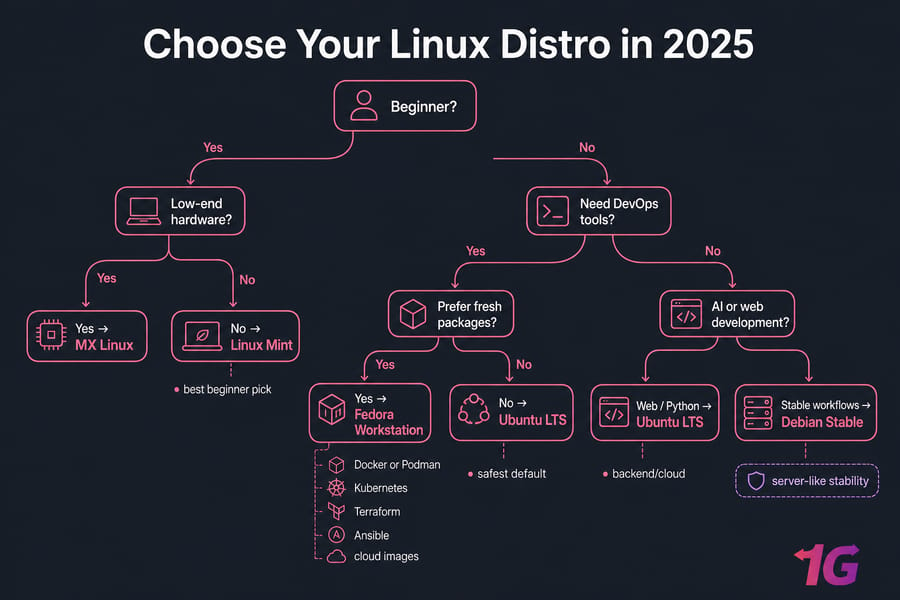
Linux Mint is my top beginner pick, with Ubuntu LTS close behind. Mint is easier on new users, while Ubuntu gives you broader documentation and better server/cloud alignment if you plan to grow into DevOps or backend work.
Best Linux distro for DevOps engineers
Ubuntu LTS is the safest default for DevOps in 2026. Fedora Workstation is excellent if you want fresher packages and a stronger Podman-first ecosystem. Debian is ideal when stability and server-like behavior matter most.
If you're building labs or staging environments, a Cloud VPS or Linux VPS server is often a better test bed than your daily laptop.
Best Linux distro for Python development
Ubuntu LTS, Debian, and Fedora are the strongest picks for Python development. Ubuntu gets the edge for broad package docs and environment setup guides. Debian is excellent for stable backend work. Fedora gives you newer Python versions faster.
You'll also want to know how to install Python packages on Linux properly rather than relying on random copy-pasted commands.
Best Linux distro for Java development
Ubuntu LTS and Fedora are the best choices for Java development. Both work well with OpenJDK, JetBrains IDEs, build tools, containers, and local server testing.
Best Linux distro for web development
Ubuntu LTS is still the safest web development choice because it works well with Node.js, PHP, Python, Docker, nginx, Apache, Git, and every mainstream editor.
For practical setup, here's how to set up Node.js on Linux. If you use Debian or Ubuntu often, it also helps to learn how to manage packages with apt.
Best Linux distro for AI and machine learning
Ubuntu LTS is usually the best Linux distro for AI and machine learning. That's largely because CUDA, TensorFlow, PyTorch, NVIDIA drivers, and third-party tutorials tend to support Ubuntu first. Pop!_OS is also a solid workstation choice when GPU friendliness matters.
Best Linux distro for low-end PCs
MX Linux wins here, with Linux Mint Xfce as another good option. If your machine has older hardware, limited RAM, or weak integrated graphics, a lightweight distro matters.
Ubuntu vs Fedora vs Debian vs Arch for Developers
These four dominate most serious developer conversations, and for good reason. If you can understand the tradeoffs here, you'll make a better choice than someone reading ten random "top distro" lists.
| Category | Ubuntu LTS | Fedora | Debian | Arch |
| Ease of use | Very easy | Moderate | Moderate | Difficult |
| Package freshness | Moderate | High | Lower | Very high |
| Stability | High | Good | Very high | Variable |
| DevOps suitability | Excellent | Excellent | Very good | Situational |
| Best for | Most developers | Modern tooling | Stable environments | Advanced control |
Development Tools That Matter on Linux
People often ask for the best Linux distro for coding, but the distro is only half the story. Your toolchain matters at least as much.
Docker and Podman
If you're shipping containers, Ubuntu and Fedora are easy recommendations. Fedora gets extra credit for Podman-first workflows. Ubuntu gets extra credit for broad third-party instructions and easier copy-paste compatibility.
Kubernetes and Minikube
For local Kubernetes work, you want a distro with current virtualization support, container tooling, and good package availability. Fedora and Ubuntu are usually the least annoying. Debian works well too if you don't need the freshest components.
Git and package managers
Git works everywhere, obviously, but the friction around package repositories, signing keys, and third-party vendor instructions doesn't. Ubuntu and Fedora tend to make mixed-toolchain development easier.
VS Code, JetBrains, Vim, and Neovim
All major distros here can run VS Code, JetBrains IDEs, Vim, and Neovim. The real difference is how much setup and maintenance you want around them. Beginners usually do better on Ubuntu, Mint, or Pop!_OS. Advanced users are often happy on Fedora, openSUSE, or Arch.
Python, Node.js, Java, Go, and Rust toolchains
Ubuntu and Fedora are the most balanced choices if you work across multiple languages. Debian is excellent for steady backend development. Arch is great if you want the newest toolchains and don't mind extra maintenance.
Virtualization and WSL alternatives
If you're moving from Windows and want a strong WSL alternative, Ubuntu, Fedora, and Pop!_OS all make sense. They handle local VMs, containers, terminal-heavy workflows, and desktop development well. If you're still deciding between desktop ecosystems, this Windows vs Linux comparison can help frame the bigger picture.
Common Mistakes When Choosing a Linux Distro
I've watched developers pick a distro for all the wrong reasons. Usually because a screenshot looked cool or someone on Reddit said "real devs use X." Don't do that.
- Choosing a rolling release when you actually need stability
- Ignoring driver support, especially for NVIDIA laptops
- Picking a niche distro with weak documentation
- Overvaluing desktop appearance and undervaluing package support
- Skipping a test install in a VM or Live USB first
- Assuming lightweight always means better for coding
- Forgetting to check whether your workflow needs server alignment
And one more. People forget file formats and package archives still matter in real Linux work. If you're unpacking source releases or manual installs, it helps to know what a tar.gz file is.
How to Choose the Right Linux Distro for Your Workflow
Now here's the practical part.
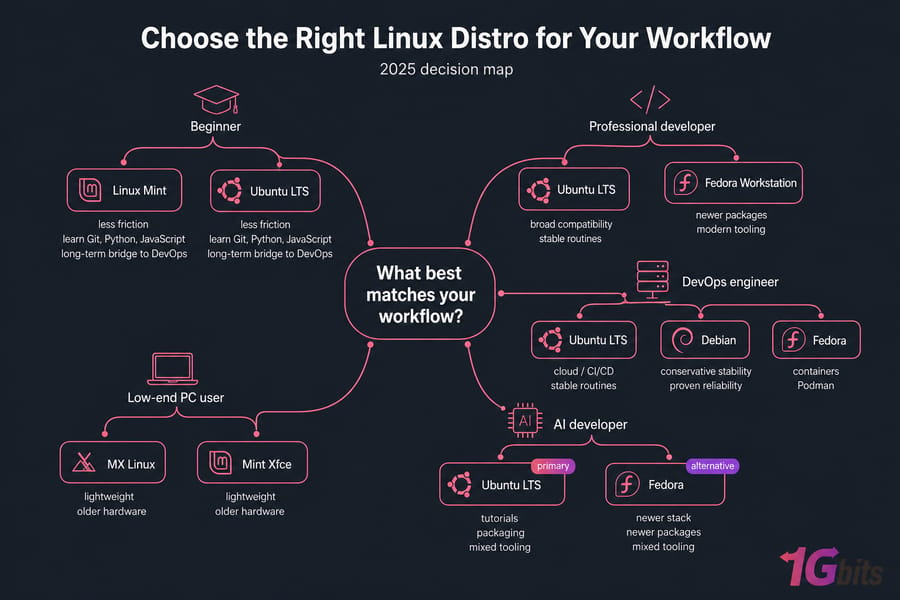
If you are a beginner
Choose Linux Mint or Ubuntu LTS. You'll spend less time fixing the operating system and more time learning Git, Python, JavaScript, and the command line. That's the tradeoff that matters early on.
If you are a professional developer
Choose Ubuntu LTS or Fedora Workstation. Ubuntu is better if you want broad compatibility and stable routines. Fedora is better if you like newer packages and modern tooling.
If you manage servers or CI/CD pipelines
Choose Ubuntu LTS, Debian, or Fedora. Ubuntu is the easiest all-rounder. Debian is the conservative stability pick. Fedora is great if your work leans into containers, Podman, and Red Hat-style environments.
If you need a lightweight distro
Choose MX Linux or Mint Xfce. You can absolutely write code on low-end hardware, but be realistic about browser tabs, IDE memory usage, and container overhead.
Final Verdict: Best Overall Linux Distro for Most Developers
The best Linux distro for developers in 2026 is still Ubuntu LTS for the broadest range of users. It's the easiest to recommend, the easiest to support, and the easiest to grow with. Fedora is the best alternative for modern tooling. Debian is the best stability-first choice. Linux Mint is the best beginner option. MX Linux is the smartest low-resource pick.
Wrapping Up!
There are tons of the best Linux distros (also known as Linux distributions), and with every new release for each of them, their positions might change in the list. However, overall, the ones that we have discussed above always manage to get a spot on the list.
Whether you're setting up a personal development environment or configuring a professional server, selecting the right distribution is crucial. If you're looking for a robust solution to host your projects or services, consider opting for a Linux VPS. With a Linux VPS, you get the flexibility and control needed to customize your environment to your specific needs, ensuring optimal performance and reliability.
We hope that you can find the most suitable distribution that would meet all your requirements.
If you're not ready to wipe your main machine, test your shortlist in a VM, boot a Live USB, or use a VPS first. That's usually the smartest move. You can also explore 1Gbits options like a Ubuntu VPS or Debian VPS to trial your preferred distro in a real server-like environment.
And if you're comparing adjacent Linux ecosystems, these guides on the best Ubuntu based distros in 2026 and even the best Linux distros for gaming can help you understand how use case changes the answer.
People Are Also Reading:

Leave A Comment