
![Ubuntu vs Fedora: Which Is Better? [2026] 🐧](https://1gbits.com/cdn-cgi/image/width=1200,quality=80,format=auto/https://s3.1gbits.com/blog/2024/08/ubuntu-vs-fedora-1200xAuto.webp "Ubuntu vs Fedora: Which Is Better? [2026] 🐧")
When it comes to choosing a Linux distribution, two names that often stand out are Ubuntu and Fedora. Pick Ubuntu if you want a desktop or server you can install once and forget for years. Pick Fedora if you want newer software, cleaner GNOME, and a workflow aligned with Red Hat Enterprise Linux. Both are excellent.
For those who prioritize battery efficiency, our Ubuntu vs Fedora battery life analysis will be particularly insightful, while gamers will find the Ubuntu vs Fedora gaming comparison crucial in making an informed decision. Developers and system administrators will benefit from our in-depth look at Ubuntu vs Fedora for development and Ubuntu vs Fedora server environments. The real split isn't speed — it's update philosophy: Canonical builds Ubuntu around Long-Term Support, while Red Hat-sponsored Fedora moves fast.
To dive deeper into what makes Ubuntu such a popular choice, explore our detailed guide on What is Ubuntu to better understand its features and benefits.
🎯 Ubuntu vs Fedora at a Glance
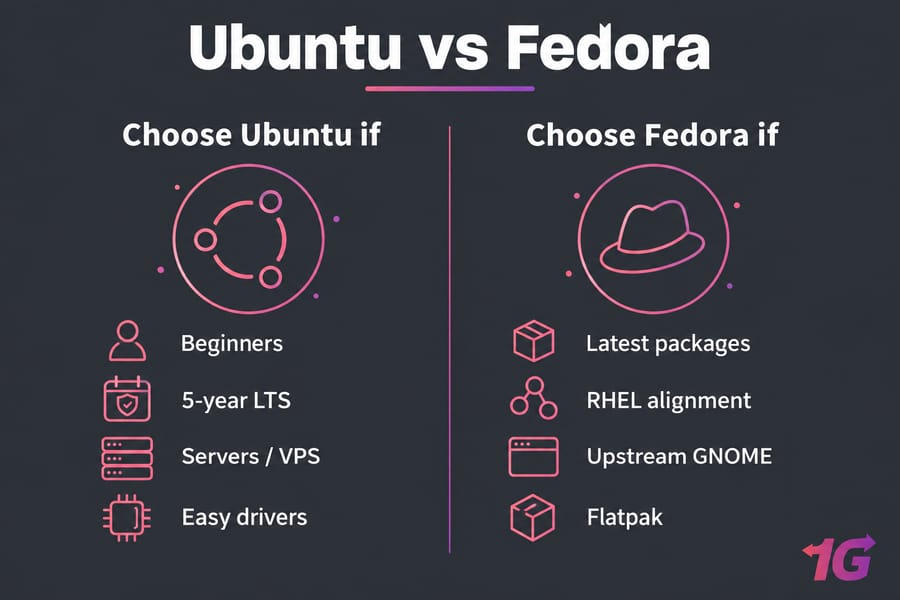
Choose Ubuntu if...
- You're new to Linux and want the largest pool of tutorials and forum answers
- You need five years of security updates without a major upgrade
- You're deploying a server, VPS, or cloud instance
Choose Fedora if...
- You want recent kernels, compilers, and desktop releases within weeks of upstream
- You develop or test for RHEL, AlmaLinux, or Rocky Linux
- You prefer stock GNOME and a Flatpak-first app model
👥 Whom is Ubuntu Ideal For?

When comparing Ubuntu vs Fedora, understanding whom each distribution is ideal for can guide your choice. Ubuntu has long been considered the go-to Linux distribution for both newcomers and seasoned professionals. Its widespread adoption, extensive community support, and user-friendly interface make it particularly appealing to those who are new to Linux. In the ongoing debate of Ubuntu vs Fedora for beginners, Ubuntu often comes out on top due to its ease of use, intuitive graphical user interface, and availability of a wide range of software directly through its package manager. If you want to know what is Ubuntu, read What is Linux Fedora?
Ubuntu's regular updates ensure it stays at the forefront of technology, making it a solid choice for developers and system administrators alike. When discussing Fedora vs Ubuntu performance, Ubuntu generally offers a more stable and reliable experience, especially for those who prioritize long-term support over cutting-edge features. However, Fedora enthusiasts may argue that Fedora's latest software packages give it an edge in performance, especially in development environments. For understanding the pros and cons of Ubuntu, read Pros and Cons of Ubuntu.
In the realm of Ubuntu vs Fedora for development, Ubuntu's compatibility with a vast array of development tools and environments makes it an excellent choice for developers. Finally, for those interested in Ubuntu vs Fedora for gaming, Ubuntu's support for Steam and other gaming platforms makes it the more accessible option. Overall, Ubuntu is ideal for anyone looking for a well-rounded, user-friendly, and reliable Linux distribution, whether you're a beginner, developer, or casual gamer.
👨💻 Whom is Fedora Ideal For?
Fedora is a versatile and powerful Linux distribution that appeals to a specific audience of users, particularly those who value cutting-edge technology, open-source principles, and a strong focus on development. It's a go-to choice for developers, system administrators, and tech enthusiasts who want to stay on the bleeding edge of software. Fedora offers an environment that closely aligns with the latest innovations in the Linux ecosystem, making it ideal for those who want to experiment with the newest features and tools before they become mainstream.
When considering "Ubuntu vs Fedora," it's clear that Fedora is tailored for users who prefer a rolling release model and are comfortable with frequent updates. Unlike Ubuntu, Fedora tends to be more aligned with upstream software, meaning it often provides a more vanilla experience with the latest versions of software packages. For users who prioritize stability and a more polished experience, Ubuntu might be the better option, but for those who enjoy a fresh, up-to-date environment, Fedora stands out.
In the "Ubuntu vs Fedora" debate, Fedora's focus on open-source purity and its strong relationship with the Red Hat ecosystem also make it ideal for professionals working in enterprise environments. It's perfect for those who need a distribution that integrates well with Red Hat technologies and who appreciate Fedora's emphasis on security and innovation. Ultimately, when choosing between "Ubuntu vs Fedora," the decision comes down to the user's needs, with Fedora being the ideal choice for those who want a cutting-edge, open-source experience.
For users opting for Ubuntu but seeking to enhance their experience with a graphical user interface, you can learn more about how to install a desktop (GUI) on an Ubuntu server to make it more user-friendly and versatile.
📊 Ubuntu vs Fedora: Quick Comparison Table
Current releases at the time of writing: Ubuntu 26.04 LTS "Resolute Raccoon" (April 23, 2026) and Fedora Workstation 44 (April 28, 2026).
| Criteria | Ubuntu | Fedora |
| Best for | Beginners, servers, long-lived workstations | Developers, enthusiasts, RHEL-adjacent work |
| Release frequency | Every 6 months; LTS every 2 years (April) | Roughly every 6 months |
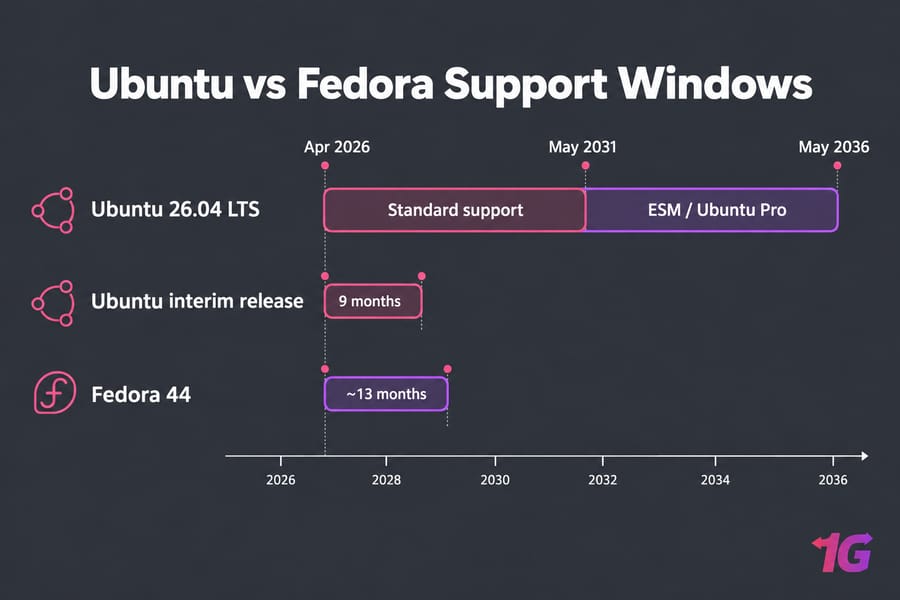
| Support duration | LTS: 5 years standard, up to 10+ with Ubuntu Pro; interim: 9 months | About 13 months per release |
| Package manager | APT (.deb) | DNF (.rpm) |
| Universal app format | Snap | Flatpak |
| Default security framework | AppArmor | SELinux (enforcing) |
| Desktop | GNOME with Ubuntu dock and theming | Near-stock upstream GNOME |
| Proprietary software | Drivers and codecs offered in the installer | Usually needs RPM Fusion or extra steps |
| Server suitability | Excellent; ubiquitous on cloud and VPS | Capable, but short lifecycle limits it |
| Learning curve | Gentle | Moderate |
🤝 Ubuntu vs Fedora Linux: Similarities
Open Source Philosophy
One of the foundational similarities between Ubuntu and Fedora is their commitment to the open-source philosophy. Both distributions are built on the Linux kernel, which itself is a paragon of open-source development. Ubuntu vs Fedora exemplifies the power of open-source communities, where transparency, collaboration, and freedom are paramount. Users are free to view, modify, and distribute the source code, which fosters innovation and ensures that both distributions remain flexible and adaptable to user needs.
Linux Kernel Foundation
At their core, both Ubuntu and Fedora are based on the Linux kernel. This similarity ensures that the fundamental functionality of these distributions is aligned. Whether you choose Ubuntu or Fedora, you'll benefit from the same robust, secure, and scalable foundation that the Linux kernel provides.
GNOME Desktop Environment
When discussing Ubuntu vs Fedora, the desktop environment is a key aspect. Both distributions use GNOME as their default desktop environment. GNOME is known for its simplicity, modern design, and ease of use. While both Ubuntu and Fedora may offer different customizations and theming options, the core GNOME experience remains consistent across both distributions.
Package Management Systems
Ubuntu uses APT (Advanced Package Tool) with DEB package formats, and Fedora uses DNF (Dandified Yum) with RPM package formats. The overall experience of managing software is similar. Both systems allow users to install, update, and remove software packages efficiently. The vast software repositories available in both distributions ensure that users have access to a wide range of applications and tools.
Customization and Flexibility
Both distributions offer extensive customization options, allowing users to tailor their desktop environment, themes, and functionality to their specific needs. Whether you're a developer, designer, or casual user, both Ubuntu and Fedora provide the tools and flexibility to create a personalized computing experience.
For users considering a fresh start with Ubuntu, learning how to install Ubuntu from a USB can be a great first step toward exploring its customization potential and functionality.
Security Features
Security is a critical concern in any operating system, and Ubuntu vs Fedora demonstrates that both distributions take this seriously. Ubuntu and Fedora are both equipped with strong security features, including built-in firewalls, SELinux support, and regular security updates. Fedora is often seen as slightly more cutting-edge in its approach to security, while Ubuntu provides a balance of innovation and stability.
Focus on Development
Developers often find both distributions appealing due to their focus on development tools and support. Ubuntu has a reputation for being developer-friendly, with extensive libraries, IDEs, and documentation readily available. Fedora, on the other hand, is known for its innovation and up-to-date software, making it a preferred choice for developers who want to work with the latest tools and technologies.
Community and Support
Community support is a crucial aspect of the Linux ecosystem. Ubuntu's community is one of the largest and most active in the Linux world, offering extensive forums, documentation, and user groups. Fedora's community, while smaller, is known for its passion for innovation and contribution to the open-source world. If you're exploring Ubuntu and want to utilize its versatility, check out our guide on how to install Python in Ubuntu to get started with one of the most popular programming languages.
Regular Release Cycles
Ubuntu offers Long-Term Support (LTS) releases that provide stability and extended support, making it ideal for users who prefer a consistent and reliable system. Fedora, on the other hand, follows a more frequent release cycle, offering the latest features and innovations. Both distributions ensure that their users have access to up-to-date software and technologies.
Extensive Software Repositories
Users of both Ubuntu and Fedora have access to a vast array of software packages, from productivity tools to development environments, multimedia applications, and more. This ensures that users can find the software they need to accomplish their tasks, regardless of which distribution they choose.
⚖️ Key Differences: Ubuntu vs Fedora Linux
When evaluating Linux distributions, Ubuntu and Fedora often emerge as popular choices due to their unique strengths and philosophies. If you want to read the comparison between Debian vs Fedora, go to the Debian vs Fedora article.
Release Cycle and Support Length
This is the big one. Every fourth Ubuntu release is an LTS, and it gets five years of standard security maintenance for the main repository. Ubuntu 26.04 LTS, for example, is covered until May 2031, with Expanded Security Maintenance through Ubuntu Pro stretching to 2036. Fedora gives each release about 13 months, ending roughly four weeks after release N+2 ships.
So Fedora means a version upgrade about once a year. It's usually painless, but it's a chore LTS users skip.
APT vs DNF Package Management
Both are mature and fast. Day to day, the commands barely differ:
# Ubuntu
sudo apt update && sudo apt upgrade
sudo apt install nginx

# Fedora
sudo dnf upgrade
sudo dnf install nginx
DNF adds transaction undo (dnf history undo), which has saved me more than once. Neither will hold you back.
| Operation | Ubuntu (APT) | Fedora (DNF) |
| Update package list | sudo apt update |
sudo dnf check-update |
| Upgrade all packages | sudo apt upgrade |
sudo dnf upgrade |
| Install a package | sudo apt install nginx |
sudo dnf install nginx |
| Remove a package | sudo apt remove nginx |
sudo dnf remove nginx |
DEB, RPM, Snap, and Flatpak
Ubuntu uses .deb packages and pushes Snap hard — Firefox ships as a snap by default. Fedora uses .rpm and leans on Flatpak, with Flathub available through the third-party repository toggle. Snaps can launch slower the first time, and some users dislike Canonical's centralized store. Flatpak is the more widely adopted cross-distro desktop format.
Default Desktop Environment
While Ubuntu has historically used the Unity desktop environment, it now defaults to GNOME as of Ubuntu 17.10. GNOME on Ubuntu is modified to include additional features and customizations tailored to the Ubuntu experience. Fedora ships GNOME almost exactly as the GNOME project designed it, and usually gets new GNOME versions first.
Security: AppArmor vs SELinux
Ubuntu loads AppArmor by default. It uses path-based profiles, which are easier to read and write. Fedora runs SELinux in enforcing mode, a label-based system that's more granular and the same model used across RHEL. SELinux denials can confuse newcomers. Neither distro is insecure; Fedora's defaults are just stricter.
Software Availability and Third-Party Apps
Fedora only ships fully open-source software in its official repos. That means NVIDIA drivers and some multimedia codecs typically come from RPM Fusion. Ubuntu's installer offers to pull in proprietary drivers and codecs with one checkbox. When a commercial tool offers one Linux package, it's usually a .deb.
Target Audience
The target audiences for Ubuntu and Fedora highlight their different philosophies. Ubuntu is designed to cater to a broad range of users, from beginners to advanced professionals, with its user-friendly approach and extensive documentation. It is also popular in enterprise environments due to its stability and support options. Fedora, however, is geared more towards developers and users who prefer the latest innovations in the Linux world.
Support and Community
Ubuntu benefits from extensive support through both its community and commercial channels, with resources available for troubleshooting, development, and professional support. Canonical, the company behind Ubuntu, offers professional services, including technical support and consulting. Fedora, while having strong community support, relies more heavily on its community for help and guidance.
You can also enhance your Ubuntu experience by exploring remote desktop solutions, such as installing XRDP on Ubuntu. For a step-by-step guide on how to set up XRDP, check out our detailed tutorial on how to install XRDP on Ubuntu. This allows you to access your Ubuntu desktop remotely, providing greater flexibility for users who need to work from different locations.
If you're considering Ubuntu and need guidance on user management, check out our guide on how to add a user to sudoers on Ubuntu.
⚡ Ubuntu vs Fedora Performance
On the same hardware, both boot and respond comparably. Performance differences are usually smaller than differences in update philosophy, packaging, and support lifecycle.
What actually moves the needle:
- Background services: Ubuntu runs snapd; disabling unneeded services matters more than the distro choice
- Kernel and Mesa versions: Fedora's newer stack can help on very recent hardware
- Graphics drivers: a badly configured NVIDIA setup will hurt far more than anything else
Old laptop with 4 GB of RAM? Try Xubuntu or Fedora's Xfce spin instead.
🎯 Ubuntu vs Fedora for Different Use Cases
Best for Beginners
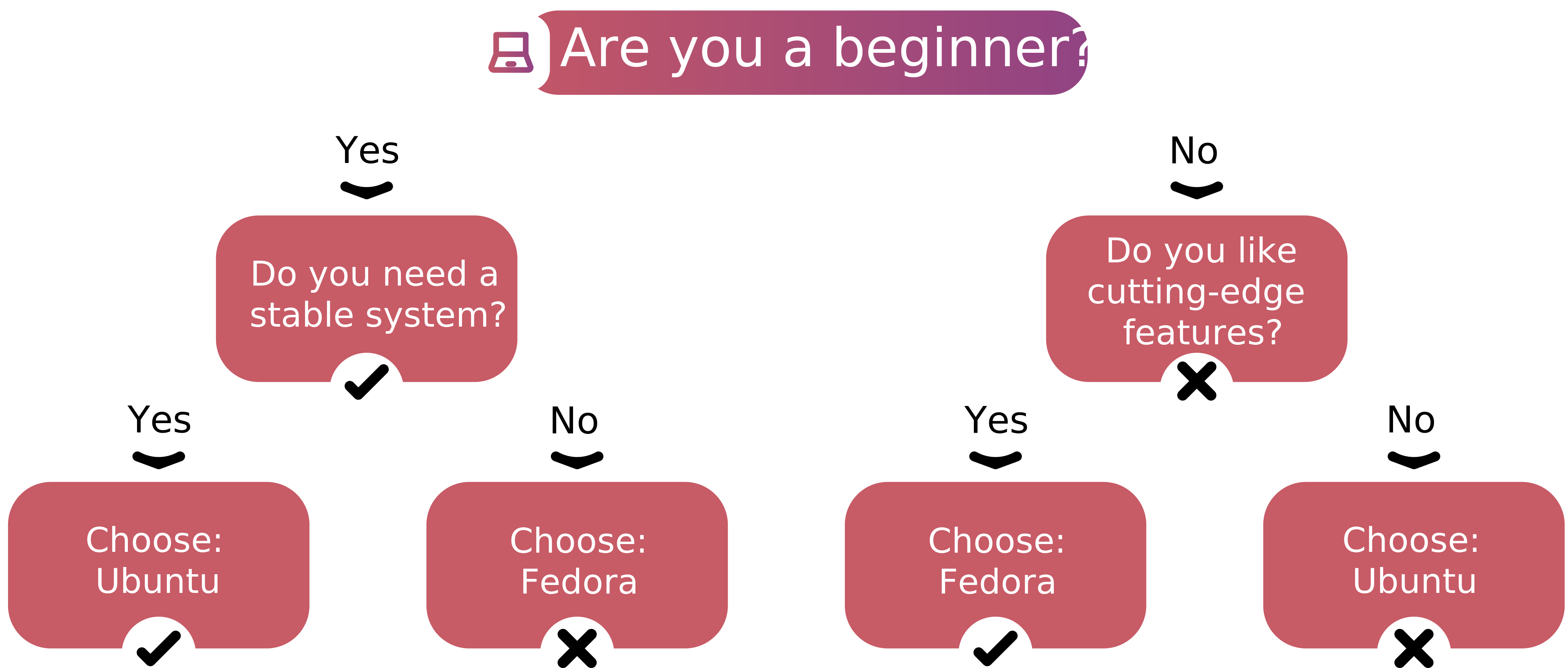
Ubuntu, in most cases. Not because Fedora is hard — almost every tutorial assumes Ubuntu commands, and LTS means no upgrade prompts for years.
Best for Developers
Fedora wins if you want current GCC, Python, Rust, and kernel releases, or if your code ultimately ships on RHEL. Podman and Toolbx come preinstalled. Ubuntu wins on compatibility: Docker docs, CI images, and vendor SDKs overwhelmingly target it.
Best for Servers and VPS
Ubuntu Server, clearly. Five years of patches without a major upgrade is what production hosts need, and nearly every VPS provider offers Ubuntu images. Fedora Server works, but yearly upgrades on production are a risk. Prefer Red Hat tooling? Use AlmaLinux or Rocky Linux instead. If you're still new to Linux hosting, our guide on what is a Linux server covers the fundamentals, and a Linux VPS is the cheapest way to test Ubuntu Server in production.
Best for Gaming
No absolute winner. Steam and Proton run well on both. Fedora's newer kernel and Mesa help AMD and Intel GPU owners, while Ubuntu's one-click NVIDIA driver install is easier for NVIDIA users. On Fedora, NVIDIA means enabling RPM Fusion first. If gaming is your primary use case, see our roundup of the best Linux distros for gaming.
Best for Enterprise Environments
Ubuntu has Canonical's commercial support. Fedora skills transfer directly to RHEL shops. Match what your employer runs.
⚖️ Ubuntu vs Fedora: Pros and Cons
Ubuntu Pros and Cons
- Pro: five-year LTS with optional extended coverage
- Pro: huge documentation base and vendor support
- Con: Snap friction and slower first launches
- Con: less upstream-pure GNOME; LTS packages age
Fedora Pros and Cons
- Pro: up-to-date packages and kernels
- Pro: SELinux enforcing by default
- Con: roughly 13-month support window
- Con: extra setup for codecs and NVIDIA drivers
🧭 How to Choose Between Ubuntu and Fedora
- Long-term stability: Ubuntu LTS
- Latest Linux features: Fedora Workstation
- Hosting workloads: Ubuntu LTS on the server, even if Fedora runs on your laptop.
🎯 Final Verdict
Ubuntu is the safer default for beginners, servers, and anyone who values predictability. Fedora is the better pick for developers and enthusiasts who want modern software and RHEL-aligned habits. Still torn? Boot both from USB for an hour each, or review the broader list of best Linux distros for 2026 to see where each fits.
If you're looking for a seamless remote desktop experience on Ubuntu, you might find it helpful to explore setting up an Ubuntu RDP server. Check out this guide on setting up an Ubuntu RDP server for a smooth remote desktop experience.
For those looking to deploy Ubuntu in a virtual private server (VPS) environment, consider checking out our guide on Ubuntu VPS Server for detailed setup instructions and tips. And if your next step is hosting a project, start with an Ubuntu LTS VPS — it's the path with the fewest surprises.
Ready to deploy Ubuntu in production? Our Ubuntu VPS hosting gives you full root access, NVMe storage, and instant deployment — so you can skip the LTS upgrade cycle and start hosting in minutes.

Leave A Comment