

A Virtual Private Server (VPS) and a Dedicated Server are two primary hosting approaches, and choosing between them depends on your specific needs. If you are currently in a position where you must decide between purchasing a VPS or a Dedicated Server, you should understand that there are significant differences in processing power, security, costs, scalability, and, most importantly, the intended use cases.
In this guide from 1gbits, I stand alongside you as an expert to help you, with precise details and a forward-looking perspective, choose the best path for your infrastructure.
How did we compare these two technologies?
To provide you with a clear and realistic picture, I did not rely solely on marketing catalogs. The basis of our comparison in this report is built on SPECrate®2017 benchmark data, economic analyses from the first quarter of 2026, and security reports related to recent infrastructure crises in the region.
I analyzed the performance of next-generation processors such as AMD EPYC 9005 and Intel Xeon 6, along with the latency rates of DDR5 and DDR6 memory, so you can understand exactly what you are paying for. Additionally, by examining the 2026 compliance standards, I evaluated both the physical and logical layers to ensure that your data security is guaranteed at the highest possible level. For a broader look at what makes VPS appealing beyond raw specs, our breakdown of VPS advantages and disadvantages covers the practical trade-offs.
What exactly are a Virtual Private Server and a Dedicated Server?
Let's start from the basics so that no ambiguity remains. A VPS or Virtual Private Server is an isolated virtual environment on a physical server, meaning resources are divided among multiple virtual machines. If you're new to the concept, our guide on what is VPS hosting covers the fundamentals in detail. In this setup, a software layer called a hypervisor is installed on a very powerful server and partitions it into separate sections. Each of these sections operates like an independent computer, has its own operating system, and is allocated resources such as RAM and CPU.
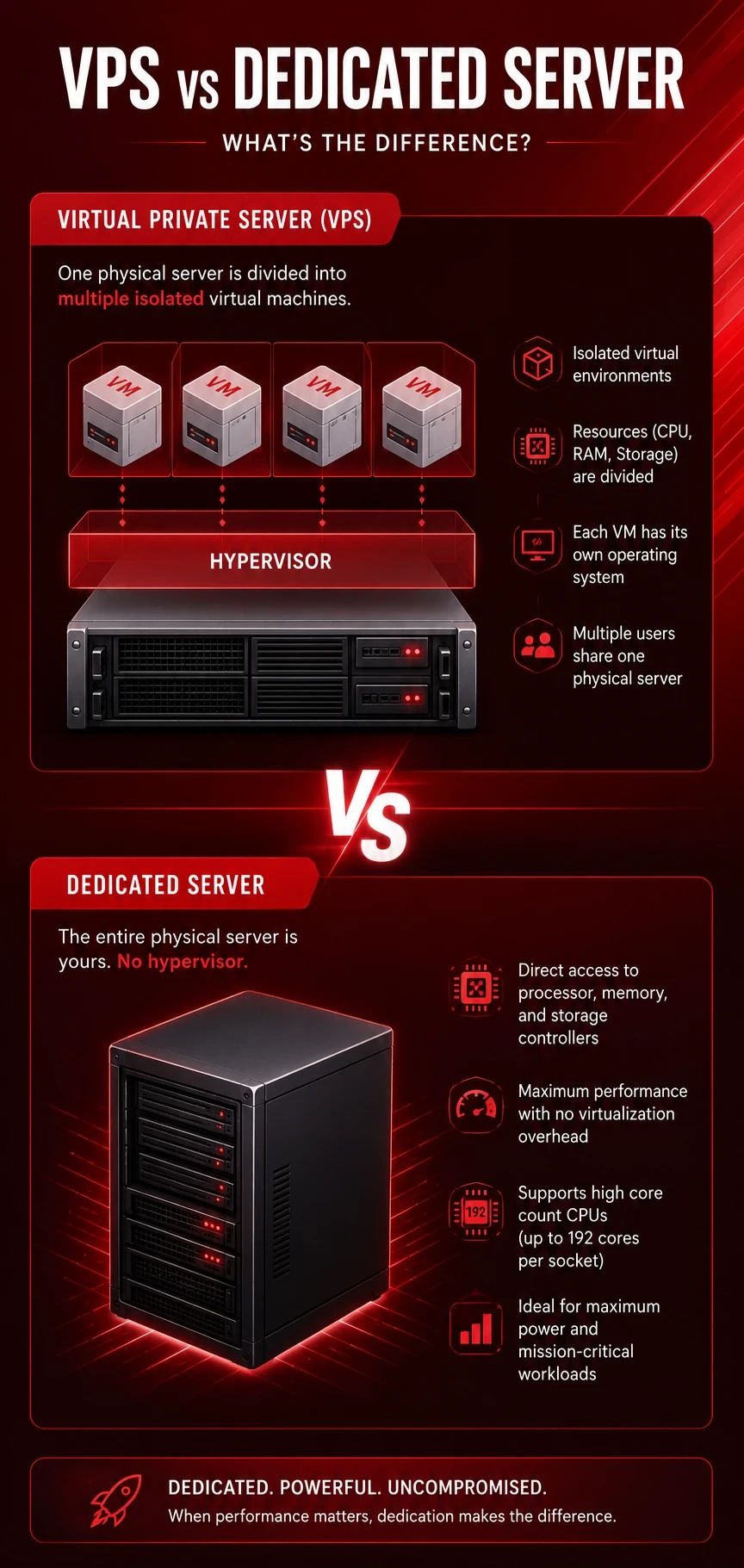
In contrast, a Dedicated Server means the entire physical machine belongs to you. There is no hypervisor between you and the hardware. You have direct access to the processor, memory, and storage controllers. For a complete breakdown, read what is a dedicated server and how it differs from other hosting types. This difference goes beyond theory and becomes a major performance distinction, as modern processors with very high core counts, up to 192 cores per socket, offer a new level of power in dedicated servers that is not always equally efficient when divided in virtualized environments.
Performance comparison and benchmarks
In 2026, performance is no longer limited to CPU clock speed alone. Now it involves memory bandwidth and AI accelerators. If your application requires heavy processing, you should take the following differences seriously. Take a look at the table below.
| Performance Metric | Virtual Server (2026) | Dedicated Server (2026) |
| Virtualization Overhead | 5% to 15% performance reduction due to the intermediary layer | Zero; direct access to the metal layer |
| Processing Power (CPU) | ~10–15% lower performance due to virtualization overhead; e.g., ~2.85s in Sysbench (4 vCPU) | ~10–15% better performance; e.g., ~2.52s with 4 Xeon cores; full hardware access without hypervisor |
| Number of Physical Cores | Typically 1 to 16 virtual cores (vCPU) | 8 to 192 real cores per socket |
| Memory Bandwidth | Shared or limited by the hypervisor | Up to 460.8 GB/s (across 12 channels) |
| Memory Performance | ~15% lower; e.g., ~18,500 MB/s; may be limited by shared environment | ~15–20% higher; e.g., ~22,800 MB/s; no sharing, full bandwidth access |
| I/O Latency | Affected by neighbor activity (Noisy Neighbors) | Stable and at microsecond level |
| I/O Performance (Disk) | ~380–450 MB/s (SSD typical); affected by other users | ~2100–2800 MB/s (NVMe); up to 4–6× faster with consistent throughput |
Next, we will discuss performance metrics in more detail.
Processing and computational power
As seen in the table, dedicated servers usually deliver significantly higher processing performance. For example, in a Sysbench CPU benchmark that measures prime number calculations, a VPS with 4 vCPUs took about 2.85 seconds, while a comparable dedicated server with 4 Xeon cores took about 2.52 seconds. This means the dedicated server performed approximately 10 to 15 percent better. This difference is due to virtualization overhead in VPS environments. In general, a dedicated server can access the full hardware capacity without any intermediate layer such as a hypervisor, reducing performance.
Memory performance and available bandwidth
Memory performance is also on average 15 to 20 percent higher in dedicated servers. In one example, memory bandwidth on a dedicated server was about 22,800 MB/s, while on a VPS it was around 18,500 MB/s, showing roughly a 15 percent advantage. This advantage comes from direct access to hardware and the absence of shared memory with other users. In contrast, in VPS environments, the virtualization layer can become a bottleneck for these extremely high speeds.
I/O performance
The greatest difference, however, is observed in disk input and output. In an FIO test with 1MB blocks, a typical VPS with an SSD recorded about 450 MB/s read and 380 MB/s write speeds, while a dedicated server with an NVMe drive achieved about 2800 MB/s read and 2100 MB/s write speeds. This means the dedicated server can be 4 to 6 times faster. Additionally, due to exclusive disk access, fluctuations and sudden latency spikes are not observed. In practice, this means that in large databases or I/O-sensitive workloads, every time a user retrieves data, the latency remains consistent.
Network performance
There is also a noticeable difference in network tests. A VPS is usually connected to a shared 1 Gbps network port and has an internal data center latency of about 0.5 to 2 milliseconds, while a dedicated server typically has a dedicated 10 Gbps port with much lower latency, for example, 0.2 to 0.5 milliseconds. Higher bandwidth and exclusive traffic mean that a dedicated server can transfer data more consistently, which is critical for applications such as live video streaming or online gaming.
Overall, although a VPS is capable of running most standard web applications, for heavy computational workloads, high I/O demands, or scenarios requiring minimal latency, a dedicated server provides higher performance and greater stability.
Cost Comparison — Example Configs
The cost of VPS hosting is usually much lower than that of a dedicated server. Take a look at the table below.
| Service Tier | Sample Specs (vCPU / RAM / SSD) | VPS Monthly Price | Dedicated Monthly Price |
| Entry | 2 Cores / 4GB RAM / 80GB NVMe | $20 – $40 | $70 – $120 |
| Mid-range | 8 Cores / 32GB RAM / 500GB NVMe | $80 – $160 | $150 – $350 |
| Enterprise | 32+ Cores / 128GB+ RAM / 2TB+ NVMe | $400 – $800+ | $350 – $1,500+ |
To better understand, consider an example of TCO (Total Cost of Ownership). Suppose a web application has 100,000 monthly users. In a 3-year scenario, a VPS with 8 vCPUs, 16GB RAM, and 200GB SSD costs about $80 per month, totaling $2880. This cost includes 2TB bandwidth and standard backups. In contrast, a dedicated server with an 8-core Xeon, 32GB RAM, and 1TB NVMe costs $199 per month, bringing the 3-year TCO to about $7164, which is roughly 2.5 times more expensive.
In general, a VPS can provide 50 to 80 percent cost savings, especially for moderate or growing workloads. If you're looking for a budget-friendly entry point without sacrificing performance, exploring our cheap VPS hosting plans is a great place to start. The average VPS plan is around $10 per month, while dedicated servers start from about $15 to $20 and can exceed $300 for more powerful systems. Of course, dedicated servers usually offer better resources and bandwidth, and depending on the use case, they can be more cost-effective in the long run.
Ultimately, the choice depends on the type of workload. For steady workloads, VPS is more economical. For higher performance, a dedicated server is the better option. For variable workloads, VPS or cloud solutions are more suitable due to their pay-as-you-go model. If you're leaning toward dedicated hosting, understanding why a dedicated IP is needed can help you see the full picture of ownership and control.
Security and compliance, how secure is your data in 2026?
In terms of security, both models can be secure, but the level of control and responsibility differs. In a VPS, user isolation is handled at the software level, for example by a hypervisor, and in rare cases, a vulnerability in this layer can affect multiple VPS instances. In contrast, on a dedicated server, no other user is present on the hardware, so attacks such as side-channel attacks are practically eliminated. Additionally, a dedicated server allows physical configuration such as custom RAID setups and provides full root access to apply low-level security configurations.
For regulation-sensitive applications such as HIPAA or PCI-DSS, dedicated servers are usually preferred because these standards require precise tracking of data location and access, known as chain of custody. However, a VPS can also be secure if modern hypervisors such as KVM and data centers with ISO or SOC standards are used. Still, for strict requirements or the need for full hardware control, a dedicated server is the more suitable choice. For Windows-based environments, our guide on security tips for dedicated Windows servers covers essential hardening practices.
Scalability and migration, agility versus stability
Now suppose your business suddenly grows rapidly and your traffic increases tenfold. Which option performs better? Without a doubt, VPS wins in instant scalability. You can upgrade your server RAM from 8GB to 32GB in the middle of the night with just a few clicks, without even a second of downtime. This is exactly what our scalable VPS hosting plans are designed for, offering instant resource upgrades and on-demand flexibility. This feature is critical for startups with unpredictable user behavior.
In a dedicated server, you are limited by physical constraints. If you need more RAM, a technician may have to physically install new hardware, or you may need to migrate to a more powerful server, which involves downtime. However, in 2026, platforms such as Bare Metal Cloud have reduced this gap and allow you to provision physical servers within hours rather than days. If you're considering making the switch, our guide on how to choose a dedicated server walks you through the key factors to evaluate.
VPS vs Dedicated Server: Backup and Disaster Recovery
In backup, snapshot, and disaster recovery discussions, the difference between VPS and dedicated servers is mostly visible in flexibility and storage architecture. In VPS environments, you can usually take fast, multi-version snapshots of the entire system, which is excellent for quick rollbacks. However, these snapshots are often stored on the same underlying infrastructure, so in the event of a hardware failure there is still a risk of data loss. Therefore, an external backup is essential.
In a dedicated server, you have more control and can use professional backup tools and separate storage systems, or even a secondary site for disaster recovery. For a flexible and scalable backup target, consider our secure storage VPS solutions, ideal for storing critical backups off-site. In practice, VPS offers speed and simplicity in recovery, while dedicated servers provide higher flexibility and stronger security for large-scale critical scenarios.
Use cases and user personas, where do you stand?
To make your decision easier, let's see what similar businesses are choosing in 2026.
When is using a VPS a better decision?
If you fall into one of the following groups, you can make the most of a VPS:
- Small businesses and websites with up to a few hundred thousand monthly visitors: VPS is suitable. It provides low cost and sufficient resources for lightweight websites and applications, for example blogs or corporate CMS platforms.
- Development and testing environments (Dev/Test): VPS is ideal. It allows you to quickly deploy multiple virtual servers to test code and software without high costs.
- Small online stores: If daily transactions are below around 1000, a VPS offers a good balance between cost and performance.
- Labs and research projects: For training or system experimentation, VPS is the most affordable way to explore virtual servers without high risk and cost.
- Single-purpose applications (one internal enterprise app): VPS can provide adequate resources and predictable cost for applications such as internal CRM systems or corporate tools.
In summary, if you are a developer or a small business looking for low cost and fast scalability, VPS is the logical choice. For a broader look at practical applications, see our list of things you can do with VPS or explore the complete guide to VPS uses and benefits.
When is a dedicated server the right choice?
On the other hand, if you are targeting the following scenarios, a dedicated server should be your priority:
- High-traffic websites (millions of monthly visits) or compute-intensive applications: Dedicated servers win here. In these cases, any latency or performance drop is eliminated because there is no noisy neighbor effect.
- Large database servers (Big Databases): High I/O databases and large datasets require maximum disk performance, which a dedicated server can fully guarantee.
- Game servers: Due to the need for very low latency and high CPU and memory performance, multiplayer online games perform better on dedicated servers.
- Artificial intelligence and machine learning: Training large models requires continuous and maximum use of CPU and GPU resources, and a dedicated environment is better because there are no shared limitations.
- Applications with strict security and privacy regulations: Industries such as healthcare or finance that must comply with HIPAA, PCI-DSS, or GDPR usually use dedicated servers to maintain full physical control over data.
In summary, if you are a large company with stable and heavy processing or high-security requirements, a dedicated server provides more power. You can explore our range of high-performance dedicated servers built for demanding workloads. To see which providers consistently rank highest, check our list of best dedicated server providers.
When should you migrate from VPS to a dedicated server?
Many people ask me: "How do I know it's time to change my server?" I have prepared a technical checklist for you. If you experience two or more of the following, you should plan your migration immediately:
- CPU steal time above 5 percent: If you use the Linux top command and consistently see the st parameter above 5 percent, it means your neighbors are stealing your processing power.
- Unpredictable disk I/O latency: If your application slows down at certain times without a clear technical reason, the shared disk bottleneck in VPS is likely affecting you.
- Monthly cost above $200: When your VPS bill exceeds $200, you are paying enough to afford a much more powerful physical server.
- Need for low-level customization: If you need specific kernel configurations or hardware modules that the hypervisor does not allow.
- Stable traffic growth: If your traffic is no longer fluctuating and has reached a stable level requiring consistent resources.
In this case, it is better to prepare a new dedicated server and migrate your data. The usual process includes provisioning the new server, installing software and configurations, synchronizing data (for example with rsync), and finally switching DNS. After that, you verify the new service and decommission the old VPS. If you're still evaluating which dedicated setup fits your workload, read how to choose the best OS for dedicated servers before provisioning.
Your Next Step: Picking the Right Server for Your Business
In 2026, VPS hosting powered by modern EPYC and Xeon CPUs delivers performance very close to physical servers, making it an excellent starting point for most growing businesses. However, for maximum power, security, and efficiency at scale, dedicated servers still lead the way.
In the end, the right choice depends on your current stage and future plans. If you're ready to move to a more powerful environment, it's worth checking out Dedicated Server at 1Gbits. But if you prefer to start lean and scale gradually, you can buy VPS server solutions that offer scalable resources, full root access, and instant deployment with high-speed NVMe SSD storage.
People Also Read

Leave A Comment