
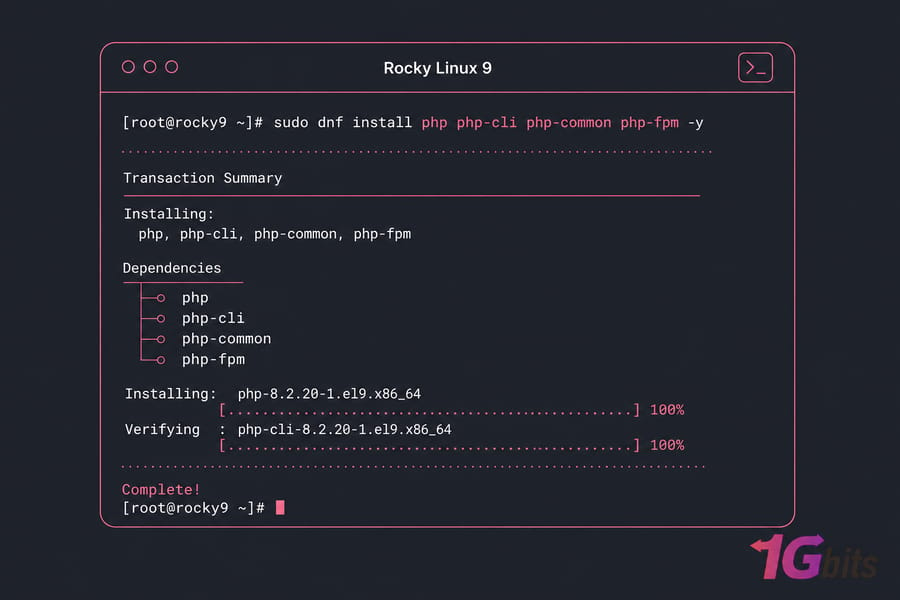
To install PHP on Rocky Linux, update the system, decide which repository you're pulling from, then install with DNF. For most servers that means one command:
sudo dnf install php php-cli php-common php-fpm -yNeed PHP 8.2 or 8.3 instead of whatever ships in AppStream? Enable EPEL and the Remi repository, reset the PHP module stream, enable the version you want, install your extensions, then restart Apache or PHP-FPM. That's the whole job in one breath — the rest of this guide explains the choices so you don't end up with PHP installed but not actually running in the browser.
And that last part matters more than people expect. I've lost count of how many tickets come down to "PHP is installed, but the page downloads as a file instead of rendering." Package installation is half the work. Web server wiring is the other half.
Rocky Linux install PHP prerequisites
What access and packages you need before starting
- A running Rocky Linux 8 or Rocky Linux 9 server (physical, VM, or VPS)
- Root access or a user with sudo privileges
- Working SSH access to the box
- Outbound internet so DNF can reach the mirrors
- Apache or Nginx already installed — only if PHP needs to serve web pages (CLI scripts don't care)
If you're spinning this up on a fresh VPS, you're in the easiest possible position: no legacy stack, no half-configured PHP, nothing to break. Clean slate installs take about four minutes.
When to back up a production Rocky Linux server first
Take a snapshot. Seriously. If the server already runs a live site, changing PHP module streams can pull dependencies in directions you didn't plan for. A snapshot turns a bad afternoon into a two-minute rollback.
Once your access is sorted, confirm which Rocky release you're actually on.
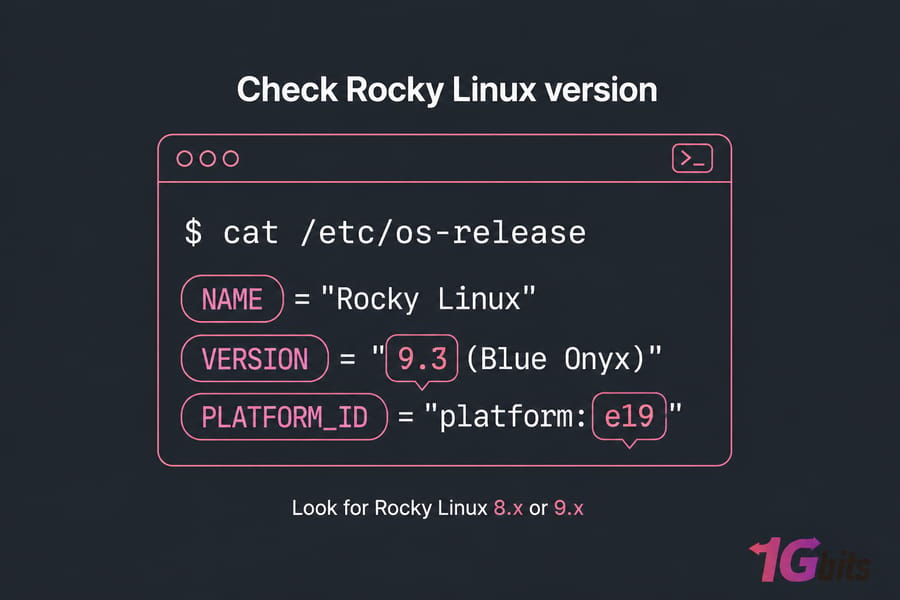
Check your Rocky Linux version before installing PHP
cat /etc/os-release
hostnamectl
Either command tells you what you need. Look for the version line — Rocky Linux 8.x or 9.x.
Why bother? Because the default PHP version in AppStream differs between releases. Rocky Linux 8 ships PHP 7.2 as its default stream (with 7.3, 7.4 and 8.0 available as alternate streams), while Rocky Linux 9 ships PHP 8.0 by default and offers 8.1/8.2 depending on your minor release. If you blindly run the install command without checking, you might land on a version your application refuses to run on. Not fun to debug at 2am.
If you want the longer explanation of release identification, our guide on how to check your Linux version covers the other commands too.
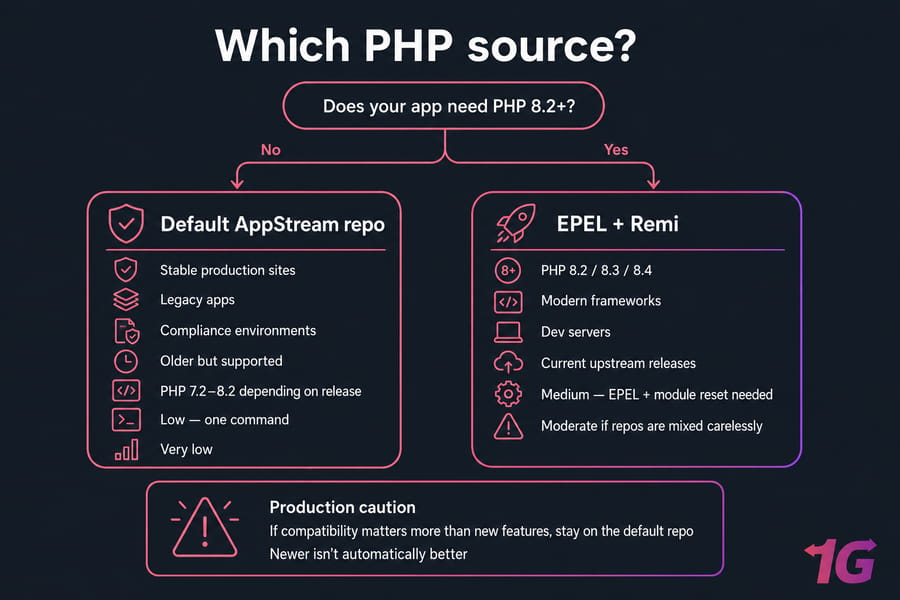
Default repo vs Remi repo for Rocky Linux PHP
When the default Rocky Linux packages are enough
The AppStream repository is maintained, security-patched, and boringly reliable. That's a compliment. If your app runs fine on PHP 8.0 or 8.1, stop reading this section and use the default. Fewer moving parts, fewer surprises during updates.
When to use Remi repo for newer PHP versions
Remi Collet's repository is the go-to for current PHP releases on RHEL-family systems. It's where you go for PHP 8.2, 8.3, and 8.4 on Rocky Linux. Laravel 11, modern Symfony, and newer WordPress plugin stacks often want these.
The trade-off is repo mixing. Remi replaces base PHP packages, so you need to be deliberate about module streams — otherwise DNF starts throwing conflicts at you.
| Source | Best for | Version freshness | Complexity | Risk |
| Default Rocky repo (AppStream) | Stable production sites, legacy apps, compliance environments | Older but supported (PHP 7.2–8.2 depending on release) | Low — one command | Very low |
| Remi repository | PHP 8.2/8.3/8.4, modern frameworks, dev servers | Current upstream releases | Medium — EPEL + module reset needed | Moderate if repos are mixed carelessly |
EPEL and Remi setup commands
Remi depends on EPEL, so install that first. Rocky Linux 9:
sudo dnf install epel-release -y
sudo dnf install https://rpms.remirepo.net/enterprise/remi-release-9.rpm -y
Rocky Linux 8 — same idea, different RPM:
sudo dnf install epel-release -y
sudo dnf install https://rpms.remirepo.net/enterprise/remi-release-8.rpm -y
Pro tip: if application compatibility matters more than shiny new PHP features, stay on the default repo. Newer isn't automatically better when a payment gateway library breaks.
Curious about the broader distro picture? Our breakdown of Rocky Linux features and requirements explains the RHEL compatibility model, and AlmaLinux vs Rocky Linux is worth a skim if you're still choosing.
Install PHP on Rocky Linux with DNF
Step 1: update packages
sudo dnf update -ySkip this and you'll occasionally hit dependency mismatches. If you want the full routine, here's how to update Linux packages properly.
Step 2: install the default PHP version
sudo dnf install php php-cli php-common php-fpm -yFour packages, and each earns its place. The php package is the runtime, php-cli gives you the command-line interpreter, php-common carries shared config and libraries, and php-fpm is the FastCGI process manager you'll need for Nginx (and modern Apache setups).
Step 3: install PHP 8.2 or 8.3 using Remi
First, check what streams are available:
sudo dnf module list phpThen reset the existing stream and enable the one you want. PHP 8.3 on Rocky Linux 9:
sudo dnf module reset php -y
sudo dnf module enable php:remi-8.3 -y
sudo dnf install php php-cli php-common php-fpm -y
For PHP 8.2, swap the stream name:
sudo dnf module reset php -y
sudo dnf module enable php:remi-8.2 -y
sudo dnf install php php-cli php-common php-fpm -y
The commands are identical on Rocky Linux 8 — only the remi-release RPM you installed earlier differs. That's the nice thing about the RHEL family: the muscle memory transfers.
Step 4: verify with php -v
php -vExpected output looks roughly like this:
PHP 8.3.14 (cli) (built: Nov 19 2024 14:22:11) (NTS gcc x86_64)
Copyright (c) The PHP Group
Zend Engine v4.3.14, Copyright (c) Zend Technologies
See a version number? PHP is installed. Not working yet in a browser, but installed.
Key takeaway: installing packages is only half the job. Apache or Nginx still has to be told how to execute PHP.
Install PHP extensions on Rocky Linux
Bare PHP won't get you far. No database driver, no image handling, no JSON-heavy API work with proper multibyte support. Extensions install exactly like any other package:
sudo dnf install php-mysqlnd php-xml php-mbstring php-gd php-curl php-zip php-opcache php-intl php-bcmath php-soap -y| Extension | Needed for | WordPress | Laravel | Generic app |
| php-mysqlnd | MySQL/MariaDB connections | Required | Required | Usually |
| php-mbstring | Multibyte string handling | Required | Required | Recommended |
| php-xml | XML parsing, DOM, SimpleXML | Required | Required | Recommended |
| php-gd | Image resizing and thumbnails | Required | Optional | Optional |
| php-curl | Outbound HTTP requests, APIs | Required | Required | Recommended |
| php-zip | Plugin/theme installs, archives | Required | Required | Optional |
| php-opcache | Bytecode caching, performance | Recommended | Recommended | Recommended |
| php-bcmath | Arbitrary precision math | Optional | Required | Optional |
| php-intl | Localisation, formatting | Optional | Recommended | Optional |
| php-soap | Legacy SOAP integrations | Optional | Optional | Optional |
WordPress bundle, minimal and sufficient:
sudo dnf install php-mysqlnd php-gd php-xml php-mbstring php-curl php-zip php-opcache -yLaravel bundle:
sudo dnf install php-mysqlnd php-xml php-mbstring php-curl php-zip php-bcmath php-intl php-opcache php-tokenizer -yConfirm what's loaded:
php -mRunning WordPress? Once PHP is sorted, the tuning side of things — OPcache values, object caching, PHP-FPM pool sizing — is covered in our guide to optimize WordPress on a VPS.
Configure PHP with Apache on Rocky Linux
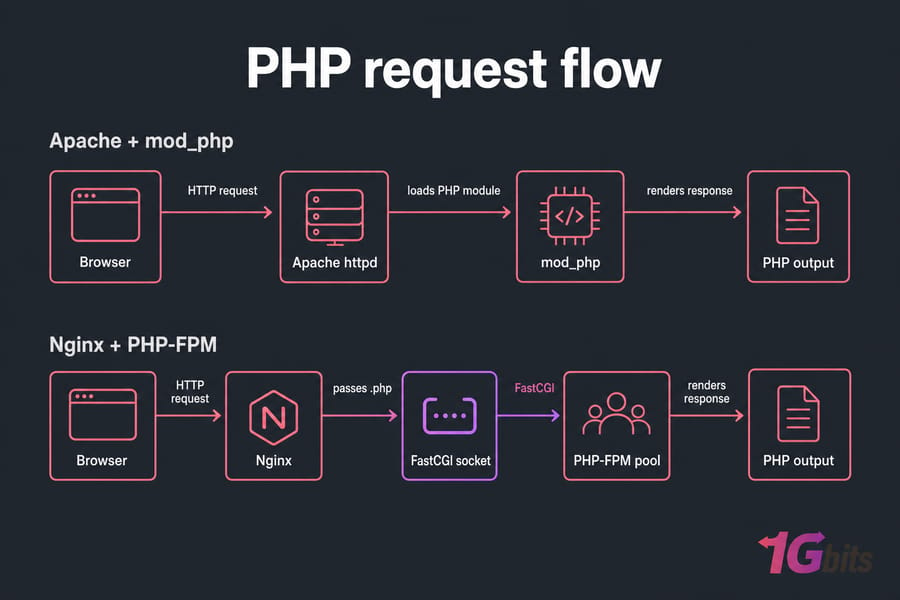
mod_php or PHP-FPM?
Rocky Linux 8's default AppStream PHP still ships mod_php, so Apache picks it up automatically. Rocky Linux 9 and Remi builds lean on PHP-FPM instead — Apache proxies requests to the FPM pool. Modern, less memory-hungry, and honestly the better default.
If Apache isn't installed yet, our install Apache on CentOS-style systems walkthrough applies directly to Rocky.
Restart Apache and test index.php
sudo systemctl enable --now php-fpm
sudo systemctl restart httpd
Drop a test file into the document root:
echo "<?php phpinfo(); ?>" | sudo tee /var/www/html/index.phpThen load your server IP in a browser. Service management basics — enable, start, restart, status — are all in our guide on how to manage services with systemctl, and there's a dedicated piece on how to restart Apache in Linux if the service behaves oddly.
Fix Apache not parsing PHP files
Browser downloading the .php file instead of rendering it? Two usual suspects. Either php-fpm isn't running, or you restarted Apache before PHP was installed so the handler config never loaded. Restart both services, in that order, and check the Apache error log.
Configure PHP-FPM with Nginx on Rocky Linux
Nginx has no PHP module. Full stop. Every PHP request gets handed off to PHP-FPM over FastCGI, so this part is mandatory rather than optional.
Start and enable php-fpm
sudo systemctl enable --now php-fpm
sudo systemctl status php-fpm
Before that, check the pool config at /etc/php-fpm.d/www.conf. On Rocky, the listen directive defaults to a TCP socket on 127.0.0.1:9000, and the user/group are set to apache. If you're running Nginx, change both user and group to nginx — otherwise permission errors are guaranteed.
Nginx FastCGI configuration example
server {
    listen 80;
    server_name example.com;
    root /usr/share/nginx/html;
    index index.php index.html;

    location / {
        try_files $uri $uri/ =404;
    }

    location ~ \.php$ {
        include fastcgi_params;
        fastcgi_pass 127.0.0.1:9000;
        fastcgi_index index.php;
        fastcgi_param SCRIPT_FILENAME $document_root$fastcgi_script_name;
    }
}
Test the syntax and reload:
sudo nginx -t
sudo systemctl restart nginx
sudo systemctl restart php-fpm
Warning: the single most common failure here is a mismatch between fastcgi_pass and the listen value in www.conf. If www.conf listens on a Unix socket, your Nginx line must be fastcgi_pass unix:/run/php-fpm/www.sock. TCP on one side and a socket on the other gives you an instant 502.
Fresh Nginx install? Start with install Nginx on CentOS-style systems, then review the Nginx default config and add TLS with our Nginx SSL configuration guide.
Test PHP on Rocky Linux after installation
- Create the test file in your document root (/var/www/html for Apache, /usr/share/nginx/html for Nginx).
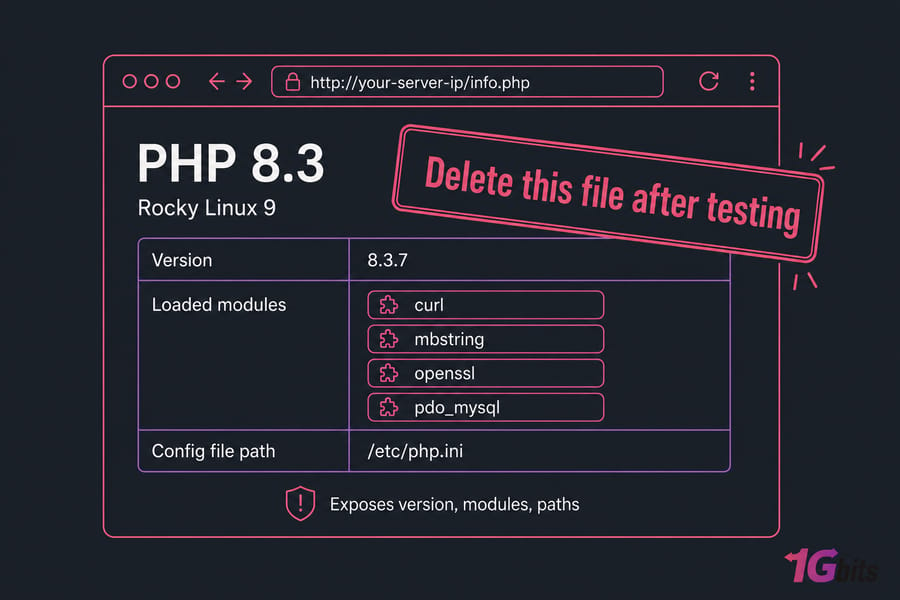
- Visit http://your-server-ip/info.php in a browser.
- You should see the purple-and-grey phpinfo table with version, loaded modules, and the config file path.
- Delete the file immediately after checking.
sudo rm /var/www/html/info.phpThat last step isn't optional paranoia. phpinfo() exposes your PHP build, extension list, paths, and environment variables — everything an attacker wants for reconnaissance. Verify, then remove.
Deploying a full site next? Our guide on how to host a website on a Linux VPS picks up from here.
Switch or upgrade PHP versions on Rocky Linux
| Goal | Command pattern | Notes |
| See available streams | dnf module list php | Shows default, enabled, and Remi streams |
| Clear current selection | dnf module reset php -y | Always run this before switching |
| Move to PHP 8.2 | dnf module enable php:remi-8.2 -y | Then run dnf update |
| Move to PHP 8.3 | dnf module enable php:remi-8.3 -y | Check framework support first |
| Apply and confirm | dnf update -y then php -v | Restart php-fpm and httpd/nginx after |
Full sequence for a jump from 8.1 to 8.3:
sudo dnf module reset php -y
sudo dnf module enable php:remi-8.3 -y
sudo dnf update -y
sudo systemctl restart php-fpm
php -v
Warning: don't do this on a production site without testing. Composer dependencies pin PHP constraints, deprecated functions get removed between minor versions, and older WordPress plugins break in creative ways. Clone to staging, run your test suite, then promote. If you manage dependencies with Composer, our Composer installation guide covers the version-constraint side of things.
Rocky Linux PHP troubleshooting tips
DNF module conflicts and dependency errors
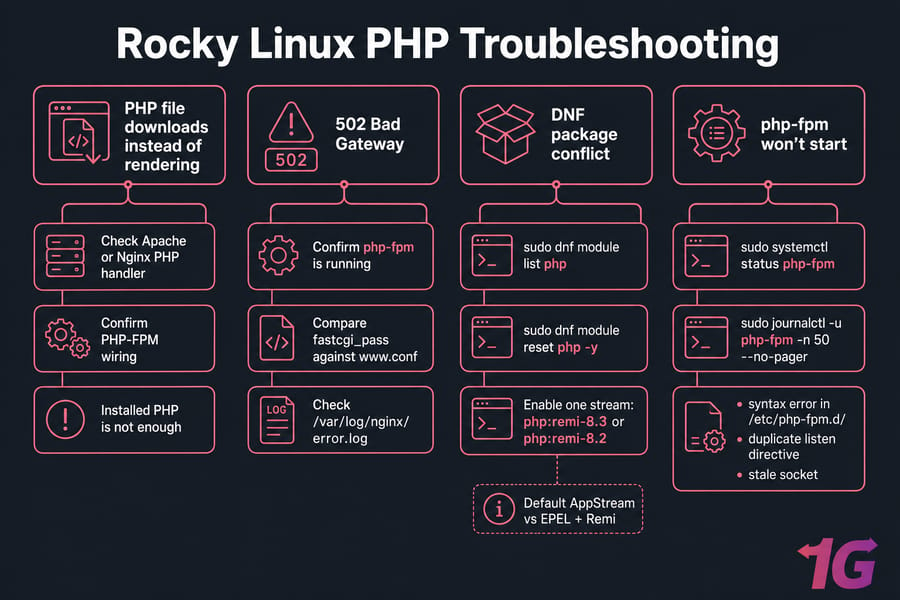
"Modular dependency problem" or conflicting package errors almost always mean you enabled a Remi stream without resetting first, or you've got both AppStream PHP and Remi PHP fighting for the same files. Reset, enable one stream, reinstall. Package management fundamentals are in our YUM and DNF command guide.
PHP-FPM won't start
sudo systemctl status php-fpm
sudo journalctl -u php-fpm -n 50 --no-pager
Nine times out of ten it's a syntax error in a pool file under /etc/php-fpm.d/, a duplicate listen directive, or a stale socket. The journal tells you the line number. Read it before restarting anything.
Nginx 502 Bad Gateway
PHP-FPM is down, or the socket path doesn't match. Confirm the service is running, compare fastcgi_pass against www.conf, and check /var/log/nginx/error.log. Our walkthrough on how to fix 502 Bad Gateway in Nginx goes deeper, and if you're getting a 500 instead, see 500 internal server error causes.
SELinux and firewalld
Rocky ships SELinux in enforcing mode. If PHP can't write uploads or connect to a remote database, you're likely hitting a boolean rather than a file permission problem:
sudo setsebool -P httpd_can_network_connect 1
sudo firewall-cmd --permanent --add-service=http --add-service=https
sudo firewall-cmd --reload
Don't disable SELinux. Flip the specific boolean instead. For general log-reading habits, see our guides on Linux logs and Linux server troubleshooting.
Run PHP websites on a Rocky Linux VPS
Everything above assumes one thing: you control the server. On shared hosting you don't. You can't enable Remi, you can't pick PHP 8.3 over 8.1, and you certainly can't tune PHP-FPM pool workers.
That's the practical argument for a VPS. Root access means you choose the PHP version, the extension set, the OPcache configuration, and whether Apache or Nginx fronts the stack. Isolated resources mean a noisy neighbour's traffic spike doesn't stall your checkout page.
A Rocky Linux VPS makes sense if you're running WordPress at real traffic, a Laravel application with queue workers, phpMyAdmin alongside a database, or anything that needs RHEL compatibility without the subscription cost. Prefer to browse the wider range? See all Linux VPS plans, or go with a managed VPS if you'd rather someone else handles patching and stack conflicts. Questions about a specific configuration go to our support team.
Quick summary
- Choose your source — default AppStream for stability, EPEL + Remi for PHP 8.2/8.3.
- Install PHP — reset and enable the module stream if using Remi, then install php, php-cli, php-common, php-fpm.
- Add extensions — match the bundle to your application, not a generic list.
- Connect the web server — mod_php or FPM for Apache, FastCGI for Nginx. Then verify with phpinfo() and delete the test file.
Follow that order and the Rocky Linux install PHP process takes minutes, not an evening. Ready to run PHP without shared hosting limits? Get a Rocky Linux VPS and build the stack your way.

Leave A Comment