
Common CyberPanel errors fall into a short list: the dashboard won't load on port 8090, sites return 500 or 403, Let's Encrypt issuance fails and you get a self-signed certificate, or OpenLiteSpeed refuses to start. Before you change anything, read two logs: /home/cyberpanel/error-logs.txt for the panel and /usr/local/lsws/logs/error.log for the web server. Then check DNS, firewall ports, file permissions, and the site's PHP version.
What causes common CyberPanel errors?
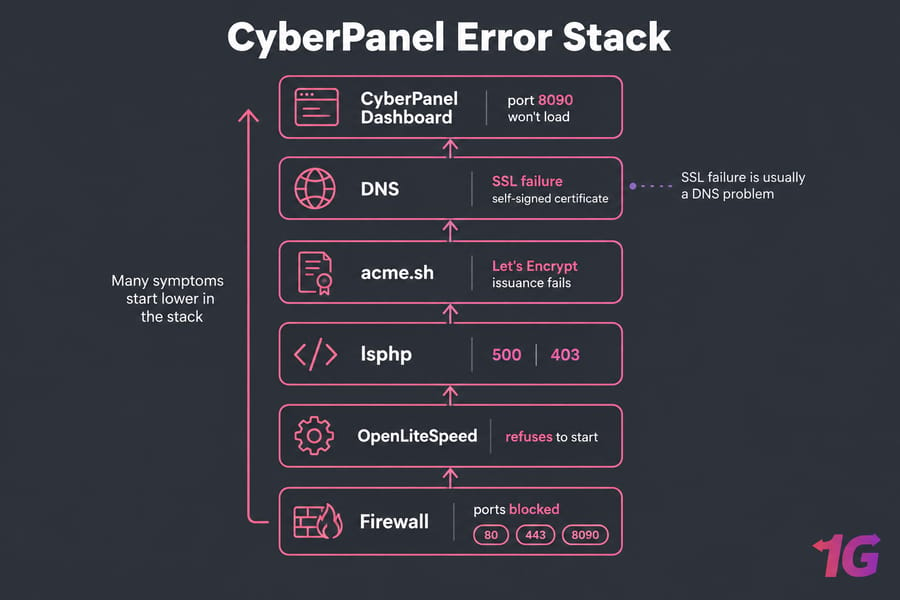
CyberPanel sits on top of several services: OpenLiteSpeed serves sites, lsphp runs PHP, acme.sh requests certificates, and the firewall decides what gets in. Many symptoms start lower in that stack; an SSL failure, for example, is usually a DNS problem.
Sort the problem first. Panel down but sites up: check the panel service and port 8090. One site broken: check its PHP, permissions, and DNS. Everything down: start with OpenLiteSpeed and server resources. (If you're still deciding on a panel, CyberPanel vs cPanel covers the trade-offs.)
CyberPanel troubleshooting checklist: what to check first
- Write down what changed recently: an update, a PHP switch, a DNS move, a new ModSecurity rule.
- Read the panel log:
tail -n 100 /home/cyberpanel/error-logs.txt - Read the web server log:
tail -n 100 /usr/local/lsws/logs/error.log - Check services:
systemctl status lscpd lsws - Check disk and memory:
df -h,free -m - Take a snapshot through your provider before any risky fix.
Running touch /usr/local/CyberCP/debug enables extra debug output in error-logs.txt, which CyberPanel's support team asks for. Don't touch permissions until the logs point you there.
CyberPanel dashboard not loading on port 8090
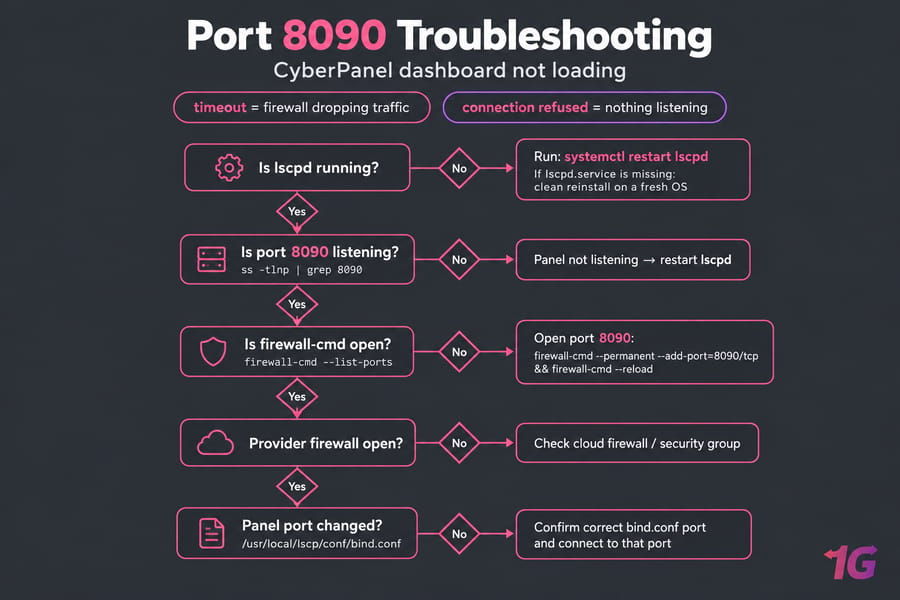
A timeout usually means a firewall is dropping traffic; "connection refused" usually means nothing is listening. Check both:
ss -tlnp | grep 8090
firewall-cmd --list-ports
firewall-cmd --permanent --add-port=8090/tcp && firewall-cmd --reload
If ss shows nothing, restart the panel with systemctl restart lscpd. If it's listening and open locally, check your provider's cloud firewall or security group. Also confirm the panel port wasn't changed; community answers say it's set in /usr/local/lscp/conf/bind.conf.
A missing lscpd.service unit usually means the install was interrupted, and a clean reinstall on a fresh OS is often faster than a manual repair.
CyberPanel 500 internal server error
A 500 on :8090 is a panel problem; on a hosted site it's usually PHP or the application. Panel 500s often follow updates, and a GitHub issue on the CyberPanel repository documented dashboard 500s after an update on Ubuntu 22.04. If yours started right after an upgrade, save the logs and take a snapshot before trying anything else.
For site-level 500s, work in this order:
- Read
/usr/local/lsws/logs/error.logand the site's own logs. - Restart OpenLiteSpeed:
systemctl restart lsws - Check the PHP version under Websites, then Manage. Community threads report that reassigning it fixed some site 500s.
- Roll back the last config or
.htaccesschange. - Disable plugins or test a plain
index.phpto isolate the app.
The general 500 Internal Server Error guide helps with application causes, but on CyberPanel the OpenLiteSpeed log tells you more.
CyberPanel 403 forbidden or permission denied
Most 403s come from wrong ownership after uploads or migrations, ModSecurity rules, or Cloudflare SSL settings that don't match the origin. Check the log for [MODSEC] lines before you blame permissions.
Don't run chmod -R 777 as a fix. It opens the site to tampering and rarely solves the cause. Reset permissions on the affected site only:
ls -la /home/example.com/public_html
find /home/example.com/public_html -type d -exec chmod 755 {} \;
find /home/example.com/public_html -type f -exec chmod 644 {} \;
Ownership should match the system user CyberPanel created for the site, so compare with a working site before running chown. The broader 403 Forbidden error guide covers browser and CDN causes.
CyberPanel SSL issues and Let's Encrypt failures
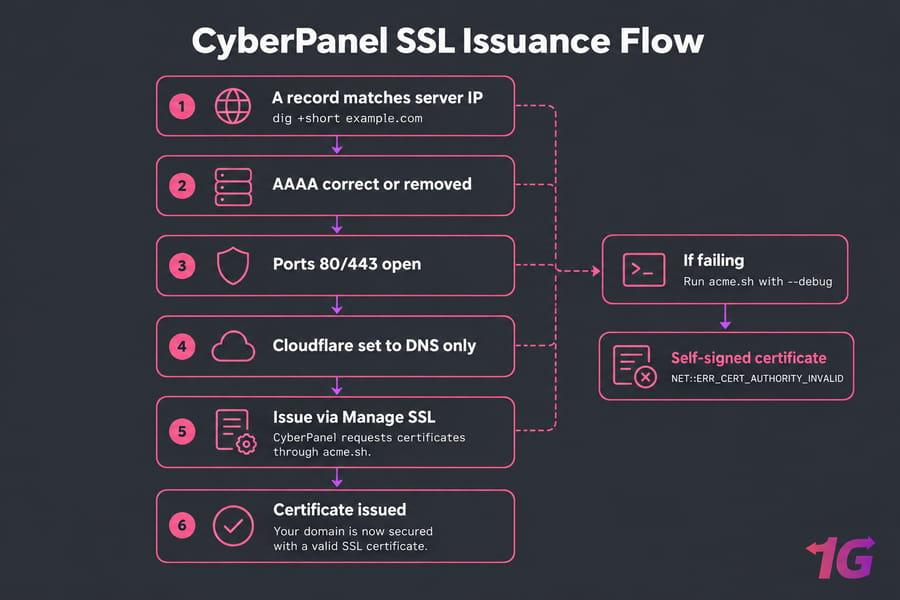
CyberPanel requests certificates through acme.sh, and validation fails when the domain doesn't resolve to your server, ports 80 and 443 are blocked, a Cloudflare proxy intercepts the challenge, or a stale AAAA record points to a different IPv6 address. When issuance fails, CyberPanel installs a self-signed certificate, which browsers flag as NET::ERR_CERT_AUTHORITY_INVALID.
Before you retry, confirm that:
- The A record matches the server IP (
dig +short example.com). - The AAAA record is either correct or deleted.
- Ports 80 and 443 are open.
- Cloudflare is set to DNS only until the certificate is issued.
Then reissue from Manage SSL, or update acme.sh (wget -O - https://get.acme.sh | sh) and run a manual issue with --debug to see the exact failure. Hostname SSL (the panel) and mail server SSL are separate certificates, so handle each on its own. For handshake errors after issuance, see SSL protocol error troubleshooting.
OpenLiteSpeed not starting in CyberPanel
Run systemctl status lsws, then read the last lines of /usr/local/lsws/logs/error.log. Look for config syntax errors, port conflicts, or missing libraries. A community thread on Ubuntu 22.04 traced one startup failure to libcrypt linkage. That fix was specific to one environment, so don't copy symlink workarounds unless your log shows the same error. Some config and module changes only take effect after systemctl restart lsws.
CyberPanel DNS issues and website misrouting
CyberPanel's DNS zone only matters if the domain uses your server's nameservers. If the registrar points elsewhere (Cloudflare, for example), edit records there. After a migration, old A records often still point to the previous server, which causes wrong content and SSL failures. Use nslookup to verify DNS against the authoritative nameserver, and see the DNS_PROBE_FINISHED_NXDOMAIN fix if the domain doesn't resolve at all.
CyberPanel error logs and symptom-to-fix table
The Linux logs guide covers system logs such as journalctl -u lsws.
| Symptom | Likely cause | Check first | First fix |
| Panel times out on 8090 | Firewall or provider filter | firewall-cmd --list-ports |
Open 8090/tcp |
| Panel refused, sites up | lscpd stopped or port changed | ss -tlnp, bind.conf |
systemctl restart lscpd |
| Site 500 | PHP version, plugin, config | lsws error.log | Reassign PHP, disable plugins |
| Site 403 | Ownership, ModSecurity | error.log [MODSEC] lines | Fix site permissions only |
| Self-signed SSL | DNS, proxy, blocked port 80 | dig +short, error-logs.txt |
Fix DNS, reissue |
| All sites down | OpenLiteSpeed stopped | systemctl status lsws |
Fix config, restart lsws |
To see which certificate the server is serving, run openssl s_client -connect example.com:443 -servername example.com.
How to prevent CyberPanel errors in the future
Snapshot before every upgrade, restrict port 8090 to your own IP, and test backup restores. Patch promptly; how to secure CyberPanel covers hardening. CyberPanel's cgroups-based resource limits stop one busy site from starving the others. If you keep fixing the same outages, managed VPS hosting moves that work to someone else.
Need a stable CyberPanel VPS environment?
1Gbits offers CyberPanel as an optional control panel on its VPS plans, with full root access. Start with CyberPanel VPS hosting, or reach the 1Gbits support team by live chat or ticket if you need help with a broken server.

Leave A Comment