
Yes, you can move from CentOS to AlmaLinux without losing data. In most cases you won't need to reinstall either. Two things matter: you pick the right migration path for your CentOS version, and you have a backup you've actually tested before you start. This guide covers both paths, the backup prep, panel caveats, and the checks to run after the reboot.
Quick answer: CentOS 8, CentOS Stream 8 and 9, Oracle Linux, RHEL, Rocky Linux and Virtuozzo Linux 8 and 9 can all be converted with almalinux-deploy.sh. CentOS 7 is different. It has to go through ELevate/Leapp and lands on AlmaLinux 8.
Can You Migrate from CentOS to AlmaLinux Without Losing Data?
Usually, yes. But no migration is risk-free, and you should be clear about what "without losing data" actually covers. An in-place conversion swaps out the OS packages and leaves your /home, /var/www, database directories and configs where they are. What tends to break is the software: third-party RPMs, old PHP builds and custom kernel modules.
Data loss, downtime and broken services are three separate risks. A snapshot protects you from the first one only. That's also why AlmaLinux's own docs recommend having a backup or snapshot of your system, so there's a restore point if something goes wrong.
Warning: If you haven't tested a restore from your backup, assume it doesn't work. Test it before you run any command below.
Why CentOS Users Are Switching After CentOS End of Life
Both CentOS Linux 8 and CentOS Linux 7 are now past end of life. Running an unsupported OS means no security patches, failed compliance audits, and repos that keep disappearing.
| Release | End of life | Migration target |
| CentOS Linux 8 | December 31, 2021 | AlmaLinux 8 (direct) |
| CentOS Linux 7 | June 30, 2024 | AlmaLinux 8 via ELevate, then 9 |
| CentOS Stream 8/9 | Rolling, no stable RHEL point releases | AlmaLinux 8/9 (direct) |
AlmaLinux is the default choice for most people because it's binary-compatible with RHEL, community-governed and free. If you want more background, read what AlmaLinux is and how it compares in AlmaLinux vs Rocky Linux. CentOS Stream is a rolling preview of RHEL, so it's not a like-for-like replacement for production servers.
Choose the Right CentOS to AlmaLinux Migration Path
First, check your CentOS version with cat /etc/redhat-release. Then find your row:
| Current OS | Tool | Risk | Recommended for |
| CentOS 8.4+ | almalinux-deploy.sh |
Low | Most servers |
| CentOS 8 below 8.4 | Update first, then the script | Low–medium | Patch to 8.4+ first |
| CentOS 7.9 | ELevate + Leapp | Medium–high | Simple stacks |
| CentOS 7 + legacy PHP/panel | Fresh server | Lowest | Business-critical sites |
Can you jump straight from CentOS 7 to AlmaLinux 9? No. The Leapp tool is designed to perform one-step upgrades, so you need to split the process: CentOS 7 to AlmaLinux 8, then AlmaLinux 8 to AlmaLinux 9.
Pre-Migration Checklist for a Safe AlmaLinux Upgrade
Most people skip this part, and it's where most failed migrations start.
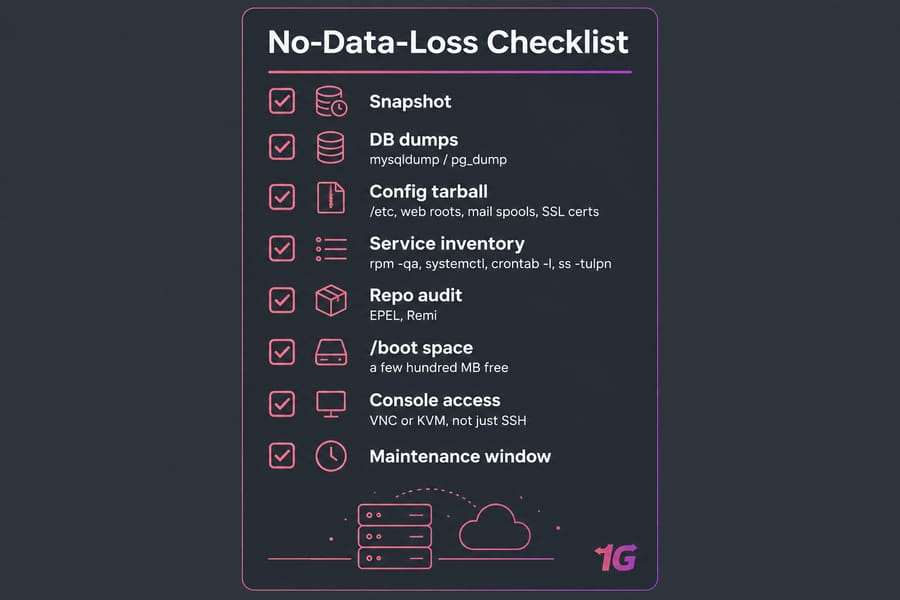
- Snapshot plus application backups. Take a hypervisor snapshot and also make
mysqldump/pg_dumpexports, a tarball of/etc, your web roots, mail spools and SSL certificates. - Console access. Make sure you can reach the server through VNC or KVM, not just SSH.
- Inventory. Save the output of
rpm -qa,systemctl list-units --type=service,crontab -lfor each user, andss -tulpn. Write down your firewall configuration on CentOS too. - Repo audit. Disable third-party repos you don't need. Keep a note of EPEL, Remi and similar.
/bootspace. Rundf -h /boot. The new kernel gets installed next to the old one, so you'll need a few hundred MB free.- Fully updated system. Update your Linux server and reboot before you migrate.
How to Migrate CentOS 8 to AlmaLinux Step by Step
If you're on CentOS 8, this is the easier path. These are the commands from the official guide:
sudo dnf update -y
sudo reboot
curl -O https://raw.githubusercontent.com/AlmaLinux/almalinux-deploy/master/almalinux-deploy.sh
sudo bash almalinux-deploy.sh
If the conversion went without any issues, you'll see that Migration to AlmaLinux is completed in the output. Reboot, then check the release file and the default kernel:
cat /etc/redhat-release
sudo grubby --info DEFAULT | grep AlmaLinux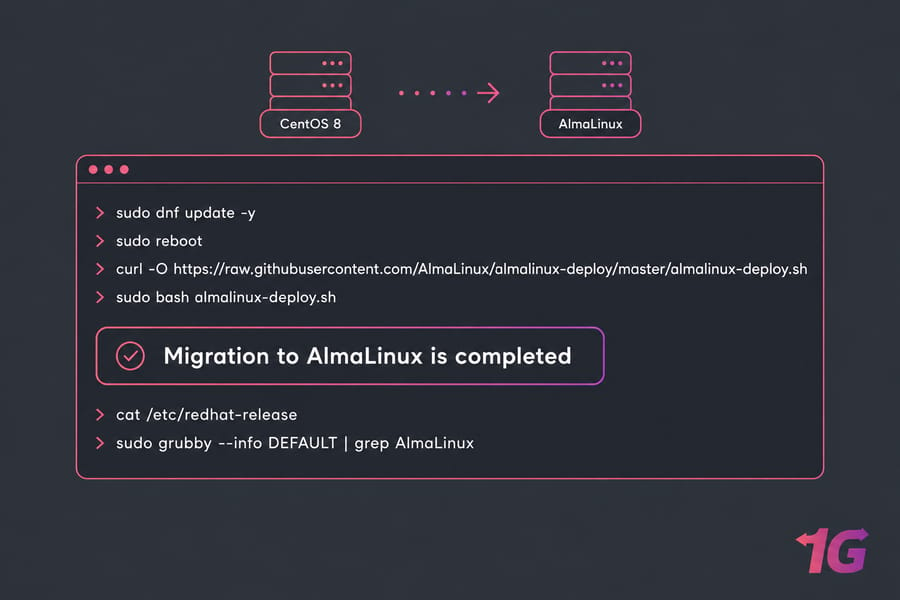
How to Migrate CentOS 7 to AlmaLinux 8 Using ELevate
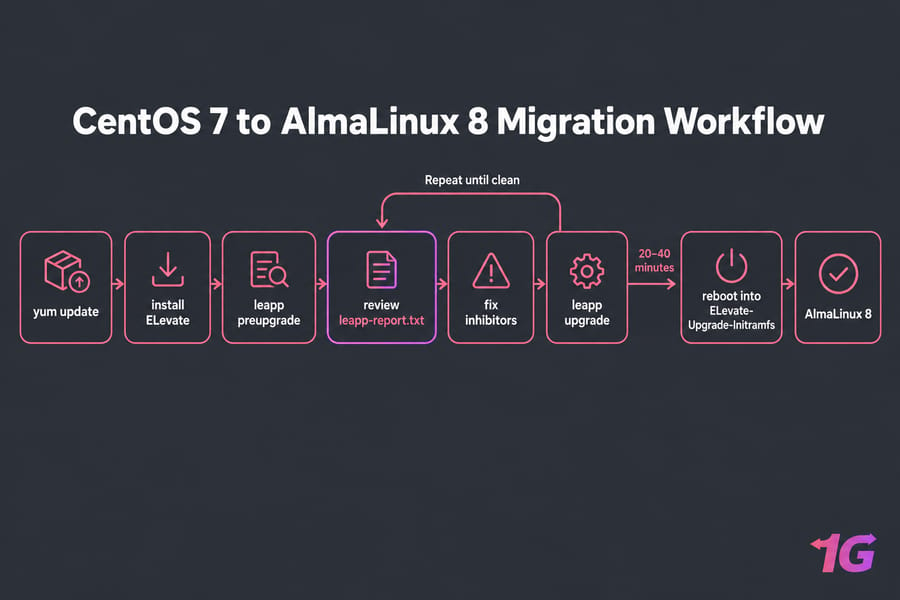
This path takes more care, honestly. Because CentOS 7 is EOL, its default mirrors no longer resolve. You'll probably have to point your repos at vault.centos.org before yum will work. Then run:
sudo yum update -y
sudo reboot
sudo yum install -y http://repo.almalinux.org/elevate/elevate-release-latest-el$(rpm --eval %rhel).noarch.rpm
sudo yum install -y leapp-upgrade leapp-data-almalinux
sudo leapp preupgrade
The preupgrade step creates a special /var/log/leapp/leapp-report.txt file that contains possible problems and recommended solutions. Read the whole report. Any inhibitor it lists will block the upgrade. The official quickstart covers the most common ones:
sudo rmmod pata_acpi
echo PermitRootLogin yes | sudo tee -a /etc/ssh/sshd_config
sudo leapp answer --section remove_pam_pkcs11_module_check.confirm=True
Once the report is clean, run the upgrade:
sudo leapp upgrade
sudo reboot
On the reboot, a new entry in GRUB called ELevate-Upgrade-Initramfs will appear. Don't touch it. The upgrade can take 20–40 minutes, so watch it from the console. When it's done, check /etc/redhat-release and list leftover packages with rpm -qa | grep el7. Also remember to remove that PermitRootLogin yes line afterward.
cPanel, Plesk, and DirectAdmin AlmaLinux Migration Notes
If your server runs cPanel or Plesk, use the vendor's tooling and don't run raw Leapp. The AlmaLinux tool also supports cPanel, Plesk and DirectAdmin panels.
| Panel | Path | Key limits |
| cPanel | CentOS 8: official conversion doc. CentOS 7: cPanel's ELevate | AlmaLinux 8 target only; check unsupported add-ons |
| Plesk | Plesk's own CentOS 7 → AlmaLinux 8 script | CentOS/CloudLinux 7.9 only, no containers, old PHP removed |
| DirectAdmin | almalinux-deploy (EL8) | Rebuild CustomBuild packages afterward |
Plesk's limits are strict. The script is only compatible with the most recent five versions of Plesk. PHP 5.5 and earlier are not supported in AlmaLinux 8, and conversions inside containers (like Virtuozzo containers, Docker containers, etc.) are not supported. If your panel is outdated or heavily customized, move to a fresh server instead.
Post-Migration Validation After Converting to AlmaLinux
Before you put the server back into production, check more than the OS version string:
| Component | Check | Expected |
| Release | cat /etc/os-release |
AlmaLinux 8.x / 9.x |
| Kernel | grubby --default-kernel |
el8/el9 kernel |
| Repos | dnf repolist |
AlmaLinux repos only (+ trusted extras) |
| Leftovers | rpm -qa | grep -E 'el7|el8' |
Few or none (match your old release tag) |
| Services | systemctl --failed |
0 loaded units |
| Logs | journalctl -p err -b |
No critical errors |
Then test what you actually rely on: SSH from a second session, your websites, database logins, cron jobs, mail delivery and firewall ports. If something doesn't start, manage services with systemctl and check Linux logs to find the cause. Remove leftover EL packages one by one, and only once you've confirmed nothing depends on them. When everything checks out, secure AlmaLinux after migration.
In-Place Conversion vs Fresh AlmaLinux Server Migration
| In-place | Fresh server | |
| Speed | 1–2 hours | Hours to days |
| Rollback | Snapshot restore | Old server stays live |
| Leftover cruft | Likely | None |
| Best for | Simple, current stacks | Legacy PHP, panels, critical apps |
My recommendation for business-critical systems: build the new box, sync your data, test on a staging hostname, then switch DNS. The old server keeps running the whole time, so rolling back just means pointing DNS back.
Need a cleaner path? Spin up a fresh AlmaLinux VPS or general Linux VPS hosting with full root access, then migrate to a new Linux VPS on your own schedule. View AlmaLinux VPS Plans
Common CentOS to AlmaLinux Migration Mistakes
- Trusting a backup you've never restored.
- Running CentOS 8 commands on CentOS 7, or the other way round.
- Leaving custom repos enabled so they conflict with the new packages.
- Converting an outdated panel or PHP stack in place.
- Stopping at
cat /etc/redhat-releaseand skipping the service checks. For deeper fixes, see our Linux server troubleshooting guide.
Ready to move off CentOS? Whether you convert in place or start on a fresh server, an AlmaLinux VPS with full root access is a clean place to land. Get an AlmaLinux Server

Leave A Comment