
![AlmaLinux vs Ubuntu: Key Differences [2026] 🐧](https://1gbits.com/cdn-cgi/image/width=1200,quality=80,format=auto/https://s3.1gbits.com/blog/2026/10/almalinux-vs-ubuntu-key-differences-2026-main.webp "AlmaLinux vs Ubuntu: Key Differences [2026] 🐧")
AlmaLinux vs Ubuntu is the server OS choice I get asked about most, and the answer is simpler than the forum threads make it sound. AlmaLinux suits long-lived, RHEL-compatible production servers. Ubuntu suits cloud-native stacks, developer workflows and anyone who wants the most software and tutorials. If you want a CentOS-style VPS that you set up once and leave alone for years, pick AlmaLinux. If you'd like to install almost anything with one command and follow nearly any tutorial on the web, pick Ubuntu.
This guide covers servers only. Desktop use doesn't come into it. If you already know your workload, skip to the decision section.
AlmaLinux vs Ubuntu at a glance
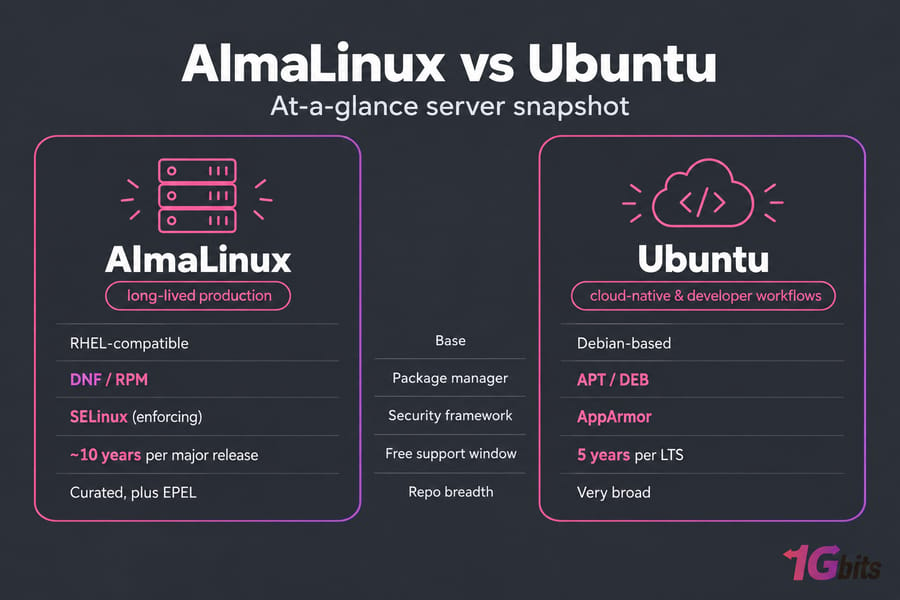
| Factor | AlmaLinux | Ubuntu | Best for |
| Base | RHEL-compatible | Debian-based | Depends on your stack |
| Package manager | DNF / RPM | APT / DEB | Whichever your team knows |
| Free support window | ~10 years per major release | 5 years per LTS | AlmaLinux |
| Security framework | SELinux (enforcing) | AppArmor | Tie, but they work differently |
| Repo breadth | Curated, plus EPEL | Very broad | Ubuntu |
| Cloud and dev fit | Good | Excellent | Ubuntu |
| CentOS migration | Near drop-in | Full rebuild | AlmaLinux |
What is AlmaLinux and what is Ubuntu?
AlmaLinux is a free enterprise distro run by the community-governed AlmaLinux OS Foundation. It was built as a CentOS replacement and tracks Red Hat Enterprise Linux closely enough that RHEL software runs on it unchanged. For more background, read our explainer on what is AlmaLinux.
Ubuntu is a Debian-based distro developed by Canonical. It's probably the most common Linux OS on public clouds and a default choice for a lot of developers. Our guide to what is Ubuntu covers its editions in more detail.
Both show up on every VPS order form because they cover the two big Linux families: RHEL and Debian.
Ubuntu vs AlmaLinux: key differences for servers
AlmaLinux puts stability first. Package versions stay frozen for the life of a major release and get backported security fixes. Ubuntu LTS is also stable, but it ships newer upstream software and moves a bit faster through point releases, HWE kernels and snaps.
Documentation differs too. Ubuntu has more tutorials than anyone could read. AlmaLinux can use the large body of RHEL documentation, which helps a lot in enterprise and compliance-heavy environments. If you're also weighing other RHEL rebuilds, see AlmaLinux vs Rocky Linux or the wider Ubuntu vs CentOS vs Rocky Linux comparison.
Release cycle and support lifecycle: AlmaLinux vs Ubuntu
This is where many teams make the call. AlmaLinux 10 was released on May 27, 2025. It gets active support until May 31, 2030 and security updates until May 31, 2035. That's a full decade with no paid add-ons.
Ubuntu puts out a release every six months and an LTS every two years. Each LTS gets five years of standard security maintenance. Ubuntu Pro extends that to 10 years, and it's free on up to five personal machines.
| Release | Released | Standard support ends | Extended option |
| AlmaLinux 10 | May 27, 2025 | May 2035 (security) | Not needed |
| Ubuntu 26.04 LTS | April 23, 2026 | May 2031 | Ubuntu Pro ESM |
| Ubuntu 24.04 LTS | April 25, 2024 | June 2029 | Ubuntu Pro ESM |
| Ubuntu interim (e.g. 25.10) | Every 6 months | 9 months | None |
Warning: Don't put an interim Ubuntu release on a production server unless you really need a newer stack. Nine months of support goes by fast.
Not sure which Ubuntu release to use? Our guide to the best Ubuntu versions breaks it down.
APT vs DNF: package management and software availability
Ubuntu uses DEB packages managed by APT. AlmaLinux uses RPM packages managed by DNF. Both are mature tools, and the real difference is the repositories behind them.
Ubuntu's main and universe repos cover almost everything: language runtimes, dev tools, monitoring agents and obscure libraries. On AlmaLinux, the base repos are deliberately conservative. For extra software you enable CRB and EPEL:
dnf config-manager --set-enabled crb
dnf install epel-release
With those two enabled, tools like fail2ban, htop and certbot are easy to install. Broad repos are handy on a dev box. Controlled repos are what you want on a server that can't break on a Tuesday.
Pro tip: If your stack depends on RHEL-certified software, check AlmaLinux support before you check anything else.
AlmaLinux vs Ubuntu security: SELinux, AppArmor and updates
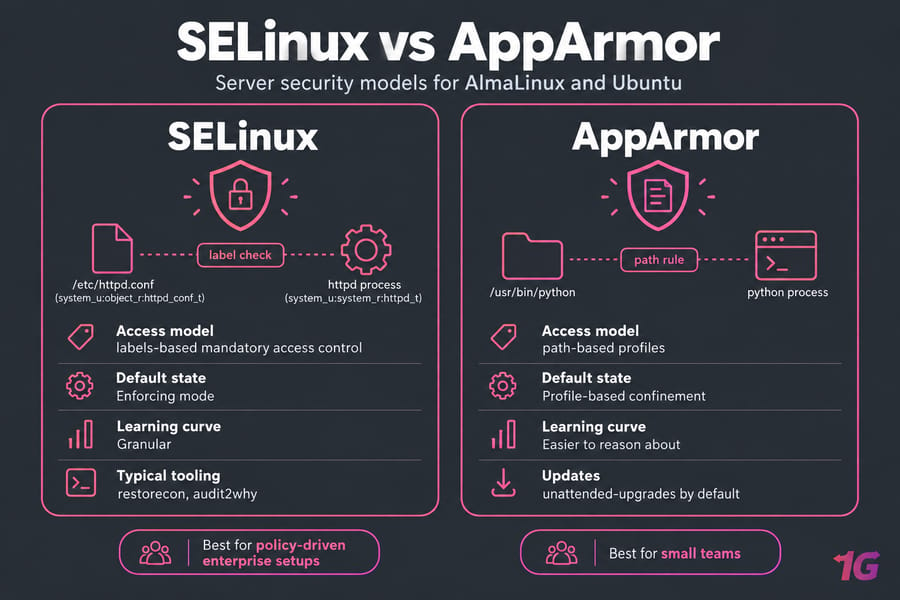
AlmaLinux ships with SELinux in enforcing mode, supports Secure Boot, signs its packages and publishes security advisories. SELinux labels every file and process, which makes it very granular. It also means a misplaced web root will get denied until you fix the context. That's frustrating at first, but not hard to manage once you learn restorecon and audit2why.
Ubuntu uses AppArmor, which works with path-based profiles. Most people find it easier to reason about. It isn't weak, just simpler. Ubuntu also enables unattended-upgrades by default, so security patches install themselves.
Which one is easier to harden? For small teams it's Ubuntu. For policy-driven enterprise setups, AlmaLinux with SELinux is the stronger base. Either way, follow our steps to secure AlmaLinux or the equivalent on Ubuntu.
Performance and resource usage on VPS hosting
Neither distro is reliably faster. I've seen benchmark claims for both sides, and most of them were really measuring which services were installed. On a KVM VPS, a minimal install of either idles at a few hundred MB of RAM.
Both projects keep their cloud images up to date for AWS, Azure, GCP, OpenStack and VMware. Ubuntu's images have been around longer and are the default in more places. For your own workload, what you run on the server matters far more than the distro underneath.
Best use cases: web hosting, Docker, development and enterprise workloads
| Scenario | Better choice | Reason |
| cPanel hosting | AlmaLinux | Longest-standing cPanel platform (Ubuntu 22.04/24.04 are now supported too) |
| CentOS migration | AlmaLinux | Same tooling, ELevate upgrade path |
| Enterprise or RHEL-certified apps | AlmaLinux | Binary compatibility |
| Docker and Kubernetes | Ubuntu | Default in most guides and CI images |
| Developer VPS | Ubuntu | Newer packages, more tutorials |
| Public cloud deployments | Ubuntu | Mature cloud-init images everywhere |
| Set-and-forget servers | AlmaLinux | 10-year free lifecycle |
Here are two real examples. An agency moving 40 cPanel sites off CentOS 7 should choose AlmaLinux. A startup shipping containers through GitHub Actions will have an easier time on Ubuntu. For more context, see our overview of VPS operating systems and the best OS for dedicated servers.
AlmaLinux or Ubuntu for VPS: how to choose
Choose AlmaLinux if…
- You're migrating from CentOS.
- You need RHEL compatibility or run traditional hosting stacks.
- You want 10 years of free updates.
Choose Ubuntu if…
- You want the easiest path through documentation and community help.
- You run Docker, CI/CD or other cloud-native workloads.
- You need newer packages without hunting through extra repos.
Common mistakes
- Choosing based on popularity alone.
- Running interim Ubuntu releases in production.
- Assuming RHEL compatibility won't matter later.
- Skipping your control panel's OS support list.
Made up your mind? You can launch AlmaLinux VPS hosting or Ubuntu VPS hosting with full root access, or compare every distro on our Linux VPS hosting plans.
Final verdict: is AlmaLinux or Ubuntu better?
Both are excellent, just for different jobs.
- For stability-first hosting: AlmaLinux. It has a long lifecycle, is RHEL-compatible and is a natural fit for cPanel.
- For flexibility-first deployments: Ubuntu LTS. It has the widest package selection, the best cloud images and fits naturally into developer workflows.
If you don't want to handle OS upkeep yourself, choose managed VPS hosting. Experienced admins who want full control can go with unmanaged VPS hosting.

Leave A Comment