
OpenVPN port forwarding on a VPS uses the VPS as a public entry point. Traffic hits the VPS's public IP and travels through an OpenVPN tunnel to a private device or service. You need a public VPS IP, a working OpenVPN server, kernel IP forwarding, firewall allow rules, and correct DNAT plus SNAT (or MASQUERADE) rules.
What OpenVPN port forwarding on a VPS means
The phrase covers three setups, so decide which one you're building first:
- Opening the OpenVPN listener port (usually UDP 1194 on community OpenVPN) so clients can connect.
- Full-tunnel routing with
redirect-gateway, where clients send all their traffic out through the VPS. That's egress, and no inbound port gets forwarded. - Forwarding an application port, where the VPS passes connections through the tunnel to a service on a private machine.
This guide covers the third. Use it for a NAS dashboard behind CGNAT, a game server on home hardware, or SSH and RDP on a machine with no public IP. If tunnels are new to you, read how a VPN works first.
How traffic forwarding through the VPN tunnel works
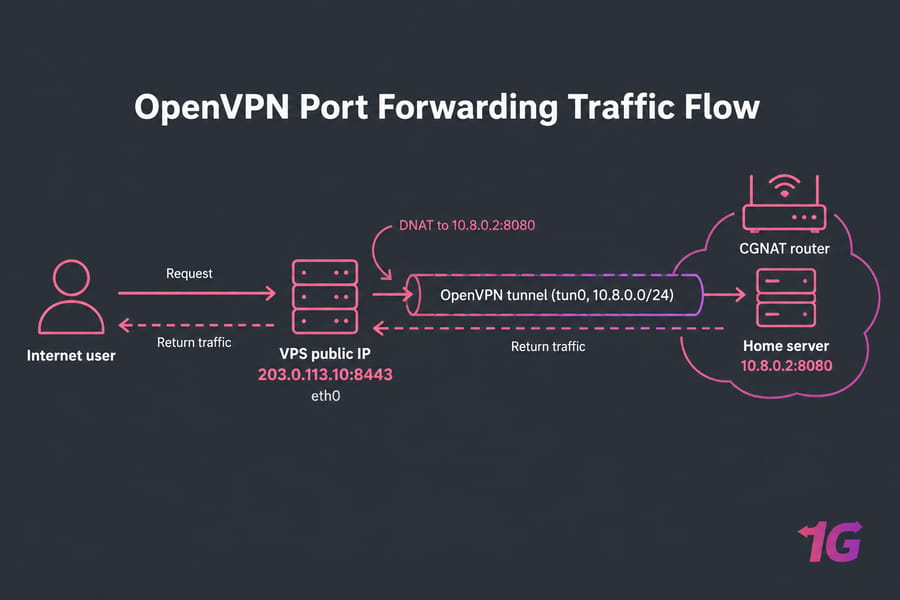
Every example uses this setup:
- VPS public IP:
203.0.113.10oneth0 - Tunnel subnet:
10.8.0.0/24ontun0 - Home server (an OpenVPN client):
10.8.0.2, app on port8080 - Public port on the VPS:
8443
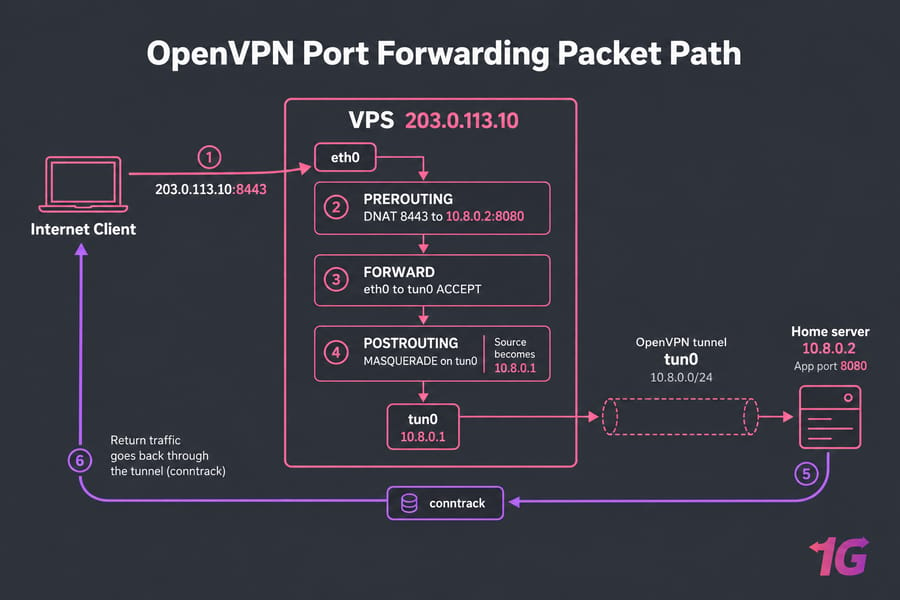
- A client connects to
203.0.113.10:8443. - DNAT in the
nattable's PREROUTING chain rewrites the destination to10.8.0.2:8080. - The kernel routes the packet out
tun0if IP forwarding is on and the FORWARD chain allows it. - MASQUERADE in POSTROUTING rewrites the source to the VPS's tunnel IP (
10.8.0.1), so the home server replies through the tunnel.
Most half-working setups fail at step 4. Without SNAT, the home server replies through its own default gateway, and the client drops packets from an address it never contacted. See what NAT is if DNAT or SNAT are unfamiliar. OpenVPN's client-nat won't help: the manual describes it as one-to-one NAT on addresses, "not ports".
Benefits of forwarding ports through an OpenVPN VPS
The home machine connects out to the VPS, so CGNAT stops mattering and your ISP never has to allow inbound traffic. Users and scanners see only the VPS address, which stays stable when your home IP changes. You expose just the ports you choose instead of your whole LAN. The service itself still needs securing. For other ideas, see these VPS use cases.
Prerequisites for an OpenVPN VPS setup
- A Linux VPS with public IPv4. IPv6 alone won't reach every client.
- Full root access in VPS hosting to change sysctl and netfilter settings.
- Control over the provider firewall and the OS firewall.
- A working OpenVPN server (see how to install OpenVPN).
- A target service listening on a known IP and port.
| Purpose | Port | Protocol | When used |
| OpenVPN daemon (default) | 1194 | UDP | Community OpenVPN and Access Server |
| OpenVPN over TCP | 443 | TCP | Networks that block UDP. Access Server shares this port with its web UI |
| Access Server web UI | 943 | TCP | Access Server only |
| Forwarded app (example) | 8443 | TCP | Your service |
Access Server's docs say 943 is needed "since TCP 443 is used for the OpenVPN TCP daemon." Behind a private network, the gateway must forward these ports to the Access Server host. Community OpenVPN only needs the port set in server.conf.
How to set up OpenVPN port forwarding on a VPS
These commands are for Ubuntu or Debian with iptables. Swap in your own IPs and ports.
Step 1: Give the home server a fixed tunnel IP
Add client-config-dir /etc/openvpn/ccd to server.conf, then create a file named after the client certificate's common name:
# /etc/openvpn/ccd/homeserver  (with topology subnet)
ifconfig-push 10.8.0.2 255.255.255.0
Restart OpenVPN and confirm the listener with ss -lntup | grep openvpn. The app must listen on 0.0.0.0 or 10.8.0.2. Bound to 127.0.0.1, it ignores tunnel traffic.
Step 2: Enable IP forwarding
sysctl -w net.ipv4.ip_forward=1
echo 'net.ipv4.ip_forward=1' > /etc/sysctl.d/99-forward.conf
Step 3: Add the DNAT, FORWARD, and MASQUERADE rules
iptables -A INPUT -i eth0 -p udp --dport 1194 -j ACCEPT
iptables -t nat -A PREROUTING -i eth0 -p tcp --dport 8443 -j DNAT --to-destination 10.8.0.2:8080
iptables -A FORWARD -i eth0 -o tun0 -p tcp -d 10.8.0.2 --dport 8080 -m conntrack --ctstate NEW -j ACCEPT
iptables -A FORWARD -m conntrack --ctstate ESTABLISHED,RELATED -j ACCEPT
iptables -t nat -A POSTROUTING -o tun0 -p tcp -d 10.8.0.2 --dport 8080 -j MASQUERADE
Open TCP 8443 and UDP 1194 in the provider firewall too, then persist the rules with apt install iptables-persistent and netfilter-persistent save.
| Rule | Purpose | Common mistake |
| DNAT (PREROUTING) | Sends the public port to the tunnel target | Wrong inbound interface name |
| FORWARD accept | Lets packets move from eth0 to tun0 | Default DROP policy with no allow rule |
| MASQUERADE (POSTROUTING) | Makes replies come back through the tunnel | Left out, so replies leave through the home ISP |
| INPUT allow | Lets clients reach the OpenVPN listener | Opened in iptables but not in the cloud firewall |
With MASQUERADE, the app sees every visitor as 10.8.0.1. For real client IPs, use a reverse proxy for HTTP apps or policy routing on the home server.
With UFW, put the *nat block in /etc/ufw/before.rules and set DEFAULT_FORWARD_POLICY="ACCEPT" or add ufw route allow rules. nftables uses dnat to in a prerouting hook and masquerade in a postrouting hook, with the same logic. For general setup, see how to configure a firewall on your VPS.
Step 4: Test from outside your network
Tests from your own LAN can mislead, so use a phone on mobile data or another server:
curl -vk https://203.0.113.10:8443      # from outside
tcpdump -ni tun0 port 8080              # on the VPS while testing
iptables -t nat -S                      # confirm rules loaded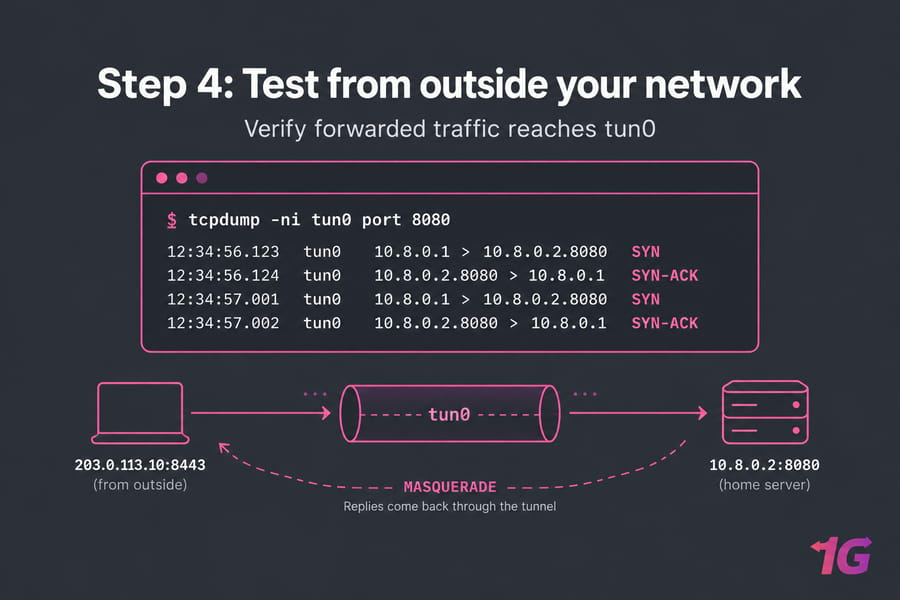
Security considerations for OpenVPN port forwarding
Each forwarded port is more attack surface, so start with one.
- Use certificate authentication plus
tls-cryptso the server ignores unauthenticated packets on 1194. Add MFA where supported. - Keep a current CRL to revoke lost client certificates quickly.
- Restrict forwarded ports with
-sin the FORWARD rule when you know your users. - Keep SSH separate, key-only, and behind fail2ban if passwords are still enabled.
- Patch OpenVPN and the OS, and review logs.
The full checklist is in how to secure an OpenVPN server on VPS. A VPS keeps attack traffic off your home line, but DDoS still needs provider mitigation.
Troubleshooting OpenVPN port forwarding
| Symptom | Likely cause | Check |
| VPN connects, app doesn't respond | App bound to localhost | ss -lntup on the target |
| SYN reaches tun0, no reply | MASQUERADE missing | iptables -t nat -S |
| Nothing arrives on tun0 | Forwarding off, or FORWARD rule missing | sysctl net.ipv4.ip_forward |
| Nothing arrives on eth0 | Cloud security group blocks the port | tcpdump -ni eth0 port 8443 |
| TCP works, UDP doesn't | Rule written for only one protocol | Add a matching -p udp rule |
To see what's listening, check Linux open ports.
OpenVPN vs WireGuard for VPS forwarding
The NAT rules are identical either way. WireGuard has shorter configs and usually performs better. OpenVPN can run over TCP 443 when UDP is blocked, has clients for almost every platform, and offers Access Server commercially. I'd keep OpenVPN if your PKI already uses it and pick WireGuard for a fresh single tunnel. More in OpenVPN vs WireGuard on VPS.
Choosing a VPS for OpenVPN port forwarding
You want public IPv4, root access, an unrestricted firewall, enough bandwidth both ways, and a data center near your users. Managed plans may block netfilter edits, so most people choose unmanaged Linux. Compare VPS for OpenVPN plans, or general VPS hosting for VPN if you might use other protocols.

Leave A Comment