
Ubuntu Server LTS is the best operating system for Docker for most people. It has the widest documentation, Docker publishes official packages for it, and each LTS release gets five years of standard security updates. Debian is the pick for quiet stability. Rocky Linux suits teams that run RHEL-style infrastructure, and Fedora CoreOS fits automated, immutable container fleets.
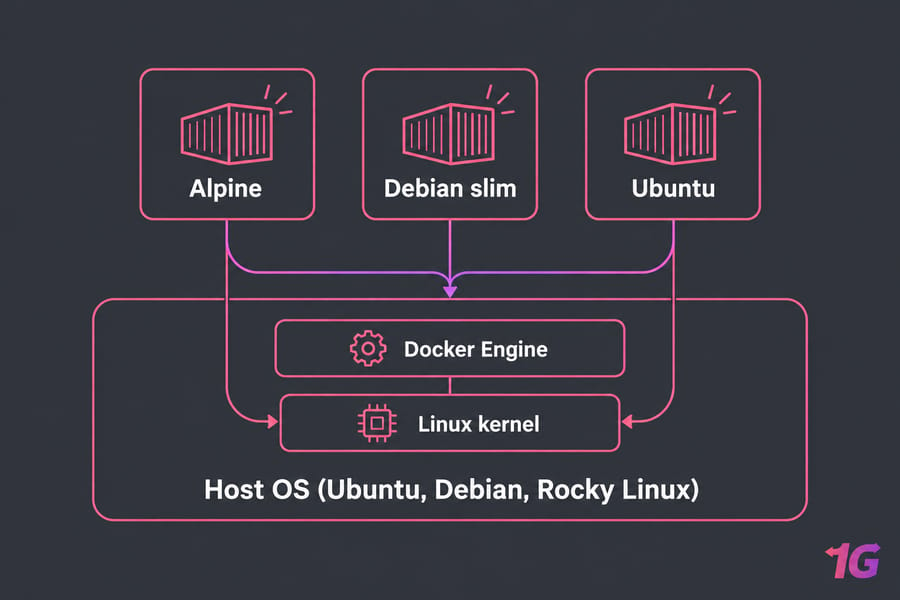
Everything below is about the host operating system: the OS installed on your VPS, server or laptop that runs the Docker daemon. The distro inside a container image (the FROM debian or FROM alpine line in a Dockerfile) is a separate choice. If you need a refresher on what Docker is and how containers share the host kernel, start there.
What is the best OS for Docker?
For a server, pick a mainstream Linux distribution. Linux containers use the host's Linux kernel directly, so on Linux there's no virtualization layer between Docker Engine and your containers. On Windows and macOS, Docker Desktop runs a Linux VM in the background to provide that kernel.
Docker's own install documentation covers Ubuntu, Debian, Fedora, RHEL and CentOS Stream, among others. It also says derivatives of those distros may work but aren't tested or verified. Use that list as your first filter.
- Best overall: Ubuntu Server LTS
- Best for stable, low-noise production: Debian Stable
- Best for enterprise-style operations: Rocky Linux
- Best immutable container host: Fedora CoreOS
- Best for local development on Windows: Docker Desktop with WSL 2
A Windows laptop is a fine place to build images and a poor default for hosting them. If you're still comparing general server distros, our overview of VPS operating systems covers the wider field.
How to choose a Docker host operating system
Start with where the containers will run and who maintains the machine. Then work through these factors:
- Workload. A dev laptop, a single VPS running a handful of apps, a production cluster and a host that only ever runs containers each point to a different OS.
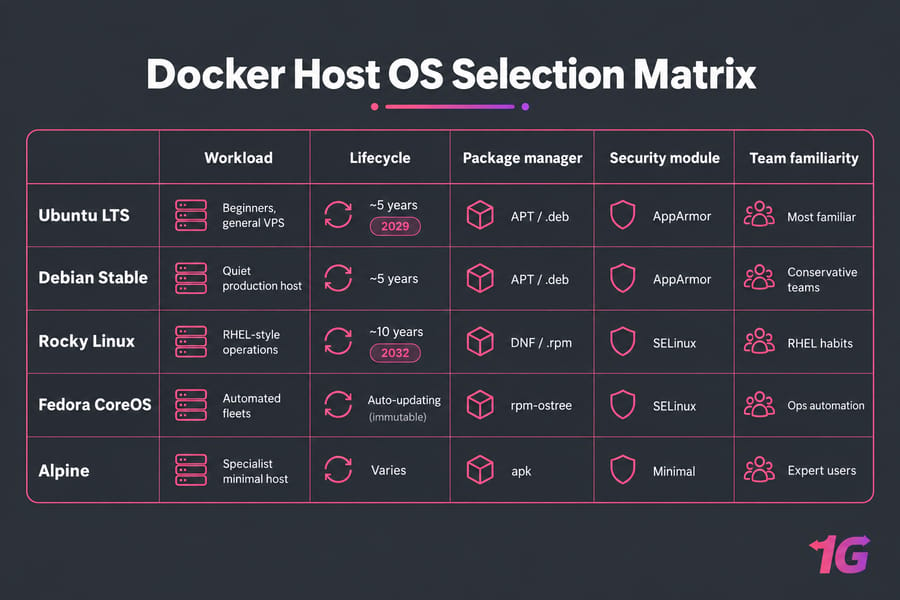
- Lifecycle. Pick a release with years of security updates left. Ubuntu LTS and Debian Stable both give you roughly five years. Rocky Linux major releases get about ten.
- Package ecosystem. Docker publishes
.debpackages for Ubuntu and Debian (installed with APT) and.rpmpackages for the RHEL family (installed with DNF). Stick with a distro that has an official Docker repository. - Security model. Ubuntu and Debian ship AppArmor by default. Rocky Linux enforces SELinux, which adds protection, but volume mounts sometimes need the
:zor:Zlabel. - Resource overhead. A minimal server install of any of these distros idles at a few hundred megabytes of RAM.
- Familiarity. The OS your team already knows how to patch and debug beats one that looks better on paper.
Docker Engine vs Docker Desktop before you choose
Docker Engine is the daemon and CLI that run natively on Linux, and it's what you install on a server. Docker Desktop is a GUI application for Windows, macOS and Linux desktops. It bundles Engine, Docker Compose and other tools inside a managed VM. On a headless server you want Engine. Our guide on how to install Docker has the steps for each distro.
Best Linux distros for Docker
Ubuntu Server LTS
Ubuntu is the default for beginners and general-purpose VPS hosting. Ubuntu 24.04 LTS gets standard security maintenance until 2029, and Ubuntu Pro extends coverage beyond that. Most Docker tutorials and Compose examples assume Ubuntu, so when something breaks, the search results match your system.
The drawbacks are minor. Ubuntu pushes Snap packages, and the Docker snap behaves differently from the official package. Install from Docker's APT repository and ignore the snap. Use Ubuntu if you're new to Linux servers or want the fewest surprises.
Debian Stable
Ubuntu is built on Debian. Debian has a smaller default install and a slower, more conservative release process. Each stable release gets about three years of regular support plus two years of LTS, so roughly five years in total. It runs nothing you didn't ask for, which makes it a good long-running Docker host.
Debian's older base packages rarely matter, because Docker Engine comes from Docker's own repository. Pick Debian if you want a host that stays boring.
Rocky Linux
Rocky Linux is a community rebuild of Red Hat Enterprise Linux, created after CentOS Linux moved to CentOS Stream. Rocky Linux 9 is supported until 2032. It uses DNF and enforces SELinux, which many security teams require.
There are two caveats. Docker doesn't list Rocky as a platform of its own, so you install from the CentOS repository. That works, but it falls under the "derivatives" note in Docker's docs. Red Hat's own tooling also favors Podman, so some RHEL-family documentation assumes Podman instead of Docker (see Docker vs Podman for the differences). For a team with SELinux experience and existing RHEL habits, Rocky is the right call. If you're weighing RHEL rebuilds, compare AlmaLinux vs Rocky Linux.
Fedora CoreOS
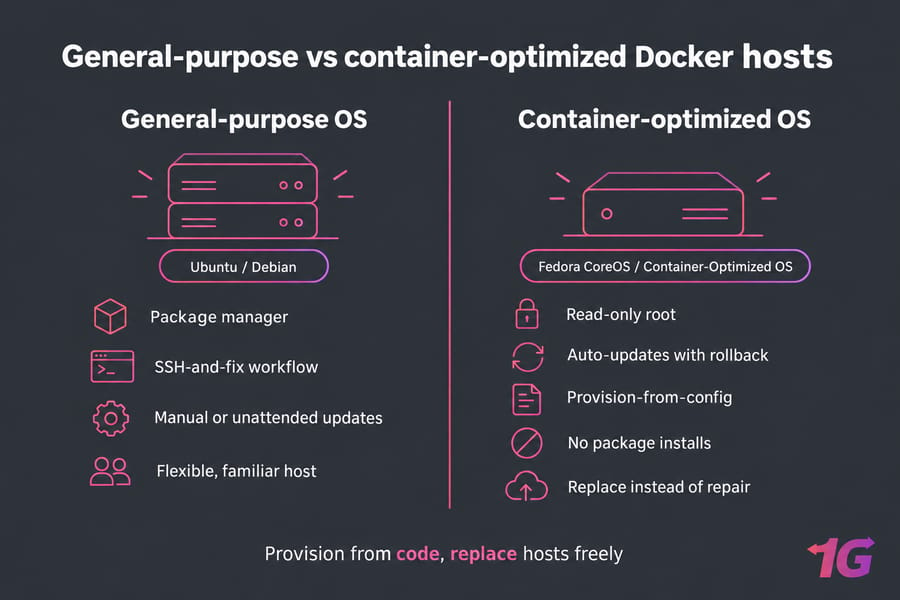
Fedora CoreOS is a minimal, immutable OS built only to run containers. You provision it with an Ignition config at first boot, and the root filesystem is read-only. It updates itself automatically through rpm-ostree and rolls back if an update fails. It ships with both Docker (Moby) and Podman.
You can't log in and install packages the way you would on Ubuntu. It's excellent for an immutable fleet with automated provisioning and the wrong tool for your first Docker server.
Alpine Linux
Alpine is tiny. It uses the musl C library, BusyBox, and OpenRC instead of systemd, and you can run Docker on it as a host from its community repository. As a host it's a specialist choice: fewer guides match your setup, and troubleshooting takes longer. Use it for small edge devices or when you already run Alpine elsewhere.
Don't start a new Docker host on CentOS Linux 7 or 8. CentOS 8 reached end of life in December 2021 and CentOS 7 in June 2024, so neither gets security patches.
| OS | Best for | Ease of setup | Support lifecycle | Security model | Main drawback |
| Ubuntu Server LTS | Beginners, general VPS | Easiest | 5 years standard, longer with Ubuntu Pro | AppArmor | Confusion over the Docker snap |
| Debian Stable | Long-running production | Easy | About 5 years (incl. LTS) | AppArmor | Older base packages |
| Rocky Linux | Enterprise, RHEL shops | Moderate | About 10 years per major release | SELinux enforcing | Podman-first ecosystem |
| Fedora CoreOS | Immutable fleets | Hard | Rolling, auto-updated | SELinux, read-only root | Steep learning curve |
| Alpine Linux | Tiny or edge hosts | Moderate | About 2 years per release | Small attack surface | Fewer matching guides |
| Windows 10/11 | Local development | Easy (Docker Desktop) | Follows Windows | VM isolation via WSL 2 | Not a production host |
Ubuntu vs Debian vs Rocky Linux for Docker
Once it's installed, Docker Engine behaves the same on all three. The differences show up in daily administration.
| Criterion | Ubuntu LTS | Debian Stable | Rocky Linux |
| Package manager | APT | APT | DNF |
| Official Docker repo | Yes | Yes | Via CentOS repo |
| Documentation volume | Highest | High | Moderate |
| Package freshness | Newer | Conservative | Conservative |
| Default security module | AppArmor | AppArmor | SELinux |
| Default install footprint | Moderate | Small | Moderate |
| Support window | 5 years standard | About 5 years | About 10 years |
| Best fit | Beginners, VPS | Quiet production | Enterprise, compliance |
Ubuntu is the easiest to get started on and ships newer kernels. Debian trades that freshness for fewer moving parts. Rocky's SELinux adds another layer of isolation between containers and the host. It's also the most common reason a bind mount suddenly returns "permission denied" on a RHEL-family box.
On a VPS, I'd pick Ubuntu if you're setting up your first container host and Debian if you've done it before. Choose Rocky when your organization already standardizes on RHEL. Our Debian vs Ubuntu comparison covers the general differences in more detail.
If you already know you want Ubuntu, Debian or Rocky Linux, you can deploy it on a VPS with full root access and install Docker Engine yourself. Explore Docker VPS hosting.
Lightweight and container-optimized operating systems for Docker
Container-optimized systems strip the host down to a kernel, a container runtime and an update mechanism. You get a smaller attack surface and hosts you can swap freely, but you lose flexibility.
When Fedora CoreOS makes sense
Use it when you provision hosts from code and replace them instead of fixing them. Automatic updates with rollback mean you no longer patch hosts by hand.
When Google Container-Optimized OS fits
Container-Optimized OS is Google's image for Compute Engine and GKE. It comes with Docker and containerd preinstalled, updates itself automatically and has no package manager. It only runs on Google Cloud, so you can't use it on a VPS or bare-metal server. Docker vs containerd explains how Docker and the containerd runtime fit together.
Why minimal isn't always better
A smaller host saves some RAM, but you lose debugging tools and a familiar package manager. If you run one to ten servers, a minimal Ubuntu or Debian install is lean enough.
Docker on Windows and macOS: is it worth it?
For development, yes. For production Linux containers, generally no. Docker Desktop on Windows uses the WSL 2 backend by default, with Hyper-V as an alternative. It needs a supported edition of Windows 10 or 11 and isn't supported on Windows Server. Windows Server can run Windows containers through Docker Engine directly, which only matters if your apps are built on Windows images such as .NET Framework. If you need a Windows machine for that, a Windows VPS is one option. For local work, follow how to install Docker on Windows.
On macOS, Docker Desktop also runs a Linux VM. How to install Docker on Mac covers setup. For lighter options, see these Docker Desktop alternatives.
Docker Desktop on Linux also runs a VM, which surprises many Linux users. It uses its own desktop-linux context, so images and containers you create there are separate from a native Docker Engine on the same machine. On a Linux server you don't need Docker Desktop at all.
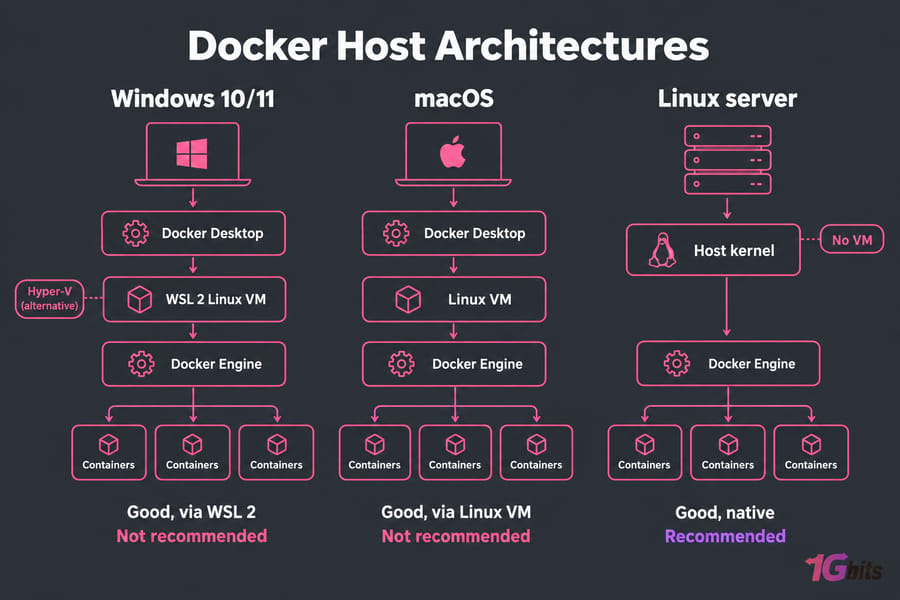
| Platform | Local development | Production Linux containers |
| Windows 10/11 + Docker Desktop | Good, via WSL 2 | Not recommended |
| macOS + Docker Desktop | Good, via Linux VM | Not recommended |
| Linux + Docker Engine | Good, native | Recommended |
Best OS for Docker by use case
| Scenario | Best OS | Why | Who should avoid it |
| Beginner | Ubuntu Server LTS | Guides match your system | Teams required to use RHEL |
| VPS hosting | Ubuntu or Debian | Official Docker repos, small footprint | Few users; fits most apps |
| Production | Debian or Rocky Linux | Conservative updates, long support | Teams without time for Linux admin |
| Security-focused | Rocky Linux or Fedora CoreOS | SELinux enforcing, immutable root | Anyone unfamiliar with SELinux |
| Lightweight | Alpine or Fedora CoreOS | Small host attack surface | Beginners |
| Local Windows dev | Docker Desktop with WSL 2 | Easiest path on Windows | Anyone hosting production |
Say you're a developer renting a VPS to host 4 to 10 containers with Docker Compose. Ubuntu on a Linux VPS is the simple answer. Pick an OS your team can troubleshoot at 2 a.m., because a smaller memory footprint won't help you then.
Common mistakes when choosing a Docker operating system
- Confusing the host OS with the image OS. Your containers can use Alpine images on an Ubuntu host; the two choices are independent.
- Choosing an end-of-life distro. CentOS Linux 7 and 8 no longer get patches, and an unpatched kernel puts every container on the host at risk.
- Choosing the smallest footprint over easy maintenance. A host that saves 100 MB but takes an hour to debug costs you more.
- Ignoring what your team knows. A Rocky server run by people who turn off SELinux to get things working is less secure than a well-kept Ubuntu box.
For related decisions, read choosing the best OS for dedicated servers and how to evaluate a VPS provider before signing up.
Our recommendation for the best operating systems for Docker
- Best overall: Ubuntu Server LTS, on an Ubuntu VPS for most app hosting.
- Best alternative: Debian Stable, on a Debian VPS if you want a quieter host.
- Best enterprise-style option: Rocky Linux, on a Rocky Linux VPS for SELinux and RHEL compatibility.
- Best advanced option: Fedora CoreOS for immutable fleets that you provision automatically.
Most 1Gbits customers running web apps, APIs or self-hosted tools only need an Ubuntu or Debian VPS. Heavier workloads that need dedicated hardware belong on a server for Docker. Once you've picked the OS, move on to how to run Docker and the Docker basic commands you'll use every day.
When you're ready to set up a host, choose Ubuntu, Debian or Rocky Linux based on your workload and how you manage servers. View Linux VPS plans.

Leave A Comment