
Minecraft server connection issues usually come down to four things: the server isn't running, the right port isn't actually open, the wrong IP or protocol is being used, or NAT loopback is fooling your local test. Timeout is not the same as refused, and a public-IP test from the same LAN can absolutely mislead you. If you want the fast path, verify the server is listening on port 25565 for Java or 19132 for Bedrock, test localhost first, then LAN, then test the public IP from outside your network.
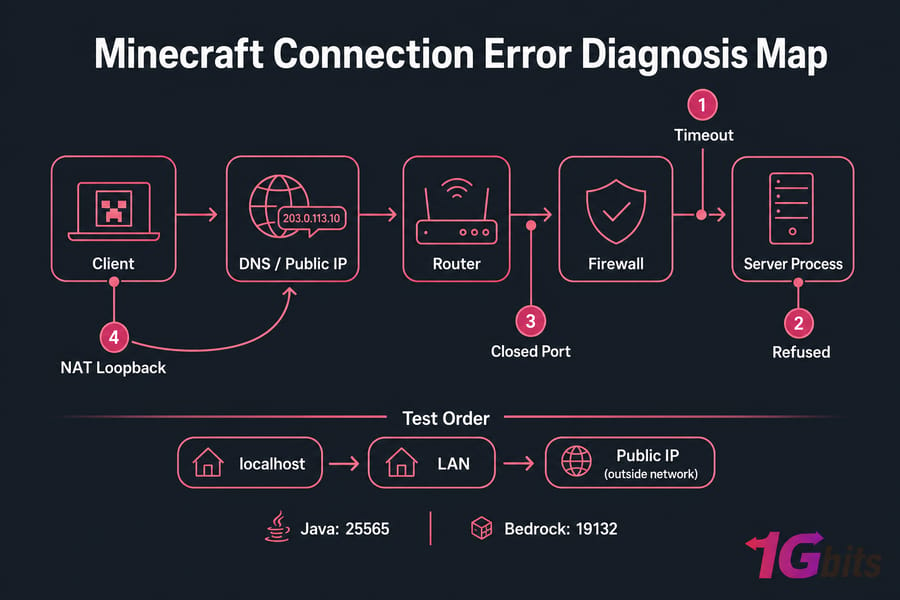
Key takeaway: timeout, refused, closed port, and NAT loopback are different problems. Treating them like the same thing is why so many fixes go nowhere.
Before you troubleshoot, gather these basics
- Access to the Minecraft server machine
- Access to the router admin panel if you're hosting at home
- Ability to read server logs
- Your public IP address or DNS hostname
- Confirmation of whether the server is Java or Bedrock
- The expected default port:
- Java Edition: 25565/TCP
- Bedrock Edition: 19132/UDP and sometimes 19133 for secondary/IPv6 use
What Minecraft server connection issues usually mean
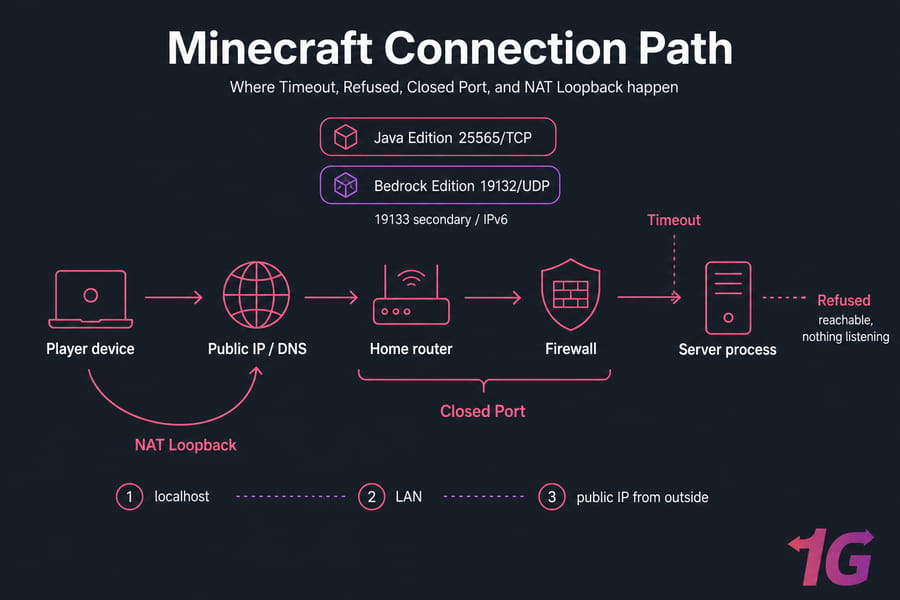
Minecraft server connection issues happen at different points in the path between the player and the game process. The path is simple enough: client → DNS or public IP → router → firewall → server process. If traffic stops at a different point, you get a different error.
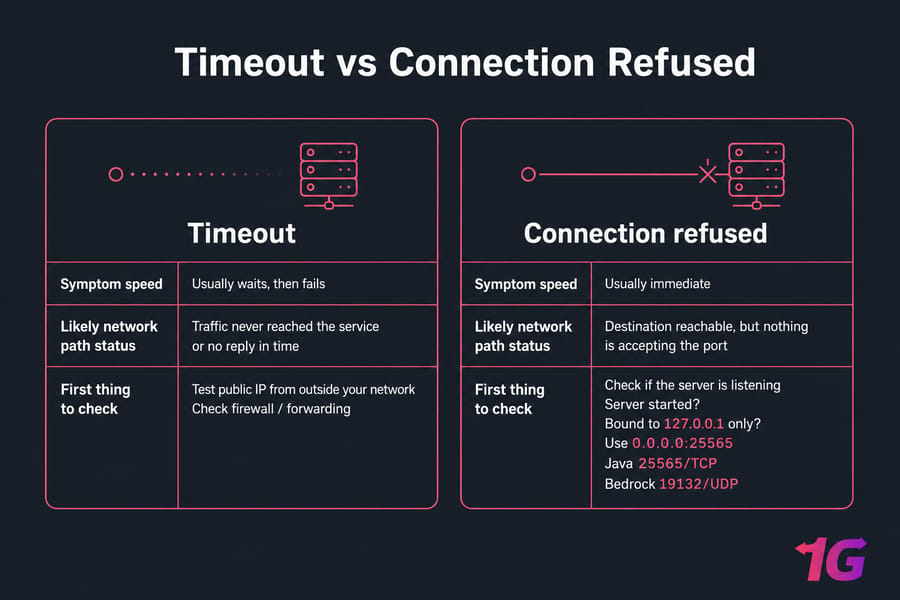
That distinction matters. A timeout usually means traffic never reached the service, or the service didn't answer in time. Connection refused usually means the destination was reachable, but nothing accepted the connection on that port. A closed-port result from a scanner often points to forwarding, firewall, or the service not listening. NAT loopback is a weird one — your server may work fine for outside players while failing only when you test the public IP from inside your own house.
If you've been mixing these up, you're not alone. A lot of admins see "can't connect" and go straight to port forwarding. Sometimes that's right. Sometimes the server process isn't even running.
If you need help sorting out addresses before anything else, this guide on how to find your Minecraft server IP is worth a quick look.
| Error message / symptom | What it usually means | Fastest check | Typical fix |
| Connection timed out | Packets aren't reaching the service, or the service responds too slowly | Test public IP from an external network and verify firewall/forwarding | Fix public IP, DNS, router rule, firewall, or overload |
| Connection refused | Target is reachable, but nothing is accepting connections on that port | Check if the server process is listening | Start server, fix bind/listen address, correct the port |
| Port 25565 appears closed | External probe can't see an open listener on that path | Confirm the server is online and listening before using a port checker | Fix forwarding, firewall, wrong LAN IP, or CGNAT |
| Public IP fails only from home | Likely NAT loopback or hairpin NAT issue | Test from mobile data instead of the same Wi-Fi | Use LAN IP internally or change router/DNS approach |
| LAN works, outside users can't join | Problem is at router, firewall, WAN IP, or ISP edge | Compare WAN IP vs public IP and test externally | Fix forwarding, public IP mismatch, CGNAT, or ISP limitation |
Before changing settings, use the quick diagnosis checklist below.
Minecraft server troubleshooting checklist: diagnose the problem fast
Don't start by changing five things at once. That usually makes the real cause harder to find. Start with one question: does the problem affect everyone, or only one player?
Check whether the problem affects everyone or only one player
If only one player can't connect, the issue may be on their side wrong address, DNS cache, local firewall, edition mismatch, or even a typo in the port. If nobody outside can connect, it's more likely your server, router, firewall, public IP, or ISP setup.
If you need to verify addresses on the host itself, these primers on how to get an IP address in Linux and what is an IP address can clear up the local IP vs public IP confusion pretty fast.
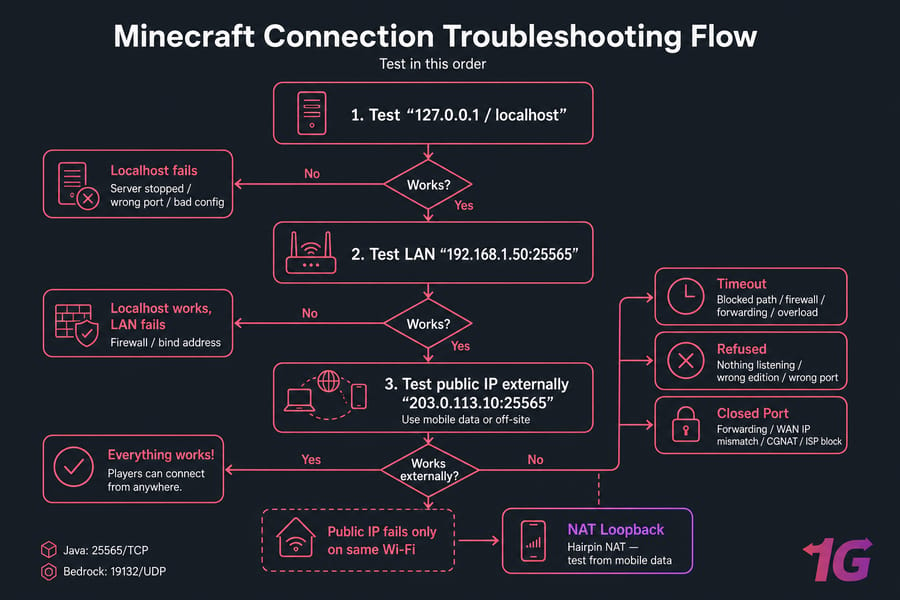
Test localhost, LAN, and public IP in the right order
- Test localhost on the server machine. Use
127.0.0.1orlocalhost. If that fails, stop there — the issue is local to the server process. - Test the LAN IP from another device on the same network. Example:
192.168.1.50:25565. If localhost works but LAN fails, think local firewall or bind/listen address. - Test the public IP from outside your network. Example:
203.0.113.10:25565. Use mobile data, a hotspot, or an off-site friend.
This order matters more than people think. Public-IP testing from the same network can fail even when the server is perfectly reachable from the internet. That's the NAT loopback trap.
Use this symptom-to-cause table before changing settings
| Symptom | Likely cause | Where to check first |
| Localhost fails | Server stopped, crashed, wrong port, bad config | Logs and listening port |
| Localhost works, LAN fails | Firewall or service bound only to localhost | Local firewall and bind address |
| LAN works, public IP fails externally | Port forwarding, WAN/public IP mismatch, CGNAT, ISP block | Router, firewall, WAN IP, ISP |
| Public IP fails only on same Wi-Fi | NAT loopback / hairpin NAT | External test from mobile data |
| Instant failure | Connection refused or wrong edition/port | Listening port and Java vs Bedrock |
| Long hang then failure | Timeout, packet loss, blocked path, overload | Firewall, forwarding, DNS, latency |
Once you know where the failure happens, verify the server itself.
Verify your Minecraft server is running and listening on the correct port
This is the first hard check. Not "I think it's running." Not "the window was open earlier." You want proof that the server process is active and actually listening on the expected port.
How to check server.properties for port and bind settings
Open server.properties and look at the port-related values. For Java Edition, the default is usually server-port=25565. For Bedrock, the default is usually 19132/UDP. If you've changed these, clients need to use the same values.
Also check whether you've set a bind or server IP field incorrectly. In many home setups, leaving the bind field empty is safer than forcing it to a specific interface. If the service binds only to 127.0.0.1, outside devices will never reach it.
server-port=25565server-ip=motd=My Server
How to see if port 25565 is listening on Windows
On Windows, open Command Prompt as administrator and run:
netstat -ano | findstr :25565
If the server is listening for Java, you should see a line with LISTENING. If you get nothing back, the process probably isn't listening on that port.
You can also use PowerShell:
Get-NetTCPConnection -LocalPort 25565
For a Bedrock server, because it uses UDP by default, PowerShell is often easier:
Get-NetUDPEndpoint | Where-Object {$_.LocalPort -eq 19132}
If you want a more complete walkthrough, here's how to check open ports in Windows.
How to see if port 25565 is listening on Linux
On Ubuntu, Debian, or most Linux distributions, use ss first:
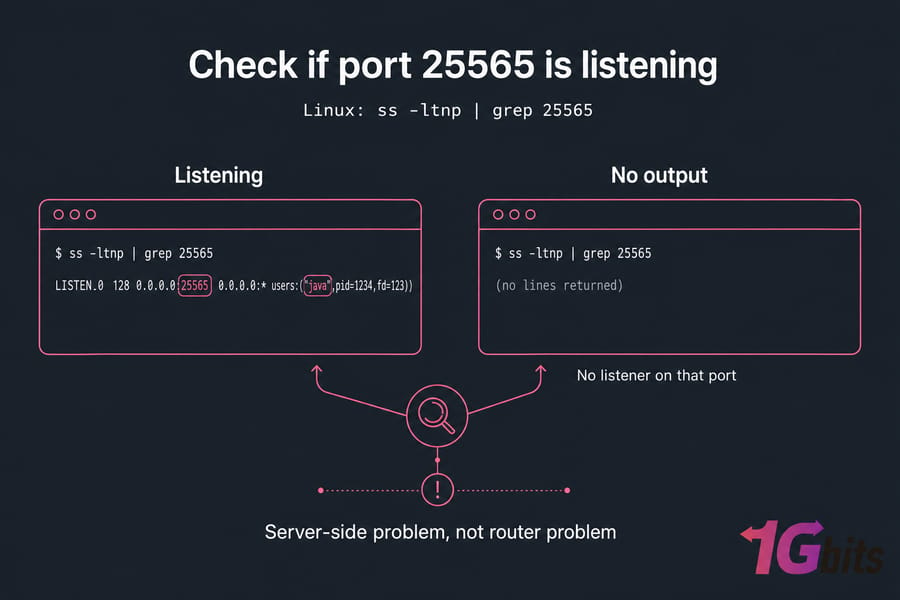
ss -ltnp | grep 25565
Older systems may still use netstat:
netstat -plnt | grep 25565
For Bedrock UDP checks:
ss -lunp | grep 19132
No output means no listener on that port. That's a server-side problem, not a router problem. If you want a broader method, this guide on how to check open ports in Linux covers the usual tools.
How to read Minecraft server logs for startup and bind errors
Now check the logs while the server starts. You're looking for messages like:
- port already in use
- failed to bind
- can't assign requested address
- crash during startup
- out of memory or mod/plugin errors before networking finishes
If you've ever seen a server appear "online" for a second and then vanish, this is where the answer usually hides. Also watch logs while someone attempts to connect. If nothing appears at all during an external attempt, traffic likely never reached the process.
If the server is listening correctly, the next step is identifying whether the failure is timeout or refusal.
Fix Minecraft server connection timed out errors
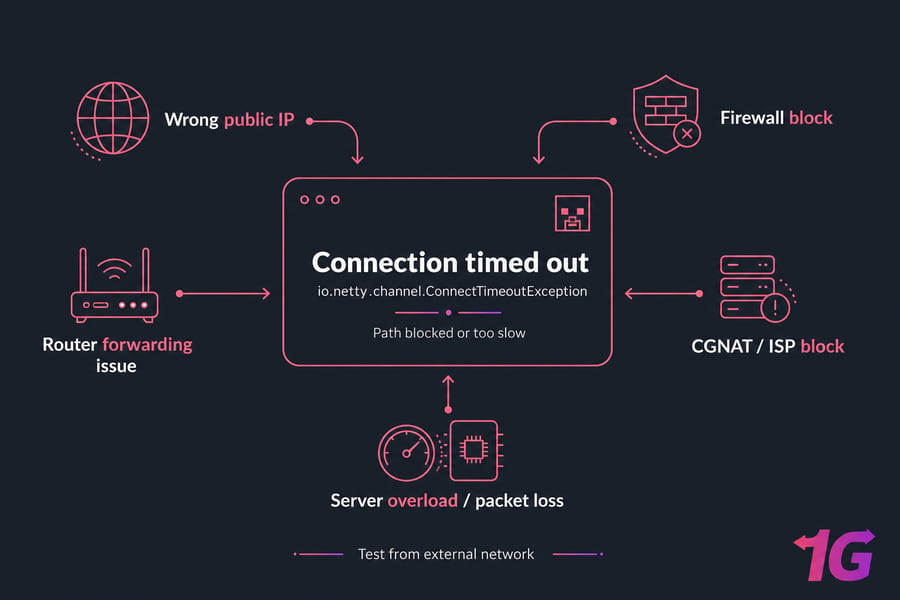
A Minecraft server connection timed out message usually means packets aren't getting to the service, or the service isn't answering quickly enough. That's different from refusal. Timeout is more like knocking on a door and hearing nothing. Refused is hearing "wrong room, nobody here."
Wrong public IP or outdated DNS record
Start with the obvious one because it breaks things constantly: are players using the right public IP or hostname? If your router gets a dynamic address from your ISP, the old IP may no longer point to your house. Example: you forwarded everything correctly for 203.0.113.10, but your ISP changed it overnight.
If you're using a domain, check the A record or SRV record. A stale DNS entry can send players to the wrong place. If you've changed records recently, flushing local DNS can help. 1Gbits has a simple guide on how to flush DNS.
Firewall blocking inbound traffic
If the server listens locally but outside users hang on connect, firewall rules are high on the suspect list. On Windows, that means Windows Defender Firewall or a third-party security suite. On Linux, it's usually UFW, iptables, or cloud-level rules if you're on a VPS.
I've seen admins forward the right port and still lose half a day because an antivirus suite silently blocked Java. It happens.
Router port forwarding set to the wrong LAN IP
This is the classic "minecraft server port forwarding not working" issue. Your rule may say external port 25565 goes to internal IP 192.168.1.40, but the actual server moved to 192.168.1.50 after DHCP renewed. The result is usually a timeout, because traffic goes somewhere useless and never reaches the service.
Reserve a static DHCP lease for the server machine if you're hosting at home. That one step prevents a lot of repeat failures.
ISP CGNAT or blocked inbound ports
If your ISP uses CGNAT, port forwarding on your router may be completely ineffective because your router doesn't have a true public-facing IPv4 address. More on that in the CGNAT section below, but yes — this is a real reason a Minecraft server is not reachable from outside network paths even when your settings look right.
Server overload or handshake delay
Not every timeout is a network block. A heavily modded server, overloaded CPU, low RAM, disk stalls, or packet loss can delay the handshake long enough to trigger io.netty.channel.ConnectTimeoutException or similar timeout errors. If players can sometimes join and sometimes can't, check system load and latency instead of only blaming the router.
These primers on what is packet loss and what is latency are useful if the connection path is technically open but still unstable.
| Cause | How to verify | Fix |
| Wrong public IP | Compare router WAN/public info with the IP players use | Update players, DDNS, or DNS records |
| Bad DNS record | Test direct public IP instead of hostname | Correct A/SRV record and wait for propagation |
| Firewall block | Localhost works, external test hangs | Allow Java or the port in firewall/security suite |
| Bad port forward | LAN works, external users time out | Forward to the correct LAN IP and protocol |
| CGNAT / ISP block | WAN IP is private or differs from public IP | Ask ISP for public IP or move to VPS |
| Overload / packet loss | Intermittent joins, lag spikes, high CPU, logs show delay | Reduce load, optimize server, improve network path |
Quick summary:
- Timeout usually means the path is blocked or too slow, not that the service actively rejected you.
- Always test the public IP from an external network, not from the same Wi-Fi.
- If the server is overloaded, you'll need performance fixes, not just router changes.
If the connection fails instantly instead of hanging, you're usually dealing with "connection refused."
Fix Minecraft server connection refused errors
Connection refused is often better news than timeout. Seriously. It usually means the destination is reachable, but nothing is accepting the connection on that port. So the network path exists — the service side is what needs attention.
Server process is stopped or crashed
If the server process isn't running, a client may get an immediate refusal. Check the console, task manager, service manager, or process list. Then check logs for crash reasons instead of just restarting and hoping.
Service is listening on the wrong interface
If the service binds only to localhost or 127.0.0.1, the machine itself can connect, but other devices cannot. On Windows or Linux, your listening output should usually show 0.0.0.0:25565 or the server's LAN IP rather than loopback only.
Wrong port for Java vs Bedrock
This one is sneaky. Minecraft Java Edition usually expects 25565/TCP. Minecraft Bedrock usually uses 19132/UDP. If you point a Java client at a Bedrock server or use the wrong port, it can look like a dead server even when the service is healthy.
Local firewall actively rejecting the connection
Some firewalls silently drop traffic, which feels like timeout. Others reject it immediately, which looks like refusal. If you recently hardened Windows Defender Firewall, UFW, or a security suite, check the allow rules first.
And yes, the general logic is similar to other service-level errors the same pattern shows up in things like how to solve SSH connection refused. Different app, same networking concept.
- Problem: server isn't started — Verification: no listening port, no active process — Fix: start the server and review crash logs
- Problem: wrong port configured — Verification: client uses 25565 but server listens elsewhere — Fix: match client port to server port
- Problem: bound to localhost only — Verification: listen output shows 127.0.0.1 only — Fix: remove bad bind setting or bind to all interfaces
- Problem: edition mismatch — Verification: Java client trying to reach Bedrock or vice versa — Fix: use the correct edition and protocol
- Problem: firewall reject rule — Verification: local security logs or recent firewall changes — Fix: allow the app or port explicitly
If you want the transport-level distinction in plain English, this article on what TCP is helps.
If the server works locally but appears closed from the internet, move to port-forwarding and firewall checks.
Fix closed port 25565 and Minecraft port forwarding problems
When a scanner says your Minecraft server port 25565 is closed, don't assume the router is the only problem. Closed from the outside usually means one of three things: the server app isn't listening, the firewall blocks the traffic, or the forwarding path is wrong. Port checkers don't magically open the service and look around — they just test whether something answers.
How to create a correct port forwarding rule
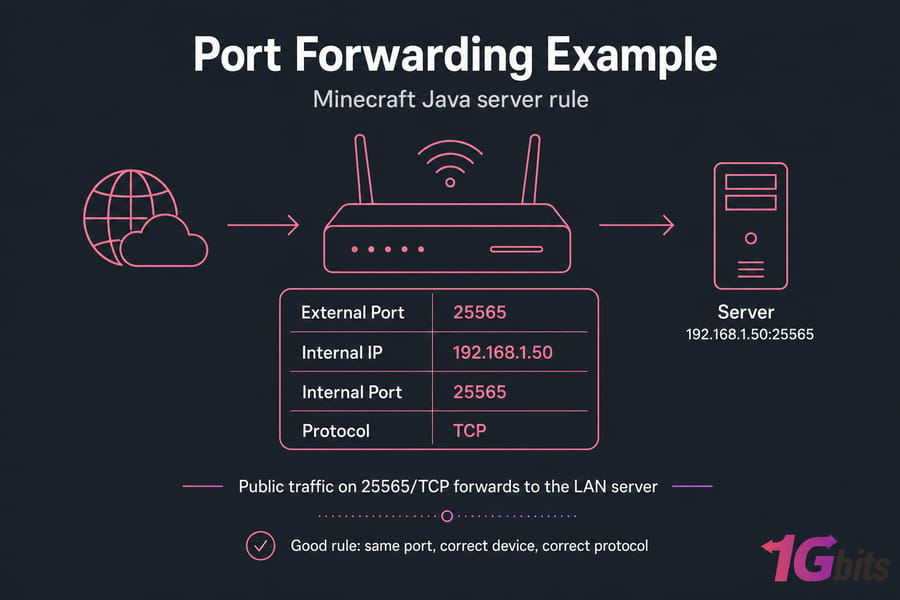
For a Java server on a home network, your router rule should usually look like this:
- External port: 25565
- Internal IP: 192.168.1.50 (example)
- Internal port: 25565
- Protocol: TCP
For Bedrock:
- External port: 19132
- Internal IP: 192.168.1.50
- Internal port: 19132
- Protocol: UDP
That's the part people skip: protocol matters. Java and Bedrock do not use the same transport by default. If you're not sure how your router labels the fields, this guide on how to port forward on your router and this broader port forwarding guide fill in the blanks.
Also, give the server machine a reserved DHCP lease or static LAN IP. If the PC changes from 192.168.1.50 to 192.168.1.87, the forward breaks even though the rule still exists.
Why port checkers say closed when the server is offline
This is where tools like canyouseeme trip people up. If the Minecraft process isn't actively listening, canyouseeme may report the port as closed even if your forwarding rule is technically fine. Same story if the local firewall drops the probe before the service can answer.
So if you're searching for "minecraft server canyouseeme not working" or "minecraft server closed port fix," the first question is not "what's wrong with my router?" It's "is the server actually listening right now?"
Warning: port scanners can report a port as closed if the Minecraft server is not actively listening.
Windows Defender Firewall rule for Minecraft
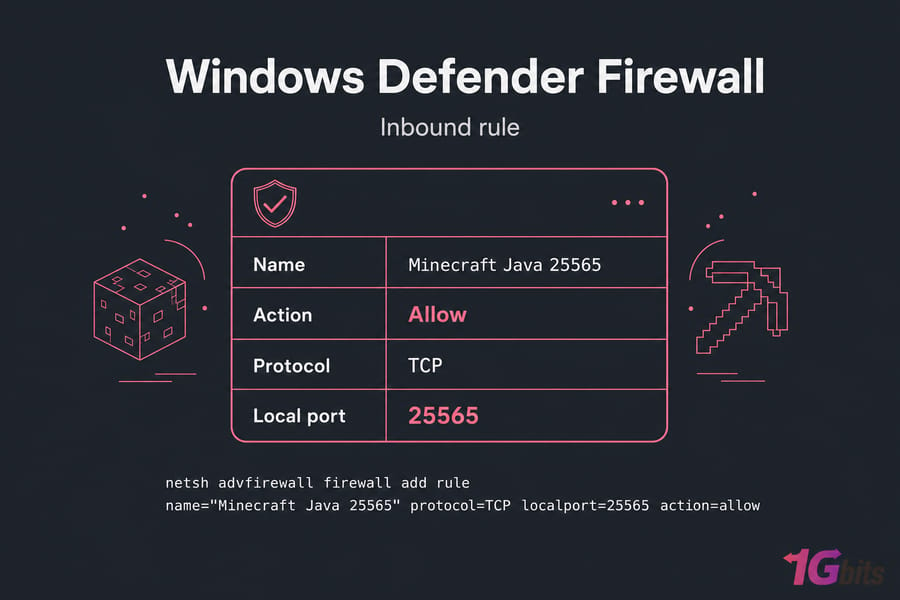
On Windows, allow either the Java runtime used by the server or create a dedicated inbound rule for port 25565 TCP.
netsh advfirewall firewall add rule name="Minecraft Java 25565" dir=in action=allow protocol=TCP localport=25565
For Bedrock:
netsh advfirewall firewall add rule name="Minecraft Bedrock 19132" dir=in action=allow protocol=UDP localport=19132
After adding the rule, test again from LAN and then from an external network. If you want a general firewall walkthrough, see how to configure a firewall on your server.
UFW and iptables rules for Linux servers
On Linux with UFW:
sudo ufw allow 25565/tcpsudo ufw allow 19132/udpsudo ufw status
If you're working directly with iptables:
sudo iptables -A INPUT -p tcp --dport 25565 -j ACCEPTsudo iptables -A INPUT -p udp --dport 19132 -j ACCEPT
Advanced users sometimes forget persistent rules. The port works until reboot, then vanishes. Tedious, honestly.
| Check | What good looks like | Common failure |
| Server listener | Java listens on 25565/TCP or Bedrock on 19132/UDP | No process listening |
| Router forward | External port maps to correct LAN IP and same internal port | Forward points to wrong device |
| Protocol | Java = TCP, Bedrock = UDP | Forwarded wrong protocol or both incorrectly |
| LAN IP stability | Reserved DHCP/static lease | Server IP changed after reboot |
| Firewall | Inbound traffic allowed | Windows Defender, UFW, or security suite blocks traffic |
| Topology | Single NAT device or correctly bridged modem | Double NAT breaks inbound path |
If a router reboot is required after saving rules, do it. Some consumer routers don't apply forwarding changes cleanly until you bounce them.
If your server works on LAN but not when you use your public IP from inside the same house, NAT loopback may be the real issue.
Fix Minecraft NAT loopback and public-IP testing issues
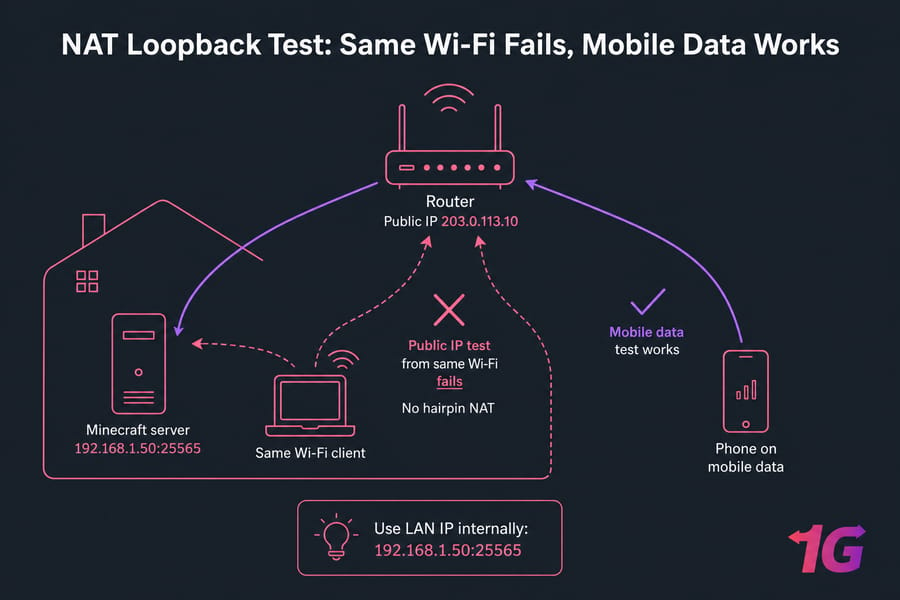
NAT loopback — also called hairpin NAT — means your router doesn't properly send your own public-IP traffic back inside the network to the server. In plain English: the server can work for outside players, but your test from the same Wi-Fi fails anyway.
Why your public IP may fail from inside your own network
Here's the classic scenario. Your server is on 192.168.1.50. Your public IP is 203.0.113.10. Your friend outside the house joins just fine using 203.0.113.10:25565. You, sitting on the same router, try the exact same public IP and can't connect. That's not a dead server. That's usually hairpin NAT.
This is why public-IP testing from the same LAN can be misleading. It says more about your router than about your Minecraft server.
How to test from a mobile network or external connection
The cleanest test is simple: turn off Wi-Fi on your phone, use mobile data, and try connecting to the public IP or DNS name. A mobile hotspot works too. You can also ask a friend off-site to test. If outside users can connect, your server is reachable and the problem is local testing behavior, not public reachability.
Pro tip: test your public IP from mobile data, not from the same Wi-Fi.
Workarounds if your router does not support hairpin NAT
- Use the LAN IP internally, such as
192.168.1.50:25565. - Use split-horizon DNS so internal devices resolve the hostname to the LAN IP instead of the public IP.
- Use a local hosts file entry if you know what you're doing.
- Replace or upgrade the router if hairpin NAT matters to your setup.
- Use a hosted server or VPS and skip home-router behavior entirely.
If you want the networking concept behind this, here's a straightforward explainer on what NAT is.
A hosted VPS avoids router hairpin NAT and local public-IP testing problems entirely. That's one of those boring infrastructure wins that becomes very appealing after the third broken router test.
If nobody outside can connect, the next thing to check is public IP accuracy and CGNAT.
Check public IP, DNS, and CGNAT if your Minecraft server is not reachable outside
If your Minecraft server is not reachable from outside network paths, the edge of the network matters a lot: the router WAN address, your actual public IP, and whether your ISP allows inbound connections at all.
How to compare your router WAN IP with your public IP
Log into your router and look for the WAN IP or internet IP. Then compare it with the public IP shown by a "what is my IP" service. If both match, good. If they don't match, stop and investigate before tweaking more port rules.
Example:
- Router WAN IP:
100.72.14.8 - Public IP seen online:
203.0.113.10
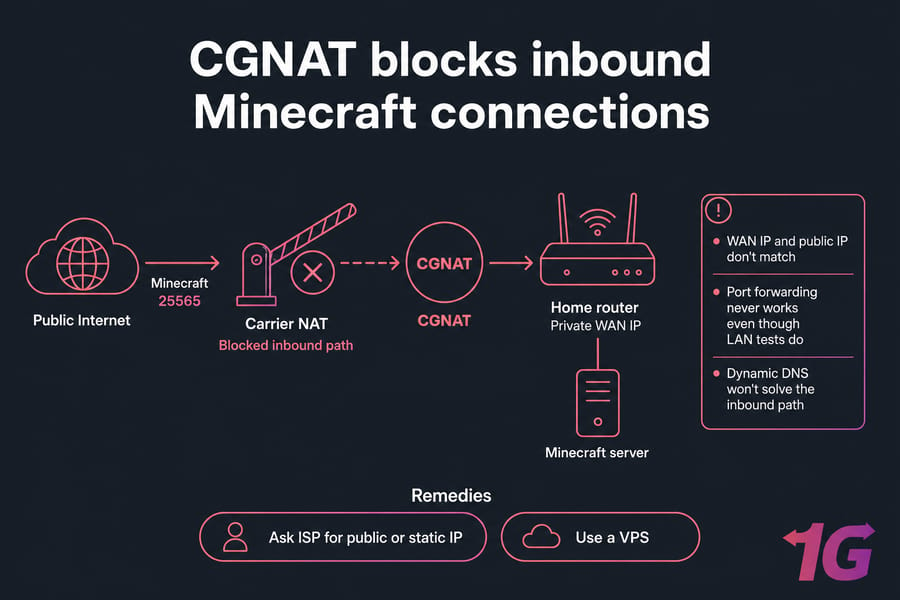
That mismatch strongly suggests CGNAT or upstream NAT. And no, forwarding a port on your own router won't fix upstream NAT that you don't control.
Signs your ISP uses CGNAT
CGNAT usually shows up when your router WAN IP is in ranges like 100.64.0.0/10, or even other private-style ranges in bad ISP setups. If your router's WAN IP isn't truly public, inbound connections can't route directly to your house.
Warning: if your router WAN IP is private, no amount of port forwarding will expose your server publicly.
Common signs:
- WAN IP and public IP don't match
- Port forwarding never works even though LAN tests do
- ISP support confirms carrier-grade NAT
- You're on mobile broadband, fixed wireless, or some budget residential plans
When dynamic DNS or a VPS reverse proxy helps
If your public IP changes but you do have a real public address, dynamic DNS helps a lot. Your hostname updates automatically instead of forcing players to chase changing IPs. If DNS management is part of your problem, a free DNS setup can help this article on free DNS is a decent starting point.
But if the issue is CGNAT, dynamic DNS won't solve the inbound path. In that case, ask your ISP for a public or static IP. Some providers will enable it. Some won't. That's just reality.
If the ISP won't cooperate, a VPS is often the cleaner fix than fighting residential limits. You get a fixed public IP, root access, and you skip the whole "router WAN IP vs actual internet IP" mess.
Also make sure you're troubleshooting the correct Minecraft edition and protocol.
Minecraft Java vs Bedrock ports and protocol differences
This section is short because the fix is usually short. But it matters a lot.
Java default port 25565 TCP
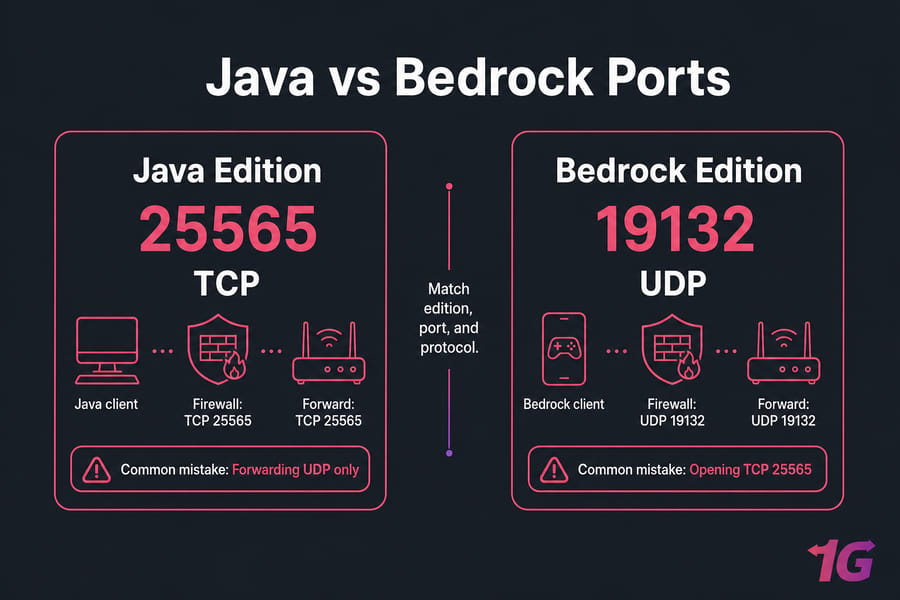
Minecraft Java Edition uses TCP 25565 by default. If you're self-hosting Java, your listener, firewall rule, and router forward should all reflect that unless you've changed the port manually.
Bedrock default port 19132 UDP
Minecraft Bedrock Edition typically uses UDP 19132. Some setups also use 19133 for secondary or IPv6-related cases, but 19132/UDP is the one most admins care about first.
Why using the wrong edition looks like a connection issue
If a player uses the wrong edition or forgets a custom port, the server can look broken when it isn't. Same idea if your host uses a non-default port and the client doesn't include it. That leads to a lot of false "server down" reports. For popular public servers, understanding how large networks manage connections like how Hypixel IP addressing works can give you perspective on how professional setups handle traffic at scale.
If you want the protocol difference spelled out, here's a clean explanation of TCP vs UDP differences.
| Edition | Default port | Protocol | Common mistake |
| Java Edition | 25565 | TCP | Forwarding UDP only or using Bedrock client expectations |
| Bedrock Edition | 19132 | UDP | Opening TCP 25565 and wondering why Bedrock can't join |
| Either edition on custom port | Custom | Depends on edition | Players forget to specify the port |
Even with the right edition and port, a few setup mistakes commonly keep servers unreachable.
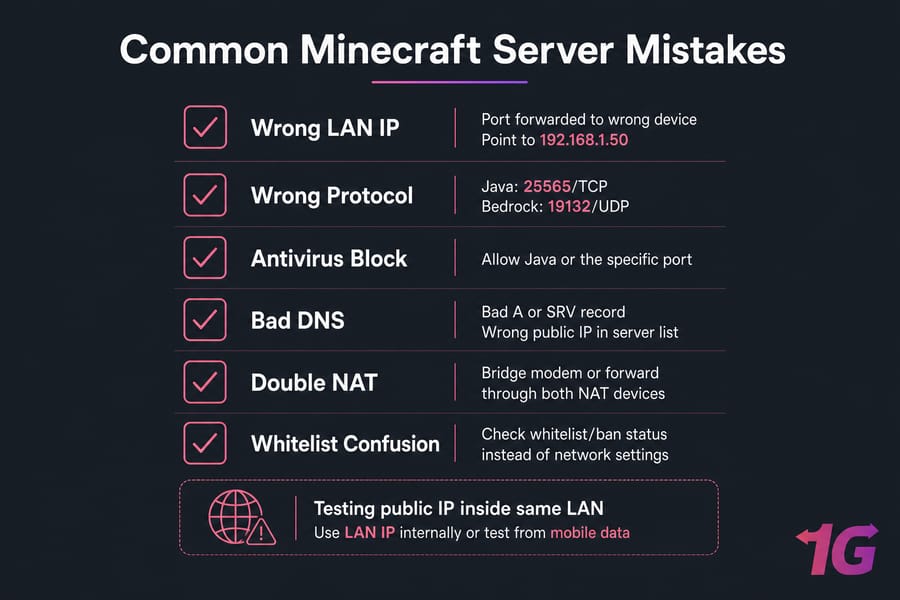
Common Minecraft server setup mistakes that cause connection issues
This is the cleanup section. The stuff that keeps biting people after they've already done the "big" steps.
Using the wrong local IP after DHCP changes
Your router forward still points at the old IP, but the server PC picked up a new one. It happens all the time. Reserve the server's LAN address in DHCP and move on with your life.
Forwarding TCP/UDP incorrectly
Java needs TCP on 25565 by default. Bedrock needs UDP on 19132. Wrong protocol, wrong result.
Testing with the wrong address format
Players may add the wrong public IP, the wrong hostname, or a hostname with a bad SRV or A record. If you need to verify name resolution, the nslookup command is your friend.
Forgetting antivirus or security suite network rules
Windows Defender Firewall is only one layer. Third-party antivirus packages sometimes block Java, open the port only on private networks, or silently change rules after updates.
Trying to host behind double NAT
If your ISP modem is routing and your own router is also routing, you may have two NAT layers. Forwarding only on one device won't be enough. Either bridge the ISP modem or configure both devices correctly.
| Mistake | Symptom | Fix |
| DHCP changed server LAN IP | Port forwarding suddenly stops working | Reserve a static DHCP lease for the server |
| Port forwarded to wrong device | LAN works on server, public IP fails | Point the rule to the correct host, like 192.168.1.50 |
| Antivirus blocks Java | Local tests work inconsistently, outside players fail | Allow Java or the specific port in the security suite |
| Bad A or SRV record | Hostname fails while direct IP works | Correct DNS records and verify resolution |
| Wrong public IP in server list | Old address no longer works | Update to current public IP or use dynamic DNS |
| Testing public IP inside same LAN | You fail, outside players may succeed | Use LAN IP internally or test from mobile data |
| Double NAT | Forwarding seems correct but outside reachability fails | Bridge modem or forward through both NAT devices |
| Whitelist confusion | Server is reachable, but specific player can't join | Check whitelist/ban status instead of network settings |
Pro tip: reserve your server PC's LAN IP in DHCP to stop forwarding rules from breaking later.
If these issues keep returning, the problem may be the hosting environment itself.
When a Minecraft VPS is the easiest fix for recurring connection issues
Home hosting is fine for a lot of people. If you've got a stable connection, a cooperative ISP, and a router that behaves, it can work well. But when you keep running into timeout, closed-port, CGNAT, or NAT loopback issues, a VPS starts to look less like overkill and more like the sane option.
Why VPS hosting avoids router and NAT loopback problems
A VPS removes most of the home-network pain points in one shot:
- No consumer router port forwarding
- No hairpin NAT confusion
- No residential ISP inbound restrictions in the same way
- No relying on a PC in your house staying powered on
- A fixed public IP is usually available from day one
For larger communities or heavily modded servers that need dedicated hardware, a game dedicated server gives you the full power of a physical machine with no resource sharing.
When self-hosting is still fine
If you're running a small private server for a few local friends, your ISP gives you a real public IP, and your router supports the features you need, self-hosting is still perfectly reasonable. No need to overcomplicate it. If you're just getting started and want to test the waters without spending anything, our roundup of free Minecraft server hostings covers the best zero-cost options available.
What to look for in Minecraft VPS hosting
Look for predictable CPU performance, enough RAM for your modpack or player count, root access, low-latency locations near your players, and actual support when networking gets weird. Not all hosts are equal here.
| Factor | Home hosted | VPS hosted |
| Public IP | May change or sit behind CGNAT | Typically fixed and directly reachable |
| Port forwarding | Required on home router | Usually not needed in the same way |
| NAT loopback | Can break local public-IP tests | Not a typical issue |
| Uptime | Depends on home power and internet | Usually more stable |
| Latency options | Limited to your home ISP route | Choose region closer to players |
| Control | High, but tied to home hardware | High with root access |
| Support | You're the support team | Host support can help with infrastructure issues |
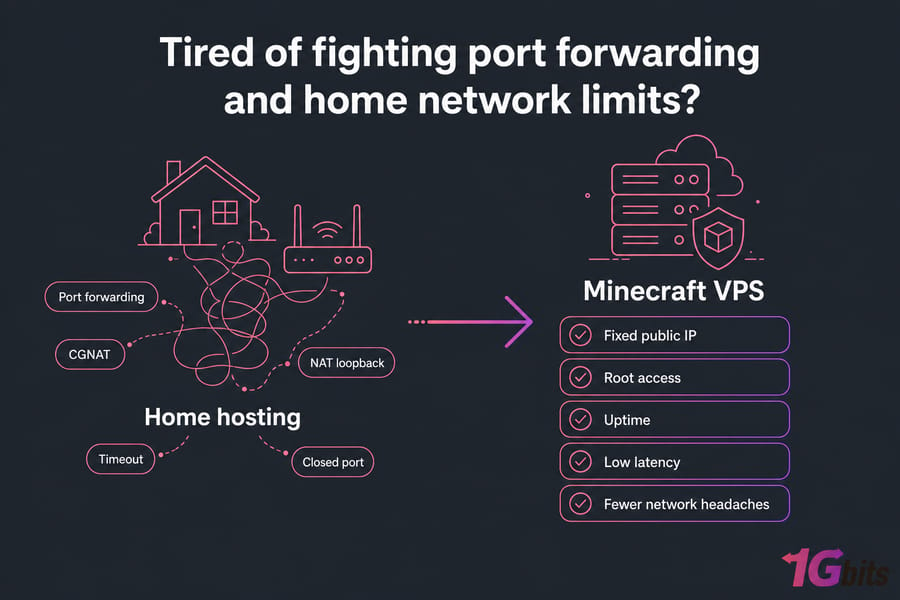
Tired of fighting port forwarding and home network limits?
If your Minecraft server keeps running into timeout, closed-port, or CGNAT problems, hosting it on a VPS gives you a stable public IP, full control, and fewer networking headaches. Explore Minecraft VPS.
For setup help after the move, see how to make a Minecraft server on VPS. If you're still comparing options, the roundup of the best Minecraft server hosting providers is a good next read.
Want a Minecraft server that players can actually reach?
1Gbits offers Minecraft-friendly VPS and hosting options with root access, global locations, and stable connectivity — ideal if home hosting keeps failing due to NAT, router, or ISP restrictions. View Minecraft Hosting.
People also read:

Leave A Comment