

If you're looking to join one of the most popular Minecraft servers in the world, you need one thing: the Hypixel IP address. The answer is straightforward — mc.hypixel.net. That's the gateway to a massive network of mini-games, competitive modes, and a thriving community of millions of players. So, what is Hypixel IP exactly? It's the server address that connects you to everything Hypixel offers from Skyblock to Bed Wars.
But connecting to Hypixel involves more than just pasting an IP. Depending on your edition, platform, or the specific game mode you're after, the details can vary. This guide covers everything from basic connection steps to Bedrock compatibility, Skyblock access, and the alpha server so by the end, you'll know exactly what is Hypixel IP and how to use it for your setup. If you're curious about the fundamentals behind how IP addresses work, read our guide on what is an IP address.
What Is the Hypixel Server IP?
The main Hypixel server IP for Minecraft Java Edition is mc.hypixel.net. Once you add this to your multiplayer server list and connect, you'll land in the main lobby where you can access dozens of game modes — Skyblock, Bed Wars, SkyWars, Murder Mystery, Build Battle, and many more. If you've ever asked what is Hypixel IP, this is the only address you need for Java Edition.
There's no port number to remember. The default Minecraft port (25565) is used automatically, so mc.hypixel.net is all you need. If you're planning to host your own server someday, understanding what a dedicated IP is can help you get better stability and control.
Why Is Hypixel So Popular?
Hypixel didn't become the largest Minecraft server by accident. It holds a Guinness World Record for the most popular independent server, with over 200,000 concurrent players during peak hours. The appeal comes down to a few things:
- Variety: Over 40 unique mini-games, from competitive PvP to cooperative adventures.
- Skyblock: A fully-fledged MMO-style experience inside Minecraft, with deep progression, bosses, and an in-game economy.
- Regular updates: New content, seasonal events, and balance patches keep the experience fresh.
- Community: A massive, active player base with forums, Discord, and social features built into the server.
- Polished experience: Custom plugins, anti-cheat systems, and professional moderation make gameplay smooth and fair.
For the best experience, especially if you're playing competitively, a stable connection is key. A dedicated IP benefits compared to shared hosting setups. If you're planning to host your own server, check out the best Minecraft server hosting providers for reliable options.
How to Connect to the Hypixel Server (Step-by-Step)
Step 1: Launch Minecraft Java Edition
Make sure you're running the latest stable version of Minecraft Java Edition. Hypixel typically supports the most recent release. Open the Minecraft Launcher, log in, and click Play.
Step 2: Go to Multiplayer
From the main menu, click Multiplayer. If this is your first time, the server list will be empty.
Step 3: Add the Server
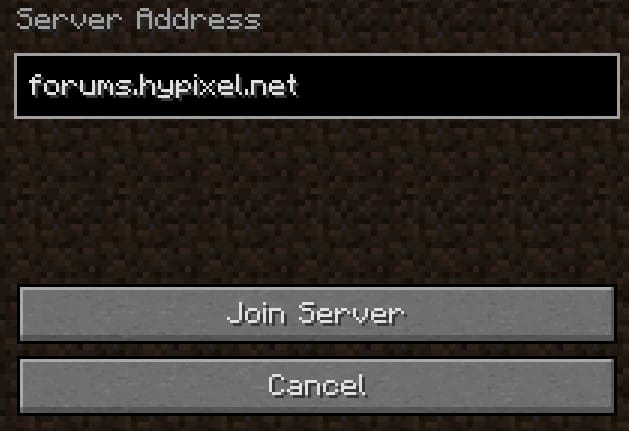
Click Add Server. Enter a name like "Hypixel" and in the Server Address field, type mc.hypixel.net. Click Done. This is the answer when players ask what is Hypixel IP — it's simply the address you enter to join.
Step 4: Join
Select the Hypixel entry from your server list and click Join Server. You'll be connected to the main lobby where you can start playing immediately.
Hypixel on Bedrock Edition
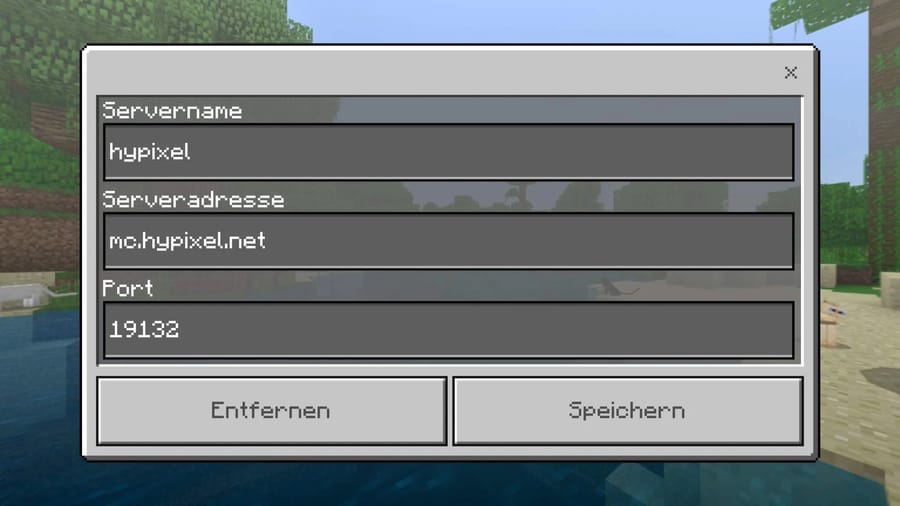
Hypixel is primarily a Java Edition server. The standard mc.hypixel.net address won't work on Bedrock Edition (Windows 10/11, consoles, mobile). However, Hypixel has released a separate server called Hypixel: Bedrock Edition with a different IP. Many players searching for what is Hypixel IP for Bedrock should know it's not the same as the Java address.
As of the latest information, the Bedrock server address is not always publicly listed as a static IP and may be accessed through featured server lists within Bedrock Edition itself. Check the official Hypixel website or the Bedrock server list in-game for the most current connection details.
If you're hosting a server for cross-play between editions, make sure you understand how IP addressing works to avoid connection conflicts.
Hypixel Skyblock
Hypixel Skyblock is one of the most popular game modes on the server, offering an MMO-style experience inside Minecraft. You don't need a separate IP — just connect to mc.hypixel.net and use the Game Menu to navigate to Skyblock. So if you're wondering what is Hypixel IP for Skyblock specifically, the answer is the same: mc.hypixel.net.
There is no public "sandbox" server for Skyblock. All gameplay happens on the main Hypixel network. Some community tools and Discord servers offer guides, calculators, and trading platforms, but the actual game mode is played on the main server only.
Hypixel Alpha Server
The Hypixel Alpha server is a private testing environment used to trial new features, balance changes, and game modes before they go live. Access is restricted — typically limited to staff, selected testers, and occasionally players with specific ranks.
The Alpha IP is not public and changes between testing phases. If you're invited, you'll receive the IP directly. Do not trust third-party sources claiming to offer "Hypixel Alpha access."
Hypixel Discord and Website
Official Website: https://hypixel.net/
Forums: Available through the website — used for bug reports, suggestions, community discussions, and ban appeals.
Discord: Hypixel maintains an official Discord server. You can find the invite link on their website or forums. The Discord is the best place for announcements, server status updates, and community chat.
If you run your own Minecraft community and need to help players connect, check our guide on how to find your Minecraft server IP address. For useful in-game shortcuts, see the best Minecraft commands.
Hypixel Server Requirements (For Hosting Your Own Similar Server)
While you can't host an official Hypixel server yourself, if you're inspired to create a similar multi-game Minecraft network, here's what you'll need:
Hardware
- CPU: High single-core clock speed is critical. Intel Xeon or AMD Ryzen 5000/7000 series recommended.
- RAM: Minimum 16GB for a medium-sized network with multiple game modes.
- Storage: NVMe SSD for fast world loading and backups.
If you want to move from joining public servers to building your own multiplayer world, our step-by-step guide on how to make a Minecraft server on VPS explains the full setup process, from choosing resources to configuring the server.
Network
- Bandwidth: 1 Gbps port speed or higher.
- Low Latency: Choose a data center close to your player base.
- DDoS Protection: Essential for any public server.
Software
- Java: Latest stable version.
- Server Software: Paper, Spigot, or Purpur for performance optimizations.
- Proxy: BungeeCord or Velocity to connect multiple sub-servers.
- Plugins: Anti-cheat, permissions, economy, and custom game mode plugins.
For a Minecraft server of any scale, a VPS for Minecraft gives you the flexibility and dedicated resources you need. Choosing the right hardware is equally important — see our guide on the best CPUs for gaming servers to optimize performance. If you're starting small, explore free Minecraft server hosting options before upgrading to a paid plan.
Conclusion
Hypixel remains the go-to destination for Minecraft multiplayer. Now that you know what is Hypixel IP mc.hypixel.net getting connected takes less than a minute. Whether you're into Skyblock, competitive PvP, or just exploring what the community has to offer, this single address opens the door to one of the largest gaming communities in the world.
If you're inspired to run your own server whether for mini-games, survival, or a private community having the right hosting makes all the difference. A VPS for Minecraft gives you full control, better performance, and a stable environment for players. Compare Minecraft hosting options to find the right fit. For those interested in the technical side of networking, advanced IP scanner tools can help you monitor and manage your server's connectivity.
People also read:

Leave A Comment