
What Is VMware NSX?
VMware NSX is a network virtualization and security platform that builds software-defined networks inside virtualized environments. Instead of routing every change through physical switches, routers, and firewalls, NSX lets you create logical switches, routers, and firewall policies entirely in software sitting on top of whatever physical network you already have.
Think of it as the same shift virtualization did for servers, except now applied to the network. ESXi virtualized the compute. NSX virtualizes the wiring, the segmentation, and the security policies that live around your workloads.
What problem does VMware NSX solve?
Traditional networking is slow to change. You file a ticket, someone reconfigures a VLAN, a firewall rule gets adjusted on a physical appliance, and a few days later your app team is unblocked. NSX flips that. Policies follow workloads, not ports. Spin up a new VM, and its segmentation rules apply automatically.
Where NSX fits in the VMware ecosystem
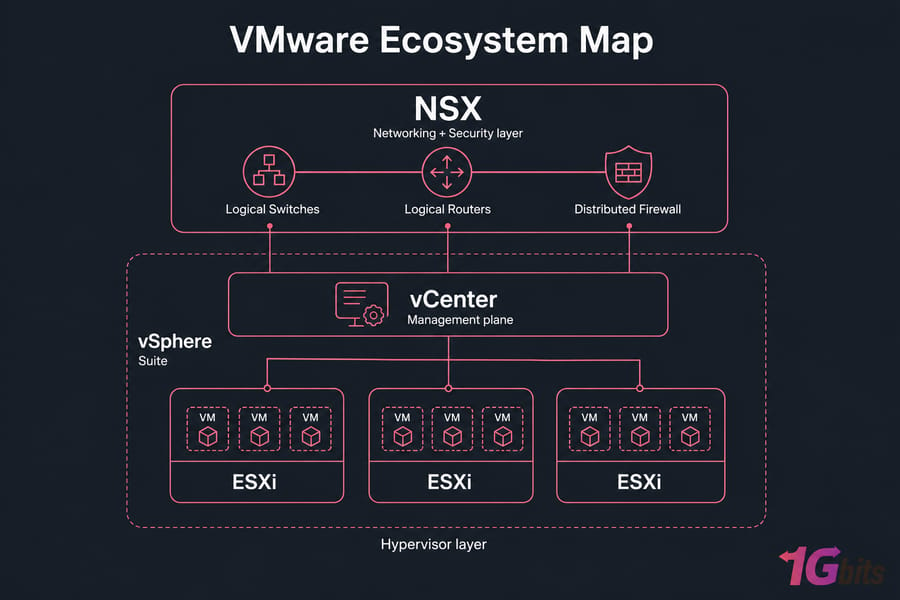
People mix these up constantly, so let's clear it up. ESXi is the hypervisor running on bare metal. vCenter manages your ESXi hosts. vSphere is the bundle. NSX is the networking and security layer that plugs into all of that. If you want the bigger picture, here's a primer on what is VMware and how VMware works, and a deeper look at VMware vCenter explained.
Is VMware NSX networking, security, or both?
Both. That's the whole point. It provides logical switching, routing, NAT, VPN, and load balancing on the networking side, plus a distributed firewall, micro-segmentation, and policy automation on the security side. Treating it as just an SDN tool — or just a firewall — sells it short.
How VMware Network Virtualization Works
To get why NSX is different, you need two ideas: underlay and overlay.
Underlay vs overlay networking in simple terms
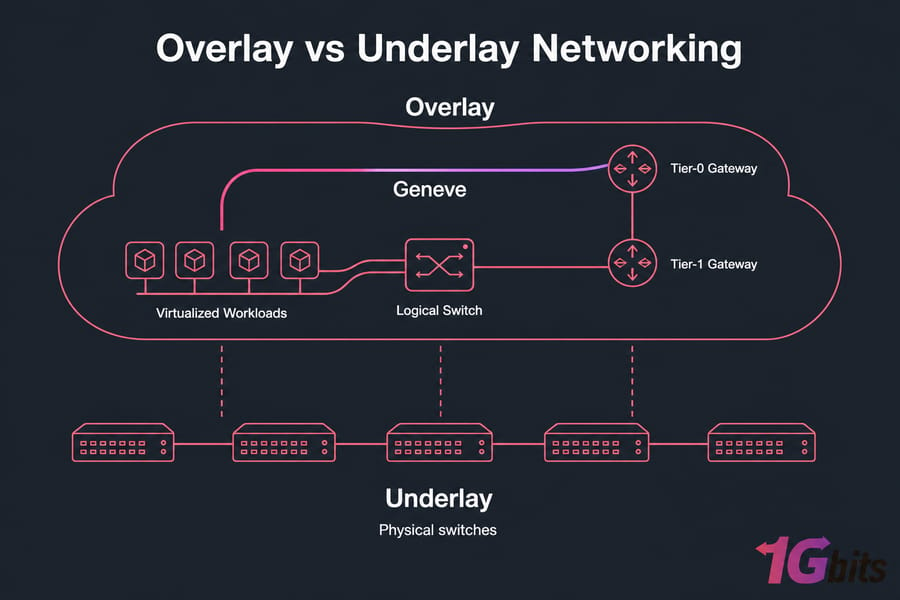
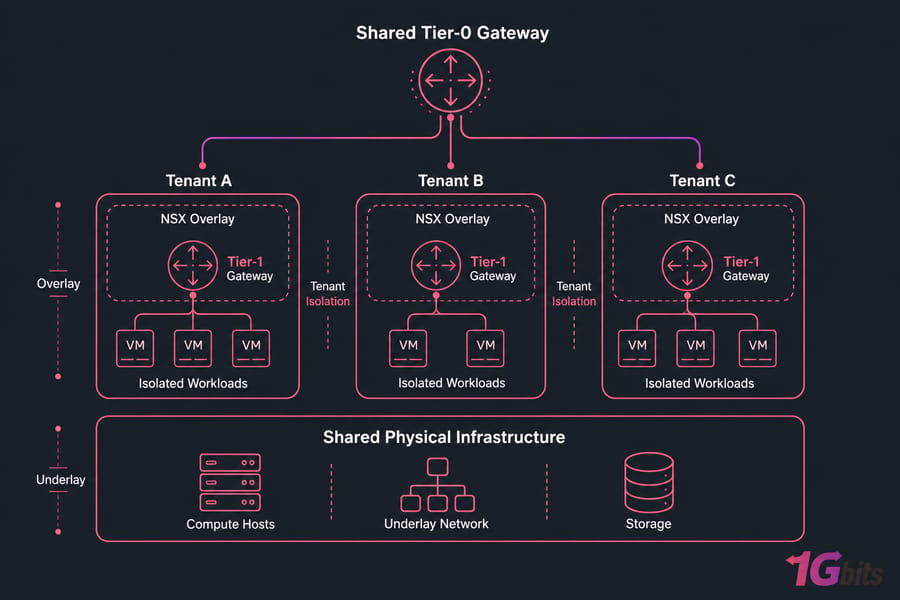
The underlay is your physical network — the switches, cables, and IP fabric humming away in the rack. The overlay is a logical network running on top of it, built using encapsulation protocols like Geneve (or VXLAN in older NSX-V deployments). Your physical network just moves packets. The overlay decides where they actually go, who can talk to whom, and what rules apply along the way.
An analogy I use a lot: the underlay is the highway system. The overlay is GPS routing and toll rules layered on top. Same roads. Different intelligence.
Logical switches, routers, and gateways
NSX gives you software-defined versions of every classic network component:
- Logical switches for Layer 2 connectivity across hosts, no matter the physical VLAN.
- Logical routers for east-west routing between segments.
- Tier-0 gateways for north-south traffic — the door to the outside world.
- Tier-1 gateways for tenant or app-level routing inside the environment.
How NSX abstracts networking from hardware
Because the network logic lives in software running on each ESXi host, you can spin up a new segment in seconds. No cable runs. No switch reconfigurations. If you're new to the underlying concept, what is virtualization and virtualization types are worth a read before going further.
VMware NSX Micro-Segmentation Explained
Here's where NSX really earns its keep. Micro-segmentation means applying firewall policy directly to each workload — not at the perimeter, not at a VLAN boundary, but right next to the VM itself.
What micro-segmentation means in virtual environments
Traditional security treats the data center like a castle: thick walls outside, soft middle inside. Once an attacker gets in, lateral movement between servers is often trivial. Micro-segmentation kills that. Every workload gets its own perimeter, enforced by NSX's distributed firewall.
How the distributed firewall works
The distributed firewall (DFW) runs in the hypervisor kernel on every ESXi host. When VM-A tries to talk to VM-B, the rules are evaluated locally — no hairpinning out to a physical appliance. That means policy enforcement scales with your cluster, not with a single bottleneck device.
Example of stopping lateral movement between workloads
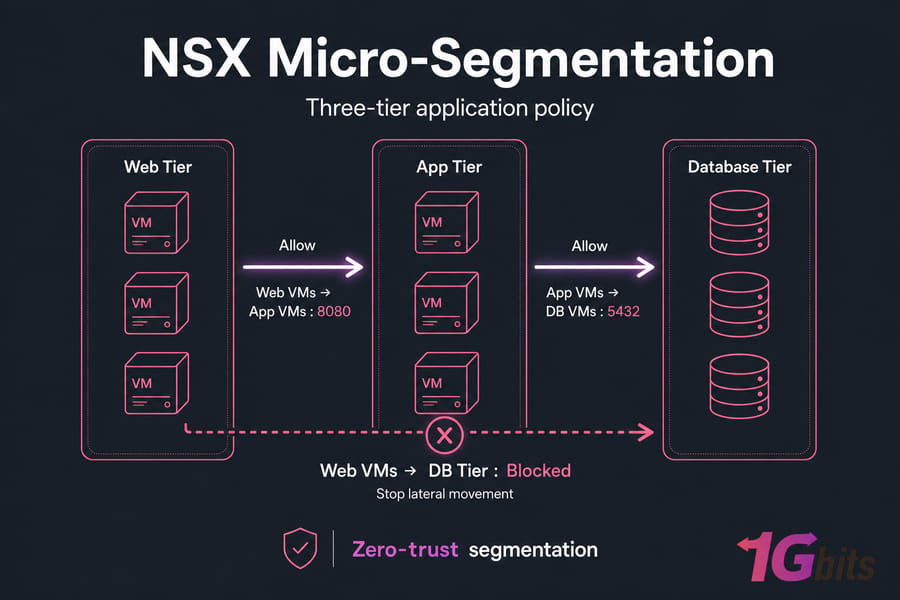
Picture a classic three-tier app: web tier, app tier, database tier. With NSX, you write a policy that says:
- Web VMs can talk to App VMs on port 8080. Nothing else.
- App VMs can talk to DB VMs on port 5432. Nothing else.
- Web VMs cannot touch the DB tier directly. Ever.
If a web server gets compromised, the attacker can't pivot straight to the database. That's zero-trust segmentation in practice. Pair this with broader hardening — see configure a firewall on your VPS and Linux server security — and you've got real defense in depth.
VMware NSX Security Features and Core Capabilities
NSX is broader than firewalling. Here's a quick view of what's in the box:
| Capability | What It Does | Why It Matters |
| Distributed firewall | Stateful Layer 4–7 policy per workload | Stops lateral movement at the source |
| Logical routing | Software-based east-west and north-south routing | No backhauling to physical routers |
| NAT | Address translation in software | Simplifies multi-tenant IP overlap |
| VPN (IPsec/L2) | Secure tunnels between sites | Hybrid and DR connectivity |
| Load balancing | L4/L7 distribution to backend pools | Drop dedicated LB appliances in many cases |
| Automation/API | Full programmability via REST and Terraform | Network as code, repeatable deployments |
If you want background on individual pieces, what is NAT is a good companion read.
VMware NSX-T and the Evolution of NSX
You'll still see two names floating around in older docs: NSX-V and NSX-T. Worth knowing the difference.
| Area | NSX-V (legacy) | NSX-T (modern) |
| Tied to vSphere | Yes, vSphere-only | Decoupled, supports KVM, bare metal, containers |
| Encapsulation | VXLAN | Geneve |
| Multi-cloud | Limited | Native |
| Container networking | Not really | Yes, with CNI integrations |
| Status | End-of-life | Current platform (now just "NSX") |
The short version: NSX-T won. Today's NSX is essentially the evolved NSX-T platform, often just branded as "NSX" in current Broadcom-era documentation. If you're planning anything new, you're working with the modern NSX. For licensing context, here's VMware licensing explained.
VMware NSX Use Cases in Private Cloud and Enterprise Networks
Where does NSX actually shine in the wild?
- Multi-tier application segmentation — the three-tier example above, but at scale across hundreds of apps.
- Multi-tenant private cloud — isolating tenants without burning VLANs (which top out at 4,094) or building physical separation per customer. See what a VPC is for the conceptual cousin.
- Compliance-driven isolation — PCI, HIPAA, and similar regimes where you must prove segmentation between regulated and non-regulated workloads.
- Disaster recovery and hybrid cloud — stretched networks and consistent policy across sites.
- VDI environments — keeping user desktops from chatting with each other or critical backend systems. Related: VDI explained.
- Dev/test isolation — clone production network topologies in seconds for testing.
VMware NSX vs Traditional Networking
Now the honest comparison. NSX doesn't make physical networking obsolete — you still need an underlay. But it changes the operating model dramatically.
| Function | Traditional Approach | NSX Approach |
| Segmentation | VLANs (max 4,094), coarse | Per-workload micro-segmentation |
| Firewalling | Centralized physical appliance | Distributed in hypervisor kernel |
| Change speed | Tickets, hours to days | API call, seconds |
| East-west security | Often nonexistent | Native and granular |
| Hardware dependency | High | Mostly decoupled from underlay |
| Best fit | Small, static environments | Dynamic, multi-tenant, large-scale |
Traditional networking still works fine for small shops with a handful of servers. But once you're managing dozens of apps or multiple tenants, manual change management becomes the bottleneck. For broader context, types of network and network topology are good background reading.
VMware NSX Benefits, Limitations, and Trade-Offs
Let's be balanced. NSX is powerful but it's not free, simple, or always the right answer.
| Area | Benefit | Trade-Off |
| Security | Workload-level policy, zero-trust ready | Policy design takes real planning |
| Agility | API-driven, network as code | Requires automation skills your team may not have yet |
| Scalability | Distributed enforcement scales linearly | Hypervisor overhead on each host |
| Cost | Reduces some hardware spend | Licensing is significant — check VMware licensing |
| Operations | Consistent policy across sites | Steep learning curve, new troubleshooting model |
In my experience, teams that succeed with NSX invest in training and policy design upfront. Teams that skip that step end up with a sprawl of rules nobody understands six months later. If your environment has ten VMs and one firewall, NSX is overkill — stick with the basics. If you're operating a private cloud or multi-tenant platform, the math flips fast. For deeper platform comparisons, see VMware vs Proxmox and KVM vs VMware.
When to Use VMware NSX on Dedicated Infrastructure
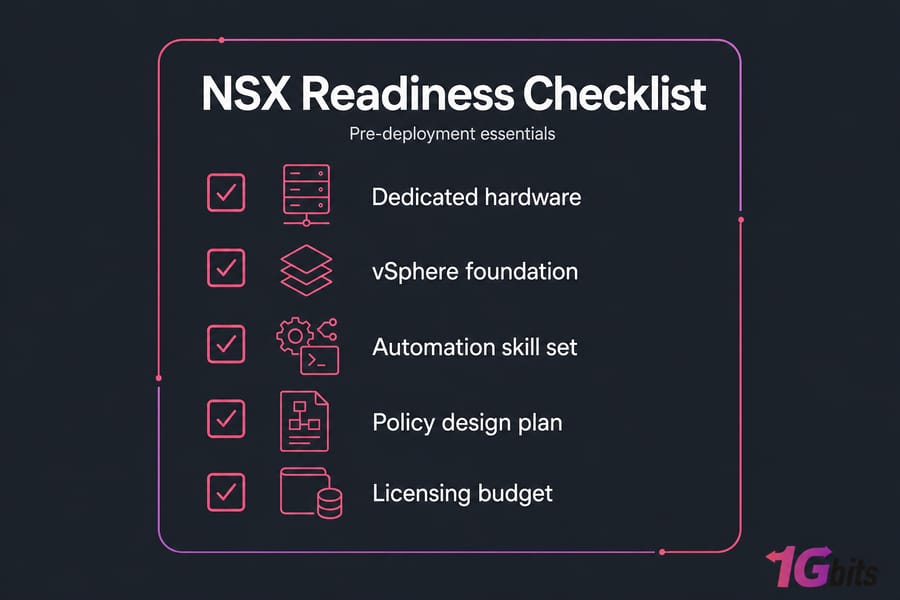
NSX runs best where you have real control over the hardware. Shared, oversubscribed environments tend to fight you. Dedicated infrastructure gives predictable CPU, memory, and network performance — all things NSX leans on heavily because policy enforcement happens in the kernel of every host.
If you're planning a serious VMware deployment with NSX in mind, look at VMware dedicated server hosting built for virtualization workloads. Need flexible compute alongside it? Virtual machine hosting and broader dedicated server infrastructure options are worth a look.

Leave A Comment