

Satisfactory dedicated server troubleshooting goes fastest in a fixed order: confirm FactoryServer is running, join from the same LAN, verify ports and firewall, then check saves, versions, and mods. If LAN joins work but remote players time out, the fault is NAT, port forwarding, or the public IP path. If setup isn't finished, start with our Satisfactory dedicated server setup guide.
Before changing anything, note whether the server is modded, which build and branch each side runs, and whether one save or one player is affected. Copy FactoryGame.log too. Logs rotate on every start, so a restart buries the first failure.
Match the symptom to the likely cause
| Symptom | Likely cause | Check first |
| Not showing in Server Manager | Process down, wrong IP:port, 7777 blocked | Process, LAN join |
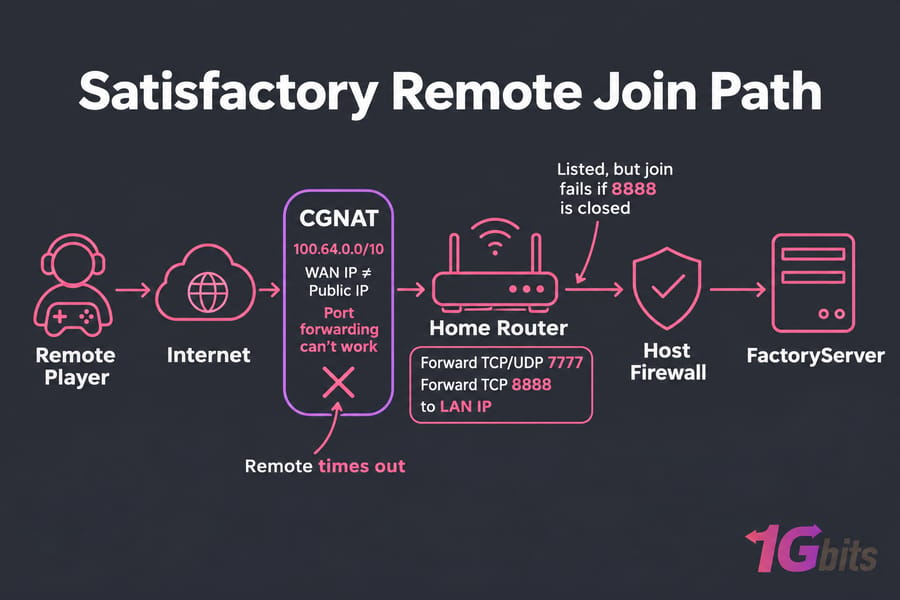
| Listed, but join fails | TCP 8888 closed | Firewall and router rules |
| LAN works, remote times out | Forwarding, CGNAT | Router WAN IP |
| One player can't join | Branch mismatch, client NAT | That player's build |
| Crash on start or on one save | Broken files, save, mods | Logs, fresh world |
| Rubber-banding | Network Quality, packet loss, CPU | Desync section |
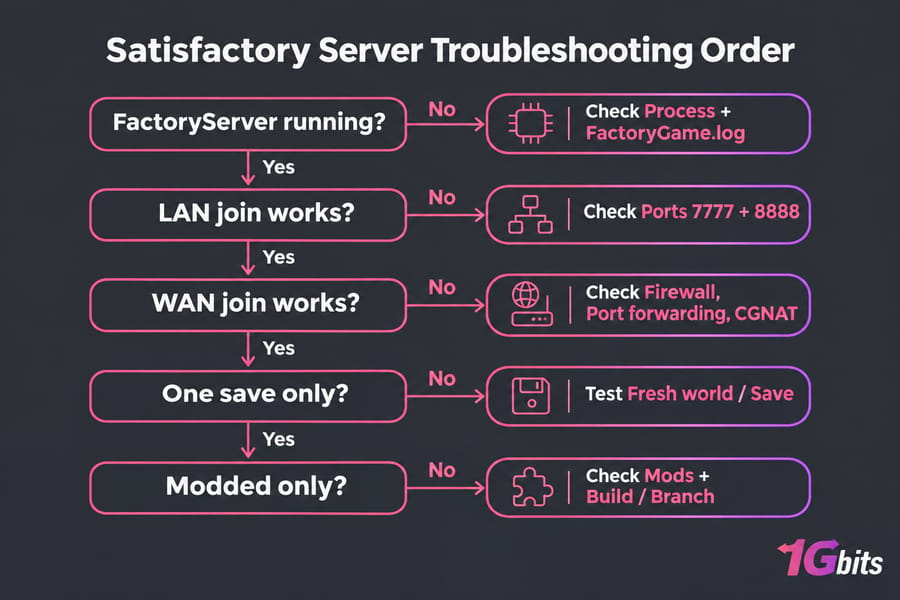
Satisfactory server connection issues: timed out, lost connection, not showing up
First, make sure the process is running. On Windows, run Get-Process FactoryServer*. On Linux, ss -plnut | grep -i factory should show listeners on 7777 and 8888.
Then test 127.0.0.1:7777 on the host, the LAN IP from another home PC, and the public IP from outside (a phone hotspot works). Many routers lack NAT loopback, so joining your own public IP from inside can fail even with correct forwarding. "Connection refused" means nothing is listening. A timeout means a firewall or router dropped the packets.
If only one player fails, check they're on the server's branch, since Stable and Experimental don't mix. For "TIMED OUT" disconnects, Coffee Stain's support page says to have everybody set Network Quality to Ultra and restart. If disconnects hit one world only, test a fresh save before touching the network. Our server connection issues troubleshooting framework and Valheim server not showing up fix use the same layered order.
Satisfactory server ports, firewall rules, and NAT
Since patch 1.1 the server uses two ports. The old ports 15000 and 15777 are retired.
| Port | Protocol | Used for |
| 7777 | TCP and UDP | Game traffic and the HTTPS API Server Manager uses |
| 8888 | TCP | Reliable messaging (join handshake) |
With 8888 closed, the server still appears in Server Manager but joins fail. Windows rules (then check open ports in Windows):
New-NetFirewallRule -DisplayName "Satisfactory UDP" -Direction Inbound -Protocol UDP -LocalPort 7777 -Action Allow
New-NetFirewallRule -DisplayName "Satisfactory TCP" -Direction Inbound -Protocol TCP -LocalPort 7777,8888 -Action Allow
Linux with ufw (then check Linux open ports):
sudo ufw allow 7777/tcp
sudo ufw allow 7777/udp
sudo ufw allow 8888/tcp
Home hosts also need to port forward on your router to the server's LAN IP. If the router's WAN address differs from your public IP, or falls in 100.64.0.0/10, you're behind CGNAT and forwarding can't work. Moving to a hosted VPS or dedicated server is usually quicker than fighting that.
Behind pfSense with strict NAT, Coffee Stain recommends Hybrid or Manual outbound NAT plus an outbound mapping for the PC's IP. If NAT shows "TBD," DNS lookups for Epic's STUN/TURN servers may be failing. Their workaround is to resolve turn.rtcp.on.epicgames.com with nslookup and add the IPs to your hosts file.
Don't raise timeout values until you've proven the ports are reachable. A longer timeout helps a slow path but does nothing for a blocked one.
Satisfactory dedicated server crashes and startup failures
To the client, a crashed server and an unreachable one look identical. Once you know the process died, work in this order:
- Copy
FactoryGame/Saved/LogsandFactoryGame/Saved/Crashesbefore restarting. - Kill any leftover FactoryServer process holding 7777 or 8888.
- Repair files:
steamcmd +login anonymous +app_update 1690800 validate +quit - If it crashes only on one save, or only with mods, jump to the save and mod section.
Reinstall only if validate doesn't help. After that, run the server as a systemd service so it restarts after a crash and starts at boot. See how to manage Linux services with systemctl and read output with journalctl -u satisfactory. For OS faults, use our Linux server troubleshooting guide. With the service enabled, the world comes back on its own after you reboot Linux.
Satisfactory server desync fixes and lag reduction
Rubber-banding, delayed interactions, and ghost buildables come from either the network or the host. Check Network Quality first. The server defaults to Low. Ultra on the server and all clients syncs more often, but it costs CPU and can hurt a mid-range home host. Patch 1.1.1.4 added a keep-alive to reliable messaging aimed at desync, so update before tuning.
Packet loss and jitter hurt more than low bandwidth. Read what packet loss is and latency explained, then monitor network traffic in Linux during a spike. On the host, look for one core pinned at 100%, RAM spilling into swap, or slow disks during autosaves. You can check CPU information on Linux and check RAM. If a fresh world runs smoothly and your main save lags, the hardware is too small for that factory.
Save and mod problems
If a fresh world loads and one save doesn't, the save is at fault. Back it up with a dated name such as factory_2026-05-12.sav before any rollback or reset. Linux server saves live in ~/.config/Epic/FactoryGame/Saved/SaveGames/server. To protect them, schedule automatic backups for a Linux server or use a bare metal server backup.
For modded servers, remove every mod from the server and all clients and confirm vanilla works. Then re-add mods in small groups. Everyone must run the same mods at the same versions. Satisfactory Mod Manager 3.0+ and ficsit-cli manage remote servers over SFTP or a network filesystem, so that workflow breaks on hosts without file access.
Logs and evidence to collect
- Current and rotated logs from
FactoryGame/Saved/Logs, plus the newestSaved/Crashesfolder - Server and client build and branch, configured ports
- LAN and WAN test results, and whether a fresh vanilla save works
Send that pack to support or contact us and you skip the back-and-forth.
When to move to a Satisfactory dedicated server host
If troubleshooting ends at CGNAT, a shaky uplink, too little RAM, or a PC you restart by hand, more tweaking won't fix it.
| Option | Fits | Limits |
| Home PC | Testing, LAN play | CGNAT, uptime |
| VPS | Small private worlds | Big late-game factories |
| Dedicated server | Large factories, bigger groups | Higher cost |
I'd start a small world on a DDoS-protected VPS and move to a Linux dedicated server when the factory outgrows it. Compare Satisfactory dedicated server hosting and other game dedicated servers, or buy a dedicated server with root access.

Leave A Comment