
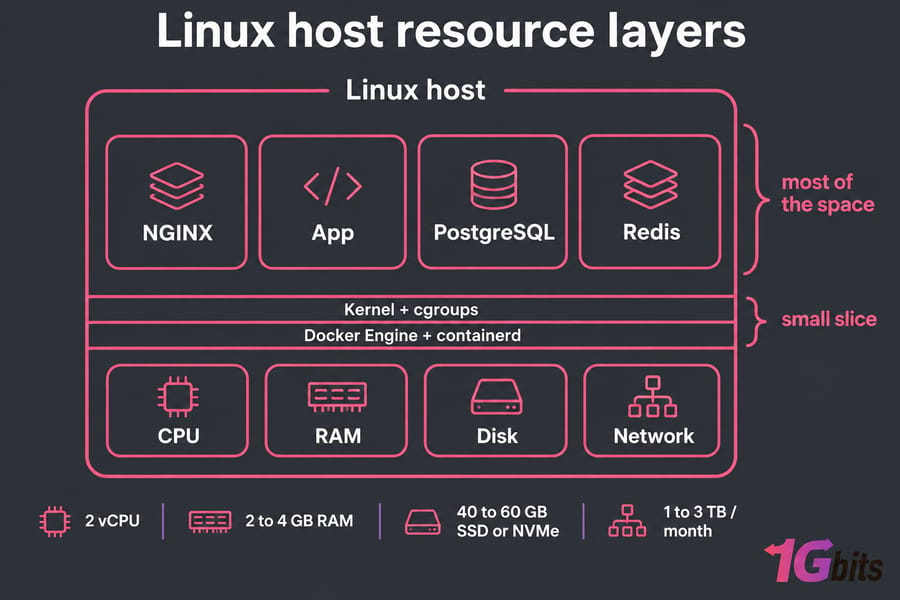
Docker server requirements depend mostly on the containers you run. On a Linux server, Docker Engine needs a small slice of CPU and a few hundred megabytes of RAM. Your app, database, cache and build jobs use the rest. For a small Docker VPS hosting plan, start with 2 vCPU, 2 to 4 GB RAM, 40 to 60 GB SSD or NVMe and 1 to 3 TB of monthly transfer. Production and multi-container stacks are safer on 4+ vCPU, 8 to 16 GB RAM and fast NVMe storage.
What are Docker server requirements?
These figures cover Docker Engine on a Linux VPS or dedicated machine. Docker Desktop is a separate product for laptops and workstations with its own VM overhead, so its hardware requirements don't apply to a server.
If you're new to this, read what is Docker and how a Docker container shares the host kernel. Containers don't reserve resources unless you tell them to. By default a container "can use as much of a given resource as the host's kernel scheduler allows," so one runaway container can starve everything else on a small host.
Minimum vs recommended Docker server specs
Treat these as starting points and adjust them to what you measure.
| Workload | vCPU | RAM | Storage | Bandwidth |
| Testing / dev box | 1 to 2 | 2 GB | 25 to 40 GB SSD | 1 TB, 100 Mbps |
| Small production web app | 2 to 4 | 4 to 8 GB | 50 to 100 GB NVMe | 2 to 3 TB, 1 Gbps |
| App + PostgreSQL + Redis | 4 | 8 GB | 100 GB NVMe | 3 TB+, 1 Gbps |
| Multi-service Compose stack | 4 to 8 | 8 to 16 GB | 100 to 200 GB NVMe | Unmetered, 1 Gbps |
| CI/CD build runner | 8+ | 16 GB+ | 200 GB+ NVMe | High, 1 Gbps+ |
Rows two and three usually fit on a VPS. Keep 20 to 30% of RAM and disk free, because per-container limits don't help if the host itself runs out.
Docker CPU requirements for container workloads
Containers share the host's CPUs through the Linux CFS scheduler. A reverse proxy or static site barely registers, and an API with steady traffic uses a moderate amount. Image builds, compilation and video transcoding run in bursts that can max out every core you have.
--cpus=1.5 caps a container at one and a half cores, and --cpu-quota sets the same kind of cap at a lower level. --cpu-shares sets relative priority that only applies when CPUs are under contention. --cpuset-cpus pins a container to specific cores. On a 4 vCPU host, capping the build container at 2 CPUs keeps your web container responsive while a build runs.
If docker stats shows containers near their cap for long periods while response times rise, you've hit a CPU limit. To see what the host actually has, check CPU information on Linux.
Docker RAM requirements and memory planning
RAM causes more Docker problems than CPU does. When the host runs out of memory, the kernel's OOM killer terminates processes, and your database can be one of them. --memory sets a hard limit and accepts values as low as 6 MB, which tells you nothing about what your containers need. --memory-reservation sets a soft limit that Docker enforces when the host gets tight on memory.
- 2 GB: one or two lightweight containers, testing only
- 4 GB: a small app with a reverse proxy
- 8 GB: safer small production, including a modest PostgreSQL
- 16 GB+: databases with real datasets, Redis caches, higher concurrency
Swap can absorb a short spike, but a database running from swap slows down badly. If the host is short on memory, buy more RAM.
Docker storage requirements: SSD, NVMe, volumes, and logs
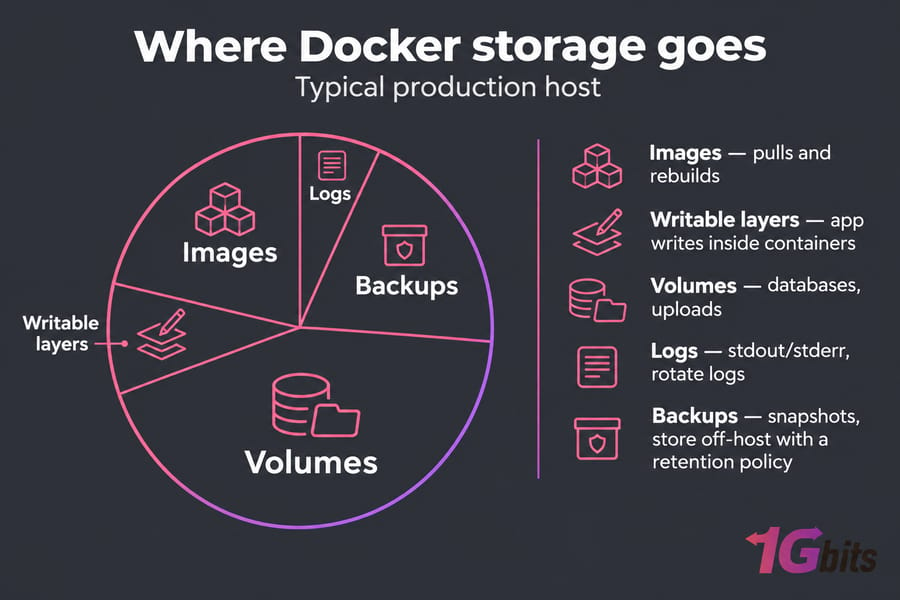
Many Docker hosts fail by running out of disk, and images are only part of what fills /var/lib/docker:
| Component | Growth source | How to control it |
| Images and layers | Every pull and rebuild | docker image prune on a schedule |
| Writable layers | Apps writing inside containers | Move writes to volumes |
| Named volumes / bind mounts | Databases, uploads | Size for data growth |
| Logs | Container stdout/stderr | Log rotation |
| Backups / snapshots | Retention policy | Store off-host |
Docker recommends putting write-heavy data in volumes instead of the writable layer. On classic setups, overlay2 is the default storage driver on Ubuntu, Debian and RHEL. Since Docker Engine v29, new installations use the containerd image store by default. The sizing above applies to both.
According to Docker's logging documentation, the default json-file driver does no log rotation, and Docker recommends the local driver to prevent disk exhaustion. Set rotation in /etc/docker/daemon.json before you deploy anything.
A SATA SSD is fine for light stacks. Databases, busy volumes and CI builds depend on IOPS, where NVMe is much faster (details in NVMe vs SSD), so write-heavy stacks belong on an NVMe VPS.
Docker bandwidth requirements and network throughput
Port speed (100 Mbps, 1 Gbps) is how fast data can move at any moment. Transfer allowance is how much you can move in a month. Latency depends more on server location than on your plan.
Internal tools and dev environments are fine on 100 Mbps. Public APIs, file downloads, streaming and image-heavy sites need a 1 Gbps port, a large allowance and a CDN for static assets. Image pulls and CI pipelines count too, since each build may download hundreds of megabytes. If monthly traffic is hard to predict, an unmetered VPS removes overage risk (see unmetered vs unlimited bandwidth). Media and download-heavy workloads may need a 10Gbps VPS.
Docker server sizing by use case
A personal dev box runs fine on 2 vCPU and 4 GB RAM, and a small app behind an NGINX reverse proxy fits in 2 to 4 vCPU and 4 to 8 GB. With PostgreSQL and Redis, start at 4 vCPU, 8 GB and NVMe. A Docker Compose deployment with six or more services needs 8 to 16 GB: add up each service's measured memory and leave a 30% margin. Install Docker Compose and run docker stats under realistic load before you pick a plan. Put CI/CD runners on their own host with 8+ vCPU so builds don't slow production. For more plan comparisons, see the best VPS for developers.
VPS vs dedicated server for Docker hosting
| Factor | VPS | Dedicated / bare metal |
| Best for | Dev, staging, small to moderate production | High concurrency, many containers |
| Disk IO | Good on NVMe, shared hardware | Consistent, no noisy neighbors |
| Databases | Small to medium | Heavy IO and large datasets |
| Root access | Yes | Yes |
| Scaling | Resize in minutes | Hardware changes or a migration |
Move to a dedicated server when your largest VPS plan is saturated or performance varies at peak hours. A purpose-built server for Docker also suits multi-container production stacks that need consistent IO.
Common Docker sizing mistakes to avoid
- Sizing for Docker Engine and forgetting the workload
- Filling the disk to 90% with no headroom for image pulls
- Leaving
json-filelogs with no rotation - Setting container memory limits that add up to more than the host's RAM
- Running the database, the app and build jobs on a 2 GB VPS
- Skipping monitoring until the first outage
How to monitor and scale a Docker host
docker stats          # live CPU, memory, net and block IO per container
docker info           # storage driver, logging driver, Docker root dir
docker system df      # disk used by images, containers, volumes
free -h; df -h; iostat -x 1
Upgrade if you see repeated OOM kills, CPUs stuck near 100%, high IO wait, disk usage climbing every week or bandwidth overage notices. Before you migrate, prune unused images, add memory limits and move logs to the local driver. That often frees enough capacity to stay on your current plan a while longer.
Final recommendation: how to choose the right server for Docker
Size the server for what your containers use, plus headroom. A Docker VPS covers small stacks, an NVMe VPS suits databases and busy volumes, and a dedicated server handles heavy production with many services. Set log rotation on day one and check docker stats weekly.

Leave A Comment