


If your Valheim dedicated server is not showing up in the server list, or players get a timeout when they try to join, the cause is almost always one of five things: closed UDP ports 2456–2458, a firewall rule that never got created, router/NAT problems, a game-versus-server version mismatch, or plain server list propagation delay. The fix order matters. Confirm the server process is alive, then check ports, then firewall, then routing, then test a direct IP connection, then read the logs.
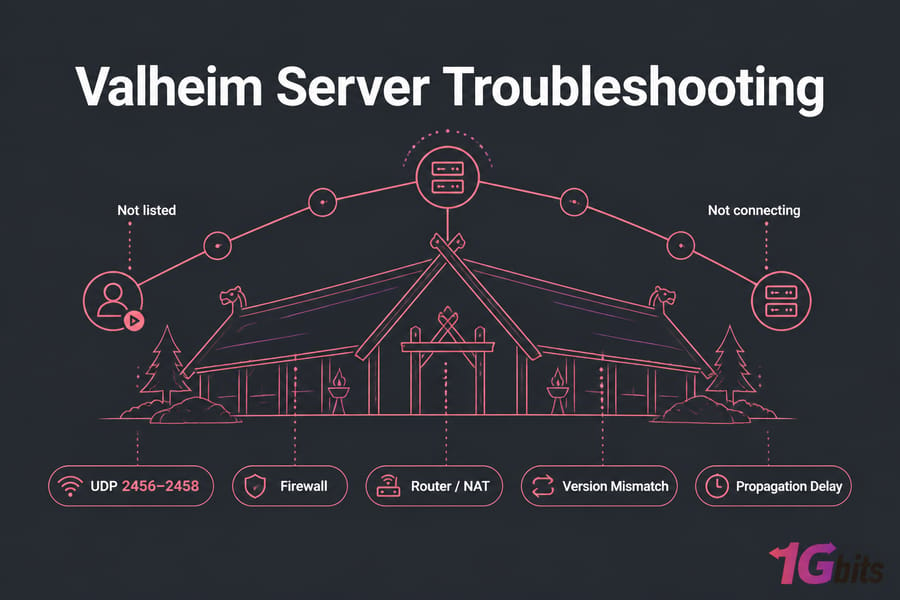
Key takeaway: Most Valheim visibility issues trace back to UDP 2456–2458 being blocked somewhere between the player and your server process. "Not listed" and "not connecting" are two different problems — treat them that way.
Before you start
You'll move faster if you've got these ready:
- Admin or root access to the machine running the server (VPS, dedicated box, or home PC)
- Ability to stop and restart the Valheim dedicated server
- Router admin login, if you're hosting from home
- Your public IP or hostname — and your local IP, they're different
- The start script (
start_headless_server.bator.sh) and the server password - A friend on a different internet connection who can test for you
That last one isn't optional. Testing from your own network tells you almost nothing.
Valheim server not showing up vs not connecting: identify the exact problem
This is the step everyone skips. Don't. Four symptoms, four very different root causes.
| Symptom | Most likely cause | First check |
| Not listed anywhere, for anyone | Server process isn't running, or UDP 2456–2458 blocked at the host firewall | Process check + listening ports |
| Listed, but "failed to connect" or timeout | Version mismatch, wrong password, or partial port blocking | Server logs + version match |
| You can join, friends can't | Router port forwarding, NAT loopback illusion, or CGNAT | Remote test from outside your network |
| Visible in Steam browser, invisible in-game | Crossplay/community flags, list propagation lag, or in-game filters | Direct IP connect test |
Notice something? Only one of those is actually an "offline server" problem. The rest are network path or config issues. If you haven't already, it's worth skimming how to set up a Valheim dedicated server to compare your setup against a known-good baseline.
Quick checks before you touch a single port
Honestly, I'd say a third of the tickets I've seen get solved right here. Run through these first.
- Restart both sides. Stop the dedicated server, close Steam completely (not just the game), relaunch both. Steam's server query cache is stubborn.
- Confirm your public IP hasn't changed. Consumer ISPs rotate dynamic IPs. If you handed friends an address last week, it may be dead now. Check what a VPS IP address is versus your local one if you're unclear on the difference.
- Re-check the password. Valheim requires at least 5 characters, and it cannot contain the server name or world name. That single rule silently kills startups constantly.
- Wait 5–10 minutes. Server list propagation lags behind actual reachability. A server can be fully joinable for several minutes before it appears publicly.
- Have a remote friend test. Not your phone on Wi-Fi. Someone on a genuinely different connection.
Still broken? Good — now we know it's real.
Confirm the Valheim dedicated server process is actually running
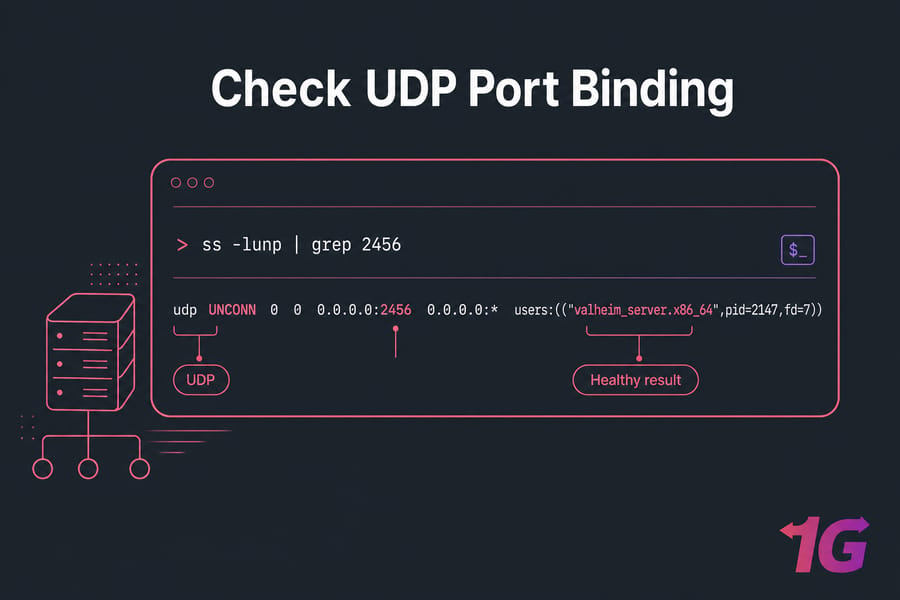
A start script that "looks fine" in a console window doesn't mean the server bound to its ports. Verify at the OS level.
Windows checks
Get-Process valheim_server -ErrorAction SilentlyContinue
netstat -ano | findstr "2456 2457 2458"
Open Task Manager too and look for valheim_server.exe. If netstat shows nothing on those ports, the process either crashed after launch or failed to bind. Our guide on how to check open ports in Windows covers the syntax variations.
Linux checks
ps aux | grep valheim_server
ss -lunp | grep -E '2456|2457|2458'
systemctl status valheim
The -u flag in ss matters — it filters UDP. If you use TCP flags you'll see an empty result and panic for no reason. If you've wrapped the server in a service unit, manage Linux services with systemctl walks through status, restart, and boot behavior. You can also cross-check with our guide to check open ports in Linux.
What a healthy startup looks like
A working Valheim server writes a steady sequence to console: Steam initialization, world load, then a line confirming the game server has connected and registered. If output stops partway or repeats a retry loop, that's your signal — jump to the logs section.
Valheim dedicated server ports and firewall rules
Here's the part people get wrong more than anything else.
| Port | Protocol | Purpose | Must be open where |
| 2456 | UDP | Primary game port | Host firewall, cloud firewall, router |
| 2457 | UDP | Steam query port | Host firewall, cloud firewall, router |
| 2458 | UDP | Reserved / auxiliary | Host firewall, cloud firewall, router |
Warning: Opening TCP only is the single most common mistake. Valheim needs UDP 2456–2458. If you changed the port with the
-portflag, open that port plus the next two.
Windows Defender Firewall
Create an inbound rule, not just an outbound one. Run PowerShell as administrator:
New-NetFirewallRule -DisplayName "Valheim UDP In" -Direction Inbound -Protocol UDP -LocalPort 2456-2458 -Action Allow
New-NetFirewallRule -DisplayName "Valheim UDP Out" -Direction Outbound -Protocol UDP -LocalPort 2456-2458 -Action Allow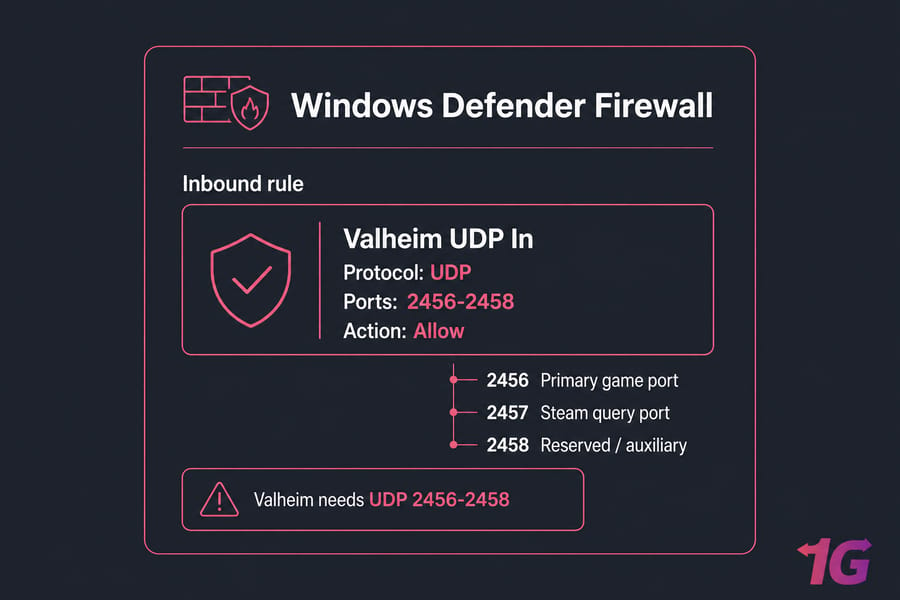
Linux: ufw, iptables, firewalld
# ufw (Ubuntu/Debian)
sudo ufw allow 2456:2458/udp
sudo ufw status verbose

# iptables
sudo iptables -A INPUT -p udp --dport 2456:2458 -j ACCEPT

# firewalld (RHEL/CentOS/Rocky)
sudo firewall-cmd --permanent --add-port=2456-2458/udp
sudo firewall-cmd --reload
If you're on a VPS, there's a second firewall you probably forgot: the provider's cloud firewall or security group. That layer sits outside the OS entirely, so ufw status will look perfect while traffic dies upstream. Our walkthrough on how to configure a firewall on your VPS covers both layers.
Valheim port forwarding, NAT, and public IP problems
Self-hosting from home? This section is where your issue probably lives.
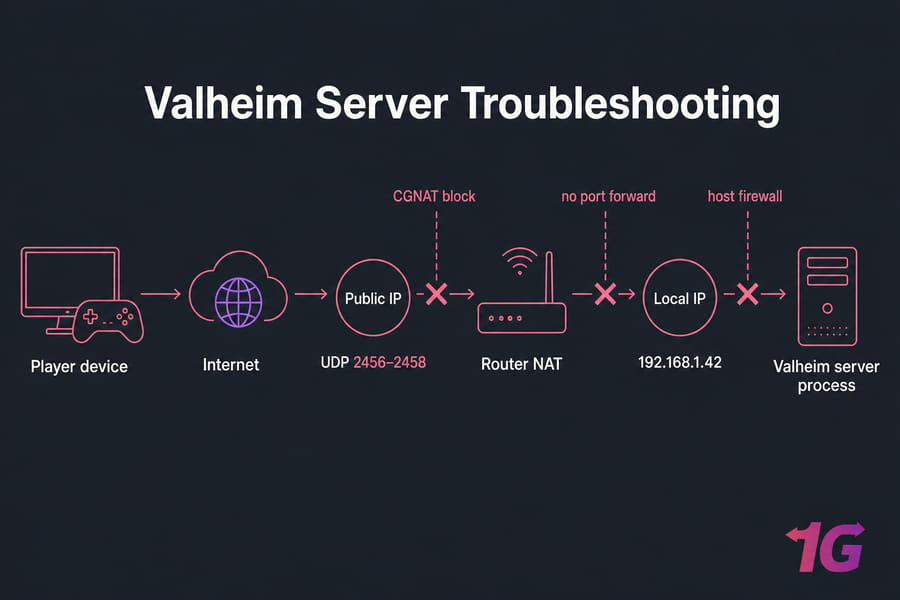
Forward the right ports to the right local IP
In your router admin panel, forward UDP 2456–2458 to the server machine's local IP (something like 192.168.1.42). Then set a DHCP reservation for that machine. Without it, the local IP drifts after a reboot and your forwarding rule quietly points at nothing. That's the "it worked last month" bug.
Step-by-step guidance lives in our port forwarding guide and the more consumer-focused how to port forward on your router.
NAT loopback will lie to you
Pro tip: Many consumer routers don't support NAT loopback (hairpinning). That means connecting to your own public IP from inside your network fails even when external players connect fine — and sometimes the reverse. Always test from a different connection.
If you want the underlying concept, here's what NAT is and why it complicates inbound game traffic.
Are you behind CGNAT?
Log into your router and look at the WAN IP. Compare it to what a public IP checker site reports. If they don't match — or the WAN IP starts with 100.64.x.x — you're behind carrier-grade NAT. No amount of port forwarding will fix that, because you don't own a routable public address.
Options: ask your ISP for a static or public IPv4 (sometimes a small monthly fee), use a tunnel service, or move the world to a host with a real public IP. If your ISP uses CGNAT, a hosted Valheim dedicated server hosting plan removes the problem entirely rather than working around it.
Direct connect and Steam server browser tests
This test splits "unreachable" from "unlisted" in about 30 seconds.
Join by IP and port
In Valheim, open the Start Game screen, select Join Game, then the direct connection option, and enter the address in this format:
203.0.113.45:2456Use the game port, not the query port. If that connects, your server is fine — you have a listing problem, not a connectivity problem.
Steam server browser route
In Steam: View → Game Servers → Favorites → Add a Server. Enter the IP with the query port (typically 2457). If it responds there, Steam can query your server and the in-game list should catch up.
[Image >>> Steam Game Servers window on the Favorites tab with the "Add a Server" dialog open and an IP address entered]
Direct connect works, listing doesn't
Then relax a bit. Check that the crossplay/community flags in your start script match what you expect, clear any active filters in the in-game browser (name filters and "show empty servers" trip people up), and give it another 10 minutes. Listing propagation genuinely lags.
Version mismatch, crossplay, and start script issues
Valheim gets patched. Your dedicated server does not auto-update unless you tell it to.
Quick summary: After any update, check server-versus-client version match before touching network settings. Post-patch "not connecting" is a version problem far more often than a firewall problem.
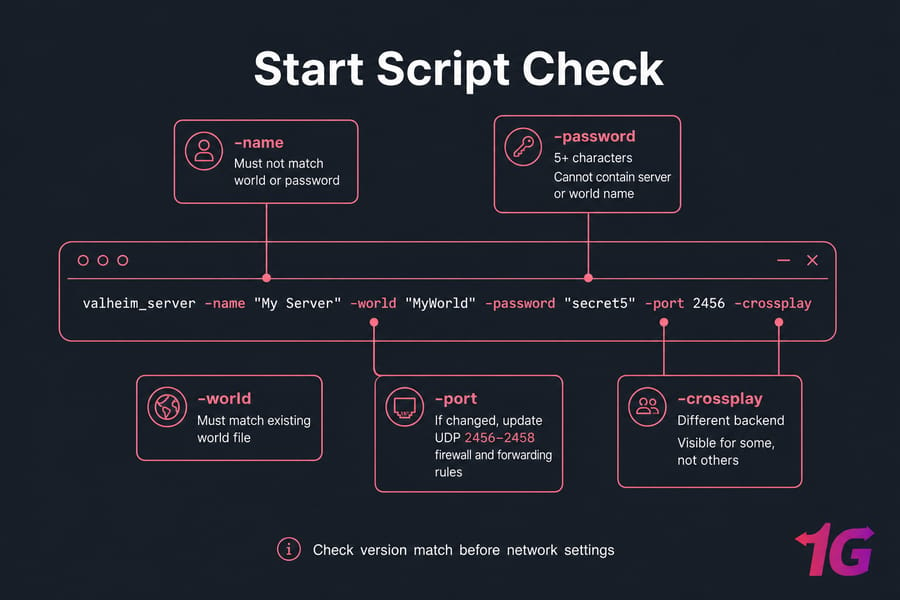
Re-run SteamCMD to update the server app, then restart it. Also validate your start script line by line:
- Server name — must not match the world name or password
- World name — must match an existing world file, or a fresh one gets created (surprise, empty server)
- Password — 5+ characters, not containing the server or world name
- Port — if you change it, update firewall and forwarding rules to match
- Crossplay flag — enabling crossplay routes matchmaking through a different backend; mismatched expectations here cause "visible for some, not others" behavior
- Mods — BepInEx and plugins break after patches. Disable everything, confirm a clean boot, then re-add mods one at a time
Reading Valheim dedicated server logs
Logs turn guesswork into a fix.
On Windows, the console window is your log unless you redirect output to a file. On Linux, capture stdout in your service unit or pipe it to a file, then tail it. If you're running under systemd, journalctl -u valheim -f gives you a live view.
Pro tip: Restart the server, reproduce the failure once, then read the newest lines first. Don't scroll through yesterday's noise.
| Error category | What it usually means | Fix |
| Bind / address in use | Another process holds UDP 2456 | Kill the orphaned process or change the port |
| Steam/network init failure | Outbound blocked or Steam backend unreachable | Allow outbound UDP, verify DNS and connectivity |
| Version / incompatible build | Client and server on different patches | Update via SteamCMD and restart |
| Password validation error | Password too short or contains server/world name | Change the password, restart |
| Plugin or assembly exception | Mod incompatible with current build | Remove mods, boot clean, reintroduce gradually |
For broader diagnosis, see Linux server troubleshooting or, on the Microsoft side, our overview of Windows logs.
Common mistakes that keep Valheim servers offline
| Mistake | Symptom | Fix |
| Sharing local IP instead of public IP | Friends time out immediately | Share the public IP with port 2456 |
| Opened TCP only | Server never appears or queries fail | Open UDP 2456–2458 |
| Router forwards to a stale local IP | Worked before, broke after reboot | Set a DHCP reservation |
| Only tested from the same network | "It works for me" | Test from an external connection |
| Cloud firewall / security group ignored | OS firewall looks correct, traffic still dies | Open UDP at the provider panel too |
| Assuming "not listed" means "offline" | Hours wasted on network settings | Run a direct IP connect test first |
When hosted Valheim server hosting is the better fix
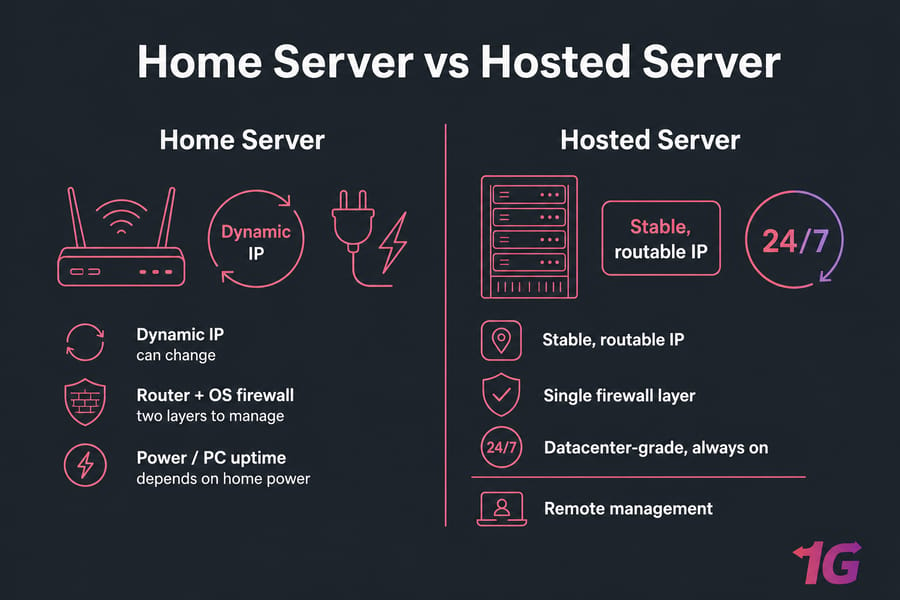
Some problems can't be configured away. If you're behind CGNAT, on a dynamic IP that rotates weekly, running an old router that chokes on UDP forwarding, or dealing with a consumer uplink that drops during peak hours — you're not troubleshooting a bug, you're fighting your ISP.
| Factor | Self-hosted at home | Hosted server |
| Public IP | Dynamic, sometimes CGNAT | Stable, routable |
| Port control | Router + OS firewall | Single firewall layer, remote panel |
| Uptime | Tied to your power and PC | Datacenter-grade, always on |
| Latency for friends | Limited by home upload speed | Choose a location near your group |
| Maintenance | Manual, on your time | Root access plus provider support |
Tired of fixing home-hosted Valheim networking issues?
If your world keeps disappearing because of router rules, changing addresses, or ISP restrictions, a hosted box gives you a stable public endpoint and clean remote management. Compare plans on our Valheim dedicated server hosting page, or look at game VPS hosting for smaller groups. Running a big modded world with 10+ players? A full game dedicated server gives you the headroom.
Want a Valheim world that stays visible and ready to join? Skip the consumer-network limits and get a Valheim dedicated server with a stable public IP, low-latency locations, and full root access — or compare Game VPS options first.

Leave A Comment