

Forex RDP is a remote Windows trading server you access through Remote Desktop Protocol to run platforms like MT4 or MT5 24/7. Traders use it to keep Expert Advisors online, check charts from anywhere and avoid downtime when their home PC is off. Whether it lowers latency depends mainly on how close the server is to your broker.
What is Forex RDP?
Strictly speaking, RDP (Remote Desktop Protocol) is Microsoft's protocol for sending a Windows desktop's screen to another device and passing your keyboard and mouse input back. When hosting companies sell "Forex RDP," they mean a Windows server in a data center that you control over RDP, set up for MetaTrader 4, MetaTrader 5 or cTrader.
Is Forex RDP a protocol, a server or both?
In practice it's both: the protocol is how you connect, and the Windows server is where your platform runs. Most "Forex RDP" products are Windows VPS plans under a trader-friendly name, which is why the label confuses people. Remoting into your own home PC is different, because that setup still goes down when your power or internet fails.
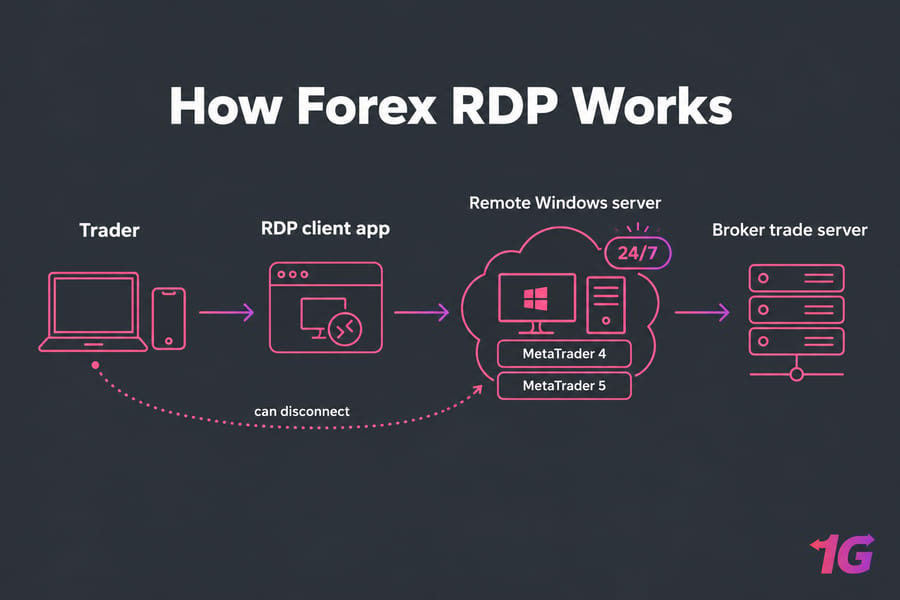
How Forex RDP works for MT4 and MT5 traders
- The provider gives you an IP address, a username and a password.
- You open an RDP client such as Microsoft's Windows App on Windows, macOS, iOS or Android and connect. By default, RDP uses port 3389 over TCP and UDP.
- The Windows Server desktop appears on your screen, and you install MT4 or MT5 there.
- You log in to your broker and attach your Expert Advisors to charts.
- You close the RDP window. The terminal keeps running on the server.
Say you're flying overnight. Your MT5 terminal stays online in the data center, and you can check the trade journal from your phone after you land. EAs only run while the terminal is open with the right charts loaded, so disconnect from the session instead of logging off. Logging off closes MetaTrader.
Why traders use Forex RDP for 24/7 trading
| Problem | How Forex RDP helps |
| PC sleeps, reboots or loses power | The terminal runs on a data center server with backup power |
| Home internet drops during a trade | The server's connection to the broker stays up |
| You need your charts away from your desk | You can connect from a laptop, tablet or phone |
| EAs or copy trading stop overnight | Robots keep running while you sleep |
Latency is the most oversold claim. RDP doesn't speed up orders by itself. Slippage drops when the server sits close to your broker's trade server, because each order travels a shorter distance. For more on the uptime trade-offs, read Forex VPS vs home PC.
Forex RDP vs Forex VPS: what's the difference?
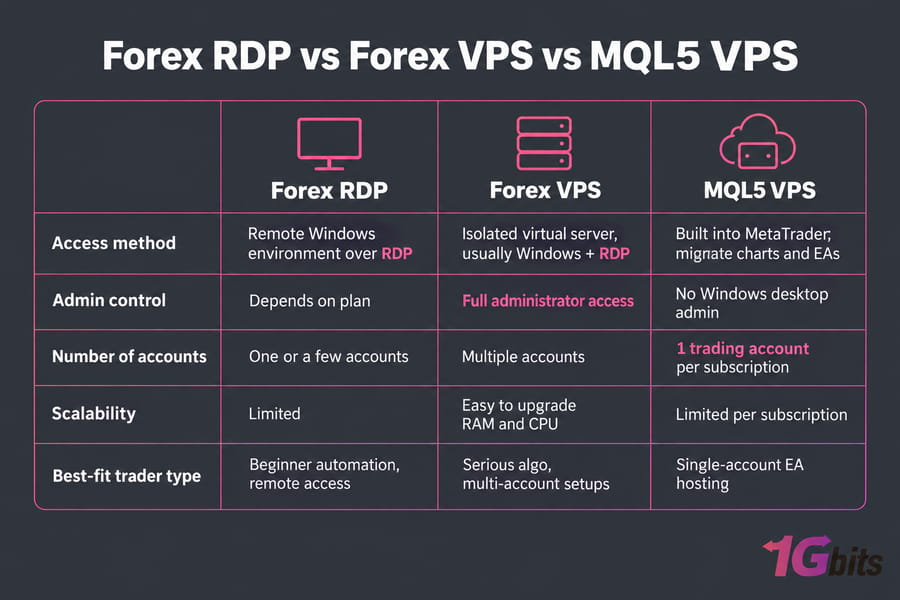
RDP is how you get in, and a VPS is the virtual server you're getting into. Providers still sell them as separate products: Forex RDP plans are usually lighter, while Forex VPS plans offer more dedicated resources and full admin control.
| Factor | Forex RDP | Forex VPS |
| What it is | Remote Windows environment you access over RDP | Isolated virtual server, usually with Windows and RDP access |
| Typical workload | One or two terminals, a few EAs | Multiple terminals and accounts, heavier automation |
| Control | Depends on the plan | Full administrator access |
| Scaling | Limited | Easy to upgrade RAM and CPU |
| Best for | Beginner automation, remote access | Serious algo and multi-account setups |
MetaQuotes' built-in MQL5 virtual hosting is a third option. It migrates your charts and EAs straight from the terminal, but each subscription covers one trading account and you never get a Windows desktop. For a fuller breakdown, see Forex RDP vs Forex VPS, or start with what is Forex VPS. If you run several EAs across several terminals, compare Forex VPS hosting plans before settling on the cheapest RDP package.
Features to look for in a low-latency Forex RDP
| Feature | Why it matters | What to check |
| Server location | Distance to the broker drives ping | Same city or region as your broker's trade server (often London, New York or Amsterdam) |
| Windows Server version | Current MetaTrader builds need a supported OS | A current, patched release |
| RAM and CPU | MetaTrader's hardware needs grow with charts, EAs and other running applications | Room to spare when every terminal is loaded |
| SSD or NVMe storage | Faster terminal startup and history loading | No spinning disks |
| Uptime and dedicated IP | Fewer outages and a stable address for the broker to see | A published uptime commitment |
| Support | Outages during market hours cost money | 24/7 response |
If you trade on one platform only, compare platform-specific MT4 VPS and MT5 VPS plans with a general Forex RDP plan.
Is Forex RDP good for automated trading and Expert Advisors?
Yes, if you run one or a few bots with a moderate number of charts open. A dozen heavy EAs spread across several terminals is a different story: a light plan runs short of RAM and CPU, and the terminals start to freeze. If you trade by hand a few hours a day on a stable home connection, you may not need remote hosting at all. When you're ready to automate, the guide on how to install an Expert Advisor on MT4 & MT5 explains the platform side.
How to set up a Forex RDP for trading step by step
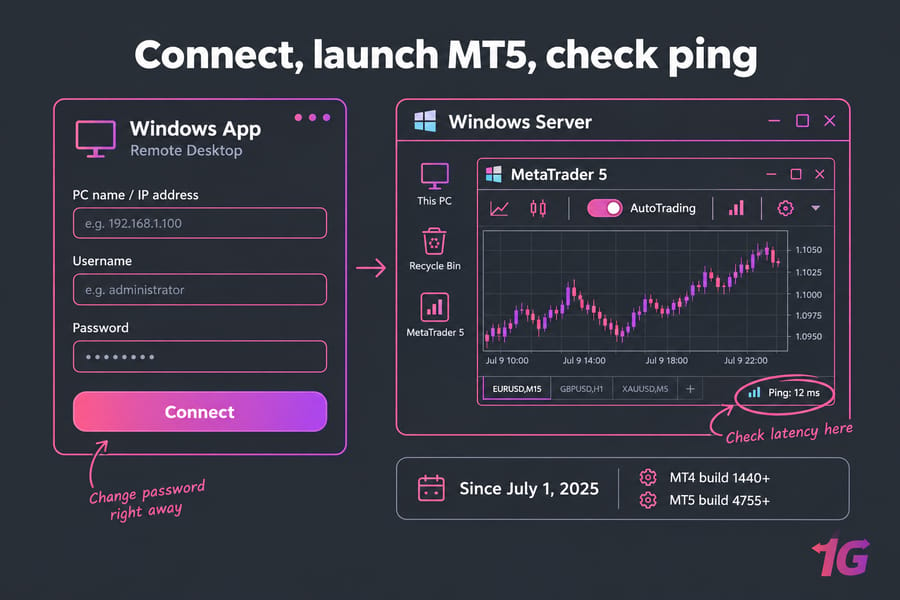
- Connect with your RDP client using the credentials the provider gave you, then change the password right away.
- Install the latest MetaTrader build (our guide shows how to download MT4 safely). Since July 1, 2025, MetaQuotes has only supported MT4 build 1440 and MT5 build 4755 or newer.
- Log in to your broker account (see how to log in to MT4) and check the ping in the terminal's status bar.
- Copy over your EAs, templates and presets, then turn on AutoTrading.
- Turn on Windows updates, schedule reboots for the weekend and keep a backup of your MQL folder.
- Run the setup on a demo account for a few days before you go live.
Common Forex RDP mistakes traders should avoid
- Picking the cheapest plan without counting how many terminals and EAs you'll run on it.
- Choosing a server location far from your broker.
- Expecting RDP alone to lower latency.
- Keeping the default password and leaving port 3389 open to anyone. Automated scanners look for exposed RDP ports constantly.
- Skipping updates, then letting Windows reboot in the middle of a trading session.
The Forex VPS security checklist covers hardening in more detail.
Who should use Forex RDP and who shouldn't?
Forex RDP suits beginner algo traders, people who need MT4 or MT5 open while they travel and anyone running one to a few terminals. Manual traders with a reliable home PC can skip it, and so can anyone who only wants MetaQuotes' one-click hosting. If you need dedicated resources for many accounts, go straight to a Forex VPS.
To keep MT4 or MT5 online when your PC is off, compare Forex RDP hosting plans with the broader VPS for trading range, and pick a location near your broker.

Leave A Comment