
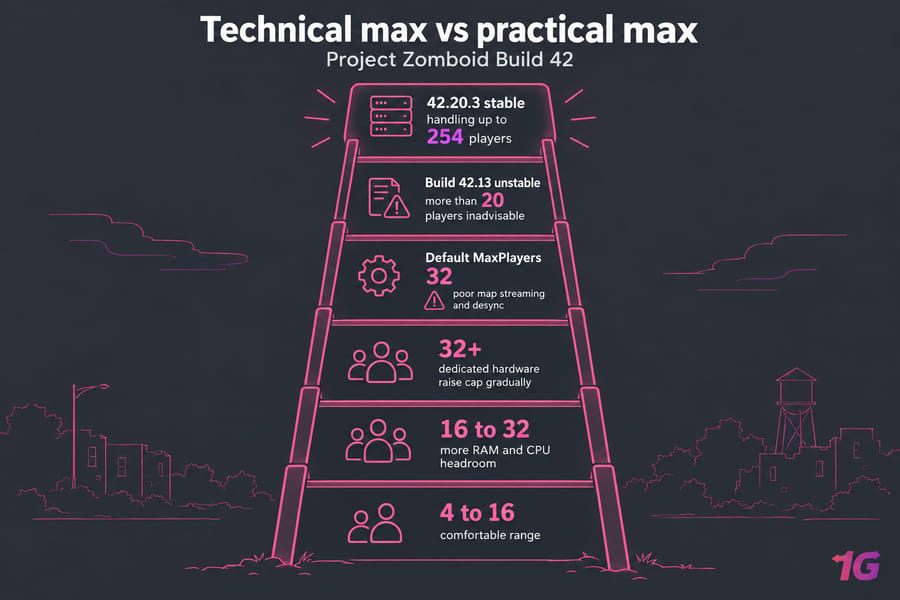
How many players can a Project Zomboid server handle? The current Build 42 stable branch accepts player limits up to 254, but most servers run smoothly far below that. Private groups of 4 to 16 are the comfortable range. From 16 to 32 you need clearly more RAM and CPU headroom, and above 32 you need dedicated hardware and a cap you raise a little at a time.
Project Zomboid server max players: the short answer
What Build 42 changed for multiplayer capacity
Build 42 multiplayer reached the unstable branch in December 2025 as a stress test. The Indie Stone's release notes called it "currently inadvisable to have more than 20 players on a server" and recommended whitelisted servers or Steam co-op. The 42.20.3 stable hotfix in August 2026 improved player-limit handling with support for up to 254 players, let admins join a full server, and fixed memory leaks. The two numbers come from different builds, and neither tells you what your own world can run smoothly.
Why the max player setting is not the full story
You set the cap with MaxPlayers in your server's .ini file. The default is 32, admins don't count toward it, and the tooltip warns that going higher can cause poor map streaming and desync. Each player who wanders off loads another part of the map, so forty players spread across Knox County cost far more than forty sharing one base. If you haven't built the server yet, start with how to set up a Project Zomboid dedicated server.
Project Zomboid player limit: technical cap vs practical cap
A server has three player numbers that are easy to mix up:
| Limit | What it means | Typical value |
| Technical cap | What the server code accepts | Up to 254 (42.20.3+) |
| Configured slot cap | Your MaxPlayers value, or the slots on your hosting plan |
32 by default |
| Stable concurrency | How many players can be online at once without lag | Depends on mods, zombie population and hardware |
A 64-slot plan lets 64 people connect, but it won't make the game run well for all of them. Host Havoc sells 4 to 64 slots, says most groups end up at 8 to 16, and notes that 32+ player servers need more RAM to keep zombie pathfinding smooth at peak times. Size for peak concurrent players. Your Discord member count says little about that.
Project Zomboid server requirements by player count
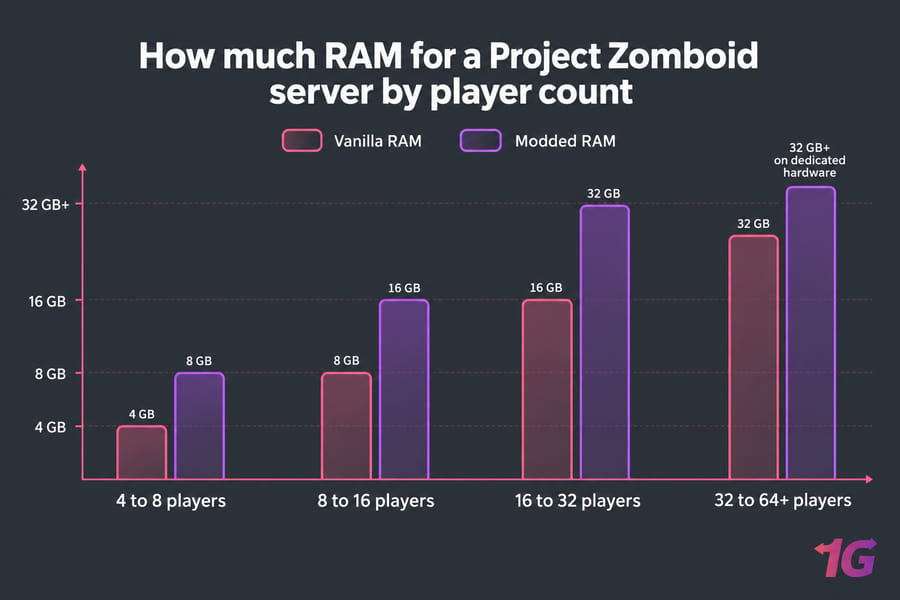
The Indie Stone doesn't publish an official sizing table, so treat these ranges as conservative starting points. The dedicated server runs on Java and is memory hungry; Host Havoc notes the default start script asks for a 16 GB heap. About 4 GB is a common start for a small vanilla server, and heavily modded worlds can need 16 GB or more. Set the heap (-Xmx) to your load and leave a few GB outside it for the OS.
How much RAM for a Project Zomboid server by player count
| Players | Vanilla RAM | Modded RAM | CPU need | Recommended hosting |
| 4 to 8 | 4 to 6 GB | 6 to 8 GB | 2 to 4 fast cores | Small VPS |
| 8 to 16 | 6 to 8 GB | 8 to 16 GB | 4 fast cores | Mid VPS |
| 16 to 20 | 8 to 12 GB | 12 to 16 GB | 4 to 8 cores, high clock | Large VPS |
| 20 to 32 | 12 to 16 GB | 16 to 32 GB | 8+ cores, high clock | Large VPS or dedicated |
| 32 to 64+ | 16 GB+ | 32 GB+ | High-clock dedicated CPU | Dedicated server |
Single-core clock speed matters more than core count. Zombie AI and other simulation work keep a few threads busy, so 4 fast cores beat 16 slow ones. NVMe storage speeds up chunk loading and saves as the world file grows over months. Bandwidth is rarely the bottleneck for a group this size; steady uptime and a stable route matter more. For general memory planning, see how much RAM do I need for hosting.
Performance factors that reduce capacity
- Zombie population (high impact): more zombies means more pathfinding, and "Insane" settings will overload a small server.
- Map spread (high impact): each player far from the others keeps another set of map cells loaded.
- Workshop mods (medium to high impact): mods add memory use and Lua work, and an out-of-sync mod keeps players from joining.
- Vehicles and large bases (medium impact): both add physics work and grow the save file.
- Ping and server location (medium impact): a fast server far from your players still feels laggy to them.
Before you pay for more RAM or CPU, check that the server sits in a region close to most of your players. The dedicated server locations page lists the options.
Project Zomboid hosting: VPS vs dedicated server
| Factor | VPS | Dedicated server |
| Best player range | 4 to 20 | 20 to 64+ |
| Mods | Light to moderate | Heavy mod packs |
| CPU | Shared host, allocated vCPUs | Whole CPU, no noisy neighbors |
| Control | Root access | Root access plus full hardware |
| Cost | Lower, easy to resize | Higher, fixed hardware |
| Fits | Friend groups, private worlds | Public communities, RP servers |
A game VPS hosting plan or a self-managed Linux VPS handles most private groups with room to spare. Move up to Project Zomboid dedicated server hosting when your server is public, runs a heavy mod list, or regularly has 25+ players online. On a long-running world with big map mods, that's usually where a 16 GB heap runs out, and dedicated hardware helps more than adding RAM to a shared VPS. An NVMe dedicated server also keeps old saves quick to load. For the general trade-offs, read VPS vs dedicated server.
Server size guide for common scenarios
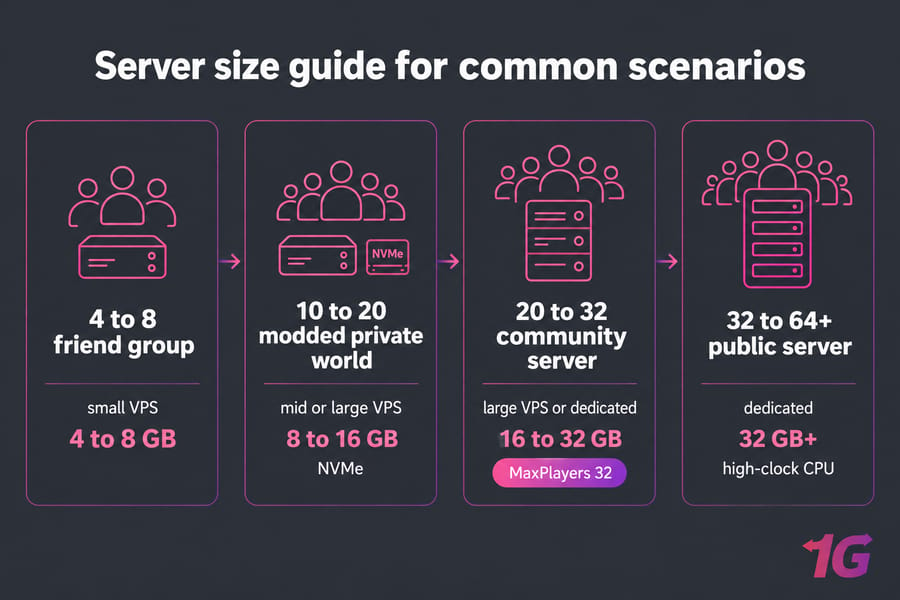
- 4 to 8 friends: a small VPS with 4 to 8 GB is enough, unless you raise zombie population above the default.
- 10 to 20 players on a modded private world: a VPS with 8 to 16 GB and NVMe storage. Test new mods before they go on the live server.
- 20 to 32 players on a community server: a large VPS or entry dedicated server with 16 to 32 GB. Leave
MaxPlayersat 32 for now. - 32 to 64+ players on a public server: a dedicated server with a high-clock CPU and 32 GB+. Raise the cap in small steps and watch for desync after each change.
Lag fixes: signs you need to scale
| Symptom | Likely bottleneck | Fix |
| Crashes or out-of-memory restarts | RAM / heap | Raise -Xmx or get a plan with more RAM |
| Zombies freeze or teleport at peak hours | CPU | Lower zombie population or move to a higher-clock CPU |
| Rubberbanding for everyone | CPU or map spread | Lower the player cap or move to dedicated hardware |
| Lag only for distant players | Ping / region | Move the server closer to most players |
| Delayed doors and looting | Desync above 32 players | Set MaxPlayers back to 32 or lower |
| Players can't join after updates | Workshop or version mismatch | Update the server and clients together |
To diagnose these problems at the VPS level, see VPS performance bottlenecks.
Best Project Zomboid hosting setup for reliable performance
Start vanilla friend groups on a 1Gbits Game VPS. Move modded worlds with 8 to 16 players to a larger Game VPS or Linux VPS, and switch to a Project Zomboid Dedicated Server once the world runs 24/7 with 20 to 32+ players. When you've outgrown a VPS, buy a dedicated server in the region closest to your players.
Sources checked
- The Indie Stone's Unstable 42 MP release notes (December 2025), also on the Steam store page: the 20-player warning.
- VeryGames, pzfans.com, and GTX Gaming coverage of the 42.20.3 hotfix (August 17, 2026): the 254-player limit and the 32-player desync warning.
- PZwiki's server settings page: the
MaxPlayersdefault of 32, which doesn't count admins. Its listed maximum of 100 predates 42.20.3. - Host Havoc's Project Zomboid hosting page: the 4 to 64 slot range, most groups at 8 to 16, about 4 GB for small vanilla, 16 GB+ for heavy mods, and the 16 GB default heap.
The per-tier RAM and CPU ranges in the sizing table are my own estimates, cross-checked against other hosts' published tiers, so treat them as starting points.

Leave A Comment