


An unmetered dedicated server is a physical server with a fixed network port speed — usually 1Gbps or 10Gbps — that lets you transfer data without paying monthly bandwidth overage fees. It's not the same thing as unlimited bandwidth. Your total traffic is still capped by the port speed, the hardware, and your provider's usage policies. So you get billing predictability, not infinite throughput.
If you've ever been burned by a surprise overage charge after a traffic spike, this is the model that fixes that. Let's break down exactly how it works, when it's worth the money, and when you're better off with something cheaper.
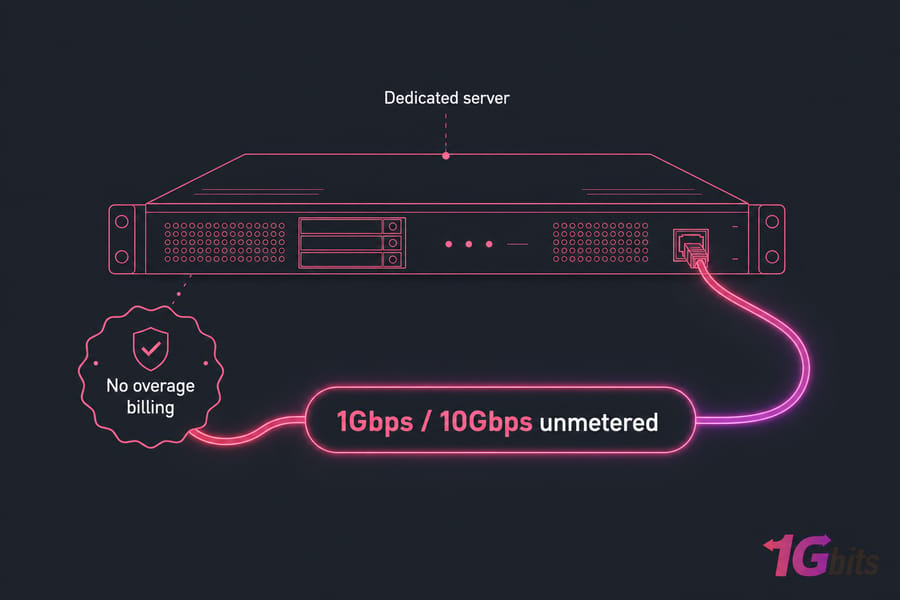
Unmetered dedicated server definition and meaning
Let's start with the two words that matter. "Dedicated" and "unmetered."
What "unmetered" means in hosting
Unmetered means the host doesn't count your monthly data transfer and doesn't bill you when you cross some threshold. You push traffic through the server's network port, and there's no per-terabyte meter running in the background waiting to charge you.
Compare that to a metered plan, where you get, say, 20TB per month and pay extra for every gigabyte beyond it. With unmetered, that meter simply isn't there.
Why dedicated servers are different from shared hosting and VPS
A dedicated server is a single-tenant physical machine. It's yours alone — the whole box, all the CPU, RAM, and disks. Nobody else shares that hardware with you. That matters because on shared hosting or a VPS, you're competing with neighbors for resources, including the network. If you're new to this, here's a good primer on what a dedicated server is before you go deeper.
The simplest way to think about unmetered billing
Think of it like a garden hose. The hose has a fixed diameter (that's your port speed). Water flows through at whatever rate the hose allows. Unmetered means nobody charges you for the total gallons that came out — but you still can't push more water than the hose physically permits.
- Dedicated = the whole physical server is yours.
- Unmetered = no monthly transfer cap and no overage bills.
- The catch = your traffic still flows through a fixed-speed port (1Gbps or 10Gbps).
Key takeaway: Unmetered means no per-terabyte overage billing — not infinite speed. Big difference.
How unmetered bandwidth works on a dedicated server
Here's where most people get tripped up. They confuse how much data they can move with how fast they can move it. These are two separate things.
Port speed vs monthly transfer
Port speed is your ceiling — the maximum rate data can travel in or out, measured in Gbps. Monthly transfer is the total volume you actually move over a month, measured in terabytes. On an unmetered plan, the transfer volume isn't billed. But it's still mathematically limited by the port speed. You can't move more data in a month than the port can physically carry.
If Mbps and Gbps feel fuzzy to you, this quick read on what Mbps means clears it up fast.
How 1Gbps and 10Gbps affect total throughput
The port speed sets your throughput ceiling. A 1Gbps port maxes out around 125 megabytes per second of real-world transfer. A 10Gbps port gives you roughly ten times that. Bump the port up, and you can serve more concurrent users and handle bigger bursts without the pipe choking.
Here's the approximate theoretical maximum monthly transfer if you fully saturated the port 24/7 (which almost nobody does in practice):
| Port Speed | Approx. Throughput | Theoretical Max Monthly Transfer (Fully Saturated) |
| 1Gbps | ~125 MB/s | ~324 TB / month (theoretical) |
| 10Gbps | ~1,250 MB/s | ~3,240 TB / month (theoretical) |
Those numbers are theoretical ceilings, not promises. Real usage is bursty — you'll rarely sit at 100% for a full month.
What can still limit performance besides bandwidth
Bandwidth is only one bottleneck. Your CPU, RAM, and storage all play a role. If you're serving thousands of large files, slow disks will choke you long before the network does. That's why disk speed and IOPS matter. NVMe SSDs run circles around old spinning drives for file-heavy work. The network interface card (NIC), the application stack, even encryption overhead — all of it can cap your real throughput below the port's rated speed.
Stat callout: A single 1Gbps port can theoretically move hundreds of terabytes a month if heavily utilized. Most workloads use a fraction of that.
Unmetered vs unlimited bandwidth: what's the difference?
This is the section that saves people money. Because "unmetered" and "unlimited" get thrown around like they're the same word. They're not.
Why unmetered is not the same as unlimited
Unmetered is honest about its one limit: port speed. No transfer cap, no overage bills, but yes — a fixed pipe. "Unlimited," on the other hand, usually hides its limits in a fair use policy. Push too hard and you might get throttled, shaped, or asked to upgrade. Unlimited often lives on shared or oversubscribed infrastructure where the "unlimited" is really "unlimited until you actually use it a lot."
Common marketing claims to watch for
When you see "unlimited bandwidth" on a cheap plan, read the terms of service. Look for phrases like "subject to fair use," "excessive usage," or "network shaping." Those are the escape hatches. I've seen plenty of folks pick an unlimited plan and get a throttle notice the first time they had a real traffic day.
Warning: Watch for "unlimited" plans that quietly throttle or restrict heavy use. Read the fair use policy before you buy.
Which option is more predictable for heavy traffic
Unmetered wins on predictability. You know your port speed, you know there's no overage bill, and dedicated hardware means no noisy neighbors eating your throughput. For a deeper look at both, this breakdown of unmetered vs unlimited bandwidth is worth your time.
| Model | How Billing Works | Main Limit | Best For | Risk |
| Metered | Fixed allotment + overage fees | Monthly transfer quota | Low, predictable traffic | Surprise overage bills on spikes |
| Unmetered | Flat fee, no transfer billing | Port speed (1/10Gbps) | Steady heavy traffic | Higher base cost, port ceiling |
| Unlimited | Flat fee, "no cap" | Fair use / shaping | Marketing-friendly, light use | Throttling, vague policy |
Metered vs unmetered bandwidth for dedicated hosting
So which billing model should you pay for? It comes down to your traffic pattern.
When metered hosting makes more sense
Got a corporate site, a small SaaS app, or a business portal that moves a few terabytes a month? Metered is often cheaper. You'll never come close to the overage line, so paying for an unmetered pipe is money left on the table.
When unmetered hosting saves money
If your traffic is heavy and steady — streaming, backups, downloads — metered overage fees stack up fast. Unmetered flips that. You pay one flat rate and stop worrying about the counter. Predictable billing beats a nasty end-of-month invoice every time.
Example traffic scenarios
| Scenario | Choose Metered If... | Choose Unmetered If... |
| Corporate Website | Traffic is low and predictable | — |
| Video Streaming | — | You push sustained high volume |
| Backup / Replication | — | Large nightly transfers |
| Small Blog | Traffic stays modest | — |
Still deciding on the bigger picture? Compare dedicated server vs cloud server and read how to choose a dedicated server before you commit.
1Gbps vs 10Gbps unmetered dedicated server plans
Port speed is the real decision here. Not "how much data" — but "how fast."
Who should choose 1Gbps unmetered
A 1Gbps unmetered dedicated server handles a huge range of workloads without breaking a sweat. Most download sites, game servers, mid-sized streaming setups, VPN nodes, and proxy deployments run fine on it. For a lot of buyers, honestly, 1Gbps is plenty.
Who needs 10Gbps unmetered
You reach for 10Gbps when concurrency and burst capacity get serious — large-scale media delivery, CDN-like distribution, bulk data transfer, or thousands of simultaneous users hammering the box. Just remember: the hardware has to keep up. There's no point in a 10Gbps uplink if slow disks or a weak CPU bottleneck you first. You want NVMe RAID and enough cores to feed the pipe.
Pro tip: Choose port speed based on sustained throughput, not just your peak-traffic fantasy. Most sites never saturate 1Gbps.
| Port Speed | Approx Capacity | Best Use Cases | When It's Overkill | Typical Buyer |
| 1Gbps | ~125 MB/s | Streaming, downloads, game servers, VPN, proxies | Low-traffic sites and apps | SMBs, media operators, gaming hosts |
| 10Gbps | ~1,250 MB/s | Large media delivery, CDN traffic, bulk data, high concurrency | Anything under a few hundred TB/month | Streaming platforms, big file hosts |
Providers like 1Gbits offer high-bandwidth unmetered dedicated server plans at both speeds, and if you want a taste of high-throughput without full bare metal, there's also a 10Gbps VPS option.
Best use cases for high bandwidth dedicated server hosting
Who actually needs a high bandwidth dedicated server? Here's where unmetered earns its keep.
Streaming and media delivery
Video streaming, IPTV, and audio platforms chew through bandwidth relentlessly. A server for streaming on an unmetered plan means you never sweat the transfer meter during a viral moment.
Backups, file hosting, and large downloads
Offsite backups, replication, and software distribution all involve moving big chunks of data on a schedule. For file-heavy work, disk I/O matters as much as the network — a proper storage server solution with fast drives makes a real difference.
Game servers, VPNs, proxies, and high-traffic apps
Game servers push constant updates and patches. VPN and proxy nodes carry heavy tunneled traffic. High-traffic web apps need headroom for spikes. A game dedicated server or a VPS for VPN both benefit from unmetered pipes.
| Workload | Why Unmetered Helps | Key Hardware Priorities |
| Streaming / IPTV | Sustained outbound traffic, no overage | Fast NIC, CPU for transcoding |
| Backups / Replication | Predictable cost on large transfers | NVMe/SSD, disk capacity |
| Game Servers | Frequent update downloads | CPU, low latency network |
| VPN / Proxy | Heavy tunneled traffic | CPU, network throughput |
| High-Traffic Apps | Headroom for spikes | Balanced CPU/RAM/network |
One caveat: if your workload is CPU-bound rather than bandwidth-bound (heavy computation, rendering), spend on cores and RAM first. Bandwidth won't fix a CPU bottleneck.
Unmetered dedicated server benefits and limitations
No sugarcoating. Here are both sides.
| Benefits | Limitations |
| Predictable, flat billing — no overage surprises | Port speed is a hard ceiling |
| Great fit for heavy, sustained traffic | Hardware (CPU, disk) can bottleneck before the network |
| Fully dedicated resources, no noisy neighbors | Fair use / abuse policies still apply |
| Stable performance and full root access | Higher base cost than shared or basic plans |
Who should not buy unmetered dedicated hosting
If you run a low-traffic brochure site, a small blog, or an internal tool that barely moves data, skip it. You'll pay for capacity you never touch. A metered plan or even a modest VPS makes far more sense there.
Also worth deciding early: do you want the provider handling the OS and security, or will you manage it yourself? Read up on managed vs unmanaged dedicated servers, then pick a managed dedicated server hosting plan or go unmanaged dedicated server if you're comfortable at the command line.
Quick summary: Unmetered dedicated hosting shines for traffic-heavy, predictable workloads. It's overkill for low-volume sites.
Need predictable high-bandwidth hosting?
If your workload involves streaming, large file delivery, backups, gaming, or sustained traffic, an unmetered dedicated server gives you stable performance without bandwidth overage surprises. View unmetered dedicated servers and see what fits.
Unmetered VPS vs dedicated server: which should you choose?
Both can come unmetered. The difference is what's under the hood.
Resource isolation and performance
A VPS is a virtual slice of a shared physical host. A dedicated server is the whole machine. On a VPS, other tenants can affect your performance during peak load. On dedicated, the CPU, RAM, and NIC are all yours — full isolation.
Network consistency under heavy load
Under sustained heavy traffic, dedicated hardware delivers more consistent throughput. A VPS may share the physical uplink, so your "unmetered" port could see contention when neighbors get busy.
Cost vs control
A VPS costs less and suits moderate traffic or smaller projects just fine. Dedicated costs more but gives you predictable resources and full control — the right call for big bandwidth and demanding workloads.
| Factor | Unmetered VPS | Unmetered Dedicated Server |
| Hardware | Shared host, virtualized | Single-tenant physical machine |
| Resource Isolation | Partial | Full |
| Throughput Consistency | Can vary under load | Consistent |
| Cost | Lower | Higher |
| Control / Root Access | Yes, within the VM | Full bare metal control |
| Best For | Moderate traffic, smaller projects | Heavy, sustained, predictable traffic |
For a fuller comparison, see dedicated server vs VPS and bare metal server vs VPS. If VPS looks like the right size, there's an unmetered VPS option too.
How to choose the right unmetered dedicated server
Here's the checklist I'd run through before buying anything.
- Profile your traffic. Estimate sustained transfer and peak bursts. This tells you whether 1Gbps or 10Gbps fits.
- Pick your port speed. Don't over-buy. Most workloads live happily on 1Gbps.
- Match CPU and RAM to the job. Streaming needs transcoding power; backups need less. Size for the workload, not the brochure.
- Choose the right storage. NVMe/SSD for file-serving and databases; large HDDs for cheap backup capacity.
- Check DDoS protection and network reputation. A clean network and solid mitigation keep you online when someone comes knocking.
- Read the fair use and abuse policy. "Unmetered" still has terms. Know them before you sign.
- Decide managed vs unmanaged. Managed if you want hands-off; unmanaged if you run your own stack.
- Pick your OS. A Linux dedicated server for most web and open-source stacks, or a Windows dedicated server for .NET, MSSQL, or Windows-only apps.
- Consider location. Closer to your users means lower latency. Check available dedicated server locations.

Ready to shortlist? You can buy a dedicated server with flexible hardware and global locations.
Common mistakes when buying an unmetered server
Assuming unmetered means no limits at all
It doesn't. Port speed is a real ceiling, and fair use policies exist. Unmetered removes the transfer meter — nothing more.
Ignoring uplink speed and hardware bottlenecks
People obsess over the port and forget the disks. If you're serving big files, storage I/O will bottleneck you long before a 1Gbps port does. Match your hardware to your actual workload.
Buying for price alone
The cheapest plan often skimps on DDoS protection, uplink quality, or support. Check the provider's support responsiveness and read why 1Gbits before you decide on price alone. A few dollars saved isn't worth downtime when traffic hits.
Compare unmetered dedicated server plans at 1Gbits
Explore high-bandwidth dedicated servers with flexible hardware, multiple global locations, Linux or Windows options, and port speeds built for traffic-heavy workloads. Managed and unmanaged paths, dedicated resource control, and 24/7 support. Browse dedicated server plans.

Leave A Comment