
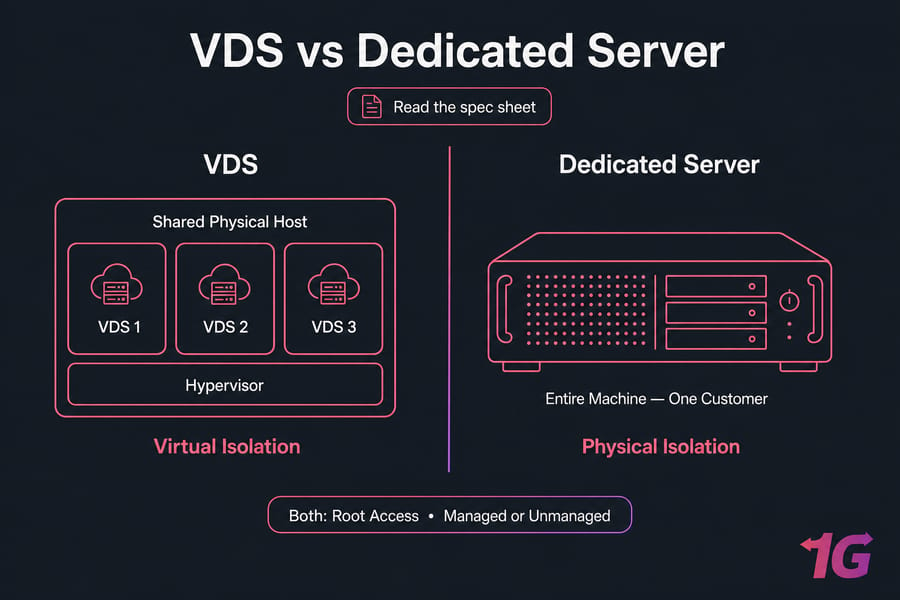
Here's the quick version: a VDS is a virtual machine with allocated resources running on shared physical hardware, while a dedicated server gives one customer the entire physical machine. Both can offer root access. Both come in managed and unmanaged flavors. But where your resource isolation actually happens is completely different — and that's what the whole VDS vs dedicated server debate comes down to.
VDS vs Dedicated Server: Key Differences at a Glance
Now, one thing I need to flag right away. "VDS" isn't a standardized product name. Some hosts call a KVM VPS a "VDS." Others reserve the term for plans with dedicated vCPU allocations. So don't trust the label — read the spec sheet. If you want the deeper breakdown on that, see our guide on VPS vs VDS differences.
VDS and dedicated server comparison table
| Factor | VDS | Dedicated Server | Why It Matters |
| Physical tenancy | Shared host node | Entire machine, one customer | Determines true isolation |
| CPU | vCPU (shared, capped, or pinned) | Full physical cores | Affects sustained performance |
| RAM | Allocated, sometimes overcommitted | Full physical, often ECC | Impacts stability under load |
| Storage | Local or shared, IOPS may be capped | Your drives, your RAID | Database and I/O workloads |
| Network | Often shared uplink | Dedicated port options | Bandwidth-heavy use |
| Hardware access | None (hypervisor layer) | Full (IPMI, RAID, PCIe) | Custom builds, GPUs |
| Provisioning | Fast, often minutes | Slower, may need setup | Deployment speed |
| Scaling | Resize or migrate | Hardware change/migration | Growth path |
| Failure domain | Shared node | Single machine | Risk concentration |
| Typical cost | Lower entry price | Higher | Budget planning |
The short verdict by workload
- Choose VDS: when flexibility and cost efficiency matter more than physical isolation.
- Choose dedicated: when predictable sustained performance and full hardware control are essential.
Key takeaway: VDS means dedicated virtual allocation — not necessarily dedicated physical hardware.
Before you compare anything, know these four requirements: peak CPU and RAM demand, storage capacity and required IOPS, monthly data transfer and port speed, and whether your app needs physical hardware access or strict isolation. Advertised RAM alone tells you almost nothing. Understanding why these differences exist starts with how a VDS is built.
What Is a Virtual Dedicated Server (VDS)?
A VDS is a virtual machine created on a physical host through a hypervisor. The guest OS runs in its own isolated environment, and you typically get root access, your choice of OS, and the ability to reboot or reinstall on demand. VDS plans usually advertise reserved RAM, reserved storage, and a stronger CPU allocation than a bog-standard shared VPS.
Read: What Is a Virtual Dedicated Server
How does VDS hosting work?
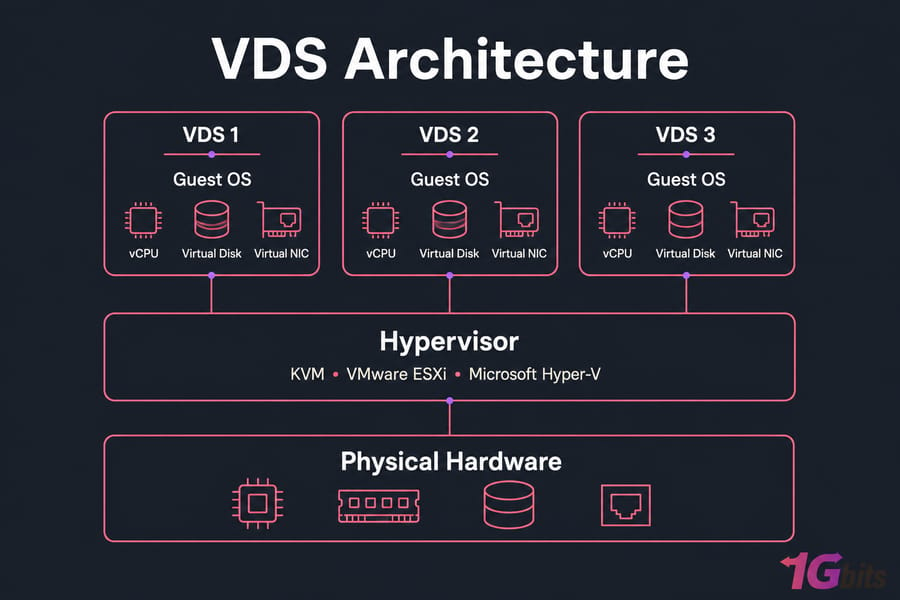
Under the hood, a hypervisor — KVM, VMware ESXi, or Microsoft Hyper-V — carves the host node into virtual machines. Your VDS sees virtual CPUs, virtual disks, and a virtual NIC. It behaves like its own server. That's the whole point of the abstraction.
Warning: providers don't use "VDS" and "VPS" consistently. Verify CPU, RAM, storage, and network guarantees before you buy.
Is a VDS the same as a VPS?
Sometimes yes, sometimes no. One host's "VDS" is another host's "premium KVM VPS." The terms overlap, and the marketing team decides the label. Judge the plan on its actual specs. If a virtualized environment fits, review VDS hosting plans by CPU allocation, RAM, storage, and bandwidth — not by the name.
What does "dedicated resources" mean in a VDS plan?
It should mean guaranteed RAM and storage, plus a CPU allocation that isn't fighting a dozen neighbors. But "dedicated" here refers to reserved virtual resources, not exclusive physical hardware. Want the fundamentals? See how virtual server hosting works. Now let's contrast this with an entire physical machine.
What Is a Dedicated Server?
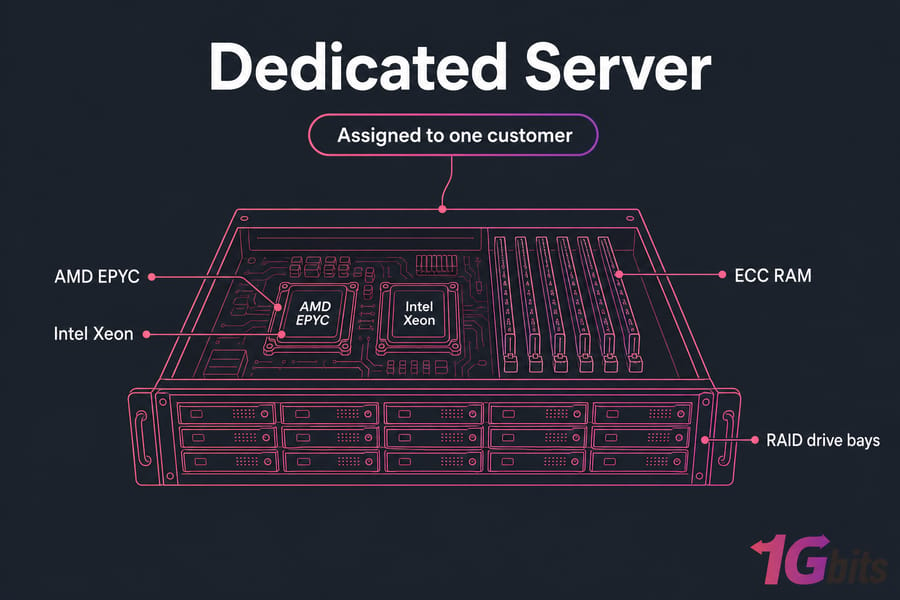
A dedicated server is one physical machine assigned entirely to you. The CPU sockets, memory, local disks, and hardware interfaces aren't sliced into customer VMs by the provider. It's yours. You get root or administrator access, though that's OS control — not a key to the data center.
How does dedicated server hosting work?
You install your OS directly on the metal — Ubuntu, Debian, AlmaLinux, Windows Server, whatever you need. Remote management usually comes via IPMI, iDRAC, or KVM-over-IP so you can reboot or reinstall without a support ticket. Hardware like AMD Ryzen, EPYC, or Intel Xeon with ECC RAM and RAID is entirely under your control.
Is dedicated hosting the same as bare metal?
Mostly, yes. People use "dedicated server" and bare metal and dedicated server terminology interchangeably. Some providers use "bare metal" to signal cloud-style automated provisioning. And no — a dedicated server can absolutely run virtualization. For a deeper foundation, read what a dedicated server is.
Managed vs unmanaged dedicated server options
Unmanaged means you handle the OS, patching, security, and monitoring. Managed shifts a lot of that to the provider — for a fee. The defining difference between VDS and dedicated isn't the control panel or OS. It's where resource isolation happens.
Physical Server vs Virtual Server Architecture and Isolation
On a VDS, a hypervisor sits between you and the hardware. That layer schedules CPU time across all guests on the host node. Most of the time you won't notice it. Under contention, though, you might see CPU steal time climb — a sign your vCPU is waiting for a real core.
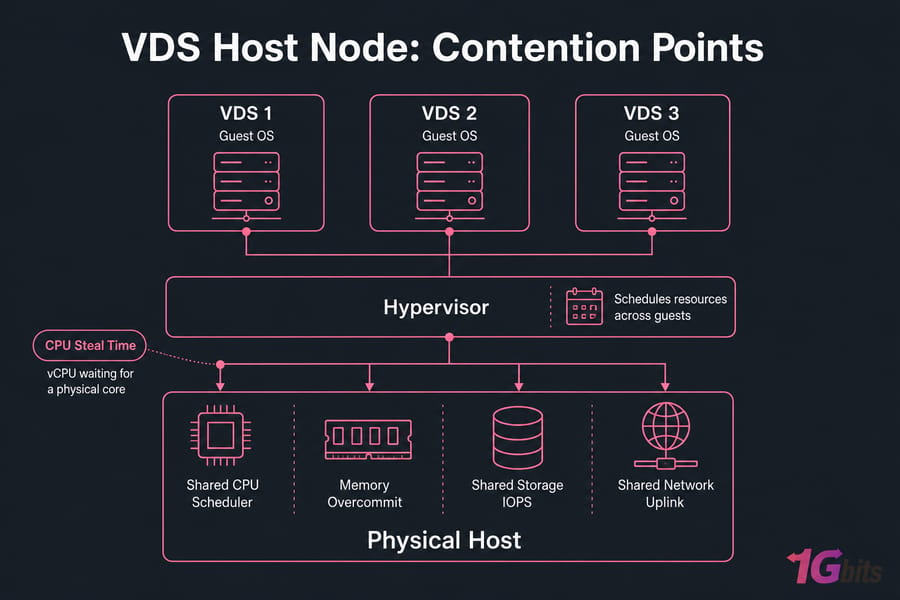
Hypervisor access versus direct hardware access
A dedicated server talks to the hardware directly. No scheduler deciding when you get a turn. That's the core reason dedicated hardware delivers steadier sustained numbers. Curious about the mechanics? Our overview of server virtualization covers it well.
Dedicated vCPU versus dedicated physical CPU cores
This trips people up constantly. A vCPU is a scheduled virtual processor. A "dedicated vCPU" means the provider reserves that slice for you — but implementation varies, so verify it. A physical core on a dedicated server is a real core with a real clock speed. Not the same thing.
| Layer | VDS question | Dedicated-server question |
| CPU | Shared, capped, pinned, or dedicated? | Model, generation, cores, clock? |
| RAM | Guaranteed? Ballooning allowed? | Capacity, ECC, DIMM layout? |
| Storage | Local or shared? IOPS cap? | Drive type, RAID, controller? |
| Network | Shared uplink? Transfer quota? | Port speed, commit, overage? |
Pro tip: ask whether vCPUs are shared, capped, pinned, or mapped to dedicated physical cores. The answer changes everything.
One caveat worth stating plainly: even a dedicated server shares upstream network and data-center infrastructure. A "1 Gbps port" doesn't guarantee 1 Gbps continuous throughput. Architecture affects performance, but plan quality and workload behavior determine the real-world result.
VDS Performance, Security, and Reliability Compared
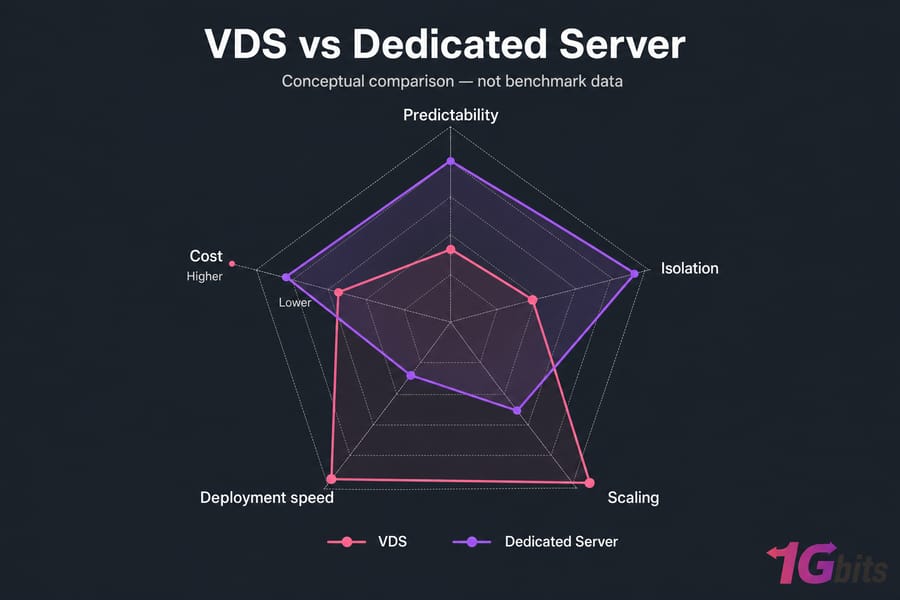
Here's something most comparison articles won't tell you: a modern, well-provisioned VDS can beat an old entry-level dedicated box. Hardware generation matters more than the label. On NVMe storage with recent EPYC cores, a VDS can be genuinely fast.
Is a dedicated server always faster than a VDS?
No. But dedicated hardware gives more predictable sustained performance because nobody else touches your cores or disks. Bursty apps often fit a VDS just fine. Steady, resource-hungry workloads lean dedicated.
Which option provides stronger tenant isolation?
Dedicated wins on physical tenancy separation — there's simply no other tenant on the box. But that doesn't make it "100% secure." You still harden the OS, patch, and lock down access. On a VDS, hypervisor security and patching matter too.
Warning: RAID, snapshots, and high availability are different controls. None of them replaces an independent backup.
What benchmarks should you run?
Don't trust marketing numbers. Test it yourself. Use fio for storage IOPS and latency, iperf3 for network throughput, and iostat plus vmstat to watch CPU steal time and I/O under load. Then run an application-level load test that mirrors your real traffic. Our roundup of server benchmarking tools walks through the setup. Neither hosting type replaces backups or a proper high-availability design.
VDS Pricing, Dedicated Server Cost, and Scalability
VDS plans usually win on entry price because one physical host is split among several customers. That efficiency gets passed to you. Dedicated pricing reflects the full hardware — CPU class, drives, RAM, bandwidth, plus any OS license or control panel.
But the sticker price lies. What matters is total cost of ownership:
Monthly TCO = server fee + software licenses + backup + management + bandwidth overages + estimated administration cost
Which server is easier to scale?
VDS scaling can be quick — resize CPU and RAM, sometimes without much downtime. But it's not always live, and it depends on the provider. Dedicated upgrades may need a hardware swap or migration. Check dedicated server pricing against your growth curve. Idle capacity you never use is money burned.
Quick summary: compare total monthly operating cost, not only the advertised server fee.
Windows Server and commercial control-panel licensing add up. So do setup fees and backup storage. Price only becomes meaningful when it's attached to a workload.
VDS and Dedicated Hosting Use Cases
Let's make this concrete with real workloads.
| Workload | Preferred option | Deciding metric |
| Small/medium sites, agencies | Usually VDS | Cost, easy resizing |
| Growing SaaS | VDS → dedicated later | Sustained CPU/IOPS |
| Database/analytics | Dedicated | IOPS, RAM footprint |
| Game server | Depends | Single-core clock, latency |
| Streaming/file delivery | Depends | Port speed, transfer |
| Virtualization lab | Dedicated | Nested virtualization |
| Dev/staging | VDS | Cost, quick teardown |
Example 1 — Agency, 30 client sites, moderate bursts. Critical resource: RAM and easy resizing. Recommended: VDS. Changes if any single client site grows into a sustained-traffic monster.
Example 2 — SaaS with heavy database writes. Critical resource: sustained IOPS and CPU. Recommended: dedicated. Changes if writes stay light and bursty — then a VDS holds up fine.
Example 3 — Modded game server. Critical resource: single-thread clock speed and route latency. Recommended: high-clock dedicated core for big player counts. Changes for small servers, where a strong VDS with game server hosting works. DDoS protection matters more than the label.
Example 4 — Video platform, high outbound transfer. Critical resource: port speed and monthly transfer allowance. Recommended: dedicated with a committed port for streaming workloads. Changes if delivery is CDN-fronted and origin load stays modest.
Pro tip: for gaming, CPU clock, route latency, DDoS protection, and mod load usually matter more than the VDS/dedicated label.
Running Docker? Both handle it. Dedicated gives more headroom; VDS is efficient for moderate deployments. Use cases narrow the field — the next process turns them into a defensible decision.
How to Choose Between a VDS or Dedicated Server
Five steps. Do them in order.
Step 1 — Size your resources. Average and peak CPU, single-thread vs multithread demand, working-set RAM, disk capacity plus IOPS and latency, port speed, and monthly transfer.
Step 2 — Measure variability tolerance. Can the app absorb occasional resource variance? Is sustained compute mandatory? Is latency sensitive?
Step 3 — Decide control and isolation. Need custom kernels, hypervisors, RAID layouts, IPMI, GPU/PCIe, or nested VMs? That points to dedicated.
Step 4 — Compare deployment and scaling. Provisioning time, vertical upgrade path, migration downtime, geographic expansion, automation.
Step 5 — Calculate TCO. Infrastructure, licensing, management, backup, migration, and labor.
| Requirement | Prefer VDS | Prefer Dedicated |
| Lowest entry cost | ✓ | |
| Rapid provisioning | ✓ | |
| Bursty workload | ✓ | Depends |
| Sustained high CPU | ✓ | |
| Custom storage/RAID | ✓ | |
| Dedicated GPU/PCIe | ✓ | |
| Frequent resizing | ✓ | |
| Physical isolation | ✓ | |
| Hosting nested VMs | Depends | ✓ |
| Max predictable IOPS | Depends on guarantee | ✓ |
Need help sizing? See choose a dedicated server configuration or choose virtual server resources. Still between options? Compare both using the same CPU, RAM, storage, and bandwidth requirements.
Common Hosting Comparison Mistakes and Provider Questions
I've watched buyers make the same errors for years:
- Assuming "VDS" guarantees physical CPU cores. It usually doesn't.
- Comparing vCPU count directly against physical core count.
- Ignoring processor model and generation entirely.
- Comparing storage capacity but not IOPS or latency.
- Overlooking network transfer limits.
- Treating root access as hardware control.
- Forgetting to price management, licenses, and backups.
- Assuming snapshots are backups. They're not.
- Ignoring migration path and downtime.
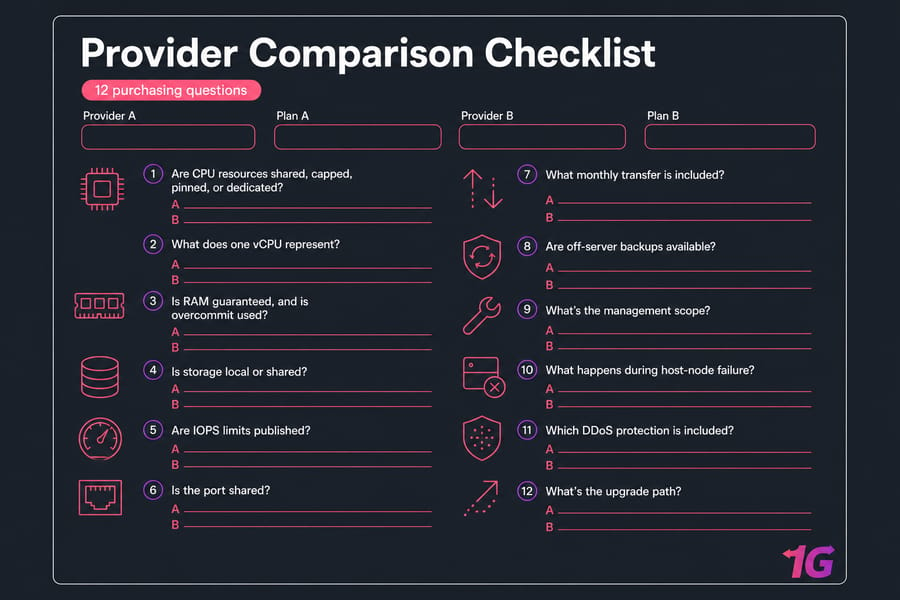
Before you buy, ask the provider: Are CPU resources shared, capped, pinned, or dedicated? What does one vCPU represent? Is RAM guaranteed, and is overcommit used? Is storage local or shared? Are IOPS limits published? Is the port shared? What monthly transfer is included? Are off-server backups available? What's the management scope? What happens during host-node failure? Which DDoS protection is included? What's the upgrade path?
Whether you go managed or handle it yourself changes your answers — compare managed vs unmanaged dedicated hosting and managed vs unmanaged virtual hosting. With specs verified, the final choice gets easy.
VDS or Dedicated Server: Final Verdict
The virtual dedicated server vs dedicated server question doesn't have one universal winner. It depends on your workload.
Choose a VDS if: cost efficiency matters, your workload is moderate or bursty, quick deployment and easy resizing are priorities, and physical hardware control is unnecessary.
Choose a dedicated server if: CPU, RAM, storage, or network use is high and sustained; predictability and physical tenancy matter; you need custom hardware, RAID, GPU, or your own hypervisor; or you're consolidating multiple services or VMs.
One more thing. If uptime and geographic resilience are non-negotiable, multiple smaller nodes or a cloud architecture may beat one large server. Dedicated hosting alone doesn't create high availability.
Final takeaway: choose VDS for efficiency and flexibility; dedicated for sustained performance and hardware control.
Review live configurations and verify every resource guarantee before ordering explore VDS hosting or browse dedicated server configurations.

Leave A Comment