
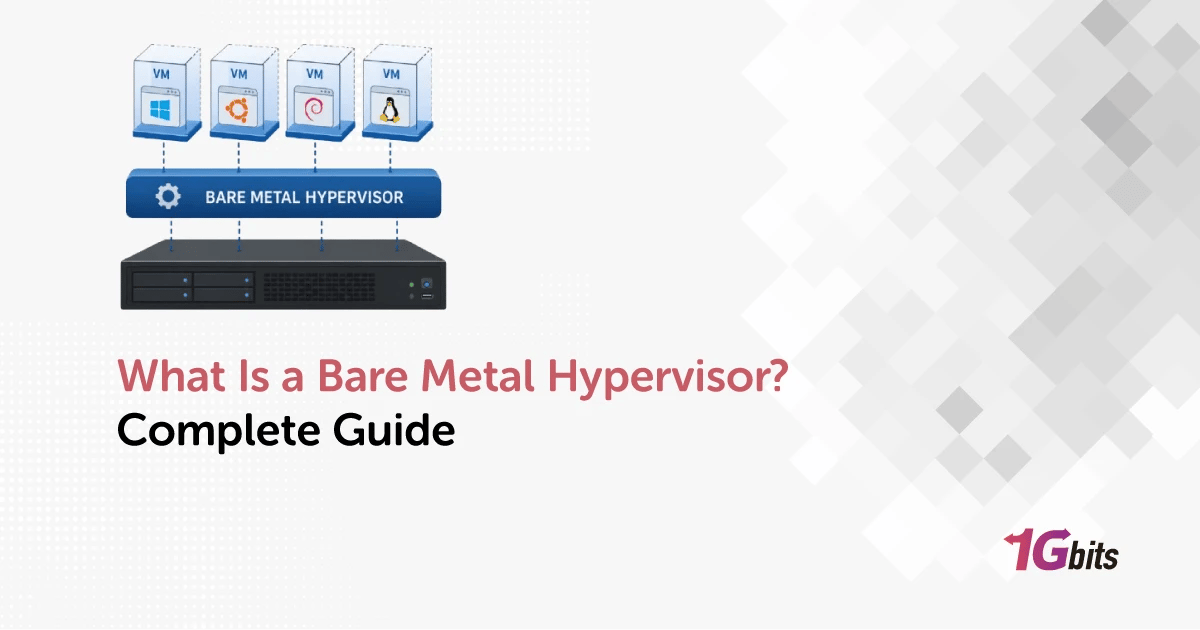
A bare metal hypervisor, also called a Type 1 hypervisor, is virtualization software that runs directly on a physical server instead of inside a conventional host operating system. It allocates CPU, memory, storage, and networking to isolated virtual machines, making it suitable for data centers, private clouds, VDI, and production hosting.
What Is a Bare Metal Hypervisor?
Common examples include VMware ESXi, Microsoft Hyper-V, KVM-based platforms, Xen, XCP-ng, and Nutanix AHV.
Before you begin
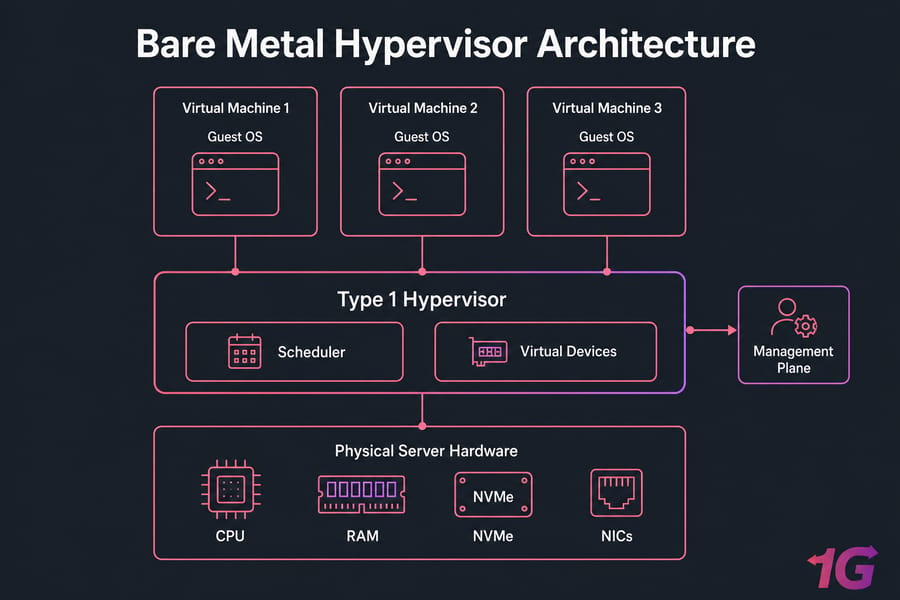
A few terms make the rest of this easier. The physical host is the server supplying CPU, RAM, storage, and network ports. A virtual machine is a software-defined computer with its own virtual hardware. The guest OS runs inside that VM. A host OS is the ordinary desktop or server operating system that sits underneath a Type 2 hypervisor. And "bare metal" just means the software talks to hardware directly — it does not mean the hypervisor is magically free of kernels, drivers, or management services. If you want the wider context, start with what virtualization means.
Is a bare metal hypervisor the same as a Type 1 hypervisor?
Yes, in practice. Type 1, native, and bare metal all describe the same architecture: the virtualization layer boots first and owns the hardware. You'll also see the older academic term virtual machine monitor (VMM) in documentation and research papers. Same idea.
Bare metal hypervisor vs bare metal server
This is where a lot of confusion starts, honestly. A bare metal server is hardware — a single-tenant physical machine, like a dedicated server you rent or own. A bare metal hypervisor is software you install on that hardware. Not every bare metal server runs a hypervisor; plenty of them just run one operating system and one workload.
Does a Type 1 hypervisor have an operating system?
It doesn't need a general-purpose host OS beneath it, but it absolutely contains OS-like machinery. ESXi has VMkernel. KVM is the Linux kernel with virtualization extensions loaded. Hyper-V loads its hypervisor beneath a Windows management partition. Xen boots first and then starts a control domain (Dom0) that handles drivers and management. Anyone claiming Type 1 hypervisors have "no OS at all" is skipping the interesting part.
How Does a Type 1 Hypervisor Work?
The hypervisor takes ownership of the hardware at boot, then hands out slices of it to each VM. Here's the sequence in plain terms:
- The server powers on and UEFI (or legacy BIOS) initializes firmware and devices.
- The hypervisor kernel loads and claims CPU, memory, storage controllers, and NICs.
- Management services start and read VM configuration definitions.
- Each VM gets vCPUs, a memory allocation, virtual disks on a datastore, and virtual NICs.
- Guest instructions execute on the physical CPU using hardware-assisted virtualization, with the hypervisor trapping only the privileged operations it must handle.
- Second-level address translation keeps each VM's memory pages separate from its neighbours.
- Virtual switches carry east-west and north-south traffic; storage abstraction presents virtual disks.
- The scheduler decides which vCPU gets physical time, moment by moment.
What hardware-assisted virtualization actually does
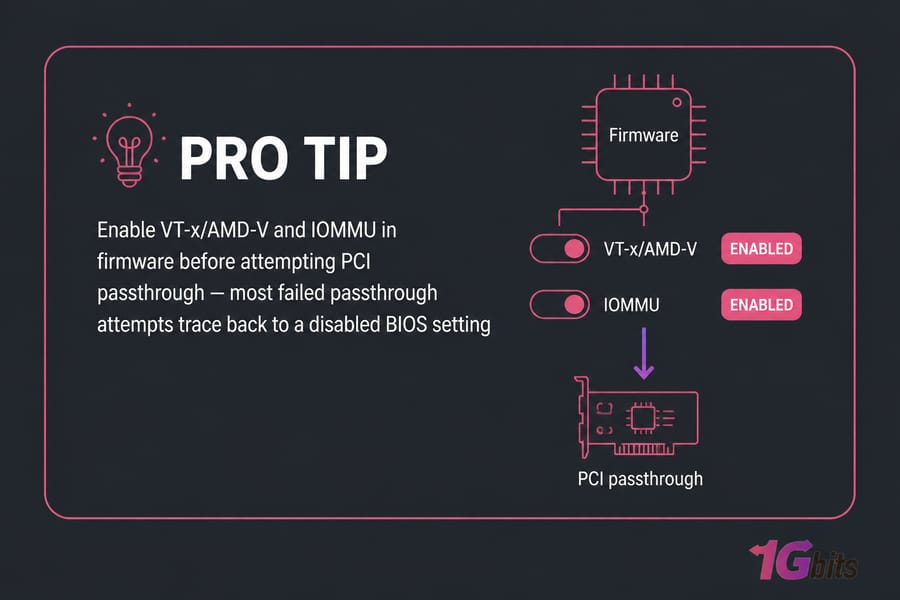
Intel VT-x and AMD-V give the CPU a dedicated mode for guest execution, so most guest instructions run natively rather than being emulated in software. That's the single biggest reason modern virtualization performs well. IOMMU — Intel VT-d or AMD-Vi — does the same job for devices, remapping DMA so a VM with a passed-through GPU or NIC can't scribble over host memory.
Physical resources and their virtual equivalents
| Physical resource | Virtual equivalent | Managed by |
| CPU cores/threads | vCPU | Hypervisor scheduler, NUMA-aware placement |
| Physical RAM | Virtual memory, ballooning, page sharing | Memory manager |
| NVMe/SSD/RAID array | Virtual disk on a datastore | Storage stack, thin provisioning |
| Physical NIC | Virtual NIC on a virtual switch, or SR-IOV VF | Virtual networking layer |
| GPU or accelerator | Passed-through or mediated device | IOMMU groups |
Management plane vs guest workloads
Keep these mentally separate. The management plane — vCenter, the Hyper-V host, the Proxmox web UI, Xen Orchestra — is how you define and control VMs. The guest workloads are what your users actually touch. They should live on different networks, and I'll come back to why in the security section. For a deeper look at the silicon side, see our notes on virtualization hardware requirements.
Type 1 vs Type 2 Hypervisor: Key Differences
A Type 2 (hosted) hypervisor runs as an application on top of Windows, macOS, or Linux. VirtualBox, VMware Workstation, VMware Fusion, and Parallels Desktop all work this way. That extra layer isn't a flaw — it's a trade-off.
| Attribute | Type 1 (bare metal) | Type 2 (hosted) |
| Installation layer | Directly on hardware | Inside an existing OS |
| Host OS required | No conventional host OS | Yes |
| Typical use | Production, data center, hosting | Laptops, labs, training |
| Performance | Generally better under sustained multi-VM load | Fine for a handful of VMs; competes with desktop apps |
| Isolation | Thinner stack, smaller attack surface | Inherits the host OS attack surface |
| Hardware access | Direct, with passthrough and SR-IOV options | Mostly emulated or mediated |
| Management | Central consoles, APIs, clusters | Local GUI |
| High availability | Supported on most platforms | Not a design goal |
| Examples | ESXi, Hyper-V, KVM, Xen, AHV | VirtualBox, Workstation, Fusion, Parallels |
When is hosted the right answer? On your laptop. If I'm testing an Ubuntu upgrade path or spinning up a throwaway Windows VM for a client demo, Workstation or VirtualBox wins on convenience every time. It's also the sane choice for classrooms and for anyone who needs their desktop OS running alongside the VMs. Comparing desktop options? Our virtual machine software roundup covers that ground.
Bare Metal Hypervisor Examples and Platforms
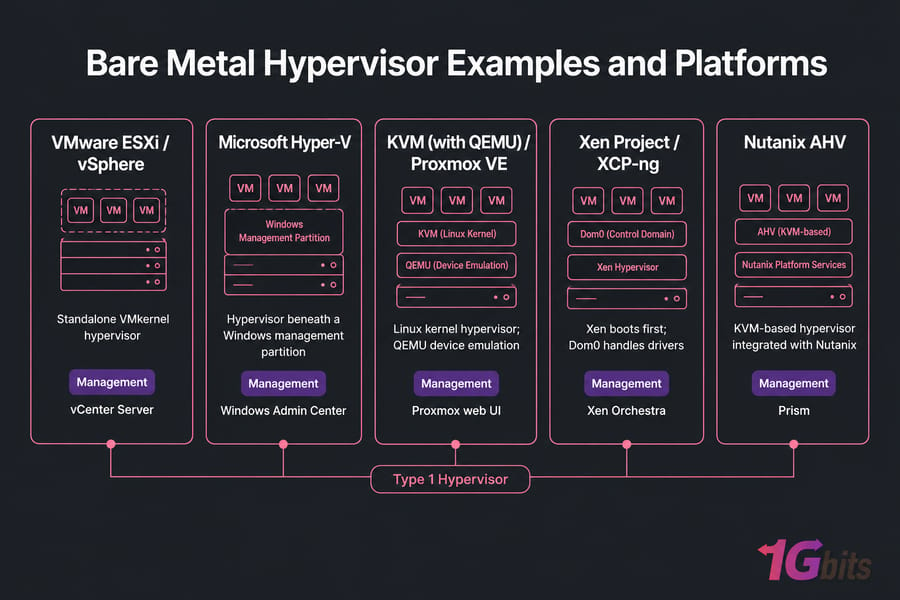
| Platform | Architecture | Management ecosystem | Licensing approach | Best suited to | Main consideration |
| VMware ESXi / vSphere | Standalone VMkernel hypervisor | vCenter Server, vMotion, HA, DRS | Commercial subscription; verify current Broadcom terms | Enterprises with existing VMware skills and tooling | Strict hardware compatibility list and licensing changes |
| Microsoft Hyper-V | Hypervisor loads beneath a Windows root/management partition | Windows Admin Center, Failover Clustering, SCVMM | Tied to Windows Server licensing | Windows-heavy environments and Active Directory shops | Linux guest tuning takes more effort |
| KVM (with QEMU) / Proxmox VE | Linux kernel becomes the hypervisor; QEMU handles device emulation | libvirt, virt-manager, Proxmox web UI, OpenStack | Open source; optional paid support subscriptions | Linux-competent teams wanting flexibility without license fees | You own more of the design and operations work |
| Xen Project / XCP-ng | Xen boots first, Dom0 control domain handles drivers | Xen Orchestra, xe CLI | Open source; commercial support available | Multi-tenant hosting, teams already familiar with Xen | Smaller talent pool than KVM or VMware |
| Nutanix AHV | KVM-derived hypervisor inside Nutanix HCI | Prism | Bundled with the Nutanix platform | Organizations buying hyperconverged infrastructure | Evaluate as a full stack, not a cheap standalone hypervisor |
One nuance worth nailing down: Proxmox VE is not a synonym for KVM. It's a virtualization management platform that installs on bare metal and uses KVM for full virtual machines and LXC for containers. Similarly, Hyper-V is a genuine Type 1 hypervisor even though you administer it through Windows — the hypervisor sits below that Windows partition, not above it. KVM's classification generates the most arguments; it's normally treated as Type 1 because the Linux kernel itself becomes the hypervisor, though the architecture clearly differs from a standalone product like ESXi.
Want head-to-head detail? See KVM vs Hyper-V, KVM vs VMware, Proxmox vs VMware, and our list of the best Linux hypervisors.
Benefits of Bare Metal Virtualization
The value isn't just speed. It's control.
- Predictable isolation. Each VM has its own kernel and its own failure domain. A crashed application server doesn't take its neighbours with it.
- Server consolidation. Six lightly used physical boxes become six VMs on one properly sized host, with less power draw and fewer things to patch at the firmware level.
- Centralized allocation. Compute, memory, storage, and networking get assigned from one console instead of one rack unit at a time.
- High availability and live migration where the platform and shared storage support it — patch a host without dropping workloads.
- Templates and cloning that turn "provision a new server" from a two-day task into a two-minute one.
- PCI passthrough and SR-IOV for GPU rendering, ML inference, or packet-heavy network appliances that need near-native device access.
Here's the discipline part. Take a 32-core, 256 GB host. On paper it swallows a dozen application servers. In reality you reserve capacity for the hypervisor itself, for workload peaks, for storage latency headroom, and — if the host is part of a cluster — for failover. Better utilization is not the same as unlimited oversubscription. More about the broader landscape in types of virtualization.
Hypervisor Limitations and Security Risks
| Risk | Operational impact | Mitigation |
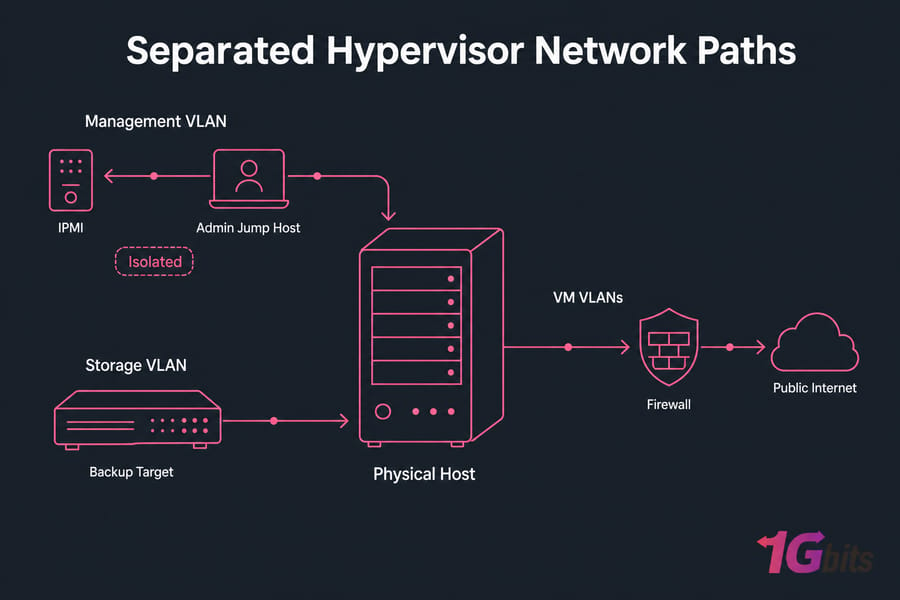
| Management interface exposed to the internet | Full compromise of every VM on the host | Dedicated management VLAN, firewall rules, VPN or jump host, MFA where supported |
| VM escape vulnerability | Rare, but breaks the isolation boundary entirely | Patch hypervisor and firmware promptly, disable unused virtual devices, enable Secure Boot and TPM where available |
| Resource contention | Noisy-neighbour slowdowns, latency spikes | Reservations and limits, NUMA-aware sizing, monitor CPU ready time and storage latency |
| Single-host failure | Consolidation concentrates outage blast radius | Clustering, spare capacity, tested recovery runbooks |
| Snapshot sprawl | Disk exhaustion and degraded I/O | Time limits on snapshots; treat them as short-lived rollback points only |
| Vendor lock-in | Proprietary formats and licensing changes complicate exit | Document a migration path, prefer portable disk formats, keep exports tested |
| Backup failure | Unrecoverable data loss | Independent backup target, scheduled restore tests, offsite copies |
Say it with me: a snapshot is not a backup. Snapshots live on the same storage as the VM and depend on the same chain of files. If the datastore dies, they die with it. Pair your virtualization plan with real bare metal server backup and proper bare metal server security hardening. East-west traffic between VMs also bypasses your perimeter firewall entirely, which surprises people the first time they audit it.
Server Virtualization Use Cases
Where Type 1 virtualization genuinely earns its keep:
- Private cloud and internal infrastructure — self-service VMs behind your own firewall.
- Tier separation — one host running a web VM, an application VM, and a database VM, each patched and restarted independently.
- VDI — pooled desktops for remote staff.
- Dev, QA, and disposable test environments — clone a template, break it, delete it.
- Disaster recovery — replicate VMs to a second site and boot them there.
- Legacy application isolation — that ancient Windows app nobody dares migrate, sealed in its own VM.
- Multi-tenant hosting and virtual firewalls or routers as appliances.
When bare metal without virtualization is better
Skip the hypervisor when a single latency-sensitive workload already consumes the whole machine — a high-frequency trading engine or a heavily loaded database with tight tail-latency targets. Same answer for software licensed to physical hardware or tied to a USB dongle, and for accelerators that can't be passed through reliably. If you're weighing containers instead, read virtualization vs containerization — containers share a kernel and are not hypervisors, no matter how often the two get lumped together.
How to Choose a Type 1 Hypervisor
Work through this before you fall in love with a brand:
- Guest OS support for every workload you plan to run
- Current licensing model — verify it the week you buy, not from a two-year-old blog post
- Hardware compatibility list for your exact server, RAID controller, and NICs
- Your team's existing skills (a platform nobody can troubleshoot at 3 a.m. is a liability)
- Centralized management, HA, and live migration requirements
- Backup vendor support and API/automation coverage
- GPU or device passthrough needs
- Cluster and shared storage design
- Support model and a documented exit strategy
Hardware readiness checklist
| Component | Minimum consideration | Production recommendation | Why it matters |
| CPU | 64-bit with VT-x or AMD-V enabled | Enough physical cores for peak vCPU demand; NUMA-aware layout | No virtualization extensions, no Type 1 hypervisor |
| RAM | Enough for all guests plus hypervisor | ECC memory with headroom for failover | RAM is usually the first hard ceiling |
| Storage | Redundant array | Enterprise NVMe/SSD with high endurance; RAID or replicated datastores | Storage IOPS and latency cap VM density more often than cores do |
| Network | One NIC | Multiple NICs or VLAN trunking; separate management, storage, VM traffic | Isolation and throughput |
| Firmware | Current stable BIOS/UEFI | IOMMU enabled, Secure Boot and TPM 2.0 where required | Passthrough and platform integrity |
| Remote management | KVM-over-IP access | IPMI, iDRAC, or iLO on an isolated network | You'll need console access when the network config breaks |
How many VMs can one server run?
There's no universal vCPU-to-pCPU ratio, so estimate four ceilings and take the lowest:
- CPU limit: host threads ÷ average vCPUs per VM, adjusted for a conservative oversubscription factor
- RAM limit: usable RAM (after hypervisor and failover reserve) ÷ average VM memory
- Storage limit: whichever runs out first — capacity or sustainable IOPS at acceptable latency
- Network limit: sustained plus peak throughput per VM
Nine times out of ten it's RAM or storage latency, not core count. Treat the result as a planning estimate and benchmark the real workload.
If you're at the hardware stage, compare dedicated server options for virtualization or look at VMware dedicated server hosting if ESXi is your target platform. Our guide to choosing a bare metal server provider covers the procurement questions.
Deploying a Hypervisor on a Dedicated Server
Four stages, platform-agnostic.
Step 1 — Confirm the foundations. Check that VT-x/AMD-V and IOMMU are enabled in firmware, that your RAID controller and NICs appear on the platform's compatibility list, and that you have working IPMI/iDRAC/iLO console access before you touch the installer.
Step 2 — Design storage, networking, and access. Decide the RAID level and datastore layout, map VLANs for management, storage, and VM traffic, plan public versus private IP usage, and pick a backup target that isn't on the same host.
Step 3 — Install and lock down the management plane. Apply updates immediately, replace default credentials, enable MFA where the platform supports it, and restrict management access to a VPN or jump host. Never publish an ESXi, Proxmox, or Hyper-V management interface straight to the public internet.
Step 4 — Test before you trust. Build one test VM, install guest tools, benchmark disk and network, take a backup, then actually restore it. Document your VM inventory and the capacity thresholds that trigger a hardware conversation.
One caveat worth stating plainly: hypervisor availability, licensing responsibility, and support scope vary by provider and plan. Confirm all three, plus remote-console access, before you order.
Choosing the Right Virtualization Host
Three things to carry away. First, a bare metal hypervisor is Type 1 architecture running directly on server hardware — the hardware is the bare metal server, the hypervisor is the software on top. Second, pick your platform on ecosystem fit, guest support, compatibility, licensing, and the skills your team already has, not on brand recognition. Third, size the host for peak load, backup windows, and failure reserve, because average demand is a comfortable lie.
For production workloads that need full hardware control, dedicated hardware beats stacking VPS instances. Ready to spec one? Compare dedicated server options , Bare Metal Server Hosting or talk to 1Gbits support about hypervisor compatibility for your build.

Leave A Comment