

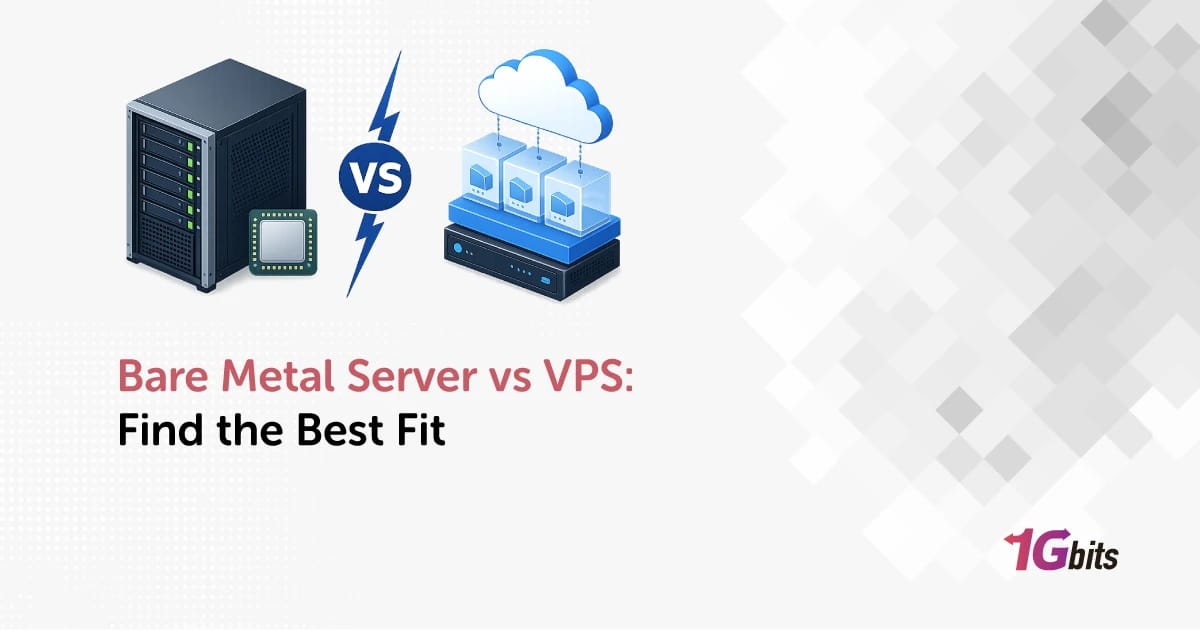
Bare Metal vs VPS at a Glance
Here's the short version: a bare metal server hands you an entire physical machine with dedicated CPU, RAM, and disks. A VPS gives you a virtualized slice of a physical host shared with other tenants. Bare metal wins on raw performance and isolation. VPS wins on price, speed of deployment, and easy scaling for small-to-mid workloads.
If you're hosting a WordPress site, a SaaS MVP, or a trading bot, a VPS is almost always enough. If you're running a large database, a busy game server, or a GPU-heavy AI workload, you'll want bare metal. We'll get into the why behind that in a minute but here's the at-a-glance table first.
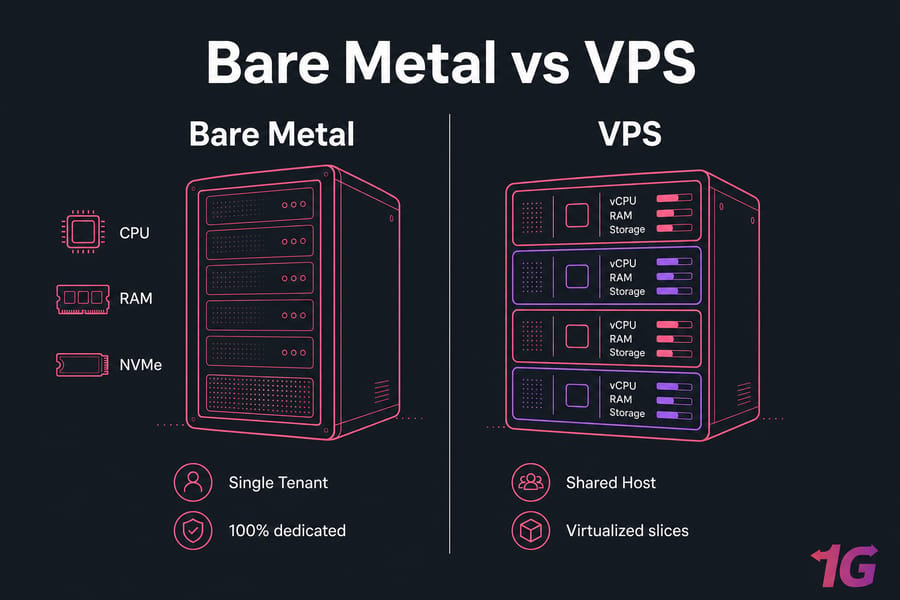
Quick answer for busy buyers
VPS = flexibility, lower cost, fast provisioning. Bare metal = dedicated hardware, predictable performance, full isolation. Pick based on your sustained workload, not your worst-case fear of a traffic spike.
Bare metal vs VPS comparison table
| Factor | Bare Metal Server | VPS | Best For |
| Hardware model | Entire physical server, single tenant | Virtualized slice of a shared host | Depends on workload |
| Resource allocation | 100% dedicated CPU, RAM, NVMe | Reserved vCPU and RAM via hypervisor | Bare metal for heavy sustained loads |
| Performance predictability | Very high | Good, but exposed to noisy neighbors | Bare metal for latency-sensitive apps |
| Provisioning time | Minutes to hours | Minutes | VPS when you need it now |
| Scalability | Vertical (hardware swaps), slower | Fast vertical upgrades, easier horizontal | VPS for fast growth |
| Hardware customization | Choose CPU, RAID, GPU, disks | Limited to provider's VPS templates | Bare metal for special builds |
| Isolation | Single-tenant, physical | Hypervisor-level (KVM, VMware) | Bare metal for compliance |
| Entry price | Higher | Lower | VPS for tight budgets |
| Best fit workloads | Large DBs, games, AI/GPU, enterprise apps | Websites, SaaS, dev, WordPress, trading | — |
| Management overhead | Higher (or pay for managed) | Lower out of the box | VPS for lean teams |
Need the commercial path? Browse VPS hosting plans if you want flexibility, or look at bare metal server hosting if you want dedicated power.
What Is a Bare Metal Server?
A bare metal server is a physical machine rented to a single customer. No hypervisor in the middle. No other tenants sharing the CPU. You get raw access to the hardware — root, BIOS-level configurations, RAID setups, NVMe drives, the works.
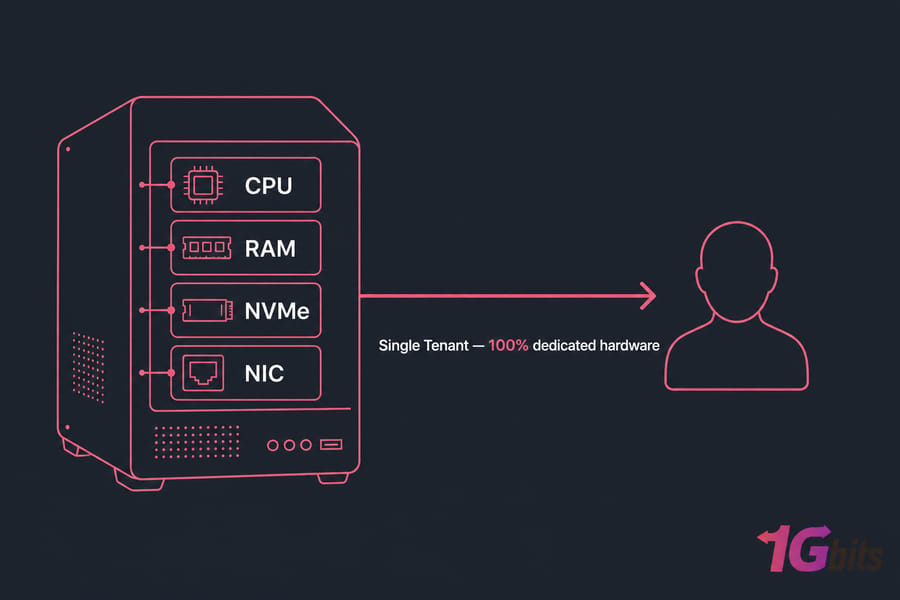
How bare metal hosting works
The provider racks the hardware, installs your OS of choice, and hands you full root or administrator access. You decide what runs on it. No virtualization layer eats CPU cycles. No neighboring VM steals disk I/O during a backup job.
Bare metal server benefits
- Dedicated CPU and RAM — every cycle is yours
- Predictable performance under sustained load
- Hardware customization (RAID levels, NVMe, GPU options)
- Single-tenant isolation for compliance-sensitive workloads
- Full root access down to firmware
Bare metal limitations to know
It's not all upside. Bare metal costs more upfront. Provisioning takes longer than spinning up a VPS — often minutes to a few hours instead of seconds. Scaling means physically swapping hardware or migrating, which is slower than clicking "upgrade plan." And if you don't have the ops chops, you'll want a managed plan.
Quick note: bare metal isn't always identical to a "traditional dedicated server." The terms overlap heavily, but bare metal usually implies modern, API-driven provisioning and cloud-style billing on physical hardware. If you want the full nuance, this bare metal vs dedicated server breakdown is worth a read.
What Is VPS Hosting?
A VPS virtual private server is a virtual machine carved out of a physical host using a hypervisor like KVM or VMware. You get a guaranteed slice of vCPU, RAM, and storage. To you, it behaves like a standalone server with root access. To the underlying host, it's one of several tenants sharing the same hardware.
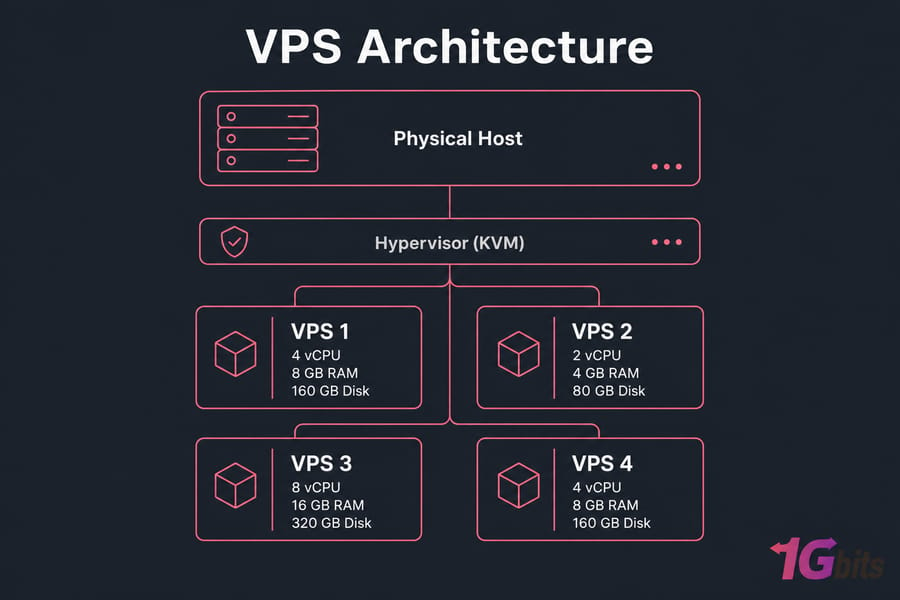
How VPS hosting works
The hypervisor enforces resource boundaries between VMs. Your 4 vCPU and 8 GB RAM are reserved for you. The OS thinks it's running on its own machine. You get a dedicated IP, root access, and you can install whatever stack you want.
VPS hosting benefits
- Fast deployment — usually under five minutes
- Lower entry cost than bare metal
- Easy scaling — bump CPU or RAM with a reboot
- Full root access on Linux or Windows
- Wide stack support — Docker, Kubernetes, cPanel, Plesk, you name it
Want the long-form explanation? See what is VPS hosting for a deeper walkthrough.
VPS limitations to know
Performance ceiling is real. If your host neighbor decides to mine crypto or run a runaway process, you might feel it — that's the noisy neighbor effect. The hypervisor itself adds a small overhead. And on busy hosts, disk I/O and network can become contended during peak hours. Good providers mitigate this with strict resource enforcement, but it's never zero.
Difference Between Bare Metal and VPS
The core difference is physical vs virtual. But buyers care about consequences, not labels. Here's what actually changes for you.
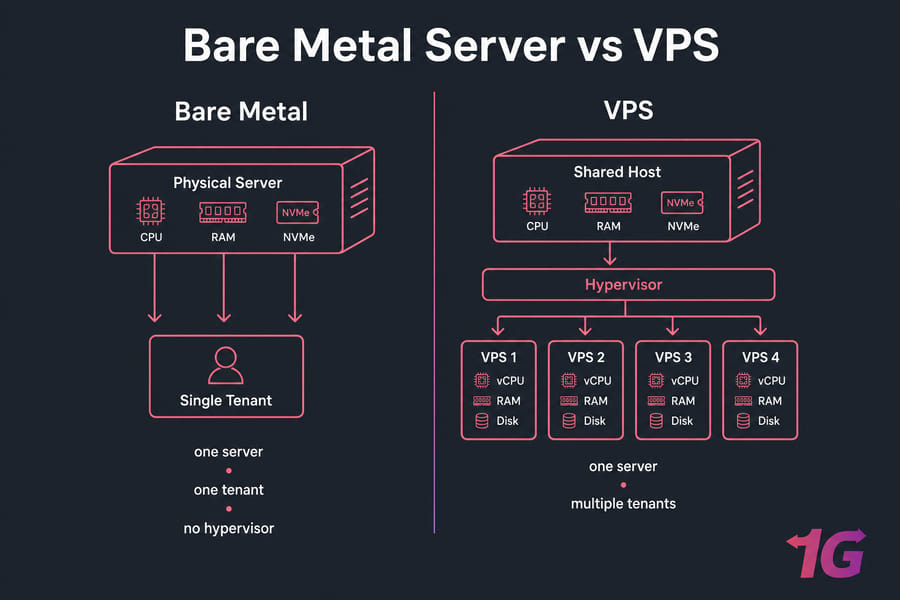
Physical hardware vs virtualized resources
On bare metal, your CPU is the CPU. On a VPS, your vCPU is a scheduled slice of a physical core. For most web apps the difference is invisible. For high-frequency trading, real-time analytics, or large in-memory databases, that scheduling overhead matters.
Single-tenant vs multi-tenant environments
Bare metal is single-tenant. Nobody else is on your hardware. VPS is multi-tenant by design — and that's fine for most workloads, but it's a non-starter if your compliance framework requires physical isolation.
Provisioning and infrastructure flexibility
A VPS spins up in minutes. Bare metal takes longer to deliver but offers more hardware choices: RAID setup, GPU add-ons, custom NIC speeds. If you're comparing this against other infrastructure options, the dedicated server vs VPS piece covers adjacent ground worth scanning.
Bare Metal vs VPS Performance Comparison
Performance is where this comparison gets real. Let's go factor by factor.
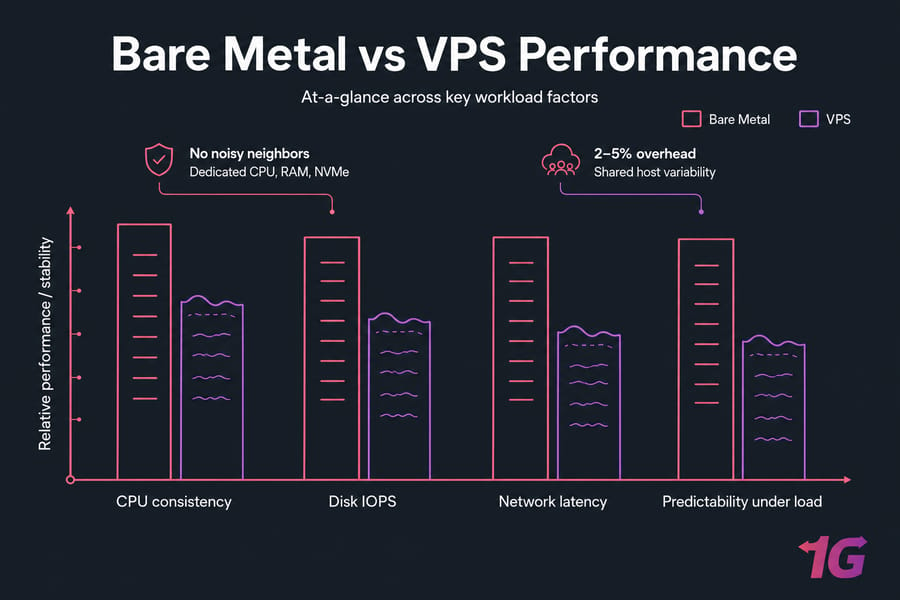
CPU, RAM, and storage performance
Bare metal gives you full access to physical CPU cores with no scheduler in the way. RAM is yours alone. NVMe drives deliver their full IOPS without competing tenants. VPS performance is good — often very good on modern KVM hosts with NVMe — but it's always one step removed from the metal.
Virtualization overhead and noisy neighbor risk
Modern hypervisors are efficient. The CPU overhead is small, maybe 2–5% on typical workloads. The bigger risk is the noisy neighbor effect — when another VM on the same host hammers shared disk or network resources. Reputable providers throttle aggressively to prevent this, but you can't eliminate it on a shared host. On bare metal? There are no neighbors.
Latency-sensitive and high-IO workloads
If you're running a database with thousands of writes per second, a game server where every millisecond of latency matters, or AI training that pegs the GPU for hours, bare metal is the right call. For everything else — a WordPress site doing 50k visits a day, a SaaS backend, a Node.js API — a properly sized VPS handles it fine. For tuning tips on the VPS side, this guide on VPS performance optimization is solid.
Pro tip: if your workload has steady heavy CPU or disk use 24/7, bare metal often delivers better long-term value per dollar. If it's bursty or moderate, VPS wins on flexibility.
Bare Metal vs VPS Cost Comparison
VPS plans start at a few dollars a month. Bare metal starts considerably higher — usually somewhere between $80 and $300+ depending on specs. But entry price isn't the whole story.
Upfront and monthly pricing differences
A small VPS runs $5–$30/month. A mid-tier VPS with serious specs lands in the $40–$120 range. Bare metal typically starts around $90–$200/month for entry hardware and climbs from there. The gap narrows fast once you stack up VPS resources to compete with a physical box.
Cost efficiency by workload size
| Scenario | VPS Value | Bare Metal Value | Recommendation |
| Small website, <20k visits/month | Excellent | Overkill | VPS |
| Mid-size SaaS, ~100k req/day | Strong | Marginal | VPS |
| Heavy WordPress, 500k+ visits/month | Tightening | Strong | Either, lean bare metal if growing |
| Large database, sustained IO | Poor at scale | Excellent | Bare metal |
| Game server, 64+ concurrent players | Marginal | Strong | Bare metal |
Hidden costs: management, scaling, migration
This is where buyers get burned. A cheap unmanaged VPS becomes expensive if you don't have a sysadmin. Bare metal often needs managed dedicated server hosting unless your team handles patching, security hardening, and monitoring in-house. Migration between platforms also costs you in engineering time. Factor that in before optimizing for the lowest sticker price.
Warning: the cheapest hosting can become the most expensive if you outgrow it in three months and have to migrate in a hurry.
Bare Metal vs VPS for Security and Isolation
Security depends more on how you configure your server than on whether it's bare metal or virtual. That said, the isolation models are genuinely different.
Dedicated hardware and compliance needs
If you're handling regulated data — PCI-DSS for payments, HIPAA for healthcare, certain GDPR scenarios — physical isolation makes audits easier. Bare metal removes the "what if a hypervisor exploit lets another tenant peek at my data?" question entirely.
Hypervisor-level isolation in VPS
Modern KVM and VMware deployments are battle-tested. Tenant escape vulnerabilities are rare and patched fast. For 95% of workloads, hypervisor isolation is more than enough.
Which is better for sensitive data?
Bare metal, when your compliance framework demands it. VPS, when standard security practices and a good provider's DDoS protection cover your risk model. Either way, hardening matters more than the choice itself check out how to secure your VPS and bare metal server security best practices for the practical steps.
When to Choose a Bare Metal Server
You should be looking at bare metal if any of these describe your workload:
- Large databases with sustained high IOPS (think MySQL clusters, PostgreSQL with heavy writes)
- High-traffic web apps consistently doing millions of requests per day
- Dedicated game servers for big multiplayer titles where latency is everything — see game dedicated server options
- AI/ML training or inference needing GPU dedicated server hardware
- Enterprise applications with strict compliance requirements
- CPU-bound batch processing running 24/7
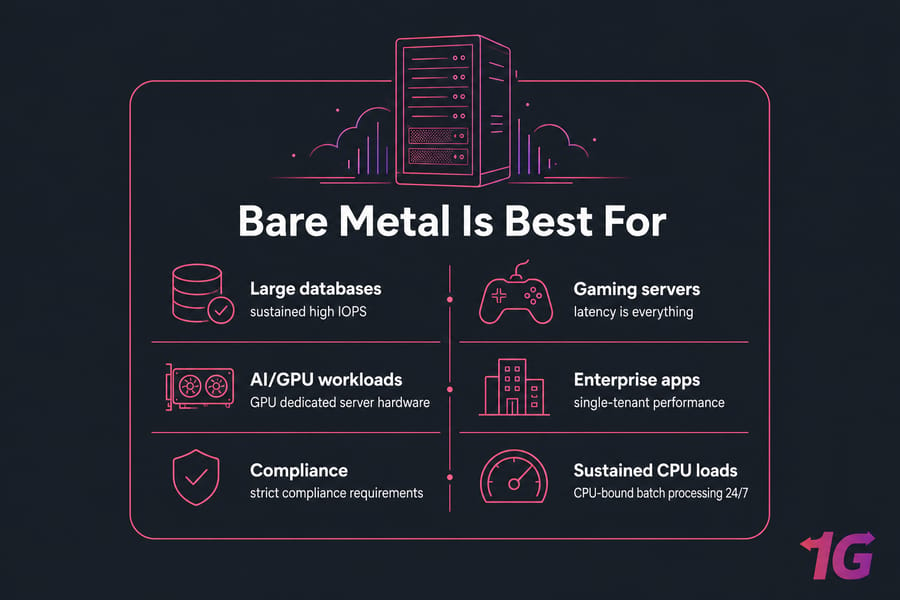
Signs you've outgrown VPS hosting
If you're already running on the largest VPS plan, watching your CPU steal time creep up, dealing with disk I/O contention, or hitting hypervisor-imposed ceilings — that's your signal. Time to look at dedicated server plans.
When to Choose VPS Hosting
For most projects starting out or running at a moderate scale, VPS is the smarter buy. Here's where it shines:
- Small to mid-sized websites (blogs, business sites, portfolios)
- WordPress hosting up to several hundred thousand monthly visits
- Development and staging environments
- SaaS MVPs and early-stage products
- Trading bots, MT4/MT5, and forex automation — check forex VPS options
- Game servers for small communities (Minecraft, CS, lighter titles)
- Reverse proxies, VPNs, and lightweight services
1Gbits offers Linux VPS and Windows VPS across global locations, plus NVMe and managed options when you want speed or less ops headache.
Signs a VPS is the smarter buy
Your traffic is under a few hundred thousand visits a month. Your budget is tight. You expect to scale gradually and want the option to bump resources fast. You don't need exotic hardware. You want to deploy today, not next week. That's a VPS.
How to Choose Between Bare Metal and VPS
Forget the marketing. Walk through this checklist instead.
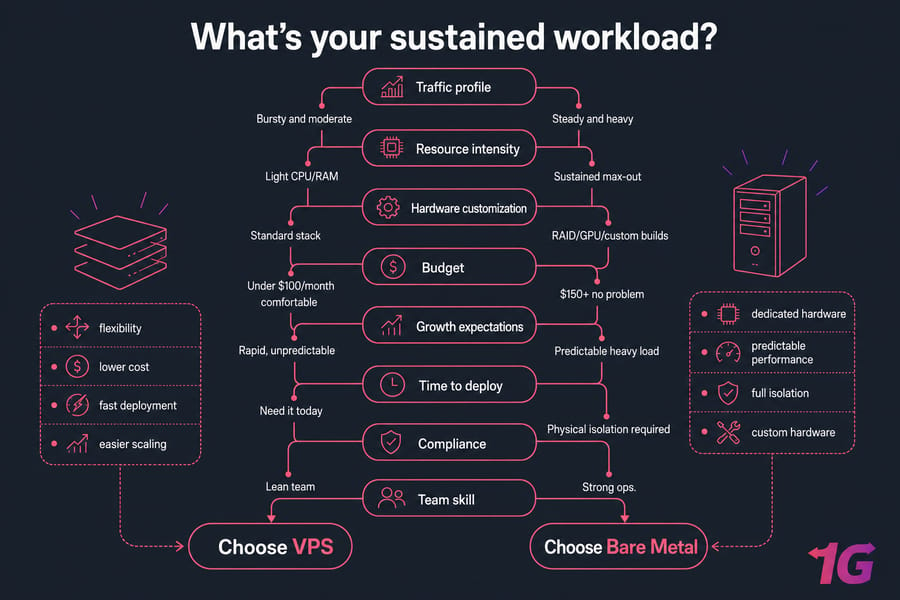
Decision checklist by traffic, budget, and growth
- Traffic profile: bursty and moderate → VPS. Steady and heavy → bare metal.
- Resource intensity: light CPU/RAM → VPS. Sustained max-out → bare metal.
- Hardware customization: standard stack → VPS. RAID/GPU/custom builds → bare metal.
- Budget: under $100/month comfortable → VPS. $150+ no problem → bare metal becomes viable.
- Growth expectations: rapid, unpredictable → VPS (easier to scale up). Predictable heavy load → bare metal.
- Team skill: lean team → managed VPS. Strong ops → either.
- Time to deploy: need it today → VPS.
- Compliance: physical isolation required → bare metal.
Simple rule of thumb
If you're asking "do I need bare metal?" — you probably don't yet. Bare metal needs make themselves obvious. They show up as performance ceilings, compliance audits, or hardware requirements you can't meet on a VPS. Until then, a right-sized VPS is the rational choice.
Best next step on 1Gbits
Want help walking through the choice? Talk to the 1Gbits team. If you already know what you want, jump to managed VPS hosting for hands-off ops, or browse the homepage for bare metal builds.
Common Mistakes When Comparing Bare Metal and VPS
- Buying for peak demand instead of real demand. If you spike for two hours a week, a beefy VPS plus caching beats overbuying bare metal.
- Confusing bare metal with all dedicated hosting. They overlap but aren't identical. Bare metal usually implies modern provisioning and cloud-style billing.
- Ignoring management complexity. Unmanaged bare metal sounds cheap until you realize you need a sysadmin on payroll.
- Choosing purely on price. Migration costs more than the savings, every time.
- Ignoring the scaling path. If you might need to double resources in six months, pick the platform that makes that painless.
Choose the Right Server for Your Workload
If you need flexible, cost-effective hosting that scales fast, look at VPS hosting plans. If you need dedicated power, hardware isolation, or specialized builds, explore Bare metal server plans. Still not sure? Talk to the 1Gbits team and we'll right-size it without overselling you.

Leave A Comment