
A virtual dedicated server (VDS) is an isolated virtual machine hosted on a physical server, typically with reserved CPU, RAM, storage, and operating-system resources. It offers more predictable performance and control than a heavily shared VPS, but it still uses virtualization and does not provide an entire physical server to one customer.
Virtual Dedicated Server Meaning: What Is a VDS?
Here's the caveat you need to hear right away: hosting providers don't use "VDS" and "VPS" consistently. So always compare the actual resource-allocation policy rather than trusting the product name on the pricing page.
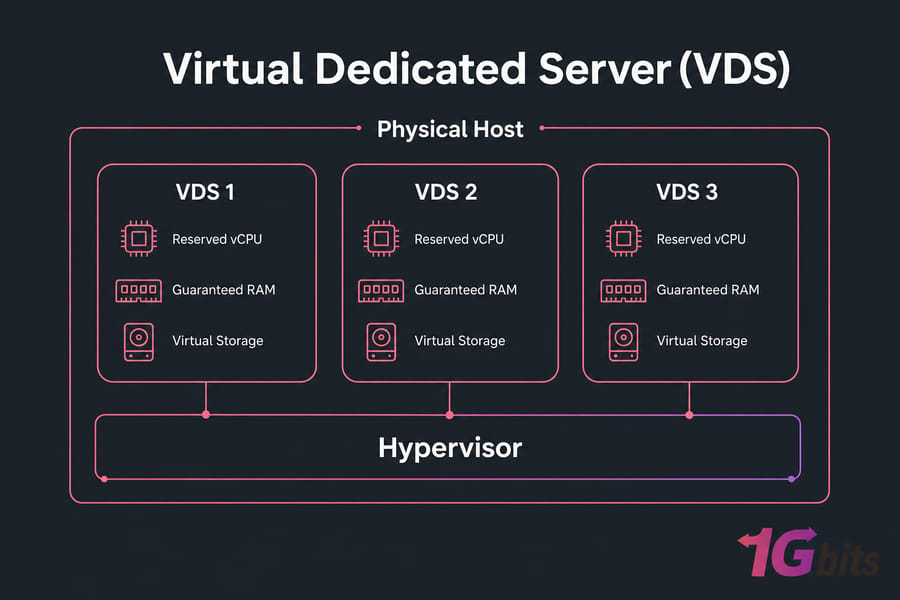
Key takeaway: A VDS is virtualized, not physical. Its main value is stronger resource guarantees and more control than a crowded shared plan.
Terms to know
- Host: the physical server running the virtual machines.
- Hypervisor: software that creates and manages those virtual machines.
- Guest: the individual virtual server and its operating system.
- vCPU: virtual CPU capacity assigned to a guest.
- Bare metal: a physical server used with no virtualization layer at all.
What resources are dedicated in a VDS?
When a provider says "dedicated," they usually mean reserved virtual resources — not exclusive physical hardware. Your RAM might be genuinely carved out for you. Your storage capacity is yours. But CPU is trickier. A vCPU can be a reserved share, a capped slice, or (rarely) a pinned physical core. Those three things behave very differently under load.
This is the single most misunderstood part of the whole category. Reserved RAM is easy to guarantee. Guaranteed CPU is where marketing gets fuzzy. Understanding what a virtual machine is makes the rest of this a lot easier to follow.
Is a VDS a physical server?
No. A VDS runs as a guest on shared physical hardware, alongside other virtual machines. That's the whole point of the "virtual" in the name. If you want a full physical box to yourself, that's a physical dedicated server — a different, more expensive animal.
Why VDS and VPS definitions differ between providers
There's no governing body handing out VDS certificates. One company's "VPS" has stronger guarantees than another's "VDS." Specifications win arguments, product labels don't. I've watched people pay a premium for a "VDS" that turned out to be a rebranded oversold VPS. Read the spec sheet, not the badge.
Warning: VDS is not a standardized hosting category. Verify specifications and allocation policies before you buy.
To understand where those resource guarantees actually come from, look at the virtualization layer.
How Does VDS Hosting Work?
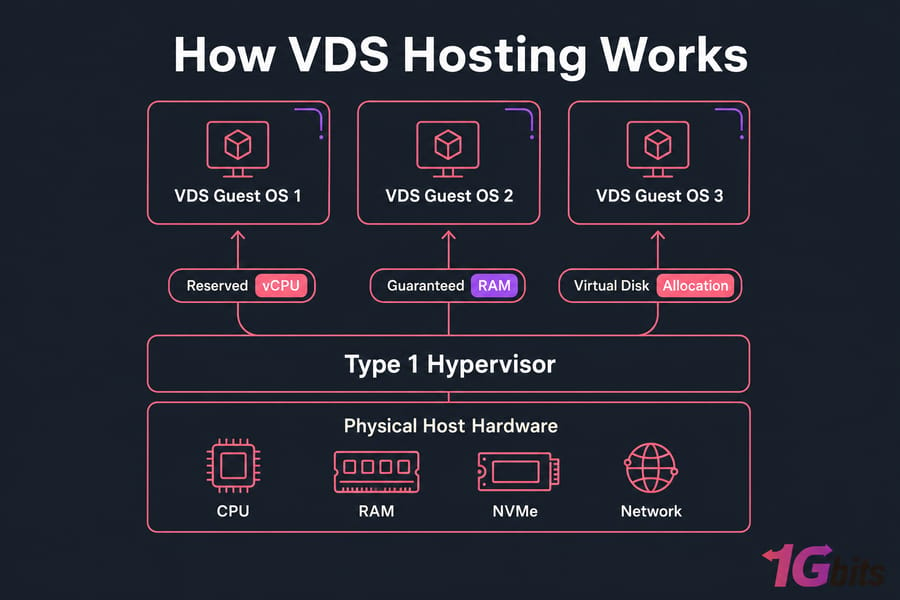
A VDS sits on top of a stack: physical hardware at the bottom, a hypervisor in the middle, and your virtual server as a guest above it. The hypervisor is the traffic cop. It slices the host's CPU, memory, disk, and network into isolated allocations and hands them to each guest.
What does the hypervisor do?
The hypervisor enforces boundaries between guests. Most production hosting runs a Type 1 (bare-metal) hypervisor that installs directly on the hardware — think KVM, Xen, VMware ESXi, or Microsoft Hyper-V. Type 2 hypervisors run on top of a regular OS and are mostly a desktop/testing thing. Modern CPUs help here with hardware-assisted virtualization: Intel VT-x and AMD-V do the heavy lifting so the overhead stays low.
If the concept of server virtualization is new to you, that link breaks it down properly.
How are CPU, RAM, storage, and networking allocated?
Here's the rough sequence when a VDS spins up:
- You (or the provider) pick an image or template — Ubuntu, Debian, AlmaLinux, Windows Server, whatever.
- The hypervisor provisions a guest with your assigned vCPU count, RAM, and a virtual disk backed by SSD or NVMe.
- A virtual network interface gets attached, with IPv4 and often IPv6 addresses.
- The OS installs onto the virtual disk.
- You get root or administrator access and can reboot, patch, and manage it independently.
Your guest behaves like its own server. It reboots on its own. It has its own kernel (on KVM and Xen). Your neighbor crashing their guest doesn't take yours down.
Reserved vCPU vs pinned physical CPU cores
This deserves its own heading because it trips up almost everyone. A reserved vCPU guarantees you a share of processing capacity. A pinned core means a specific physical core is bound exclusively to your guest. A shared burst vCPU lets you spike up but competes with neighbors. These are not the same, and providers often blur them.
Pro tip: Ask the provider directly — are the vCPUs shared, reserved, or pinned to physical cores? Get it in writing if performance matters.
Different hypervisors and management styles handle this differently, which leads us to the variations.
Types of Virtual Dedicated Servers
Not all VDS setups are built the same. The virtualization technology, the management level, and the OS all shape what you actually get.
KVM and Xen virtual dedicated servers
KVM and Xen are full hardware virtualization. Each guest runs its own independent kernel, which means you can install custom operating systems, load kernel modules, and run pretty much anything. This is why serious VDS plans lean on KVM. Container-based virtualization (like OpenVZ) shares the host kernel — cheaper, but more restrictive and less isolated. Don't call a container a full VM; they're genuinely different.
VMware and Hyper-V VDS environments
VMware ESXi and Microsoft Hyper-V dominate enterprise virtualization. You'll see them where uptime, live migration, and management tooling matter. VMware is polished and battle-tested; Hyper-V integrates tightly with Windows Server environments. Neither is "best" universally — it depends on your stack. For a deeper look at the options, see the rundown of common Linux hypervisors.
Managed vs unmanaged VDS hosting
On an unmanaged plan, the server's yours to run — updates, security, backups, monitoring, all of it. On a managed plan, the provider handles some or most of that for a higher price. Beginners often underestimate how much work unmanaged is. If you're not comfortable in a terminal, read up on managed vs unmanaged hosting before committing.
Linux vs Windows virtual dedicated servers
Linux VDS (Ubuntu, Debian, Rocky Linux, AlmaLinux) is free of OS licensing and dominates web and app hosting. Windows Server VDS costs more because of licensing, but you'll need it for .NET apps, MSSQL, or software that only runs on Windows. Factor the license into your budget — it's not trivial.
The technology name alone doesn't settle the VPS-versus-VDS question, though. That comes down to allocation.
VPS vs VDS: What Is the Difference?
Since the labels aren't standardized, the honest answer is: it depends on the provider. But there's a common market convention worth knowing.
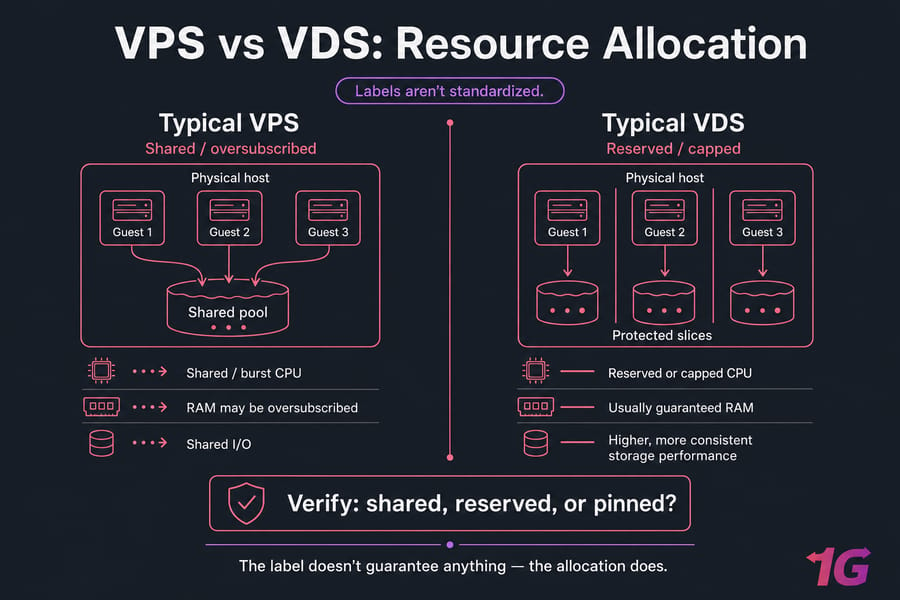
Generally, a VPS uses more shared or oversubscribed capacity — providers pack more guests onto a host and count on not everyone maxing out at once. A VDS emphasizes stronger reservations, so your slice is more protected. That's the pattern. It's not a law.
| Factor | Typical VPS | Typical VDS | What to Verify |
| CPU Allocation | Often shared/burst | Reserved or capped | Shared, reserved, or pinned? |
| RAM | May be oversubscribed | Usually guaranteed | Guaranteed vs burstable |
| Storage Performance | Shared I/O | Higher, more consistent | IOPS, not just "NVMe" |
| Oversubscription | Common | Lower, sometimes none | Contention policy |
| Isolation | Good | Stronger | Hypervisor type |
| Root Access | Usually | Yes | Full admin rights |
| Cost | Lower | Higher | Value per guaranteed unit |
| Best Fit | Lighter, variable loads | Predictable production loads | Your traffic pattern |
Is VDS better than VPS?
For predictable, resource-hungry workloads, usually yes. But a well-provisioned VPS can absolutely outperform a poorly provisioned VDS. The label doesn't guarantee anything — the allocation does. I'd rather have a VPS with reserved RAM and honest IOPS than a "VDS" running on an overcrowded host.
VPS or VDS: which one should you choose?
- Choose VPS if: your budget's tight, traffic is variable, and occasional contention won't hurt you.
- Choose VDS if: you need consistent CPU and RAM under sustained load and can't tolerate noisy neighbors slowing you down.
For the full head-to-head, check the detailed VPS vs VDS comparison. And if you're still fuzzy on the basics, VPS hosting explained covers the foundation.
If your workload needs more predictable resources than a typical shared VPS, review the CPU, RAM, storage, and virtualization details of 1Gbits VDS hosting.
When even a VDS doesn't isolate enough, it's time to compare it with single-tenant hardware.
VDS vs Dedicated Server and Cloud Hosting
A VDS sits in the middle of a spectrum. On one side, cheaper and more shared. On the other, more powerful and more expensive.
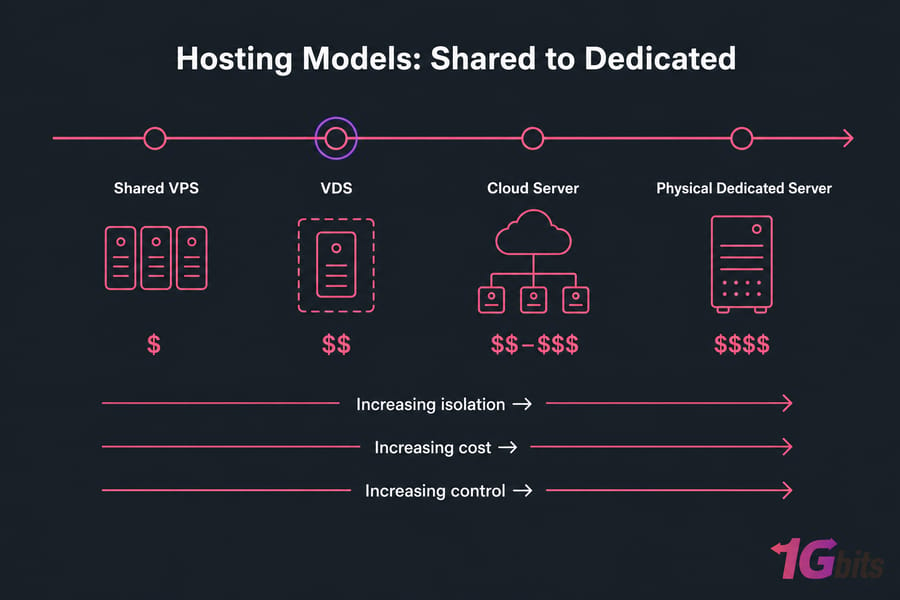
| Hosting Model | Hardware Tenancy | Predictability | Scaling | Overhead | Relative Cost | Best Use Case |
| Shared VPS | Multi-tenant | Variable | Manual, limited | Low | $ | Small sites, light apps |
| VDS | Multi-tenant, reserved | High | Plan upgrades | Some | $$ | Production apps, databases |
| Cloud server | Multi-tenant, elastic | High | Elastic, fast | Some | $$–$$$ | Bursty, auto-scaling loads |
| Dedicated server | Single-tenant | Highest | Hardware swaps | None | $$$$ | Heavy, sustained, compliance |
Virtual dedicated server vs physical dedicated server
The physical dedicated server gives you an entire machine, single-tenant, no hypervisor overhead. A VDS gives you a strong slice of a shared machine at a fraction of the cost. If you don't need the whole box, you're overpaying for bare metal.
VDS vs cloud server
A cloud server is typically virtualized too, but built for elasticity — scale up and down on demand, pay for what you use, distributed across hardware. A VDS is more of a fixed, reserved allocation. Cloud shines for spiky traffic; VDS shines for steady, predictable workloads where you want a known cost.
VDS vs VDI: why they are not the same
People confuse these constantly. VDS is server infrastructure — you host apps, sites, databases. VDI (Virtual Desktop Infrastructure) delivers desktop environments to end users. Same virtualization roots, completely different products. Don't buy one thinking it's the other.
Benefits of Virtual Dedicated Server Hosting
So why pay the premium? A few concrete reasons.
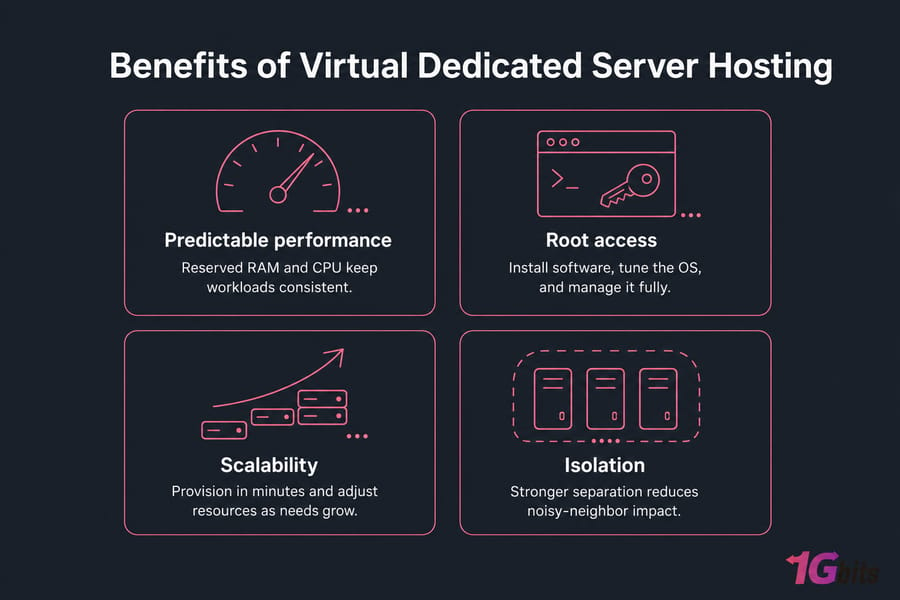
- Predictable capacity. Reserved RAM and CPU mean your app performs consistently, not at the mercy of whoever else is on the host.
- Stronger workload separation. Better isolation than crowded shared plans, so one bad neighbor doesn't tank your response times.
- Full root or admin access. Install what you want, tune the OS, run custom software. See root access for what that unlocks.
- Flexible OS and stack. Linux or Windows, your choice of distro, your choice of runtime.
- Faster and cheaper than hardware. Provisioning takes minutes, not days, and the entry cost is far below a physical server.
- Snapshots and recovery. Where offered, snapshots let you roll back quickly after a bad deploy.
None of this makes a VDS bulletproof, though. Every upside has a matching trade-off.
VDS Limitations and Trade-Offs
Let's be honest about the downsides. More isolation doesn't remove every operational responsibility.
| Limitation | Why It Matters | What to Ask | Mitigation |
| Hypervisor overhead | A small performance tax vs bare metal | Which hypervisor? | KVM/hardware-assisted virtualization |
| Shared host hardware | Host failure can hit multiple guests | Redundancy? SLA? | Off-site backups, uptime SLA |
| Oversubscription | Contention unless contractually limited | Reserved or pinned? | Get guarantees in writing |
| Storage/network contention | I/O and bandwidth can be shared | IOPS and port speed? | Benchmark, verify limits |
| Your responsibility (unmanaged) | Patching, backups, monitoring on you | Managed option? | Managed plan or your own ops |
| Licensing costs | Windows and commercial panels add up | Included or extra? | Budget for licenses |
Warning: Snapshots are not automatically a complete off-site backup strategy. Keep independent backups you actually control.
If contention becomes a real problem, read up on virtual server performance bottlenecks, and lock things down with a proper security setup. On unmanaged plans, security is your job — the hypervisor's isolation only goes so far.
When bare metal is the better choice
If you're running sustained heavy CPU, need strict single tenancy for compliance, require specialized hardware, or push extreme I/O, a physical dedicated server is worth the money. A VDS is a compromise, and sometimes you shouldn't compromise.
Need Predictable Virtual Server Resources?
Compare 1Gbits VDS configurations when a standard VPS no longer delivers the performance consistency or control your application needs. Review CPU, RAM, storage, network capacity, OS options, and locations before ordering. Compare VDS Plans at 1Gbits VDS hosting, or dig into the full VPS and VDS comparison first.
VDS Use Cases and Real-World Examples
A VDS fits a wide band of workloads. Here's where it earns its keep.
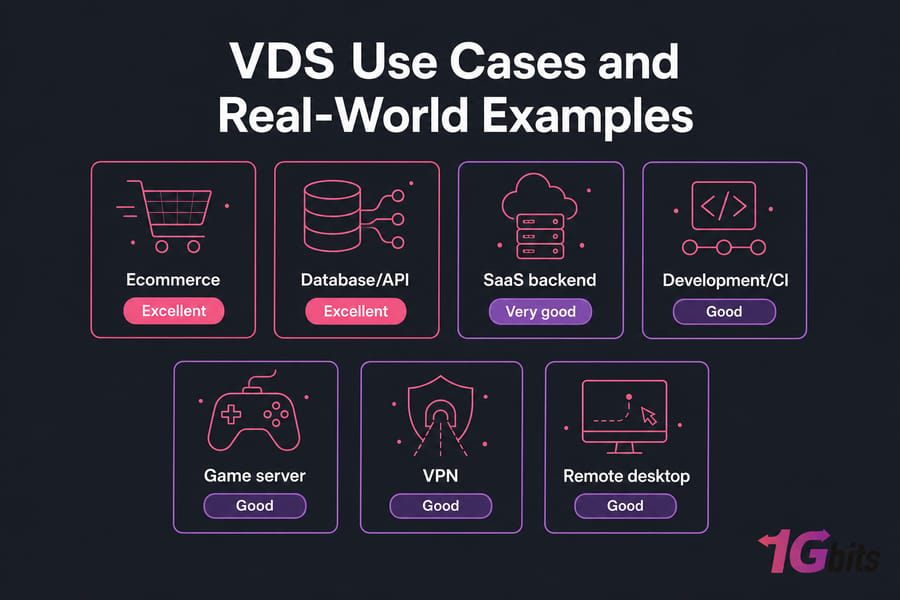
| Workload | VDS Suitability | Priority Resource | Consider Instead |
| Ecommerce | Excellent | RAM, database I/O | Cloud for big seasonal spikes |
| Database/API | Excellent | CPU, IOPS | Bare metal for extreme I/O |
| SaaS backend | Very good | Consistent CPU | Cloud for elastic scaling |
| Development/CI | Good | Snapshots, isolation | — |
| Game server | Good | Low latency, CPU | Bare metal for large populations |
| VPN | Good | Bandwidth | — |
| Remote desktop | Good | RAM, Windows license | — |
| HPC | Poor | Sustained CPU | Bare metal, always |
Three concrete scenarios
Growing ecommerce site. Traffic's climbing, checkout can't lag. A VDS with reserved RAM keeps NGINX and MySQL responsive during sales, without the noisy-neighbor gambling of a shared plan.
SaaS API. Consistent CPU and independent deploy control matter. Root access lets you run your exact PostgreSQL version and roll releases on your own schedule.
Development environment. You want snapshots, isolated dependencies, and SSH access to break things safely. A VDS gives you a sandbox you fully control.
As an illustration only — not a rule — many of these land comfortably around 4–8 vCPU and 8–16 GB RAM. Your actual numbers depend entirely on your load.
Running containers? A VDS on KVM handles Docker workloads well since the full kernel gives you flexibility. Gaming folks should look at dedicated game VPS options, and if you're consolidating sites, here's a guide to hosting multiple websites on one server.
Once a VDS fits the workload, evaluate plans by specifications — not labels.
How to Choose a Virtual Dedicated Server
This is where buyers protect themselves. Work through it in order.
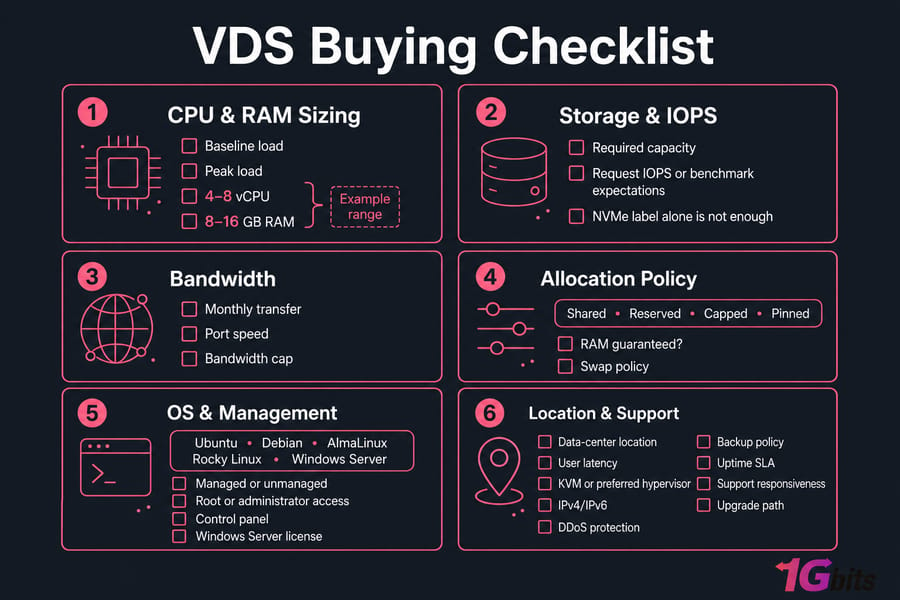
Step 1: Measure CPU, RAM, storage, and bandwidth needs
Look at your current baseline and your peaks. Undersize and you'll crash under load; oversize and you're burning money. Estimate monthly transfer and required port speed too — bandwidth caps sneak up on people.
Step 2: Verify whether resources are reserved
Ask flat out: are vCPUs shared, reserved, capped, or pinned? Is RAM guaranteed, and what's the swap policy? For storage, don't accept "NVMe" as an answer.
Pro tip: Request storage IOPS or benchmark expectations, not only an "NVMe" label. NVMe on a saturated host can still be slow.
Step 3: Choose an operating system and management level
Pick your OS — Ubuntu, Debian, AlmaLinux, Rocky Linux, or Windows Server (budget the license). Then decide managed vs unmanaged based on your team's comfort level. Confirm you get root or administrator access and check what control panel, if any, is included.
Step 4: Check location, latency, security, and support
Data-center location drives latency for your users — pick close. Confirm KVM or your preferred hypervisor, IPv4/IPv6 allocation, DDoS protection, backup policy, uptime SLA, support responsiveness, and the upgrade path. Before signing, run through this provider evaluation process and browse available server locations.
VDS provider questions checklist
- Are vCPUs shared, reserved, capped, or pinned to physical cores?
- Is RAM guaranteed or burstable? What's the swap policy?
- What storage IOPS can I expect, not just "NVMe"?
- What's the oversubscription and contention policy?
- What bandwidth and network port speed do I get?
- Which hypervisor and which OS templates are supported?
- Is DDoS protection included? What's the uptime SLA?
- Who owns backups — me or you?
- How fast is the upgrade/migration process?
1Gbits offers virtual server options across multiple operating systems and workloads. Compare the published specifications against this checklist before you pick a plan.
Key takeaway: Choose by workload, guarantees, location, support, and recovery options — not by VDS branding alone.
Choose the Right Server for Your Workload
A VDS can strike a practical balance of isolation, control, predictable resources, and cost. Use the checklist above to confirm the allocation model, then View VDS Hosting at 1Gbits VDS, or contact support if your workload needs custom guidance.

Leave A Comment