

Dedicated server vs cloud server at a glance
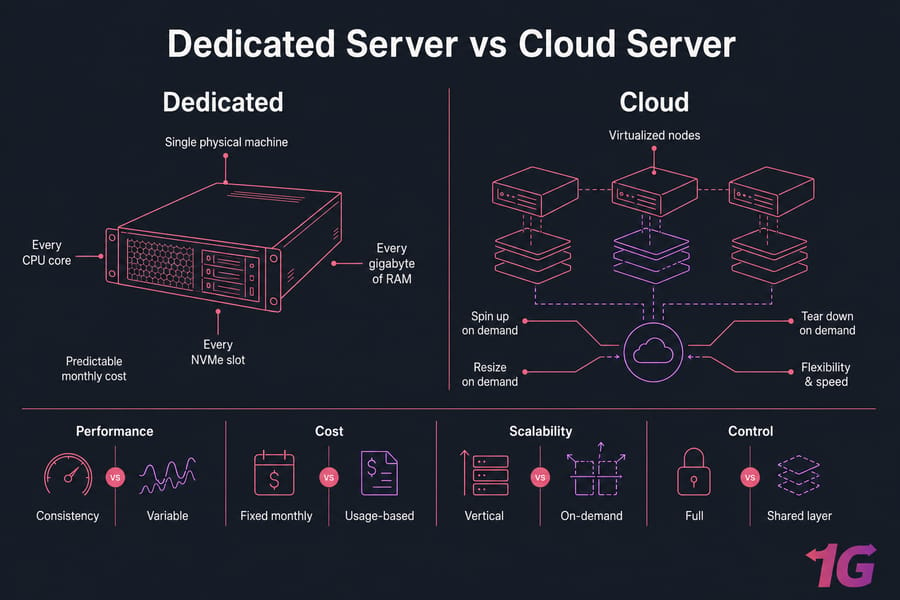
Here's the short version. A dedicated server hands you a full physical machine every CPU core, every gigabyte of RAM, every NVMe slot belongs to you. A cloud server gives you a virtualized slice of a much larger pool of hardware, with the ability to spin up, resize, or tear down instances on demand. Both can power serious production workloads. They just solve different problems.
If your workload is steady, performance-hungry, or compliance-heavy, dedicated wins on consistency and predictable monthly cost. If your traffic is spiky, your team is small, or you need to deploy in minutes, cloud almost always wins on flexibility.
What is the fastest way to understand the difference?
Think of it this way. Renting a dedicated server is like leasing an entire warehouse the whole building is yours, you decide what goes inside, and the rent is fixed. Renting a cloud server is like renting flexible office space inside a coworking building you pay for what you use, you can grab more space tomorrow, but the walls, power, and HVAC are shared with everyone else.
That analogy isn't perfect, but it captures the trade-off most buyers care about: control and consistency on one side, flexibility and speed on the other.
Dedicated vs cloud server comparison table
| Feature | Dedicated Server | Cloud Server | Best Choice When |
|---|---|---|---|
| Tenancy | Single-tenant (bare metal) | Multi-tenant (virtualized) | Dedicated for isolation; cloud for elasticity |
| Performance consistency | Very high, no noisy neighbors | Generally good, can vary | Dedicated for sustained load |
| Scalability | Vertical (upgrade hardware) | Horizontal and vertical | Cloud for fast scale-out |
| Pricing model | Fixed monthly/annual | Hourly or usage-based | Dedicated for predictable budgets |
| Provisioning time | Minutes to hours | Seconds to minutes | Cloud when speed matters |
| Hardware control | Full — RAID, GPU, custom NICs | Limited to instance types | Dedicated for custom builds |
| Root access | Yes | Yes | Both |
| Compliance fit | Easier for strict regulations | Possible but requires effort | Dedicated for regulated workloads |
| Failover/redundancy | You design it | Often built into the platform | Cloud for built-in HA |
| Ideal for | Gaming, databases, trading, streaming | SaaS, dev/test, variable traffic apps | Match to workload pattern |
Key takeaway: Dedicated = control and predictable performance. Cloud = flexibility and fast scaling. The "right" pick depends on your workload, not on which sounds more modern.
Now let's break down how each actually works, then compare them on the things that matter when you're spending real money.
What is a dedicated server and how does dedicated hosting work?
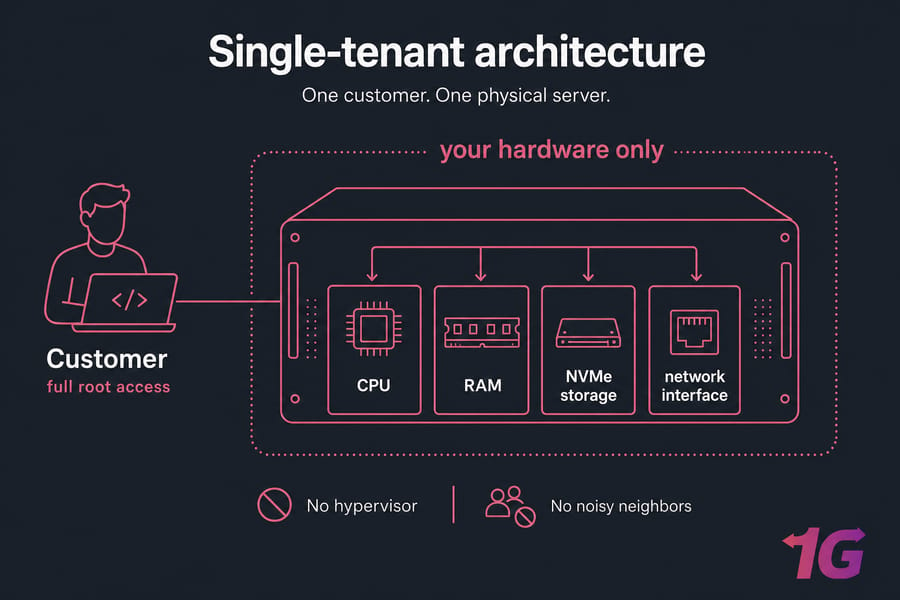
A dedicated server is a physical machine a real box sitting in a data center rack that's reserved entirely for one customer. You don't share CPU cycles with strangers. You don't share RAM. You don't share disks. The whole machine is yours to configure, secure, and run as you see fit.
You typically get full root or administrator access, which means you can install any operating system you want (Linux distros, Windows Server, FreeBSD, custom kernels), run any workload, configure RAID arrays, and tune the kernel however you like. If you want to learn more about the fundamentals, we've covered them in our what is a dedicated server guide.
Single-tenant infrastructure explained
Single-tenant means one customer per machine. No hypervisor sitting between your application and the metal. No "noisy neighbor" hammering the same disk while your database is trying to flush writes. The hardware behaves predictably because nothing else is competing for it.
This matters more than people realize. In my experience, the gap between a well-tuned dedicated box and a comparable cloud instance shows up most clearly under sustained load — exactly when your application can least afford a wobble.
When physical hardware makes sense
Dedicated wins in a few specific scenarios:
- Latency-sensitive apps — game servers, forex trading platforms, real-time bidding, VoIP
- I/O-heavy databases — large MySQL, PostgreSQL, MongoDB, ClickHouse deployments
- Specialized hardware needs — GPUs for AI inference, custom RAID, specific NIC offloads
- Compliance workloads — when you need physical isolation on paper, not just logically
- Steady high utilization — if your servers run hot 24/7, you're paying cloud premium for nothing
Common configurations include Linux dedicated server running Ubuntu, Debian, AlmaLinux, or Rocky, and Windows dedicated server for .NET stacks, MSSQL, or Active Directory environments. You'll choose between managed (the provider handles OS patching, monitoring, backups) and unmanaged (you handle everything).
Key dedicated server benefits and limits
What you get: raw performance, full control, fixed monthly bills, hardware-level customization, stronger isolation, and easier compliance answers.
What you don't get: instant scaling. Adding a second server means provisioning a second server. Vertical upgrades (more RAM, bigger disks) usually require a maintenance window. And if your workload only spikes once a month, you're paying full price for capacity that mostly sits idle.
Dedicated works best when predictable power matters more than instant elasticity.
What is a cloud server and how does cloud hosting work?
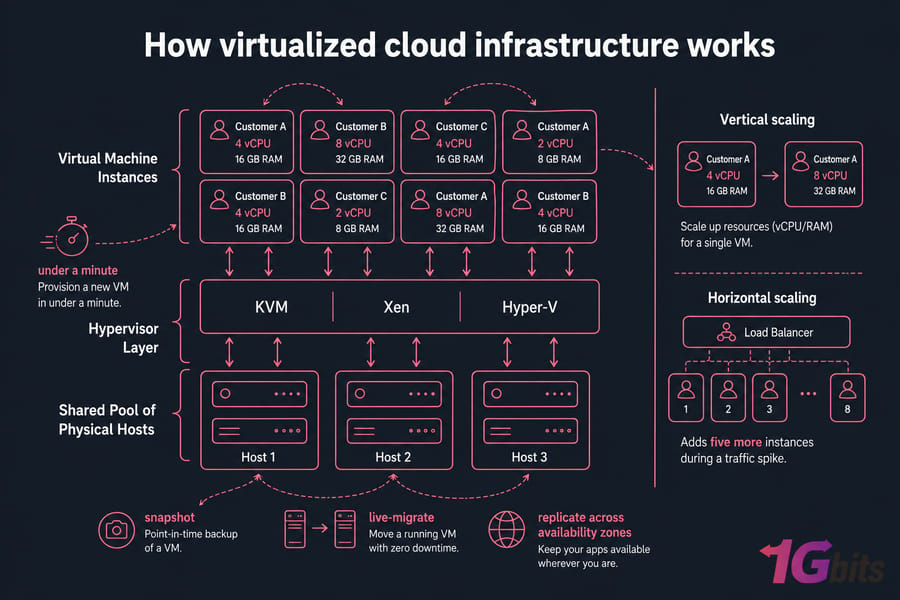
A cloud server is a virtual machine running on top of a pool of physical hosts. A hypervisor software like KVM, Xen, or Hyper-V slices each physical machine into multiple virtual ones, and your "server" is one of those slices. The provider abstracts the underlying hardware so you can provision, resize, clone, snapshot, and destroy instances through an API or control panel.
Our deeper writeup on the cloud server concept covers the architecture in more depth. The short version: cloud servers turn infrastructure into something closer to a utility you turn it on when you need it, you turn it off when you don't.
How virtualized cloud infrastructure works
When you spin up a cloud server, the platform picks a physical host with available capacity, allocates the vCPU and RAM you requested, attaches network-backed storage (often replicated across multiple disks for durability), and boots your VM. The whole process usually takes under a minute.
Because resources come from a shared pool, the platform can do things bare metal can't: live-migrate your VM to a different host during maintenance, snapshot the entire disk in seconds, or replicate your instance across availability zones for failover.
What makes cloud servers scalable
Two flavors of scaling matter here:
- Vertical scaling — bumping a 4 vCPU instance up to 8 vCPU. Often a reboot, sometimes live.
- Horizontal scaling — adding more instances behind a load balancer. The bread and butter of cloud architecture.
If you've built your app to scale horizontally — stateless web tier, externalized sessions, managed database — cloud lets you respond to traffic in real time. A traffic spike at 9 AM can trigger autoscaling that adds five more instances before your users notice anything. That's hard to replicate on dedicated hardware without standby capacity sitting idle.
Key cloud server benefits and limits
What you get: minute-scale provisioning, elastic scaling, snapshots and cloning, API-driven automation, often built-in redundancy options, and pay-for-what-you-use billing at the entry level. Cloud VPS plans usually fit teams that want this flexibility without going full hyperscaler.
What you give up: some performance predictability (you're sharing a host), bill predictability (usage-based pricing can creep), and direct hardware control. You also pick from preset instance types — you don't get to specify "this exact CPU model with this exact NIC."
If you're sizing options, our roundup of the best cloud VPS setups walks through what to look for.
To decide correctly, you need to compare the two on outcomes not just definitions.
Dedicated hosting vs cloud hosting: the biggest differences
Definitions are fine, but the real question is: where do these models diverge in ways that affect your decision? Here are the differences that actually move the needle.
Resource allocation and isolation
Dedicated gives you 100% of the hardware, full stop. No hypervisor overhead. No shared cache lines. No storage queue contention with other tenants. Cloud gives you a guaranteed allocation, but the underlying hardware is shared. Most of the time you won't notice. Occasionally — under heavy I/O or CPU-bound workloads — you might.
If you've ever been hit by the "noisy neighbor" problem on a cheap VPS, you know what I mean. Reputable cloud providers mitigate this with strict resource limits, but it's not the same as having the box to yourself.
Control and customization
On dedicated, you can pick the CPU generation, the RAM type and amount, the storage layout (NVMe, SATA SSD, spinning rust, or a hybrid RAID), the network card, and even add a GPU. You can tune BIOS settings, run custom kernels, and set up software RAID exactly the way you want.
On cloud, you pick from a menu. The menu is usually generous, but it's still a menu. If you need an unusual hardware combination, dedicated is your only realistic option.
Deployment and provisioning speed
Cloud wins this one outright. A new VM in 60 seconds. A new dedicated server takes longer anywhere from a few minutes (for instant deploy hardware kept ready) to several hours, depending on the provider. If you need infrastructure now, cloud is the answer.
If you're also weighing VPS into the mix, our breakdowns of VPS vs cloud and VPS vs dedicated server cover the adjacent comparisons.
From here, the biggest deciding factors are performance and cost.
Dedicated vs cloud performance: speed, latency, and consistency
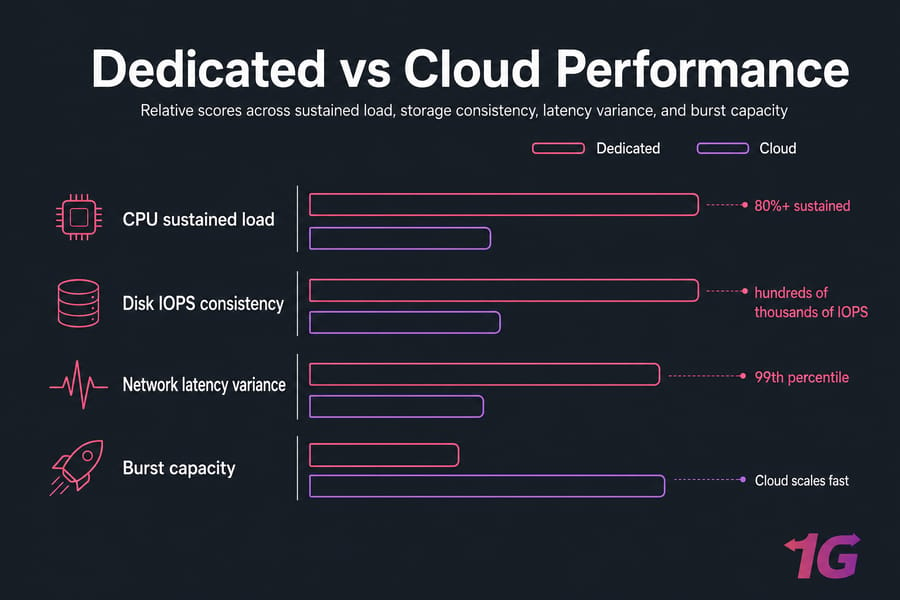
Performance is where this comparison gets interesting and where most articles oversimplify. The honest answer: dedicated tends to win on sustained, predictable performance, while cloud is excellent for most workloads but introduces variability you have to architect around.
Which is better for high CPU and RAM workloads?
For workloads that pin the CPU at 80%+ for hours at a time — video transcoding, data processing pipelines, large compilation jobs, AI inference dedicated hardware delivers consistently better throughput per dollar. The reason isn't magic; it's just that you're not paying virtualization overhead and you're not subject to CPU steal time from other tenants.
For workloads that are bursty (web apps, APIs, batch jobs that run for minutes), cloud handles them just fine, and you don't pay for idle capacity.
Storage IOPS and NVMe considerations
This is where dedicated really pulls ahead for I/O-heavy work. A direct-attached NVMe drive on a dedicated server gives you hundreds of thousands of IOPS with sub-millisecond latency. Cloud storage is often network-attached, which adds latency and IOPS caps tied to your instance size or storage tier.
If you're running a busy database, the difference shows up in tail latency. The 99th percentile query time on direct NVMe will usually be faster and more predictable. For more on what IOPS actually means in practice, see our explainer on what is IOPS.
When performance consistency matters more than elasticity
Some workloads care about the floor more than the ceiling. A game dedicated server doesn't need to scale to a million concurrent players — it needs every tick to land within the same millisecond budget, every time. A forex trading bot doesn't need horizontal scaling — it needs the lowest possible latency to the exchange. A streaming server doesn't need to add capacity in seconds it needs sustained, high-bandwidth throughput without hiccups.
For all of those, dedicated is usually the smarter buy.
Pro tip: Server type is only part of the performance story. Data center location, NVMe vs SATA, CPU generation, network capacity, and even how you've configured the OS often matter just as much. A well-tuned cloud VPS in the right region beats a poorly configured dedicated box in the wrong city.
If performance is one side of the decision, pricing is the other.
Dedicated vs cloud cost: fixed pricing vs usage-based billing
Money. This is where the wrong choice hurts the most.
Dedicated servers come with a fixed monthly (or annual) bill. You know exactly what hits your card on the first of every month. Dedicated server pricing ranges from budget configurations under $100/month to high-end builds in the four-figure range. The number doesn't change because you served more traffic that month.
Cloud servers usually bill by the hour or by usage. The base instance might look cheap. But the bill is the sum of: instance hours + storage GB + bandwidth out + snapshots + load balancer + managed database + backup retention + sometimes API requests. It adds up.
Upfront and monthly cost expectations
| Scenario | Dedicated Cost Fit | Cloud Cost Fit | Notes |
|---|---|---|---|
| Steady 24/7 production workload | Strong — predictable bill, often lower TCO | Weak — paying premium for elasticity you don't use | Dedicated typically wins after 6–12 months |
| Bursty traffic (10x spikes) | Weak — you'd over-provision for peaks | Strong — autoscaling matches demand | Cloud's elasticity pays for itself |
| Dev/staging environments | Weak — idle hardware costs full price | Strong — spin up/down on demand | Cloud is almost always right here |
| High-bandwidth streaming or downloads | Strong — unmetered or high-cap bandwidth | Weak — egress fees can dominate the bill | Egress is the silent budget killer in cloud |
| Short-term project (under 3 months) | Weak — commitment and setup overhead | Strong — pay only while running | Cloud for short timelines |
| Database with heavy IOPS | Strong — direct NVMe at fixed cost | Weak — provisioned IOPS gets pricey | I/O is expensive in cloud |
How cloud costs can scale up unexpectedly
I've watched a startup's cloud bill triple in a month because someone enabled hourly snapshots and forgot. I've seen another team rack up four-figure egress charges serving video to mobile users. The cloud is generous about letting you turn things on. It's terrible at stopping you.
The big cost drivers people underestimate:
- Bandwidth egress — outbound data transfer is metered on most cloud platforms, often at $0.05–$0.15 per GB
- Snapshots and backups — they accumulate, and old snapshots keep billing
- Premium IOPS — guaranteed disk performance often costs more than the instance
- Idle resources — load balancers, NAT gateways, and reserved IPs bill 24/7 whether used or not
- Managed services — convenient, but the markup over running it yourself can be 2–4x
Warning: Cloud bills can rise fast due to bandwidth egress, snapshots, and autoscaling. Set budget alerts on day one. If you've never been surprised by a cloud bill, congratulations — you're in the minority.
When dedicated offers better long-term value
Run the math. If your cloud setup consistently costs more than $200–$300/month and your usage is steady, a comparable dedicated server almost always beats it on total cost of ownership. The crossover happens faster than most people expect.
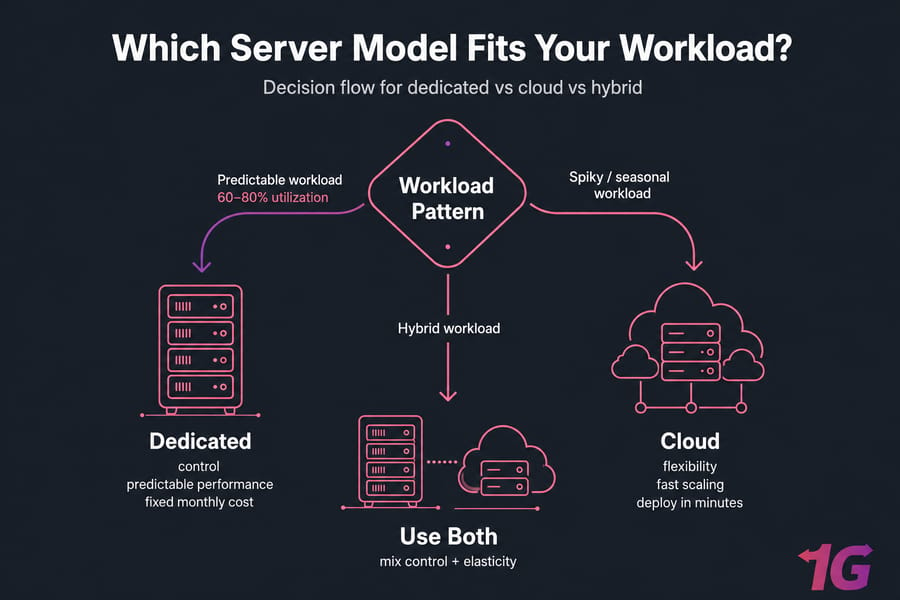
Cloud wins when you genuinely need the elasticity. If you don't — if your servers run at 60–80% utilization most of the time — you're paying a flexibility tax for no return. For users who want a middle path, VPS hosting sometimes splits the difference.
Next, consider how much flexibility and uptime architecture you actually need.
Cloud scalability vs dedicated control: uptime, flexibility, and management
Scalability and uptime are often where cloud is sold hardest. Some of that pitch is fair. Some of it isn't.
Horizontal vs vertical scaling
Cloud excels at horizontal scaling. Need ten more web servers in five minutes? Trivial. Tearing them down at 2 AM when traffic dies? Also trivial. If your application is stateless and designed for it, cloud is genuinely transformative.
Dedicated handles vertical scaling well — you can pick a beefier server up front, or upgrade hardware during a maintenance window. But adding a second machine to a dedicated cluster takes longer. You can absolutely build scalable architectures on dedicated (load balancer + multiple backends), but you don't get autoscaling for free. For some context on growing without downtime, see our guide on how to scale your VPS without downtime.
Failover and redundancy differences
Here's something most articles get wrong: cloud doesn't automatically give you high availability. A single cloud VM can and does go down. What cloud gives you is the ability to design for failure — multiple availability zones, automated failover, replicated storage.
Dedicated can absolutely match that. You just have to design and pay for it explicitly: two boxes, a load balancer, replicated database, monitoring, automated failover. It's more work up front. It's not impossible.
The right framing isn't "cloud is reliable, dedicated isn't." It's "uptime is an architecture decision, not a hosting decision."
Operational complexity and management overhead
Cloud platforms abstract away a lot — networking, storage, snapshots, basic security groups. That's a productivity boost for small teams. The trade-off is that cloud architectures get complex fast. Suddenly you've got 14 services, IAM policies, VPCs, NAT gateways, and a billing dashboard you can't decode.
Dedicated is simpler in concept (one box, one OS, one network interface) but harder if you're new to sysadmin work. You're patching kernels. You're configuring firewalls. You're setting up backups.
This is where managed plans pay for themselves. A managed dedicated server hands the OS-level work to the provider — patches, monitoring, backups, security hardening. If you don't have a sysadmin on staff, this is usually money well spent.
For some buyers, security and compliance override every other factor.
Dedicated vs cloud security: compliance, isolation, and risk
Security is one of those topics where both camps oversell. Dedicated isn't automatically more secure. Cloud isn't automatically less secure. The actual risk profile depends on configuration, hardening, and operational discipline.
Single-tenant vs multi-tenant security models
The strongest argument for dedicated is physical isolation. Your data sits on disks no other customer touches. Your CPU never executes another tenant's instructions. For threat models that include side-channel attacks, hypervisor escapes, or strict data residency requirements, this matters.
For 99% of use cases, well-configured cloud isolation is plenty. Major cloud platforms have invested heavily in tenant separation. But "well-configured" is doing real work in that sentence — misconfigured cloud is the leading cause of breaches in cloud environments.
Compliance-sensitive workloads
If you're dealing with HIPAA, PCI-DSS, GDPR data residency, or similar, dedicated often makes the audit easier. You can point to a physical machine in a specific data center and say "that's where the data lives." Cloud compliance is achievable, but it requires more documentation, more controls, and usually a specific compliant tier from the provider.
What security still depends on you
Regardless of which model you pick:
- Patches don't apply themselves
- Firewalls need actual rules
- SSH should use keys, not passwords
- Backups need to exist and be tested
- Logs need to be collected and reviewed
- DDoS protection should be confirmed (a DDoS protected VPS or dedicated server saves real headaches)
For a deeper run-through, our how to secure servers guide and the Linux server security article cover the practical hardening steps.
Warning: Dedicated hardware isn't automatically secure. The isolation helps, but unpatched software on a dedicated box is just as exploitable as unpatched software anywhere else. Hardening, patching, and backups are non-negotiable on either platform.
Now apply those trade-offs to actual workloads.
Best use cases for dedicated servers and cloud servers
Theoretical comparisons are fine. Real workloads are better. Here's where each model usually wins.
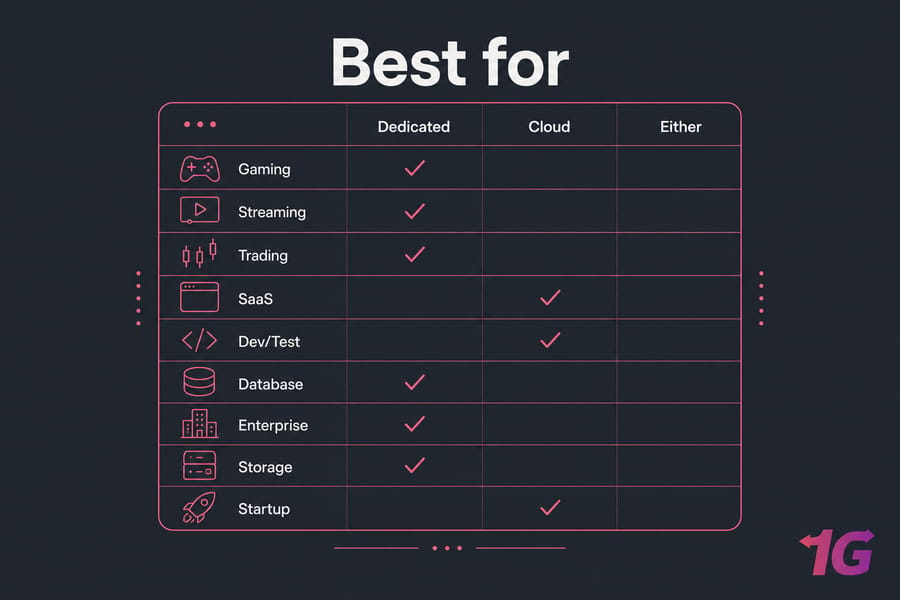
| Use Case | Dedicated | Cloud | Why |
|---|---|---|---|
| Game servers (FPS, MMO, MOBA) | Usually | Sometimes | Latency consistency and CPU determinism win matches |
| Forex/HFT trading platforms | Usually | Rarely | Microsecond latency, predictable jitter |
| Video streaming and CDN origin | Usually | Sometimes | Bandwidth costs and sustained throughput |
| High-traffic websites (steady) | Usually | Sometimes | Better TCO at sustained load |
| SaaS apps with variable users | Sometimes | Usually | Autoscaling matches demand |
| Dev/test/staging | Rarely | Usually | Spin up/down kills idle costs |
| Large databases (OLTP) | Usually | Sometimes | Direct NVMe IOPS, predictable latency |
| Storage-heavy archives | Usually | Sometimes | Cloud storage tiers expensive at scale |
| Early-stage startups | Sometimes | Usually | Flexibility while finding product-market fit |
| Enterprise apps with compliance | Usually | Sometimes | Easier audit story |
Best for gaming, streaming, and trading
These three workloads share a common requirement: low, consistent latency. A game dedicated server running on bare metal in the right city will outperform a comparable cloud instance for player experience nearly every time. The same goes for streaming infrastructure, where bandwidth caps and egress fees on cloud platforms can wreck your unit economics, and for Forex VPS setups (or dedicated trading boxes) where every millisecond of jitter is money.
Best for SaaS, dev/test, and startups
Cloud's home turf. If you're a small team building a product, you don't know what your traffic will look like in six months. You don't want to commit to fixed hardware costs. You want to spin up a staging environment, test a feature, tear it down, and only pay for what you used. Cloud is purpose-built for this.
For small business server needs that fall somewhere in between — predictable enough to forecast, but not large enough to justify dedicated managed VPS or cloud VPS often hits the sweet spot.
Best for databases, enterprise apps, and storage-heavy workloads
Big databases and storage-heavy workloads benefit massively from direct hardware. Native NVMe, large RAM allocations for buffer pools, and predictable I/O paths. Enterprise apps with strict performance SLAs and compliance requirements usually land on dedicated or hybrid setups for the same reasons. If you need raw horsepower, high-end dedicated servers push into territory cloud can't easily match without paying through the nose.
Quick summary: Gaming, trading, large databases, streaming → usually dedicated. Dev/test, early-stage startups, variable-traffic SaaS → usually cloud. Everything else → run the math.
If you're still unsure, use the checklist below.
How to choose between a dedicated server or cloud server
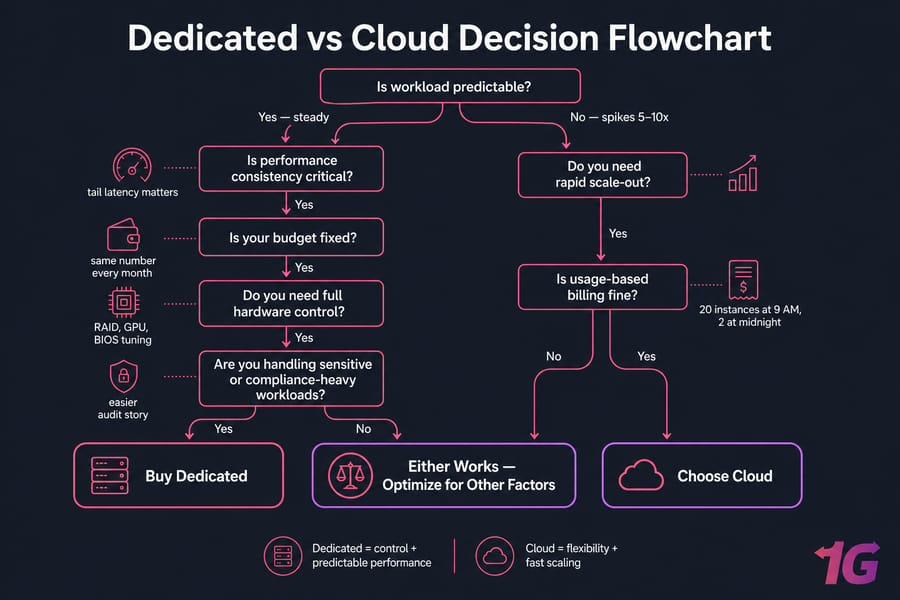
Time for a real decision framework. Answer these seven questions honestly.
A 7-question decision checklist
- Is your workload predictable? If usage is roughly the same every day, lean dedicated. If it spikes 5–10x at random times, lean cloud.
- Is performance consistency critical? Tail latency matters? Real-time? Latency-sensitive? Lean dedicated.
- Do you need rapid scale-out? If you might need 20 instances at 9 AM and 2 at midnight, cloud.
- Is your budget fixed? If your finance team needs the same number every month, dedicated. If usage-based billing is fine, cloud is on the table.
- Do you need full hardware control? Custom RAID, specific GPUs, particular CPU generation, BIOS tuning? Dedicated.
- Are you handling sensitive or compliance-heavy workloads? Easier audit story on dedicated.
- Do you have sysadmin capacity? If yes, either works. If no, lean cloud or pick a managed plan on either platform.
Quick recommendations by business type
- Choose dedicated if you run a game server, trading platform, large production database, streaming origin, compliance-bound workload, or any high-traffic site with steady usage.
- Choose cloud if you're a startup, building a SaaS, running variable workloads, doing dev/test, or your traffic patterns are still unknown.
- Choose either if your usage is moderate and steady — at that point, decide based on team skills, budget structure, and how much management overhead you want to take on.
For deeper buying guidance on the dedicated side, our how to choose a dedicated server walkthrough covers spec selection.
Can you start with cloud and move to dedicated later?
Yes, and it's a common path. Start in cloud while you're figuring out product-market fit and traffic patterns. Once usage stabilizes — and you can see your cloud bill flatlining at uncomfortable levels — migrate the steady workloads to dedicated. Keep the elastic, bursty pieces in cloud. This hybrid approach is how a lot of mature businesses run.
The reverse migration (dedicated → cloud) happens too, usually when a business needs to scale globally or shift to a more elastic architecture. Neither direction is unusual.
Common mistakes when buying cloud or dedicated hosting
I've seen these mistakes burn smart people. Don't repeat them.
- Choosing on price alone. The cheapest dedicated server with old CPUs and SATA SSDs will underperform a mid-tier modern config. The cheapest cloud instance might have abysmal CPU credits. Look at price-per-performance, not price.
- Ignoring bandwidth and egress. Both platforms can bite here. Dedicated providers cap monthly bandwidth on cheap plans. Cloud providers charge per GB out. Read the bandwidth terms before you sign.
- Underestimating storage performance. "100 GB SSD" tells you nothing about IOPS or sustained throughput. For databases, this matters enormously. NVMe is not a marketing word it's a real performance class.
- Forgetting migration effort. Picking the wrong platform first and migrating later costs days of engineering time and risks downtime. Pick deliberately the first time.
- Overbuying hardware. A 64-core server for a workload that uses 4 cores is wasted money. Right-size from real measurements, not aspirations.
- Underestimating management complexity. Unmanaged servers need an actual human to patch, monitor, back up, and respond to incidents. If you don't have that person, get a managed plan or accept the risk.
Our deeper writeup on how to evaluate a VPS provider before signing up covers the due diligence checklist in more detail.
Need help choosing the right server for your workload?
If you're stuck between dedicated power and cloud flexibility, 1Gbits offers both global locations, full root access, managed and unmanaged options, NVMe storage on most plans, and 24/7 support. Match your traffic, performance, and budget to the right setup without the guesswork.
Choose the server that fits your workload — not just the trend
Here's the bottom line. Dedicated servers are usually the better buy for predictable, high-performance workloads where consistency, control, and fixed monthly costs matter. Cloud servers are ideal when flexibility, fast deployment, and elastic scaling are non-negotiable.
Most decisions aren't actually close once you answer the seven checklist questions honestly. The wrong choice costs real money — either in surprise cloud bills or in dedicated capacity sitting idle. Get it right the first time.
- buy dedicated server — predictable performance, fixed pricing, full control
- buy cloud VPS — fast deployment, flexible scaling, pay as you grow

Leave A Comment