
![How to Set Up an ARK Dedicated Server 🦖 [2026 Guide]](https://1gbits.com/cdn-cgi/image/width=1200,quality=80,format=auto/https://s3.1gbits.com/blog/2026/07/set-up-an-ark-dedicated-server-main.webp "How to Set Up an ARK Dedicated Server 🦖 [2026 Guide]")
Setting up your own ARK server sounds intimidating until you actually do it once. Then it clicks. This guide walks you through how to set up an ARK dedicated server step by step — from the hardware you need, through the SteamCMD install, ports, config files, and launch, all the way to troubleshooting the annoying "why won't my server show up" problem that trips up almost everyone.
I've built ARK servers for private tribes and public modded communities. Both. And I'll be honest with you upfront: the setup itself isn't the hard part. Keeping it stable under load is. So we'll cover both.
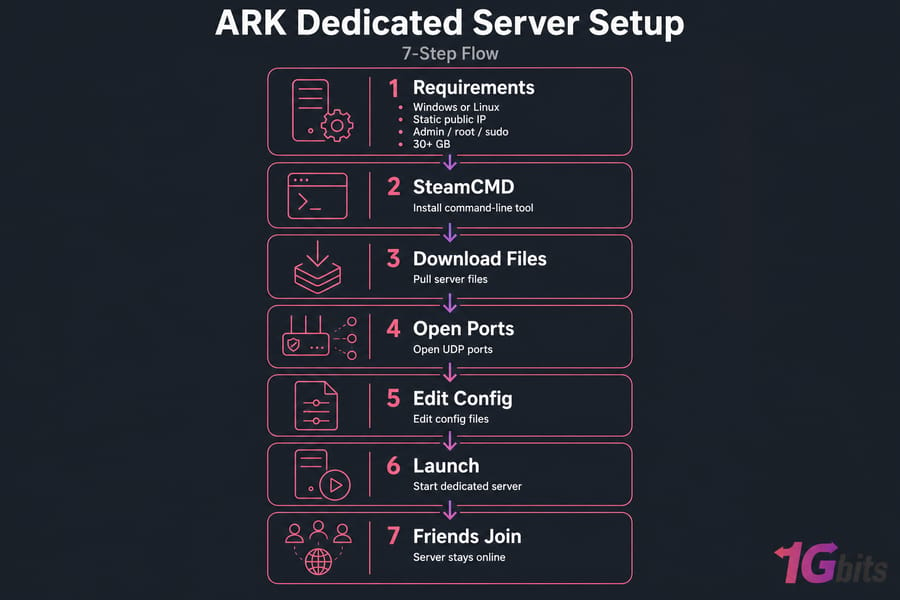
What you need before an ARK dedicated server setup
A dedicated ARK server is a machine that runs the ARK world 24/7 independently of any player's game client. That's the key difference from a non-dedicated session, where the world only exists while the host is actually playing and everyone gets tethered to them on the same map. Dedicated means the world keeps ticking whether you're online or not.
Before touching a single command, you want a few things lined up. This part's quick, so don't skip it.
Minimum tools and access you should have ready
- A Windows or Linux machine you fully control
- A stable internet connection (upload speed matters more than you'd think)
- A static public IP, or a hosted server IP that stays fixed
- Administrator (Windows) or root/sudo (Linux) access
- SteamCMD — the command-line tool that pulls the server files
- Open UDP ports on your router and firewall
- A plain text editor for config files
- Enough disk space for ARK files, saves, and mods (budget 30+ GB)
Home-hosted vs remote-hosted ARK server basics
Here's the fork in the road. You can host on your home PC, or you can rent a remote box. Home hosting is free-ish but means dealing with port forwarding, your ISP's quirks, and tying up your own hardware. A rented ARK dedicated server hosting setup skips most of that pain — you get a public IP, no NAT headaches, and hardware built for the job.
The workflow is the same either way: install, open ports, edit configs, launch. Before you install anything, though, make sure your hardware can actually run ARK smoothly.
ARK dedicated server requirements for smooth performance
ARK is heavy. I won't sugarcoat it. It's one of the more demanding survival games out there, and the resource appetite climbs fast once you add mods, larger maps like Ragnarok, and active tribes building sprawling bases. So ignore anyone who tells you "2GB RAM is fine." It isn't.
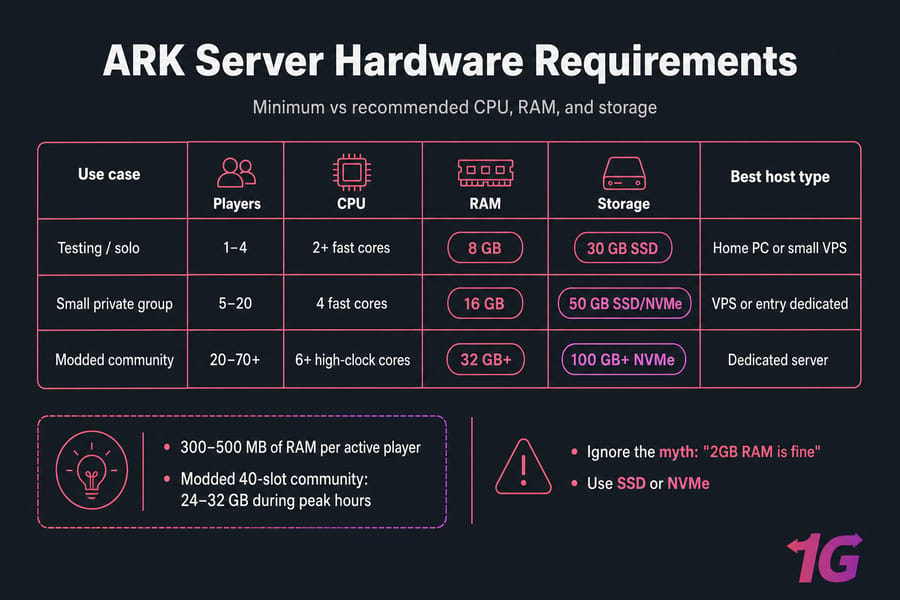
Minimum vs recommended CPU, RAM, and storage
The server process is fairly single-thread hungry, so per-core clock speed counts more than raw core count. RAM usage grows with map size and player activity. And storage — please use SSD or NVMe. Spinning disks make save writes crawl, which causes lag spikes and, worst case, corrupted saves.
| Use Case | Players | CPU | RAM | Storage | Best Host Type |
| Testing / Solo | 1–4 | 2+ fast cores | 8 GB | 30 GB SSD | Home PC or Small VPS |
| Small Private Group | 5–20 | 4 fast cores | 16 GB | 50 GB SSD/NVMe | VPS or Entry Dedicated |
| Modded Community | 20–70+ | 6+ high-clock cores | 32 GB+ | 100 GB+ NVMe | Dedicated Server |
Pro Tip: ARK performance drops sharply with mods and larger tribes. Leave RAM headroom instead of sizing to the bare minimum — a server that's constantly maxing out memory will crash at the worst possible moment.
How many players your ARK server hardware can handle
Rough rule: figure roughly 300–500 MB of RAM per active player on a vanilla map, more with mods. A modded 40-slot community can easily chew through 24–32 GB during peak hours. Home PCs handle small groups fine but struggle badly once a busy public server hammers them.
Not sure how much memory you actually need? This breakdown on how much RAM you need for gaming and hosting is worth a read. For storage, an NVMe VPS keeps save times snappy, and if you're going big, a dedicated server gives you the raw resources ARK loves.
Windows vs Linux requirements for ARK hosting
Both work. Windows is friendlier if you prefer a GUI and remote desktop. Linux (Ubuntu or Debian usually) tends to use fewer resources for the OS itself and is the go-to for headless remote servers. The ARK server files are the same underneath; only the management style differs.
Once you know the resource level you need, the next step is deciding where to host.
How to host an ARK server: home PC, VPS, or dedicated server
Three realistic options, each with trade-offs. Let me lay them out plainly.
| Factor | Home PC | VPS | Dedicated Server |
| Upfront Cost | Free (own hardware) | Low Monthly | Higher Monthly |
| Uptime | Depends on your PC/power | Good | Excellent |
| Performance Under Load | Weak for big servers | Fine for small/medium | Strong, dedicated resources |
| Port Forwarding Hassle | High | None | None |
| Best For | Testing, tiny groups | Private tribes, light mods | Public/modded communities |
When a VPS is enough for ARK
For a private server with a handful of friends and a light mod list, a decent VPS does the job nicely. No router configuration, a fixed public IP, and it stays online while your gaming rig is off. See game VPS hosting for what that looks like in practice.
When you need a dedicated server instead
Once you're running 20+ players, heavy mods, or a public server, you'll want the isolated horsepower of a dedicated box. Shared VPS resources start to bottleneck. The full breakdown in VPS vs dedicated server covers exactly when that switch makes sense.
Why latency and bandwidth matter for ARK multiplayer
ARK sends constant position and state updates. High latency means rubber-banding, delayed hits, and frustrated players. Public servers also need decent bandwidth and, honestly, DDoS protection — attacks on game servers are common. If low ping is your priority, low latency game hosting explains why server location matters so much. If you want to skip home network issues and port forwarding entirely, a hosted game dedicated server hosting saves real setup time.
If you're ready to proceed with a manual install, SteamCMD is the usual starting point.
ARK SteamCMD server setup step by step
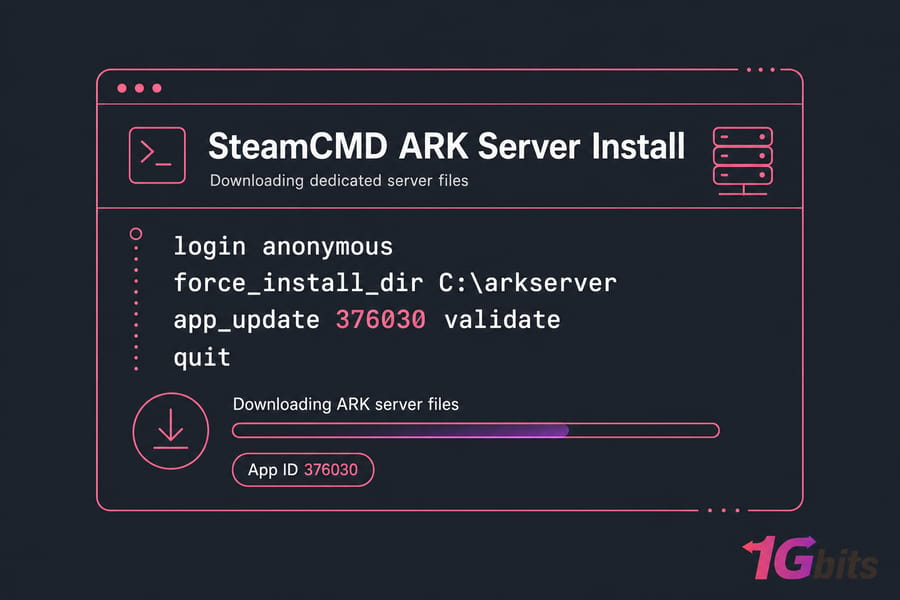
SteamCMD is Valve's command-line version of the Steam client. It downloads dedicated server files without a full GUI — perfect for servers. The ARK dedicated server app ID is 376030. Worth double-checking against the ARK wiki before you run it, since IDs can change with major game versions.
Install SteamCMD on Windows
- Download SteamCMD from the official Valve developer page.
- Extract
steamcmd.zipinto a folder likeC:\steamcmd. - Run
steamcmd.exeonce — it self-updates.
Install SteamCMD on Linux
On Ubuntu/Debian, enable multiverse and install the package. You'll usually need to add the i386 architecture first.
sudo dpkg --add-architecture i386
sudo apt update
sudo apt install steamcmd -y
If the package isn't available, grab the tarball manually. New to the command line? These guides on how to SSH and how to log in to a VPS will get you connected first, and installing packages in Linux covers the basics.
Download ARK dedicated server files with SteamCMD
Launch SteamCMD and run these lines. On Linux, use a forward-slash path like /home/ark/server instead of the Windows path.
login anonymous
force_install_dir C:\arkserver
app_update 376030 validate
quit
ARK's server files are big — expect several GB and a download that can take a while on slower connections. Keep the login anonymous line as-is; ARK's server doesn't need a Steam account. After every game patch, re-run that same app_update 376030 validate command to update the files.
With the server files installed, the next priority is making sure players can actually reach your server.
ARK server ports to open for router and firewall access
This is where most first-time setups fall apart. ARK uses UDP, not TCP. Get that wrong and your server simply never appears. Here are the defaults.
| Port | Protocol | Purpose | Where to Open |
| 7777 | UDP | Game port (main connection) | Router + Firewall |
| 7778 | UDP | Raw socket (used alongside 7777) | Router + Firewall |
| 27015 | UDP | Query port (server browser listing) | Router + Firewall |
| 27020 | TCP | RCON (optional, remote admin) | Firewall (only if used) |
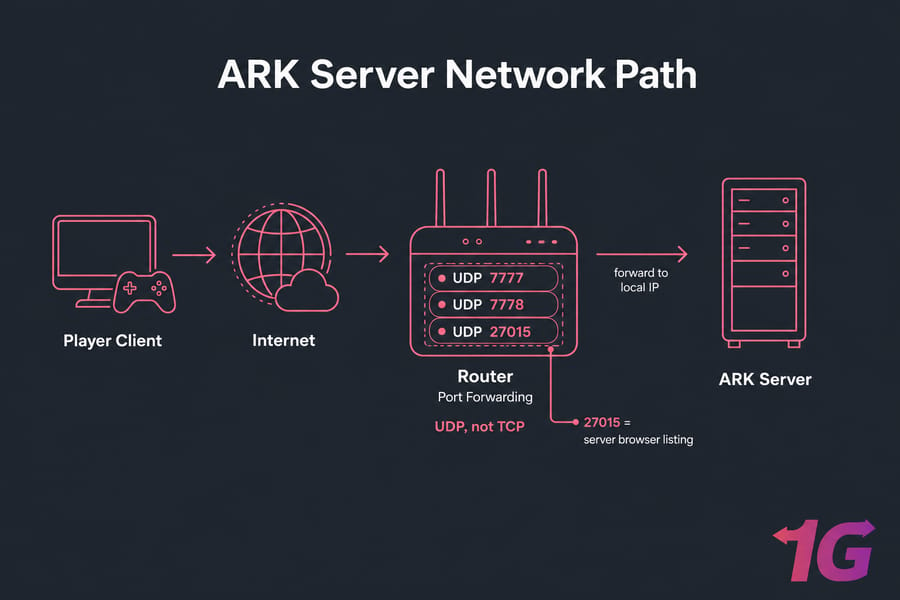
Warning: Opening the wrong protocol or forgetting router forwarding is one of the top reasons ARK servers never appear online. If you take one thing from this section: it's UDP, and both the game port and the query port must be open.
Default ARK game port and query port
The game port (7777) handles the actual gameplay connection. The query port (27015) is what the Steam server browser uses to find your server. Miss the query port and the server runs fine but stays invisible in the list.
How to configure port forwarding on a home network
Log into your router, find the port forwarding section, and forward those UDP ports to your PC's local IP. It varies by router brand, so these walkthroughs help: how to do port forwarding and the router-specific port forward on your router guide.
How to allow ARK through Windows Firewall or UFW
On Linux with UFW:
sudo ufw allow 7777/udp
sudo ufw allow 7778/udp
sudo ufw allow 27015/udp
On Windows, add inbound rules for those UDP ports in Windows Defender Firewall. For a remote box, configuring a firewall on your VPS covers this properly. Once the network path is open, move on to the settings that define how your ARK world behaves.
ARK server config files: GameUserSettings.ini and Game.ini
Two files run the show. Back them up before editing — a stray typo can stop the server from booting, and you'll want a clean copy to fall back on.
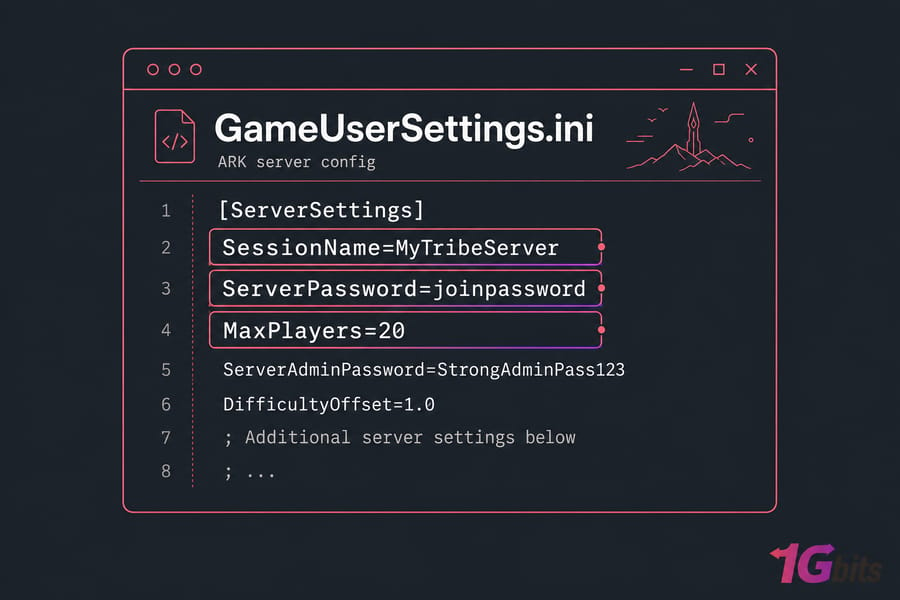
Where ARK config files are located
Both live under your server install directory at:
ShooterGame/Saved/Config/WindowsServer/    (Windows)
ShooterGame/Saved/Config/LinuxServer/      (Linux)
Don't have them yet? They generate automatically the first time you launch the server, then you edit and relaunch.
Basic settings to edit first
Key Takeaway:GameUserSettings.inihandles most server identity and settings, whileGame.iniis used for deeper gameplay adjustments like breeding, harvesting, and engram tweaks.
Start with the essentials in GameUserSettings.ini: your session name (what shows in the browser), the join password if you want it private, the admin password, and max players.
Example ARK server configuration for beginners
Here's a sane starting block. Adjust the values, don't copy blindly.
[ServerSettings]
SessionName=MyTribeServer
ServerPassword=joinpassword
ServerAdminPassword=StrongAdminPass123
MaxPlayers=20
DifficultyOffset=1.0
XPMultiplier=2.0
TamingSpeedMultiplier=3.0
HarvestAmountMultiplier=2.0
Editing over SSH? A quick refresher on the nano text editor and this handy Linux cheat sheet save time. After the configs are in place, the server still needs the correct startup command to load your map and settings.
ARK dedicated server command line and launch parameters
Launch parameters tell ShooterGameServer which map to load, which ports to use, and how to behave. You pass them on one line. The ?listen flag is what makes the server publicly joinable.
Example startup command for Windows
Create a start.bat file in the server folder:
start ShooterGame\Binaries\Win64\ShooterGameServer.exe "TheIsland?listen?SessionName=MyTribeServer?ServerPassword=joinpassword?ServerAdminPassword=StrongAdminPass123?Port=7777?QueryPort=27015?MaxPlayers=20" -server -logExample startup command for Linux
./ShooterGame/Binaries/Linux/ShooterGameServer "TheIsland?listen?SessionName=MyTribeServer?ServerPassword=joinpassword?ServerAdminPassword=StrongAdminPass123?Port=7777?QueryPort=27015?MaxPlayers=20" -server -logRun it inside a Linux screen session so it keeps running after you disconnect. That's a common beginner miss — close the terminal, kill the server.
How to set map name, session name, passwords, and player slots
The first value is the map name. Common ones include TheIsland, TheCenter, Ragnarok, and CrystalIsles. Everything after the map is a chained parameter separated by ?. The Port value is your game port, QueryPort the browser query port, and SessionName is what players see.
Once the server launches successfully, most people immediately want mods, admin access, and custom rules.
ARK server mods setup, admins, and server customization
Mods are where ARK gets fun — and where mismatches cause the most grief. The golden rule: server mods and client mods must match exactly, in the same order.
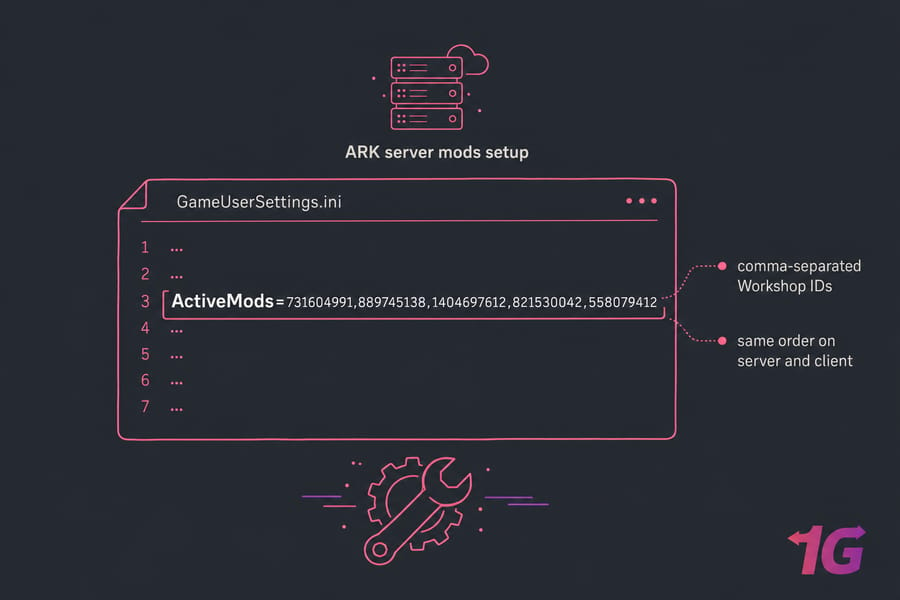
How to add Workshop mods
- Find the mod on the Steam Workshop and grab its numeric ID from the URL.
- Add the IDs to your config under the
ActiveMods=line, comma-separated. - Restart the server so it downloads and mounts them.
Players joining need those same mods installed locally, or they'll get a mod mismatch error.
How to assign admin access
Set your ServerAdminPassword, then in-game open the console and enter enablecheats YourAdminPassword. That unlocks admin commands. The full list lives in this ARK cheats and admin commands reference.
Popular quality-of-life settings players usually change
- Faster taming and harvesting multipliers
- Higher XP rates for a less grindy start
- Shorter egg-hatch and mating intervals for breeding
- Structure decay and pickup timers
A working ARK server still needs maintenance if you want to avoid save loss and downtime.
ARK server backup, updates, and maintenance best practices
This is the unglamorous part nobody talks about — and the reason servers die. Skip it at your own risk.
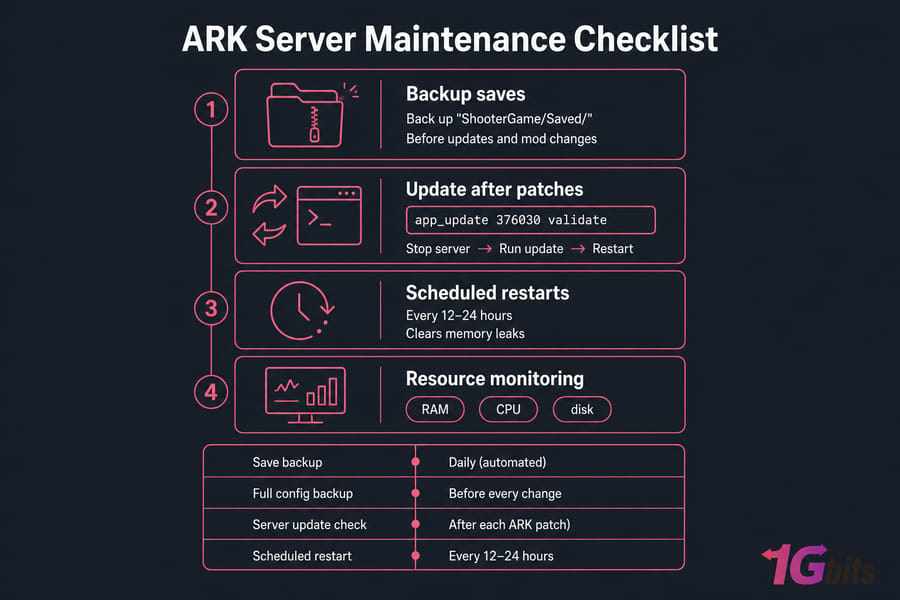
How to update the server after ARK patches
When ARK gets a patch, your server files fall out of sync and players can't connect until you update. Stop the server, re-run app_update 376030 validate in SteamCMD, then restart. Always update before players report they can't join — not after.
How to back up saves and configs
Back up the entire ShooterGame/Saved/ folder. That holds your world saves, player data, and configs. Do it before every update and before adding or removing mods. On Linux, automate it — this guide on scheduling automatic backups for a Linux server shows how.
| Task | Frequency |
| Save Backup | Daily (automated) |
| Full Config Backup | Before every change |
| Server Update Check | After each ARK patch |
| Scheduled Restart | Every 12–24 hours |
How to automate restarts and monitor performance
Scheduled restarts clear memory leaks and keep things stable. Cron jobs or systemd timers handle this cleanly. Keep an eye on RAM, CPU, and disk with the tools in Linux monitoring tools and commands and this piece on monitoring and improving VPS speed. If anything breaks, these are the first ARK-specific problems to check.
ARK server troubleshooting for common setup problems
Most issues boil down to a handful of causes. Scan the table, match your symptom, apply the fix.
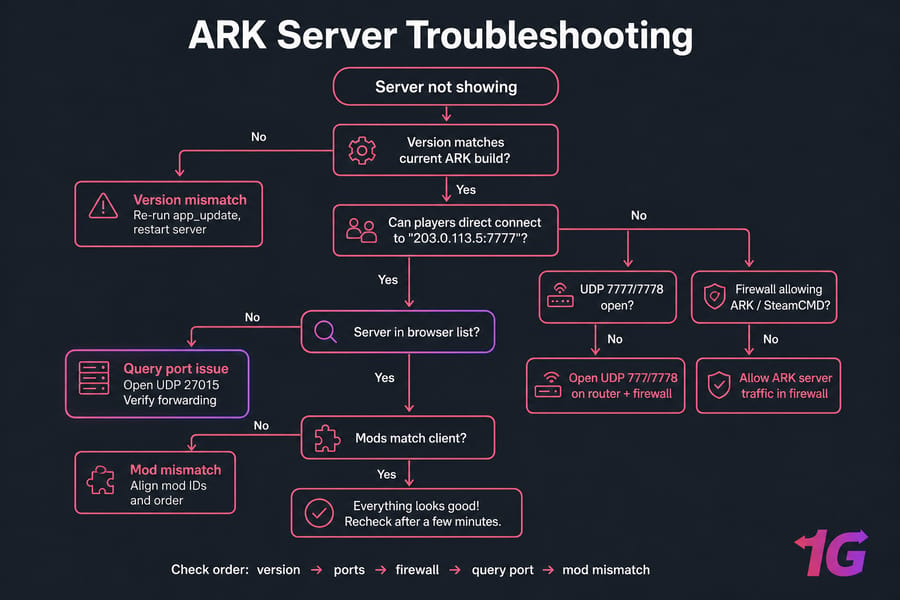
| Problem | Likely Cause | Fix |
| Server not in list | Query port closed or wrong protocol | Open UDP 27015; verify forwarding |
| Connection timeout | Game port (7777) blocked | Open UDP 7777/7778 on router + firewall |
| Mod mismatch error | Client mods don't match server | Align mod IDs and order on both sides |
| Fails after a patch | Version mismatch | Re-run app_update, restart server |
| Lag / stutter | RAM or CPU overloaded | Reduce players/mods or upgrade hardware |
| Won't launch | Config typo or bad path | Restore backup config; check the log |
Quick Summary: If your server isn't showing, check version, ports, firewall, query port, and mod mismatch — in that order. Nine times out of ten it's one of those five.
ARK server not showing up in the server list
The single most common complaint. Almost always it's the query port. Try connecting directly first — open the game, use "direct connect," and enter your public IP with the game port, like 203.0.113.5:7777. If direct connect works but the browser doesn't, your query port isn't open. Confirm ports with checking open ports on Linux.
Connection timeout, mod mismatch, and crash fixes
Timeouts usually mean the game port is blocked or forwarded to the wrong internal IP. Mod mismatch means someone's client mods don't match the server exactly. Crashes after updates point to a version gap — update both. Deeper diagnosis? The Linux server troubleshooting guide and netstat on Linux help you see what's actually listening.
What to check when performance is poor
Check the log files in ShooterGame/Saved/Logs/ first. Then watch resource usage during peak hours. Recurring crashes or lag under load are often a sign you've outgrown your current hardware — a common tipping point for home hosts. If you'd rather avoid these tasks entirely, hosted ARK infrastructure is often the easier route.
Best hosted ARK dedicated server option if you want an easier setup
Look, self-hosting is a great learning experience and genuinely fine for small private groups. But for public servers or busy modded communities, hosted infrastructure is usually easier to keep stable than a self-hosted PC.

When renting ARK hosting saves time and reduces downtime
- You're running a public or 20+ player server
- You're tired of port forwarding and ISP restrictions
- You need reliable uptime while your own PC is off
- Your home hardware can't handle the mod load
- You want DDoS protection for a public community
Why 1Gbits fits ARK dedicated server hosting needs
1Gbits focuses on dedicated infrastructure with full root access, strong bandwidth, and hardware built for demanding games. You get a fixed public IP (no NAT), room to scale as your community grows, and DDoS protection out of the gate. Browse the ARK dedicated server hosting page, or if you prefer managing your own OS, a Linux dedicated server gives you the same power with total control.
Launch Your ARK World on Reliable Infrastructure. Use this guide to self-host, or move faster with 1Gbits ARK dedicated server hosting for better performance, bandwidth, and long-term stability.

Leave A Comment