


Plex hardware requirements depend mostly on how many streams the server has to transcode at the same time. Storage size matters much less. If 1–2 users mostly Direct Play, almost any modern machine will do. Several 1080p transcodes, or even a single 4K HDR transcode, need either a strong CPU or hardware acceleration such as Intel Quick Sync. Remote users also depend on your upload speed. I've watched people buy a 32GB RAM box to fix buffering when the actual cause was a 20 Mbps upload line.
What Determines Plex Server Hardware Requirements?
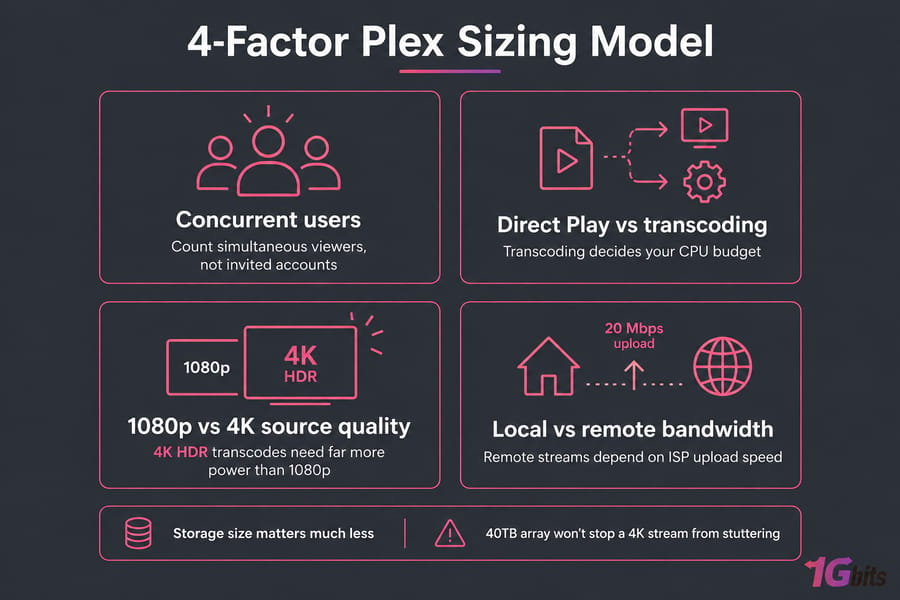
Before you size anything, you need answers to three questions:
- How many users stream at the same time? Count simultaneous viewers, not invited accounts. Twenty shared users rarely means twenty streams.
- Do they Direct Play or transcode? This one decides your CPU budget.
- Are the streams local or remote? Remote viewers are limited by your ISP upload speed.
Plex itself names processor power, network speed and storage space as the main limits. Storage is a capacity question, though, and it doesn't affect playback speed. A 40TB array won't stop a 4K stream from stuttering. For the wider picture, see our guide to choosing the right server for streaming.
Direct Play vs Transcoding: The Real Bottleneck
| Method | What happens | CPU load |
| Direct Play | The client plays the file as it is | Almost none |
| Direct Stream | The container or audio is remuxed and the video is left alone | Low |
| Transcoding | The video is re-encoded to a different codec, resolution or bitrate | High |
Plex says even a 1.2GHz Atom can handle playback with no transcoding. Transcoding gets triggered when the client can't decode the codec, when the remote bitrate cap is below the file's bitrate, or when subtitles have to be burned in. That last one is the trap. Image-based subtitles like PGS often force a full video transcode, and that can cut into the gains from hardware acceleration. HDR-to-SDR tone mapping adds even more load.
Your OS choice matters less than this. If you're still deciding, our best OS for Plex Server breakdown covers the trade-offs.
Plex Server Hardware Requirements by Number of Users
This table assumes you're counting concurrent streams. The CPU numbers are for software transcoding unless the row says otherwise.
| Concurrent users | Stream pattern | CPU guidance | RAM | Upload (remote) |
| 1–2 | Mostly Direct Play | Any modern quad-core or Intel-based NAS | 4GB | Sum of the file bitrates |
| 1–2 | Mixed 1080p transcodes | ~4,000+ PassMark, or Quick Sync | 4–8GB | 10–20 Mbps |
| 3–5 | Multiple 1080p transcodes | ~10,000 PassMark, or a recent Intel iGPU | 8GB | 40–60 Mbps |
| 5–8 | Mixed local/remote | Recent Intel Core with Quick Sync | 8–16GB | 60–100 Mbps |
| 8+ | Heavy concurrency | Quick Sync or NVENC plus a strong CPU | 16GB+ | 100 Mbps+ or a hosted uplink |
| Any | 4K HDR → 1080p | 17,000 PassMark per stream, so hardware acceleration is close to mandatory | 8–16GB | ~10 Mbps per transcoded stream |
Here's how that works out in practice:
- 2 users, both Direct Play: an old mini PC or an Intel NAS handles this with no trouble.
- 3 users, mixed 1080p transcodes: 3 × 2,000 = 6,000 PassMark, plus headroom. Any 8th-gen or newer Intel Core with Quick Sync covers this.
- 1 remote user transcoding 4K to 1080p: on CPU alone, that one stream needs 17,000 PassMark. With Quick Sync, a modest i3 can do it.
When concurrency outgrows a spare PC, a dedicated server for Plex or a general streaming server takes the load off your home network.
Plex Server CPU Requirements for 1080p and 4K Transcoding
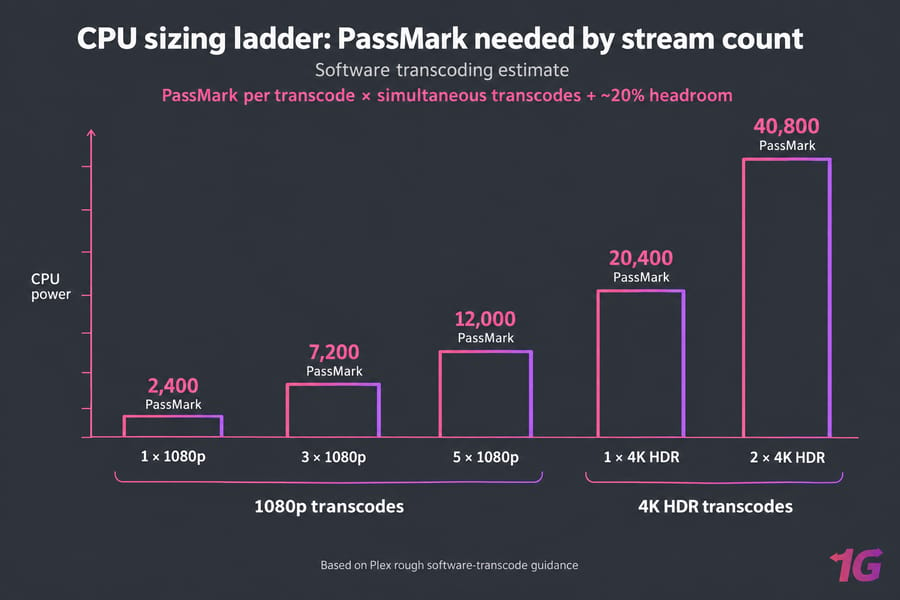
Plex publishes rough PassMark guidelines for a single software transcode:
| Source file | Rough PassMark per transcode |
| 720p, 4 Mbps H.264 | 1,500 |
| 1080p, 10 Mbps H.264 | 2,000 |
| 4K SDR, 40 Mbps 8-bit HEVC → 1080p | 12,000 |
| 4K HDR, 50 Mbps 10-bit HEVC → 1080p | 17,000 |
The formula is simple: PassMark per transcode × simultaneous transcodes + ~20% headroom. These are Plex's own estimates, so treat them as rough guidance.
Hardware acceleration changes these numbers a lot. Plex requires an active Plex Pass for hardware-accelerated streaming, and it uses Intel Quick Sync on most recent Intel Core chips. HEVC encoding needs 7th-gen or newer. For home use, Quick Sync gives you the best value per watt. NVIDIA NVENC makes sense if you already own a GPU, and Apple VideoToolbox works on Macs. Hardware acceleration doesn't make the CPU irrelevant, though. Audio transcoding and subtitle burn-in still use it. For more on server-grade options, see best server CPU processors and Intel Xeon vs AMD EPYC.
RAM, Storage and Transcode Cache
Plex says 4GB of RAM is typically more than enough for a standard install. Go with 8GB to be comfortable, or 16GB if you're also running Docker containers or other apps. Adding RAM won't fix buffering.
- SSD for the OS and Plex app data. The metadata, thumbnails and database get sluggish on HDDs once a library grows large. See NVMe vs SSD.
- HDD or RAID array for media. Plan capacity separately. Our guide on how much storage server capacity you need helps with this.
- Transcode directory on SSD or NVMe. It's a small change that keeps write-heavy temp files off your media disks.
For growing libraries, a dedicated storage server keeps capacity separate from compute.
Plex Remote Streaming Bandwidth Requirements
Plex says remote quality is limited mainly by the upload speed where the server sits. All your remote streams have to fit within it together. If Mbps math isn't your thing, here are two examples:
- 2 remote users × 8 Mbps = 16 Mbps, plus headroom, so about 20 Mbps
- 4 remote users × 10 Mbps = 40 Mbps, plus headroom, so about 50 Mbps
Gigabit LAN doesn't fix a 20 Mbps home upload cap. Set realistic per-stream and total limits under Settings → Remote Access. If you're sharing with a lot of people, an unmetered dedicated server takes your ISP out of the picture. Read up on unmetered vs unlimited bandwidth before you sign anything.
NAS vs Mini PC vs Dedicated Server for Plex
| Option | Strengths | Weaknesses | Best for |
| NAS | RAID, low power, all your storage in one place | Weak CPUs. Plex disables transcoding entirely on some ARM models | Direct Play households |
| Intel mini PC | Quick Sync, low power, cheap | Little room for drives | Most families |
| Dedicated server | Always on, high uplink, easy to expand | Monthly cost | Heavy remote sharing, large libraries |
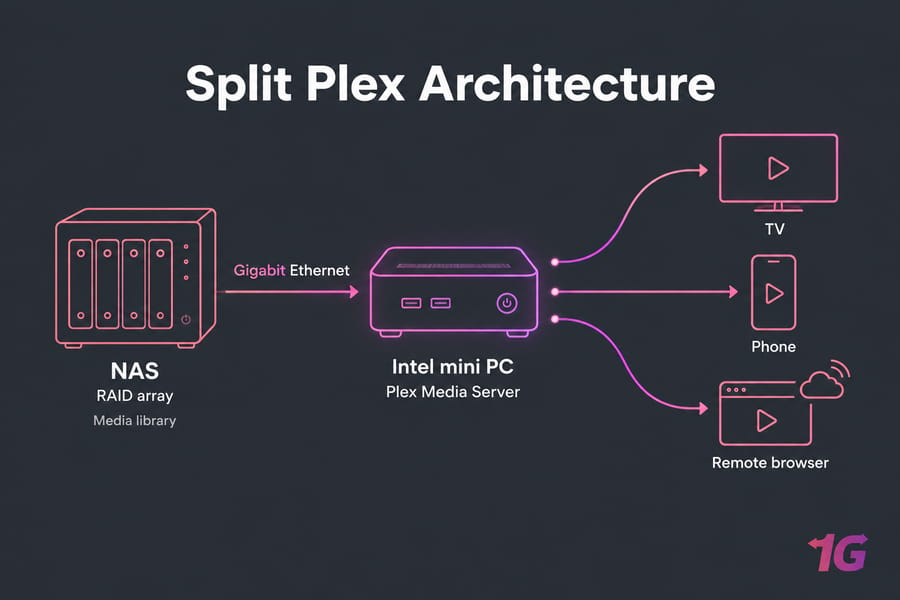
My usual advice: if you already own a NAS, keep it for storage and run Plex on a separate Intel box. Advanced admins who want full control should look at a Linux dedicated server, or a dedicated server sized to their concurrency. For a home lab, check out our best home server options. For more on split designs, read NAS vs SAN vs dedicated storage server and what a storage server is.
Common Sizing Mistakes
- Counting invited users when you should be counting concurrent streams.
- Ignoring subtitles, which can force a full transcode.
- Assuming all 4K is the same. 4K HDR HEVC is far harder to transcode than 4K SDR.
- Buying an ARM NAS and expecting it to handle several transcodes.
- Spending on RAM before the CPU, the iGPU or the upload line.
Once your server is up and running, lock it down. Our guide on how to secure a Plex server walks through it.
Recommended Setups by Scenario
- Budget (1–2 users, Direct Play): Intel mini PC, 8GB RAM, SSD boot drive, USB or NAS media, Gigabit Ethernet.
- Balanced (2–4 users, some 1080p transcodes): recent Intel Core i3/i5 with Quick Sync, 8–16GB RAM, NVMe for app data and transcodes, HDD array.
- Power user (4–8 users, heavy remote, some 4K): a newer Intel Core i5 or i7 with Quick Sync, 16GB RAM, 100 Mbps+ upload. If your ISP can't provide that, move up to a managed dedicated server.
- Split storage and compute: a NAS or storage server for the library and a separate Plex compute node.
Ready to build? Follow our steps on how to install Plex Media Server.
Final Recommendation
Size your server for concurrent transcodes and your upload speed, not for how big your library is. For most homes, an Intel machine with Quick Sync and a Plex Pass is the best value. If remote sharing grows beyond what your ISP upload can handle, compare dedicated options on our Plex server hosting page.

Leave A Comment