
If you're looking for the best operating system for a Plex server, the short version is that Linux, Windows, macOS and NAS can all run Plex Media Server well. Plex officially supports all four. What they differ on is how much maintenance they need, how well they handle transcoding and how easily you can add storage later. I've built Plex boxes on each of them, and people usually regret their choice because they bought the wrong hardware, not because they picked the wrong OS.
Quick Verdict: Best OS for Plex Server
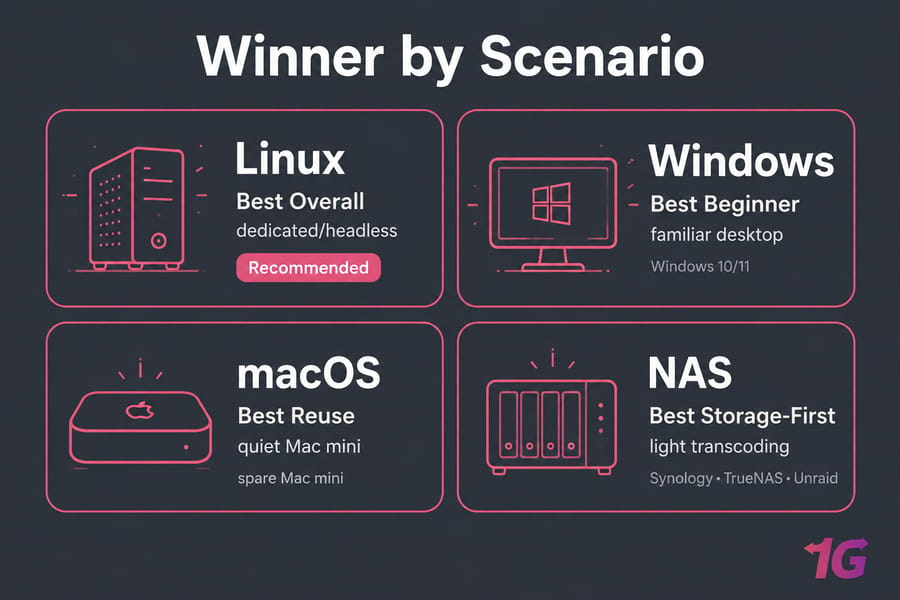
For a dedicated, low-overhead machine, Linux (Ubuntu or Debian) is the best OS for a Plex server for most people. Windows is the easiest option if you already use a PC every day. macOS works well on a quiet Mac mini you already own. A NAS is the best choice when storage comes first and you don't need much transcoding.
- Best overall: Linux on a mini PC with an Intel CPU
- Best for beginners: Windows 10/11
- Best reuse pick: macOS on a spare Mac mini
- Best for storage-first setups: Synology, TrueNAS or Unraid
What Matters More Than the Plex Server Operating System
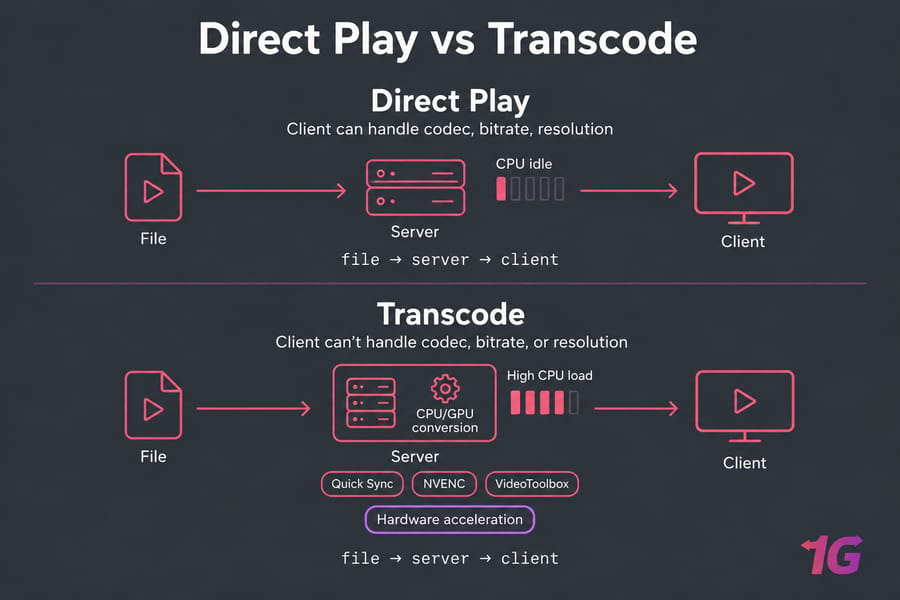
Direct Play vs Transcoding
With Direct Play, the server sends the file as it is and the CPU does almost nothing. Transcoding happens when a phone, browser or TV can't handle the codec, bitrate or resolution, so the server converts the video on the fly. This is where hardware matters. Plex points out that almost every client app needs some transcoding at least part of the time.
Hardware Transcoding and Plex Pass
Hardware-accelerated streaming uses Intel Quick Sync, NVIDIA NVENC or Apple VideoToolbox instead of the regular CPU cores. It's fast and uses little power. You need two things for it: compatible hardware and an active Plex Pass. Also keep in mind that Plex says hardware acceleration doesn't work inside virtual machines, because the host doesn't pass the video hardware through to the guest.
CPU, RAM, and Storage Basics
Plex's CPU guidance for a single software transcode of a 4K HDR file (50 Mbps, 10-bit HEVC) down to 1080p is a PassMark score of about 17,000. A 4K SDR file needs about 12,000. Two simultaneous transcodes need roughly twice the CPU power. RAM is rarely the bottleneck. Plex itself runs fine on a few gigabytes, and 8GB gives you room for other services. If you're still sizing your workload, read our guide to choosing the right server for streaming.
Linux vs Windows vs macOS vs NAS: Comparison Table
| Platform | Best For | Transcoding / HDR | Ease | Growth |
| Linux | Dedicated, headless builds | Excellent (VAAPI, Quick Sync, NVENC); widest HDR tone mapping support | Moderate | Excellent, fits Docker well |
| Windows | Users already on a PC | Very good; HDR tone mapping needs newer Intel chips | Easiest | Good |
| macOS | Quiet Apple hardware | Good (VideoToolbox) | Easy | Limited, storage expansion is expensive |
| NAS | All-in-one storage | Depends on the model; ARM units are weak | Easy to moderate | Excellent for storage, limited for compute |
Many of the trade-offs are the same ones that apply in a Linux vs Windows dedicated server decision.
Linux for Plex Server: Best for Dedicated and Headless Builds
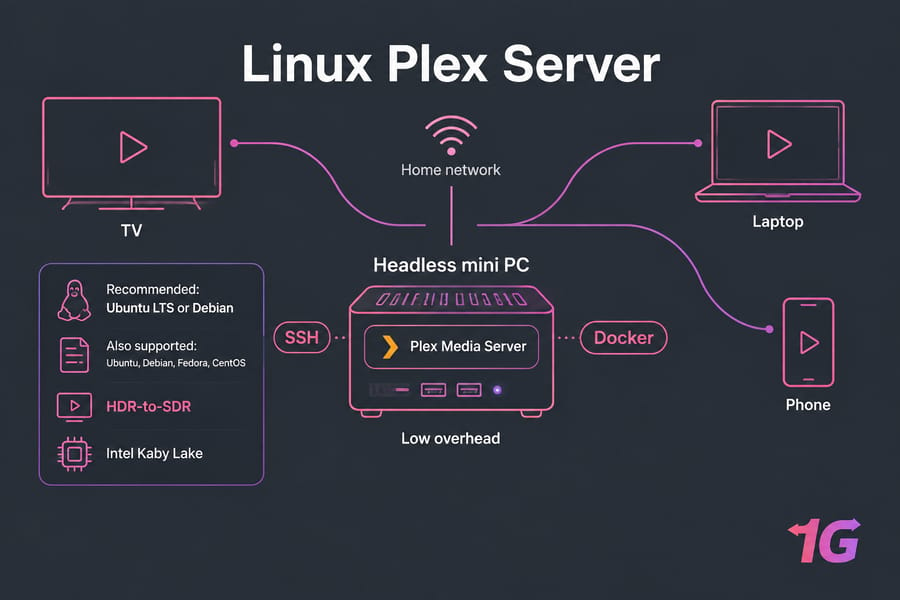
Linux uses few resources, you can manage it entirely over SSH, and it works very well with Docker. Plex publishes official packages for Ubuntu, Debian, Fedora and CentOS. Stick with Ubuntu LTS or Debian. They have the biggest communities and cause the fewest surprises. Linux has also long had the most complete HDR-to-SDR hardware tone mapping support, and it works on Intel chips as old as Kaby Lake.
The downside is that you'll deal with file permissions, mount points and the terminal. Expect a weekend of setup. If you'd rather have a remote Linux environment, Linux VPS hosting gives you root access. Be aware, though, that Plex expects servers to run from home and warns it may not work with every hosting provider.
Windows for Plex Server: Best If You Want Familiarity
You download the installer, click through it and you're done. Windows 10/11 and Windows Server both work, and Intel Quick Sync and NVIDIA cards are well supported. Plex's documentation notes one catch: on Windows with Intel, you can't pick which tone mapping algorithm is used. Hardware HDR tone mapping on Windows also requires a Tiger Lake or newer CPU.
Don't expect Windows to fix buffering if your CPU is too weak for the job. In real-world use, Windows performs fine. Its main costs are forced updates, occasional reboots and more background processes. Windows VPS hosting is available if you want a familiar remote desktop.
macOS for Plex Server: Best for Quiet Apple Hardware
Plex supports macOS 10.13 High Sierra and newer. An Apple Silicon Mac mini is silent, sips power and handles hardware transcoding through VideoToolbox. If you already own one, it's a great option. Buying one new just for Plex makes less sense, because adding storage means external drive enclosures and there's nothing inside you can upgrade.
NAS for Plex Server: Best for All-in-One Storage
A NAS keeps your drives, RAID protection and Plex in one low-power box. Plex's own support pages say that most NAS devices have weak processors. ARM models can usually manage one direct-play stream but can't transcode reliably. Intel-based models with Quick Sync are much better at transcoding.
| Platform | Strength | Weakness | Best Plex Fit |
| Synology | Polished DSM, easy Plex package | Many models have weak or ARM CPUs | Households that mostly Direct Play |
| QNAP | Intel options, PCIe slots on some models | More complex interface | Tinkerers on a budget |
| TrueNAS | ZFS data integrity, Plex via its Apps catalog | Steeper learning curve | Large libraries where data safety matters |
| Unraid | Mix-and-match drives, easy Docker, GPU passthrough | Paid license | Enthusiasts who want storage and transcoding in one box |
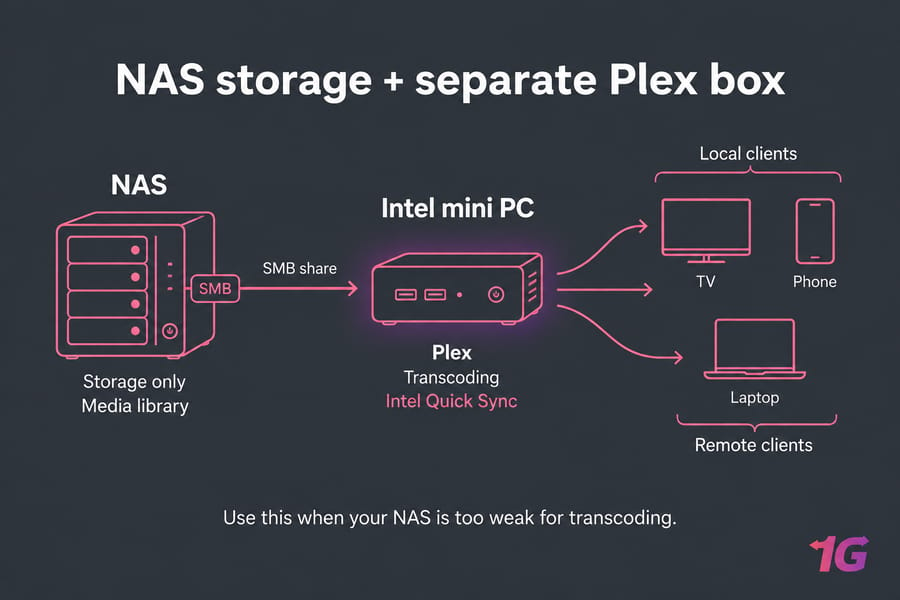
If your NAS is too weak, keep it for storage only and run Plex on a separate mini PC. Our breakdown of NAS vs SAN vs dedicated storage server and our explainer on what is a storage server cover this setup. For offsite capacity, look at our storage server solutions.
Best Operating System for Plex by Use Case
| Scenario | Best Choice | Avoid If |
| First Plex server | Windows | You want a headless box |
| 4K HDR, 2+ remote users | Ubuntu + Intel Quick Sync | You won't learn basic Linux |
| Low-power, always on | Mac mini or Intel NAS | You need lots of transcodes |
| Large, growing library | Unraid or TrueNAS | You want zero setup work |
Say you share your library with two relatives who stream on phones. That means regular transcoding, so an Intel box running Linux is the right call. For more ideas, see our best home server options or compare server for streaming plans.
Common Mistakes When Choosing a Plex Server Platform
- Buying an ARM NAS and expecting it to transcode. Having lots of storage doesn't make streaming faster.
- Choosing Linux without being willing to learn it. Pick an OS you can actually fix at 11 p.m. when something breaks.
- Assuming Windows is slow. It isn't. The hardware makes the difference.
- Ignoring future growth. Keeping storage and compute separate saves you from rebuilding everything later.
Final Recommendation: Which Plex Server OS Should You Choose?
For a dedicated machine, the best operating system for a Plex server is Ubuntu or Debian Linux. Pick Windows if you want the most familiar option, macOS if you have a spare Mac mini, and a NAS only if your transcoding needs are small. Once you've chosen, follow our guide on how to install Plex Media Server, then read how to secure a Plex server. If you'd rather have more control over the infrastructure, explore our server for Plex options.

Leave A Comment