
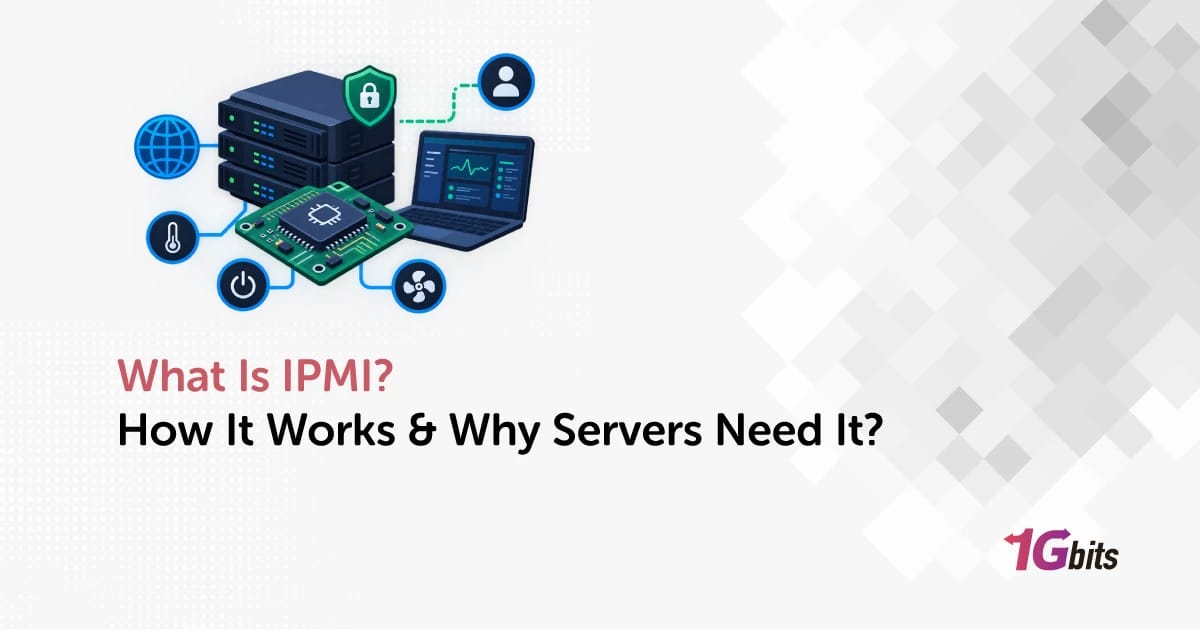
IPMI, or Intelligent Platform Management Interface, is a hardware-level remote management standard that lets administrators monitor, power cycle, and access a server through its Baseboard Management Controller (BMC), even when the operating system is down.
On a dedicated server, IPMI turns "open a ticket and wait for remote hands" into "log in to the BMC, watch the boot screen, and fix it yourself." If you need a refresher, read what a dedicated server is and how it differs from VPS hosting.
What is IPMI in server management?
What IPMI stands for
IPMI stands for Intelligent Platform Management Interface. Intel, Dell, HP, and NEC published the first version in 1998, and IPMI 2.0 is the version you'll find on almost every server board shipped in the last two decades. It defines how software talks to server hardware for power control, sensor readings, and event logs, locally or over a network.
The simplest definition of IPMI
Think of IPMI as a tiny second computer inside your server whose only job is to look after the big one. It reads temperatures, logs hardware faults, and can press the power button for you. It doesn't depend on the main CPU or the OS, so it keeps working when Linux has panicked or no OS is installed at all.
Strictly speaking, IPMI is the interface and the BMC is the hardware that implements it. People mix the terms up, and that gets confusing when you compare vendors.
Why IPMI is called out-of-band management
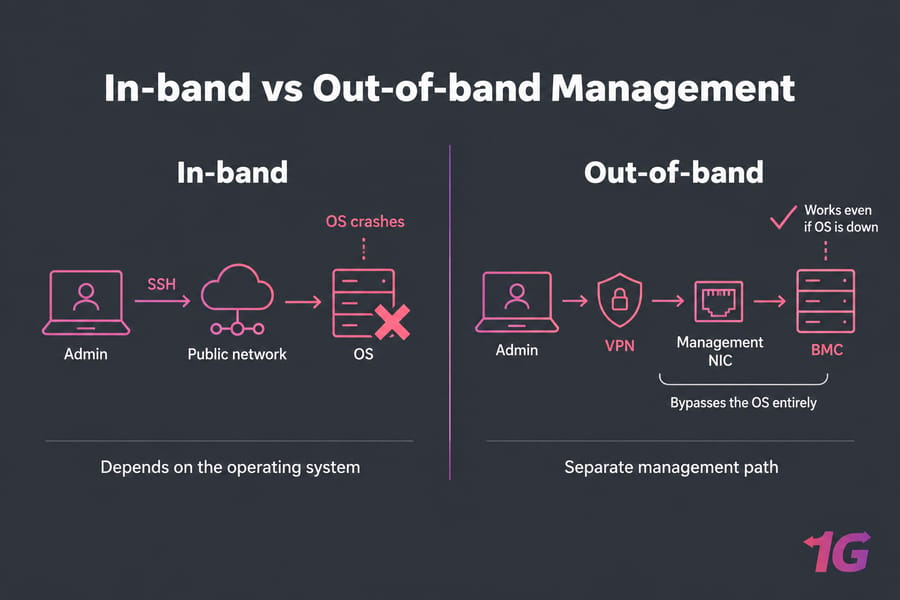
Normal administration is in-band: you connect to the operating system over its own network interface, using SSH or RDP. If the OS or its network config breaks, that path disappears. Out-of-band management uses a separate path that bypasses the OS entirely, and IPMI is the most common out-of-band standard on x86 servers.
How a BMC enables IPMI remote access
What a Baseboard Management Controller does
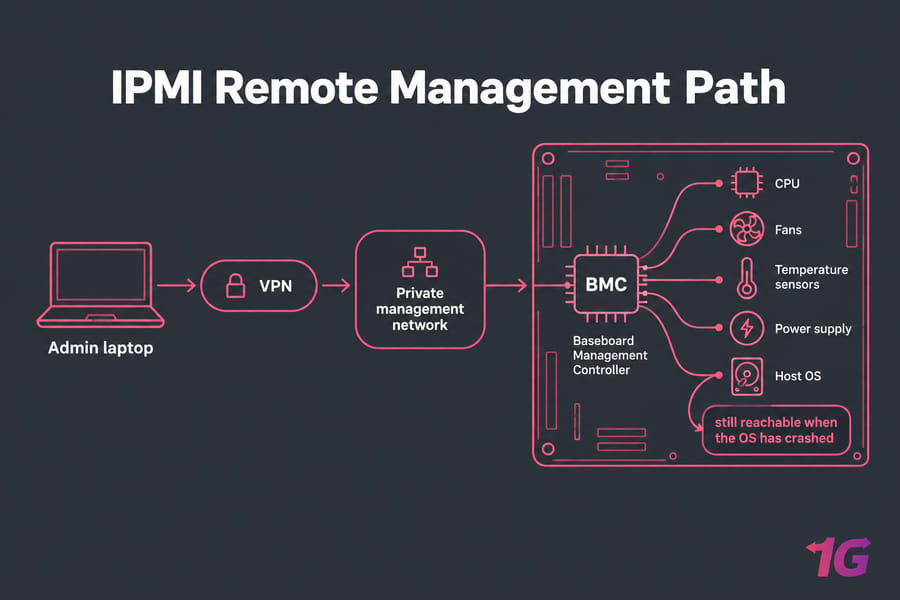
A BMC is a small system-on-chip on the motherboard with its own processor, memory, firmware, and network stack. It's wired to the sensors, the power circuitry, and usually the video output, which is how it streams the server's screen to your browser.
Every major vendor ships one under its own name:
- Supermicro calls it the BMC, and most people just say "Supermicro IPMI"
- Dell's is iDRAC (integrated Dell Remote Access Controller)
- HPE's is iLO (Integrated Lights-Out)
- Lenovo's is XClarity Controller (XCC), which replaced the older IMM
All of them support IPMI and add their own web interface and features on top.
How IPMI works when the OS is down
The BMC runs on standby power, so it stays awake whenever the server is plugged in, even with the main system off. That's why IPMI can switch on a powered-down server or show it failing during POST before any OS loads.
The host OS can also talk to the BMC locally through a system interface such as KCS. Remote access uses IPMI over LAN on UDP port 623.
Dedicated management NIC vs shared LAN port
Most server boards have a separate RJ45 management port, and wiring it to an isolated network keeps management traffic off your public interface. Many BMCs can also share a main NIC (sideband or NC-SI mode). That saves a cable, but puts management traffic on the same physical link as production, which makes isolation harder.
Core IPMI features for dedicated server management
Exact features depend on the vendor, the board, and sometimes a license (some iDRAC and iLO tiers lock the graphical console behind a paid upgrade).
| Feature | What it does | Why it matters | Requires OS? |
| Power control | Power on, off, hard reset, power cycle | Recovers a hung server without a datacenter technician | No |
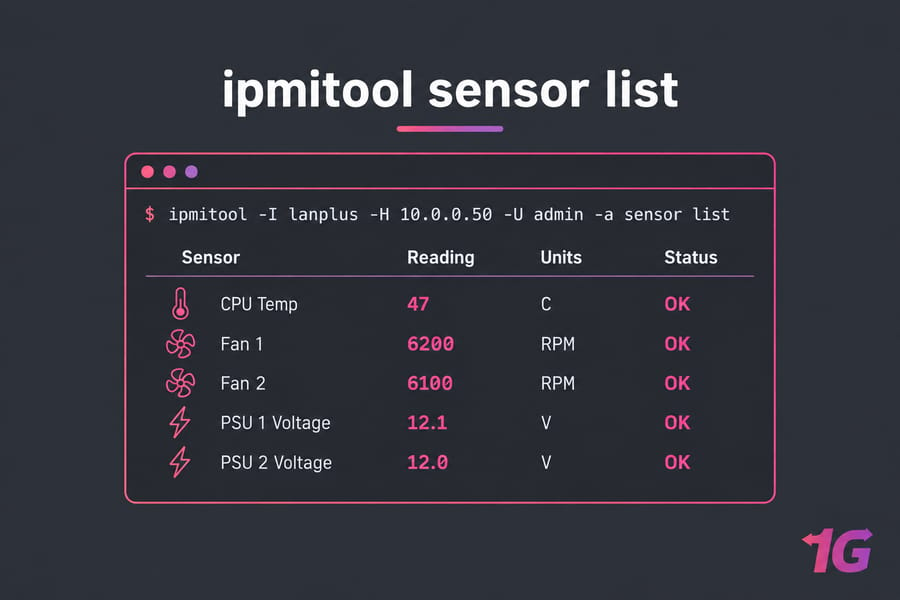
| Sensor monitoring | Reads temperatures, fan speeds, voltages, PSU status | Spots a failing fan or overheating CPU before it causes a crash | No |
| System Event Log (SEL) | Records hardware events such as ECC memory errors and PSU faults | Shows what happened right before an unexplained reboot | No |
| Serial over LAN (SOL) | Redirects the serial console to your terminal | Text access to GRUB, kernel messages, and the login prompt | No |
| Remote console (KVM-over-IP) | Streams video, keyboard, and mouse to a browser or Java/HTML5 viewer | BIOS changes, RAID setup, Windows recovery screens | No |
| Virtual media | Mounts an ISO from your machine as a virtual DVD or USB drive | Reinstall an OS or boot a rescue image remotely | No |
You reach these through the vendor's web console, Supermicro's IPMIView, or ipmitool. Serial over LAN and power control are part of the IPMI standard. The graphical console and virtual media are vendor features the BMC provides alongside IPMI, so check they're enabled before you count on them.
Virtual media saves the most time, since mounting a Linux ISO or rescue image over the BMC lets you reinstall or repair a server from your desk. If you run Supermicro hardware and can't get in, our Supermicro IPMI password guide covers resetting the default credentials.
Why IPMI matters on unmanaged dedicated servers
On a VPS, the hypervisor gives you a console and reboot button in the panel. On bare metal, only the BMC can play that role.
Recovering a server without physical access
Typical cases where IPMI saves the day:
- A kernel update leaves the server stuck at GRUB or a kernel panic
- A firewall rule or netplan typo locks you out of SSH
- The OS hangs and only a power cycle will help
- A BIOS or RAID setting needs changing
- You want an OS the provider's auto-installer doesn't offer
Faster troubleshooting during boot failures
A console shows you where boot stops (a failed fsck, a missing disk, a hanging driver), so you fix the cause instead of guessing.
When IPMI reduces support tickets and downtime
On unmanaged dedicated servers, the OS is your responsibility, and so is recovering it. Every problem you fix through the BMC is one less ticket in a support queue. Our comparison of managed vs unmanaged dedicated servers lays out who handles what. Either way, confirm what remote management options come with the plan before you order.
If you run custom stacks, game servers, or production workloads, dedicated server hosting with reliable remote recovery cuts downtime when the OS becomes unreachable.
IPMI vs SSH, KVM-over-IP, iDRAC, iLO, and Redfish
| Tool or protocol | Layer | Works when OS fails | Best use | Caveats |
| IPMI | Hardware (BMC) | Yes | Power control, sensors, event logs, SOL | Old security model; keep off public networks |
| SSH | Operating system | No | Daily administration | Needs a working OS, network, and sshd |
| KVM-over-IP | Hardware (BMC or external device) | Yes | Graphical console, BIOS, OS installs | Feature availability varies by vendor and license |
| iDRAC / iLO | Hardware (vendor BMC) | Yes | Full lifecycle management on Dell or HPE | Vendor-specific; advanced features may need a license |
| Redfish | Hardware (BMC, REST API) | Yes | Automation and fleet management | Support depth varies by firmware generation |
IPMI vs SSH
SSH needs a booted OS, working network config, and a running SSH daemon. IPMI talks to the BMC and needs none of them. Use SSH (or RDP on Windows) for everyday work and IPMI for when it's gone.
IPMI vs KVM-over-IP
KVM-over-IP (keyboard, video, mouse) is a way of seeing and controlling the server's screen remotely. On most server boards the BMC that speaks IPMI also provides the KVM console, which is why hosts often say "IPMI" when they mean the whole remote console package.
IPMI vs iDRAC and iLO
IPMI is a standard. iDRAC and iLO are Dell's and HPE's management controllers. Both support IPMI and add their own web interfaces, licensing tiers, and features such as firmware updates. More on Dell's version in our guide to iDRAC remote management.
IPMI vs Redfish
Redfish is the DMTF's RESTful API for server management. It uses HTTPS and JSON, which suits automation far better than IPMI's binary UDP protocol. In its June 2019 newsletter, the DMTF stated there would be no further updates to the IPMI specification, and the industry is moving to Redfish.
IPMI is legacy but still widely deployed, and ipmitool remains a quick way to check sensors or cycle power on mixed hardware. HPE, for one, already lets you configure IPMI settings through Redfish.
IPMI security best practices
Why IPMI has a security reputation problem
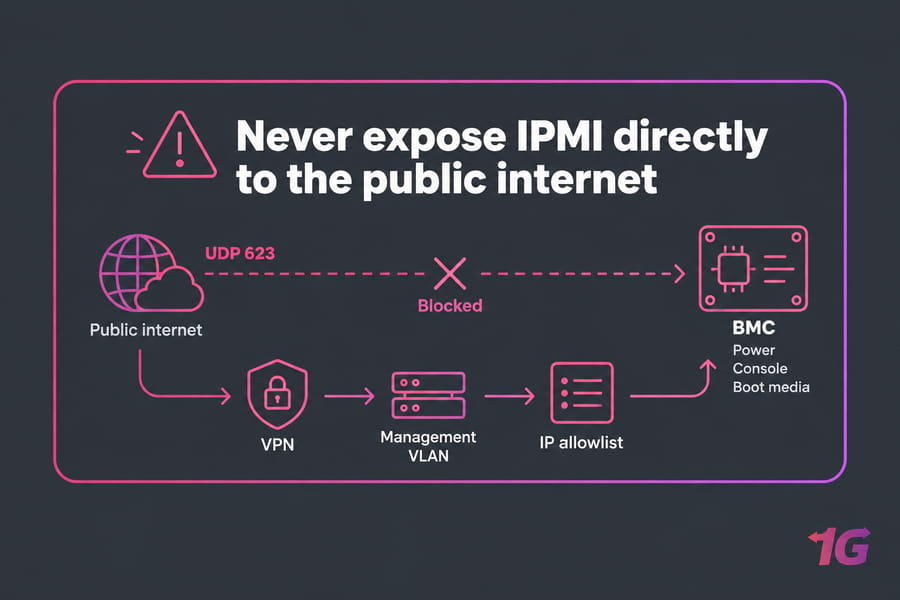
IPMI 2.0 assumed a trusted management network. HPE leaves IPMI over LAN disabled by default in some iLO security modes, citing known issues inherent to IPMI 2.0 sessions. One well-known weakness in the authentication handshake lets anyone who can reach UDP 623 request a password hash for a valid username and crack it offline. Hetzner cites past security problems as the reason it limited IPMI and KVM access on many of its server lines.
Should IPMI be exposed to the public internet?
No. The BMC controls power, console, and boot media, so whoever compromises it owns the server, however well the OS is hardened. If your BMC sits on an unfiltered public IP, fix that on day one.
Hardening steps for safer IPMI access
- Put the BMC on a dedicated management NIC and an isolated management VLAN
- Reach it only through a VPN or a jump host, with MFA where your setup allows
- Restrict source IPs with the BMC's own allowlist or an upstream firewall
- Replace default credentials with unique, long passwords per server
- Update BMC firmware on the same schedule as the BIOS
- Disable unused services, such as IPMI over LAN if you only use the web console
- Remove unused accounts and review BMC logs regularly
See also our bare metal server security best practices and the general guide on how to secure servers.
IPMI tools, interfaces, and common workflows
Web console and vendor dashboards
Browse to the BMC's IP and you get the vendor's web interface with power controls, sensors, the event log, and the remote console launcher. Most virtual media and BIOS work happens here.
ipmitool and command-line access
ipmitool is the standard open-source CLI on Linux; Lenovo documents it for sensors, power management, and event logs once IPMI over LAN is enabled in the XCC. FreeIPMI is an alternative, and Supermicro ships IPMIView (GUI) and IPMICFG (CLI). Typical calls, where -a prompts for the password:
ipmitool -I lanplus -H 10.0.0.50 -U admin -a sensor list
ipmitool -I lanplus -H 10.0.0.50 -U admin -a sel list
ipmitool -I lanplus -H 10.0.0.50 -U admin -a chassis power cycle
ipmitool -I lanplus -H 10.0.0.50 -U admin -a sol activate
A basic IPMI recovery workflow
- Connect through your VPN, check power state and the event log.
- Open the console or SOL session to see where it's stuck.
- Power cycle, or boot a rescue ISO through virtual media if the OS is damaged.
- Fix the config, unmount the media, reboot, and confirm SSH works.
Beyond the BMC, see our guides to remote management tools and Linux monitoring.
Does every dedicated server include IPMI access?
No, and provider policy varies widely.
Provider-controlled IPMI vs customer-accessible IPMI
Some hosts give you permanent BMC credentials. Others keep the BMC internal and attach a KVM console only on request, sometimes for a limited time. At Hetzner, IPMI availability depends on the server model, and some systems need an additional IP address for it.
Questions to ask before buying a dedicated server
| Question | Why it matters |
| Is BMC access included, or only on request? | Decides whether you can recover at 3 a.m. without a ticket |
| Is the BMC on a public IP or behind a VPN? | Public exposure is the biggest IPMI risk |
| Does it use a dedicated management port or a shared NIC? | Affects isolation and whether you need an extra IP |
| Is virtual media enabled? | Required for custom OS installs and rescue boots |
| Is the graphical console licensed and enabled? | Some iDRAC and iLO tiers restrict it |
Our guide on how to choose a dedicated server covers the rest of the evaluation.
When managed hosting may be the better fit
If you'd rather not touch BIOS screens or rescue ISOs, direct IPMI access matters less. With managed dedicated server hosting, the provider's team uses the BMC on your behalf.
When to choose a dedicated server with remote management
Direct BMC access makes the most sense for sysadmins, hosting resellers, developers running custom stacks, GPU and AI nodes, game servers, and anyone deploying hardware in a country they'll never visit. For them, uptime depends on fast recovery, and custom OS or ISO installs are routine.
It's less important for fully managed customers and simple apps where the provider handles the OS. 1Gbits offers both Linux dedicated servers and Windows dedicated servers, in managed and unmanaged form. View 1Gbits dedicated server plans to pick the level of control you need.

Leave A Comment