

What is Plesk licensing and how do Plesk license types work?
Here's the short version of Plesk licensing explained: Plesk sells its control panel in three main editions Web Admin, Web Pro, and Web Host. Each one is built for a different kind of operator, not just a different price point. Pick wrong and you'll either hit a wall or pay for tools you never touch.
Plesk is a hosting control panel. It's the dashboard you use to manage websites, email, databases, SSL certificates, and server settings without living in the command line. The license you buy decides how much you can do how many sites, whether you can create client accounts, whether you can spin up resellers.
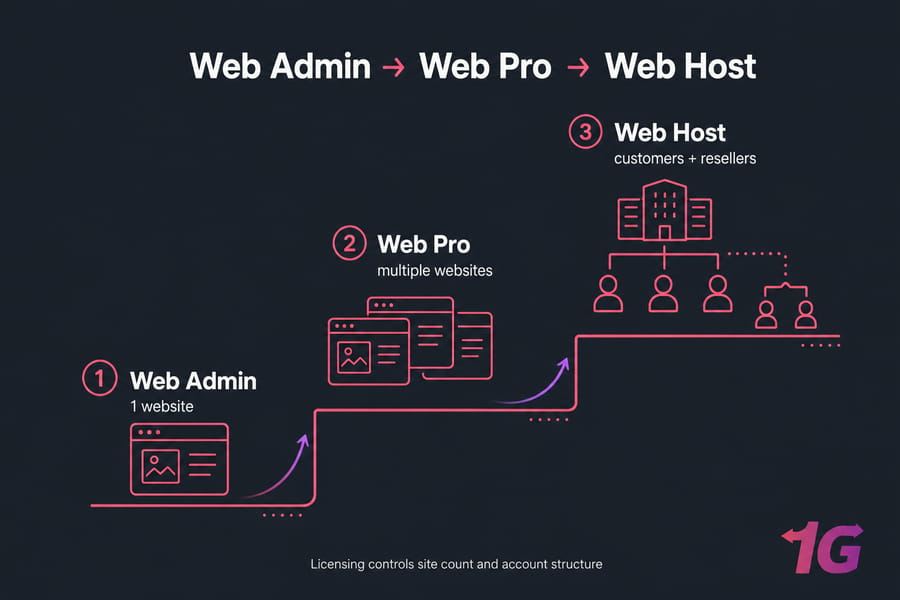
What a Plesk edition actually controls
The edition mostly gates two things: how many domains (websites) you can host, and what kind of account structure you're allowed to build. Web Admin keeps you small. Web Pro opens up multi-site management. Web Host unlocks the full customer-and-reseller machinery.
One thing worth flagging up front: Plesk changes its packaging and limits from time to time, and hosting providers sometimes bundle editions differently by region. So always confirm the current caps with your provider or Plesk before you buy. I've seen people quote three-year-old domain limits and get burned.
Domains, subscriptions, customers, and resellers explained
These four words trip up more buyers than anything else. Let me clear them up:
- Domain — a single website or hostname you manage (yourdomain.com).
- Subscription — a hosting package tied to a set of resources and service plans. One subscription can hold one or more domains.
- Customer — a separate user account with its own login and isolated subscriptions. This is how you give a client access without letting them see everyone else's data.
- Reseller — a user who can create and manage their own customers. Think of a reseller as a mini-admin operating under you.
Domains and subscriptions matter to everyone. Customers and resellers only matter if you're hosting other people. That single distinction is the backbone of choosing the right tier.
Does Plesk licensing differ by server environment?
Plesk runs on both Linux and Windows Server, and the edition structure is the same on either. Web Admin is Web Admin whether you're on Ubuntu or Windows. Some extensions and features are OS-specific (certain ASP.NET tooling on Windows, for example), but the core licensing logic doesn't shift. If you want the wider picture, our rundown of Plesk VPS hosting features and benefits covers what the panel does across both platforms.
Now let's compare all three editions side by side.
Plesk Web Admin vs Web Pro vs Web Host comparison table
Want the fast answer? Web Admin fits one site, Web Pro fits professionals juggling many sites, and Web Host fits hosting businesses with clients and resellers. Here's the full breakdown.
| Feature | Web Admin | Web Pro | Web Host |
| Ideal user | Solo site owner, small business | Freelancers, developers, agencies | Hosting providers, resellers |
| Number of domains | Small (limited) | Larger allowance | Unlimited (provider-dependent) |
| Multi-site management | Basic | Full | Full |
| WordPress Toolkit | Limited | Full (SE edition) | Full (SE edition) |
| Customer accounts | No | No | Yes |
| Reseller management | No | No | Yes |
| Best server type | Small VPS | Mid VPS | Larger VPS / dedicated |
| Best for | One or a few sites | Managing many sites yourself | Selling hosting to others |
Always verify current package limits with your provider or Plesk before buying — these caps shift over time. If you're ready to match an edition to hardware, our Plesk VPS Hosting plans cover every tier.
Three takeaways:
- Web Admin is about simplicity and low entry cost.
- Web Pro is about managing volume yourself, efficiently.
- Web Host is about giving other people controlled access.
Plesk Web Admin explained for single-site and simple server management
Web Admin is the entry tier. It's built for people who own a website (or a small handful) and want a clean, no-fuss panel to run it. No client management, no reseller layers — just you and your sites.
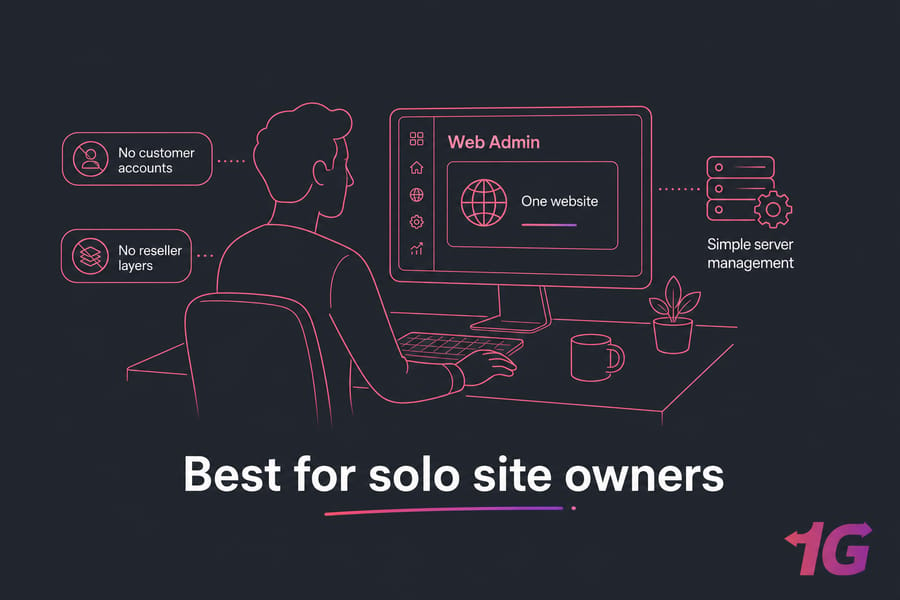
Who should choose Web Admin?
If any of these sound like you, Web Admin is probably your match:
- You run a business website or personal project.
- You host one WordPress site, maybe two.
- You've got a single app server with one public-facing site.
- You want admin access to server settings but nothing more complex.
Main limits of Web Admin
The domain allowance is on the small side, so it's not built for scaling into dozens of sites. There's no customer or reseller functionality at all. And the WordPress Toolkit is the trimmed-down version — fine for basics, but you won't get the full developer-grade cloning and staging tools.
That's not a flaw, by the way. It's just the design. Web Admin does one job well and stays cheap doing it.
When Web Admin becomes too restrictive
You'll feel the ceiling when you start adding client projects or your site count creeps upward. If you're spinning up a new site every month, or a friend asks you to "just host their thing too," that's the signal. Setting up a first site? Our guide on how to host a website on a Linux VPS pairs nicely with Web Admin.
If you manage several sites or client projects, Web Pro is usually the next step.
Plesk Web Pro explained for freelancers, agencies, and multi-site management
Web Pro is the sweet spot for web professionals. If you build and maintain lots of websites — your own or your clients' — this edition gives you the room and the tooling to do it without friction.
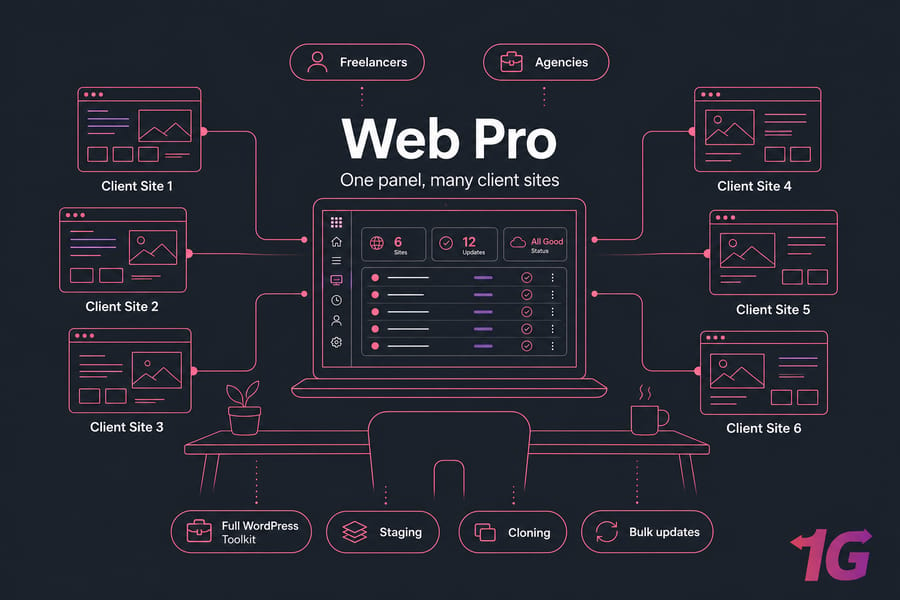
Who should choose Web Pro?
Web Pro is ideal for:
- Freelance developers running client sites off one server.
- Agencies managing 10, 20, 50 websites in-house.
- Anyone who needs the full WordPress Toolkit for staging, cloning, and bulk updates.
Not ideal for: hosting companies that need to hand clients their own isolated logins, or anyone reselling hosting accounts. That's Web Host territory.
Why Web Pro is popular for WordPress professionals
The full WordPress Toolkit is the big draw. You can clone a site to staging, push changes back, run security scans, and update plugins across dozens of installs in a few clicks. For agencies, that alone saves hours every week. Managing a fleet? Read our take on how to manage multiple websites on a Plesk VPS.
But it's not WordPress-only. Web Pro handles Git deployments, Docker, Node.js, and multi-PHP setups just as well — useful if you build with more than one stack.
When Web Pro is enough and when it is not
Web Pro is enough when you control every site and the clients just wait for the finished product. It stops being enough the moment clients need their own dashboard access, or you want to sell hosting packages. It has no reseller layer and no true multi-tenant customer isolation.
But if you need to host customers or resellers, Web Host is the edition to look at.
Plesk Web Host explained for hosting providers and reseller hosting
Web Host is the full multi-tenant edition. It's built for businesses whose product is hosting — shared hosting providers, reseller operations, and service companies that give clients self-managed accounts.
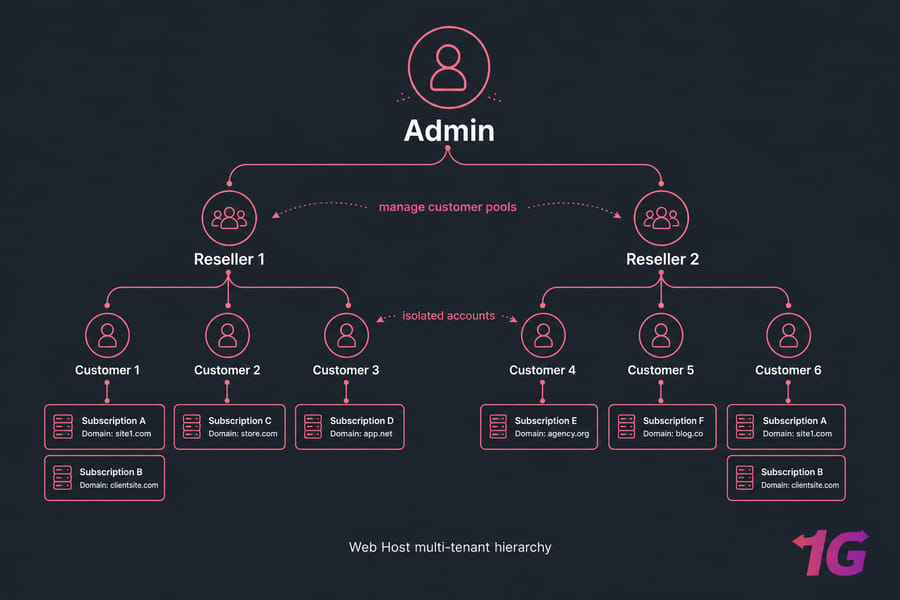
Who should choose Web Host?
Choose Web Host if you:
- Run a shared hosting business and sell plans to the public.
- Let clients log in and manage their own sites, email, and databases.
- Operate a reseller hosting environment where others sell under your infrastructure.
Customer and reseller management features
This is where the customer and reseller model earns its keep. Each customer gets an isolated account — they see only their own sites, and can't touch anyone else's. Resellers go a step further: they create and manage their own pool of customers, with their own branding and service plans. That's the multi-tenant logic Web Pro simply doesn't have.
Why Web Host is built for service providers
The whole edition is designed around billing-adjacent workflows — service plans, resource quotas per account, and clean tenant separation. It's genuinely operationally different from Web Pro, not just "more domains." If you're hosting others, that separation isn't a nice-to-have; it's mandatory. For a hands-off setup, pair it with managed VPS hosting.
One caution: Web Host is usually overkill for a single business site or an in-house agency. Don't buy the hosting-company edition to run your own blog.
Next, match the edition to your actual server plan and growth path.
Which Plesk license should you choose for your VPS or dedicated server?
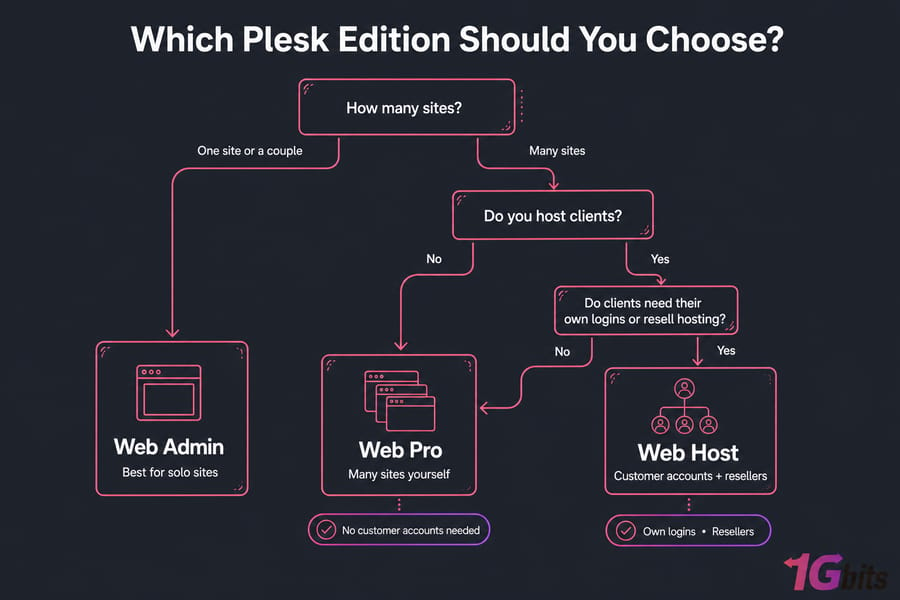
Time for direct recommendations. Forget domain counts for a second and ask the real question: what's your operational model? Are you running your own sites, or providing hosting to other people? That answer matters more than the raw number of domains.
Best edition for one website
One site, maybe a couple? Web Admin. It's the cheapest way in and does everything a single site needs. A small VPS hosting plan is plenty.
Best edition for multiple client websites
Managing many sites yourself — client work, a portfolio of projects, an agency workload? Web Pro, every time. You get the volume allowance and the WordPress Toolkit without paying for reseller features you won't use.
Best edition for reseller or shared hosting
Selling hosting, giving clients their own logins, or running resellers? Web Host. It's the only tier with the account isolation and reseller management to do it properly.
Upgrade path from Web Admin to Web Pro to Web Host
Good news — you're not locked in. Upgrading between editions is usually a matter of applying a new license key; your sites and settings stay put. The exact process depends on your provider, so check with them. My advice: start with the edition that fits today, and upgrade when growth demands it. Don't over-buy "just in case."
Here are five quick buyer profiles:
| User Type | Recommended Edition | Why |
| Small business owner, one site | Web Admin | Simple, low cost, no client needs |
| Freelance developer, 5–15 client sites | Web Pro | Multi-site + full WordPress Toolkit |
| Digital agency managing sites in-house | Web Pro | Volume without reseller overhead |
| Shared hosting startup | Web Host | Customer accounts and isolation |
| Reseller hosting business | Web Host | Reseller management is essential |
Need a server that matches your Plesk edition?
Whether you need a simple Plesk VPS for one site or a larger environment for agencies and hosting clients, 1Gbits offers scalable VPS and dedicated options for Plesk deployments. If you've chosen Web Pro or Web Host, a scalable Plesk VPS makes future upgrades painless. View Plesk VPS Plans.
Common Plesk licensing mistakes and upgrade issues to avoid
I've watched buyers make the same handful of errors over and over. Here's what to dodge.
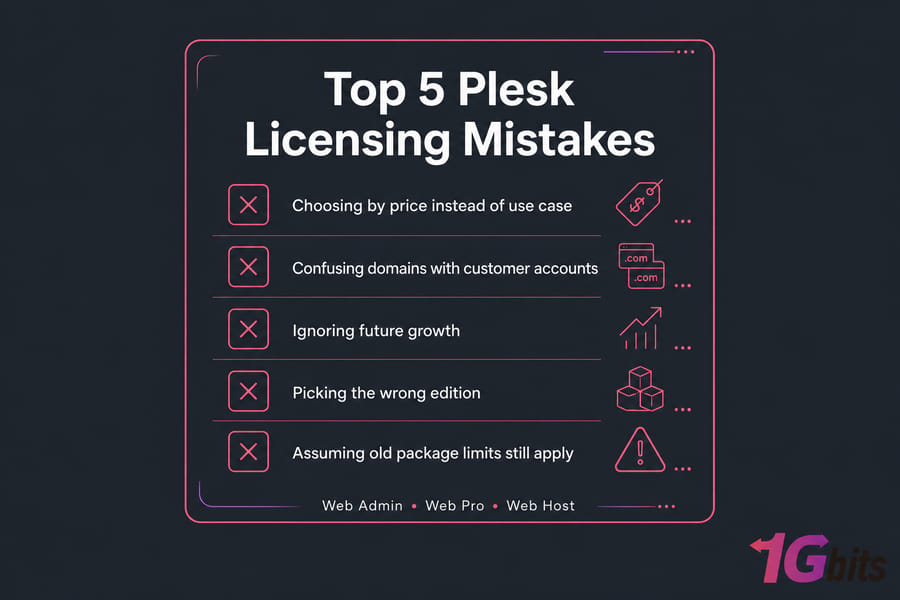
Choosing by price instead of use case
Grabbing the cheapest license feels smart until you hit a domain wall mid-project. Don't pick a Plesk edition on headline price alone. Match it to what you actually do.
Confusing domains with customer accounts
This is the big one. Hosting 30 of your own sites needs Web Pro, not Web Host. Web Host is only for when those 30 sites belong to 30 different customers who log in themselves. Domain count and customer count are not the same thing.
Ignoring future growth
The flip side: don't buy so lean that you're upgrading in three months. Think about where you'll be in a year. And confirm your host's management level too — an unmanaged box means you handle patching yourself. Our guide on managed vs unmanaged VPS hosting explains the trade-off.
Licensing also affects how Plesk stacks up against cPanel.
Plesk vs cPanel licensing: which panel makes more sense?
I'll keep this brief since we've got a full piece on it. The quick version:
| Choose Plesk if… | Choose cPanel if… |
| You need Windows or Linux support | You're on Linux and want the classic shared-hosting standard |
| You want modern multi-site and WordPress workflows | Your team already knows cPanel inside out |
| You like tiered editions matched to use case | You prefer the familiar WHM/cPanel account model |
Both are licensed panels, so the cost lands on top of your server bill either way — factor that into total hosting cost. Plesk's edition tiers can work out cheaper if you're not running a full hosting company. For the deep dive, read Plesk vs cPanel VPS, or browse cPanel alternatives if you're weighing options.
If you've decided on Plesk, the next step is matching it with the right hosting environment.
Best hosting setup for Plesk on 1Gbits
Plesk and VPS hosting go together naturally. A VPS gives you root-level control, dedicated resources, and the freedom to install whichever edition you need.
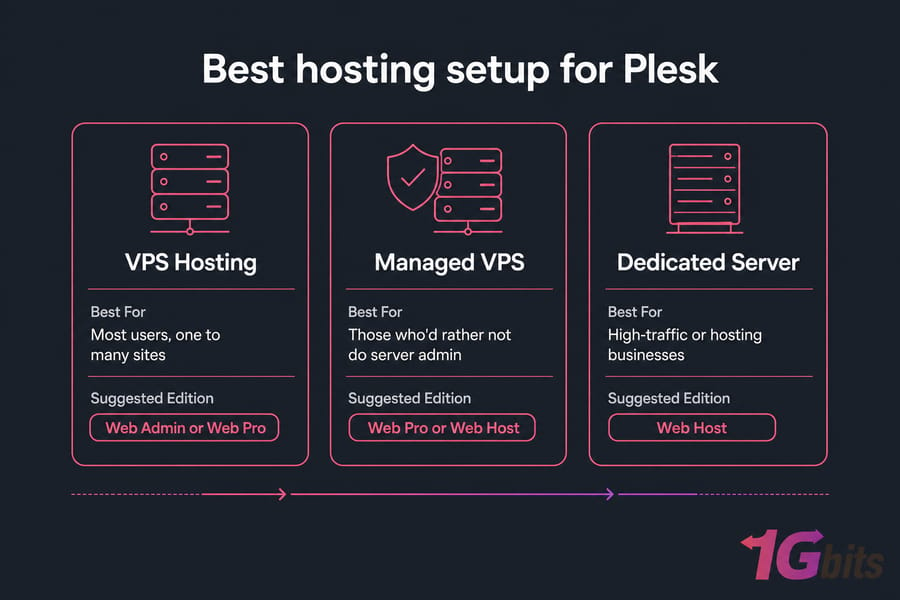
| Setup Type | Best For | Suggested Edition |
| VPS hosting | Most users, one to many sites | Web Admin or Web Pro |
| Managed VPS | Those who'd rather not do server admin | Web Pro or Web Host |
| Dedicated server | High-traffic or hosting businesses | Web Host |
When to choose a Plesk VPS
For most people, a VPS is the answer. It scales, it's affordable, and 1Gbits offers both Linux VPS hosting and Windows VPS hosting since Plesk runs happily on either.
When a dedicated server makes sense
Running a hosting business with Web Host and lots of customers? That's when a dedicated server earns its cost full hardware, no neighbors, room to grow. Need install help? See our tutorial for installing Plesk on Windows Server and How To install Plesk on Centos 7
Choose the right Plesk license — and the right server
Web Admin works best for simple setups, Web Pro is ideal for professionals managing multiple websites, and Web Host is built for hosting businesses. Ready to deploy Plesk on a fast, scalable server? Get Started with Plesk VPS.

Leave A Comment