
cPanel vs DirectAdmin at a glance
Short answer up front: cPanel is the safer pick if you want the most familiar interface, the biggest plugin ecosystem, and the easiest path for clients who've used hosting before. DirectAdmin is the smarter pick if you're running a VPS on a tight budget, want lower licensing costs, and prefer a leaner panel that doesn't chew through RAM.
Both are Linux hosting control panels. Both handle the basics domains, email, DNS, databases, SSL, backups. The differences show up in price, resource footprint, and how the workflow feels day to day.
Quick verdict for most users
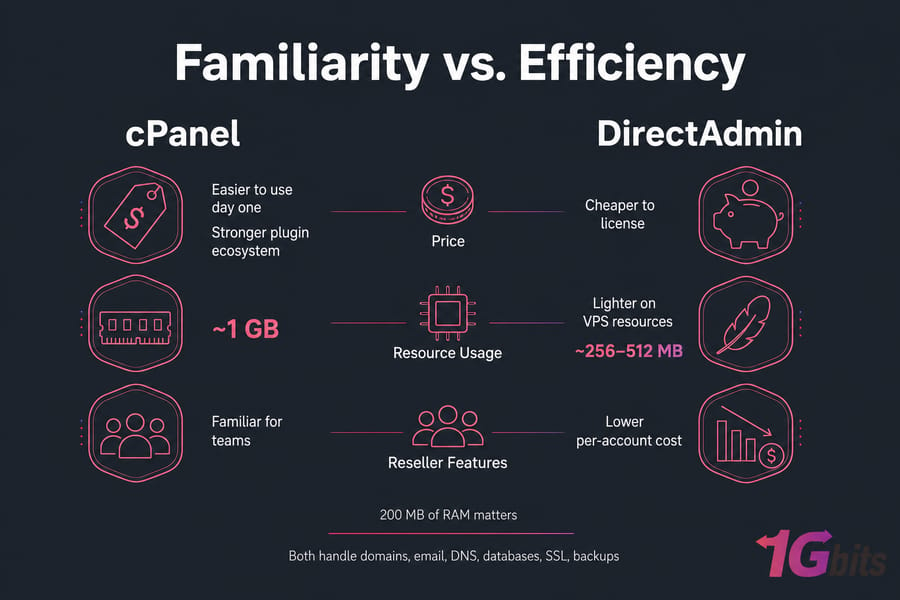
- Easier to use day one: cPanel (most tutorials and screenshots online assume it)
- Cheaper to license: DirectAdmin, often by a wide margin
- Lighter on VPS resources: DirectAdmin
- Stronger plugin ecosystem: cPanel
- Better for reseller workflows: cPanel/WHM if your team already knows it; DirectAdmin if you want lower per-account cost
Best choice for beginners, resellers, and VPS owners
If you're brand new and just want to point-and-click your way through hosting a few sites, grab cPanel VPS hosting. If you're cost-sensitive or running a small VPS where every 200 MB of RAM matters, look at DirectAdmin VPS hosting instead. The rest of this article digs into why.
What is cPanel and what is DirectAdmin?
Both panels do the same fundamental job: they put a graphical layer between you and the command line so you don't have to SSH in every time you need to add an email account or restore a backup.
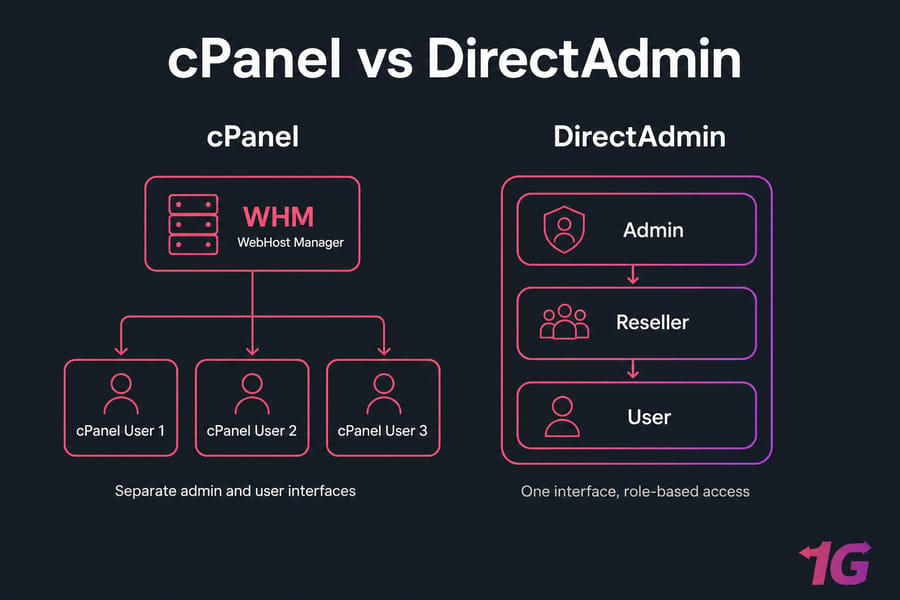
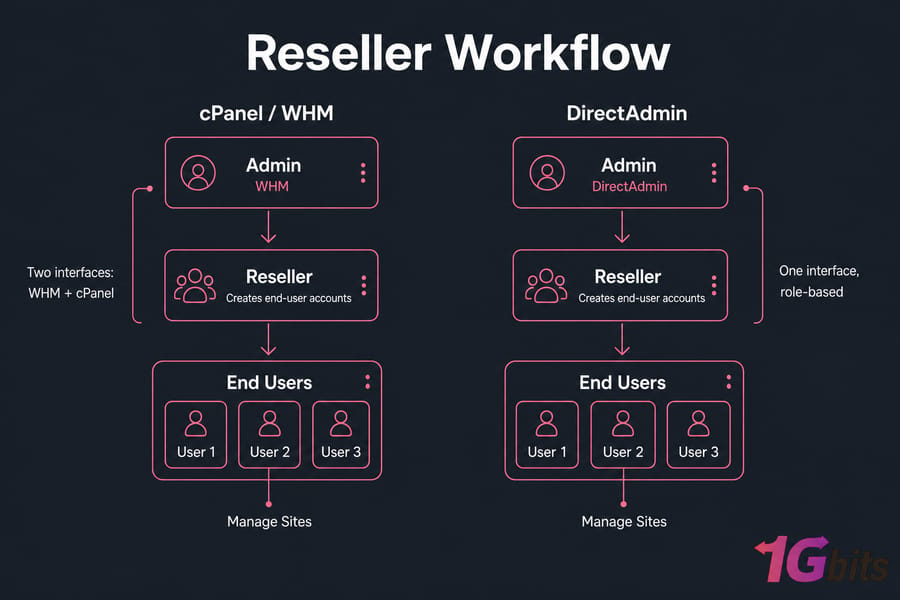
cPanel is the older, more dominant player. It's been around since the late 1990s and is paired with WHM (WebHost Manager), which handles the server-level stuff — creating accounts, setting resource limits, managing packages. End users get cPanel itself, the orange-and-white dashboard most people recognize. Resellers and admins get WHM. The two are siblings, not the same tool.
DirectAdmin launched in 2003 and took a different path. It uses a three-tier model baked into a single interface: admin at the top, resellers in the middle, users at the bottom. You log in with the same panel; what you can see and do depends on your role. It's a tighter, less sprawling experience.
How cPanel works with WHM
Think of WHM as the building manager and cPanel as the keys handed to each tenant. As an admin you live in WHM — creating accounts, tweaking PHP versions server-wide, configuring backups, installing WHM plugins. Your users (or resellers' users) only ever touch cPanel and never see the WHM side. It's a clean separation, and it's part of why hosting companies built entire businesses around the model.
How DirectAdmin structures users, resellers, and admins
DirectAdmin folds everything into one URL. Log in as admin and you see admin-level options. Log in as a reseller and you see your account quota, your customers, and a stripped-down menu. Log in as a regular user and it looks like a normal hosting dashboard. Less context-switching, fewer separate URLs to remember.
Why both panels are popular on Linux VPS hosting
They run well on AlmaLinux, Rocky Linux, CloudLinux, and Ubuntu (DirectAdmin supports more distros, including Debian, more readily). They integrate with the standard LAMP/LEMP stack, support LiteSpeed, and handle the parts of VPS hosting that most people don't want to manage manually — Apache configs, MySQL users, named DNS zones, SpamAssassin rules. If you've used a Linux VPS with any control panel, you'll feel at home in either.
Key differences between cPanel and DirectAdmin
Now here's where it gets interesting. Most comparison articles list features. That's not very useful — both panels do roughly the same things. What actually matters is how they feel, what surrounds them, and how the industry treats them.
| Feature | cPanel | DirectAdmin | Best For |
| Interface familiarity | Industry standard | Cleaner, less common | cPanel for client handoff |
| Plugin ecosystem | Huge (Softaculous, JetBackup, WHMCS, etc.) | Smaller but functional | cPanel for power features |
| RAM footprint | ~1 GB baseline, more in practice | ~256–512 MB baseline | DirectAdmin for small VPS |
| Admin/user separation | Two interfaces (WHM + cPanel) | One interface, role-based | cPanel for strict separation |
| OS support | AlmaLinux, Rocky, CloudLinux, Ubuntu | Same plus Debian, FreeBSD | DirectAdmin for flexibility |
| Licensing model | Per-account tiered | Flat tiers with lifetime option | DirectAdmin for predictable cost |
| Documentation | Extensive official + community | Solid official, smaller community | cPanel for self-service learning |
| Email management | Mature, lots of features | Streamlined, easier to navigate | Tie — both work well |
Interface and workflow differences
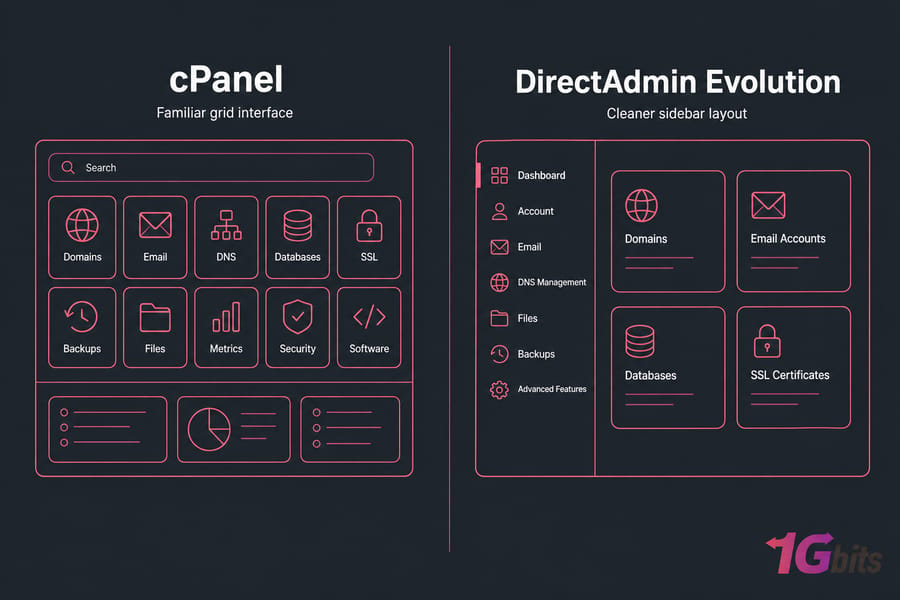
cPanel's interface is busy. Tons of icons, grouped into sections, with a search bar that you'll learn to rely on within ten minutes. DirectAdmin's default skin (Evolution) is calmer — fewer items, less visual noise, faster to scan once you know where things live. Neither is "better." If you've trained dozens of clients on cPanel already, switching to DirectAdmin means re-teaching everyone where to click.
Ecosystem, plugins, and compatibility
This is cPanel's biggest moat. Softaculous, JetBackup, WHMCS billing integrations, CloudLinux LVE Manager, Imunify360, KernelCare — almost every third-party hosting tool ships a cPanel plugin first. DirectAdmin supports many of these too (including Softaculous, Installatron, CloudLinux, and LiteSpeed), but the long tail of niche plugins is thinner. If you're not running niche tools, you'll never notice. If you are, you might hit a wall.
Considering other options entirely? Check out cPanel alternatives, or sibling comparisons like CyberPanel vs cPanel and Plesk vs cPanel VPS.
Administration model and account management
WHM is more powerful for sysadmins who want fine-grained control over feature lists, package definitions, and per-account tweaks. DirectAdmin is faster for admins who just want to provision an account and move on. It's the difference between a dashboard with twenty configuration screens and one with five — both get you there, but they reward different working styles.
cPanel vs DirectAdmin pricing and licensing
This is the section most readers actually came for. Let's be honest about it.
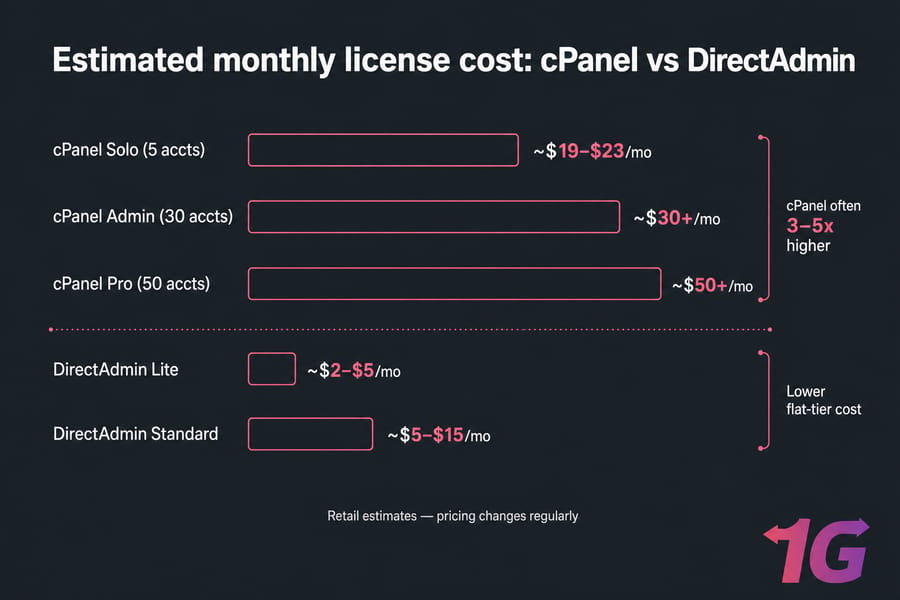
cPanel changed its pricing model back in 2019 to per-account tiered licensing, and it's gotten more expensive since. A small admin-cloud license (up to 5 accounts) is roughly $19–$23/month at retail. Need 100 accounts? You're looking at $50+/month, and prices climb from there. Most hosting providers bundle the license into their VPS plans, but you're still paying for it.
DirectAdmin charges by tier, not by account count. The Standard license (used by most hosts) sits around $5–$15/month depending on features. They also offer a Lite tier that's even cheaper for single-domain use. Over a year, you're often saving $200–$500 per VPS compared to cPanel.
| Cost Factor | cPanel | DirectAdmin | Notes |
| Base license | Higher | Lower | Often 3–5x difference at retail |
| Per-account scaling | Yes — tiered | Flat per tier | cPanel gets expensive fast |
| Lifetime license option | No | Yes (legacy) | DirectAdmin has historically offered this |
| Plugin add-on costs | Common | Common | Roughly comparable |
| Server resource cost | Higher (more RAM needed) | Lower | Indirect savings on smaller VPS |
Heads up: Vendor pricing changes regularly. cPanel has raised prices multiple times in recent years. Always check current pricing on your cPanel VPS plan or DirectAdmin VPS plan before locking in.
Total cost beyond the license
The license is only part of the bill. cPanel's heavier footprint means you may need a bigger VPS just to keep things responsive. DirectAdmin runs comfortably on a 2 GB RAM VPS; cPanel really wants 3–4 GB to feel smooth, especially if you add CloudLinux and Imunify360. Add another $5–$15/month in server costs and the gap widens further.
cPanel vs DirectAdmin ease of use for beginners
Here's where I'll push back on a common myth. DirectAdmin's interface is arguably cleaner, but that doesn't automatically make it easier. Easier depends on what you already know.
If you've never touched a control panel before, cPanel will be easier because the entire internet has written tutorials for it. Stuck on creating an email forwarder? Google returns 30 cPanel walkthroughs with matching screenshots. DirectAdmin tutorials exist, but the pool is smaller, and skin updates sometimes mean older screenshots don't match what you see.
If you've never used either, DirectAdmin is genuinely simpler to navigate. Fewer icons. Less clutter. The default Evolution skin groups things logically.
Which panel is better for client handoff
If you build sites for clients, this matters more than your own preference. Most clients have seen cPanel before — at their old host, in tutorials, in YouTube videos. Handing them a DirectAdmin login means you'll get more "how do I…" support tickets, at least at first.
Counterpoint: DirectAdmin has fewer places for clients to get lost. I've had agency clients who actually prefer it because their non-technical staff can't accidentally wander into 47 different cPanel sections they shouldn't touch.
Support familiarity and documentation
cPanel wins on third-party tutorials, YouTube videos, Stack Overflow answers, and Reddit threads. DirectAdmin's official docs are actually quite good and tend to be more current. So it's a wash if you're a self-starter who reads documentation. It's a clear cPanel win if you Google your way through problems.
cPanel vs DirectAdmin performance on VPS
This is where DirectAdmin pulls ahead, especially on smaller VPS plans. cPanel's daemons, monitoring processes, and bundled services consume noticeably more RAM and CPU at idle.
Rough field numbers (your mileage will vary):
- cPanel idle footprint: 800 MB – 1.2 GB RAM, with several persistent processes
- DirectAdmin idle footprint: 250 MB – 500 MB RAM, fewer background processes
On a 2 GB VPS, that difference is the gap between "site feels snappy" and "I need to upgrade." On an 8 GB VPS, you won't notice at all.

When lightweight administration matters
If you're running a single WordPress site on a 2 GB VPS, the panel choice might be the difference between PHP-FPM having enough memory for 12 workers or 4. That's real. But please don't expect a panel swap to fix slow sites — that's almost always a stack issue (Apache vs LiteSpeed, missing object cache, unoptimized queries) or a hosting plan issue. Want to dig into that? See how to optimize your VPS and common VPS performance bottlenecks.
Pro tip: On small VPS plans (1–2 GB RAM), panel overhead matters a lot. On bigger plans (8 GB+), it disappears into the noise — pick the panel you actually want to use.
cPanel vs DirectAdmin security features and updates
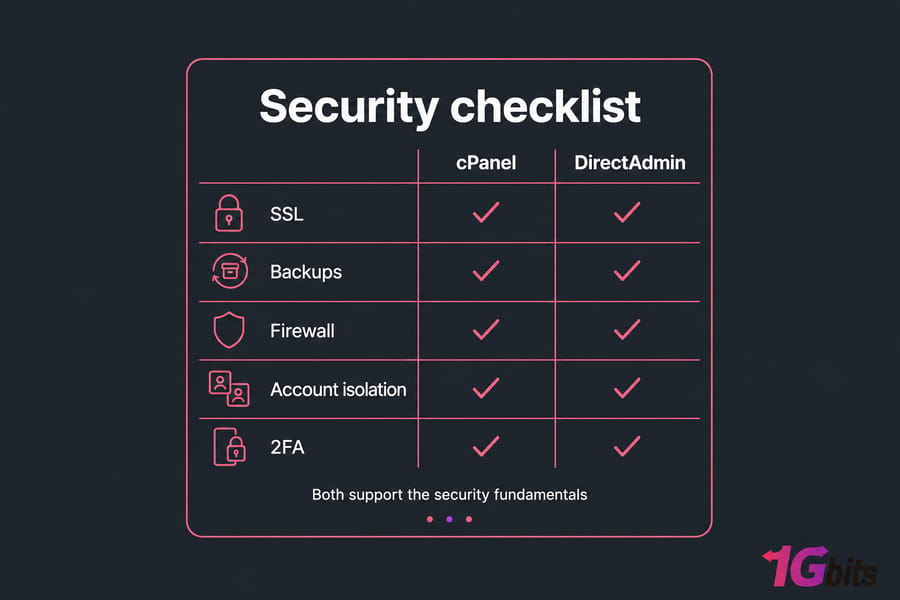
Both panels handle the security fundamentals well. Both support:
- Free SSL via Let's Encrypt (cPanel's AutoSSL, DirectAdmin's Let's Encrypt integration)
- Automated backups, with paid add-ons for incremental/remote backup
- Per-account isolation (especially when paired with CloudLinux)
- Brute-force protection, IP blocking, and two-factor auth
- ModSecurity rules and integration with Imunify360
Where they differ is patching cadence and tooling defaults. cPanel pushes updates aggressively and has a long history of quickly patching disclosed CVEs. DirectAdmin's updates are also regular but less frequent in cadence. Neither is "more secure" out of the box — security is mostly a function of how well you configure the underlying server. See Linux server security basics for the actual heavy lifting.
DirectAdmin vs cPanel for reseller hosting and multiple websites
If you're running a reseller business or an agency managing client sites, this section probably matters more than any other.
WHM is the gold standard for reseller hosting. It's what billing platforms like WHMCS were built to talk to. It's what your customers expect when they sign up for "reseller hosting." If you're charging clients money to host their sites, cPanel/WHM removes a lot of friction.
DirectAdmin's reseller model works fine — arguably more elegantly, since it lives in one panel — but it lacks the deep WHMCS integration and the ecosystem of reseller-specific tools cPanel enjoys. For low-volume resellers or in-house agencies running a handful of sites, this won't matter. For someone trying to grow a reseller business to 200+ accounts, cPanel is the path of least resistance.
Key takeaway: If your team already knows WHM, switching purely to save on licensing is rarely worth the retraining cost. If you're starting fresh, DirectAdmin's reseller model is cleaner and cheaper.
Either way, if you're stacking multiple sites on one server, the panel matters less than the underlying plan. Read up on hosting multiple websites on one VPS and consider managed VPS hosting if you'd rather not deal with kernel updates and firewall rules yourself.
cPanel or DirectAdmin for your exact use case
| User Type | Recommended Panel | Why |
| Personal site owner / hobbyist | DirectAdmin | Cheaper, runs fine on small VPS, simple workflow |
| Small business with 1–3 sites | Either — lean DirectAdmin | Cost savings add up, no reseller features needed |
| Agency managing client sites | cPanel | Client familiarity, easier handoff, WHMCS integration |
| Reseller hosting business | cPanel (or DirectAdmin if margin-focused) | Industry expectation vs license savings tradeoff |
| Developer/sysadmin running multiple stacks | DirectAdmin | Lighter, broader OS support, less in your way |
| Budget-conscious VPS buyer | DirectAdmin | Lower license, lower RAM need, lower total cost |
| Migrating from another panel | Match the source | Reduce migration risk; switch later if needed |
If you're not sure how much server management you want to handle yourself, the managed VPS route is honestly the most stress-free path. For more advanced users who want full root access and don't mind getting hands dirty, unmanaged VPS with either panel works great.
Moving from cPanel to DirectAdmin (or vice versa)
People migrate panels for a few reasons: license costs got out of hand, the current panel is too heavy for the VPS, or they're standardizing across a fleet. Sometimes the move pays off in a single billing cycle. Sometimes it's a slow, painful weekend you'll wish you hadn't started.
When migration is worth it
- You're paying for cPanel on a small VPS where DirectAdmin would free up 500+ MB of RAM
- You're scaling reseller accounts and cPanel's per-account pricing is eating your margin
- You're consolidating servers and want a single panel across the board
Common migration challenges
The official DirectAdmin importer handles cPanel backups reasonably well for standard accounts. But here's where things get messy:
- Email: Mailbox formats, filters, and forwarders don't always map cleanly. Test thoroughly.
- DNS zones: Custom records often don't transfer. Export and re-import manually.
- SSL certificates: AutoSSL certs won't carry over — reissue via Let's Encrypt post-migration.
- Cron jobs: They sometimes drop. Check every account.
- Plugin-specific data: Softaculous installs typically survive; JetBackup archives may not.
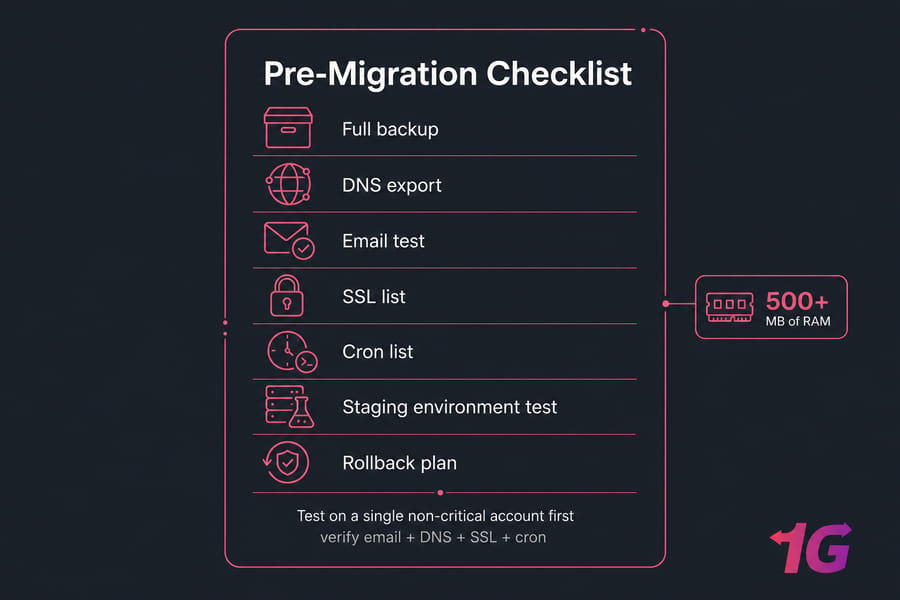
Always test on a single non-critical account first. Spin up a fresh VPS, install the destination panel, migrate one site, and verify email + DNS + SSL + cron before you touch production. If you need a fresh start, our guides on installing cPanel on Linux VPS and installing DirectAdmin on CentOS walk through both. For moving servers entirely, see migrating to a 1Gbits Linux VPS.
Final verdict: which control panel is better?
There's no universal winner. There's only the better choice for your situation.
Choose cPanel if…
- You want the most familiar interface — for you, your team, or your clients
- You rely on specific plugins like JetBackup, WHMCS, or niche industry tools
- You're running reseller hosting at scale
- You have enough VPS resources (3 GB+ RAM) to absorb the overhead
Choose DirectAdmin if…
- You want to keep recurring costs as low as possible
- You're running on a small or mid-size VPS where every MB of RAM counts
- You prefer a cleaner, less cluttered admin experience
- You don't need cPanel's specific ecosystem extras
Choose your hosting plan based on the panel
Once you've picked, get the right VPS. Browse cPanel VPS plans if you've decided on cPanel, or DirectAdmin VPS plans if you're going the leaner route. Still on the fence? Compare both alongside our broader VPS hosting plans and pick the one that matches your skill level and budget.

Leave A Comment