

If you're hunting for Plesk panel alternatives, you've probably hit one of these walls: the licensing bill keeps climbing, the panel eats too much RAM on your small VPS, or you just want something open-source. Whatever your reason, the good news is there are solid replacements. The tricky part? None of them clone Plesk exactly — especially not on Windows.
Plesk Alternatives at a Glance
Here's the fast version. The best Plesk alternative depends on your server and workload. DirectAdmin is a strong full-panel option for Linux hosting, CloudPanel suits lightweight web application hosting, and HestiaCP is a practical free choice. For Windows Server, evaluate SolidCP carefully because most popular Plesk replacements support Linux only.
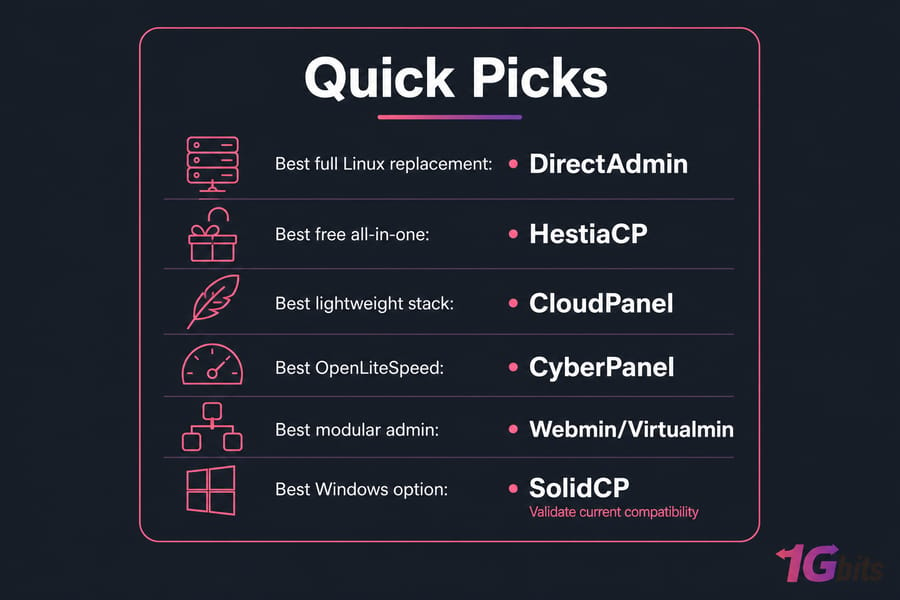
- Best full Linux replacement: DirectAdmin
- Best free all-in-one option: HestiaCP
- Best lightweight web stack: CloudPanel
- Best OpenLiteSpeed option: CyberPanel
- Best modular administration platform: Webmin/Virtualmin
- Best Windows-focused option: SolidCP (validate current compatibility)
One thing worth flagging early — not every tool on this list is a "complete" hosting panel. Some, like RunCloud, are server-management and deployment platforms. They're great, but they don't hand you integrated mailboxes and reseller accounts the way Plesk does. Keep that difference in mind.
Quick comparison table
| Panel | License | OS Focus | Email Included? | Reseller / Multi-User | Best For | Main Drawback |
| DirectAdmin | Paid commercial | Linux | Yes | Yes | Full Linux hosting | License cost |
| cPanel & WHM | Paid commercial | Linux | Yes | Yes | Established hosting | Pricing may not drop |
| CloudPanel | Free | Linux | External | Limited | Web apps | No integrated mail |
| HestiaCP | Free/open source | Linux | Yes | Yes | Free all-in-one | Community support |
| CyberPanel | Free/paid | Linux | Yes | Yes | OpenLiteSpeed | Security upkeep |
| Virtualmin/Webmin | Free/paid | Linux | Yes | Yes | Granular admin | Learning curve |
| ISPConfig | Free/open source | Linux | Yes | Yes | Multi-server | Setup complexity |
| aaPanel | Free/paid | Linux | Yes | Limited | Simple dashboard | Plugin due diligence |
| RunCloud | Paid | Linux | External | Team-based | Deployment | Not full mail/reseller |
| Enhance | Paid | Linux | Yes | Yes | Multi-server hosting | Infrastructure complexity |
| SolidCP | Free/open source | Windows | Integrations | Yes | Windows Server | Fewer options, parity gaps |
Verify every cell against official docs before you commit — control panel plans change often. For the cost side of the story, our breakdown of Plesk licensing and editions explains why so many admins start shopping around.
What Makes a Good Plesk Replacement?
Before you compare products, get clear on what you're actually replacing. Plesk isn't just a pretty dashboard — it bundles web serving, domains, DNS, email, SSL automation via Let's Encrypt, database management (MySQL/MariaDB), backups, and user accounts into one place. A weak "alternative" quietly drops one of those.
Run through this checklist against your current setup:
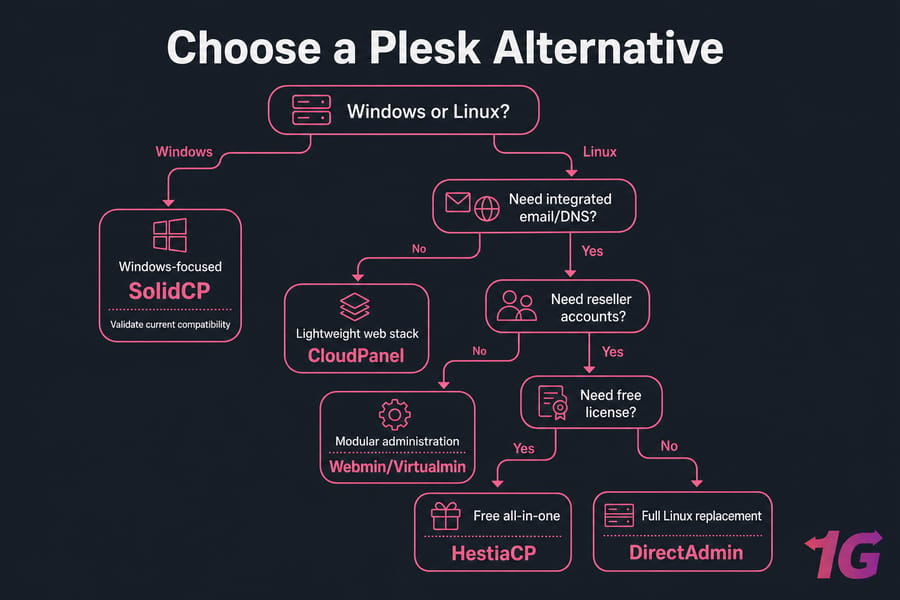
- Operating system: Linux or Windows? This kills most options before feature comparison even starts.
- Integrated email: Do you host mailboxes? Many developer-focused panels don't include a mail stack.
- DNS management: Are you running your own zones, or using external DNS?
- Reseller / multi-tenant: Need isolated customer accounts and packages?
- Backups and restore: Scheduled, off-server, and actually tested.
- Security: Firewall, fail2ban, ModSecurity, 2FA, and a real update channel.
- API / CLI: For automation and billing integrations.
- Resource usage: Some panels barely fit on a 1GB VPS. PHP-FPM tuning helps, but the base footprint matters.
And here's the thing everyone forgets: "free" doesn't mean zero cost. Skip the license fee and you still pay in setup time, patching, monitoring, mail deliverability tuning, backup storage, and 2 a.m. incident response. That's real money, just spent as hours. If you'd rather not own all that, weigh managed vs unmanaged VPS hosting before going the DIY route.
The 11 Best Plesk Alternatives Compared
Each panel below gets the same treatment: what it is, who it's for, and when to choose it. No fabricated benchmarks, no "fastest ever" nonsense.
1. DirectAdmin — best full Linux hosting panel
DirectAdmin is the closest thing to a like-for-like commercial Plesk replacement on Linux. It ships the familiar three-tier model — admin, reseller, user — plus email, DNS, databases, SSL, and backups. Lightweight too. It's Linux-only, so Windows folks are out. See our cPanel vs DirectAdmin comparison for the head-to-head. Choose it if you want a conventional hosting panel with reseller support and lower licensing than cPanel. Prefer not to license separately? Compare DirectAdmin VPS hosting.
2. cPanel & WHM — best established commercial alternative
The industry veteran. WHM handles server-wide and reseller management; cPanel is the per-account interface. Mature, well-documented, Linux-only. The catch — its per-account pricing may not actually cut your total cost versus Plesk. Read Plesk vs cPanel and, if it's not your thing, cPanel alternatives. Choose it if you want the most battle-tested hosting ecosystem and don't mind the license.
3. CloudPanel — best lightweight panel for web applications
CloudPanel is tuned for web application hosting — NGINX, PHP, WordPress, cloud/VPS deployments — not traditional shared hosting parity. Free to use. But integrated email and full DNS aren't its focus, so you'll likely lean on external services. Choose it if you're a developer or agency running web apps without needing built-in mail hosting.
4. HestiaCP — best free all-in-one Linux panel
Hestia Control Panel is the free, open-source option that comes closest to Plesk's breadth: Apache/NGINX, mail, DNS, backups, and user management out of the box. Great for self-managed servers. Support is community-driven, which differs from a commercial SLA. Choose it if you want integrated hosting services with no license fee and you're comfortable maintaining the box.
5. CyberPanel — best for OpenLiteSpeed hosting
CyberPanel is built around OpenLiteSpeed (with a paid LiteSpeed Enterprise path). It covers WordPress deployment, SSL, email, DNS, and backups. Stay on top of updates — like any panel, it needs security maintenance. More detail in CyberPanel vs cPanel. Choose it if OpenLiteSpeed is a defined requirement. There's also CyberPanel VPS hosting for a ready path.
6. Virtualmin and Webmin — best modular server administration
Webmin manages the system; Virtualmin adds virtual-hosting management on top. Together they give you granular control over web, mail, DNS, and databases — free and commercial editions both exist. The trade-off is a steeper learning curve. Choose it if you want deep, flexible server control and don't need a beginner-friendly UI.
7. ISPConfig — best for flexible multi-server hosting
ISPConfig shines at multi-server, multi-service setups — web, mail, DNS, and databases across several machines from one interface. Free and open source. Setup and daily admin aren't beginner territory. Choose it if you're an experienced Linux admin managing distributed infrastructure.
8. aaPanel — best simple administration dashboard
aaPanel offers a clean UI with extension-based management for LAMP/LEMP stacks. Some extensions are free, others paid. Do your homework on plugin provenance and update cadence before running it in production. Choose it if you want a straightforward dashboard and will vet the security posture yourself.
9. RunCloud — best managed deployment platform for developers
RunCloud is a cloud server management and deployment platform, not a full shared-hosting replacement. It connects to your existing servers (provider-agnostic) and handles deployment, staging, team access, and backups. Email and DNS scope is narrow. Choose it if you're a developer or agency focused on app deployment over mail/reseller hosting.
10. Enhance — best modern multi-server hosting platform
Enhance targets growing hosting operations with a modern multi-server architecture, roles, WordPress tooling, mail, and backups. It's paid, and the orchestration adds infrastructure complexity you should plan for. Choose it if you're scaling a hosting business or agency and want centralized multi-server control.
11. SolidCP — best Plesk alternative for Windows Server
SolidCP exists to fill the Windows gap — IIS, ASP.NET, SQL Server, mail integrations, and virtualization support. It's open source. Verify active maintenance and your Windows Server version before committing, because Windows replacements are scarce and rarely match Plesk's integration. Choose it if you're on Windows and have confirmed current release activity meets your needs.
Best Free and Open-Source Plesk Alternatives
Want a free Plesk alternative? Your maintained shortlist: HestiaCP (closest to full parity), ISPConfig (multi-server), Virtualmin GPL/Webmin (granular), and CyberPanel's free OpenLiteSpeed edition. CloudPanel is free too, though it's app-focused rather than a mail-and-reseller powerhouse.
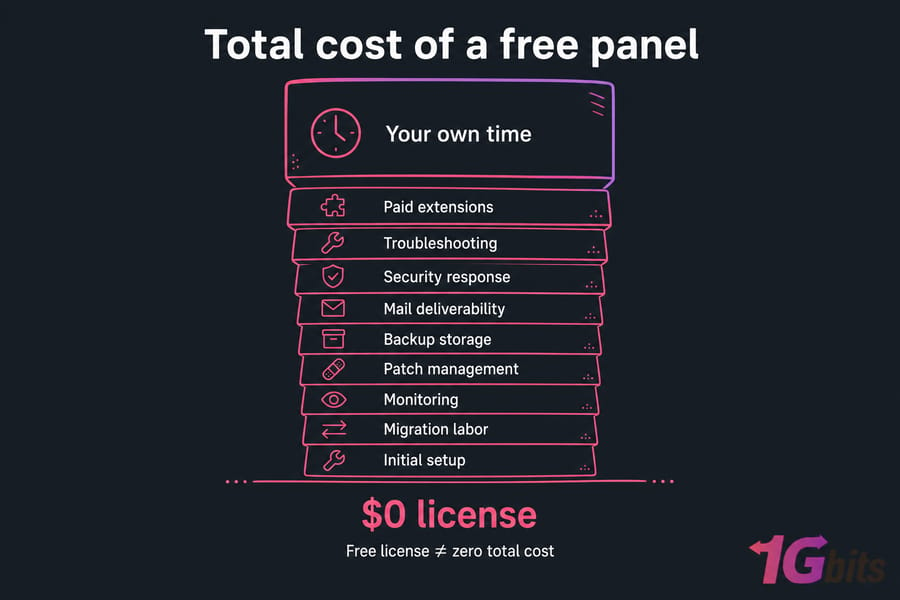
Before you celebrate the $0 license, budget for the hidden stack: initial setup, migration labor, monitoring, patch management, mail deliverability, backup storage, security response, troubleshooting, paid extensions, and — the big one — your own time. Pick a free panel only if you can maintain the server or have managed support behind you.
Best Server Control Panel for Each Use Case
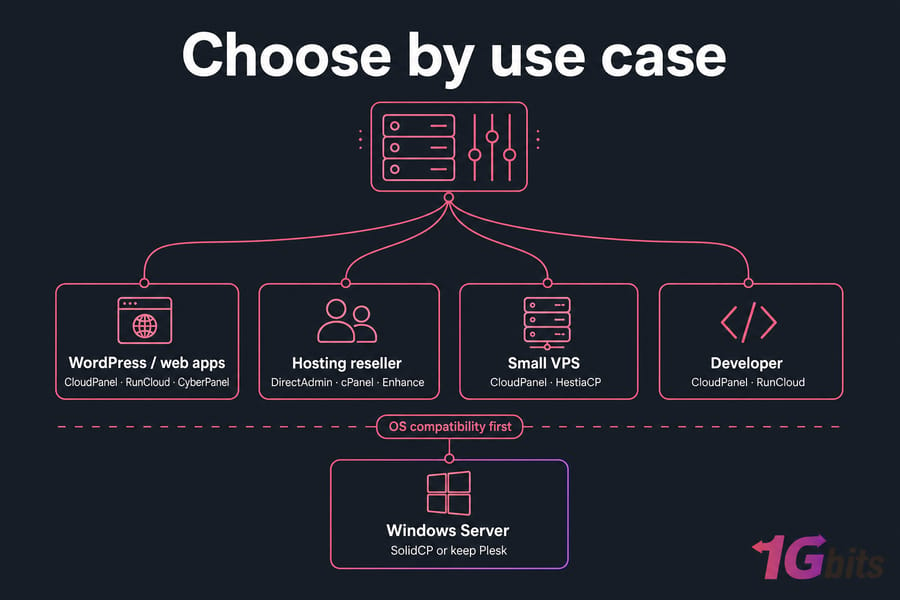
| Use Case | Recommended Shortlist | Why | Watch Out For |
| Traditional Linux hosting | DirectAdmin, cPanel | Full hosting account model | License cost |
| Free self-hosted panel | HestiaCP, ISPConfig, Virtualmin | No/low license cost | Admin responsibility |
| WordPress / web apps | CloudPanel, RunCloud, CyberPanel | Streamlined deployment | May lack full mail/reseller |
| Hosting reseller | DirectAdmin, cPanel, Enhance | Reseller tooling | Price or complexity |
| Windows Server | SolidCP or keep Plesk | Windows/IIS relevance | Limited parity |
| Small VPS | CloudPanel, HestiaCP | Focused stack | Check minimum resources |
| Multi-server operation | Enhance, ISPConfig | Centralized management | More complex deployment |
Notice that OS compatibility disqualifies whole categories before you even weigh features. That's why Windows deserves its own conversation.
Linux vs Windows Plesk Alternatives
This is where Plesk quietly wins. Plesk runs on both Linux and Windows Server — most alternatives on this list don't. DirectAdmin, cPanel, HestiaCP, CyberPanel, CloudPanel: all Linux-only. If you rely on IIS, ASP.NET, or Microsoft SQL Server, your realistic replacement is SolidCP, and you'll want to confirm it's actively maintained first.
| Platform | Linux Panels | Windows Panels |
| Web server | Apache, NGINX, OpenLiteSpeed | IIS |
| Runtime | PHP, PHP-FPM | ASP.NET, PHP |
| Database | MySQL, MariaDB, PostgreSQL | SQL Server, MySQL |
| Panel options | DirectAdmin, cPanel, HestiaCP, more | SolidCP, Plesk |
Replacing Plesk on Windows often means changing more than the panel — potentially the OS, web server, runtime, mail stack, and database connections. If the workload can move to Linux, re-check application compatibility before you pick anything. If it can't, keeping Plesk VPS hosting may genuinely be the lower-risk call.
How to Choose a Hosting Control Panel
Don't pick by feature-count marketing. Score candidates against what you actually need. Here's a weighting I'd use for most VPS setups:
| Criterion | Weight |
| Workload & OS compatibility | 20% |
| Required hosting features | 20% |
| Security & update process | 15% |
| Migration feasibility | 15% |
| Administration / support burden | 10% |
| Scalability / multi-server | 10% |
| Total cost of ownership | 10% |
Check the update channel, 2FA support, firewall and WAF options, API access, backup retention, and role-based access before you get attached to a UI. And once you've picked? Validate it through a staged migration — never move production straight over. If you're still sizing the box, our guide to choosing your management level and a clean Linux VPS with root access is the right starting point.
How to Migrate from Plesk to Another Control Panel
Migration is where good plans go sideways. Anyone selling you a "one-click" move is glossing over the details. Actual tooling and completeness vary by source panel, target panel, edition, and OS — so test, don't trust.
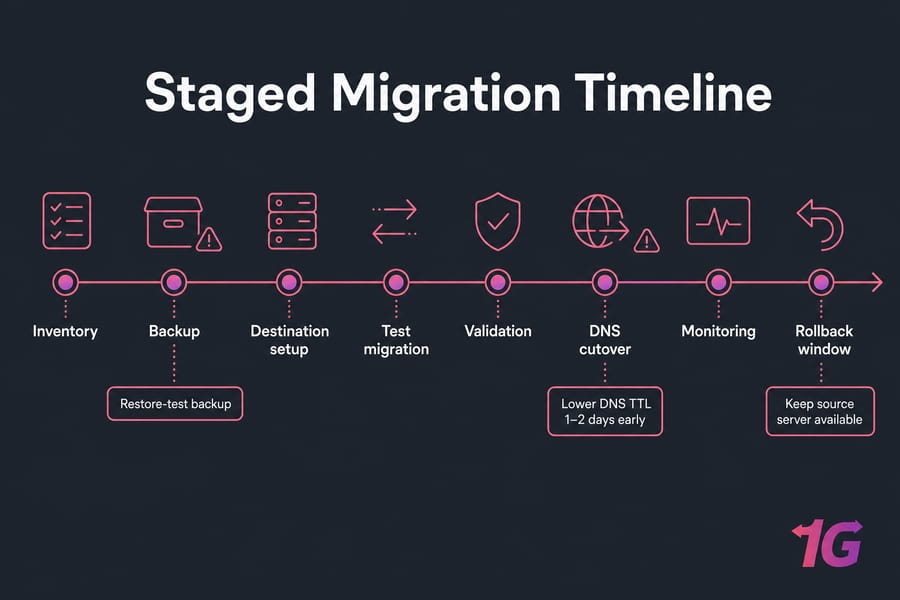
- Inventory every subscription, domain, alias, database, user, mailbox, SSL cert, and cron job.
- Create application-consistent, off-server backups. A backup isn't proven until you've restored it.
- Record DNS zones and lower TTL ahead of cutover.
- Provision a separate destination server — never overwrite the live Plesk host.
- Harden and fully update the new OS and panel.
- Migrate one low-risk site first as a test.
- Transfer files, databases, configs, mail, and DNS data.
- Map PHP versions, extensions, rewrite rules, and permissions.
- Test via a hosts-file override or staging hostname before touching DNS.
- Validate forms, logins, cron jobs, outgoing SMTP, SSL, and backups.
- Sync changing data right before cutover, then change DNS.
- Monitor logs and error rates; keep the source server through the rollback window.
Pro tip: drop DNS TTL a day or two early, then restore normal values once the new server proves stable. For the infrastructure side, our migrate to a Linux VPS walkthrough and automatic backup scheduling guide cover the follow-up steps.
Common Plesk Replacement Mistakes
- Assuming every panel includes email and DNS. CloudPanel and RunCloud often don't. Check before you migrate mailboxes.
- Migrating without a tested backup. Restore it somewhere first. Every time.
- Ignoring Windows and app compatibility. IIS/ASP.NET workloads don't move to a Linux panel unchanged.
- Exposing an unsecured admin panel. Lock it down — 2FA, a properly configured firewall, and restricted ports from day one.
- Choosing by license price alone. TCO includes your admin hours, not just the sticker.
Which Plesk Alternative Should You Choose?
Quick summary — answer three questions: What OS? Do you need integrated mail and DNS? How much server admin can you handle?
- DirectAdmin — conventional Linux hosting-panel model, reseller support, lower license than cPanel.
- HestiaCP — open-source licensing with integrated services, if you can self-manage.
- CloudPanel — web apps without a full mail/reseller stack.
- CyberPanel — when OpenLiteSpeed is a hard requirement.
- Enhance or ISPConfig — multi-server operations.
- SolidCP — Windows only, after compatibility checks.
- Keep Plesk — when Windows support, extensions, or a safe migration path outweigh the savings. Sometimes staying put and managing multiple websites with Plesk is the smart move.
Found your panel? Match it with the right server. Compare DirectAdmin VPS hosting, a Plesk VPS hosting, or managed VPS hosting if you'd rather not own the maintenance. Not sure about OS or panel compatibility? Ask support before you migrate.

Leave A Comment