
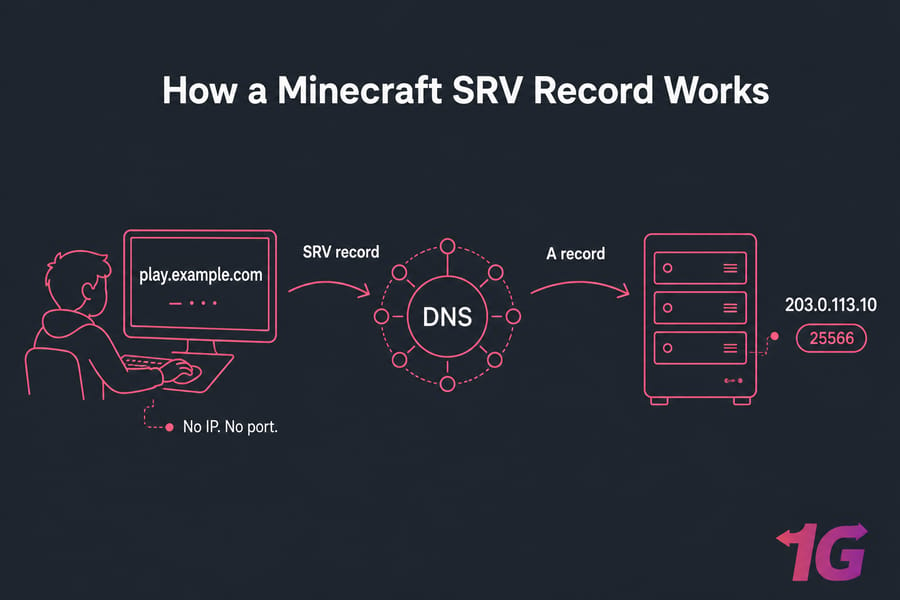
If you've ever shared a Minecraft server with friends, you know the pain. 198.51.100.42:25566 isn't exactly memorable. A custom domain fixes that — players type play.yourdomain.com and they're in. No IP. No port. No copy-paste mistakes in Discord.
That's the goal of this guide. You'll create the right DNS records, hide the port behind an SRV record, and test everything before sharing the address. Most of what follows applies to Minecraft Java Edition, which is where SRV records actually shine.
Why bother at all?
- Easier to share and remember
- Looks more professional for community servers
- Lets you change IPs later without telling every player
- Hides non-default ports cleanly
If you don't have the IP yet, grab it first here's a quick guide on how to find your Minecraft server IP address.
Do you actually need an SRV record?
Short answer: not always. Here's the longer version.
If your server runs on the default port 25565, an A record pointing your subdomain to the server IP is enough. Players type play.yourdomain.com and the Minecraft client assumes 25565 automatically.
You need an SRV record when:
- Your server runs on a non-default port (anything other than 25565)
- You want players to type just the domain, with no port appended
- You're running multiple servers behind the same IP on different ports
| Situation | A record | SRV record | Notes |
| Single server on port 25565 | Yes | Optional | A record alone works |
| Custom port (e.g., 25566) | Yes | Yes | SRV hides the port |
| Multiple servers, same IP | Yes | Yes | SRV routes by subdomain |
| Bedrock Edition server | Yes | Limited support | See Java vs Bedrock section |
In my experience, most server owners add the SRV anyway even on port 25565 just to keep things consistent. If you're spinning things up from scratch, our walkthrough on how to set up a Minecraft server on a VPS covers the server side first.
Subdomain vs root domain: which one to use
Use a subdomain. Almost always. Something like play.yourdomain.com or mc.yourdomain.com.
Why? Because your root domain (yourdomain.com) probably already points to a website or has email records attached. Pointing it at a Minecraft server can break your site, break your email, or both. Not fun to debug at 2am.
A subdomain keeps everything isolated. Your website lives on the root, your Minecraft server lives on play., and your email keeps working without you touching MX records. If you've never made one before, here's how to create a subdomain for your domain.
The root domain can work usually for fresh domains with nothing else on them. But the moment you add a website later, you'll regret not using a subdomain from the start.
DNS records explained: A, CNAME, and SRV
Quick refresher before we build anything.
| Record | What it does | Minecraft use |
| A | Maps a hostname to an IPv4 address | Required — points your subdomain to the server IP |
| AAAA | Same as A, but for IPv6 | Optional, only if your server has IPv6 |
| CNAME | Aliases one hostname to another | Rarely needed; A record is cleaner |
| SRV | Points a service (like Minecraft) to a host + port | Required to hide non-default ports |
The magic syntax for Minecraft SRV records is _minecraft._tcp.subdomain.yourdomain.com. The underscores aren't a typo — they're part of the spec. Minecraft Java Edition queries that exact name to find your server. If you want a deeper dive on DNS itself, here's what a DNS server does.
How to point a domain to a Minecraft server, step by step
Here's the actual procedure. UI labels vary between Cloudflare, Namecheap, GoDaddy, and others — but the fields are the same underneath.

Step 1: Gather what you need
- Server's public IPv4 address (example:
203.0.113.10) - Server port (default
25565, or whatever you set) - The subdomain you want to use (example:
play)
Step 2: Create the A record
In your DNS zone editor, add:
- Type: A
- Name/Host:
play(just the subdomain part — most panels append the root automatically) - Value/Target:
203.0.113.10 - TTL: Auto or 300 seconds
Step 3: Create the SRV record
This is where people trip up. The fields depend on your provider, but you'll need all of these:
- Service:
_minecraft - Protocol:
_tcp - Name/Host:
play(the subdomain — same one as your A record) - Priority:
0 - Weight:
5 - Port:
25565(or your custom port) - Target:
play.yourdomain.com(the hostname you just made the A record for)
One important note: the SRV target must be a hostname, not a raw IP. That's why we made the A record first. The SRV record points to the A record, which points to the IP. Skip the A record and the SRV breaks.
Step 4: Save and wait
Save the records. DNS propagation usually takes 5 minutes to 1 hour, sometimes up to 24. If you're using Cloudflare, make sure the SRV record isn't set to "Proxied" — game traffic doesn't pass through Cloudflare's HTTP proxy. It must be DNS-only (grey cloud).
Need server-side help too? Check our guide on how to make a Minecraft server on VPS.
A real SRV record example for Java Edition
Let's say your server runs at 203.0.113.10 on port 25566 (non-default). Your records would look like this:
; A record
play.example.com.    300    IN    A    203.0.113.10

; SRV record
_minecraft._tcp.play.example.com.    300    IN    SRV    0 5 25566 play.example.com.
Reading the SRV line left to right: priority 0, weight 5, port 25566, target play.example.com. Players join with just play.example.com — no port, no IP.
For a default-port (25565) server, the SRV is optional but still valid:
_minecraft._tcp.play.example.com. 300 IN SRV 0 5 25565 play.example.com.How to test your domain
Don't share the address until you've verified it works. Test in this order: A record, SRV record, Minecraft client.
Check the A record first:
nslookup play.example.comYou should see the server IP in the response. If you don't, the A record either hasn't propagated or has a typo. More on the nslookup command here.
Then check the SRV record:
dig SRV _minecraft._tcp.play.example.comExpected output includes a line like 0 5 25566 play.example.com. in the ANSWER section. Windows users without dig can use online DNS checkers (whatsmydns and similar) or grab the dig command guide.
Finally, fire up Minecraft Java Edition, add a server with address play.example.com, and connect. If it joins, you're done.
Need a stable server behind your Minecraft domain?
A clean domain only matters if the server behind it stays online. If your current host stutters under load, Minecraft VPS hosting gives you root access, dedicated resources, and the headroom to add mods or more players without lag spikes.
Common SRV record problems and fixes
| Problem | Likely cause | Fix |
| "Unknown host" | A record missing or not propagated | Verify A record, wait 1–24 hours |
| Domain resolves but won't connect | Firewall or port forwarding | Open the port; see port forwarding and VPS firewall configuration |
| SRV ignored, players still need port | Typo in _minecraft._tcp or wrong host field |
Re-check service and protocol fields exactly |
| SRV resolves but wrong port | Wrong port value in SRV | Match SRV port to actual server port |
| Works for some, not others | DNS propagation still in progress | Wait, flush local DNS cache |
| Connects on Java, fails on Bedrock | Edition mismatch | Bedrock has limited SRV support |
| Cloudflare SRV not working | Proxy enabled on game traffic | Set DNS-only (grey cloud) |
| Domain works, server offline | Server process down | Check server status, not DNS |
If the domain resolves cleanly but Minecraft still throws a connection error, it's almost never DNS. Check our guide on how to fix Minecraft server connection issues.
Java vs Bedrock: what's different
Quick reality check: this guide is built around Minecraft Java Edition. Java clients query the _minecraft._tcp SRV record automatically, so the setup above works the way you'd expect.
Bedrock Edition is a different story. Bedrock client SRV support is inconsistent across platforms (console, mobile, Windows), and many players still need to enter the IP and port manually or use the in-client server entry form. Don't assume your Bedrock players will get the same seamless experience as Java players. Test from each platform you support. For a deeper comparison, see Minecraft Java vs Bedrock servers.
Before you share the address: a few final tips
Pick a hostname people can remember and type one-handed: play, mc, survival, smp. Save your DNS settings somewhere (a doc, a password manager note anywhere). You'll thank yourself in six months when you've forgotten what you did.
Set up backups before going public. Here's the Minecraft server backup guide. If you ever change hosts, you'll only need to update one A record but you'll still want a clean Minecraft server migration plan.
For public community servers, lag and disconnects do more damage than a non-memorable domain ever will. A DDoS-protected VPS or dedicated game VPS keeps things stable when someone inevitably tries to ruin your day. Compare options on the Minecraft hosting page.

Leave A Comment