
Minecraft Java vs Bedrock servers at a glance
Minecraft Java and Bedrock servers are not natively the same. Java servers usually use port 25565 over TCP, while Bedrock servers commonly use port 19132 over UDP. Java is better for mods and plugins, Bedrock is better for cross-device play, and a Java server with Geyser can bridge some Bedrock access.
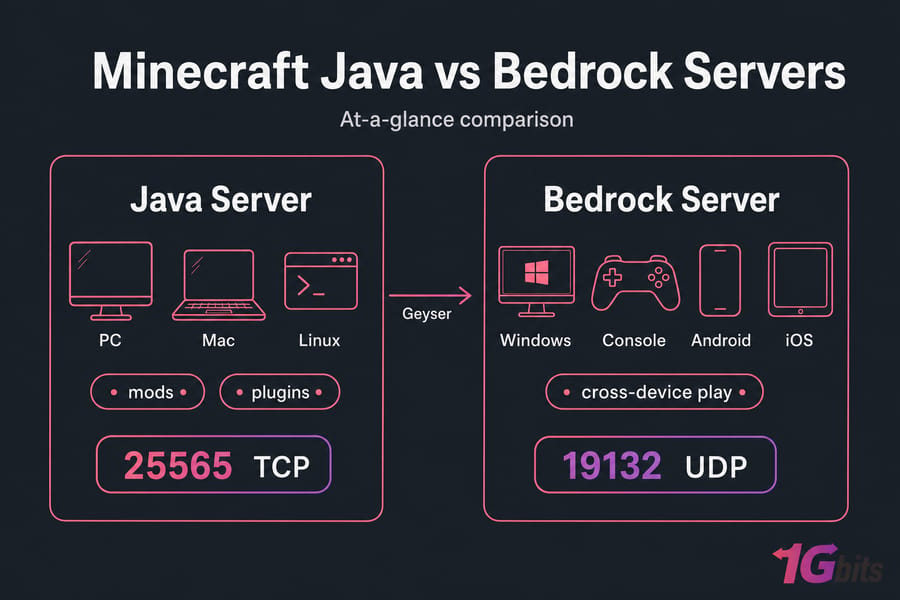
If you're comparing Minecraft Java vs Bedrock servers, the short answer is this: Java Edition servers are built for Java clients on PC, Mac, and Linux, while Bedrock Edition servers are built for Bedrock clients on Windows, console, Android, and iOS. Same game brand, different server ecosystems.
I've seen people rent hosting first and ask questions later. That's usually where the trouble starts. Before you buy anything, check who needs to join and what devices they use.
| Feature | Java Server | Bedrock Server |
| Best for | PC-focused groups, plugins, mods | Console, mobile, mixed-device casual play |
| Server software | Vanilla, Paper, Spigot | Bedrock Dedicated Server |
| Default port | 25565 TCP | 19132 UDP |
| Cross-play | Java clients only by default | Bedrock clients only by default |
If you want a broader hosting comparison, see the best Minecraft server hosting providers list or go straight to Minecraft hosting. But first, the IP and port details matter most.
Minecraft server IP and port differences for Java vs Bedrock
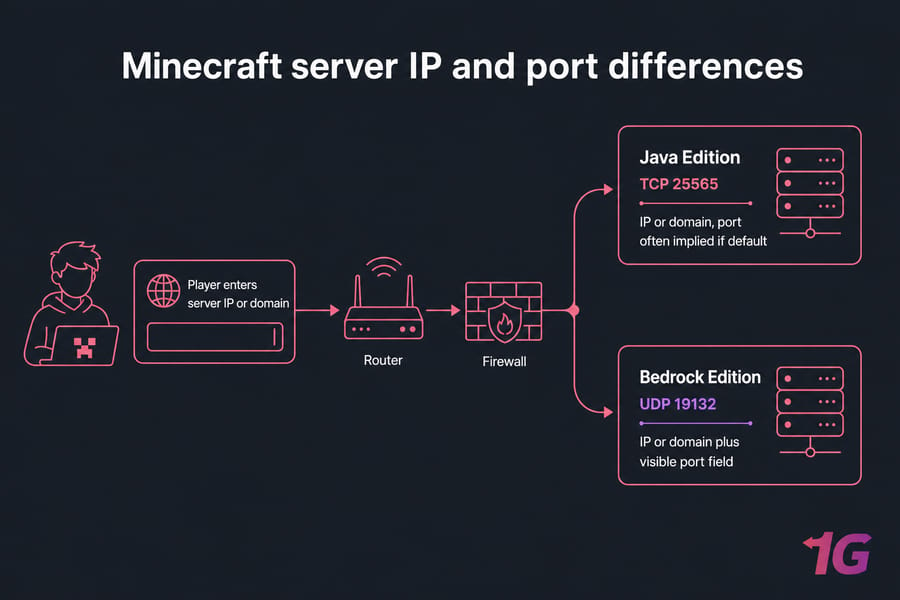
Java players usually enter a server address as an IP or domain name, and if the server uses the default Java port, the client often hides that detail. Bedrock is more explicit. It commonly asks for both the server address and a separate port field.
That doesn't mean the IP address itself is magically different by edition. The real difference is the software listening on that address, the default port, and the protocol used to carry traffic.
| Edition | Default Port | Protocol | How Player Enters It |
| Java Edition | 25565 | TCP | IP or domain, port often implied if default |
| Bedrock Edition | 19132 | UDP | IP or domain plus visible port field |
And yes, protocol matters. If you open TCP 25565 for a Bedrock server, it still won't work because Bedrock expects UDP 19132 by default. That's a classic firewall mistake. On a VPS or dedicated box, you'll want matching firewall rules. On home hosting, you may also need how to port forward on your router guidance.
If you need a refresher on finding or sharing the right address, this guide to your Minecraft server IP address helps. Knowing the IP and port is only half the story—the next question is compatibility.
Minecraft Java and Bedrock server compatibility explained
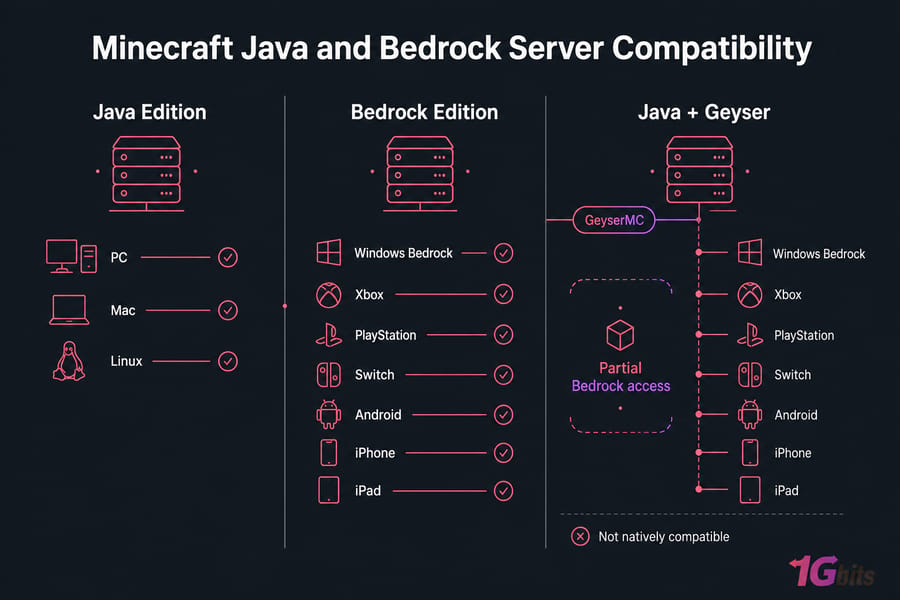
Java and Bedrock are not natively compatible. A normal Java server does not accept Bedrock clients, and a normal Bedrock server does not accept Java clients. That's because they use different codebases and different server software.
So can Java and Bedrock play together on a server? Not directly. But there's a practical workaround: GeyserMC. Geyser acts as a protocol translation layer so Bedrock players can join a Java server. Floodgate is often added so Bedrock users can log in without needing a Java account flow on that server.
I personally think Java + Geyser is the sweet spot for creators who want Java plugins but don't want to lock out mobile or console-adjacent players. Still, manage expectations.
- Not every mechanic feels identical across editions.
- Some plugin behavior and UI interactions can be awkward.
- Anti-cheat tools sometimes need tuning for bridge traffic.
- Java mods do not suddenly become native Bedrock features.
If a friend can't join, wrong edition choice is one of the first things I'd check. This is why the Minecraft server connection issues guide is handy. And if someone expects a giant Java network like Hypixel to work the same way everywhere, reading about what Hypixel IP is also clears up some edition confusion.
Java vs Bedrock server setup differences step by step
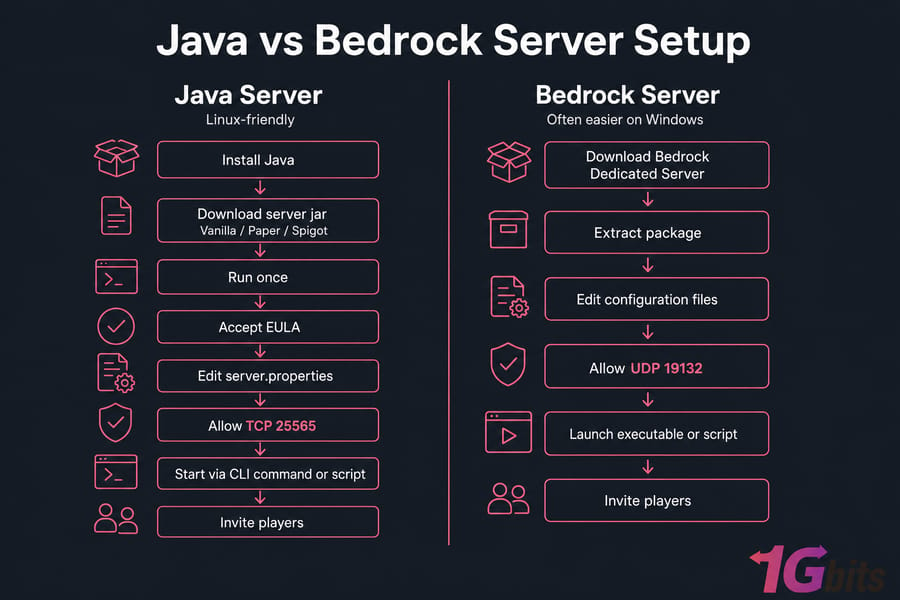
The setup gap is real, but it isn't scary once you break it down.
For Java, you typically install Java first, download a server jar such as Vanilla, Paper, or Spigot, run it once, accept the EULA, edit server.properties, and start it from the command line or a script. On Ubuntu and other Linux systems, this workflow feels pretty natural. If you need the basics, here's how to install Java on Ubuntu.
For Bedrock, you usually download the Bedrock Dedicated Server package, extract it, edit the configuration files, open UDP port 19132, and launch the executable. In my experience, beginners often find Bedrock a bit simpler on Windows. Linux is possible too, often with containers or community-managed workflows, but Java still tends to be the more familiar path on VPS hosting.
| Setup Area | Java Server | Bedrock Server |
| Core software | Vanilla jar, Paper, Spigot | Bedrock Dedicated Server package |
| OS comfort zone | Linux-friendly | Often easier on Windows |
| Startup style | CLI command or script | Executable or launch script |
| Firewall rule | Allow TCP 25565 | Allow UDP 19132 |
| Bridge option | Can add Geyser/Floodgate | Not used the same way |
First-time checklist? Keep it simple:
- Confirm player edition and Minecraft version.
- Set the correct port and firewall rule.
- Use a whitelist if it's private.
- Test locally before sharing the address.
- Plan updates and read the Minecraft server backup guide before major version changes.
If you want root access, custom startup scripts, or a Java stack with Geyser, this tutorial on how to make a Minecraft server on VPS is the right next move. Setup is only one factor—customization changes the picture even more.
Minecraft Java server mods vs Bedrock add-ons and plugin support
Java is the usual pick for admins who want deep control. You get plugins through Paper or Spigot, broader mod support, and a much larger ecosystem for custom game modes, permissions, and automation.
Bedrock works differently. Instead of Java-style mods and plugins, you mostly deal with add-ons, behavior packs, and resource packs. That's not useless at all — just narrower on the server side.
For a PC-only friend group that wants custom mechanics, Java wins most of the time. For a family server with tablets and consoles, Bedrock can be the less painful choice. And no, Geyser doesn't magically give Bedrock players full Java mod support. That's one of those assumptions that looks fine on paper and falls apart fast.
If your server is more about admin tools and fun commands than heavy modding, the best Minecraft commands article is worth a read. If you're just starting a world and want something fresh, best Minecraft seeds is a nice bonus.
Hosting requirements for Java vs Bedrock Minecraft servers
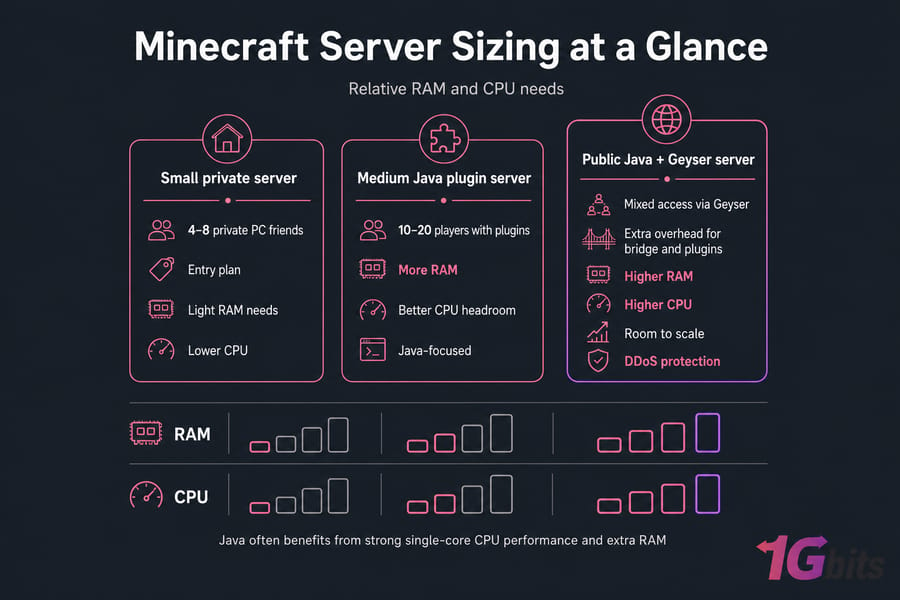
Java often benefits more from strong single-core CPU performance and extra RAM, especially once plugins or modpacks pile up. Bedrock can be lighter in some setups, but player count, redstone-heavy worlds, and view distance still matter. I've seen small servers run fine on modest plans, then choke the moment everyone logs in at once.
| Use Case | Recommended Edition | Hosting Type | Suggested Resources |
| 4–8 private PC friends | Java or Bedrock | Managed hosting | Entry plan, light RAM needs |
| 10–20 players with plugins | Java | VPS | More RAM, better CPU headroom |
| Mixed access via Geyser | Java + Geyser | VPS | Extra overhead for bridge and plugins |
| Public server | Depends on audience | VPS or dedicated | DDoS protection and room to scale |
Pick a location close to your players. Low latency fixes more complaints than fancy specs sometimes. If you want broader gaming flexibility, game VPS options are worth checking too.
Java or Bedrock server: which one should you choose?
If your group is PC-only and wants plugins or mods, choose Java. If your players are on Xbox, PlayStation, Switch, Android, or iPhone, choose Bedrock. If you want Java-first management with wider access, choose Java + Geyser, and often Floodgate.
Budget matters, sure. So does admin effort. Bedrock can be simpler for casual mixed-device play. Java asks for a bit more hands-on work, but you get much more room to build exactly what you want.
And if you're comparing budget options first, check free Minecraft server hostings just keep expectations realistic on performance and control.
Common Minecraft server mistakes with IP, port, and compatibility
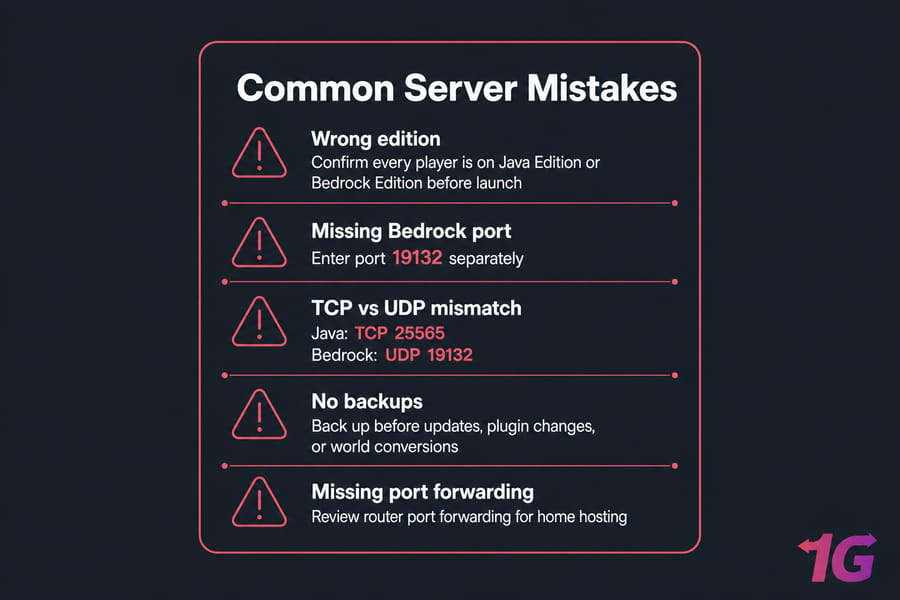
- Using the wrong edition. Fix: confirm every player is on Java Edition or Bedrock Edition before launch.
- Forgetting the Bedrock port. Fix: Bedrock players often need the server address and port 19132 entered separately.
- Opening the wrong protocol. Fix: Java uses TCP 25565; Bedrock uses UDP 19132.
- Assuming Geyser solves everything. Fix: test plugins, login flow, and gameplay quirks before inviting everyone.
- Skipping port forwarding on home hosting. Fix: review how to port forward on your router.
- Ignoring backups. Fix: back up before updates, plugin changes, or world conversions.
Best next steps after choosing a Minecraft server type
If you want simple hosting, start with Minecraft hosting. If you want full VPS control for Paper, Geyser, Floodgate, root access, and custom firewall rules, go with Minecraft VPS.
Need Java plugins, Bedrock access, or both? Match the hosting model to the job. Managed plans are easier to launch. A VPS gives you more freedom and more responsibility. Either way, keep the server close to your players for lower latency, and if you need help, 1Gbits support is available at 24/7 support.
The bottom line on Minecraft Java vs Bedrock Servers: IP, Port, Compatibility, and Setup Differences is pretty simple. Choose Java for control, Bedrock for device reach, and Java + Geyser when you want a middle path without starting over later.

Leave A Comment