

How to Create a Subdomain for My Domain starts with understanding what a subdomain actually is, why it exists, and how it fits into real-world website and infrastructure setups. A subdomain is an extension of your main domain that allows you to separate content, services, or environments, such as blogs, apps, staging platforms, or servers, without registering a new domain. People create subdomains to improve organization, scale projects cleanly, isolate technical components, and manage performance or SEO more effectively.
This guide explains how to create a subdomain for your domain step by step, covering DNS-based methods, hosting panels like cPanel, providers such as Cloudflare and Google Domains, SEO considerations, common mistakes, and practical use cases so you can confidently set up a subdomain that works correctly in 2026.
👍 What Is a Subdomain?
A subdomain is a prefix added to your main domain name that creates a separate address under the same domain structure, such as blog.example.com or api.example.com, and it functions as an independent section of a website or service. From a technical perspective, subdomains function through DNS records that direct the subdomain to a specific IP address or service, enabling it to load different content, applications, or servers while remaining part of the main domain.
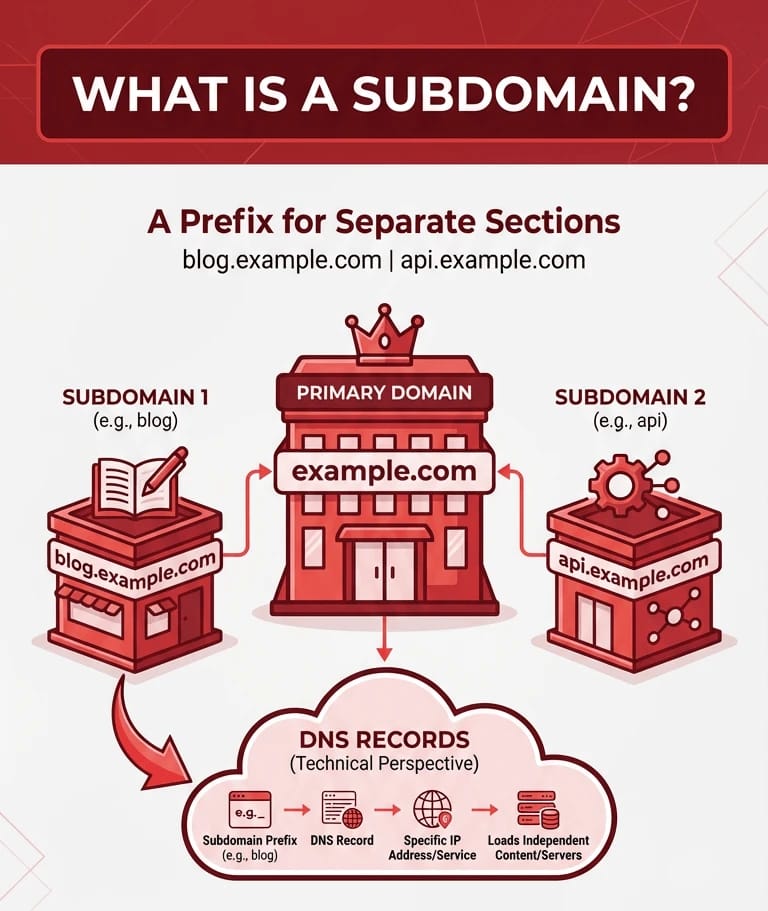
A clear domain and subdomain example helps visualize this relationship: example.com represents the primary domain, while shop.example.com, blog.example.com, or dev.example.com are subdomains that can each host distinct projects with their own hosting setup, configuration, and purpose. It is essentially a way of hosting multiple websites under a single brand identity.
🔍 Domain vs Subdomain Comparison
A domain represents the primary web address of a project, while a subdomain acts as an extension that separates specific content, services, or environments under that main address. Understanding the difference helps you decide how to structure websites, applications, and infrastructure more efficiently.
| Feature | Domain | Subdomain |
| URL structure | example.com | blog.example.com |
| Purpose | Main identity of a brand | Dedicated section or service |
| SEO behavior | Primary authority | Treated as a separate entity |
| Hosting | One main hosting setup | Can point to a different IP |
| DNS | Root DNS records | Separate records under root |
In practice, domains define ownership and branding, while subdomains provide structural flexibility, technical isolation, and scalability without requiring the registration of multiple domains.
🚀 Why Create a Subdomain?
Creating a subdomain allows you to organize projects while keeping them technically separated. This approach improves scalability and management across both simple websites and complex infrastructures.
- Blogs: Use blog.example.com to separate content publishing from the main website functionality.
- Apps: Host web applications or APIs on subdomains like app.example.com with independent hosting.
- Stores: Run an eCommerce platform on shop.example.com to isolate payment systems and security rules.
- Staging: Create a staging environment like dev.example.com to test updates safely.
- Game Servers: Point mc.example.com to a Minecraft server IP address for easier player connections.
🧭 How to Create a Subdomain for My Domain
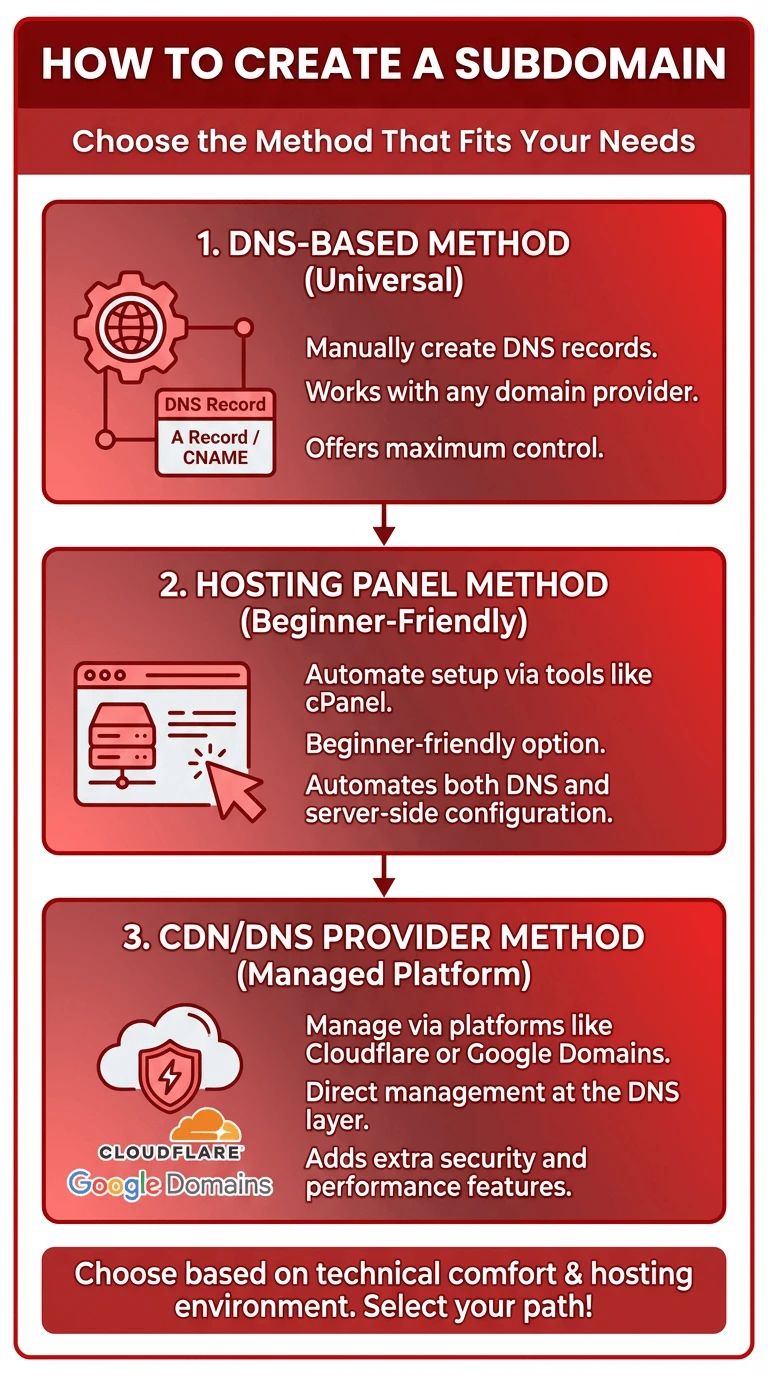
Creating a subdomain can be done in several ways, depending on where your DNS is managed. Before diving into instructions, choose the method that matches your environment:
- DNS-based method: Manually creating A or CNAME records (Universal control).
- Hosting panel method: Using tools like cPanel or Plesk to automate server configuration.
- CDN method: Managing records via platforms like Cloudflare for added security.
🌐 How to Create a Subdomain in DNS
Setting up a subdomain in DNS is the most flexible approach. It relies on creating records that tell the internet where your subdomain should point.
- Choose the record type: Use an A record for an IP address or CNAME for another hostname.
- Define the prefix: Enter the name (e.g., blog) which forms blog.example.com.
- Set destination: Add the server IP address or target hostname.
- Adjust TTL: Lower TTL (Time to Live) values speed up propagation during setup.
- Save and Propagate: Wait for the changes to update globally.
🧩 Create Subdomain Using A Record
An A record points a subdomain directly to an IPv4 address. This is the standard method for a Linux server or VPS where the IP is fixed. It connects the subdomain straight to the hardware without intermediaries.
🔗 Create Subdomain Using CNAME
A CNAME record links a subdomain to another hostname. This is ideal for external platforms or cloud services. If the destination's IP changes, the CNAME follows it automatically, simplifying long-term management.
🖥️ How to Create a Subdomain in cPanel
cPanel is the fastest way to create a subdomain because it handles both DNS and server folders in one click.
- Navigation: Log in and open the "Subdomains" section.
- Setup: Enter the prefix and choose the parent domain.
- Document Root: cPanel creates a specific folder for your subdomain files.
If you are using a managed service, you might want to install cPanel on your own server to gain these automation benefits.
☁️ How to Create a Subdomain in Cloudflare
In Cloudflare, subdomains are managed at the DNS layer with optional Proxy features.
- Proxied vs DNS-only: Proxied records route traffic through Cloudflare's security layer.
- Security: Benefit from DDoS protection and performance optimization.
- Common Fix: Ensure your Nginx SSL configuration matches Cloudflare's encryption settings to avoid "Too many redirects" errors.
🧬 Can You Create a Subdomain of a Subdomain?
Yes, you can create "nested" subdomains like api.dev.example.com. This hierarchy is great for complex dev environments. However, be aware that deeper levels make SSL certificate management and DNS flushing more complicated for users.
📈 Are Subdomains Bad for SEO?
Search engines often treat subdomains as separate entities. They require their own optimization strategy rather than strictly inheriting authority. Subdomains are useful for regional content or technical documentation, but for standard blogs, some prefer subdirectories (example.com/blog) to keep authority centralized. Consistent URL redirects and internal linking are key to maintaining visibility.
🛠️ Common Subdomain Problems & Fixes
| Problem | Cause | Fix |
| DNS not resolving | Missing A/CNAME record | Check records using the nslookup command. |
| SSL Issues | Cert doesn't cover prefix | Use a Wildcard SSL or issue a specific cert. |
| Wrong Content | Incorrect Document Root | Verify the folder path in your hosting panel. |
| Propagation | Old cached data | Wait 24 hours or clear local DNS cache. |
🎯 Conclusion
A subdomain is a powerful tool to organize your web presence, separate environments, and manage technical resources without purchasing extra domains. Whether you are setting up a blog, a staging site, or a game server, knowing how to manage DNS records and hosting panels is essential. For projects that require high performance and isolation, leveraging a reliable dedicated server or VPS ensures your subdomains remain fast and accessible globally.
To fully understand how subdomains fit into your overall web structure, it helps to start from the fundamentals. Reviewing What Is a Domain Name clarifies how domains, DNS, and subdomains work together before choosing the right hosting environment.

Leave A Comment