

In the virtual worlds that Minecraft offers, seeds are codes that are generated at random. Every new world you make will have a special seed leading to its locations, loot, villages, and other things. In Minecraft, a seed can add many fresh resources, adventures, and more to your world. Each seed includes a unique seed code and spawn coordinates, helping you quickly locate villages, structures, and rare biomes.
It is crucial to pick the best Minecraft seed because it will determine your Minecraft experience. Whether you choose a pastoral setting or one with ice and snow, Minecraft seeds keep the game interesting and give fresh gameplay challenges. If you're planning to host a server, check out the best game VPS hosting providers for optimal performance.
However, some seeds are superior to others, and understanding what is available can greatly alter how your gaming experience is set up. We've compiled a list of what we believe are the best Minecraft Seeds currently on the market to help you enjoy the game more.
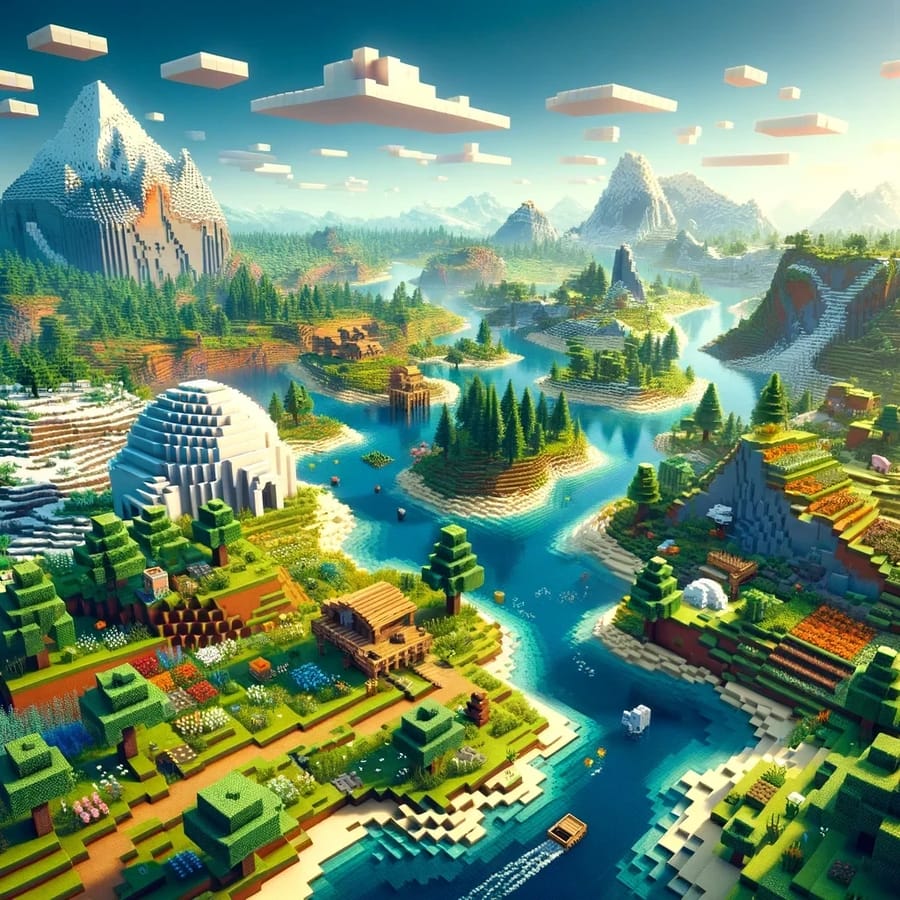
How to Use a Minecraft Seed (Step-by-Step)
Once you've found a Minecraft seed that matches your playstyle, the next step is knowing how to use it correctly. While the process is fairly simple, it can vary slightly depending on the platform you're playing on. Below, we've broken it down step-by-step for each version of the game.
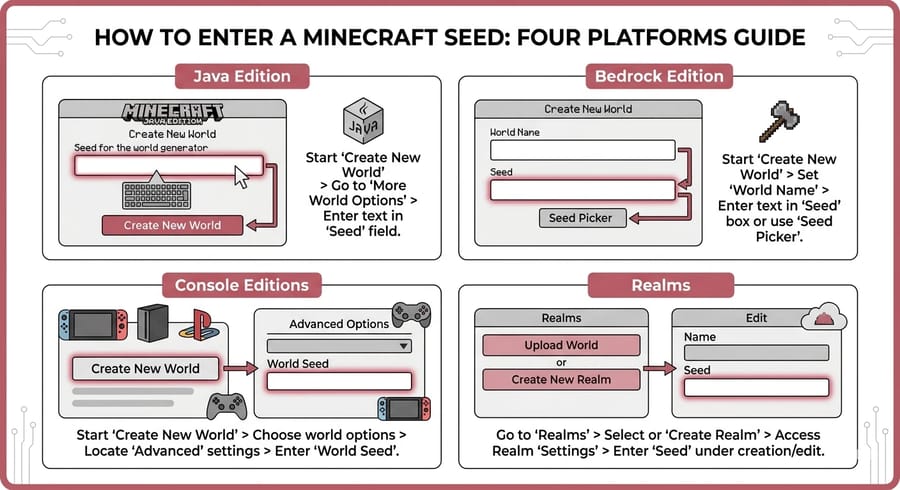
How to Use a Seed in Minecraft Java Edition
- Launch Minecraft and click on "Singleplayer".
- Select "Create New World".
- Click on "More World Options".
- Locate the field labeled "Seed for the World Generator".
- Paste or type your desired seed number.
- Customize other settings if needed, then click "Create New World".
This will generate a world based exactly on the seed you entered, giving you access to the same terrain, structures, and features.
How to Use a Seed in Minecraft Bedrock Edition (Windows / Mobile)
- Open Minecraft and click "Play".
- Tap "Create New" and then "Create New World".
- Scroll down to the "Seed" field under World Options.
- Enter your seed code.
- Adjust settings like difficulty or game mode if needed.
- Tap "Create" to start your world.
Bedrock Edition also includes some preset seeds you can choose from if you don’t want to enter one manually.
How to Use a Seed on Consoles (PS, Xbox, Nintendo Switch)
- From the main menu, select "Play".
- Click "Create New" → "Create New World".
- Find the "Seed" input box in the world settings.
- Enter your seed value.
- Configure any additional settings.
- Select "Create" to begin.
The steps are nearly identical to Bedrock Edition since consoles run on the same engine.
How to Use a Seed in Minecraft Realms
- Open Minecraft and go to "Play".
- Navigate to your Realm.
- Click "Edit World".
- Select "Replace World".
- Choose "Generate New World".
- Enter your seed in the seed field.
- Confirm to upload the new world.
This allows you to share a specific seed experience with friends across your Realm server.
Pro Tip: Keep in mind that seeds may generate slightly different worlds between Java and Bedrock editions due to differences in world generation mechanics.
For smoother gameplay while testing different seeds, using a game VPS can significantly improve performance and reduce lag.
What Minecraft Versions These Seeds Work With (And How Versions Affect World Generation)
One important thing many players overlook when using Minecraft seeds is that not all seeds work the same across different game versions. While a seed might generate an incredible world in one version, it can look completely different—or even break—when used in another.
This happens because Minecraft’s world generation system changes over time. Updates introduce new biomes, terrain mechanics, structures, and even entirely new underground systems, which directly impact how seeds are interpreted.
These changes are part of broader Minecraft world-generation updates that affect how seeds behave across versions.
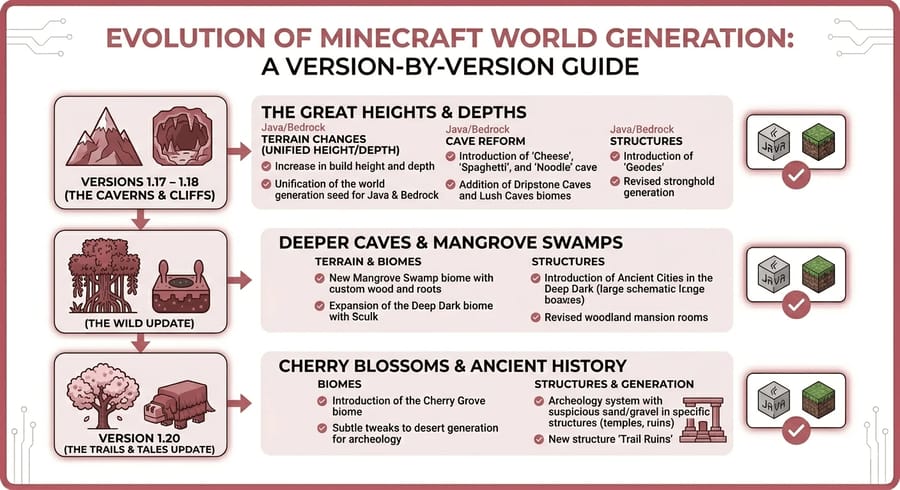
Do Minecraft Seeds Work Across All Versions?
In short: not always.
Minecraft seeds are highly dependent on the version they were created in. If you're using a seed from an older update in a newer version, you might notice:
- Different biome placement
- Missing or relocated structures (villages, temples, etc.)
- Changed terrain shapes (mountains, caves, oceans)
- New features overriding old generation patterns
Because of this, it's always best to use a seed in the version it was originally discovered in for the most accurate results.
Major Updates That Changed World Generation
Some Minecraft updates have significantly altered how seeds work. Here are the most important ones:
- Caves & Cliffs Part I & II (1.17 - 1.18): Completely redesigned terrain generation, including taller mountains and deeper caves.
- The Wild Update (1.19): Introduced mangrove swamps and the Deep Dark biome, affecting seed layouts.
- Trails & Tales (1.20): Added new structures and subtle world generation tweaks.
Seeds created before these updates may not behave the same way after installing them.
Java vs Bedrock: Do Seeds Generate the Same Worlds?
Even when using the same seed number, Java Edition and Bedrock Edition can generate slightly different worlds.
Although recent updates have made them more similar than ever, differences can still include:
- Structure locations (villages, temples, shipwrecks)
- Biome borders and terrain transitions
- Mob spawning behavior in certain areas
So if you're copying a seed from a website, always check whether it's designed for Java or Bedrock to avoid unexpected results.
How to Make Sure a Seed Works Properly
- Check the Minecraft version the seed was shared for
- Match your game version as closely as possible
- Use the correct edition (Java or Bedrock)
- Test the seed in Creative mode before starting survival
Taking a few extra seconds to verify compatibility can save you from spawning into a completely different world than expected.
Pro Tip: If you want consistent results when sharing seeds with friends, make sure everyone is using the same version and edition of Minecraft.
How We Tested These Minecraft Seeds (Our Methodology)
With thousands of Minecraft seeds available online, finding the ones that are actually worth your time can be challenging. To make this list as useful and reliable as possible, we didn’t just collect random seeds—we tested them in real gameplay scenarios.
To maintain consistent performance during testing, we used environments similar to low latency game VPS setups.
Our goal was simple: identify seeds that offer unique terrain, valuable resources, and enjoyable exploration right from the start.
Our Testing Process
Each seed included in this list was carefully reviewed using a consistent testing approach:
- Spawn Point Analysis: We checked what players experience immediately after spawning, including nearby structures, safety, and available resources.
- Exploration Value: We explored the surrounding area to evaluate biome diversity, terrain uniqueness, and long-term gameplay potential.
- Resource Availability: We looked for access to key materials like wood, ores, villages, and loot structures.
- Performance & Playability: Seeds were tested to ensure they are playable and not dependent on glitches that may break in future updates.
Game Versions & Platforms Used
To ensure accuracy, we tested these seeds using recent Minecraft versions across multiple platforms:
- Minecraft Java Edition (latest version)
- Minecraft Bedrock Edition (Windows & mobile)
Whenever a seed behaved differently between versions, we’ve mentioned it in the description so you know exactly what to expect.
What Makes a Seed “Worth It”?
Not every seed makes the cut. We focused on seeds that deliver something special, such as:
- Rare or unusual terrain generation
- Villages or structures close to spawn
- Strong survival potential
- Visually impressive landscapes
This ensures that whether you're starting a survival world or just exploring, each seed offers a meaningful experience.
Why You Can Trust These Recommendations
Instead of relying solely on community lists, we combined hands-on testing with insights from experienced Minecraft players. This approach helps us filter out outdated or misleading seeds and focus only on those that still perform well in current versions.
Pro Tip: Even with thorough testing, small differences can occur depending on your Minecraft version or edition—so always double-check compatibility before starting your world.
Minecraft Seed Testing Logs (Screenshots & Verification)
To make our recommendations as transparent and trustworthy as possible, we’ve documented parts of our seed testing process. These logs include screenshots, coordinates, and timestamps collected during real gameplay sessions.
If you're testing seeds with others, using a VPS for Minecraft helps maintain consistent results across sessions.
While Minecraft worlds can slightly vary depending on version and edition, these logs give you a clear reference point for what to expect.
Sample Testing Evidence
- Seed: -7783854906403730143 (Coastal Towns)
- Version Tested: Minecraft Java 1.20+
- Spawn Coordinates: X: 120, Z: -45
- Notable Findings: Village within 100 blocks, nearby ocean ruins, visible mountain range
- Timestamp: Tested during latest version update cycle
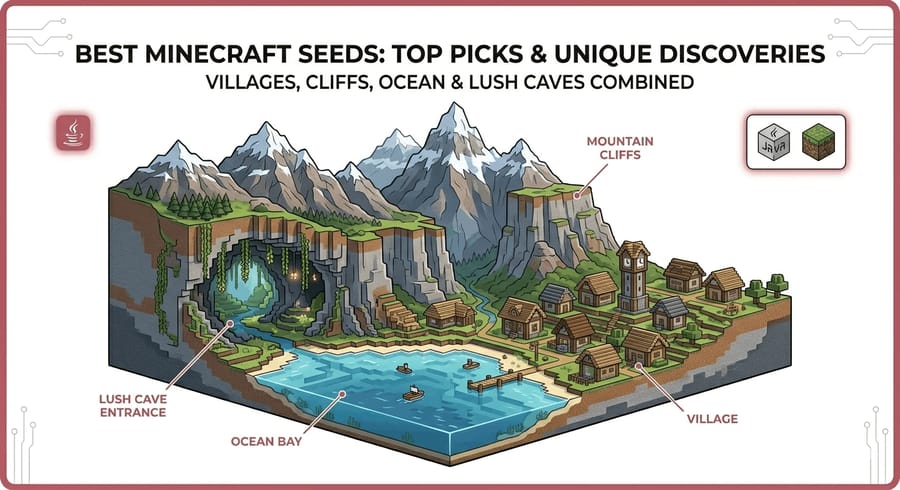
The screenshot above shows a real in-game capture from one of the tested seeds. Visual verification like this helps confirm terrain generation, nearby structures, and biome layout.
What We Log During Testing
- Spawn location and surrounding environment
- Nearby structures (villages, temples, shipwrecks)
- Biome types and transitions
- Resource accessibility (wood, ores, caves)
- Any unusual or rare world generation features
Why Testing Logs Matter
Many seed lists online are based on outdated data or unverified claims. By including testing logs, we aim to:
- Provide real proof of gameplay results
- Increase transparency and trust
- Help you verify seeds before using them
- Reduce inconsistencies caused by version differences
These logs are especially useful if you're planning to use seeds for multiplayer servers or long-term survival worlds.
Pro Tip: If you want even more accurate results, test seeds in your exact game version and note your own coordinates for comparison.
| Seed Name | Seed Code | Best For | Edition | Highlight |
| Coastal Towns | -7783854906403730143 | Survival / Multiplayer | Java | Villages, ocean loot, strong early-game setup |
| Flowering Mountain | -9041095622391834929 | Building | Java | Beautiful terrain, flowers, scenic base location |
| Dripstone Mountain Village | -1557631284 | Villages / Exploration | Java | Rare village generation with exposed dripstone cave |
| Mangrove Swamp and Outpost | 3546842701776989958 | Rare Biomes | Bedrock-first | Mangrove biome plus nearby structures |
| Vertical Island Village | -6537256334104833826 | Building / Unique Terrain | Java | Cliffside village layout with dramatic sea views |
| Spawn Next to Free Allay and Shipwreck | 759733268 | Multiplayer / Early Loot | Java | Fast loot access and unusual allay spawn setup |
| Ocean Monument Island | -3821186818805133221 | Rare Structures | Java | Mushroom biome plus visible ocean monument |
| Empty Spawn to Create a Base | 873506786 | Base Building / Survival | Java | Flat open space with mountains and cave access |
Best Minecraft Seeds for Exploration
1. Above-ground dripstone
Seed: -1935233121
This seed includes an above-ground dripstone caves biome, as the name implies. Surprisingly, the dripstone elements don't feel out of place due to the nearby desert habitat. Numerous sand hills in the region are also considered less typical as if that weren't enough.
2. Bamboo jungle
Seed: -4813269715648826820
You can immediately access a lot of bamboo and jungle wood from your lush jungle starting point. When you spawn, take a look around. You'll also find a safe, enclosed ravine that allows easy access to common ores like coal and copper.
From there, you can travel south for warmer weather or across the water by boat for miles of diverse forests.
3. Desert Badlands Coast
Seed: 4479470260786833195
As one of the cool Minecraft Seeds, this starting seed allows you to enjoy the beautiful look of terracotta without the difficult lack of surrounding trees that may otherwise impede your early development if you enjoy the sight of a few Badlands hilltops.
To find plenty of wood, climb the adjacent mountain. From there, you can also look out over the expansive desert landscape and see what catches your attention.
4. Dripstone Mountain Village
Seed: -1557631284
With the help of a glitch, this seed transforms a taiga settlement into a mountain with an exposed dripstone cave.
Minecraft's world generation rules are broken in every facet of this village. However, as a player, this seed offers you one of the most unique locations of any seed.
5. Spawn Next to Free Allay and Shipwreck
Seed: 759733268
Allays typically spawn in cages near pillager outposts in the game. By leaving an opening in the bottom of those cages, this Minecraft seed also tries to accomplish the same goal but fails.
Allays are thus available in Minecraft for the first time in a naturally free state. If that still isn't enough for you, a shipwreck is located just adjacent to the outpost and is simply ready to be looted.
This is also considered a great shipwreck seed with early loot access.
6. Dripstone Ravine
Seed: 821163920768877950
You will be placed right on the edge of an intriguing-looking ravine covered in dripstones by this intriguing seed, and the more you look at it, the more you'll realize that such terrain formation was only made possible by the two-part Caves and Cliffs upgrade.
You'll be surrounded by trees and swampland as far as the eye can see if you stick your head above the ground.
7. Mangrove Swamp and Outpost
Seed: 3546842701776989958
By using this seed discovered by Minecraft & Chill, you can spawn quite near an Illager outpost close to a beach.
A shipwreck, a desert pyramid, and a village are nearby, but you can also explore a sizable Mangrove swamp, which is perfect if you're looking for Minecraft frogs.
Since the Bedrock Edition was used to find this world, Java Edition structures may alter somewhat or be completely absent.
8. Coastal Towns
Seed: -7783854906403730143
As one of the good Minecraft Seeds, this seed places you near a sizable village on a rocky plateau. Another village carved into the Cliffside, a fantastic starting point for ocean exploration, is just over the water, and other magnificent mountains can be seen in the distance. This is one of the best village at spawn seeds for multiplayer gameplay.
Even better, there is a neighboring ocean ruin that can be reached and a portal ruin that contains great loot. This excellent Minecraft survival seed best explores the Caves and Cliffs update.
If you're sharing this world, make sure you know how to find your Minecraft server IP address so others can join easily.
9. Vertical Island Village
Seed: -6537256334104833826
This strange village was found by user u/szmirgley on Reddit and is located west of the island where you spawn.
With harbors on each side, structures perched on top, and fields carved into the cliff side, these brave residents have built a community all the way around a steep, jagged cliff that projects out into the water.
10. Exposed Igloo Basement
Seed: 9044663440596244341
Igloos are among the most uncommon buildings in Minecraft, but they are also fascinating. If you're lucky, you might locate one with a cellar that seems to be a testing ground for zombie village cures. However, this seed doesn't appreciate your good fortune enough to give you a reward.
Instead, it gives you access to an igloo that the game's regulations don't allow. This igloo spawns with its basement exposed on a mountainside. Along with it, you get to admire the tunnel's design leading to the basement, typically buried underneath. Igloos, found in beautiful Minecraft seeds, offer a unique and enjoyable gaming experience.
11. Pirate Village at Spawn
Seed: 3153934843
Do you enjoy visiting ports, ships, or pirates at sea? If the answer is yes, this seed spawns us in a seashore plains settlement, giving us the best natural representation of them. This seed is produced over the water and has a dock-like sensation. The scene is completed by a shipwreck that is located in the center.
This shipwreck differs from most in that it resembles a complete ship poised to set sail. This unique feature makes it an exciting find for players exploring the world of Minecraft. With its intricate details and almost pristine condition, it offers a fascinating glimpse into the maritime adventures that once were. Therefore, this seed is one of the best Minecraft Seeds if you don't want to install some of the custom maps for Minecraft. If you're looking to elevate your gaming experience even further, consider using a reliable game VPS. A game VPS can provide you with a dedicated server environment, ensuring smoother gameplay and better performance for all your Minecraft adventures.
12. Exposed Seaside Lush Cave
Seed: -1058557249
The game's lush caves are undoubtedly its most stunning cave biome. Axolotls are only found in these caverns in Minecraft, and they have distinctive vegetation and topography. However, despite having such incredible features, Minecraft has buried them well below the surface.
This seed, thankfully, corrects that by producing us atop a hollow mountain that is completely open on one side. One of the biggest and most beautiful cave biomes may be found inside this mountain. The famous landscape is then elevated to a whole new level by the presence of a big ocean right next to the lush cave.
13. Village Inside Ravine
Seed: -2411962888717872099
The majority of Minecraft seeds provide rewards at the spawn point. However, this specific seed requires you to travel tens of thousands of blocks before spawning one of the game's most elusive wonders.
It embeds the iron golem, along with villagers, mobs, farms, and an entire plains village, inside a ravine. Therefore, even though you have to travel far to find it, the effort is undoubtedly worthwhile.
14. Flowering mountain
Seed: -9041095622391834929
The next item on our list of best Minecraft Seeds spawns with a hamlet in the center of a big flower field, so if you like flowers, you'll adore them. You can find tulips, dandelions, cornflowers, poppies, and more. And after you've finished looking for flowers, you can explore a sizable dripstone cave biome located directly beneath the hamlet.
You can enter the cave through any of its several openings.
15. Deadly spawn with six exposed diamonds
Seed: 1870652620
You might think this seed is good or awful, depending on your skill set. You are spawned right in the midst of a large hole that is filled with moving water.
You will gradually be pushed into the lava lake at the bottom of this hole if you don't move because of the water. If you want to follow the flow, you can discover a fossil near some lava that contains six blocks of diamond ore.
However, the issue appears when you attempt to escape the pit. Despite the fact that it is brimming with resources, you cannot harvest any of them without first obtaining wood.
You need to do so, but getting out of that hole will be difficult due to the steep terrain and deadly enemies.
16. A Jail at Spawn
Seed: -5162463139528282983
One of the most intriguing hostile structures in the game is pillager outposts. They are the game's most reliable source of goat horns and Allays.
The special cages that grow next to them, which this seed produces nine at once, make them extremely fascinating. The most you'll typically find in one place is three of them.
17. Ocean Monument Island
Seed: -3821186818805133221
On this ocean-based seed, there are a few unusual items to find, one of which is truly very rare, which is more than enough cause to visit and take a look.
Not far from the starting point lies a super-rare mushroom biome, and as you spawn, you'll be able to see an ocean monument submerged in the water. So you only need to decide which one you want to visit first!
This is a powerful ocean monument seed with rare biome combinations.
18. Empty Spawn to create a base
Seed: 873506786
It has become more difficult for players to locate the ideal location to build their base after the developers overhauled the game's topography with the 1.18 update. But this Minecraft seed is specifically designed for that use. You start in a levelling area surrounded by mountains, trees, and the sea.
Not to mention, the area has a number of cave entrances that might provide you with building materials. As a result, it is, without a doubt, the finest location to test out some incredible Minecraft house ideas.
19. Unannounced Swamp Village
Seed: 1835704
Even after years of adding swamp inhabitants, there is still no indication that Minecraft will ever include swamp communities. Thankfully, this top seed for Minecraft 1.19 enables us to picture life in those villages.
It generates a swamp biome blended with a hamlet from the plains. The locals are plains villagers by default, however, you can breed them in swampy areas to quickly get swamp villagers in this community.
20. Exposed Deep Dark
Seed: -6923120087752786636
This Minecraft 1.19 seed is straightforward in concept but uncommon in practice, as the name would imply. It has a sizable cave entrance leading into a dripstone cave's deep, gloomy environment.
The area is covered in lava and water, making it simple to create a Nether gateway quickly. Not to mention, there are lots of ores available for you to gather. If you're looking to host your Minecraft world on a reliable platform, check out our guide on the best Minecraft server hosting providers to ensure smooth gameplay and enhanced server performance.
Best Minecraft Seeds by Category
Not all Minecraft seeds are designed for the same playstyle. Some are perfect for survival, while others shine when it comes to building, exploration, or multiplayer gameplay. To make your choice easier, we've grouped some of the best Minecraft seeds based on how you might want to play.
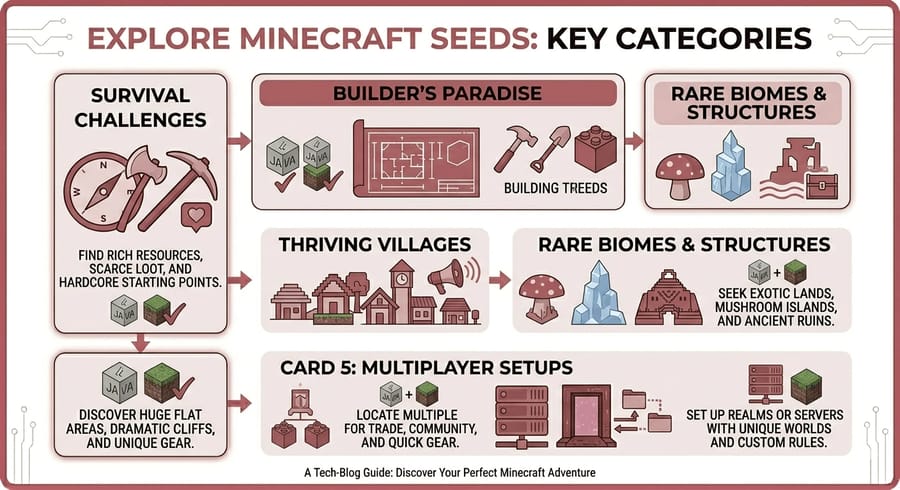
Best Minecraft Seeds for Survival
- Coastal Towns (Seed: -7783854906403730143): Easy access to villages, ocean resources, and loot makes survival much smoother.
- Deadly Spawn with Six Diamonds (Seed: 1870652620): High-risk, high-reward start for experienced survival players.
- Empty Spawn to Create a Base (Seed: 873506786): Perfect open area with resources nearby for building a survival base.
These seeds give you the right balance of challenge and resources to survive and progress efficiently.These survival seeds often include village at spawn and easy access to resources.
Best Minecraft Seeds for Building
- Flowering Mountain (Seed: -9041095622391834929): Stunning natural scenery with flowers and open terrain for creative builds.
- Vertical Island Village (Seed: -6537256334104833826): Unique cliffside layout ideal for advanced architectural projects.
- Exposed Seaside Lush Cave (Seed: -1058557249): Combines ocean views with lush cave interiors for aesthetic builds.
If you enjoy designing and constructing, these seeds offer visually inspiring environments.
Best Minecraft Seeds for Villages
- Dripstone Mountain Village (Seed: -1557631284): A rare village setup merged with mountain terrain.
- Pirate Village at Spawn (Seed: 3153934843): Coastal village with a shipwreck for a unique starting experience.
- Unannounced Swamp Village (Seed: 1835704): A rare chance to simulate swamp village gameplay.
These seeds are ideal if you want quick access to villagers, trading, and structured gameplay.
Best Minecraft Seeds for Rare Biomes
- Mangrove Swamp and Outpost (Seed: 3546842701776989958): Access to mangrove biome and multiple structures nearby.
- Exposed Deep Dark (Seed: -6923120087752786636): Rare access to Deep Dark biome near the surface.
- Ocean Monument Island (Seed: -3821186818805133221): Includes a rare mushroom biome and ocean monument.
Perfect for players who want to explore unusual or hard-to-find environments.
Some of these include rare environments like deep dark seeds, lush cave seeds, and dripstone cave seeds.
Best Minecraft Seeds for Multiplayer
- Spawn Next to Free Allay and Shipwreck (Seed: 759733268): Great shared starting point with loot and mobs.
- Coastal Towns (Seed: -7783854906403730143): Multiple villages make it ideal for cooperative gameplay.
- Village Inside Ravine (Seed: -2411962888717872099): A unique and challenging world to explore with friends.
These seeds are especially fun when played with others, offering shared resources and interesting challenges.
For larger multiplayer worlds, using a dedicated game server can provide better stability and performance.
Pro Tip: If you're planning to play with friends, using a dedicated server or game VPS can significantly improve performance and reduce lag.
Minecraft Seed Maps & Useful Tools
Exploring a Minecraft seed blindly can be fun—but if you want to fully understand your world, using seed map tools can give you a huge advantage. These tools allow you to preview terrain, locate structures, and plan your gameplay before even spawning into the world.
To get the best experience, you can combine these tools with game VPS hosting for better gaming performance.
Below are some of the most useful Minecraft seed tools that both beginners and advanced players rely on.
1. Chunkbase (Biome & Structure Finder)
Chunkbase is one of the most popular tools for Minecraft seeds. It allows you to input your seed and instantly view:
- Biome distribution
- Villages, temples, and structures
- Strongholds and End portals
- Slime chunks and rare locations
It supports both Java and Bedrock Edition, making it a go-to choice for most players.
These tools also help you find exact structure coordinates, including stronghold locations, villages at spawn, and ocean monuments.
2. Biome Finder
The Biome Finder (available through Chunkbase) is especially useful if you're looking for specific environments like jungles, mushroom islands, or mangrove swamps.
You can quickly locate the nearest biome and get exact coordinates to reach it in-game.
3. Amidst (Advanced Seed Mapping Tool)
Amidst is a more advanced desktop tool designed mainly for Minecraft Java Edition.
It provides a detailed map view of your seed, including:
- World terrain layout
- Biome overlays
- Structure locations
- Spawn point visualization
This tool is ideal for players who want deep control and detailed planning before starting a world.
4. Downloadable Minecraft Maps
Some seed creators also provide downloadable world files, allowing you to jump directly into a fully generated version of the seed.
You can find downloadable maps on platforms like:
This is especially helpful if you want to explore a seed without manually setting it up.
Why Use Seed Tools?
- Save time finding rare structures
- Plan base locations more efficiently
- Locate valuable resources faster
- Improve multiplayer coordination
While these tools can enhance your experience, you can also choose to explore naturally if you prefer the surprise element of Minecraft gameplay.
Pro Tip: If you're playing on a shared world or server, tools like Chunkbase can help your entire team coordinate exploration and resource gathering more efficiently.
How to Download & Import Minecraft Seeds for Realms and Servers
If you want to go beyond single-player and share a Minecraft seed with friends, you’ll need to import it into a Realm or a server. The process is slightly different depending on whether you're using a downloadable world file or just a seed code.
Before setting up your server, make sure you understand how much RAM you need for gaming and hosting.
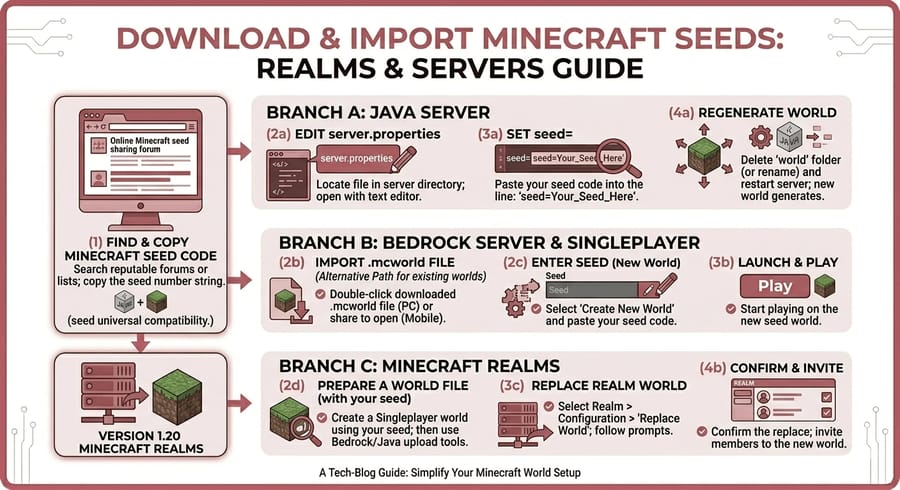
Using a Seed Code on a Server
If you only have a seed number, you can generate a new world directly on your server:
- Access your server files (via hosting panel or FTP).
- Locate the server.properties file.
- Find the line labeled level-seed=.
- Paste your desired seed after the equals sign.
- Save the file and restart the server.
When the server restarts, it will generate a new world based on that seed.
Uploading a World to a Minecraft Server
If you've downloaded a pre-generated world instead of using a seed, follow these steps:
- Download and extract the world file (usually a ZIP or RAR).
- Upload the folder to your server directory.
- Rename the folder to match the level-name in your server.properties.
- Delete or replace the existing world folder if needed.
- Restart your server.
Your server will now load the uploaded world instead of generating a new one.
How to Import a World into Minecraft Realms
- Open Minecraft and click "Play".
- Select your Realm.
- Click "Edit World".
- Choose "Replace World".
- Select the world file from your device.
- Upload and confirm.
This will replace your current Realm world with the new seed or downloaded map.
Importing Worlds in Bedrock Edition (Mobile / Windows)
- Download the .mcworld file.
- Open the file directly—Minecraft will import it automatically.
- The world will appear in your world list.
This is the easiest method for Bedrock players to install custom maps and seeds.
Tips for Smooth Setup
- Always back up your existing world before replacing it
- Make sure your world version matches your server version
- Check file permissions when uploading via FTP
- Restart the server after any changes
Setting up a shared Minecraft world becomes much easier when you understand how seeds and world files work together.
Pro Tip: If players can't join your server, check our guide on Minecraft server connection issues and fixes.
Known Issues & Compatibility Notes (Java vs Bedrock)
While Minecraft seeds are a great way to explore specific worlds, they don’t always behave exactly the same across different versions and editions of the game. Understanding these differences can help you avoid confusion and get the experience you expect.
Java vs Bedrock: Key Differences
Even when using the same seed number, Minecraft Java Edition and Bedrock Edition may generate slightly different worlds.
- Structure Placement: Villages, temples, and strongholds may appear in different locations.
- Biome Generation: Biome borders and terrain transitions can vary.
- Loot Tables: Items found in chests may differ between editions.
- Mob Behavior: Spawning patterns and mob mechanics are not always identical.
Although recent updates have made both editions more consistent, these differences still exist and can impact gameplay.
Performance can also depend on your hardware, so choosing the best CPU for gaming servers can improve your experience.
Version Compatibility Issues
Seeds are also affected by the version of Minecraft you’re using. If you try to run a seed from a different version, you may encounter:
- Missing or shifted structures
- Different terrain generation
- New biomes replacing older ones
- Glitches caused by outdated world generation
This is especially common when using seeds from before major updates like Caves & Cliffs (1.18).
Common Problems Players Face
- Spawning in a completely different location
- Not finding expected villages or structures
- Seed working differently on multiplayer servers
- Inconsistent results between single-player and Realms
Most of these issues are related to version mismatches or edition differences.
How to Avoid Compatibility Problems
- Always check the game version the seed was designed for
- Use the correct edition (Java or Bedrock)
- Test seeds in Creative mode before committing
- Keep your game updated—but be aware of changes after updates
Taking these precautions can help you avoid unexpected world generation and ensure a smoother gameplay experience.
Pro Tip: If you're playing with friends, make sure everyone is on the same version and edition to prevent mismatched worlds or missing structures.
You can copy any seed code above and start exploring instantly. If you prefer visual previews, check the seed gallery or use a seed walkthrough video for each world.
Conclusion
This post examined various best Minecraft seeds, ranging from unusual buildings to impractical environments. We hope you can locate one or two worlds that fit your search criteria. Although it might seem like there are endless seeds available, gamers constantly create new landscapes to explore. Whether you’re setting up your own server or using a VPS for Minecraft, these seeds can add a lot of excitement to your gameplay.
If you're looking to host a larger group or want more control over your server, consider Minecraft hosting services. These can offer more power, stability, and customization options, allowing you to create the ultimate gaming experience. Knowing which options are the most appealing and entertaining can help you avoid wasting time sifting through all of them. If you enjoy other games as well, explore dedicated game server options or check out ARK dedicated server hosting for similar survival experiences.
If you're just getting started, you can try free Minecraft server hosting before upgrading to a more powerful solution.
References & Resources
To ensure accuracy and provide up-to-date information, this guide is based on official Minecraft resources, update notes, and trusted community tools. If you want to dive deeper into how seeds and world generation work, the following resources are highly recommended:
- Official Minecraft News & Update Articles – Stay updated with the latest features, biomes, and gameplay changes.
- Minecraft Release Changelogs – Detailed patch notes explaining changes in world generation and mechanics.
- Minecraft Wiki: World Generation – A comprehensive breakdown of how terrain, biomes, and structures are generated.
- Chunkbase Seed Tools – Interactive tools for exploring seeds and locating structures.
- Amidst (Advanced Mapping Tool) – Open-source software for visualizing Minecraft worlds.
These resources can help you better understand how Minecraft seeds work, how updates affect world generation, and how to make the most out of your gameplay experience.
Pro Tip: Bookmark official changelog pages to quickly check if a new update has affected your favorite seeds.

Leave A Comment