
Layer 3, Layer 4, and Layer 7 DDoS attacks target different parts of the network stack. Layer 3 attacks flood network bandwidth, Layer 4 attacks exhaust connection and transport resources like TCP or UDP, and Layer 7 attacks overload applications with HTTP or API requests. For VPS owners, the key difference is where mitigation must happen: local firewall rules help some Layer 4 and Layer 7 abuse, but large Layer 3 floods usually require upstream provider protection.
What is the difference between Layer 3, Layer 4, and Layer 7 DDoS attacks?
If you need a refresher on what a DDoS attack is, read that first. And if terms like VPS, TCP, UDP, or HTTP still feel fuzzy, it also helps to review basic VPS hosting concepts and TCP vs UDP differences.
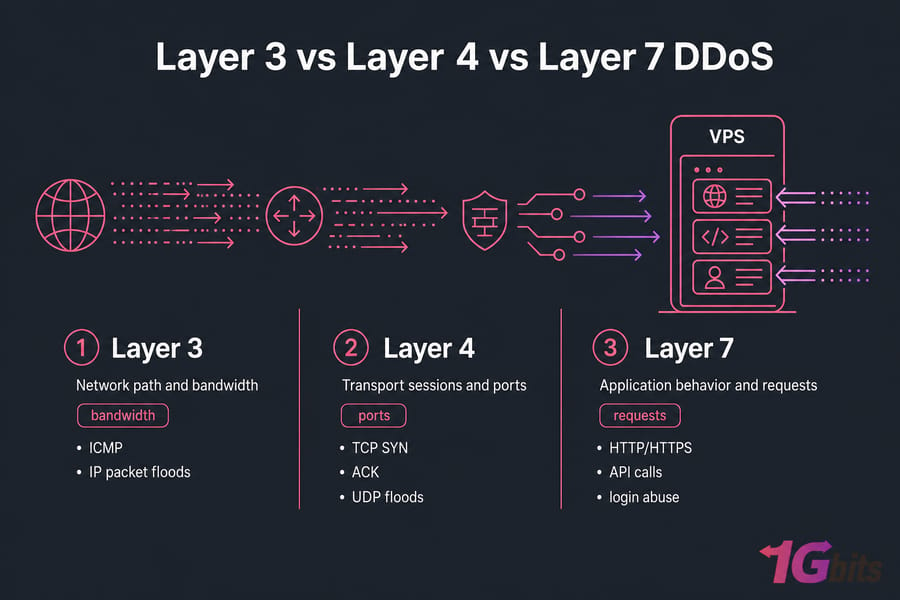
Here's the plain-English version. Layer 3 DDoS is about the network path itself. Layer 4 DDoS is about transport sessions, ports, and connection handling. Layer 7 DDoS is about the application — your website, login page, API, or backend workers.
You do not need a textbook OSI model lecture here. You just need enough to classify the problem fast.
| Layer | Main target | Typical protocol examples |
| Layer 3 | Network path and bandwidth | ICMP, IP packet floods |
| Layer 4 | Transport sessions and ports | TCP SYN, ACK, UDP floods |
| Layer 7 | Application behavior and requests | HTTP/HTTPS, API calls, login abuse |
A simple OSI model explanation for VPS owners
At Layer 3, traffic is trying to clog the road. At Layer 4, it's trying to overwhelm connection handling at the service level. At Layer 7, it's acting more like fake users hammering the expensive parts of your app.
That distinction matters because your VPS can only defend what it actually receives. If the line is saturated before packets even reach your server, the cleanest firewall rule in the world won't save you. I've seen people spend an hour tuning iptables while the upstream link was already toast.
Why “higher layer” does not mean “bigger attack”
This trips people up a lot. A Layer 7 DDoS can be much smaller in raw bandwidth than a volumetric DDoS attack at Layer 3 or Layer 4, yet still take your service down.
Why? Because a few thousand carefully crafted HTTP requests against a login endpoint or search API can burn CPU, PHP-FPM workers, database connections, or application threads. So no, “higher layer” doesn't mean “more traffic.” It often means “more expensive per request.”
The fastest way to classify a DDoS incident
If your whole VPS becomes unreachable with heavy packet loss and ugly latency, think Layer 3 first. If the server is reachable but specific ports or services are timing out under a surge of TCP or UDP sessions, think Layer 4. If the network looks mostly fine but NGINX, Apache, PHP, or your API is choking, think Layer 7.
Now let's see why the difference matters specifically when you run a VPS.
Why DDoS attack layers matter when you run a VPS
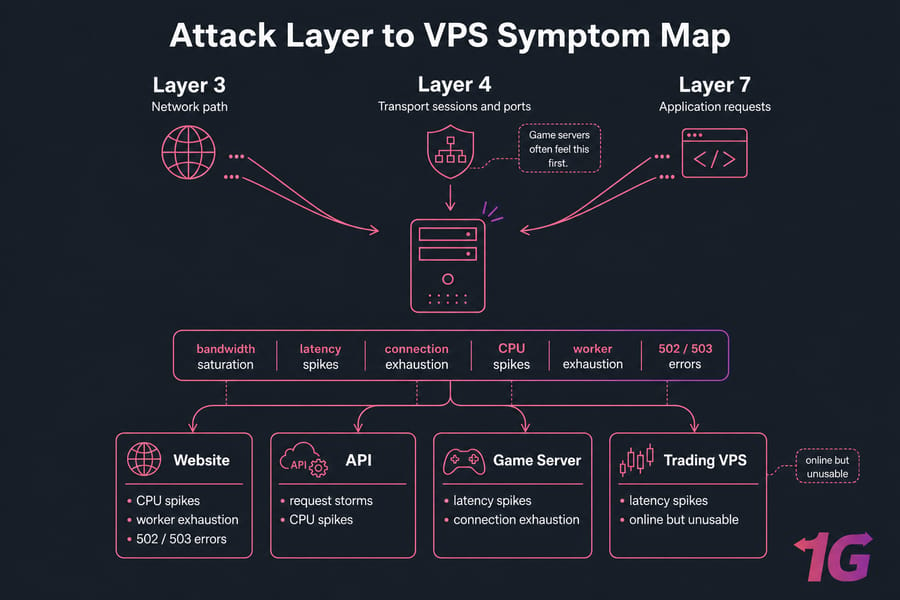
If you run a Linux VPS or Windows VPS, the effect of an attack depends heavily on what the box is doing. A WordPress site, a game server, an API endpoint, and a remote trading app don't fail the same way.
Website, API, game server, and trading VPS impacts
A website hit by Layer 7 abuse may show 502 or 503 errors and spiking PHP workers. An API can get buried under request storms that look half-legitimate. A game server often feels Layer 4 pain first — packet loss, lag, rubber-banding, disconnects. A public trading VPS might stay “online” while latency jumps high enough to make it useless.
And that last point matters. Downtime isn't always a hard outage. Sometimes it's just enough latency to break the service in practice. If you want more background on delay and responsiveness, here's a useful explainer on what latency is.
What your VPS can stop locally and what it cannot
Your VPS can help with port restrictions, packet filtering, SYN cookies, rate limiting, app hardening, and log-based blocking. That's real value. But it can't magically unsaturate the provider link feeding your virtual server.
So the operational question is simple: is the attack consuming bandwidth before your VPS sees it, exhausting transport resources on the box, or abusing the app itself? Start by understanding Layer 3, where the attack can overwhelm your connection before your VPS even gets a chance to respond.
Layer 3 DDoS attacks explained: network layer floods
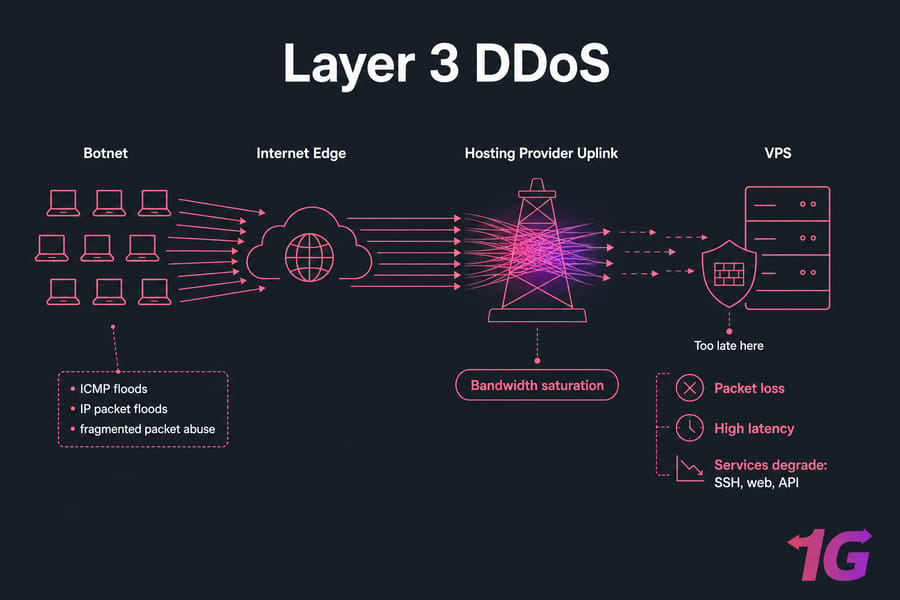
A Layer 3 DDoS attack targets the network layer. In practice, that means the attacker is trying to overwhelm the path carrying IP packets to your VPS. Think raw volume, bandwidth saturation, and a lot of collateral pain.
Common Layer 3 attack examples
The usual examples are ICMP floods, generic IP packet floods, and fragmented packet abuse. The exact packet type matters less than the outcome: too much traffic for the network path to handle cleanly.
You'll also hear people mix Layer 3 and Layer 4 in real conversations. That's not entirely wrong, because attacks can overlap. But for VPS owners, the useful distinction is this: Layer 3 is mainly about the network path and capacity, not the application logic.
Symptoms of a Layer 3 attack on a VPS
- Sharp packet loss
- Sudden increase in latency
- Server becomes intermittently unreachable
- SSH, web, and API services all degrade at once
- Monitoring shows bandwidth spikes but not necessarily CPU saturation
If your VPS feels cut off from the world, that's a strong clue. You might still get the occasional ping response, but real service quality falls apart. For supporting reads, see what an IP address is and what packet loss means.
Why upstream bandwidth protection matters most
Here's the hard truth: local firewall rules often arrive too late. If the upstream connection is full, your server never gets the luxury of making nice filtering decisions. The attack has already won the first round by clogging the pipe.
What helps most is upstream mitigation — traffic scrubbing, anti-DDoS filtering at the provider edge, and enough network capacity to absorb volumetric floods. This is where a host's anti-DDoS network matters more than any tweak inside the VPS.
What doesn't help much on its own? Blocking individual source IPs during a large botnet flood. That's like trying to bail out a leaking boat with a coffee mug.
Layer 4 attacks are different: instead of just overwhelming bandwidth, they often exhaust transport sessions and service capacity.
Layer 4 DDoS attacks explained: transport layer attacks
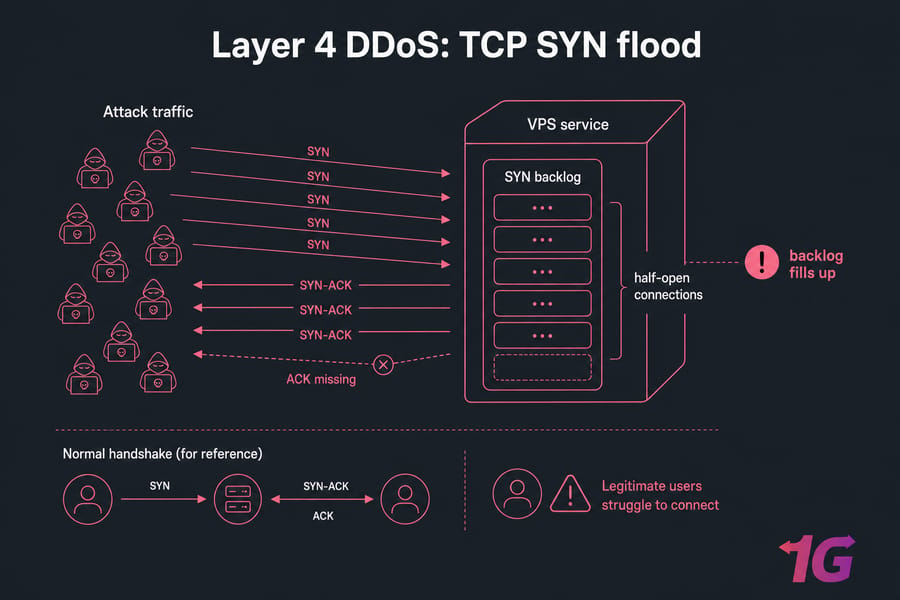
A Layer 4 DDoS attack goes after transport-layer behavior — mostly TCP and UDP sessions, ports, and state handling. This is where protocol attacks and connection exhaustion show up.
SYN floods, UDP floods, and connection exhaustion
The classic example is a SYN flood attack. An attacker sends a wave of TCP SYN packets, your server starts the handshake, and too many half-open connections pile up in the SYN backlog. Legitimate users then struggle to connect.
UDP floods work differently. They hammer services with high packets-per-second traffic, often across specific ports. ACK floods and other packet-based attacks can do similar damage by exhausting connection tables or forcing the system to spend resources processing junk.
The key difference from pure bandwidth flooding is state exhaustion. It's not just packet volume. It's what those packets make your server do.
How Layer 4 attacks affect ports and services
At this layer, one service might fail while others limp along. Your website could stay reachable, but a game server port times out. Or your API port gets swamped while SSH still works. That partial failure pattern is common with Layer 4 DDoS.
Typical symptoms include:
- Service timeouts on one or more ports
- Large numbers of half-open TCP connections
- Full connection tables
- High packets-per-second rates
- Lag or disconnects on UDP-heavy services
If you want a cleaner mental model for protocol behavior, read TCP vs UDP differences.
Which Layer 4 mitigations can run on the VPS
This is where on-server tuning actually helps — up to a point.
- Enable SYN cookies on Linux
- Use iptables, nftables, or UFW to restrict exposed ports
- Rate limit abusive new connections
- Disable services you don't need
- Reduce public surface area
You should also configure a firewall on your VPS before trouble starts, not during the middle of it. In my experience, most self-managed users leave at least one unnecessary port open for months.
Still, local mitigation has limits. If the SYN flood or UDP flood is large enough, CPU interrupts, packet processing, or the upstream link can become the bottleneck anyway. So yes, iptables and nftables can help. No, they are not magic.
If Layer 4 attacks strain the transport layer, Layer 7 attacks go one step further by imitating legitimate user behavior at the application level.
Layer 7 DDoS attacks explained: application layer attacks
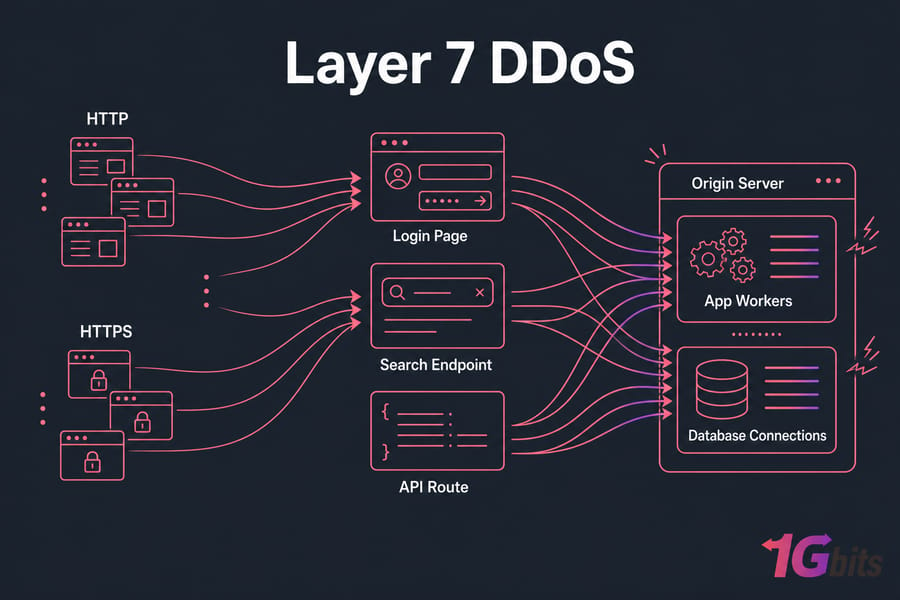
A Layer 7 DDoS attack targets the application layer. That's your web app, API, WordPress login page, XML-RPC endpoint, admin panel, search function, checkout flow, or any route that does meaningful work.
HTTP floods, login abuse, and API request storms
The common patterns are HTTP GET or POST floods, login endpoint abuse, WordPress XML-RPC abuse, API request storms, and slow HTTP attacks like slowloris-style behavior. Instead of trying to smash the network, the attacker tries to burn the expensive parts of your stack.
I've seen tiny-looking request rates hurt more than bigger traffic bursts because every request triggered PHP, cache misses, and database reads. That's why web admins sometimes mistake Layer 7 abuse for “just a busy day.”
If you're running WordPress, it's worth reading how to optimize WordPress on a VPS and how to secure a WordPress site on a VPS. A weak login page or exposed XML-RPC endpoint is low-hanging fruit for attackers.
Why Layer 7 attacks are smaller but harder to identify
Unlike Layer 3, application layer DDoS doesn't need huge bandwidth. It just needs to look plausible enough to get served. That's what makes it sneaky.
Signs usually include high CPU, PHP-FPM or worker exhaustion, rising memory use, 502 or 503 errors, slow backend responses, and database connection pressure. Your NGINX or Apache logs may show repeated hits to the same URI, odd user-agent patterns, or bursts against login and API routes.
But be careful. Not all bot traffic is DDoS, and not every spike is malicious. Search crawlers, broken plugins, and real marketing traffic can look ugly too.
WAF, caching, and rate limiting for app-layer defense
This is where a reverse proxy, WAF, CDN, and smart caching earn their keep. NGINX or HAProxy can rate limit by IP or URI. A WAF can block suspicious request patterns. A CDN can cache static and even some dynamic content so the origin server does less work. Bot filtering can cut down junk before it reaches your app.
For web-facing services, I usually recommend layered app defense:
- Put the site behind a CDN such as Cloudflare
- Use a WAF for login, API, and admin routes
- Enable caching where possible
- Rate limit by URI, IP, or session behavior
- Hide and protect the origin server IP
That last one matters. If your origin IP is exposed, attackers can bypass the CDN and hit the VPS directly. Then your shiny front-end protection isn't doing much.
To make these differences easier to evaluate quickly, summarize them in a side-by-side comparison.
Layer 3 vs Layer 4 vs Layer 7 DDoS comparison table
| Layer | Primary target | Common examples | Typical symptoms | Can VPS mitigate locally? | Best defense |
| Layer 3 | Network path, IP routing, bandwidth | ICMP flood, IP flood, fragmented packet abuse | Packet loss, high latency, unreachable server | Usually very limited | Provider protection, upstream scrubbing, edge capacity |
| Layer 4 | TCP/UDP sessions, ports, connection state | SYN flood, ACK flood, UDP flood | Timeouts, half-open connections, full connection tables | Partly, for small to moderate events | Firewalling, SYN cookies, rate limits, provider filtering |
| Layer 7 | Application layer, HTTP/HTTPS, APIs | HTTP flood, login abuse, API request storm, slow HTTP | High CPU, 502/503 errors, worker and DB exhaustion | Yes, if paired with app and edge controls | WAF, CDN, reverse proxy, caching, origin shielding |
Target, traffic pattern, symptoms, and mitigation
In general, Layer 3 and some Layer 4 attacks are more volumetric. Layer 7 attacks are often lower in traffic size but higher in request complexity. And real attacks aren't always polite enough to stay in one lane.
Which layer is most dangerous for different VPS workloads
Game servers often fear Layer 4 first. Public websites and APIs get hit hard at Layer 7. Customer-facing apps with uptime requirements need protection across all three. If you want the broader prevention view, read how to prevent DDoS attacks.
How to detect DDoS traffic on a Linux or Windows VPS
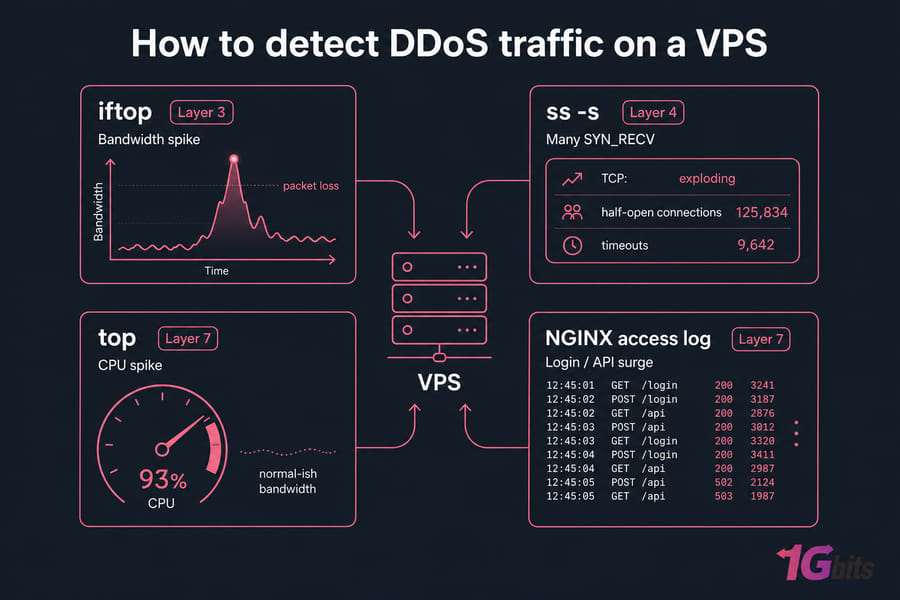
Detection is mostly pattern recognition. You're trying to answer three questions fast: is the network saturated, are connections exploding, or is the application doing too much work?
Network-level signs to watch
On Linux, start with ss -s, netstat, iftop, vnstat, and tcpdump. On Windows VPS hosting, Task Manager, Resource Monitor, Performance Monitor, and Windows event logs can give the first clues.
| Symptom | Likely layer | Tool to check | Immediate next step |
| Bandwidth spike and packet loss | Layer 3 | iftop, vnStat, provider graphs | Contact host and check upstream mitigation |
| Many SYN_RECV or half-open connections | Layer 4 | ss -s, netstat, tcpdump | Enable SYN cookies and tighten port rules |
| One UDP service timing out | Layer 4 | tcpdump, service logs | Rate limit and restrict exposed ports |
| CPU spike with normal-ish bandwidth | Layer 7 | top, htop, Task Manager | Inspect web and app logs |
| 502 or 503 errors | Layer 7 | NGINX or Apache logs, app logs | Check workers, rate limits, and cache hit rate |
| Sudden login or API route surge | Layer 7 | Access logs, GoAccess, WAF logs | Block or challenge abusive patterns |
Application-level signs to watch
Look at NGINX or Apache access logs, application logs, and timestamps. That's where you'll often spot repeated hits to /login, /xmlrpc.php, search pages, or API endpoints. For Linux-specific visibility, here are guides to monitor network traffic in Linux and Linux monitoring tools and best practices. Windows admins should also review Windows logs.
Useful tools for fast diagnosis
Before you restart services, capture evidence. Save connection summaries, traffic snapshots, and log excerpts with timestamps. A reboot may temporarily hide the symptom and erase the context you need to classify the attack properly.
Detection is only half the job—mitigation depends on whether the attack can be handled on the VPS or must be absorbed upstream.
DDoS mitigation for VPS: what works on-server vs at the provider edge
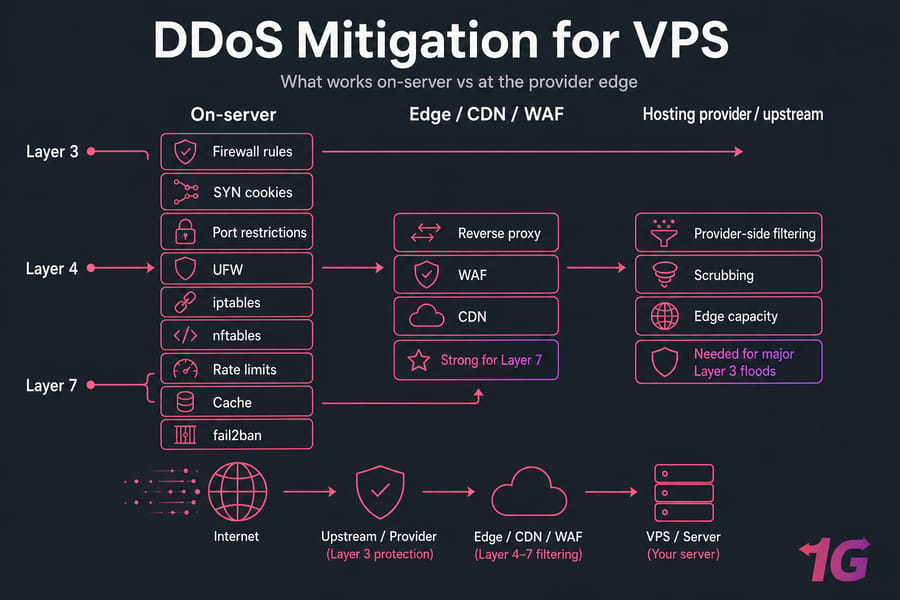
I like to split DDoS mitigation for VPS into three layers: what you do on the server, what you offload to the edge, and what only the provider can realistically handle.
Firewall rules, SYN cookies, and port restrictions
On-server, keep it practical. Close unused ports. Use UFW, iptables, or nftables. Turn on SYN cookies. Add connection and request rate limits where they make sense. Harden the application. Cache aggressively. And use fail2ban as a helper, not as your whole anti-DDoS plan.
Fail2ban is decent for repeated abusive patterns in logs. It is not a cure for a volumetric DDoS attack.
Reverse proxies, WAFs, and CDNs
At the edge, use a reverse proxy, WAF, and CDN for web-facing services. These are especially strong against Layer 7 DDoS and can also absorb some Layer 4 noise depending on the provider and protocol. Just make sure the origin IP is actually hidden and locked down.
When only your host’s upstream protection will help
For major Layer 3 floods — and some heavy Layer 4 floods — you need provider-side filtering, scrubbing, and enough edge capacity. That's where DDoS-protected VPS hosting stops being a nice-to-have and becomes the practical fix.
Need protection beyond firewall rules?
If your VPS hosts a public website, API, game server, or trading workload, local hardening alone may not be enough against larger Layer 3 or Layer 4 floods. Explore 1Gbits DDoS-protected VPS plans built for better uptime and traffic resilience.
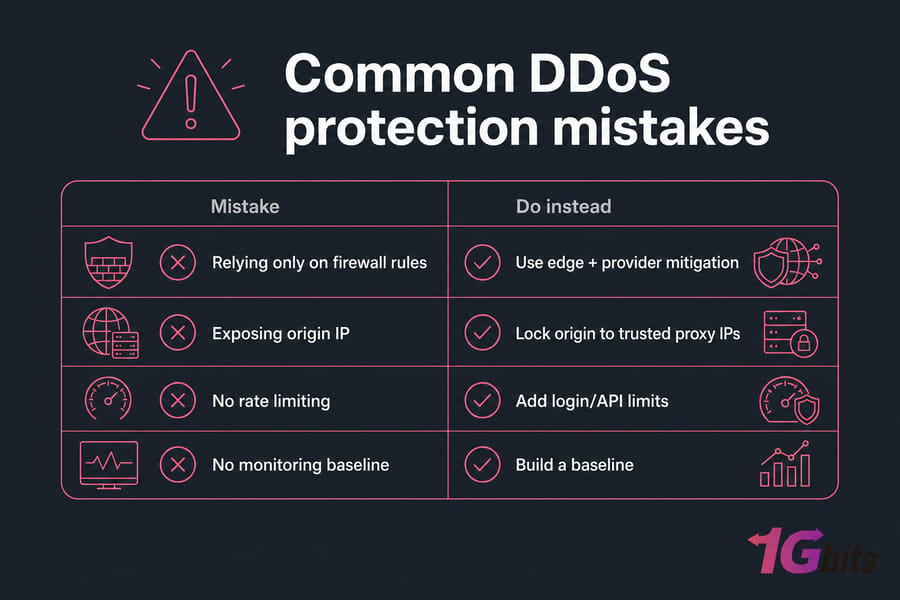
Common DDoS protection mistakes VPS owners make
Confusing traffic spikes with attacks
Not every slowdown is hostile. Broken bots, real user surges, app bugs, and backup jobs can look ugly. What to do instead: build a baseline and compare current behavior against normal patterns.
Relying only on iptables or fail2ban
These tools help, but they won't stop upstream saturation. What to do instead: combine local filtering with edge services and provider-level mitigation when the service is public and uptime matters.
Leaving origin IPs exposed
If your CDN front-end points to a discoverable origin, attackers can skip the edge and hit your VPS directly. What to do instead: lock origin access to trusted proxy IPs only.
Other repeat offenders? Unused services left open, no rate limiting on login or API routes, and no monitoring. Tighten the basics and secure your VPS before the first incident, not after.
When to upgrade to DDoS-protected VPS hosting
If you face recurring attacks, run customer-facing services, host gaming or trading workloads, or simply don't have the time to babysit logs and firewall rules, you may have outgrown a basic self-managed setup.
Signs your current setup is underprotected
Repeated outages. Public apps with no CDN or WAF. Services where every minute of downtime costs money. Or a team that knows Linux admin basics but not traffic forensics. That's usually the turning point.
Features to look for in DDoS-protected VPS plans
| Scenario | Basic VPS enough? | Need CDN/WAF? | Need DDoS-protected VPS? |
| Private internal tool | Often yes | Usually no | Usually no |
| Public WordPress site | Sometimes | Yes | Recommended if uptime matters |
| Public API | Rarely alone | Yes | Often yes |
| Game server | Often no | Not always relevant | Usually yes |
| Trading or crypto-facing service | Weak fit | Often yes for web parts | Strongly recommended |
How 1Gbits can help reduce downtime risk
If you need stronger protection, look at DDoS-protected VPS hosting. If you want help managing the stack too, check managed VPS hosting. And if your environment is platform-specific, compare Linux VPS plans and Windows VPS hosting.
Final checklist for VPS owners facing DDoS risk
- List every exposed service and close what you don't need
- Restrict ports with UFW, iptables, or nftables
- Enable SYN cookies and sensible connection limits
- Rate limit login, admin, and API routes
- Use a CDN and WAF for web-facing apps
- Hide and lock down your origin IP
- Monitor bandwidth, connections, CPU, and logs
- Document what to capture before restarting services
- Review how to prevent DDoS attacks and tighten weak spots
- If your service is public and uptime matters, move to DDoS-protected VPS hosting
Choose VPS hosting that’s ready for real-world DDoS risk
Understanding Layer 3, Layer 4, and Layer 7 attacks is the first step. The next is using the right mix of server hardening, monitoring, and upstream protection. If you need stronger availability for customer-facing services, 1Gbits offers DDoS-protected, Linux, Windows, and managed VPS options.

Leave A Comment