
Most traders think security is just a strong password and antivirus. It isn't. Once you put MT4 or MT5 on a VPS and let it trade 24/7, you're running a small, always-online financial machine and the attack surface looks nothing like a regular gaming PC or office laptop.
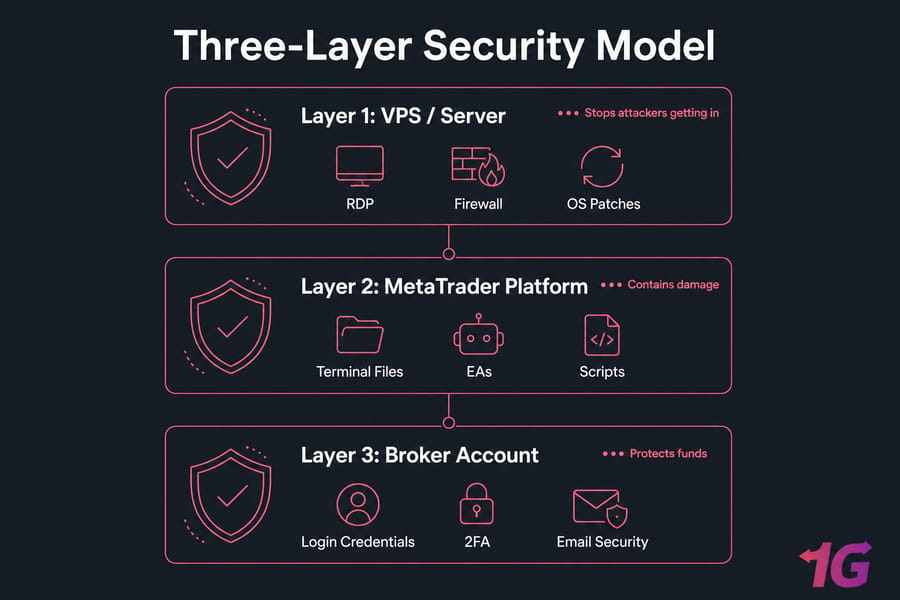
This Forex VPS security checklist walks you through exactly what to lock down, in what order, and without breaking your live trading. We'll cover three layers most guides miss: the VPS itself, your MetaTrader installation, and the broker account behind it all.
Quick Answer
A Forex VPS security checklist should protect three layers: your VPS, your MT4/MT5 platform, and your broker account. The essentials include using strong unique passwords, enabling 2FA wherever possible, hardening RDP access, keeping Windows updated, configuring the firewall, backing up MetaTrader files, limiting admin accounts, and monitoring for suspicious login or trading activity.
Key takeaway: A secure trading setup protects the VPS, MetaTrader, and the broker account separately. Fix one and ignore the others, and you've still got an open door.
Before You Start: Prerequisites
Quick checklist before you touch anything:
- Admin access to your Windows VPS
- MT4 and/or MT5 already installed
- Broker account login working
- Access to your VPS provider dashboard
- A maintenance window if you have live positions or running EAs
- A backup destination ready (local disk, cloud storage, or provider snapshot)
Don't run any of this during a London or New York open if you're holding positions. Wait for a quiet session. I learned that the hard way after rebooting a VPS during NFP twice.
What a Forex VPS Security Checklist Should Include
Generic VPS hardening guides assume a web server. A trading VPS is different. You're running a Windows desktop OS in most cases, you're connecting via RDP, and you've got financial software with API connections to a live broker. The threat model isn't just "someone defaces my site." It's "someone places trades on my funded account."
So a real Forex VPS security plan needs three layers and you have to think about each one separately. If you're still getting familiar with how trading VPS setups work, start with our guide on what is Forex VPS before diving into the security details below.
What Risks Are Unique to MT4 and MT5 on a VPS?
Here's what's actually different about trading hosting:
- RDP brute-force attacks. Windows VPS instances expose port 3389 by default. Bots scan the entire IPv4 range looking for it.
- Untrusted EAs and DLLs. Traders download Expert Advisors from forums, Telegram groups, and "leaked" archives. Many of them ship with surprises.
- Credential persistence. MetaTrader saves your broker login locally. Anyone with access to the terminal data folder can steal it.
- Continuous uptime. Your VPS runs 24/7. That's 24 hours a day for an attacker to find a weakness not just business hours.
- VPS failure during open positions. Data loss isn't just inconvenient. It's potentially expensive.
If you're still picking platforms, our MT4 vs MT5 comparison covers the differences, and the how to download MT4 safely walkthrough explains why source matters. For login basics, see what is MetaTrader 4 primer.
Why Traders Need a Layered Security Approach
Think of it like a bank. The vault, the alarm, and the staff IDs are all separate controls. Lose one and the others should still hold the line. With trading hosting:
- VPS layer: stops attackers from getting in at all.
- MetaTrader layer: contains the damage if they do.
- Broker account layer: protects the money even if the VPS is fully owned.
Most "secure" trading setups I audit have layer 1 partially done and ignore layers 2 and 3. Don't be that person.
Critical Forex VPS Security Steps to Do First
If you only have an hour, do these. They cover roughly 80% of real-world risk for the typical MT4/MT5 trader.
| # | Task | Priority | Why It Matters | Frequency |
| 1 | Change the default Administrator password to a long, unique one | Critical (today) | Default or weak passwords are the #1 cause of compromise | Once + every 90 days |
| 2 | Disable or rename the built-in Administrator account | Critical (today) | Bots target "Administrator" specifically | Once |
| 3 | Enable Account Lockout Policy (5 failed attempts, 15-min lockout) | Critical (today) | Stops sustained brute-force attempts cold | Once |
| 4 | Run Windows Update fully and reboot | Critical (today) | Closes known vulnerabilities | Monthly minimum |
| 5 | Enable Windows Defender (or reputable AV) | Critical (today) | Catches commodity malware in EAs and downloads | Always on |
| 6 | Configure Windows Firewall — block inbound except RDP from your IPs | Critical (this week) | Reduces exposed services to almost zero | Once + on changes |
| 7 | Reinstall MT4/MT5 from the official broker download only | Critical (this week) | Modified installers can ship with keyloggers | Once + on broker change |
| 8 | Take a full snapshot before installing any new EA | Recommended | Lets you roll back a bad installation in minutes | Per change |
| 9 | Enable 2FA on broker portal and billing email | Critical (today) | Stops account takeover even if password leaks | Once |
| 10 | Document admin contacts and recovery info | Recommended | Speeds up incident response when stress is high | Once + reviews |
If you're setting up a brand-new server, follow our guide on how to set up a VPS for Forex robot trading alongside this checklist and read the broader secure your VPS walkthrough for the full hardening picture.
Test every change before market hours. Reboot, log back in, confirm MT4/MT5 reconnects, EAs load, and the trade thread runs. Don't trust until you verify.
How to Secure RDP and Windows VPS Access
RDP is the most attacked surface on any Windows VPS. Period. Microsoft's own security telemetry has flagged RDP brute-force as one of the top initial-access vectors for years. If your trading VPS uses Remote Desktop and it almost certainly does this section is non-negotiable.
How to Reduce Brute-Force Attacks on Remote Desktop
Stack these defenses, don't pick one:
- Strong, unique password. 16+ characters, mixed case, numbers, symbols. Use a password manager. Don't reuse it anywhere not on your broker, not on your email, never.
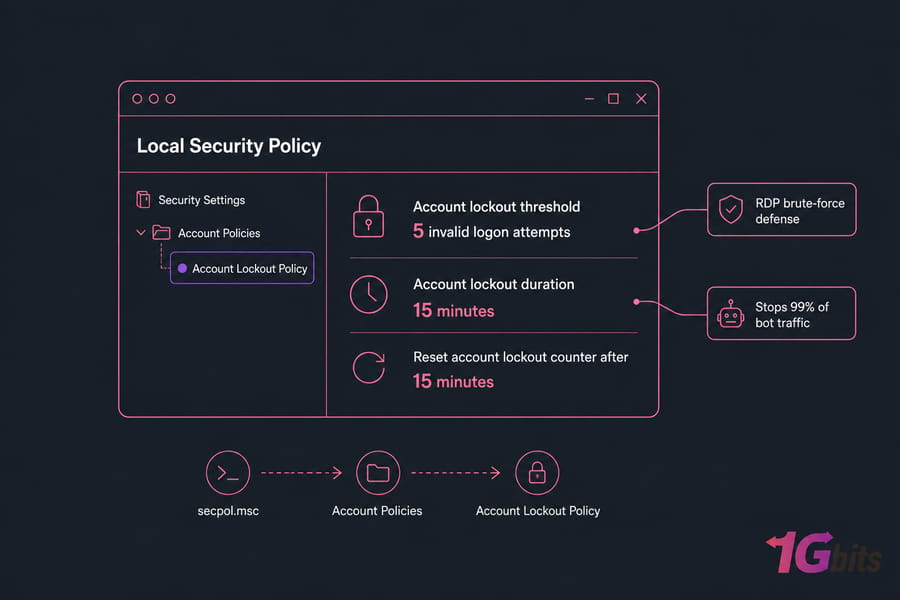
- Account lockout policy. Open secpol.msc → Account Policies → Account Lockout Policy. Set threshold to 5 attempts, duration 15 minutes. This alone stops 99% of bot traffic.
- Limited user accounts. Don't trade as Administrator. Create a standard user for daily MT4/MT5 use, and only elevate when needed.
- IP allowlisting. If you trade from a fixed location or VPN, restrict RDP in Windows Firewall to that IP range. This is the single most effective control.
- Network Level Authentication (NLA). Required, not optional. Make sure it's enabled in System Properties → Remote.
- Session timeout. Configure idle disconnect at 30–60 minutes so an unattended session doesn't sit logged in forever.
If you're new to RDP, start with the basics: enabling RDP on Windows and how to change your RDP password properly.
Should You Change the Default RDP Port?
Short answer: it helps with noise, but it's not real security.
Moving RDP off port 3389 to something like 49387 will dramatically cut the volume of automated brute-force attempts in your event logs. Targeted attackers who actually scan all 65,535 ports will find it anyway. So treat the port change as cleanup, not as defense. Read more on how RDP ports work before you change anything.
Warning: Changing the RDP port alone is not enough to secure a VPS. It must be paired with strong passwords, account lockout, firewall rules, and ideally MFA at the provider level.
How to Use Account Lockout, Strong Passwords, and Limited Users
Three concrete moves that close most of the gap:
- Create a non-admin user account (e.g., "trader") and use it for everyday MT4/MT5 work.
- Keep a separate admin account for installations, with its own strong password.
- Disable any unused or default accounts. If you don't need "Guest," kill it.
For broader context on remote work hardening, this guide on securing remote work with RDP is worth a read.
How to Protect MT4, MT5, and MetaTrader Files
Securing access to the box is half the job. Now we secure what's inside it the trading platform itself, your strategies, and the data that goes with them.
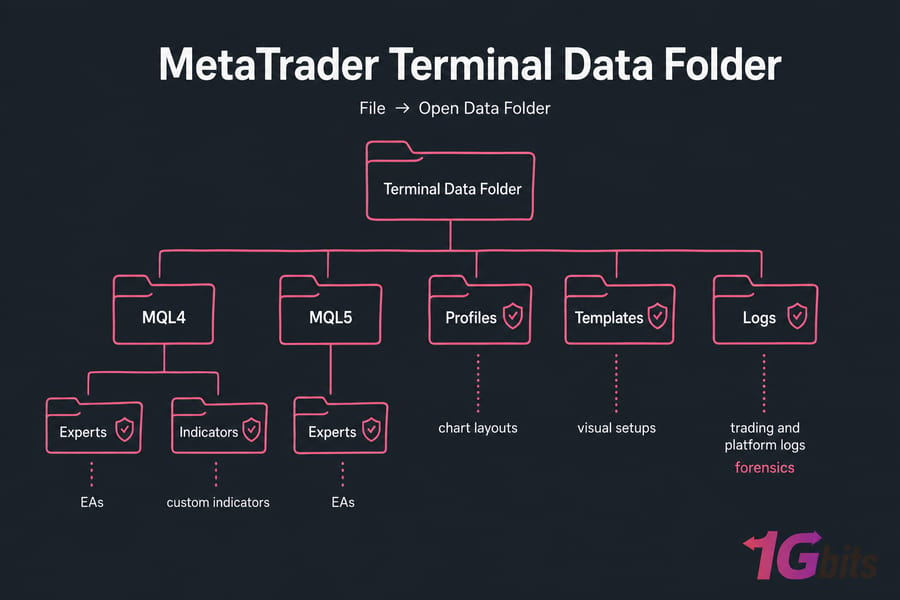
How to Secure Terminal Data Folders, Profiles, and Logs
MetaTrader stores everything important in the terminal data folder. You can find it from inside MT4/MT5 via File → Open Data Folder. What's there matters:
- MQL4\Experts or MQL5\Experts — your EAs
- MQL4\Indicators — custom indicators
- profiles and templates — chart layouts and visual setups
- config — connection and account references
- logs — trading and platform logs (gold for forensics)
Anyone with access to this folder can copy your strategies, see broker connections, and inspect logs. Keep the VPS locked down and these files inherit that protection.
How to Vet Expert Advisors, Scripts, and Indicators Safely
This is where most traders get burned. Honestly. The Telegram-leaked-EA culture is a malware delivery system with extra steps.
| Practice | Risky | Safer Approach |
| EA source | Random forum download, "cracked" archive, Telegram group | MetaQuotes Market, paid vendor with support, open-source repo |
| File format | Compiled .ex4/.ex5 only, no source |
.mq4/.mq5 source you (or a developer) can read |
| External DLLs | EA requires "Allow DLL imports" with no explanation | Pure MQL4/MQL5 code, no DLL calls |
| Testing | Drop straight onto live account | Demo account first, then small live, then scale |
| Permissions | Give third-party developer full RDP admin | Share specific files only, or use a temporary limited account |
If an EA needs DLL imports, treat it like signing a blank check because that's effectively what you're doing. DLLs run with the same privileges as MetaTrader, which means full filesystem and network access on your VPS.
Pro tip: Take one clean snapshot before installing any new EA, indicator, or DLL. Test on a demo account first, monitor for 48 hours, then promote to live. If something looks off, restore the snapshot — you're back where you started in minutes.
How to Separate Demo, Test, and Live Trading Environments
Don't mix them. I've seen traders accidentally run a half-tested EA on a funded account because they had three terminals open and clicked the wrong window. A few discipline rules:
- Use separate MetaTrader installations (use the portable mode trick, or install to different folders) for demo, testing, and live.
- Color-code chart backgrounds so you visually know which is which. Live = white background, demo = grey, test = dark blue, for example.
- Document every magic number per EA per account. A spreadsheet is fine.
- Never run untested EAs on a live account, even briefly.
How to Secure Broker Accounts and Trading Credentials
Securing the terminal isn't enough if your broker credentials are exposed. Most traders confuse three completely different logins. Let's untangle them.
| Access Type | Example | Main Risk | Best Protection |
| VPS login | RDP user/password to the Windows server | Brute-force, full server takeover | Strong password + 2FA at provider + IP allowlist |
| MetaTrader login | Account number + password inside MT4/MT5 | Stored locally, can be lifted from terminal files | Use investor (read-only) password where possible, separate from main |
| Broker portal login | Web dashboard for deposits/withdrawals | Account takeover, unauthorized withdrawals | 2FA, dedicated email, withdrawal whitelist |
| Email account | Gmail / Outlook tied to broker + VPS billing | Password reset path for everything else | 2FA (hardware key ideal), unique strong password |
| VPS provider account | 1Gbits dashboard or similar | Reinstalls, snapshots, billing changes | 2FA, separate password, billing notifications |
Each of these should have a unique password. Not similar. Unique. Use a password manager — Bitwarden, 1Password, KeePass, whatever you'll actually open. The full guidance on choosing a strong password is worth twenty minutes of your time.
Where Traders Usually Expose Broker Logins
The repeat offenders I see during audits:
- A passwords.txt file sitting on the VPS desktop
- Same password for VPS RDP and broker portal
- Email tied to broker has no 2FA
- Browser "remember password" enabled inside RDP session
- Broker password screenshots in chat history with a "developer"
That last one is more common than you'd think. Don't share live credentials with anyone, ever. Use the investor (read-only) password if a developer needs to inspect trade history.
How to Use 2FA and Account Alerts Effectively
Turn on every alert your broker offers — login notifications, withdrawal requests, IP changes, password changes. Same for your email provider. The faster you find out, the faster you can react.
Warning: Your email account is often the recovery key to both your broker and your VPS. If an attacker controls the email, they can reset everything else. Lock the email down first, before anything.
What to Do If You Suspect Unauthorized Account Access
If something looks off — a trade you didn't place, an unfamiliar login, a missing balance:
- Disconnect the VPS from the network (via your provider dashboard, not from inside the VPS).
- Contact your broker and request an immediate account freeze.
- Change passwords from a clean device — not the VPS, not your usual laptop if it might be compromised too.
- Rotate the email password and check active sessions.
- Review the last 30 days of trades and account history.
- Don't reconnect the VPS until you've restored from a known-clean snapshot.
Backup, Monitoring, and Disaster Recovery for Trading VPS Setups
Backups aren't sexy. Until you need them. Then they're the only thing that matters.
What to Back Up From an MT4 or MT5 VPS
| Asset | MT4/MT5 Location | Backup Frequency | Restore Priority |
| EA files | MQL4\Experts / MQL5\Experts |
On every change | Critical |
| Indicators | MQL4\Indicators / MQL5\Indicators |
On every change | High |
| Templates and profiles | profiles\, templates\ |
Weekly | Medium |
| Presets / .set files | MQL4\Presets / MQL5\Presets |
On every change | Critical |
| Trading logs | logs\ |
Weekly + before incident response | High (forensics) |
| Broker server config | config\ |
Monthly | Medium |
| Full VPS snapshot | Provider dashboard | Weekly + before major changes | Critical |
| Documentation (account list, magic numbers) | Offline / encrypted note | On every change | High |
How Often to Back Up Live Trading Environments
Depends on your style:
- Scalpers / high-frequency EAs: daily snapshots, file backups before any change, hourly logs export.
- Swing traders: weekly snapshots, file backups on changes, monthly full archive.
- Position / long-term: weekly snapshots, monthly full archive.
And critically test the restore. A backup you've never restored is a hypothesis, not a backup. At least once a quarter, spin up a test instance and confirm you can actually recover an EA, a profile, a full system. If you've automated this on Linux side projects, the principles in our automatic Linux backup guide translate well to thinking about scheduling and retention.
Quick summary: Snapshots help recovery, but they don't replace file-level MetaTrader backups. Snapshots get you back online; file backups get you back the right config.
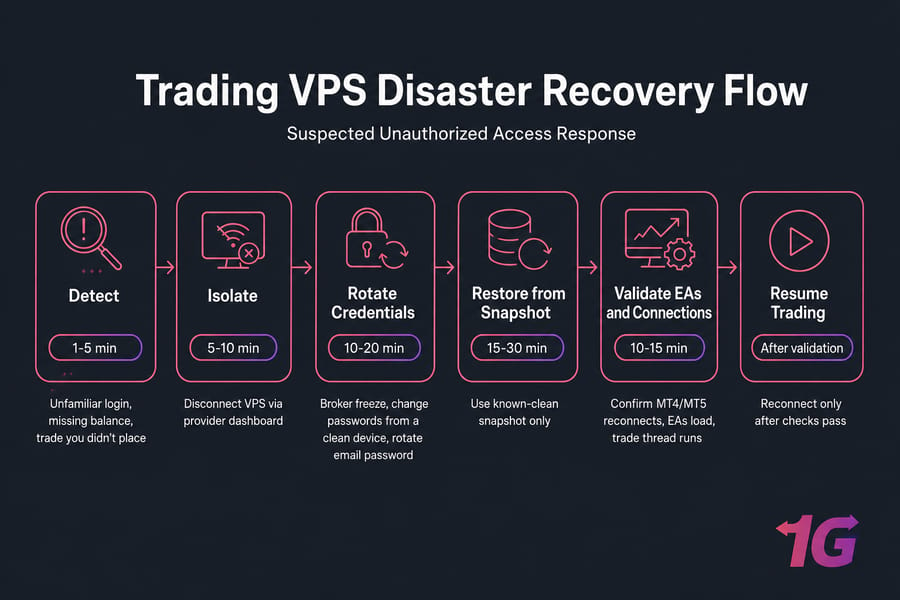
Recovery Steps After a VPS Failure or Compromise
If you suspect compromise not just a crash:
- Detect. Watch for unfamiliar logins, missing files, unexpected EAs running, or trades you didn't place.
- Isolate. Disconnect the VPS from the network at the provider level.
- Rotate credentials. VPS, MetaTrader, broker, email — all of them, from a clean device.
- Restore. Roll back to a snapshot from before the suspected compromise.
- Validate. Confirm EA versions, magic numbers, account settings, and test connections on demo first.
- Resume. Reconnect to the broker server only after everything checks out.
For more detail on incident handling, our walkthrough on what to do if your VPS gets hacked covers the broader response process.
Common Forex VPS Security Mistakes Traders Make
I've seen the same mistakes a hundred times. Here's the shortlist, with the better path next to each.
| Mistake | Why It's Risky | Better Approach |
| Same password for VPS, broker, and email | One leak compromises everything | Unique password per service via password manager |
| RDP open to the world with weak password | Bots crack it in days, sometimes hours | IP allowlist + lockout policy + 16+ char password |
| Downloading EAs from random Telegram groups | Often bundled with malware or backdoors | MetaQuotes Market or vetted vendors only |
| Skipping Windows updates to avoid restarts | Leaves known exploits open for months | Schedule patches in weekend market quiet |
| No backup before strategy changes | One bad config = no rollback path | Snapshot before any meaningful change |
| Mixing demo and live terminals | Wrong-window mistakes on funded accounts | Separate installs + color-coded backgrounds |
Saving passwords in passwords.txt on desktop |
Anyone with VPS access reads them in seconds | Password manager outside the VPS |
| Giving developers full admin access | Permanent backdoor, unaudited changes | Limited user, time-boxed, or screen-share session |
| Never checking event logs or alerts | Compromise goes undetected for weeks | Weekly 5-minute log review |
| Assuming low latency = secure hosting | Speed and security are unrelated | Pick a provider that delivers both |
The biggest one? "I'll fix it later." Three months later, the VPS is compromised and there's no snapshot to restore from. For more on common pitfalls, see our roundup of essential VPS security measures.
Secure Forex VPS vs Regular VPS: What Security Features Matter
A regular VPS and a Forex VPS aren't different products in some magical sense. The hardware is similar. What differs is what the provider optimizes for, and which security-supporting features are actually present.
| Feature | Regular VPS | Secure Forex VPS | Why Traders Care |
| Operating system | Often Linux-only or limited Windows | Windows Server optimized for MT4/MT5 | MetaTrader runs on Windows; Wine on Linux is fragile |
| Latency to broker servers | Generic data center location | Locations near major broker hubs (LD4, NY4, TY3) | Slippage and execution quality |
| Uptime SLA | 99.9% typical | 99.95–99.99% with monitoring | Live positions can't survive long outages |
| DDoS protection | Sometimes available, often extra | Built-in network-layer protection | Trading hosts get targeted around major news |
| Snapshots / backups | Manual or extra cost | Available and recommended in workflow | Recovery from compromise or bad EA |
| Support response | Hours to days | 24/7 with trading-aware staff | Outages during open positions are emergencies |
| Resource consistency | Shared, can throttle | Predictable allocation | EAs need consistent CPU for tick processing |
| Reboot / redeploy time | 10–30 minutes | 2–5 minutes | Time off-market = missed signals |
For a deeper look at the differences, see Forex VPS vs regular VPS and the best Forex VPS providers roundup. The performance angle matters too low latency in Forex VPS hosting isn't just about speed, it's also about predictable, monitored infrastructure.
Stat callout: Uptime and response time aren't separate from security. A security incident that takes a host offline during NFP is a trading incident too. Pick infrastructure that treats both the same way.
Managed vs Unmanaged VPS for Security-Sensitive Traders
Unmanaged means you do all the patching, hardening, and monitoring yourself. Managed means the provider handles OS-level security. For most traders who don't want to become Windows admins, managed is worth the small premium it's one less thing to forget during a busy week.
When to Upgrade to a More Secure MT4 or MT5 VPS
Some signs your current setup is past its expiration date:
- Frequent disconnects from broker servers, especially during high-volume sessions
- No native snapshot or backup features in the dashboard
- Support tickets sit unanswered for 24+ hours
- OS images are years out of date when you provision
- RAM and CPU spike unexpectedly because of "noisy neighbor" tenants
- No DDoS or network-layer protection
- No clear documentation or security guidance from the provider
What to look for instead:
- Windows VPS optimized for MT4/MT5 with current OS images
- Data center locations near your broker
- Strong uptime track record, not just a number on a marketing page
- Snapshots and backup-friendly workflows
- 24/7 support that understands trading workflows
- Clear path to scale resources without redeploying
Forex VPS Security Checklist Summary
Print this out. Stick it next to your monitor. Run through it monthly and after any major change.
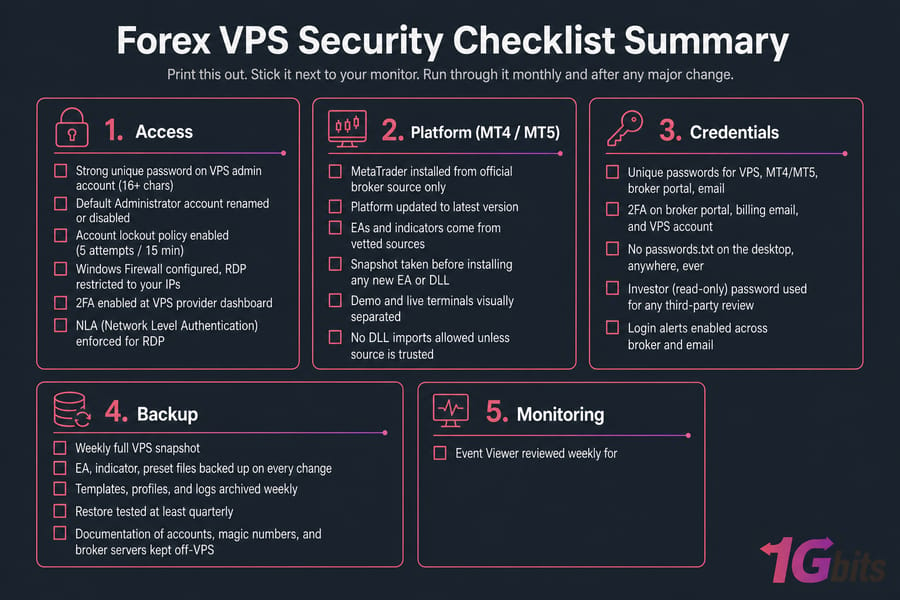
Access
- Strong unique password on VPS admin account (16+ chars)
- Default Administrator account renamed or disabled
- Account lockout policy enabled (5 attempts / 15 min)
- Windows Firewall configured, RDP restricted to your IPs
- 2FA enabled at VPS provider dashboard
- NLA (Network Level Authentication) enforced for RDP
Platform (MT4 / MT5)
- MetaTrader installed from official broker source only
- Platform updated to latest version
- EAs and indicators come from vetted sources
- Snapshot taken before installing any new EA or DLL
- Demo and live terminals visually separated
- No DLL imports allowed unless source is trusted
Credentials
- Unique passwords for VPS, MT4/MT5, broker portal, email
- 2FA on broker portal, billing email, and VPS account
- No
passwords.txton the desktop, anywhere, ever - Investor (read-only) password used for any third-party review
- Login alerts enabled across broker and email
Backup
- Weekly full VPS snapshot
- EA, indicator, preset files backed up on every change
- Templates, profiles, and logs archived weekly
- Restore tested at least quarterly
- Documentation of accounts, magic numbers, and broker servers kept off-VPS
Monitoring
- Event Viewer reviewed weekly for failed logins
- Broker account history checked weekly for unfamiliar trades
- VPS resource usage (CPU, RAM, disk) monitored
- Windows Update applied monthly, scheduled around quiet sessions
- Incident response steps documented and accessible
Pro tip: Re-run this checklist monthly and after any strategy change, EA install, or broker switch. Most compromises happen in the gap between "I'll fix it later" and "later."
Secure Your Trading Setup Before the Next Market Session
Review the checklist, back up your terminals, and make sure your hosting matches your strategy. If you're ready to upgrade, start with 1Gbits Forex VPS, or jump straight to MT4 VPS or MT5 VPS.

Leave A Comment