
Here's the thing most comparison articles get wrong from the first paragraph: RDP and VPS aren't really the same kind of thing. RDP is a protocol a way to connect to a remote Windows machine. VPS is a product a virtual server you rent and run things on. Comparing them head-to-head is a bit like comparing "a car key" to "a car."
So why does this comparison even exist? Because hosting companies sell something they label "RDP" (basically, a ready-made remote Windows desktop), and they also sell VPS plans. Buyers see two products and assume they're alternatives. Sometimes they are. Sometimes they overlap. And occasionally, what you actually need is a Windows VPS that you access via RDP which is both at once. To fully understand what you're connecting to, it helps to start with what is RDP before comparing it to a server product.
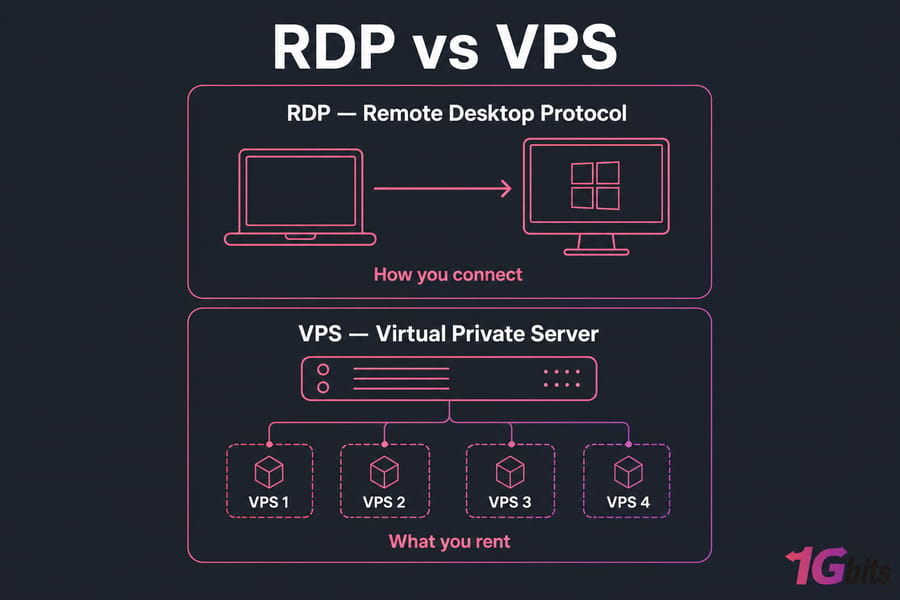
Quick preview before we get into the details:
- Need a remote Windows desktop with minimal fuss? RDP (or a Windows VPS) is your lane.
- Need to host websites, run apps, deploy Docker, or build something custom? A VPS is what you want.
- Need Windows software and full admin control? Windows VPS with RDP best of both.
Key takeaway: RDP is how you connect. VPS is what you rent.
What is RDP and how does Remote Desktop Protocol work?
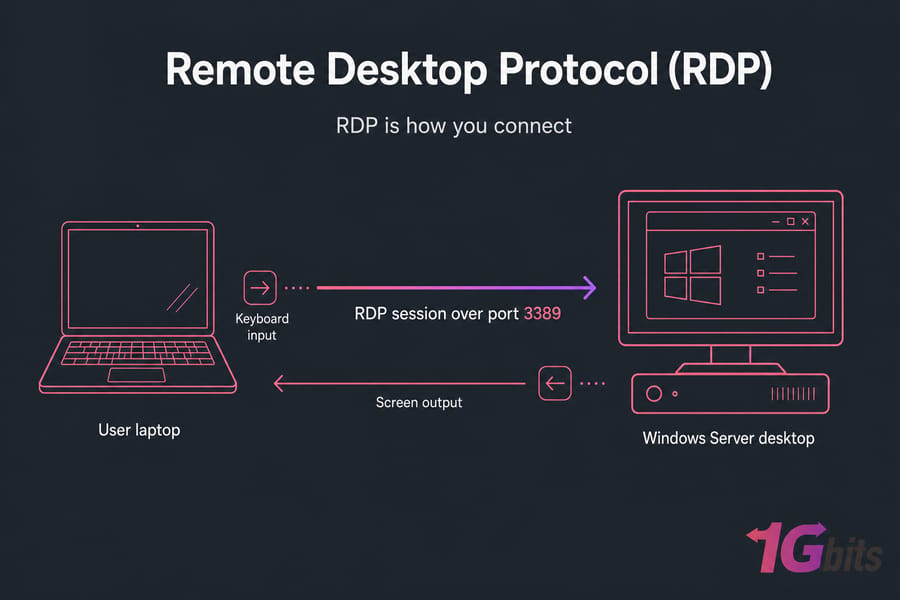
RDP stands for Remote Desktop Protocol. Microsoft built it. It's been around since the late 90s, and its job is simple: let you sit at one computer and control another one as if you were physically there. Mouse, keyboard, full Windows desktop all streamed over a network connection, typically on port 3389.
The RDP connection process is straightforward. You launch the Microsoft Remote Desktop Connection client (or any RDP-compatible app), enter an IP and credentials, and a session opens. The remote machine sends your screen down the wire, you send keystrokes back up. That's the whole dance. If you're setting this up from a non-Windows device, knowing how to RDP from Mac or Linux makes the cross-platform workflow much easier.
RDP as a protocol vs "RDP" as a hosted product
This is where things get fuzzy. When a hosting company sells "RDP" or "buy RDP," they usually don't mean "we sell you a protocol." They mean a pre-configured, hosted Windows environment you log into using RDP. Think of it as a remote Windows seat, ready to go. No setup, no patching the OS, no installing the desktop yourself.
So in casual buyer language, "RDP" became shorthand for "hosted remote Windows desktop." That's fine but it's why people compare it to a VPS. They're really comparing a simplified hosted desktop product to a full virtual server.
Typical RDP use cases
- Remote work where you just need a Windows machine in the cloud
- Running trading terminals like MT4 or MT5 24/7
- Light automation tasks that need a GUI
- Accessing region-locked tools from another country
- Lightweight bot/script work that needs Windows
Main limitations of RDP
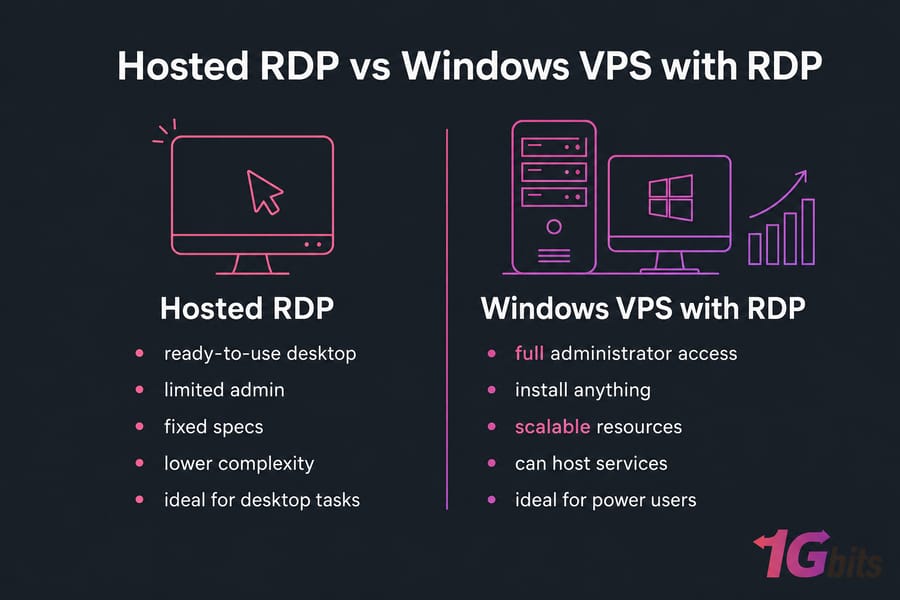
RDP is great for desktop tasks but it's not infrastructure. A typical hosted RDP product gives you Windows, an account, and remote access — usually with shared or limited admin rights. You probably can't reinstall the OS, swap to Linux, install kernel-level drivers, or treat it as a full server. If you want that, you've outgrown basic RDP and you're really shopping for a VPS.
RDP explains how you connect. VPS explains what you're connecting to. Now let's look at the other half of the equation.
What is a VPS and how does a virtual private server work?
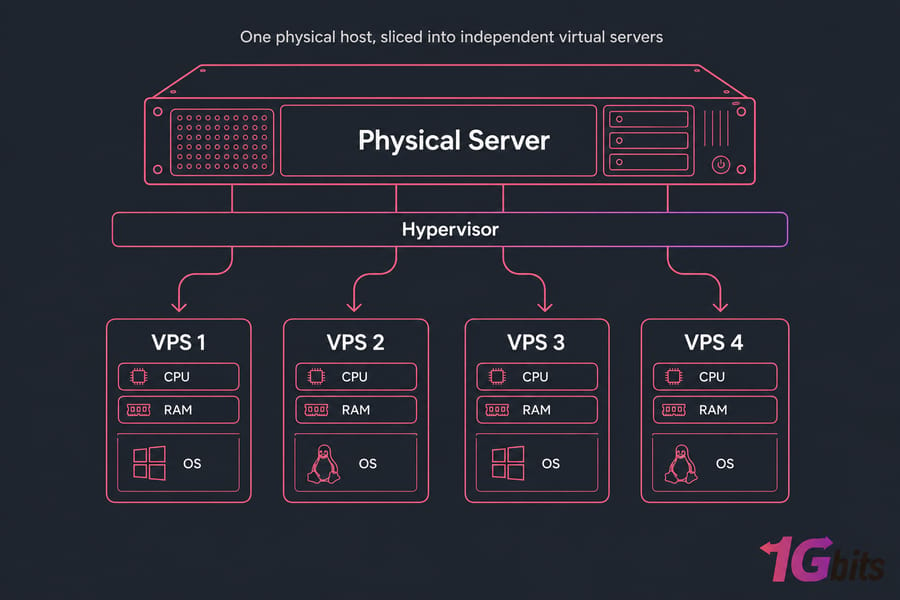
A VPS — Virtual Private Server — is a virtual machine running on a physical host, with a slice of CPU, RAM, storage, and bandwidth carved out just for you. You get root or administrator access. You decide the OS. You install whatever you want. It behaves like a dedicated server, but at a fraction of the cost because the underlying hardware is shared (your resources are not).
If you want the deeper dive, our explainer on what is VPS hosting walks through hypervisors (KVM, Hyper-V, VMware), resource isolation, and how virtualization works under the hood. For this article, all you need is the mental model: one big physical box, sliced into independent virtual servers.
VPS as a virtual machine with dedicated resources
The "private" part matters. Even though you share hardware with other tenants, your CPU cores, RAM, and disk are allocated to your VPS. Your neighbor's runaway process doesn't slow you down (in a properly configured environment, anyway). You get a dedicated IP, a real OS, and total control inside your slice.
Windows VPS vs Linux VPS
This is where most of the practical decision-making happens.
- Windows VPS: runs Windows Server. Has a GUI. You connect via RDP. Best for Windows-only software, .NET stacks, trading platforms, or anyone who simply prefers a Windows desktop.
- Linux VPS: runs Ubuntu, Debian, CentOS, AlmaLinux, etc. Usually no GUI by default. You connect via SSH. Best for web hosting, Docker, databases, dev workflows, VPNs, anything server-shaped.
If you're stuck on which OS makes sense for your workload, the breakdown of Windows vs Linux covers this in detail.
Typical VPS use cases
- Hosting websites, WordPress, e-commerce stores
- Running web apps, APIs, microservices, Docker containers
- Databases (MySQL, PostgreSQL, MongoDB)
- VPN servers, proxies, mail servers
- Game servers, Discord bots, build agents
- Development and staging environments
Now that both terms are defined properly, the differences sort themselves out pretty fast.
Difference between RDP and VPS: core features compared
Let's put them side by side. Keep in mind the asterisk: when we say "RDP" in this table, we mean a typical hosted RDP product (a pre-configured remote Windows desktop), not the protocol itself.
| Feature | RDP (hosted) | VPS | Best Choice |
| What it is | Hosted remote Windows desktop you access via RDP | Full virtual server with allocated resources | Depends on use case |
| Main purpose | Remote desktop usage, GUI tasks | Hosting, server workloads, custom infra | VPS for hosting, RDP for desktop |
| OS support | Windows only | Windows, Linux, custom ISOs | VPS |
| GUI access | Yes, by default | Yes on Windows VPS; optional on Linux VPS | RDP for instant GUI |
| Admin/root control | Often limited | Full root or administrator | VPS |
| Software install freedom | Restricted in many plans | Anything the OS supports | VPS |
| Hosting websites/apps | Possible but awkward | Designed for it | VPS |
| Ease of use | Very easy — log in and use | Steeper learning curve | RDP for beginners |
| Customization | Limited | Extensive | VPS |
| Security responsibility | Mostly on the provider | Mostly on you (unmanaged) | RDP for hands-off |
| Best for | Remote desktop work, trading, simple GUI tasks | Hosting, dev, automation, custom servers | Match to workload |
| Typical cost pattern | Lower-to-mid range | Wide range based on resources | Varies |
Access methods: RDP, SSH, VNC, browser-based tools
Worth mentioning: RDP isn't the only way to reach a remote machine. Linux servers usually use SSH for command-line access. VNC is another remote desktop option that's cross-platform but generally slower and less polished than RDP. If you're weighing these protocols side by side, the direct RDP vs VNC comparison spells out when each makes sense. Some providers also offer browser-based consoles for emergency access. The point: VPS gives you choices on how to connect; RDP-as-a-product gives you exactly one.
Performance, control, and scalability
VPS plans usually scale more cleanly. You bump up CPU/RAM/disk as your needs grow. Hosted RDP products are typically sold as desktop "seats" with fixed specs — fine for what they're for, but not ideal if you need to scale a database or handle traffic spikes.
The biggest insight here is that these two often overlap in a single product. Which brings us to the part everyone gets confused about.
Windows VPS with RDP: how RDP and VPS overlap
Here's the thing that ties everything together: a Windows VPS is accessed via RDP. Always. That's the standard way you log in.
This is exactly why the comparison gets muddy. People shop for "RDP" and end up with a Windows VPS. Or they shop for a "VPS" not realizing they need Windows specifically. Both products can technically deliver "remote Windows desktop." The question is how much control and flexibility you need underneath. For those who need to enable RDP on their own Windows machine, our guide on how to enable RDP on Windows walks through the setup in a few minutes.
Can a VPS use RDP?
Yes Windows VPS plans use RDP by default. Linux VPS plans typically use SSH, but you can install a desktop environment plus an RDP server to get GUI access. Here's how to set that up on common distributions:
sudo apt install xrdpsudo systemctl enable xrdpsudo ufw allow 3389/tcp
Most people don't bother with this on Linux though. If you want a remote desktop, just get Windows. But if you do need to configure it, our guide on how to install xrdp on Ubuntu walks through the full setup step by step.
When a Windows VPS is better than basic RDP hosting
- You need to install custom software, drivers, or services
- You want full administrator control
- You're running anything that needs to persist beyond a desktop session
- You plan to scale resources later
- You're hosting an app alongside your desktop usage
When simple RDP access is enough
- You just need a remote Windows seat for browsing, email, or a single app
- You don't want to manage updates, security, or configuration
- You want the cheapest path to "Windows in the cloud"
- You'd rather not think about server stuff at all
Warning: Don't assume every product labeled "RDP" gives you full admin control like a VPS does. Read the spec sheet. If admin freedom matters, go VPS.
Remote desktop vs VPS for common use cases
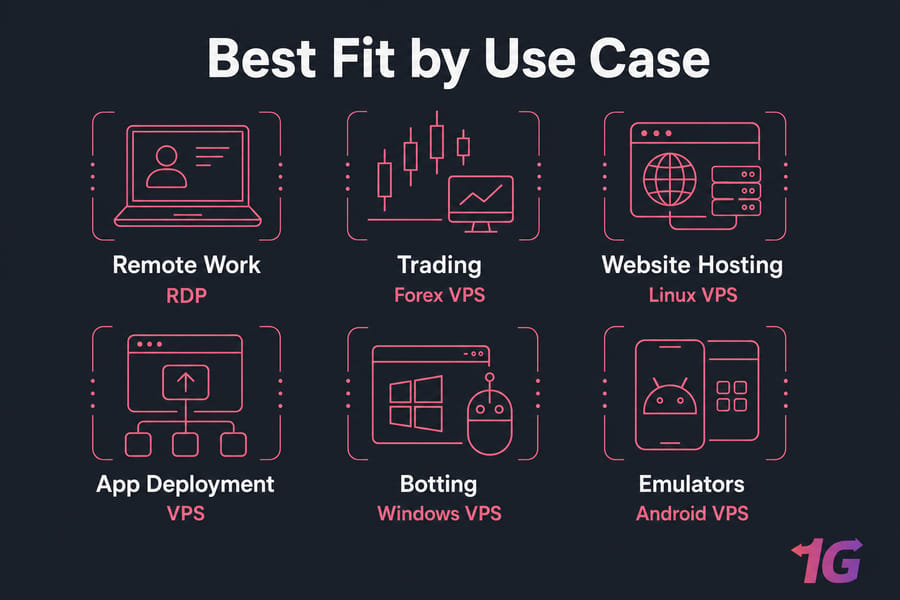
Forget the labels for a second. The real question is: what are you actually trying to do? Let's match workloads to the right product.
| Use Case | Better Choice | Why |
| Remote work / cloud desktop | RDP or Windows VPS | You need a Windows GUI, not a server |
| Forex trading (MT4 / MT5) | Windows VPS or Forex VPS | 24/7 uptime, low latency, Windows-only platforms |
| Website hosting | Linux VPS | LAMP/LEMP stacks run cleaner on Linux, cheaper, more efficient |
| App / API deployment | VPS (Linux preferred) | Docker, Node, Python, databases — server territory |
| Linux admin / dev workflows | Linux VPS | SSH, root access, full toolchain |
| Botting / GUI automation | Windows VPS or RDP | GUI-driven bots need a real desktop session |
| Android emulators / BlueStacks | Specialized emulator VPS | Needs nested virtualization and GPU support |
Remote work and cloud desktop access
If your goal is "I want a Windows desktop I can log into from anywhere," RDP is honestly perfect. You don't need to manage a server. You log in, work, log out. If you also need to install heavier software or run background services overnight, step up to a Windows VPS.
Forex trading and low-latency automation
Trading platforms like MetaTrader 4 and 5 are Windows-only and need to run 24/7 without your home internet hiccupping. A Windows-based remote machine — whether it's RDP or a Forex-optimized VPS — solves that. In my experience, traders almost always end up on a Forex VPS because of the latency tuning and broker proximity. Don't overthink this one.
Website hosting and application deployment
If you're hosting a site or deploying an app, a Linux VPS is almost always the smarter pick. Cheaper, faster, more documentation online, and the entire web ecosystem assumes Linux. Trying to host a busy website on a hosted RDP product is fighting the wrong tool. Our guide on how to host a website on Linux VPS walks through the setup if you're new to it.
Linux administration and developer workflows
Need root, package managers, Git, Docker, kernel-level tweaks? Linux VPS. RDP isn't even in the conversation here.
Botting, Android emulators, and GUI tools
This is where things get nuanced. Bots that drive a real GUI (clickers, web automation, social media tools) need a Windows session — so RDP or Windows VPS. Android emulators like BlueStacks need nested virtualization and decent GPU performance, so a generic RDP product probably won't cut it. You want a purpose-built emulator VPS. For those using RDP specifically for botting workloads, our analysis of RDP botting and its impact on businesses covers what to watch for before committing.
Even when a choice is technically possible, it may not be the most efficient one. That's worth keeping in mind.
RDP vs VPS pros and cons
RDP advantages and disadvantages
What RDP gets right:
- Dead-simple setup — log in, you're done
- Familiar Windows GUI, no learning curve
- Lower mental overhead, no server admin work
- Generally affordable for desktop-focused use
- Provider handles most of the maintenance
Where RDP falls short:
- Narrow use case — desktop only, basically
- Often limited admin control depending on the plan
- Windows-only, no flexibility on OS
- Not built for hosting websites or running services at scale
- Less customizable infrastructure
VPS advantages and disadvantages
What VPS gets right:
- Full root or administrator access
- OS choice — Windows or Linux, your call
- Install anything, configure anything
- Scales as you grow
- Designed for hosting, dev, and server workloads
Where VPS gets harder:
- Steeper learning curve, especially Linux VPS
- You're responsible for security, updates, backups (on unmanaged plans)
- Need to install a desktop environment if you want a GUI on Linux
- More setup time before it's "ready"
If admin work isn't your thing but you still want VPS power, look at managed VPS options provider handles updates, monitoring, and security while you keep the flexibility. For a deeper look, our breakdown of VPS advantages and disadvantages goes further.
If you still aren't sure which way to lean, the rules below simplify the choice.
RDP or VPS: how to choose the right option
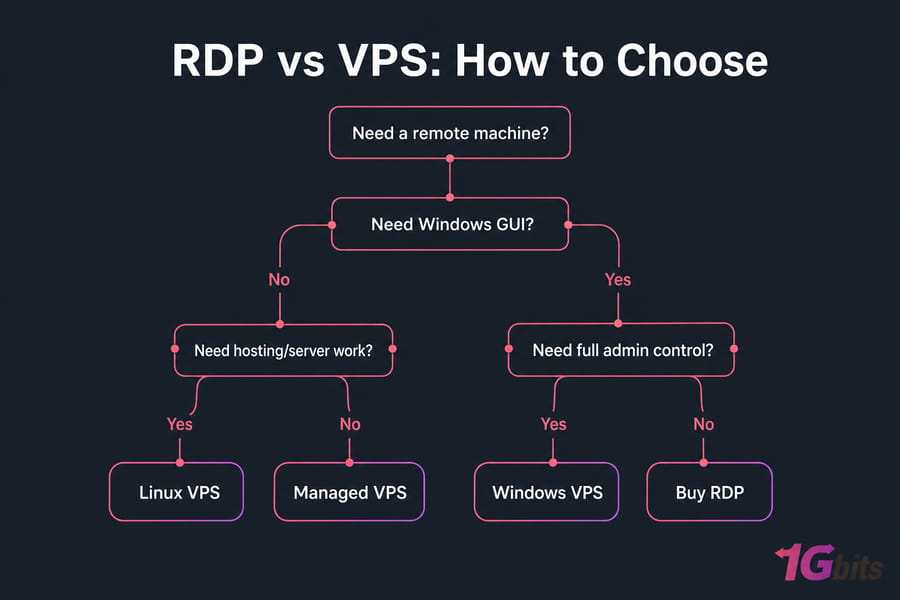
Here's a simple framework. Run yourself through these five questions before you click "buy" on anything.
- Which OS do you need? Windows-only software → Windows route. Linux/server software → Linux VPS.
- Do you need a GUI or just CLI? GUI = RDP or Windows VPS. CLI = Linux VPS.
- Are you hosting something, or just using a remote desktop? Hosting → VPS. Just using → RDP works.
- Do you need full admin/root control? Yes = VPS. No = RDP is fine.
- Easiest setup, or maximum flexibility? Easiest = RDP. Flexibility = VPS.
Choose RDP if...
- You want a ready-made remote Windows desktop
- You don't want to manage server stuff
- Your work is GUI-based and lightweight
- Budget matters and your needs are simple
Choose Windows VPS if...
- You need Windows + full administrator control
- You want to install custom software freely
- You'll scale resources later
- You're running trading platforms, automation, or Windows server apps
Choose Linux VPS if...
- You're hosting websites, web apps, APIs
- You're running Docker, databases, or dev environments
- You're comfortable with SSH and the command line
- You want the most performance per dollar
Choose managed hosting if...
- You want VPS power without the admin headache
- You'd rather pay a bit more and have someone else handle updates and security
- Downtime due to your own misconfiguration would hurt your business
Common mistakes when choosing RDP hosting vs VPS hosting
I've seen these go wrong dozens of times. Don't be that person.
- Treating RDP as the same thing as VPS. They're different categories. Comparing them feature-for-feature without acknowledging the overlap leads to bad purchases. You end up with a hosted desktop when you needed a server, or vice versa.
- Choosing on price alone. RDP is often cheaper, but if you actually needed a Linux VPS, you've just bought the wrong tool at any price.
- Ignoring OS and software compatibility. You bought a Linux VPS but your software is Windows-only. Now you're either reinstalling or paying twice. Check your software requirements first.
- Underestimating security and admin work. A VPS especially unmanaged needs you to patch the OS, configure firewalls, and harden SSH/RDP. If that's not happening, you're a target. Worth reading our notes on securing remote work with RDP.
- Buying generic RDP when you really needed a full Windows VPS. Common when people want to install custom apps and discover their plan doesn't allow it. If admin control matters, jump straight to Windows VPS.
- Choosing Linux VPS for a Windows-only workflow. Cheaper per month, but useless if your tool only runs on Windows. Match the OS to the software, not the price tag.
Final verdict: is RDP or VPS better for your needs?
Honest answer? Neither is "better." They solve different problems. Once you know what you're solving, the choice almost makes itself.
Quick recap by user type:
- Remote workers wanting a cloud desktop → Buy RDP
- Forex/MT4/MT5 traders → Forex VPS
- Power users needing Windows + admin control → Windows VPS or RDP VPS
- Web hosting, Docker, dev work → Linux VPS
- Anything custom, scalable, or server-shaped → VPS hosting
- Choose the right remote hosting solution with 1Gbits.
The protocol-vs-product distinction is the whole game here. RDP gets you in the door. VPS is the building. Sometimes you need just the door (hosted RDP). Sometimes you need the whole building (VPS). And sometimes you want both that's a Windows VPS with RDP.

Leave A Comment