

MetaTrader 5 (MT5) is a multi-asset trading platform developed by MetaQuotes for trading forex, CFDs, stocks, futures, and more. It offers charting tools, technical indicators, automated trading, and backtesting. Traders often use MT5 with a broker account and a VPS for stable 24/7 execution.
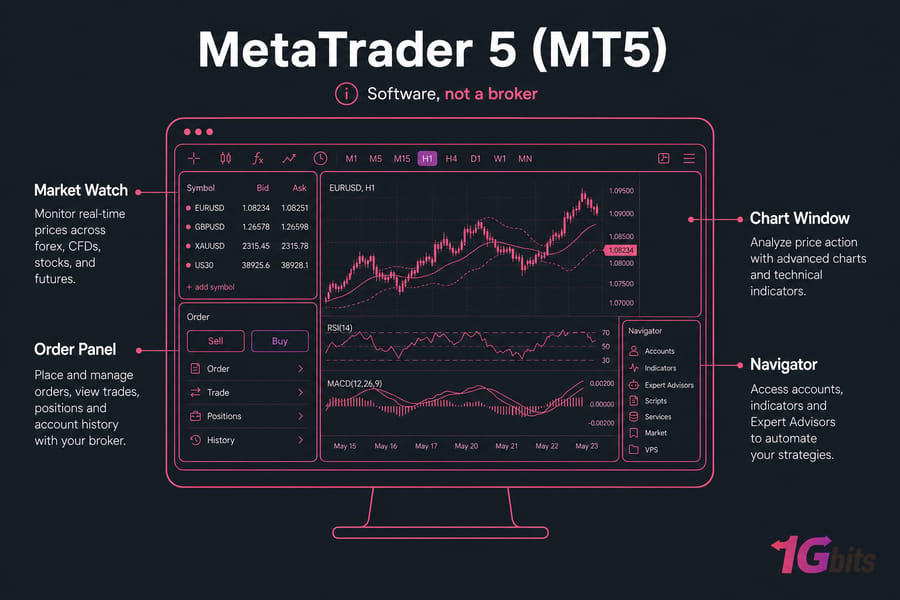
If you're asking what is MetaTrader 5, the short answer is simple: it's software, not a broker. That distinction matters more than most beginners realize. MT5 gives you the trading terminal, charts, indicators, and order tools, while your broker gives you the account, server access, and the actual instruments you can trade.
So what is MT5 used for? Mostly three things:
- Analyzing markets with charts and indicators
- Placing and managing trades through a broker
- Running automated strategies like Expert Advisors
It also covers more than forex. Unlike the old reputation of MT4 as mainly forex trading software, the MetaTrader 5 platform is built with broader multi-asset use in mind.
Key takeaway: MT5 is a trading platform, not a brokerage service. If you also want context on older MetaQuotes software, see what MetaTrader 4 is or compare MT4 vs MT5.
How the MetaTrader 5 Trading Platform Works
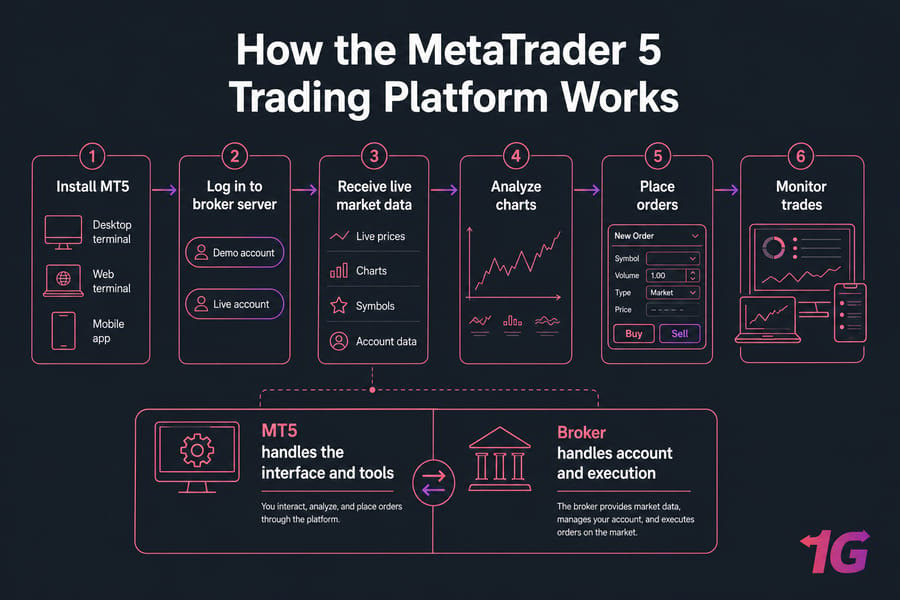
Here’s how traders actually use it in practice.
- You install the MT5 desktop terminal, use the web terminal, or open the mobile app.
- You log in using demo account or live account credentials from an MT5-compatible broker server.
- MT5 then pulls in live prices, charts, symbols, and account data from that broker.
- You analyze the chart, add indicators, and place or manage orders from the platform.
- Your broker handles the trading account and execution path. MT5 handles the interface and tools.
That broker/platform split is where people get confused. I've seen beginners blame MT5 for missing symbols when the real issue was broker-side availability.
MT5 comes in three common forms: desktop terminal for full functionality, web terminal for browser-based access, and a mobile trading app for monitoring or placing trades on the go. Desktop is usually the main setup if you care about automation. Web and mobile are handy, but they aren't where most traders run serious Expert Advisors.
If you're coming from another platform, related login and install walkthroughs like how to log in to MT4 and how to download MT4 help illustrate the same general workflow.
MetaTrader 5 Features: Charts, Indicators, Orders, and Tools
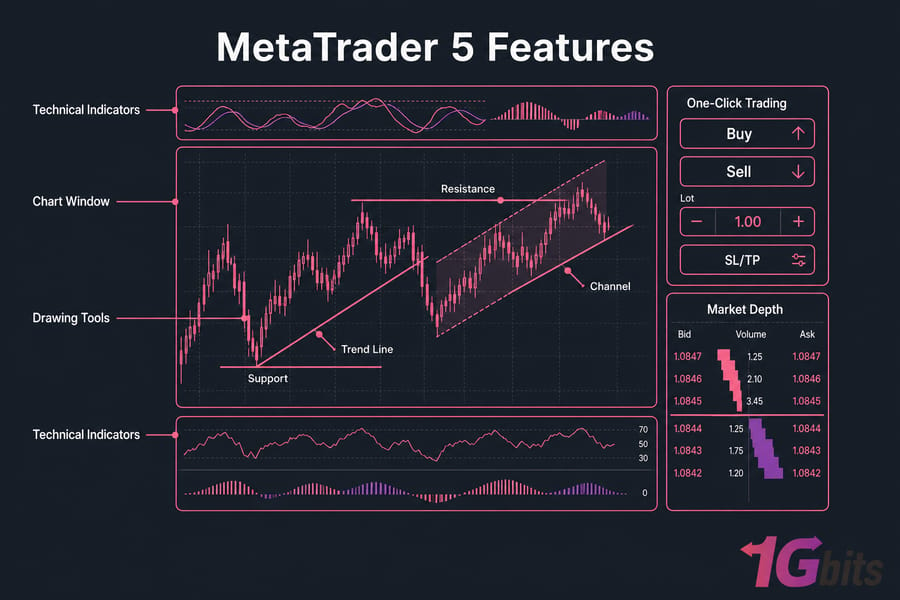
Once connected, the value of MT5 comes from its built-in tools. And this is where MetaTrader 5 explained properly starts to make sense.
| Feature | What It Does | Why It Matters |
| Charting tools | Shows price action across multiple chart views and timeframes | Helps you spot trends, ranges, and entry zones faster |
| Technical indicators | Adds overlays and oscillators for chart analysis | Useful for structured decision-making instead of guessing |
| Drawing tools | Lets you mark support, resistance, channels, and trend lines | Makes manual analysis easier to follow |
| Order types | Supports market and pending orders with different execution options | Gives you more control over entries and exits |
| Market depth | Displays available liquidity levels when supported by the broker | Can help active traders judge order flow and pricing |
| One-click trading | Places trades quickly from the chart or panel | Reduces delay during fast markets |
| Strategy tester | Tests automated strategies on historical data | Lets you backtest before risking live capital |
| Expert Advisors | Runs automated trading logic, scripts, and custom indicators | Useful if you want systematic or semi-automated execution |
A few of these deserve extra emphasis. Multiple timeframes and charting tools are great for manual traders. The strategy tester matters more for anyone exploring forex algorithmic trading. And if you're using bots, MT5 supports custom indicators, scripts, and Expert Advisors in the MQL5 ecosystem.
Pro tip: more features only help if your broker actually supports them. Economic calendar integration, market depth, and even some order behavior can vary by broker.
What Can You Trade on MetaTrader 5?
MT5 is often associated with MetaTrader 5 for forex trading, but it goes further than that.
- Forex pairs
- CFDs
- Indices
- Commodities
- Stocks
- Futures
There’s one catch: the platform can support these asset classes, but your broker decides what you actually get. Not every MT5 broker offers all of them.
If you're still learning the basics, forex trading for beginners is a good companion read. For chart-based concepts, you might also find what a fair value gap is useful.
MetaTrader 5 vs MetaTrader 4: What’s the Difference?
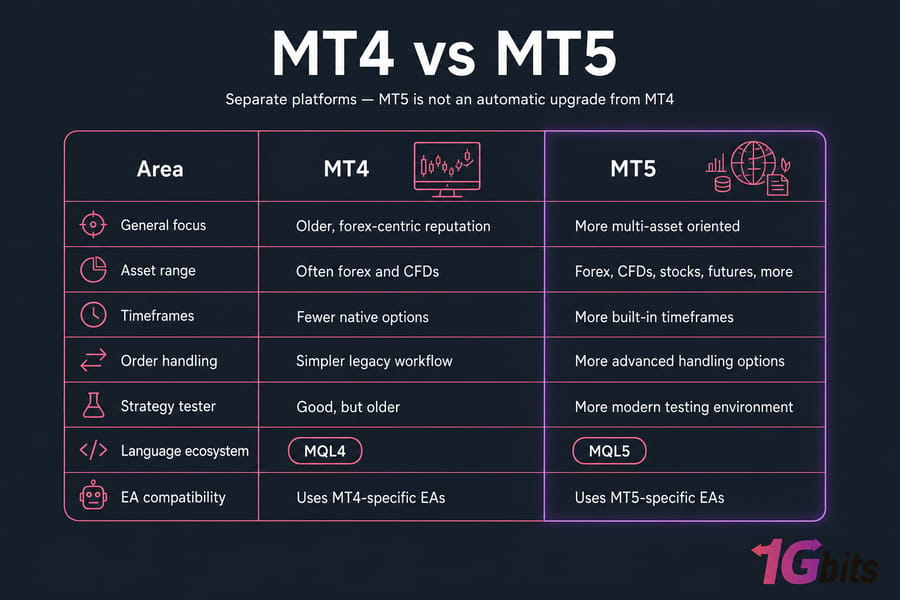
MT4 and MT5 are separate platforms. That's the first thing to know. MT5 is not an in-place upgrade that automatically turns MT4 into something newer.
| Area | MT4 | MT5 | Best For |
| General focus | Older, forex-centric reputation | More multi-asset oriented | Depends on broker and strategy |
| Asset range | Often forex and CFDs | Forex, CFDs, stocks, futures, more | MT5 for broader market access |
| Timeframes | Fewer native options | More built-in timeframes | MT5 for flexible chart analysis |
| Order handling | Simpler legacy workflow | More advanced handling options | MT5 for more complex setups |
| Strategy tester | Good, but older | More modern testing environment | MT5 for systematic testing |
| Language ecosystem | MQL4 | MQL5 | Important for EA compatibility |
| EA compatibility | Uses MT4-specific EAs | Uses MT5-specific EAs | Pick based on your tools |
Is MT5 better than MT4 for beginners? Often, yes — especially if you want a modern MT5 trading platform with broader market support. But traders still choose MT4 when they rely on older Expert Advisors, broker support, or a workflow they already know well. I’ve seen plenty of traders stay on MT4 simply because their favorite EA stack lives there.
For the full breakdown, read the dedicated MT4 vs MT5 comparison.
Who Should Use MT5 for Forex and Multi-Asset Trading?
MT5 is a good fit if you’re a beginner trader who wants one platform for charts, analysis, and execution. It also makes sense for manual traders who want access to more than just forex, and for algorithmic traders who care about testing tools.
It’s especially practical when your broker already supports MT5. That sounds obvious, but people skip it.
MT5 may not be the right choice if your entire setup depends on legacy MT4-only EAs or a broker that doesn't offer MT5 cleanly. If infrastructure is part of your plan, it helps to understand why traders use VPS in forex trading and what a Forex VPS is.
MetaTrader 5 Algorithmic Trading and Expert Advisors
Yes, MetaTrader 5 supports Expert Advisors. It also supports custom indicators and scripts, which is why MetaTrader 5 algorithmic trading is such a common use case.
A typical workflow looks like this: install MT5, add or develop an EA, backtest it in the strategy tester, run it on a demo account, then move to a live setup once you've verified the mechanics. Notice I said mechanics, not returns. That's an important difference.
Warning: running EAs on a sleeping home PC can interrupt execution. I've seen Windows updates and power hiccups knock automated setups offline at the worst possible time.
That’s where latency, uptime, and execution consistency come in. If your strategy depends on being online overnight or while you’re away from your desk, local hardware becomes a weak link. For deeper setup help, see set up a VPS for forex robot trading.
MetaTrader 5 VPS Hosting: Do You Need a VPS for MT5?
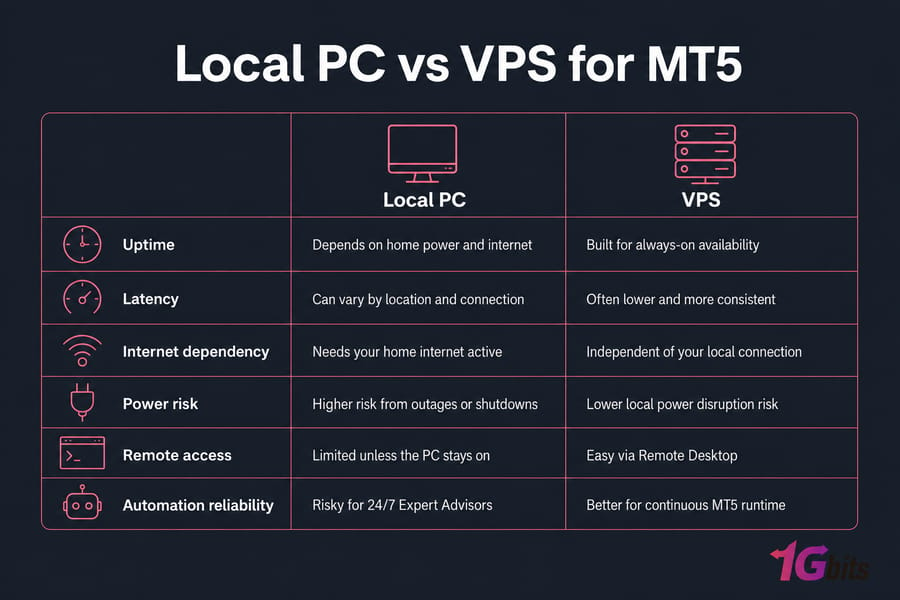
You don't always need a VPS for MT5. If you trade manually a few times a day from your own computer, a local setup may be fine. But if you run Expert Advisors, alerts, or copy trading around the clock, a VPS becomes much more than a nice extra.
| Factor | Home Computer | VPS |
| Uptime | Depends on your power and internet | Built for always-on availability |
| Latency | Can vary by location and connection quality | Often lower and more consistent |
| Interruptions | Sleep mode, updates, crashes | Fewer local disruptions |
| Remote access | Limited unless your PC stays on | Easy through Remote Desktop |
| EA reliability | Risky for 24/7 operation | Much better suited for continuous runtime |
Windows VPS is common because MT5 runs naturally in that environment and is easy to manage with Remote Desktop. If you're comparing options, these guides on Forex VPS vs regular VPS and the Forex VPS security checklist are worth your time.
For traders who want low-latency, always-on hosting, 1Gbits offers MT5 VPS hosting, Forex VPS, and VPS for trading plans that fit typical MT5 setups.
How to Start Using MetaTrader 5
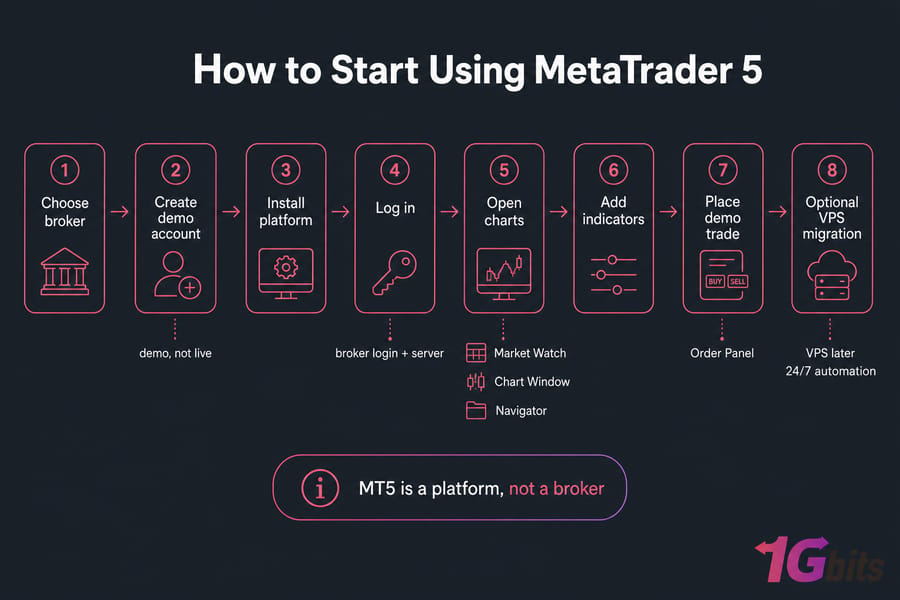
- Choose a broker that supports MT5.
- Create a demo account first. You can open a live account later.
- Download and install MT5 on desktop, or use web/mobile if needed.
- Log in with your broker login credentials and server details.
- Open Market Watch, load a chart, and add an indicator or two.
- Place your first trade on demo, not live.
- If you plan to automate, move the setup to a VPS later.
Keep it simple at first. One chart. A small watchlist. A couple of indicators. Most beginners overload the terminal and end up learning nothing from the noise.
Common MetaTrader 5 Mistakes Beginners Should Avoid
Here are the big ones:
- Thinking MT5 is a broker instead of a platform
- Picking a broker/platform combo that doesn't support your needs
- Running an EA on an unstable home setup instead of a VPS
- Skipping demo testing
- Ignoring risk management
- Piling on indicators without a clear method
That last one is more common than people admit. Fancy charts don't fix a weak process.
Need a Reliable Setup for MetaTrader 5? Whether you trade manually or run automated strategies, 1Gbits offersView MT5 VPS and Compare Forex VPS Plans for traders who want uptime, speed, remote access, and Windows VPS compatibility.

Leave A Comment