

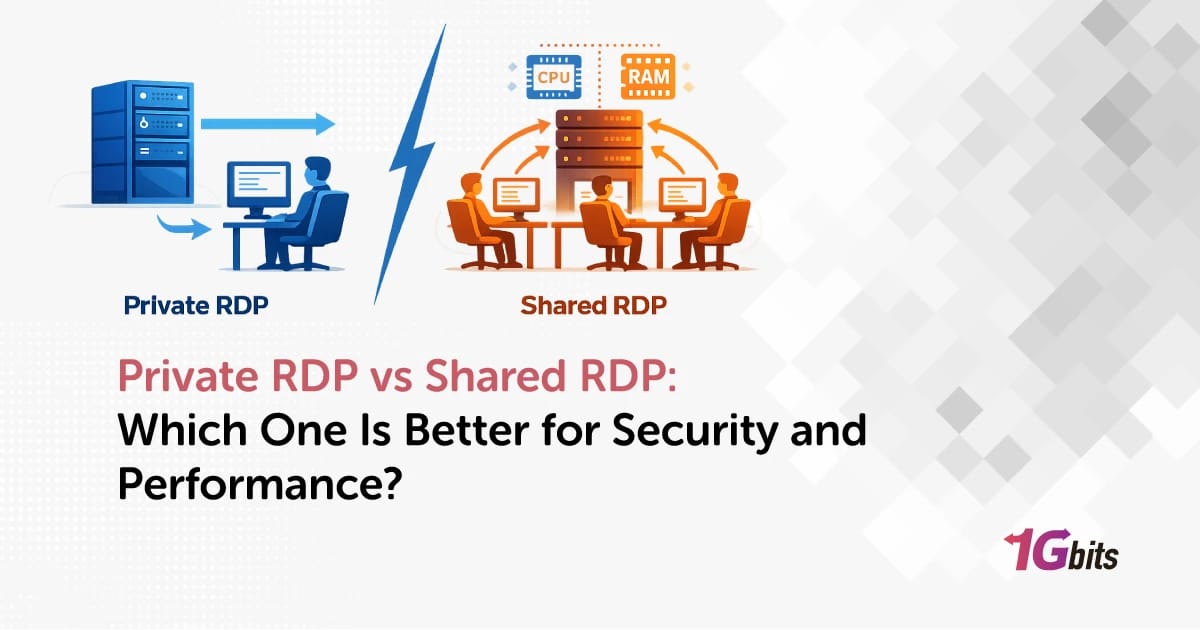
Private RDP vs Shared RDP — The 60-Second Answer
Private RDP gives you a fully isolated Windows environment with dedicated CPU, RAM, NVMe storage, and a dedicated IP. Shared RDP drops you onto a multi-tenant Windows server where 5–50 users split the same hardware and (usually) the same IP. Private wins on security, performance, and predictability. Shared wins on price and almost nothing else. If you're running forex, bots, SEO tools, or anything mission-critical, get Private. If you just need a cheap Windows desktop in the cloud for light tasks, Shared is fine.
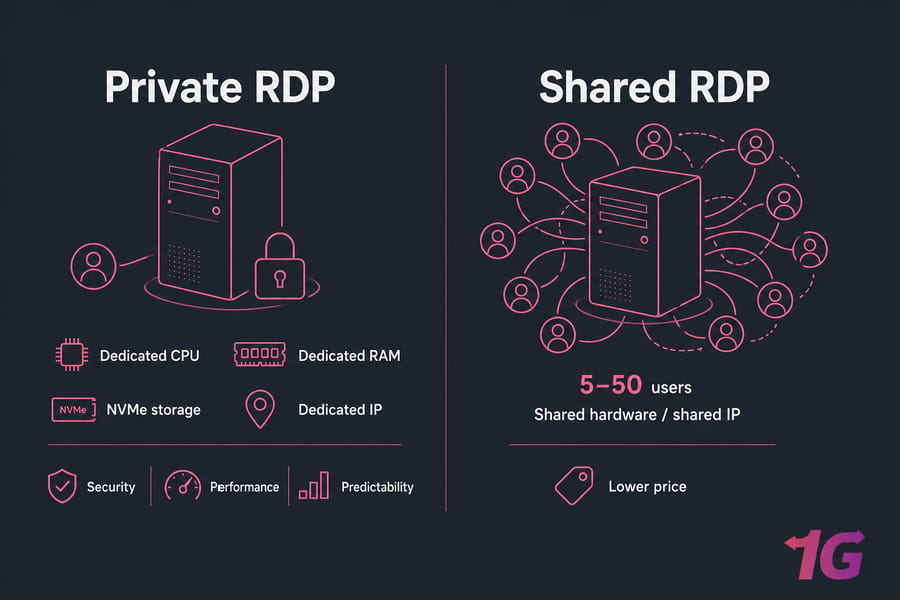
| Use Case | Recommended |
| Forex / MT4 / MT5 | Private RDP |
| Crypto bots / multi-account | Private RDP |
| SEO tools (Scrapebox, GSA) | Private RDP (residential IP if scraping) |
| Casual remote desktop / file access | Shared RDP is enough |
New to the protocol itself? Skim our guide on what is Remote Desktop Protocol first, then come back. Now let's break down what each one actually is.
What Is Private RDP? Dedicated Resources, Dedicated IP, Full Control
Private RDP is a Windows server that belongs to you and only you. No co-tenants, no shared sessions, no fair-share scheduler eating your CPU at peak hours. You get administrator privileges, can install whatever you want, change the RDP port, reboot the box at 3 a.m. — it's your machine.
Under the hood, a Private RDP is almost always a Windows VPS or dedicated server with RDP enabled. The hypervisor (KVM, Hyper-V, VMware) carves out a slice of the physical host and hands it to you as an isolated VM. Sometimes it's bare metal, but the user-facing behaviour is the same: dedicated vCPU, dedicated RAM, NVMe SSD storage, and a dedicated IPv4. If you're comparing the underlying protocol options, understanding the broader RDS vs RDP can clarify how these environments are structured.
How Private RDP Works (Architecture)
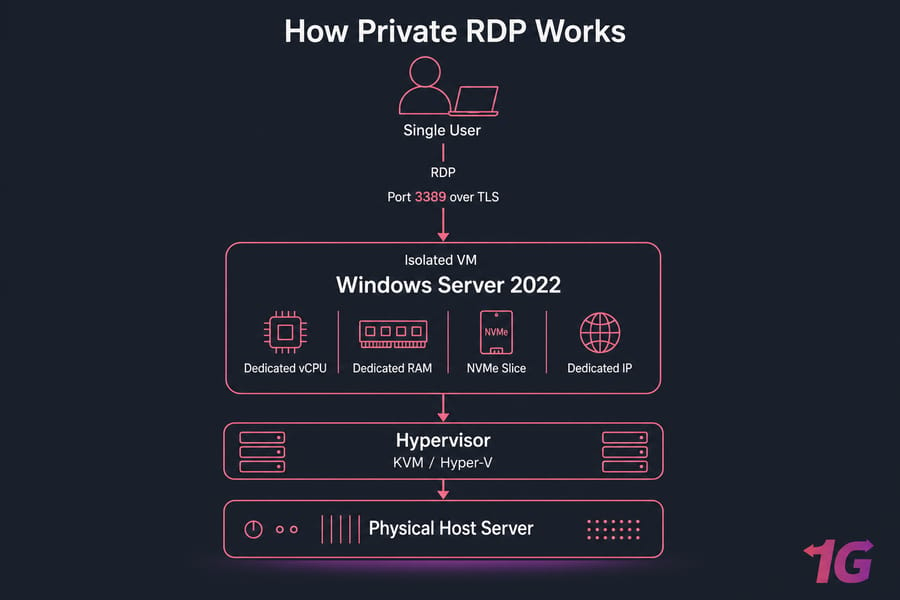
Six traits define a real Private RDP:
- Dedicated vCPU cores — pinned or guaranteed, not "best effort."
- Dedicated RAM — no oversubscription games.
- NVMe SSD storage — typically 50–500 GB, all yours.
- Dedicated IPv4 — your reputation, not someone else's.
- Full administrator access — install MT4 EAs, register DLLs, enable IIS, whatever.
- Port + firewall control — change 3389 to something obscure, lock down by IP.
💡 Pro Tip: Always change the default RDP port. Port 3389 is the most-attacked port on the public internet. See our guide on what the RDP port is and how to change it.
Who Uses Private RDP? (Typical Profiles)
Forex traders running MT4/MT5 24/7. Crypto bot operators who can't risk an exchange flagging their IP. SEO agencies running Scrapebox, GSA SER, or ScrapeBox at scale. Devs who need a Windows build environment in the cloud. Small teams who treat the server like a remote office — RDS-style, but locked to their staff only. Now contrast that with how Shared RDP carves up a single server.
What Is Shared RDP? Multi-Tenant Remote Desktop Explained
Shared RDP is exactly what it sounds like: one Windows server (typically Windows Server 2019 or 2022 with the Remote Desktop Services role installed), and a bunch of users RDP-ing into it at the same time. You get a user account on that machine. So do 5, 20, sometimes 50 other strangers.
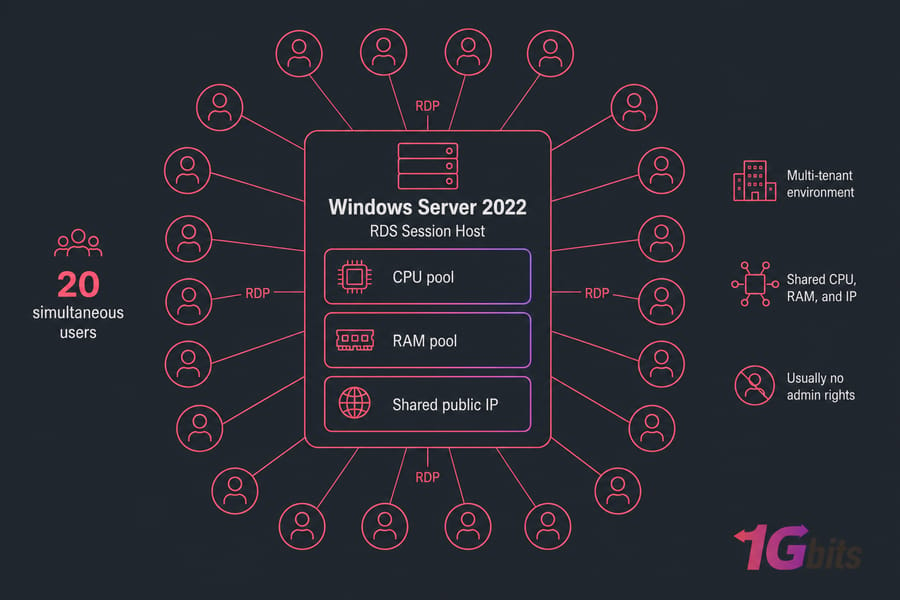
You log in, you see a Windows desktop, you can use Chrome, you can run light apps. But you don't own the box. The CPU is shared via Windows' fair-share scheduler. The RAM is often oversubscribed (the host promises more total RAM to users than physically exists, betting not everyone uses it at once). The IP is shared by everyone on the box. And in 9 cases out of 10, you don't have administrator rights.
⚠️ Warning: On Shared RDP you usually can't install software that requires admin privileges or DLL registration. That includes most MT4 EAs, certain Selenium drivers, and a lot of trading utilities. If your workflow needs an installer, ask the provider about Admin access before you pay.
Admin RDP vs User RDP: The Hidden Distinction Inside Shared RDP
This is where most blog posts get sloppy. "Shared RDP" actually splits into two flavours, and the difference matters.
| Aspect | Admin RDP | User RDP |
| Privilege level | Local administrator on a shared box | Standard user, sandboxed |
| Install software | Yes (most things) | Rarely — portable apps only |
| Resource isolation | Still shared CPU/RAM | Still shared, plus permission limits |
| IP type | Shared | Shared |
| Typical price | $8–$15/mo | $3–$8/mo |
| Closest cousin | Semi-private, cheap VPS alternative | Cheap multi-user terminal |
Admin RDP is the middle ground — administrator rights, but resources still shared with neighbours. It's not Private RDP, even if some sellers market it that way. The hardware is still split. The IP is still shared. The noisy-neighbor problem is still real.
How Shared RDP Allocates CPU, RAM, and Bandwidth
Windows' Dynamic Fair Share Scheduling (DFSS) tries to give each session a roughly equal slice of CPU. Sounds fair. In practice, if your neighbour is running a video encoder or a poorly-written bot, you feel it. RAM works similarly Windows will page to disk before killing a session, which means your responsive desktop suddenly turns into molasses. Bandwidth is rarely throttled per-user, so one heavy uploader can saturate the NIC for everyone. Understanding how concurrent RDP connections work provides useful context on these session limits.
With both definitions clear, here's how they stack up across every dimension.
Private RDP vs Shared RDP: Side-by-Side Comparison Table
Twelve dimensions, two columns, no marketing fluff.
| Feature | Private RDP | Shared RDP |
| Resource allocation | Dedicated vCPU, RAM, storage | Shared via fair-share scheduler |
| IP type | Dedicated IPv4 (sometimes IPv6 too) | Shared IP across all users |
| Admin access | Full administrator | User-level (Admin RDP variant: shared admin) |
| Security isolation | Single-tenant VM or bare metal | Multi-tenant session host |
| Performance consistency | Predictable, even at peak | Variable — degrades under co-tenant load |
| Custom software install | Anything you want | Limited or impossible |
| Port customization | Yes — change 3389 freely | No — provider-locked |
| Simultaneous users | You decide (RDS CALs if needed) | Provider-set, usually 5–50 |
| Typical price | $15–$80+/month | $3–$10/month |
| Ideal workload | Forex, bots, SEO, dev, agencies | Casual browsing, light file access |
| Uptime stability | High — only your reboots affect you | Lower — neighbour crashes can ripple |
| Scalability | Vertical or horizontal, your call | Tied to provider's plan tiers |
🔑 Key Takeaway: If 4 or more rows in this table actually matter to your workflow, you don't need to think about it any further — Private RDP is the right call.
RDP Security: Is Private RDP Really Safer Than Shared RDP?
Short answer: yes, by a comfortable margin. Long answer needs three subsections, because "more secure" means different things in different threat models.
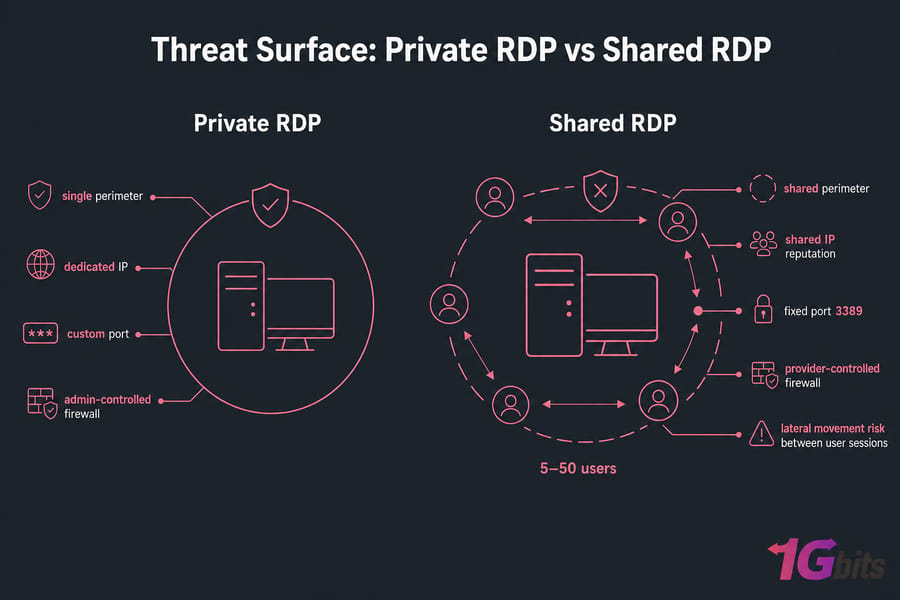
The Noisy Neighbor & IP Blacklisting Problem
This is the silent killer. On Shared RDP, the public IP is shared among every user on the box. If one of them runs a spam tool, scrapes Google too aggressively, or — worst case — gets compromised and used for botnet traffic, the IP gets flagged. Now Cloudflare blocks you. Google shows captchas. Your crypto exchange flags the login. Your forex broker's risk system throws extra friction. You did nothing wrong, but you wear someone else's reputation.
I've seen traders lose half a day to this — they couldn't even log into their broker portal because the shared IP had been flagged as "high risk" by an anti-fraud vendor. With Private RDP plans that ship with a dedicated IP, that entire risk class disappears.
Lateral Movement and Attack Surface
Multi-tenant Windows servers, when poorly configured, can let one compromised user enumerate other sessions, read open file handles, or exploit privilege escalation bugs to jump between accounts. Microsoft patches these regularly, but patching cadence on cheap shared boxes isn't always quick. On Private RDP, the only attacker who can move laterally is one who's already on your VM — and there's nobody else there to compromise in the first place.
For the broader picture on hardening, read our guides on securing your RDP and the piece on RDP botting threats.
Authentication, NLA, and Port 3389 Exposure
Both plans expose RDP to the internet. Both should use Network Level Authentication (NLA). Both should use TLS 1.2 or 1.3 with strong AES-256. The difference is what you can do beyond the defaults. On Private RDP, you change the port from 3389 to 49237, you add 2FA via something like Duo or RDP Defender, you whitelist source IPs at the firewall. On Shared RDP, you can't touch most of that — the provider sets it, and you live with it.
📊 Stat Callout: Honeypot research consistently logs over 1.3 million RDP brute-force attempts hitting exposed port 3389 every single day across the public internet. Don't be a default-port target — and definitely change your RDP password from whatever the welcome email gave you.
One more thing: regulated workloads (PCI-DSS, HIPAA, SOC 2) almost never approve a multi-tenant Shared RDP. The audit trail and isolation requirements just don't fit. If compliance is in your future, start Private.
RDP Performance: Latency, CPU Throttling, and Real Workloads
Performance is where Shared RDP looks fine in the demo and falls apart at 9 a.m. on a Tuesday when everyone's logged in. Let's get into it.
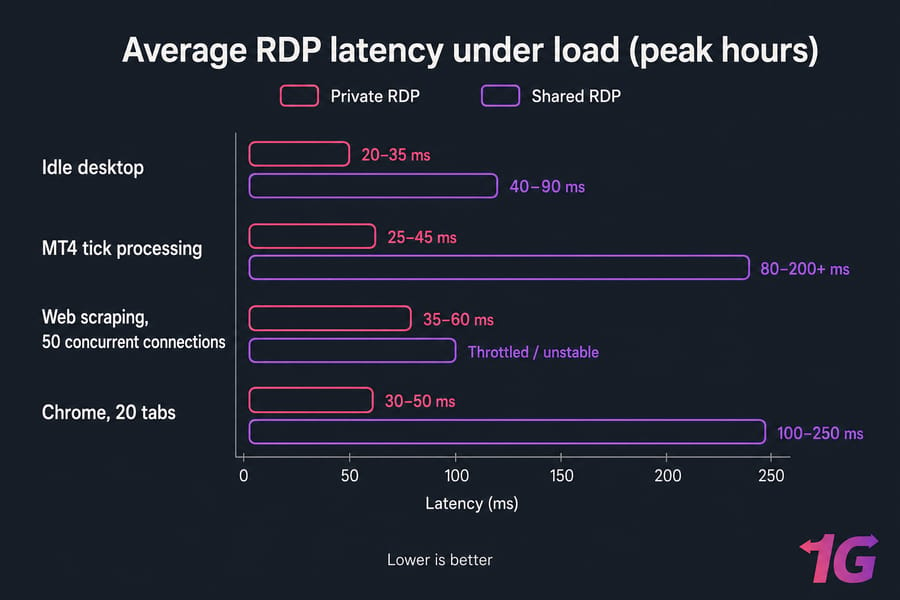
| Workload | Private RDP (ms) | Shared RDP (ms) |
| Idle desktop | 20–35 | 40–90 |
| MT4 tick processing | 25–45 | 80–200+ |
| Chrome, 20 tabs | 30–50 | 100–250 |
| Scrapebox, 50 threads | 35–60 | Throttled / unstable |
| Multi-instance bot | 40–70 | Frequent crashes |
These ranges assume same-region connectivity. Cross-continent will add 80–200ms regardless of plan type, which is why geographic location matters as much as plan tier.
Forex & MT4 Tick Processing
Forex EAs need sub-50ms tick processing to avoid slippage. On Shared RDP at peak hours, I've seen tick handling balloon past 200ms, which means missed entries on scalping strategies and stop-losses that fire late. That's real money.
Streaming, Browsing, and SEO Tools
SEO tools like Scrapebox, GSA SER, and SEnuke open dozens of concurrent connections and chew CPU. Run them on Shared RDP and either the fair-share scheduler throttles you, or the provider's anti-abuse system bans the activity outright. Private RDP handles 24/7 crawling without breaking a sweat — and with a residential IP variant, you avoid the soft blocks Google throws at datacenter IPs.
📚 Related Reading: Want to squeeze every ms? RDP performance optimization covers tweaks that work on either plan type.
Botting and Heavy Automation
Multi-instance bots — whether crypto, sneaker, or social media — need dedicated RAM lanes. Each instance might want 500 MB to 2 GB. Stack 10 of them on Shared RDP and you're competing for memory with everyone else's Chrome tabs. Result: crashes, dropped sessions, lost trades. Private RDP is the only sane choice here.
Pricing Reality Check — Why Shared RDP Is Cheaper
Shared RDP runs $3–$10/month. Private RDP runs $15–$80+/month depending on specs and location. The 3–10× price gap looks dramatic until you understand the math.
One physical Windows server costs the provider roughly the same whether 1 or 30 people use it. Spread the cost across 30 users and each pays a tenth of what a dedicated tenant would. That's the entire economics of Shared RDP. It's not lower quality hardware — it's the same hardware, divided.
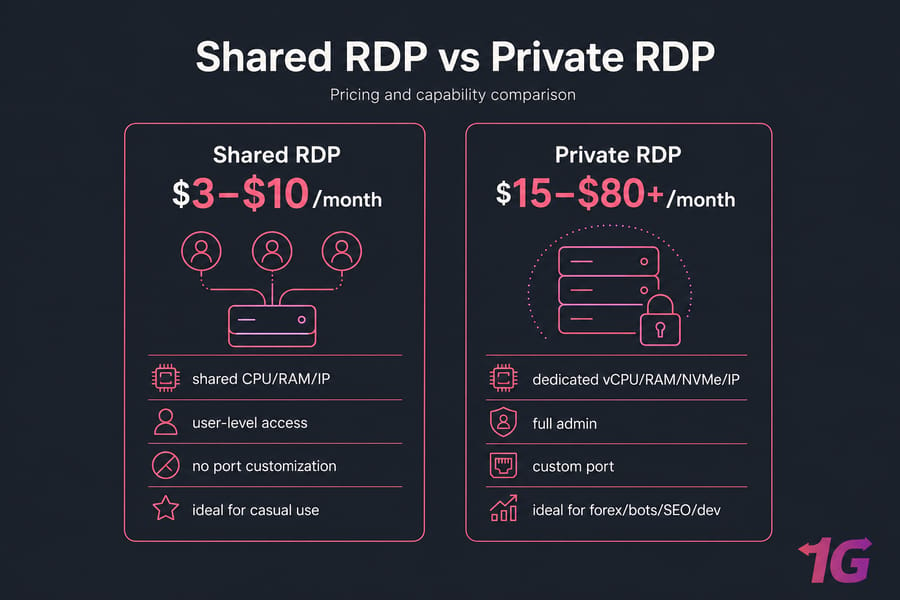
The honest cost comparison includes hidden line items most people miss on the shared side:
- Downtime when a co-tenant crashes the box.
- IP blacklisting losses (a flagged IP can mean a day of unusable trading).
- Switching cost when you outgrow it in 60 days and migrate everything anyway.
- Time tax from inconsistent performance you'll spend hours debugging "why is it slow today?"
Add it up and Shared RDP is genuinely cheaper only for genuinely casual use. If you'd be unhappy losing a day's productivity, the math flips. When you're ready to explore your options, buy RDP and see what dedicated resources actually cost.
Which RDP Should You Buy? Decision Matrix by Use Case
Five common profiles, five verdicts. Find yours.
Forex Traders & Algo Bots
✅ Verdict: Private RDP. Latency is non-negotiable on tick-driven strategies, and a dedicated IP keeps your broker's risk engine calm. Pick a location near your broker's matching engine — for most ECN brokers that's London (LD4) or New York (NY4).
Crypto Bots and Multi-Account Operators
✅ Verdict: Private RDP with a dedicated IP. Exchanges flag IPs that show suspicious patterns. A shared IP picks up other people's flags by accident. A dedicated IP keeps your account history clean and predictable.
SEO Professionals & Marketing Tools
✅ Verdict: Private RDP, ideally with a residential IP. Scrapebox, GSA, and similar tools live and die on IP reputation. Datacenter IPs get soft-blocked by Google fast; shared datacenter IPs get blocked even faster.
Remote Workers & SMB Teams
✅ Verdict: Mixed — Private for sensitive work, Shared for casual. If your team handles client data, financial records, or anything that would survive a compliance audit, go Private. If it's just "I want a Windows desktop in another country to access geo-locked tools," Shared (or Admin RDP) works.
Casual Users & Testers
✅ Verdict: Shared RDP is fine. Want to test how a website renders from a specific location? Want a sandbox to install random freeware? Want a cheap Windows desktop to RDP into from your iPad on the couch? Shared RDP at $5/month does the job. Just enable NLA and use a strong password.
⚡ Quick Summary: Forex / Botting / SEO / Compliance → Private RDP. Casual remote desktop / testing → Shared RDP is enough.
6 Common Mistakes When Choosing Between Private and Shared RDP
Most regret stories I see come from one of these six errors. Avoid them.
- Buying Shared RDP for forex. The latency variance alone will eat your edge. If you scalp or run an EA, this isn't an "it'll probably be fine" situation — it'll cost you trades.
- Assuming Shared = secure because it's "isolated by user." Per-user isolation is real but thin. Shared IPs, shared firewall rules, and patching delays are still very much shared.
- Ignoring IP type. A shared IP that some neighbour got blacklisted is a problem nobody warned you about until you couldn't log into your exchange.
- Skipping NLA and 2FA regardless of plan. Both plan types need them. Don't assume your provider enabled the right defaults.
- Confusing Admin RDP with Private RDP. Admin rights on a shared box ≠ a private box. The hardware is still split. The IP is still shared. The marketing copy is occasionally misleading on this.
- Choosing the wrong geographic location. A "high-spec" RDP 5,000 km from your broker is slower than a modest one 50 km away. Location often matters more than CPU count.
🛡️ Security Tip: Regardless of which plan you pick enable NLA, change the default port, turn on 2FA, and set a 16+ character password. Doing all four blocks 99% of opportunistic attacks.
Final Verdict — Private RDP vs Shared RDP in 2026
Here's the bottom line. Shared RDP is a Honda Civic that 30 people share. Private RDP is your own Honda Civic. Same engine, dramatically different experience. For light errands, the shared one is fine. For your daily commute (or your 3 a.m. trading run), you want the keys.
Pay roughly 3× more, get something like 10× more reliability, security, and predictability. That's the deal. If your work is mission-critical money on the line, accounts that can't get flagged, client data that can't leak Private RDP isn't a luxury, it's the baseline. If you just want a cheap cloud Windows desktop for occasional use, Shared RDP gets the job done at five bucks a month.
🎯 Verdict Box: Go Private if any of these apply — forex, bots, SEO tools, compliance, dedicated IP needs, custom software. Go Shared if you just want a casual cloud desktop and you're fine with whatever the provider gives you. Ready to start? Choose the plan that fits your workload and get your environment deployed in minutes.

Leave A Comment