
In today's interconnected digital world, remote access to computers and servers has become an essential requirement for businesses and individuals alike. Among the various remote access protocols available, two prominent options are Remote Desktop Protocol (RDP) and Secure Shell (SSH). Understanding the difference between RDP and SSH can help determine which one is the better choice for your specific needs. Selecting the right connection protocol depends heavily on your underlying infrastructure, such as whether you are managing an unmanaged VPS or a complex multi-user enterprise environment. Let's delve into the details and explore the advantages and disadvantages of each.
🔒 What is Secure Shell (SSH)?
.jpg)
Secure Shell, commonly known as SSH, is a cryptographic network protocol that provides secure remote access and control over a network. It establishes an encrypted connection between a client and a server, ensuring confidentiality and integrity of data transmission. SSH utilizes public-key cryptography, which involves the use of public and private keys to authenticate and establish a secure connection. The protocol supports various authentication methods, including password authentication, public key authentication, and multi-factor authentication. Before delving into the advantages and disadvantages of SSH, we recommend you to read the article on “How to SSH: A Complete Guide”. For engineers executing massive text-based commands or configuring a high-performance Linux dedicated server, SSH serves as the ultimate industrial-standard interface.
🛠️ How SSH Works Internally
SSH operates on a client-server architecture model. The process begins when the SSH client initiates an asymmetric handshake with the daemon listening on the server. They negotiate standard symmetric encryption parameters to shield subsequent communications. This architecture guarantees that even if automated systems intercept network traffic, translating raw packets back into plain text remains impossible without the designated asymmetric private key pairs.
🚀 What are the advantages of SSH?
- Security: SSH is renowned for its strong security measures. It encrypts all data transferred between the client and server, safeguarding sensitive information from unauthorized access and interception.
- Authentication: SSH employs public-key cryptography for authentication, making it highly resistant to password-based attacks. Public key authentication offers an extra layer of security, reducing the risk of brute force attacks.
- Port Forwarding: SSH allows port forwarding, enabling users to securely access services on a remote server through an encrypted tunnel. This feature is especially useful when accessing internal resources behind firewalls.
- Low Overhead: Because it operates without a graphical interface, SSH consumes minimal system RAM and CPU overhead, ensuring blazing-fast execution speeds even on minimal server configurations.
⚠️ What are the disadvantages of SSH?
- Complexity: SSH can be more complex to set up and configure compared to other remote access protocols. Proper key management and understanding of cryptographic concepts are required for effective implementation.
- Limited GUI Support: SSH primarily operates in a command-line interface, which may not be suitable for users who prefer graphical user interfaces (GUI). Although X11 forwarding allows remote GUI applications, it may not offer the same level of responsiveness as native desktop environments.
🖥️ What is Remote Desktop Protocol (RDP)?
.jpg)
Remote Desktop Protocol (RDP), developed by Microsoft, is a proprietary protocol that enables remote access and control of Windows-based systems. It allows users to interact with a remote desktop environment as if they were sitting in front of the physical machine. RDP uses port 3389 for communication and provides a rich graphical user interface experience, allowing remote access to applications, files, and resources. If you're interested in learning more about RDP, take a look at our article titled "What is a Remote Desktop Protocol" You'll discover valuable information within it. Deploying environments like a specialized RDP VPS empowers global teams to manage windows applications seamlessly without command-line dependencies.
🌟 What are the advantages of RDP?
- User-Friendly Interface: RDP offers a user-friendly interface with full graphical support, making it convenient for users who prefer a familiar Windows desktop environment. It allows seamless access to desktop applications and resources, providing a similar experience to working on the local machine.
- Multi-Monitor Support: RDP supports multiple monitors, enabling users to utilize their entire workspace remotely. This feature is particularly beneficial for tasks that require increased screen real estate.
- Easy Setup: RDP is relatively straightforward to set up, especially within a Windows environment. It comes pre-installed on Windows operating systems, reducing the need for additional software installations.
- Local Resource Redirection: RDP uniquely allows users to share local clipboards, printers, drives, and peripherals directly with the remote workspace session, bridging the physical gap between systems instantly.
❌ What are the disadvantages of RDP?
- Security Risks: RDP has faced security vulnerabilities in the past, making it a potential target for attacks. Brute force attacks and exploitation of vulnerabilities in RDP implementations have been reported, emphasizing the need for strong security practices and regular updates.
- Platform Limitation: RDP is primarily designed for Windows systems, limiting its compatibility with other operating systems. While there are RDP clients available for Linux and Mac, the experience may not be as seamless as within a Windows environment.
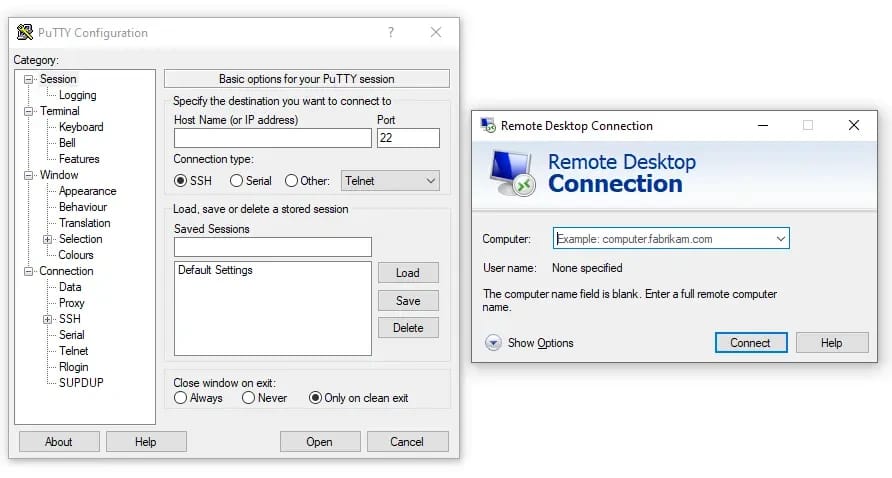
🔍 What is the difference between RDP and SSH?
While both RDP and SSH provide remote access capabilities, they differ in terms of functionality, security measures, and compatibility.
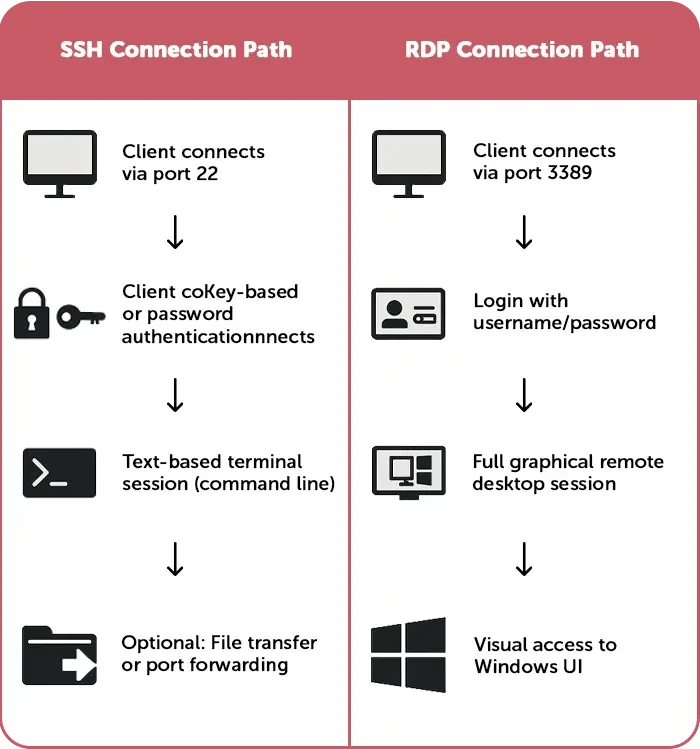
- The primary distinction lies in their design and intended use cases. RDP is optimized for providing a graphical user interface experience on Windows-based systems, whereas SSH focuses on secure command-line access and tunneling capabilities.
- RDP excels in offering a user-friendly interface, seamless Windows desktop experience, and robust multi-monitor support. It is an excellent choice for users who require remote access to Windows applications and resources, especially in environments where graphical interaction is essential.
- On the other hand, SSH prioritizes security, encryption, and command-line access. It is widely used for secure remote administration, file transfers, and tunneling services. SSH is favored by system administrators, developers, and security-conscious individuals who prioritize data confidentiality and integrity.
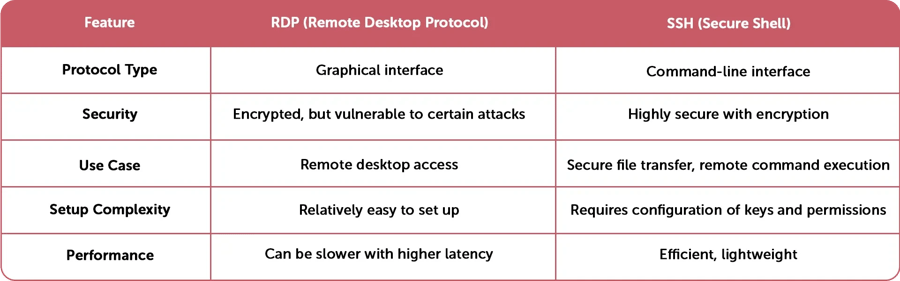
📊 Head-to-Head Comparison: RDP vs SSH
To help visualize the clear structural and behavioral operational distinctions between these protocols, we have summarized their core architectural variances below.
| Feature Feature | Remote Desktop Protocol (RDP) | Secure Shell (SSH) |
|---|---|---|
| Interface Type | Full Graphical User Interface (GUI) | Command-Line Interface (CLI) |
| Default Network Port | Port 3389 | Port 22 |
| Resource Consumption | Higher RAM & CPU usage | Extremely minimal overhead |
| Primary Platform Match | Microsoft Windows Ecosystem | Linux, Unix, and BSD Ecosystems |
| Primary Use Case | Running Desktop apps, end-user tasks | Server scripting, automation, configs |
🤔 Which one is better; SSH or RDP Account?

The choice between SSH vs RDP depends on your specific requirements and use case.
- If you primarily work with Windows systems and rely on graphical user interfaces, RDP is the better choice. Its user-friendly interface, multi-monitor support, and seamless integration with Windows environments make it an ideal solution.
- However, if security and command-line access are your top priorities, SSH is the superior option. SSH provides strong encryption, secure authentication methods, and robust tunneling capabilities, making it suitable for system administration, remote server management, and secure file transfers.
Ultimately, both protocols have their strengths and weaknesses. It's essential to evaluate your needs, consider the security implications, and select the protocol that aligns best with your specific requirements.
SSH keys provide a more secure method of authentication in SSH protocols, utilizing public and private key pairs. SSH on Ubuntu enables secure remote connections and administrative tasks on Ubuntu Linux systems. An SSH connection establishes a secure and encrypted link between a client and a server, facilitating remote access, file transfers, and command-line interactions. To gain access to Windows-based servers or desktop environments, users can buy an RDP server, while RDP client software and RDP clients for Ubuntu offer Linux users the ability to connect and interact with remote Windows systems using the Remote Desktop Protocol (RDP). If you need to access a graphical interface directly on Linux distributions, setting up a specialized Ubuntu RDP server allows you to bypass the text-only shell restriction. RDP port 3389 is the default port used for RDP communication, which should be properly configured and secured to prevent unauthorized access.
⚠️ Common Remote Access Mistakes to Avoid
- Leaving Default Ports Open Globally: Leaving port 22 or port 3389 exposed to all public IP addresses exposes your host to constant automated automated credential stuffing scripts. Always utilize host firewalls or restricted VPN subnets.
- Using Weak Dynamic Passwords: Relying purely on basic passwords instead of cryptographic SSH key-pairs or complex multi-factor authentication methods leaves systems vulnerable to brute force exploits.
- Neglecting Host Patch Updates: Missing structural system updates lets legacy protocol-level vulnerabilities threaten the security state of your dedicated or virtual machines.
🎯 Final Words
As a leading provider in the field of remote access and server management, 1Gbits offers various services related to SSH vs RDP. We specialize in SSH keys, which are essential for secure authentication and access control. Additionally, 1Gbits provides SSH on Ubuntu, facilitating secure remote administration on Ubuntu-based systems. Our SSH connection services ensure encrypted communication and data integrity during remote access.
For users seeking reliable and high-performance RDP solutions, 1Gbits offers the option to Buy RDP Server. Our RDP clients for Linux and Ubuntu provide seamless remote access to Windows environments. With a focus on performance and security, 1Gbits ensures a smooth and secure remote desktop experience. Check our RDP service and Buy RDP now to find the ideal solution for your remote connectivity needs- Unparalleled Security and Lightning-Fast Speeds Await You!

Leave A Comment