
You just spun up a Rocky Linux box. It's already being scanned — probably within minutes of the IP going live. This Rocky Linux VPS security hardening checklist covers what to do right after first login: patch the system, create a sudo user, disable root SSH, enforce keys, configure firewalld, keep SELinux enforcing, add Fail2ban, close unused services, then set up logging and backups. Nothing exotic. Just the baseline that stops most opportunistic attacks on a self-managed Rocky Linux VPS hosting instance.
Rocky Linux is RHEL-family, so the tooling is dnf, firewalld, and SELinux — not apt or UFW. Copying Ubuntu commands from a random blog is how people break things. If you want background on the distro itself, see Rocky Linux features and requirements.
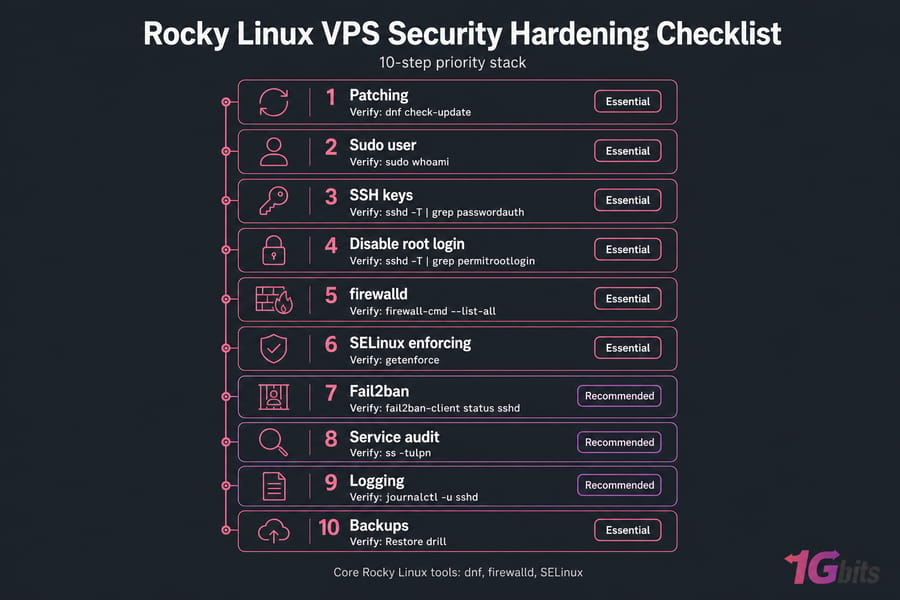
Priority checklist: what to do first
| Task | Risk reduced | Priority | Verify with |
| Full package update | Known exploits | Essential | dnf check-update |
| Sudo user + SSH key | Root compromise | Essential | sudo whoami |
| Disable root SSH login | Brute force on root | Essential | sshd -T | grep permitrootlogin |
| Disable password auth | Credential guessing | Essential | sshd -T | grep passwordauth |
| firewalld default-deny | Exposed services | Essential | firewall-cmd --list-all |
| SELinux enforcing | Service escalation | Essential | getenforce |
| Fail2ban SSH jail | Automated attacks | Recommended | fail2ban-client status sshd |
| Disable unused services | Attack surface | Recommended | ss -tulpn |
| Log review + auditd | Undetected intrusion | Recommended | journalctl -u sshd |
| Tested backups | Unrecoverable loss | Essential | Restore drill |
Before you change anything
Take a snapshot. Seriously. Every SSH and firewall edit in this guide carries lockout risk, and a snapshot turns a disaster into a five-minute rollback.
Then open a second SSH session and leave it connected. If your config change kills authentication, that live session is your lifeline. Note your current SSH port, your users, and your existing firewall rules before touching them. Also check whether your provider gives you console or VNC access — if it doesn't, be extra careful. And if you're reading this because something already looks wrong, start with what to do if your VPS gets hacked instead.
Patch the system and automate security updates
First command on any new server:
sudo dnf upgrade --refresh -y
sudo dnf needs-restarting -r || sudo reboot
Kernel updates only take effect after a reboot. Do it now, while nothing depends on uptime.
For ongoing patching, dnf-automatic handles it:
sudo dnf install dnf-automatic -y
sudo systemctl enable --now dnf-automatic.timer
Set upgrade_type = security in /etc/dnf/automatic.conf. Security-only updates are safe to auto-apply on almost any workload. Full package upgrades on a production app server? Test those first — I've watched an unattended minor PHP bump take down a site at 3 a.m.
Create a sudo user, then disable root login
sudo adduser ahmed
sudo passwd ahmed
sudo usermod -aG wheel ahmed
sudo mkdir -p /home/ahmed/.ssh
sudo chmod 700 /home/ahmed/.ssh
Paste your public key into /home/ahmed/.ssh/authorized_keys, set it to 600, and fix ownership with chown -R ahmed:ahmed /home/ahmed/.ssh. Now log in as that user from a fresh terminal and run sudo whoami. If it returns root, you're clear.
Only then set PermitRootLogin no in /etc/ssh/sshd_config. Direct root SSH is the single most attacked door on the internet, and once it's compromised there's no second layer.
Rocky Linux SSH hardening
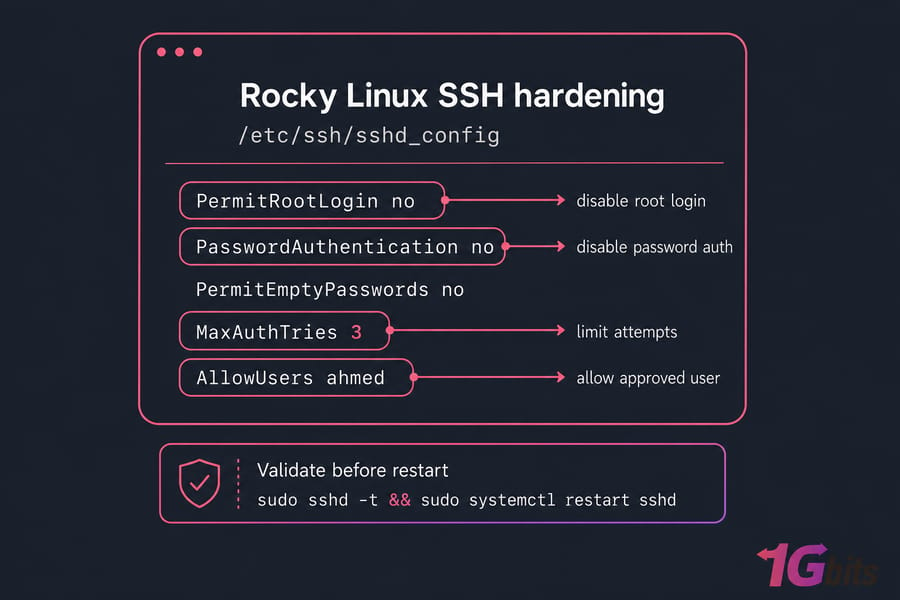
Keys beat passwords, full stop. If you're new to this, read what SSH keys are and then how to generate an SSH key. Once key login works, edit /etc/ssh/sshd_config:
PermitRootLogin no
PasswordAuthentication no
PermitEmptyPasswords no
MaxAuthTries 3
AllowUsers ahmed
Validate before restarting — this is the step that saves you:
sudo sshd -t && sudo systemctl restart sshdKeep the old session open and test a new login. Changing the port (see how to change the SSH port) cuts log noise dramatically, but don't mistake it for security — it's obscurity, not access control. If you move it, add the port to firewalld and SELinux first. For an admin-only jump box, add TOTP 2FA via google-authenticator as an advanced layer.
Configure firewalld and close what you don't need
Default-deny is the rule. A basic web VPS needs three things open:
sudo firewall-cmd --permanent --add-service=ssh
sudo firewall-cmd --permanent --add-service=http
sudo firewall-cmd --permanent --add-service=https
sudo firewall-cmd --reload
sudo firewall-cmd --list-all
Remove anything you don't recognize with --remove-service. Database ports should never face the internet — bind MySQL to 127.0.0.1 or restrict by source IP using a rich rule. For syntax depth, see configure firewalld securely and the broader guide on how to configure a firewall on your VPS. Cross-check reality against check open ports in Linux — firewalld rules and actual listeners often disagree.
Keep SELinux enforcing
Check it:
getenforce
sestatus
You want Enforcing. Every guide telling you to set SELINUX=disabled because Nginx couldn't read a directory is bad advice — you're removing a whole containment layer to fix a two-minute labeling problem.
Instead: fix contexts with restorecon -Rv /var/www, register non-standard ports with semanage port -a -t http_port_t -p tcp 8080, and flip booleans like setsebool -P httpd_can_network_connect on. Read the denials in /var/log/audit/audit.log or run ausearch -m avc -ts recent. Permissive mode is a debugging tool, not a destination. More context in our Linux server security guide.
Fail2ban for brute-force protection
sudo dnf install epel-release -y && sudo dnf install fail2ban -y
sudo systemctl enable --now fail2ban
Create /etc/fail2ban/jail.local — never edit jail.conf directly:
[sshd]
enabled = true
maxretry = 4
findtime = 10m
bantime = 1h
ignoreip = 127.0.0.1/8 203.0.113.5
Put your own static IP in ignoreip. Check the jail with sudo fail2ban-client status sshd. Fail2ban trims log noise and slows scanners, but with key-only auth those attempts were already failing. It's a complement to SSH keys, never a replacement.
Audit services, permissions, and logs
Look at what's actually listening:
ss -tulpn
systemctl list-unit-files --type=service --state=enabled
Disable what you don't use — cups, avahi-daemon, postfix (if nothing sends mail), leftover control panels. Use systemctl disable --now servicename, and see list running services in Linux plus manage Linux services with systemctl if you're unsure what's safe. Then hunt world-writable files with find / -xdev -type f -perm -0002 -ls and review root's crontab.
For visibility, watch /var/log/secure for auth attempts, install auditd for syscall-level tracking, aide for file integrity baselines, and run lynis audit system monthly for a scored report. Our Linux logs guide and Linux monitoring tools and best practices go deeper.
Backups and monthly maintenance
Hardening without a tested restore is half a job. Back up configs (/etc), web roots, databases (dumped, not raw files), SSH keys, and app data — off-server, with at least one copy you can't delete from the VPS itself. Provider snapshots are great for rollback but they're not a backup strategy on their own. Automate it: see schedule automatic backups for a Linux server.
📋 Maintenance Cadence
| Task | Frequency | Tool |
| Security patches | Automatic / weekly check | dnf-automatic |
| Failed login review | Weekly | /var/log/secure |
| Open port audit | Monthly | ss, firewall-cmd |
| Restore test | Quarterly | Snapshot / backup |
| Full audit scan | Quarterly | Lynis, AIDE |
⚠️ Common Mistakes
| Mistake | Why it's risky | Do this instead |
| Disabling SELinux | Removes containment for compromised services | Fix contexts and booleans |
| Editing sshd without a backup session | Permanent lockout | Snapshot + second terminal + sshd -t |
| Opening ports "temporarily" | Temporary always becomes permanent | Timed rich rules, then verify |
| Hardening once, then forgetting | Config drift and unpatched CVEs | Monthly cadence table above |
| Using Debian/Ubuntu commands | They simply don't exist here | dnf, firewalld, semanage |
Want the wider view across distros? Our guide on how to secure your VPS covers the shared fundamentals.
Start with a VPS you can harden your way
All of this assumes you've got real root control. 1Gbits offers Rocky Linux VPS and Linux VPS plans with full root access and global locations — or if you'd rather someone else run the patching and monitoring, look at Managed VPS.
Get my Rocky Linux VPS and start hardening in 10 minutes.

Leave A Comment