

AlmaLinux 9 vs AlmaLinux 10 really boils down to one question: are you building a new VPS, or protecting one that already works? For most new VPS deployments in 2026, AlmaLinux 10 is the better pick. It runs on a newer platform and gets security support through May 31, 2035. But if you run a stable AlmaLinux 9 production server, staying put is often smarter until your apps, repos, control panel, and hardware are validated for 10.
New to the distro? Read what is AlmaLinux first. Otherwise, here's how I'd choose an image for AlmaLinux VPS hosting.
AlmaLinux 9 vs AlmaLinux 10 at a Glance
Both branches are alive and well. AlmaLinux 9.8 and 10.2 shipped on the same day (May 26, 2026), and the 9.9 and 10.3 betas are already out.
| Feature | AlmaLinux 9 | AlmaLinux 10 |
| Current stable release | 9.8 | 10.2 |
| Upstream base | RHEL 9 | RHEL 10 |
| Kernel family | 5.14 | 6.12 |
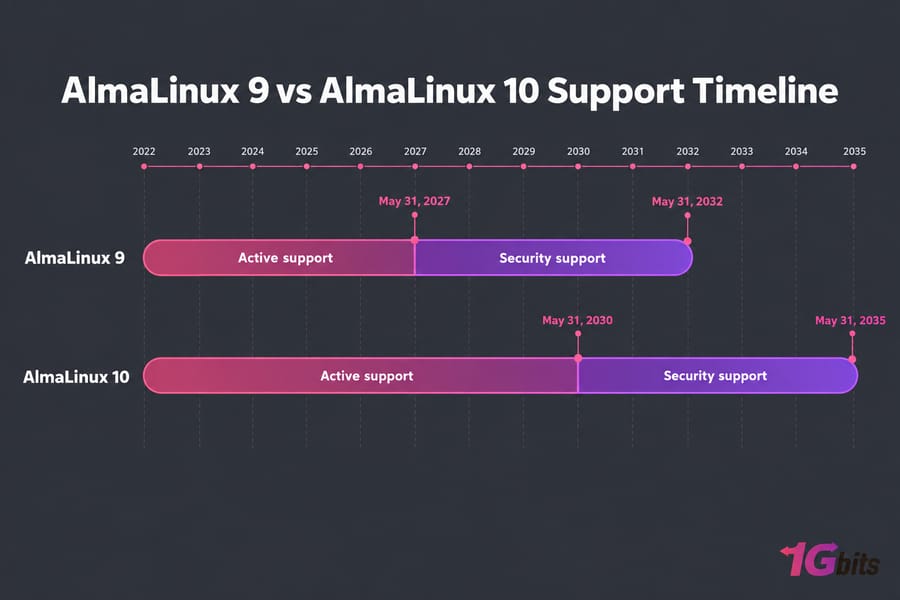
| Active support ends | May 31, 2027 | May 31, 2030 |
| Security support ends | May 31, 2032 | May 31, 2035 |
| x86_64 baseline | x86-64-v2 | x86-64-v3 (separate v2 build available) |
| Ecosystem maturity | Very mature | Solid, but some vendors are still catching up |
| Best for | Existing production, panels, older nodes | New deployments, modern stacks, long runway |
| Risk level | Low | Low to moderate |
What Actually Changed in AlmaLinux 10
- Kernel 5.14 → 6.12. You get years of upstream NVMe, networking and driver work. Mostly that means better support for newer hardware.
- Newer toolchain. 10.2 ships Python 3.14, PostgreSQL 18, MariaDB 11.8, PHP 8.4, and GCC Toolset 15. To be fair, 9.8 also added Python 3.14, so 9 isn't frozen.
- Software delivery. EL10 moves away from the module streams EL9 admins got used to. If your provisioning scripts rely on
dnf module enable php:8.2, expect to rewrite them. - AlmaLinux-specific extras. CRB is on by default, Btrfs is supported, and frame pointers are back on for system-wide profiling.
DNF, SELinux, firewalld, Podman, and RHEL compatibility stay the same. For a wider look at the field, see our roundup of the best VPS operating systems.
Support Lifecycle and Release Maturity
People underestimate this. AlmaLinux 9's active support ends May 31, 2027, about eight months from now. After that you still get security fixes until 2032, but no new features or hardware enablement.
AlmaLinux 10 buys you three extra years on both counts. For long-lived infrastructure, that means one fewer forced migration and a longer compliance runway. (More on that trade-off in our guide to choosing the best OS for servers.)
Still, support dates don't guarantee third-party compatibility.
AlmaLinux 10 Hardware Compatibility on a VPS
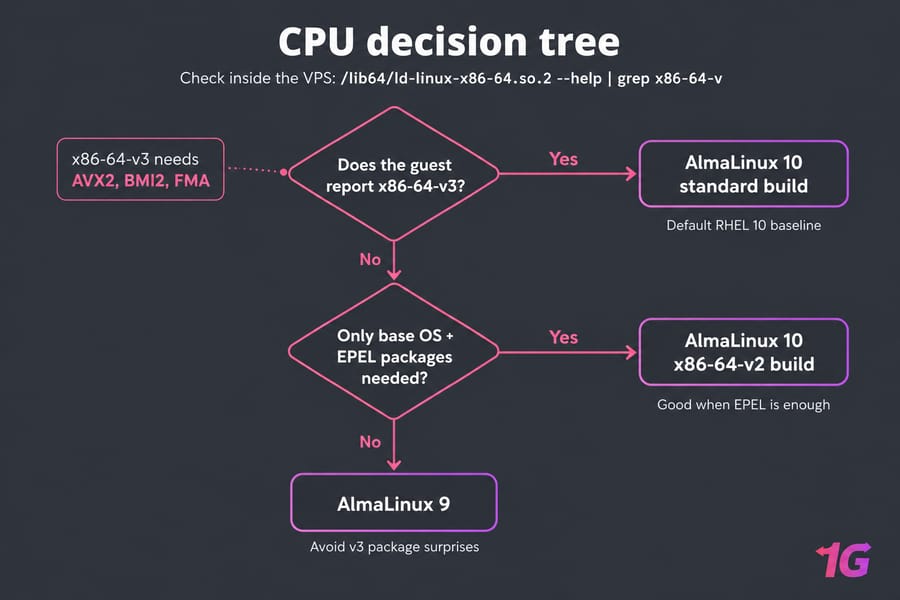
RHEL 10 raised its default baseline to x86-64-v3, which requires AVX2, BMI2, and FMA. That's roughly Intel Haswell (2013) or newer. x86-64-v2 only needs SSE4.2-era CPUs. AlmaLinux follows RHEL with v3 by default but also ships a separate v2 build, so older CPUs aren't locked out.
On KVM there's a catch I've seen trip people up. The host CPU might support AVX2, but if the hypervisor exposes a generic CPU model, your guest won't see those flags. Check from inside the VPS:
/lib64/ld-linux-x86-64.so.2 --help | grep x86-64-vIf x86-64-v3 (supported) appears, you're fine for the standard build.
Warning: Third-party packages built for RHEL 10 target x86-64-v3. The v2 build works best if the default OS packages are enough, or if you're willing to rebuild extras yourself. AlmaLinux does rebuild EPEL for v2, but vendor repos usually won't.
Software, Repos, and Control Panel Compatibility
Even with a compatible CPU, your software can still block you. Confirm EL10 packages exist for:
- Web server and PHP/Node/Python runtimes
- Database server and its vendor repo
- Monitoring, backup, and security agents
- Every EPEL package you actually use
- Your control panel
Speaking of panels: cPanel, Plesk, and DirectAdmin each publish their own supported-OS lists, and those lists change. Check the vendor's current list before you provision, not a year-old forum thread.
Security and Performance Differences
AlmaLinux 10 inherits RHEL 10's newer security baseline, including SELinux userspace 3.8 and updated crypto defaults. RDP replaces VNC for graphical remote access, though that rarely matters on a headless VPS.
Performance? Don't expect a free speed boost. A newer kernel helps on recent NVMe and network hardware, but web hosting speed depends far more on caching, storage, RAM, and tuning than on the distro version. Whichever you pick, harden it. Our Linux server security guide covers the basics.
Best AlmaLinux Version by VPS Use Case
| VPS use case | Pick | Why | Risk |
| New general-purpose VPS | AlmaLinux 10 | Longest runway, current toolchain | Low |
| Stable production VPS | AlmaLinux 9 | Nothing's broken; plan the move before 2027 | Low |
| Control panel hosting | 9 unless vendor confirms 10 | Panel support lags OS releases | Moderate |
| Docker / dev VPS | AlmaLinux 10 | Newer kernel, Podman, compilers | Low |
| VPN / proxy / infra | Either | Depends on package availability and node age | Low to moderate |
| Older or unknown CPU | AlmaLinux 9 | No v3 or third-party package surprises | Low |
| Long-term enterprise | AlmaLinux 10 | Support to 2035, once validated | Moderate |
Planning to host a website on a Linux VPS? Either version works. Still weighing distros? Read AlmaLinux vs Rocky Linux.
AlmaLinux 9 to 10 Upgrade Planning
ELevate, AlmaLinux's Leapp-based upgrade tool, has supported 9 → 10 since mid-2025. There are two caveats. EL9 packages without an EL10 build just stay behind. And the 9 → 10 x86-64-v2 path is still in the development branch, marked as not for production.
For panel servers, custom-repo boxes, or systems with years of cruft, a fresh AlmaLinux 10 VPS plus a data migration is safer. If you go in-place anyway:
- Take a full backup (here's how to schedule automatic backups for Linux server) and a VPS snapshot.
- Build a dependency map of every repo, agent, and runtime.
- Clone the server to staging. Run the ELevate pre-upgrade report, fix whatever it flags, and test the upgrade there.
- Write down your rollback plan before touching production.
Patch fully first. See how to update Linux. Rebuilding instead? You can migrate to a 1Gbits Linux VPS and run both side by side.
Common Mistakes to Avoid
- Picking 10 just because it's newer
- Ignoring the v3 baseline on budget or self-managed KVM nodes
- Upgrading production before staging
- Treating support dates as the only factor
Final Recommendation: AlmaLinux 9 or 10 for Your VPS?
- New VPS in 2026: AlmaLinux 10, in most cases.
- Stable production server: stay on 9 for now. Test compatibility with 10 before active support ends in 2027.
- Unsure about hardware or repos: keep 9 in production and test 10 on a second VPS.
Ready to build? Launch an AlmaLinux VPS with full root access, or browse Linux VPS hosting for other distros. If you'd rather not manage it yourself, try managed VPS hosting.

Leave A Comment