

![Forex RDP vs Forex VPS: Which Is Better? [2026] 💹](https://1gbits.com/cdn-cgi/image/width=1200,quality=80,format=auto/https://s3.1gbits.com/blog/2026/10/forex-rdp-vs-forex-vps-main.webp "Forex RDP vs Forex VPS: Which Is Better? [2026] 💹")
Ask most traders and they'll tell you RDP and VPS are the same thing. They aren't, and mixing them up is how people end up running their EAs on a crowded shared server. So, Forex RDP vs Forex VPS: which is better for MT4 and MT5? Short answer: a Forex VPS hosting plan wins for most serious setups. A Forex RDP can still make sense for one light MT4 terminal on a tight budget.
Some quick background first. You should know what an Expert Advisor is and what "ping to your broker" means. If you don't, read what is Forex VPS, what is MetaTrader 4, and what is MetaTrader 5 before you go on.
Forex RDP vs Forex VPS: Quick Answer for MT4 and MT5
For MT4 and MT5, a Forex VPS is usually the better choice than a Forex RDP. You get isolated resources, full admin control, and steadier performance for EAs and multiple terminals. A Forex RDP works for lighter MT4 setups or tight budgets. Because its resources are shared and your control is limited, it's a weaker fit for serious MT5 or latency-sensitive trading.
| Trader profile | Best fit |
| Manual trader, one MT4 terminal, tight budget | Forex RDP |
| Single MT4 EA running 24/5 | Either one, but VPS is safer |
| MT5 algo trader or several terminals | Forex VPS |
| Scalper, prop trader, copy trader using extra tools | Forex VPS |
What Is Forex RDP, and How Is It Different From a Forex VPS?
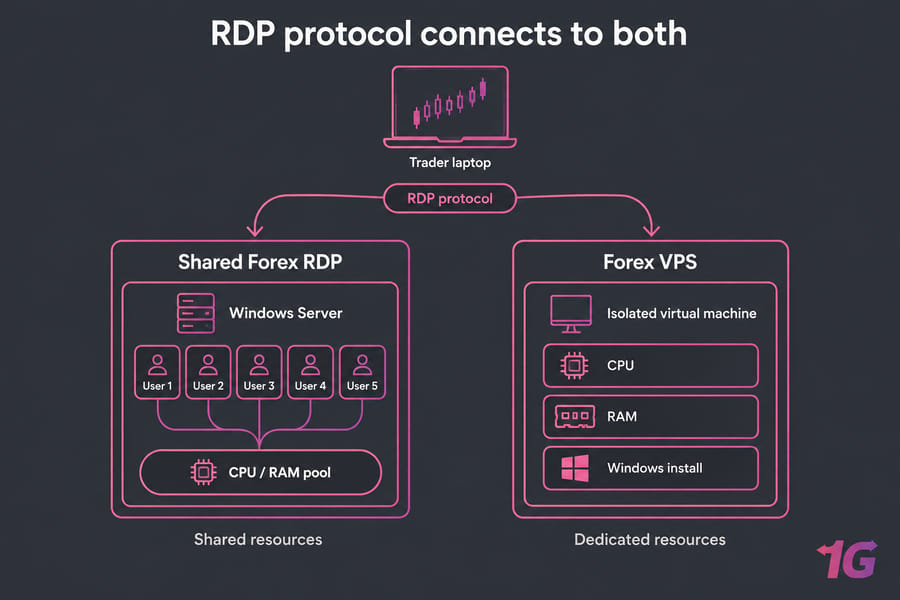
Most of the confusion starts here. RDP (Remote Desktop Protocol) is just a way to connect to a computer. It's how you reach a machine, not a type of machine. Microsoft's documentation describes using Windows App or the Microsoft Remote Desktop client to connect to and control a remote PC.
When a host sells you a "Forex RDP," though, they usually mean a user account on a shared Windows Server. Lots of other customers use the same CPU, RAM, and disk. A Forex VPS is a separate virtual machine with its own allocated resources and its own copy of Windows. And here's the catch: you connect to it over RDP too. That's exactly why so many traders think the two are the same product. (I've seen people buy a $6 shared RDP, believing it was a VPS, and then wonder why MT5 froze at the London open.)
For a deeper look at shared accounts, read private RDP vs shared RDP.
Forex RDP vs Forex VPS Comparison Table for MT4 and MT5
| Feature | Forex RDP | Forex VPS | Better choice |
| Resource isolation | Shared with other users | Dedicated allocation | VPS |
| Admin rights | Usually none | Full administrator access | VPS |
| Installing software (trade copiers, DLL tools) | Often restricted | Install whatever you need | VPS |
| MT4 fit | Fine for 1 light terminal | Good at any scale | Depends on workload |
| MT5 fit | Limited | Strong | VPS |
| Running multiple terminals | Risky | Easy to scale | VPS |
| Predictable performance | Depends on your neighbors | Consistent | VPS |
| Price | Lowest | Higher | RDP |
A shared RDP only wins on price. Whether price should be your deciding factor depends on how much money your EA is handling. If you want the bigger picture, see Forex VPS vs regular VPS.
Latency, Uptime, and Performance in Forex Trading
Location matters more than marketing. Pick the server closest to your broker's trade server, not the one closest to you. Many brokers host in Equinix data centers such as NY4 (New York) or LD4 (London). Measure the ping yourself and ignore "ultra-low latency" claims you can't check. Our guide on why latency matters in Forex VPS hosting covers this in detail.
You also need to separate two kinds of speed. One is execution latency, meaning how quickly orders reach your broker. The other is how smooth the desktop feels while you use it over RDP. A shared RDP can feel fine when you click around at 2 p.m. But when another user's backtest maxes out the CPU during NFP, your EA's ticks start lagging. You won't be watching when that happens.
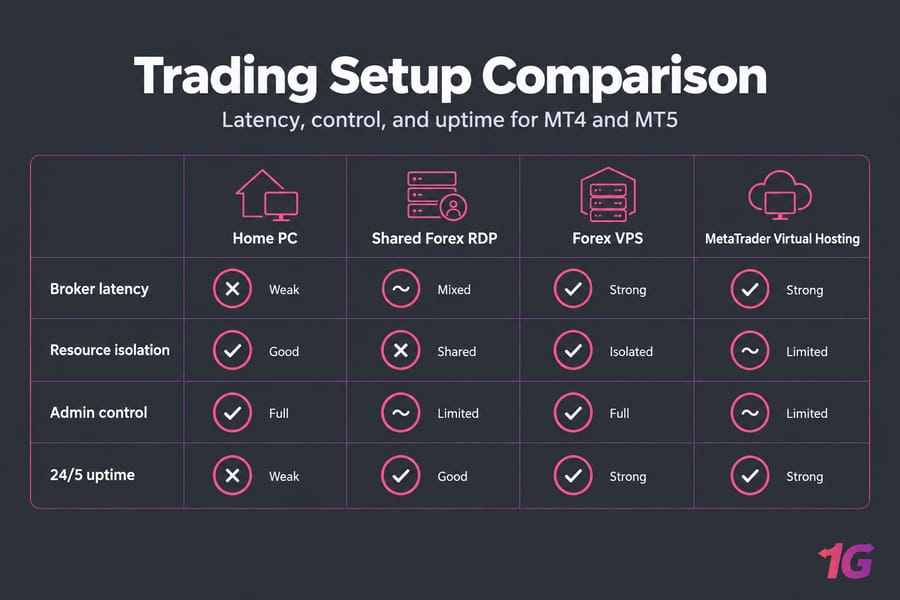
Uptime counts just as much. Your EA can only act on signals while it's running, and that's why a home PC loses out (see Forex VPS vs home PC). No server type guarantees zero slippage. An isolated server just takes one variable out of the equation.
Forex RDP for MT4: When Shared Remote Desktop Is Enough
I'll be fair to RDP here. A shared remote desktop for MT4 is often fine if:
- you run one MT4 terminal
- your EAs are light (one or two, not tick-scalpers)
- you mainly trade manually and just want a desktop that stays online
- your budget really is tight
The risks are noisy neighbors, no control over reboots, and slowdowns in busy sessions. It also gets awkward once you want a second terminal. If all of that sounds acceptable, Forex RDP hosting is a reasonable place to start. If you're planning to grow, go with an MT4 VPS from the beginning.
Forex VPS for MT5: Why MT5 Needs Isolated Resources
MT5 typically needs more headroom than MT4. It handles multiple asset classes, more charts and timeframes, and a multi-threaded strategy tester. Add several EAs, a prop-firm setup, or a trade copier, and RAM and CPU use rise fast. On a shared box, that's when freezes start.
A Windows VPS gives you admin rights, room to install custom tools, and the option to upgrade RAM without moving servers. Troubleshooting is also easier because the only processes on the machine are yours. That's why an MT5 VPS is the better default. To get more out of it, read how to optimize MT5 for algorithmic trading, and see MT4 vs MT5 for a platform comparison.
MetaTrader Virtual Hosting vs Forex VPS vs Forex RDP
There's a third option to weigh before you buy anything: MetaTrader's own built-in hosting. MetaQuotes says MetaTrader VPS servers are located very close to brokers' trade servers minimizing network delays during order execution. Setup happens through migration. Migration is performed every time you synchronize the trading platform. Synchronization is always a one-direction process, from your local terminal to the virtual one.
The limits are strict, though. DLL calls are completely forbidden in the virtual platform. You also don't get a desktop. User has no physical access to the rented terminal. That makes it a poor fit for trade copiers or anything you'd install outside MetaTrader.
| Option | Strength | Best for |
| MetaTrader Virtual Hosting | Simplest setup | Pure EAs or signals, no DLLs |
| Forex RDP | Cheapest Windows desktop | One light MT4 setup |
| Forex VPS | Most flexible, scales up | MT5, multiple terminals, custom tools |
How to Choose Between Forex RDP and Forex VPS
Go through these checks in order:
- Broker location: which data center or city is your trade server in?
- Platform: MT4 or MT5?
- Number of terminals: one now, or several within six months?
- Manual or automated trading?
- Admin access: do you need DLLs, copiers, or third-party apps?
The logic works out like this. Manual trading plus light MT4 on a low budget means RDP is an option. MT5, multiple terminals, or copy tools point to a VPS. If you only run MetaTrader robots with no DLLs, MetaTrader hosting may be enough. Before you pay, ask the provider three things: what ping you'll get to your broker, which Windows Server version they use, and whether resources are dedicated or oversold. Once you've decided, set up a VPS for forex robot trading step by step.
Common Mistakes When Choosing MT4 or MT5 Hosting
- Choosing on price instead of ping to your broker.
- Assuming every shared RDP is a VPS.
- Underestimating how much MT5 uses once you add EAs.
- Finding out about software restrictions after you've already paid.
- Not planning for growth from one terminal to five.
Whatever you pick, go through the Forex VPS security checklist. To compare providers, see our roundup of the best Forex VPS options.
Best Next Step: Pick the Right 1Gbits Trading Server
Choose based on how you actually trade. For a cheap Windows desktop for light MT4 use, view Forex RDP plans. For isolated resources and admin access, compare Forex VPS plans. If you want a setup built for one platform, go straight to the MT4 VPS or MT5 VPS pages. You can also browse every VPS for trading option by location.

Leave A Comment