

To reduce lag on an Astroneer server, work out which kind of lag you have before you change anything. A connection failure keeps players out of the world entirely. Network lag shows up as high ping, rubber-banding, and slow joins. Simulation stutter freezes everyone at once because the server or the save is overloaded. Check causes in this order: server status and version, port 8777 and firewall rules, upload bandwidth, save complexity, then hosting limits. If the base install isn't done yet, start with the Astroneer server setup guide, because everything below assumes the server already runs.
Make sure you can reach the host machine or control panel, Engine.ini, AstroServerSettings.ini, and the firewall. Back up the save folder too.
What causes Astroneer server lag in multiplayer?
In Astroneer, "lag" usually means one of four problems, and each has its own fix. System Era's official dedicated server page covers ports and config but has no performance tuning guide, so the diagnosis is up to you.
| Symptom | Likely cause | First fix |
| Server not showing up, or join fails | Port, firewall, PublicIP, or version mismatch | Check UDP 8777 and update the server and clients |
| Join stuck on "Loading Solar System" for a long time | Large save plus limited upload bandwidth | Check the save size and test with a fresh world |
| Everyone freezes at the same moment | Host CPU load, autosave, heavy base | Watch CPU during the freeze and check the autosave interval |
| Terrain edits snap back, items rubber-band | Desync from packet loss or an overloaded host | Wired connection on the host, then check host load |
| Only one player stutters | That player's FPS, Wi-Fi, or route | Test that client on a wired connection |
How to identify Astroneer server lag before changing settings
Run three tests and change one thing per test. Have one external player join: if local players connect and outside players can't, the network path is the problem. Load a fresh save: if it runs smoothly and your main world doesn't, the save is the bottleneck. Put the struggling player on a wired connection: if their stutter goes away, the server was never the issue.
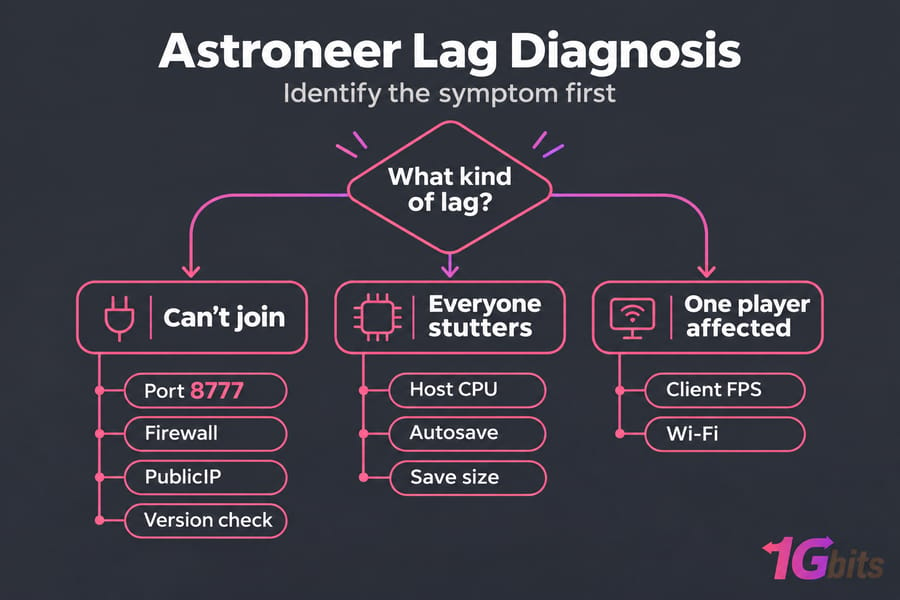
Astroneer network lag fixes: port 8777, firewall, and upload bandwidth
If outside players can't connect, or connect and then rubber-band, work through these in order:
- Confirm the server has fully started and clients run the same game version as the server tool.
- Open
Astro/Saved/Config/WindowsServer/Engine.iniand confirm the port line from the official guide:[URL] Port=8777 - In
AstroServerSettings.ini, setPublicIP=to your real public IP, or the server won't list correctly. - Allow UDP 8777 in Windows Firewall. If you're not sure the rule took effect, check open ports in Windows.
- Port forward on your router so UDP 8777 reaches the server's local IP.
If forwarding is correct and outside players still fail, compare your router's WAN IP with what a public IP checker reports. If they differ, your ISP probably uses CGNAT, and port forwarding can't get traffic in. Ask the ISP for a public IP or host the server elsewhere.
Upload speed is the other home-network limit, since everything players receive goes out through your upload. On Steam's forums, one player said a save over 300 MB took about an hour to load for a remote friend and blamed a roughly 1 Mbps transfer cap. That's one report, but it matches the slow-join complaints. Keep the host on Ethernet, because Wi-Fi packet loss shows up as desync.
Reduce Astroneer server stuttering caused by saves, bases, and world activity
Worlds get heavier as you play. Sprawling automation, parked vehicles, and large terrain edits add to what the server simulates and what it sends to joining players. Players also report spikes when the group is spread across planets, because the host has to keep more than one area loaded.
Autosave is the other common cause of freezes. AutoSaveGameInterval in AstroServerSettings.ini defaults to 900 seconds, so if everyone freezes on a regular schedule, compare the timing to that value. Hosts warn that a very short interval on a large save makes the spikes worse.
- Load a fresh save and compare. If it runs smoothly, your hardware is fine and the world needs trimming.
- Spread dense automation across sites instead of stacking it in one hub.
- Clear out abandoned vehicles and leftover builds.
- Keep the group on one planet during busy sessions.
Astroneer dedicated server performance: CPU, RAM, storage, and host load
System Era doesn't publish hardware requirements for avoiding lag, so size the server by its symptoms. CPU spikes during saves or when several players are busy point to a CPU limit. Slow saves and world loads point to storage, and NVMe or SSD is far faster than an HDD. RAM matters most when the server shares the machine with other software. Dedicated servers support up to 8 players. A modern few-core VPS with NVMe usually handles a small group, and dedicated hardware makes sense for an always-on world that also runs other games. The guides on how to monitor and improve your VPS server speed and common VPS performance bottlenecks explain how to read those metrics. On bare metal, see how to optimize dedicated server performance.
Self-hosted Astroneer server optimization on a home PC
- Avoid playing and hosting on the same machine, because the game client and server compete for CPU.
- Turn off sleep and hibernation, and schedule Windows updates outside play hours.
- Close browsers, launchers, and sync tools while the server runs.
- Restart the host in a planned maintenance window, not mid-session.
- Update the dedicated server tool whenever the game updates.
VPS vs dedicated server for Astroneer lag reduction
If the lag keeps coming back after all of the above, the hosting model is usually the cause. A server in a data center takes your home router, CGNAT, and upload cap out of the picture.
| Option | Best for | Limits |
| Home PC | Occasional sessions with 2 or 3 friends | Upload cap, CGNAT, sleep and update interruptions |
| VPS | Small group, always-online world | Shared host resources, so pick NVMe |
| Dedicated server | Large saves, full groups, several games at once | Higher cost, and you manage everything |
| Official provider (Nitrado, GPORTAL) | Groups that include Xbox players | Less control over the machine |
Check crossplay first. Xbox players can only join preferred, authenticated provider servers, so a self-hosted box (including a VPS) won't work for them. For PC-only groups, the official server tool runs on Windows, which makes a Windows VPS the simplest move. Compare game VPS hosting for smaller groups with game dedicated server hosting for heavier worlds, or see the plans for Astroneer dedicated server hosting.
Astroneer server tweaks and experimental fixes to use carefully
| Tweak | Status | Risk |
Port=8777, PublicIP, OwnerName, OwnerGuid=0 |
Official | Low |
Raising AutoSaveGameInterval |
Documented setting | Low, but you lose more progress if the server crashes |
Bandwidth values in Engine.ini, Game.ini, Scalability.ini |
Old community fix, unofficial | Can be unstable |
The bandwidth tweak comes from a 2021 Reddit thread that borrowed it from Satisfactory, which uses the same Unreal config files. One user reported faster loads, but higher values caused instability, and later Steam threads question whether the posted numbers are even right. If you try it, use a backed-up world, change one value at a time, and roll back as soon as things get worse. Stop the server before every edit; the official docs warn that changes made while it runs won't be saved.
Final Astroneer server lag checklist
- Back up the save.
- Match the game and server versions.
- Verify
Port=8777,PublicIP, the firewall rule, and router forwarding. - Rule out CGNAT.
- Connect the host by Ethernet.
- Test with a fresh save.
- Line up the freezes against the autosave interval.
- Watch CPU, RAM, and disk during a lag spike.
- Check crossplay rules before blaming the server when Xbox players can't join.
- If home upload or CGNAT is the limit, move the world to a VPS or dedicated server.
The mistakes that waste the most time are editing INI files while the server runs, setting a different port in the config than in the firewall, treating one player's low FPS as server lag, and changing five settings at once.

Leave A Comment