
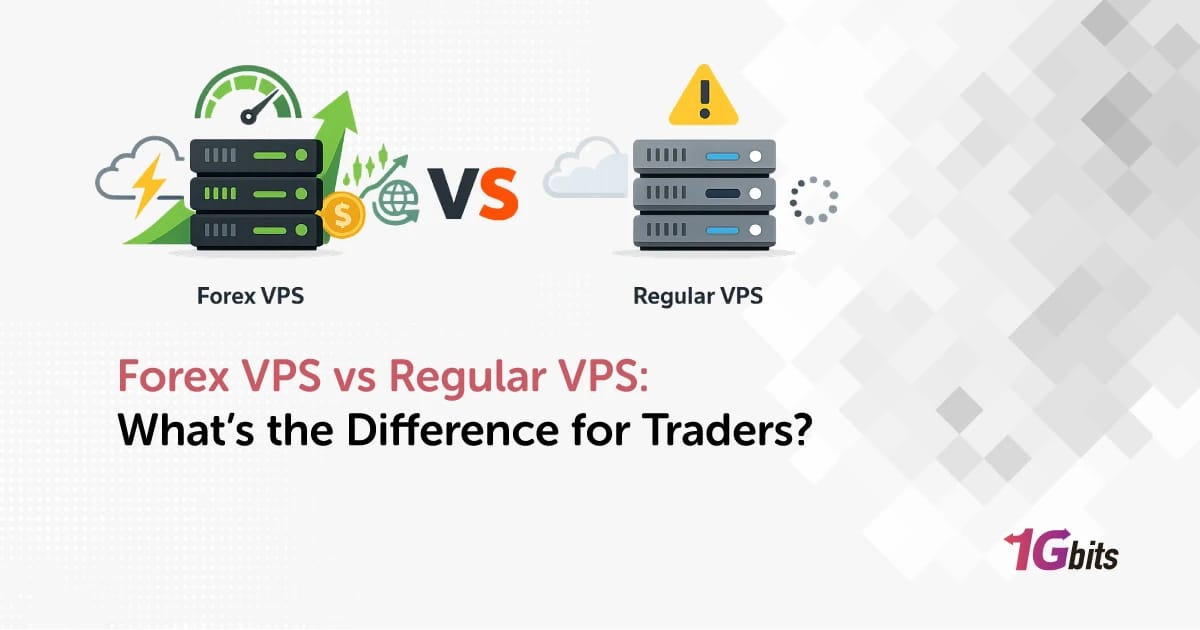
Here's the question every algo trader asks before pulling out their credit card: do I actually need a "Forex VPS," or will a regular VPS run my MT4 just fine? It's a fair question. The price gap between a $5 generic VPS and a $30 Forex-branded VPS is wide enough to make anyone pause.
I've built and benchmarked both for traders running everything from slow swing EAs to aggressive 1-minute scalpers. The short answer? It depends but probably not for the reason you think. The "Forex VPS" label isn't magic. What you're really paying for is one specific thing: where the server physically sits.
Let's break down what's genuinely different between a Forex VPS and a regular VPS, with concrete latency numbers, broker mappings, and an honest take on when you can skip the premium.
Quick Answer — Forex VPS vs Regular VPS at a Glance
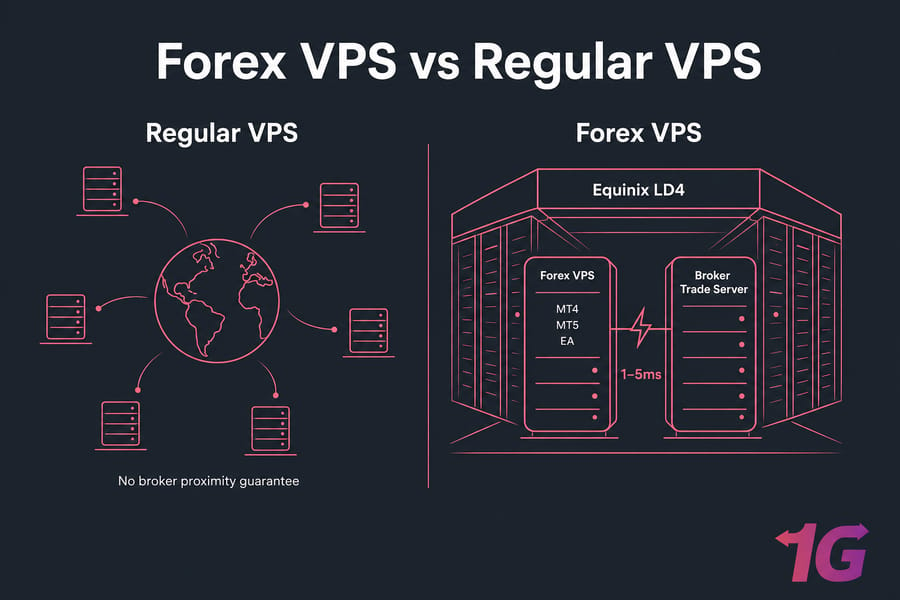
A Forex VPS is a virtual private server hosted inside or next to forex broker data centers — typically Equinix LD4 (London), NY4 (New York), TY3 (Tokyo), or FR2 (Frankfurt) — delivering sub-5ms latency to broker trade servers and pre-configured for MT4, MT5, and EA execution. A regular VPS is a general-purpose virtual server with no broker-proximity guarantee. The three things that actually differ:
- Data center location — Forex VPS sits next to broker trade servers; regular VPS sits wherever the provider has cheap rack space.
- Latency to broker — Forex VPS: 1–5ms. Regular VPS: anywhere from 30ms to 200ms+.
- Trading-specific readiness — Forex VPS comes with Windows Server, RDP access, and often pre-installed MetaTrader. Regular VPS is bare.
Before you read on: you should know what a VPS is, what MT4/MT5 do, what a broker server is, and roughly what an EA does. New to all this? Start with our intro guide on what is Forex VPS and our forex trading for beginners primer first.
What Is a Regular VPS? (Standard Virtual Private Server Explained)
A regular VPS is exactly what the name suggests — a slice of a physical server, isolated from other slices by a hypervisor, with its own CPU allocation, RAM, storage, and IP address. You get root or admin access. You can install whatever you want. It behaves like a dedicated machine, except multiple "machines" share the same hardware underneath.
How a Regular VPS Works
The host machine runs a hypervisor usually KVM virtualization, sometimes Hyper-V or VMware. The hypervisor carves the hardware into isolated virtual machines. Each VPS gets its slice and can't see or touch the others. That's the whole trick.
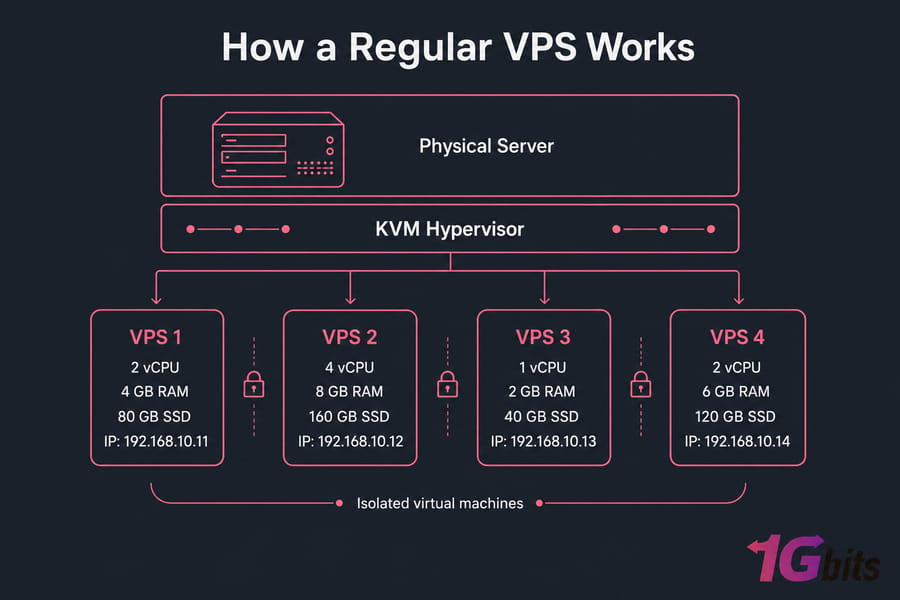
What you don't get with a regular VPS: any guarantee about where the server lives in relation to anything else. The provider picks the data center based on cost, capacity, or general geographic demand. Your VPS in "London" might be in a Tier-3 facility 40km from Equinix LD4 — close enough for a website, but useless for a scalping EA.
Common Use Cases for a Standard VPS
- Web hosting for small to medium sites
- Development and staging environments
- VPN servers for personal or team use
- Game server hosting (Minecraft, Valheim, etc.)
- General-purpose apps, bots, scrapers, automation scripts
For all of these, geographic precision doesn't matter much. A 50ms ping to your VPS doesn't ruin your WordPress site. It does ruin your scalping bot.
Now let's see how a Forex VPS does things differently.
What Is a Forex VPS? (And How It Differs From Standard Hosting)
A Forex VPS is a regular VPS — same virtualization, same admin access, same OS choices — with three deliberate differences baked in:
- Location — physically inside or adjacent to forex broker data centers (Equinix LD4, NY4, TY3, FR2 are the big four).
- Latency — engineered for sub-5ms round-trip to major broker trade servers, with low jitter and minimal packet loss.
- Platform-readiness — typically ships with Windows Server pre-installed, RDP enabled, sometimes MT4 or MT5 already on the desktop.
Why Forex Trading Needs Specialized VPS Infrastructure
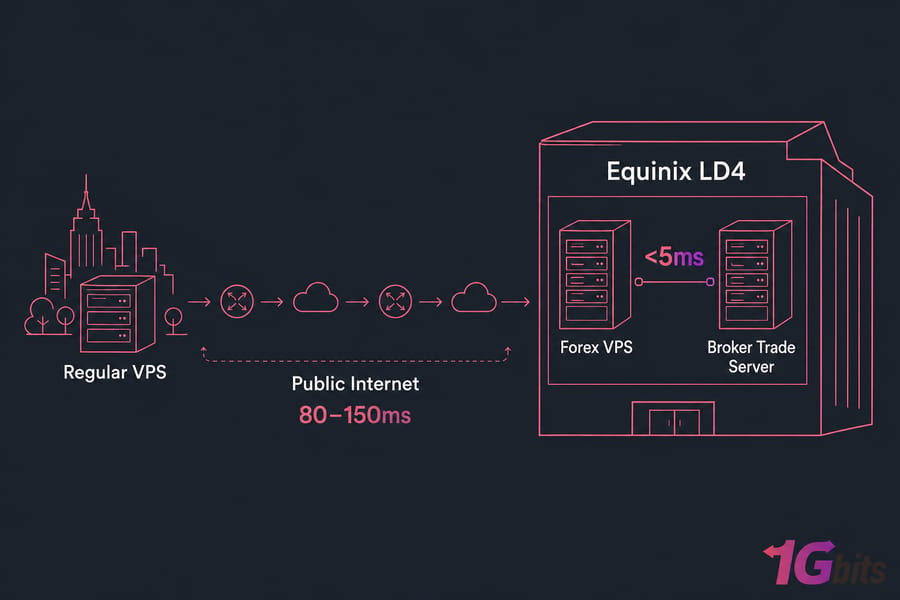
EAs don't sleep. Markets don't sleep. Your home PC absolutely does usually right when the news drops. A Forex VPS solves the always-on problem and the proximity problem at the same time. You connect once via RDP, log into MT4 or MT5, attach your EA, and walk away. The server stays in the broker's data center, executes your orders in single-digit milliseconds, and survives power cuts, ISP hiccups, and your cat unplugging the router. If you're new to automated trading, our guide on what is a forex trading robot and how does it work covers the basics of EAs before you deploy them.
Forex VPS vs Forex RDP — Are They the Same?
No, and this is where a lot of new traders get burned. They look almost identical on the surface — both give you a Windows desktop in a data center. But under the hood:
- Forex VPS — your own isolated virtual machine. Full admin rights. Reboot whenever. Install anything. Resources are yours.
- Forex RDP — usually a shared Windows Server where multiple users have separate logins on the same machine. Cheaper, but you share CPU and RAM with strangers running who-knows-what. Limited admin control.
For a single MT4 instance running a slow EA, a Forex RDP can be fine. For multi-EA setups, scalpers, or anyone who wants predictable performance, a Forex VPS is the right call. Don't let a provider sell you "Forex RDP" while implying it's the same product as a VPS — it isn't.
Forex VPS vs Regular VPS: Side-by-Side Comparison Table
Here's the whole picture in one place. Skim the row that matters most to you and we'll dig into the details after.
| Feature | Regular VPS | Forex VPS |
| Primary purpose | General-purpose hosting | Forex trading platform hosting |
| Data center location | Generic — chosen by provider | Equinix LD4, NY4, TY3, FR2 (next to brokers) |
| Latency to broker | 30–200ms (varies wildly) | 1–5ms typically |
| Default OS | Linux (often) or Windows | Windows Server 2019/2022 |
| Pre-installed software | None — bare OS | RDP enabled, often MT4/MT5 ready |
| Uptime SLA | 99.5–99.9% | 99.99% |
| Average price/month | $4–$12 | $15–$60 |
| Best for | Sites, dev, VPN, bots | EAs, scalping, prop firm trading |
| Access | SSH or RDP | RDP (Windows-first) |
| DDoS protection | Sometimes optional | Standard |
| Hardware tier | Mixed — often oversubscribed | Premium, low oversubscription |
Key takeaway: the "Forex VPS" premium pays for one thing above all — data-center proximity. Everything else is secondary.
Let's break down the most important row in that table latency.
Latency: The Critical Difference Between Forex VPS and Regular VPS
Latency, in trading terms, is the round-trip time it takes for a signal to leave your VPS, hit the broker's trade server, and come back. Measured in milliseconds. Lower is better. There's no upper limit to "bad" — it just keeps getting worse until your EA is essentially trading on stale prices.
If you've never measured it, here's a real-world snapshot from servers I've benchmarked:
| VPS Location → Broker Server | Typical Latency | Verdict |
| NY VPS → IC Markets NY4 | 1–2ms | Excellent (Forex VPS territory) |
| London VPS → Pepperstone LD5 | 2–4ms | Excellent |
| Frankfurt VPS → IC Markets NY4 | 75–90ms | Mismatched location |
| Brazil VPS → IC Markets NY4 | 105–120ms | Bad for scalping |
| Generic Singapore VPS → LD4 broker | 180–220ms | Unusable for fast EAs |
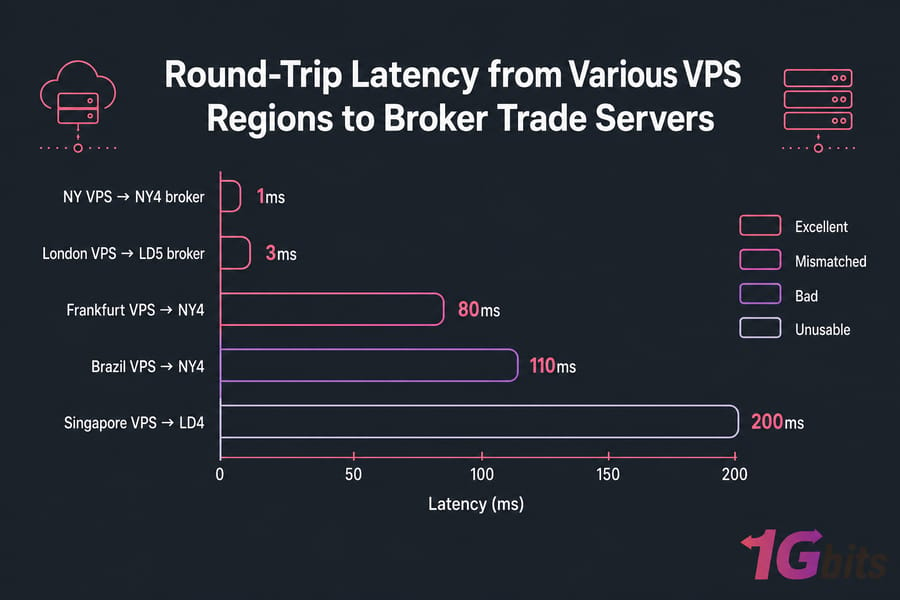
Notice something? The Forex VPS isn't faster because of magic hardware. It's faster because it's physically closer. Light only travels so fast through fiber. A New York server talking to a London server can't go below ~70ms that's a physics floor, not a hosting limitation. For a deeper look at the network mechanics behind these numbers, see our article on ping reduction in forex hosting.
How Latency Affects EA Execution and Slippage
Here's a worked example. You're running a scalping EA on EUR/USD. The bot fires a buy at 1.10500.
- Forex VPS (2ms latency): order leaves, hits broker, fills at 1.10500. Done.
- Regular VPS (80ms latency): in those 80ms, the price moved up to 1.10503. You fill at 1.10503.
That's 0.3 pips of slippage on a single trade. On a 1 standard lot trade, that's $30 gone. Sounds small? Run that EA 200 times a month and you're bleeding $6,000 in slippage you'd otherwise keep. And that's on a calm day. During an NFP release, slippage of 3–5 pips on a slow VPS isn't unusual.
Stat callout: A 50ms latency increase can cause up to 3 pips of avoidable slippage during high-volatility news events.
Acceptable Latency Thresholds for Different Trading Styles
| Trading Style | Recommended Latency | Required VPS Type |
| Scalping / HFT EAs | Under 5ms | Forex VPS — mandatory |
| Day Trading / News Trading | Under 30ms | Forex VPS — strongly recommended |
| Swing Trading (H1–H4) | Under 100ms | Regular VPS in correct region works |
| Position Trading (D1+) | Under 250ms | Any VPS (latency mostly irrelevant) |
If your EA holds positions for hours or days, a 100ms ping doesn't matter. The market moves more in one minute than your latency cost over a thousand trades. Be honest about which camp you're in.
Data Center Location & Broker Server Proximity
This is where the rubber meets the road. The "Forex VPS" label is meaningless if it's in the wrong location. A London Forex VPS connecting to a New York broker is worse than a regular VPS in New Jersey. Geography wins. Always.
The 4 Key Forex Data Centers (LD4, NY4, TY3, FR2)
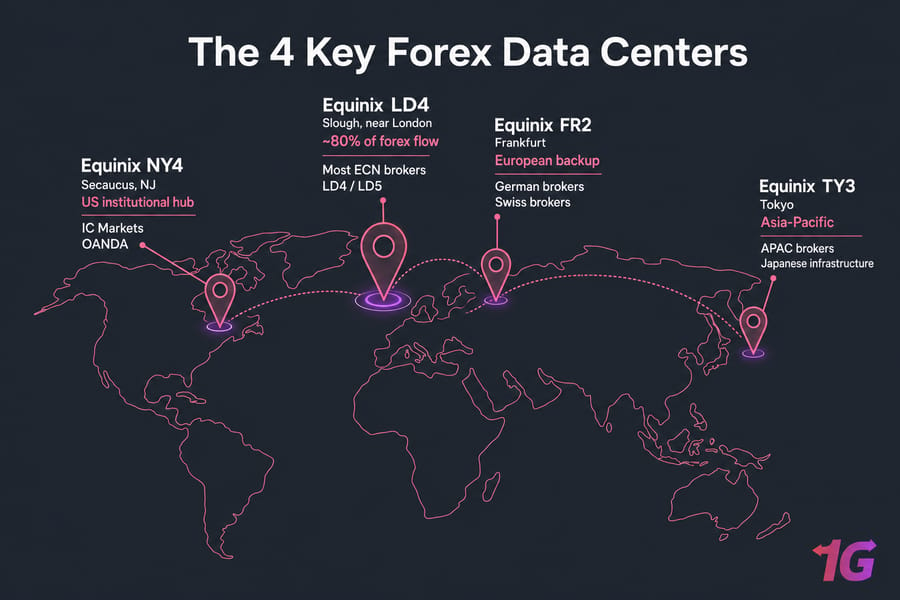
- Equinix LD4 (Slough, UK) — the big one. Estimated to carry around 80% of global retail forex flow. Most ECN brokers route through here. If you trade with a London-headquartered broker, your trade server probably lives in LD4 or its sibling LD5.
- Equinix NY4 (Secaucus, NJ) — US institutional hub and the home of many ECN order books. IC Markets, OANDA, and several others have NY4 trade servers.
- Equinix TY3 (Tokyo) — Asia-Pacific hub. Critical if your broker has Japanese or APAC infrastructure.
- Equinix FR2 (Frankfurt) — European secondary hub. Some German and Swiss brokers route here.
Broker → Recommended VPS Location Mapping Table
Match your broker to the right VPS region. This single decision matters more than the brand of VPS you buy.
| Broker | Trade Server Location | Recommended VPS Region |
| IC Markets | Equinix NY4 / LD5 | New York or London |
| Pepperstone | Equinix LD5 / NY4 | London / New York |
| FXCM | LD4 | London |
| OANDA | NY4 / TY3 | New York or Tokyo |
| Exness | LD4 / Asia DCs | London or Singapore |
| FxPro | LD4 | London |
| FBS | Asia DCs | Singapore |
Don't see your broker? Open MT4, log in, look at the server hostname, and ping it from a few locations. Whichever pings lowest — that's where your VPS belongs.
Hardware Specs Compared: CPU, RAM, Storage, and OS
Outside of location, the hardware story is mostly the same — but the priorities shift when you're running MT4 instead of a website.
CPU: Forex VPS plans usually advertise dedicated cores rather than bursty shared CPU. Why it matters: tick processing on a busy pair (gold, indices, EURUSD during NFP) can spike CPU. If you're sharing cores with someone running a crypto miner, your EA stalls.
RAM: A single MT4 instance uses ~512MB–1GB depending on indicators and history depth. MT5 is heavier — plan for 1–1.5GB per instance. Two MT4 charts, one EA each? 2GB is your floor. Five EAs across MT4 and MT5? You want 4GB minimum. If you're new to MetaTrader, our guide on what is MetaTrader 4 covers the platform basics before you start sizing your VPS.
Storage: NVMe SSD beats SATA SSD beats spinning disks for one reason — log writes. MT4 hammers the disk every tick if you have logging enabled. NVMe plans handle this without breaking a sweat.
OS: Windows wins for forex. MT4 and MT5 are native Windows applications. Yes, you can run them on Linux via Wine, but unless you've already invested in that toolchain, just run Windows and save yourself the headache.
Why Forex VPS Plans Lean Toward Windows Server
MetaQuotes builds MT4 and MT5 for Windows. Native installers, native UI, native everything. RDP gives you a familiar desktop experience that's easier than wrestling with Wine on Linux. Most Forex VPS providers ship Windows Server 2019 or 2022 because trader-friendliness beats Linux-purist preferences in this niche.
If you want Linux for some reason — say you're running a custom Python bot alongside MT5 — that's possible. But for 99% of traders, Windows is the default and the right choice.
Recommended Specs for MT4, MT5, and Multi-EA Setups
| Use Case | CPU | RAM | Storage | OS |
| Light: 1 MT4 + 1 EA | 1 vCPU | 2GB | 30GB NVMe | Windows Server 2019/2022 |
| Standard: 2–3 MT4/MT5 + 2–3 EAs | 2 vCPU | 4GB | 50GB NVMe | Windows Server 2022 |
| Heavy: 5+ instances, multi-pair scalping | 4 vCPU | 8GB | 80GB NVMe | Windows Server 2022 |
Pricing Compared — Why Forex VPS Costs More Than a Regular VPS
The price gap is real. Here's roughly what you'll pay:
| Plan Type | Price Range | What You Get |
| Cheap regular VPS | $4–$8/mo | 1 vCPU, 1–2GB RAM, 20GB storage, generic location, 99.5% uptime |
| Standard regular VPS | $8–$15/mo | 2 vCPU, 2–4GB RAM, 40GB SSD, 99.9% uptime |
| Forex VPS (entry) | $15–$30/mo | 2 vCPU, 2–4GB RAM, NVMe, broker DC location, sub-5ms latency, 99.99% uptime, Windows Server |
| Forex VPS (pro) | $30–$60/mo | 4 vCPU+, 8GB+ RAM, NVMe, dedicated cores, premium support |
So why the 3–5x premium? A few honest reasons:
- Equinix isn't cheap. Rack space inside LD4 or NY4 costs many times what a generic Tier-3 data center charges. That cost gets passed on.
- Lower oversubscription. Cheap VPS providers stack 30+ VMs on a host. Forex VPS providers cap closer to 10–15 to keep performance predictable.
- Higher SLA. 99.99% uptime requires redundant power, redundant network, redundant everything. That's expensive.
- Windows licensing. Microsoft charges per-VM licensing. Linux is free; Windows isn't.
Honest take: if you don't need broker proximity, paying the Forex VPS premium is wasted money. If you do — say, you're scalping NFP — the premium pays for itself in saved slippage on a single bad fill.
When a Regular VPS Is Actually Good Enough for Trading
Most articles refuse to admit this. I'll say it plainly: in several real scenarios, a regular VPS works fine for forex. You just have to pick the location intentionally.
- Manual swing or position trading. If you're holding trades for days, a 100ms ping changes nothing about your P&L.
- Long-timeframe EAs (H4, D1). The EA fires a few orders a day, max. Latency is irrelevant.
- Backtesting and strategy development. No live execution = no latency requirement.
- Trading-journal apps, charting-only setups. You're reading data, not executing trades.
- Hosting a Telegram signal bot or trade-copier receiver. If the source isn't latency-sensitive, neither is the receiver.
Pro tip: Even with a regular VPS, always pick a region in the same continent as your broker. Geography matters more than the "Forex" label on a product page. A regular London VPS with a London broker beats a Forex-branded VPS in the wrong city, every single time.
When You Truly Need a Dedicated Forex VPS
And here's the flip side. If any of these describe you, stop debating and just buy the Forex VPS. For a deeper understanding of how automated strategies execute in live markets, our guide on forex algorithmic trading walks through the mechanics behind EA-based trading.
- Scalping or HFT-style EAs. Anything sub-1-minute timeframe. Slippage will eat your edge alive on a slow VPS.
- News trading. NFP, FOMC, CPI releases. Volatility windows are measured in seconds; your VPS needs to be in the broker's data center, not on the other side of an ocean.
- Multi-EA setups across multiple pairs. When you're running 5+ EAs, you need predictable performance, dedicated resources, and consistent execution across all of them.
- Prop firm challenges (FTMO, MyForexFunds, FundedNext, etc.). These have tight drawdown rules. One bad slippage day fails the challenge. Don't risk a $500 challenge fee to save $20/month on hosting.
- Latency-arbitrage strategies. If your edge is literally being faster than the next guy, you cannot — cannot — run on a regular VPS.
Warning for prop traders: failing an FTMO challenge because of slippage on a cheap VPS is the most expensive way to save $30 a month. If you're serious about forex algorithmic trading, the VPS is the cheapest piece of your infrastructure. Don't cut corners here.
Once you're committed, follow our walkthrough on how to set up a VPS for forex robot trading for the rest of the configuration.
How to Measure Your Current VPS Latency to Your Broker
Don't trust marketing numbers. Measure your own latency. Here's how, three ways:
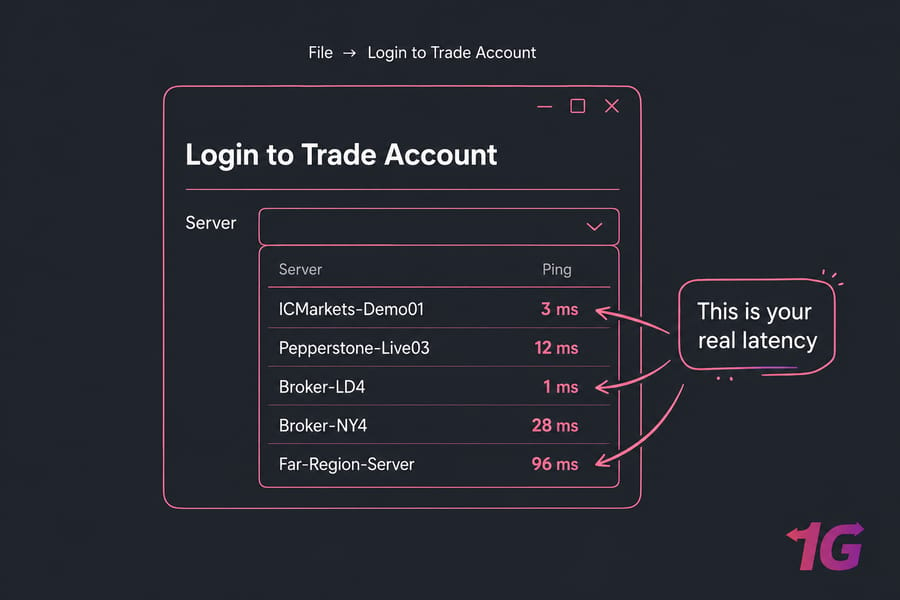
Method 1: MT4 Ping Column
- Open MT4.
- Go to
File → Login to Trade Account. - In the server dropdown, look at the Ping column next to each server name.
- That number is your real round-trip latency to the broker's trade server. Lower = better.
Method 2: Command-Line Ping
From your VPS (or your local PC, just to compare):
ping demo.icmarkets.com
ping live.pepperstone.com
Watch the time= values. Anything under 5ms is excellent. 5–30ms is solid. Above 80ms and you're losing money on faster strategies.
Method 3: Continuous Monitoring Tools
Tools like SmartPing for MT4 or generic uptime monitors can log ping continuously. Useful for catching jitter (variance in latency) — a stable 20ms is better than a flapping 5–60ms.
Common Mistakes Traders Make Choosing Between Forex VPS and Regular VPS
I've watched these five mistakes play out hundreds of times. Don't be the next data point.
- Buying a Forex VPS in the wrong region. A London Forex VPS connecting to a New York broker is worse than a regular New Jersey VPS. The "Forex" label doesn't override physics. Always check broker server location first, then pick the VPS region.
- Choosing the cheapest regular VPS without checking broker location. A $4 VPS sitting in some random data center 5,000km from your broker will give you 200ms ping. Cheap is expensive when slippage starts adding up.
- Confusing Forex VPS with Forex RDP. RDP is shared. VPS is not. If a $10/mo "Forex VPS" looks too good to be true, it's probably a shared RDP environment. Check what you're actually buying.
- Underestimating RAM for multi-EA setups. Running 5 EAs on 2GB of RAM means thrashing, swap, and dropped ticks. Size up. RAM is the cheapest performance you'll ever buy.
- Ignoring uptime SLA and DDoS protection. Your EA is useless if the VPS goes down during NFP. Pick providers with 99.99% uptime and DDoS protection — both standard on real Forex VPS plans, often missing on bargain-bin VPS.
Forex VPS vs Regular VPS — Final Verdict
Here's the TL;DR matrix you came for:
| Trader Type | Recommendation |
| Scalper / HFT EA | Forex VPS — mandatory, no exceptions |
| Day trader / News trader | Forex VPS — strongly recommended |
| Swing or position trader | Regular VPS in correct region works fine |
| Backtest / strategy dev only | Cheapest regular VPS — anywhere |
| Prop firm trader (FTMO etc.) | Forex VPS — protect your challenge fee |
| Multi-EA, multi-pair operator | Forex VPS — predictable performance matters |
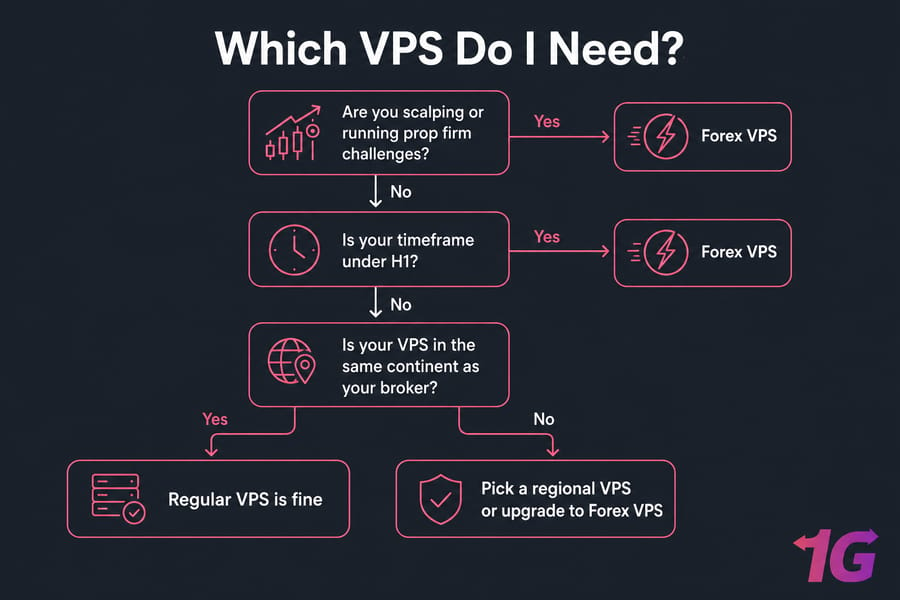
If you've read this far, you already know the answer. The Forex VPS premium isn't a marketing tax — it's the cost of being in the same building as your broker. For traders whose strategy depends on speed, that's not optional. For everyone else, a well-located regular VPS does the job.
When you're ready to compare specific options, check out the Forex VPS available now. 1Gbits offers Forex VPS hosting in 7+ strategic locations including New York, London, Frankfurt, Tokyo, and Singapore with sub-5ms latency to major brokers, Windows Server preinstalled, 99.99% uptime, and instant deployment.

Leave A Comment