

To use the Binance API on a VPS, deploy your app on a Linux server, secure your API keys, use REST for setup and occasional queries, and use WebSocket for real-time updates. Watch your request weight, respect rate limits, and build in reconnect, keepalive, and logging so the bot stays stable.
Most bots don't fail in the trading logic. They fail in the plumbing. I've watched good strategies die at 3 a.m. because a WebSocket dropped without any error.
Before you start, you'll need:
- An Ubuntu or Debian VPS with SSH access (if you're rusty, here's how to SSH into a server)
- A Binance account with an API key
- Python 3 or Node.js
Binance changes its limits regularly. The numbers below are current at the time of writing.
Why Use a VPS for Binance API Trading Bots
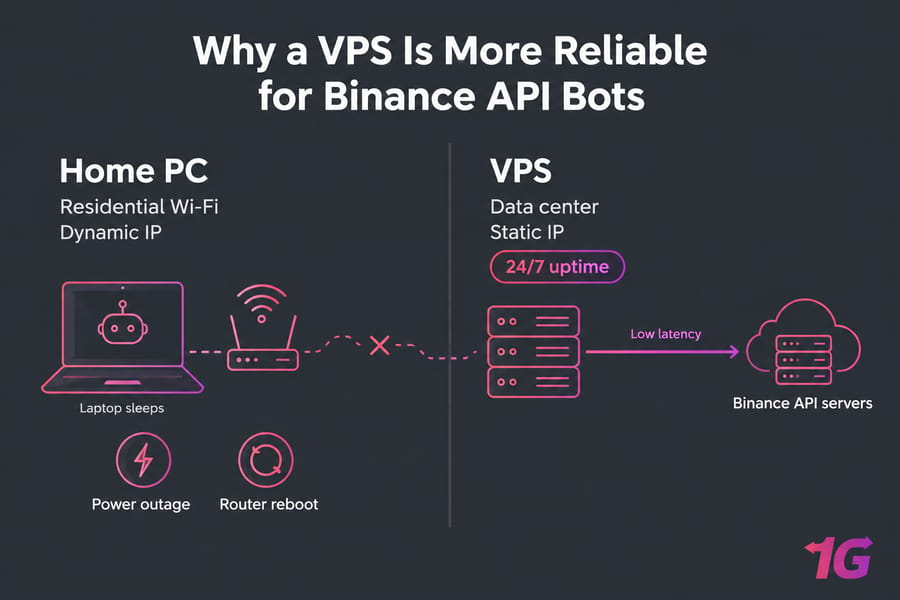
What a VPS Solves That a Home PC Doesn't
Your laptop sleeps. Your ISP rotates your IP. Your router reboots at the worst moment. A VPS fixes all three:
- 24/7 uptime: data centers have backup power and redundant network links.
- A stable public IP: you'll want to lock your Binance API key to one whitelisted address.
- Better network paths: a well-connected region can cut latency and jitter.
When a VPS Improves Uptime but Not Your Strategy
A VPS makes your bot reliable, not profitable. A losing strategy on a VPS still loses money. It just stays online while it does.
Who This Setup Is Best For
It suits people running market scanners, alert scripts, grid or DCA bots, and anyone logging order-book data. If you want a ready-made option, Binance VPS hosting comes with root access and a fixed IP.
Binance REST API vs WebSocket API vs WebSocket Streams
People mix these up all the time, but they do different jobs.
| Interface | How it works | Best for | Counts against request weight? |
| REST API | Request → response over HTTPS | Startup snapshots, exchangeInfo, placing orders, account checks | Yes, every call |
| WebSocket Streams | Server pushes data after you subscribe | Live prices, trades, klines, order-book diffs | No (pushed events aren't rate-limited) |
| WebSocket API | Request → response over a persistent socket | Low-overhead order placement, user data subscription | Yes, same weight system as REST |
| User Data Stream | Pushes your order fills, balance and account updates | Tracking order state in real time | Only the setup/keepalive calls |
When REST Is the Better Choice
Use REST for anything you do once or rarely: loading exchangeInfo, grabbing a depth snapshot at startup, checking balances, and placing or cancelling orders. It's stateless and easy to debug with curl.
When WebSocket Streams Are the Better Choice
Use streams for anything that changes constantly. Polling 50 tickers every second wastes your budget, while 50 streams on one socket cost no request weight at all. Binance's own ban message tells you to "use WebSocket Streams for live updates to avoid bans." Take the hint.
How Authenticated User Data Streams Fit In
The old way was to create a listenKey through REST and connect with it. On Spot, those endpoints (/api/v3/userDataStream) are now deprecated, and Binance wants you to subscribe through the WebSocket API instead. Futures still uses listenKeys. Either way, rely on user data events rather than REST polling to know the real state of your orders when markets move fast.
Recommended Architecture for Most VPS Deployments
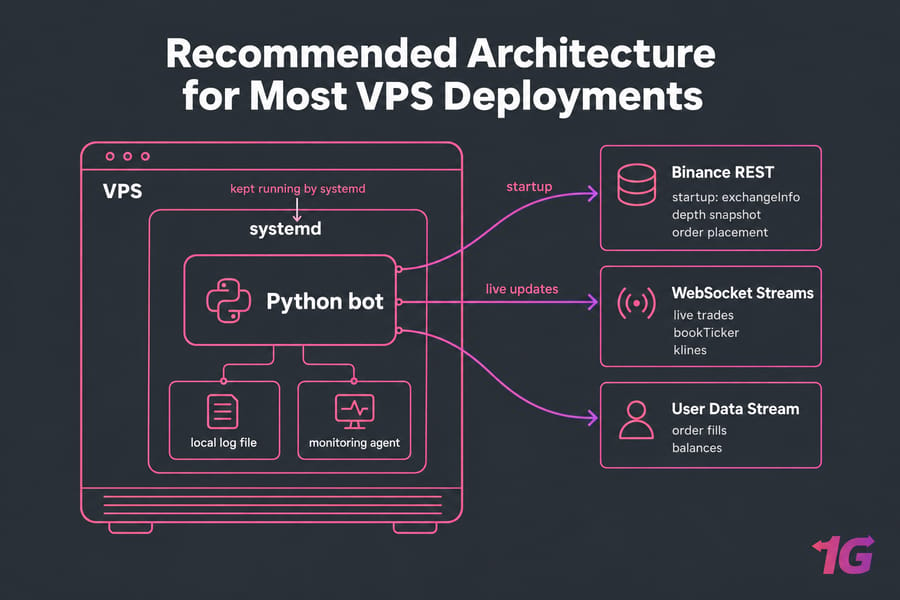
Use REST for the starting snapshot, WebSocket for live updates, and systemd to keep everything running. Round-trip time matters when you place orders, so it's worth knowing what latency means before you pick a region.
How to Choose a Low-Latency VPS for Binance API Workloads
Why Server Location and Stable IP Matter
Test REST response times from two or three candidate locations before you commit. I won't name a "fastest" region, because network routing changes over time. Two things aren't optional: a static IP, and a region where you're legally allowed to use Binance. If you use a VPS to get around regional restrictions, expect your account to get frozen.
Minimum VPS Specs for Scripts and Bots
| Workload | vCPU | RAM | Storage | Notes |
| Price alert script, 1–5 symbols | 1 | 1 GB | 20 GB | Barely touches the CPU |
| Single-strategy bot, 5–20 pairs | 1–2 | 2 GB | 40 GB | Room for logs and a Python venv |
| Multi-pair scanner, 100+ streams | 2–4 | 4 GB | 50 GB NVMe | JSON parsing becomes the bottleneck |
| Bot + database + dashboard | 4+ | 8 GB | 80+ GB NVMe | Databases need fast disk |
Linux vs Windows VPS for Binance Automation
Pick Linux unless your software only runs on Windows. It's lighter, and systemd supervises your processes at no extra cost. A Linux VPS hosting plan with full root access is the natural fit. If you're comfortable running a server yourself, an unmanaged VPS is enough. If not, a managed VPS is worth paying for. You can compare more plans on the VPS for trading page.
How to Set Up a Linux VPS for Binance API Access
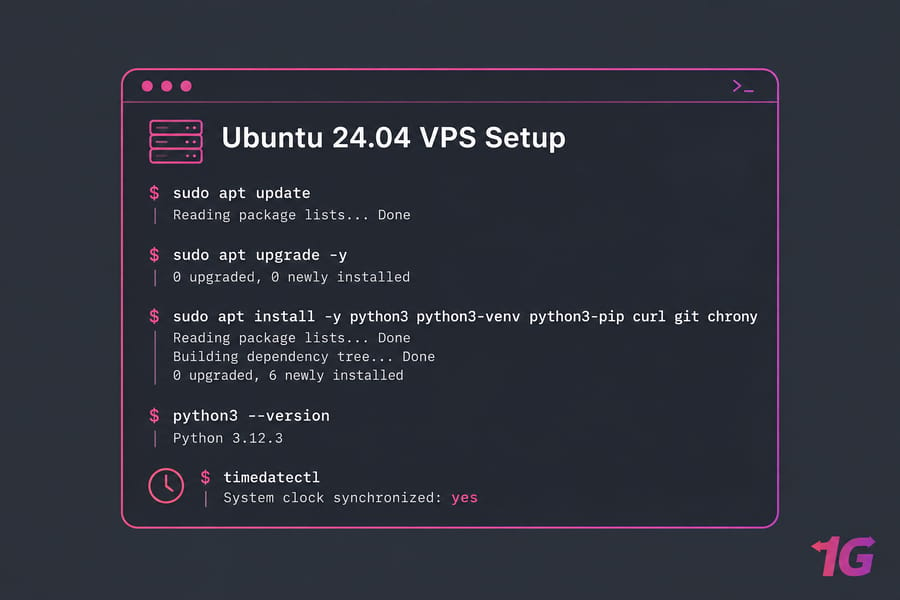
Install Updates, Python or Node.js, and Basic Tools
sudo apt update && sudo apt upgrade -y
sudo apt install -y python3 python3-venv python3-pip curl git chrony
timedatectl   # confirm "System clock synchronized: yes"
Don't skip time sync. Signed requests include a timestamp, and Binance rejects them if your clock drifts too far.
Secure SSH, Firewall, and API Secrets
Generate SSH keys and turn off password login in /etc/ssh/sshd_config. The bot only makes outbound connections, so you can block almost everything inbound:
sudo ufw default deny incoming
sudo ufw default allow outgoing
sudo ufw allow OpenSSH
sudo ufw enable
sudo apt install -y fail2ban
For more detail, see how to configure a firewall on your VPS.
Create a Project User and Working Directory
sudo adduser --system --group --home /opt/binbot binbot
sudo -u binbot python3 -m venv /opt/binbot/venv
sudo -u binbot /opt/binbot/venv/bin/pip install requests websockets
sudo install -o binbot -g binbot -m 600 /dev/null /opt/binbot/.env
Running the bot as an unprivileged user limits the damage if one of its packages gets compromised.
How to Use the Binance REST API on a VPS
Public Endpoints for Market Data
The main Spot base URL is https://api.binance.com. For public market data only, you can also use https://data-api.binance.vision. Quick test:
curl -s "https://data-api.binance.vision/api/v3/ticker/price?symbol=BTCUSDT"
curl -sI "https://api.binance.com/api/v3/ping" | grep -i x-mbx-used-weight
The X-MBX-USED-WEIGHT-1M header shows how much request weight you've used this minute. Log it.
Signed Endpoints, Timestamps, and Authentication
Account and trading endpoints need three things: the X-MBX-APIKEY header, a timestamp, and a signature over the query string. The signature can be HMAC-SHA256 or Ed25519.
Testing REST Calls with curl and Python
import os, time, hmac, hashlib, requests
from urllib.parse import urlencode

KEY, SECRET = os.environ["BINANCE_KEY"], os.environ["BINANCE_SECRET"]
params = {"timestamp": int(time.time() * 1000), "recvWindow": 5000}
qs = urlencode(params)
sig = hmac.new(SECRET.encode(), qs.encode(), hashlib.sha256).hexdigest()
r = requests.get(f"https://api.binance.com/api/v3/account?{qs}&signature={sig}",
                 headers={"X-MBX-APIKEY": KEY}, timeout=10)
print(r.status_code, r.headers.get("X-MBX-USED-WEIGHT-1M"))
Fetch /api/v3/exchangeInfo once at startup and cache it. It contains the symbol filters (tick size, lot size, min notional) and the current rateLimits. If you hard-code those values, your orders will start failing when Binance changes a filter.
Warning: If you're calling the same endpoint every few seconds, switch it to a WebSocket stream.
How to Use Binance WebSocket Streams on a VPS
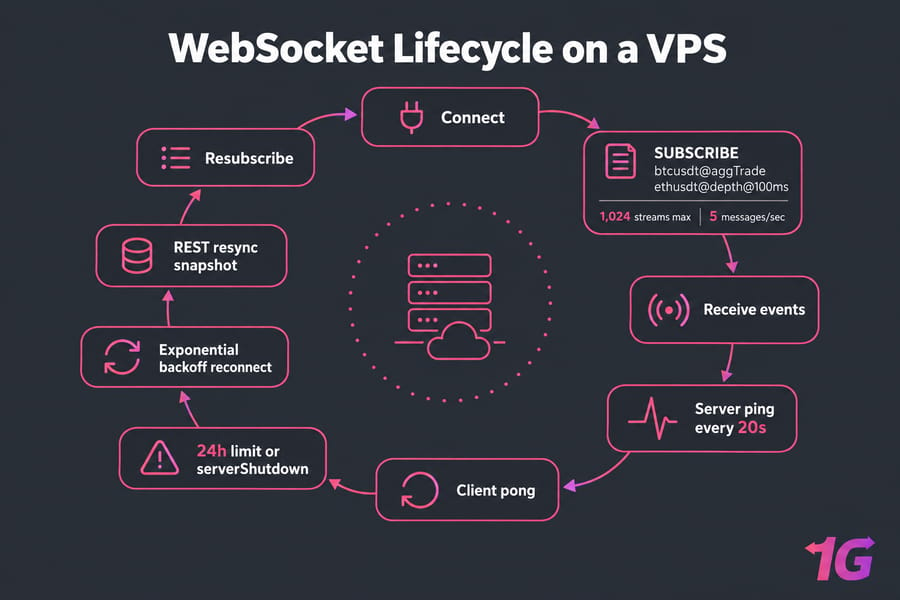
Connecting to Market Data Streams
Spot streams live at wss://stream.binance.com:9443. For market data only, you can use wss://data-stream.binance.vision. There are two URL styles:
- Raw:
/ws/btcusdt@tradegives you one stream with bare payloads. - Combined:
/stream?streams=btcusdt@trade/ethusdt@bookTickerwraps each payload as{"stream": ..., "data": ...}.
Symbols have to be lowercase. Uppercase symbols are a common first-day bug.
Subscribing and Unsubscribing to Streams
{"method": "SUBSCRIBE", "params": ["btcusdt@aggTrade", "ethusdt@depth@100ms"], "id": 1}
{"method": "UNSUBSCRIBE", "params": ["ethusdt@depth@100ms"], "id": 2}
One connection can carry up to 1,024 streams, but you can only send it 5 messages per second. Send 200 subscribe messages in a loop and you'll be disconnected. Put many streams in each message's params instead.
Handling Ping, Pong, and 24-Hour Disconnects
The server sends a ping every 20 seconds. If it doesn't get a pong back within a minute, it closes the connection. Python's websockets and Node's ws answer pings automatically.
Connections are also closed after 24 hours. Reconnect as soon as you get a serverShutdown event. Your reconnect logic should:
- Wait longer after each failed attempt, with some random jitter (1s, 2s, 4s…, up to about 60s).
- Fetch fresh REST snapshots so your order books don't have gaps.
- Resubscribe in batches.
Pro tip: If a busy stream goes silent for 60 seconds, assume the connection is dead and reconnect.
Keeping User Data Streams Alive with listenKey
If you're using listenKeys (Futures or older Spot code), the key expires after 60 minutes without a keepalive. Send a PUT every 30 minutes. On Spot, move to the WebSocket API method before Binance retires the old endpoints. Set up Linux monitoring as well, so you notice when reconnects start happening too often.
Binance API Rate Limits and Request Weight Explained
REQUEST_WEIGHT, ORDERS, and exchangeInfo
The rateLimits array in exchangeInfo lists three types of limit:
| Limit type | Applies to | Where to verify | How to reduce usage |
| REQUEST_WEIGHT | Per IP, all requests | X-MBX-USED-WEIGHT-1M header |
Move live data to streams; cache exchangeInfo |
| RAW_REQUESTS | Per IP, request count | exchangeInfo | Fewer, larger requests |
| ORDERS | Per account, unfilled orders | X-MBX-ORDER-COUNT-* headers |
Avoid cancel/replace spam |
At the time of writing, Spot allows 6,000 request weight per minute. Limits are counted per IP, not per API key, so three bots on one VPS share one budget.
Current WebSocket Connection Limits
You get 300 connection attempts per 5 minutes per IP. That sounds like plenty, but a reconnect loop with no delay can use it up in seconds.
How to Reduce Polling and Avoid 429 Errors
A 429 means you've hit a limit. Wait for the time given in the Retry-After header before sending more requests. If you keep going, you'll get a 418, which is an automatic IP ban. Bans get longer for repeat offenders, from 2 minutes up to 3 days.
Rate-Limit Budgeting Example for Multi-Symbol Bots
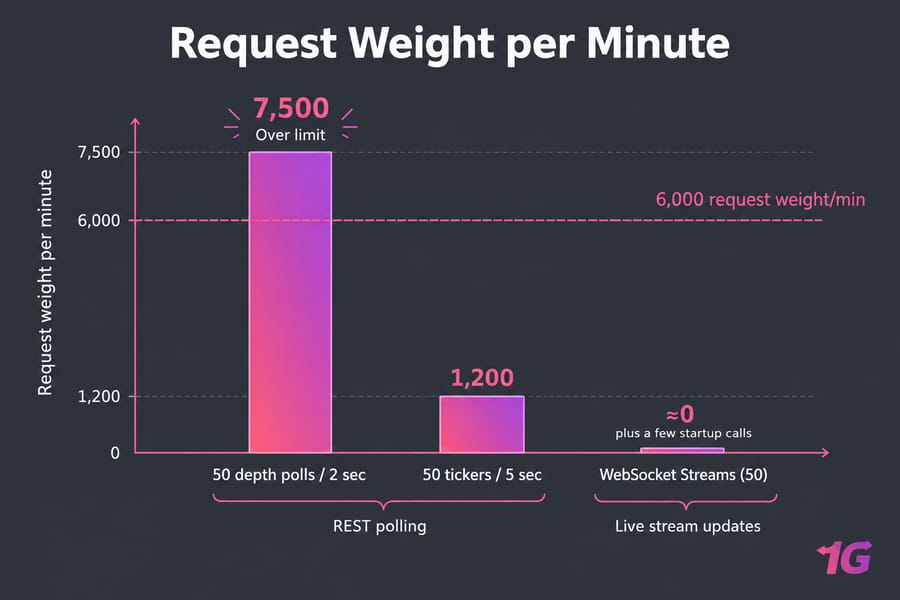
Say you poll /api/v3/depth for 50 symbols every 2 seconds. At the default limit it currently costs 5 weight per call, so that's 30 × 50 × 5 = 7,500 weight per minute. You're over the limit before placing a single order. Switch to @depth streams and your REST usage drops to a few snapshot calls. If the bot is still slow after that, look at common VPS performance bottlenecks.
How to Secure Binance API Keys on a VPS
IP Whitelisting and Least-Privilege Permissions
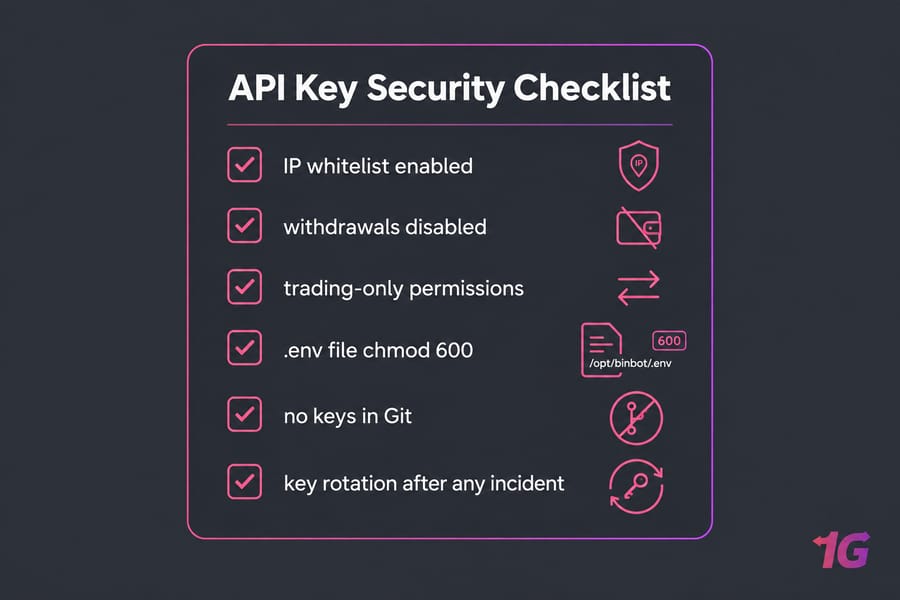
Whitelist only your VPS IP on the key. Keys without an IP restriction lose their Spot & Margin trading permission after 30 days, and you can't enable withdrawals without one anyway. Turn on reading and trading, and leave withdrawals off.
Environment Variables and Secret Storage
Keep your keys in /opt/binbot/.env with mode 600, and load them with systemd's EnvironmentFile=. Never pass keys as command-line arguments, because they end up in shell history. Add .env to your .gitignore before your first commit.
Monitoring Logs for Suspicious Behavior
Log every order the bot places and compare the log with your account history. If you see orders you didn't expect, delete the key and create a new one right away. A DDoS-protected VPS also stops traffic floods from knocking the bot offline.
Common Binance API Errors on a VPS and How to Fix Them
| Symptom | Likely cause | Fix |
| Error -1021, timestamp outside recvWindow | Clock drift | Enable chrony; compare against /api/v3/time |
| Error -1022, invalid signature | Signed string differs from the sent one | Sign the exact encoded query string; check the secret for whitespace |
| HTTP 429 | Weight limit hit | Honor Retry-After; move polling to streams |
| HTTP 418 | Ignored 429s, IP banned | Stop all requests until the ban lifts; fix the loop |
| User events stop after ~1 hour | listenKey expired | Keepalive every 30 min or migrate to WebSocket API |
| Reconnect storm | No backoff | Exponential backoff with jitter |
One more: a 5XX error when placing an order doesn't mean the order failed. Check the order's status before you retry, or you could end up doubling your position.
Final Checklist for Deploying a Binance Bot on a VPS
Pre-Launch Checklist
- SSH keys only, UFW enabled, clock synced
- API key IP-whitelisted, withdrawals disabled
- REST calls and signed requests tested
- WebSocket reconnect tested by killing the connection
- systemd unit with
Restart=alwaysandsystemctl enableset
Post-Launch Monitoring Checklist
- Logs rotating, used-weight header being recorded
- Alerts on reconnect frequency and stale streams
- CPU, RAM, and latency reviewed after the first week
When to Upgrade Your VPS Plan
If CPU stays above 70% when markets are busy, or processing falls further behind each time you add pairs, it's time for more cores.
Ready to deploy? To run the Binance API on a VPS, you need a stable IP and root access. Get a VPS for Binance trading and keep your bot online 24/7.

Leave A Comment